2013 CHEVROLET SONIC oil
[x] Cancel search: oilPage 246 of 382

Black plate (12,1)Chevrolet Sonic Owner Manual - 2013 - 2nd PrintReady - 10/11/12
10-12 Vehicle Care
When the system has calculated
that oil life has been diminished, it
indicates that an oil change is
necessary. A Code 82 (Change
Engine Oil Soon) DIC message
comes on. SeeVehicle Messages
on page 5‑25. Change the oil as
soon as possible within the next
1 000 km (600 mi). It is possible that,
if driving under the best conditions,
the oil life system might indicate that
an oil change is not necessary for
up to a year. The engine oil and
filter must be changed at least once
a year and, at this time, the system
must be reset. Your dealer has
trained service people who will
perform this work and reset the
system. It is also important to check
the oil regularly over the course of
an oil drain interval and keep it at
the proper level.
If the system is ever reset
accidentally, the oil must be
changed at 5 000 km (3,000 mi)
since the last oil change.
Remember to reset the oil life
system whenever the oil is changed.How to Reset the Engine Oil
Life System
Reset the system whenever the
engine oil is changed so that the
system can calculate the next
engine oil change. To reset the
system:
1. Press the MENU button to show Remaining Oil Life on the
display. This display shows an
estimate of the oil’s remaining
useful life. If 99% is displayed,
that means that 99% of the
current oil life remains.
2. To reset the engine oil life system, press the SET/CLR
button while the oil life display is
active. After a few seconds,
there will be a single chime and
the oil life will be reset to 100%.
Be careful not to reset the oil life
display accidentally at any time
other than after the oil is changed.
It cannot be reset accurately.
If the Code 82 (Change Engine Oil
Soon) DIC message comes back on
when the vehicle is started, the
engine oil life system has not reset.
Repeat the procedure.
Page 248 of 382
Black plate (14,1)Chevrolet Sonic Owner Manual - 2013 - 2nd PrintReady - 10/11/12
10-14 Vehicle Care
When to Inspect the Engine Air
Cleaner/Filter
Inspect the air cleaner/filter at the
scheduled maintenance intervals.
SeeMaintenance Schedule on
page 11‑2 for more information.
If you are driving in dusty/dirty
conditions, inspect the filter at each
engine oil change.
How to Inspect the Engine Air
Cleaner/Filter
To inspect the engine air cleaner/
filter, remove the filter from the
vehicle and lightly shake the filter to
release loose dust and dirt. If the
filter remains covered with dirt, a
new filter is required. To inspect or replace the air cleaner/
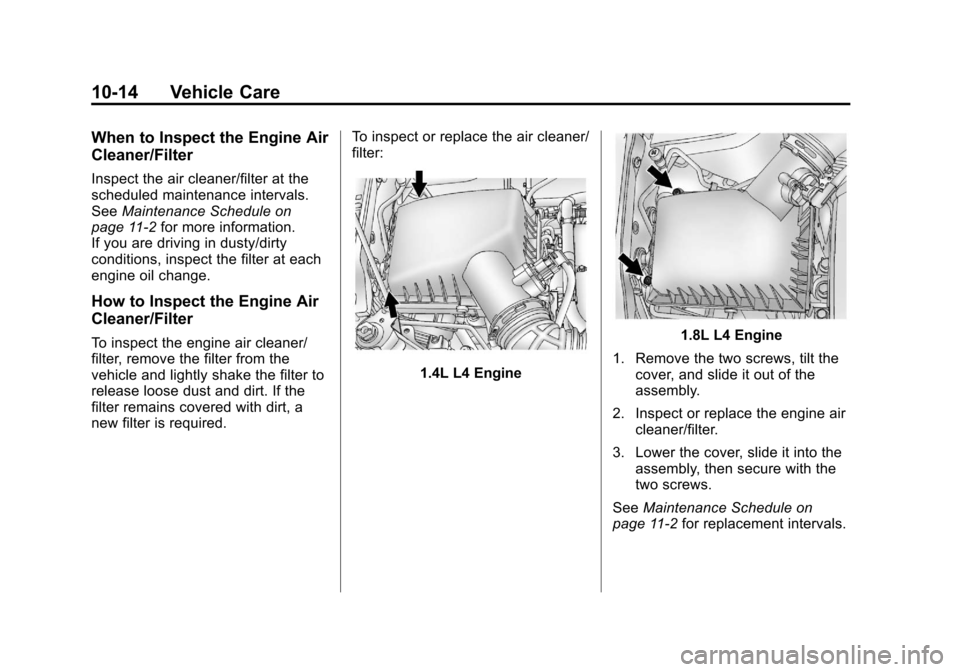
filter:
1.4L L4 Engine
1.8L L4 Engine
1. Remove the two screws, tilt the cover, and slide it out of the
assembly.
2. Inspect or replace the engine air cleaner/filter.
3. Lower the cover, slide it into the assembly, then secure with the
two screws.
See Maintenance Schedule on
page 11‑2 for replacement intervals.
Page 250 of 382
Black plate (16,1)Chevrolet Sonic Owner Manual - 2013 - 2nd PrintReady - 10/11/12
10-16 Vehicle Care
{WARNING
Heater and radiator hoses, and
other engine parts, can be very
hot. Do not touch them. If you do,
you can be burned.
Do not run the engine if there is a
leak. If you run the engine, it
could lose all coolant. That could
cause an engine fire, and you
could be burned. Get any leak
fixed before you drive the vehicle.
Notice: Using coolant other than
DEX‐COOL
®can cause premature
engine, heater core, or radiator
corrosion. In addition, the engine
coolant may require changing
sooner, at the first maintenance
service after each 30,000 miles
(50 000 km) or 24 months,
whichever occurs first. Any
repairs would not be covered by
the vehicle warranty. Always use
DEX‐COOL
®(silicate‐free) coolant
in the vehicle.
Engine Coolant
The cooling system in the vehicle is
filled with DEX-COOL engine
coolant. This coolant is designed to
remain in the vehicle for 5 years or
240 000 km (150,000 mi), whichever
occurs first.
The following explains the cooling
system and how to check and add
coolant when it is low. If there is a
problem with engine overheating,
see Engine Overheating on
page 10‑19.
What to Use
{WARNING
Adding only plain water or some
other liquid to the cooling system
can be dangerous. Plain water
and other liquids, can boil before
the proper coolant mixture will.
The coolant warning system is set
for the proper coolant mixture.
With plain water or the wrong
(Continued)
WARNING (Continued)
mixture, the engine could get too
hot but you would not get the
overheat warning. The engine
could catch fire and you or
others could be burned. Use
a 50/50 mixture of clean,
drinkable water and DEX-COOL
coolant.
Use a 50/50 mixture of clean
drinkable water and DEX-COOL
coolant. This mixture:
.Gives freezing protection down
to −37°C (−34°F), outside
temperature.
.Gives boiling protection up to
129°C (265°F), engine
temperature.
.Protects against rust and
corrosion.
.Will not damage aluminum parts.
.Helps keep the proper engine
temperature.
Page 251 of 382
Black plate (17,1)Chevrolet Sonic Owner Manual - 2013 - 2nd PrintReady - 10/11/12
Vehicle Care 10-17
Notice:If improper coolant
mixture, inhibitors, or additives
are used in the vehicle cooling
system, the engine could
overheat and be damaged. Too
much water in the mixture can
freeze and crack engine cooling
parts. The repairs would not be
covered by the warranty. Use only
the proper mixture of engine
coolant for the cooling system.
See Recommended Fluids and
Lubricants on page 11‑12.
Never dispose of engine coolant by
putting it in the trash, pouring it on
the ground, or into sewers, streams,
or bodies of water. Have the coolant
changed by an authorized service
center, familiar with legal
requirements regarding used
coolant disposal. This will help
protect the environment and your
health.
Checking Coolant
The vehicle must be on a level
surface when checking the coolant
level. It is normal to see coolant moving in
the upper coolant hose return line
when the engine is running.
Check to see if coolant is visible in
the coolant surge tank. If the coolant
inside the coolant surge tank is
boiling, do not do anything else until
it cools down.
If coolant is visible but the coolant
level is not at or above the mark
pointed to, add a 50/50 mixture of
clean drinkable water and
DEX-COOL coolant.
Be sure the cooling system is cool
before this is done.
If no coolant is visible in the coolant
surge tank, add coolant as follows:
How to Add Coolant to the
Coolant Surge Tank
Notice:
This vehicle has a
specific coolant fill procedure.
Failure to follow this procedure
could cause the engine to
overheat and be severely
damaged. If no problem is found, check to see
if coolant is visible in the coolant
surge tank. If coolant is visible but
the coolant level is not at the
indicated level mark, add a
50/50 mixture of clean, drinkable
water and DEX-COOL coolant at the
coolant surge tank, but be sure the
cooling system, including the
coolant surge tank pressure cap, is
cool before you do it.
{WARNING
Steam and scalding liquids from a
hot cooling system can blow out
and burn you badly. Never turn
the cap when the cooling system,
including the surge tank pressure
cap, is hot. Wait for the cooling
system and surge tank pressure
cap to cool.
Page 252 of 382
Black plate (18,1)Chevrolet Sonic Owner Manual - 2013 - 2nd PrintReady - 10/11/12
10-18 Vehicle Care
{WARNING
Adding only plain water or some
other liquid to the cooling system
can be dangerous. Plain water
and other liquids, can boil before
the proper coolant mixture will.
The coolant warning system is set
for the proper coolant mixture.
With plain water or the wrong
mixture, the engine could get too
hot but you would not get the
overheat warning. The engine
could catch fire and you or others
could be burned. Use a
50/50 mixture of clean, drinkable
water and DEX-COOL coolant.
Notice: In cold weather, water
can freeze and crack the engine,
radiator, heater core and other
parts. Use the recommended
coolant and the proper coolant
mixture.
{WARNING
You can be burned if you spill
coolant on hot engine parts.
Coolant contains ethylene glycol
and it will burn if the engine parts
are hot enough. Do not spill
coolant on a hot engine.
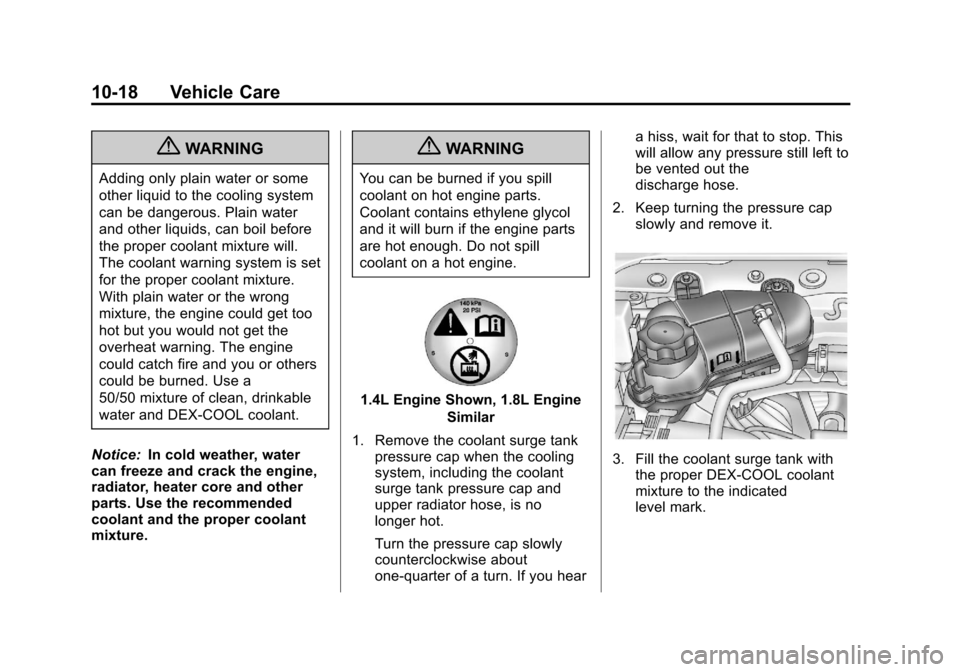
1.4L Engine Shown, 1.8L Engine
Similar
1. Remove the coolant surge tank pressure cap when the cooling
system, including the coolant
surge tank pressure cap and
upper radiator hose, is no
longer hot.
Turn the pressure cap slowly
counterclockwise about
one-quarter of a turn. If you hear a hiss, wait for that to stop. This
will allow any pressure still left to
be vented out the
discharge hose.
2. Keep turning the pressure cap slowly and remove it.
3. Fill the coolant surge tank withthe proper DEX-COOL coolant
mixture to the indicated
level mark.
Page 257 of 382
Black plate (23,1)Chevrolet Sonic Owner Manual - 2013 - 2nd PrintReady - 10/11/12
Vehicle Care 10-23
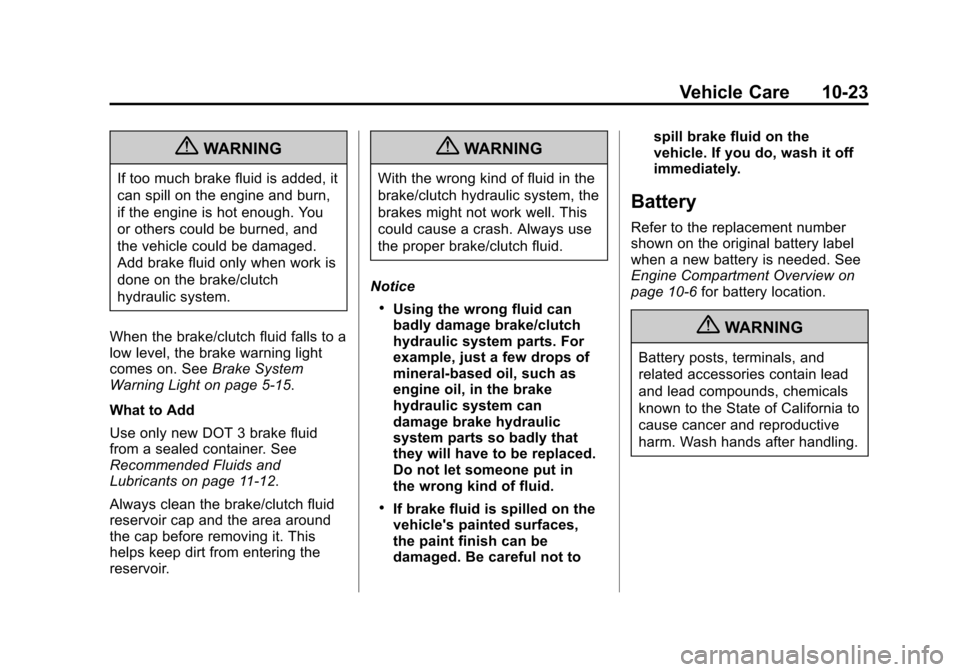
{WARNING
If too much brake fluid is added, it
can spill on the engine and burn,
if the engine is hot enough. You
or others could be burned, and
the vehicle could be damaged.
Add brake fluid only when work is
done on the brake/clutch
hydraulic system.
When the brake/clutch fluid falls to a
low level, the brake warning light
comes on. See Brake System
Warning Light on page 5‑15.
What to Add
Use only new DOT 3 brake fluid
from a sealed container. See
Recommended Fluids and
Lubricants on page 11‑12.
Always clean the brake/clutch fluid
reservoir cap and the area around
the cap before removing it. This
helps keep dirt from entering the
reservoir.
{WARNING
With the wrong kind of fluid in the
brake/clutch hydraulic system, the
brakes might not work well. This
could cause a crash. Always use
the proper brake/clutch fluid.
Notice
.Using the wrong fluid can
badly damage brake/clutch
hydraulic system parts. For
example, just a few drops of
mineral-based oil, such as
engine oil, in the brake
hydraulic system can
damage brake hydraulic
system parts so badly that
they will have to be replaced.
Do not let someone put in
the wrong kind of fluid.
.If brake fluid is spilled on the
vehicle's painted surfaces,
the paint finish can be
damaged. Be careful not to spill brake fluid on the
vehicle. If you do, wash it off
immediately.
Battery
Refer to the replacement number
shown on the original battery label
when a new battery is needed. See
Engine Compartment Overview on
page 10‑6
for battery location.
{WARNING
Battery posts, terminals, and
related accessories contain lead
and lead compounds, chemicals
known to the State of California to
cause cancer and reproductive
harm. Wash hands after handling.
Page 268 of 382
Black plate (34,1)Chevrolet Sonic Owner Manual - 2013 - 2nd PrintReady - 10/11/12
10-34 Vehicle Care
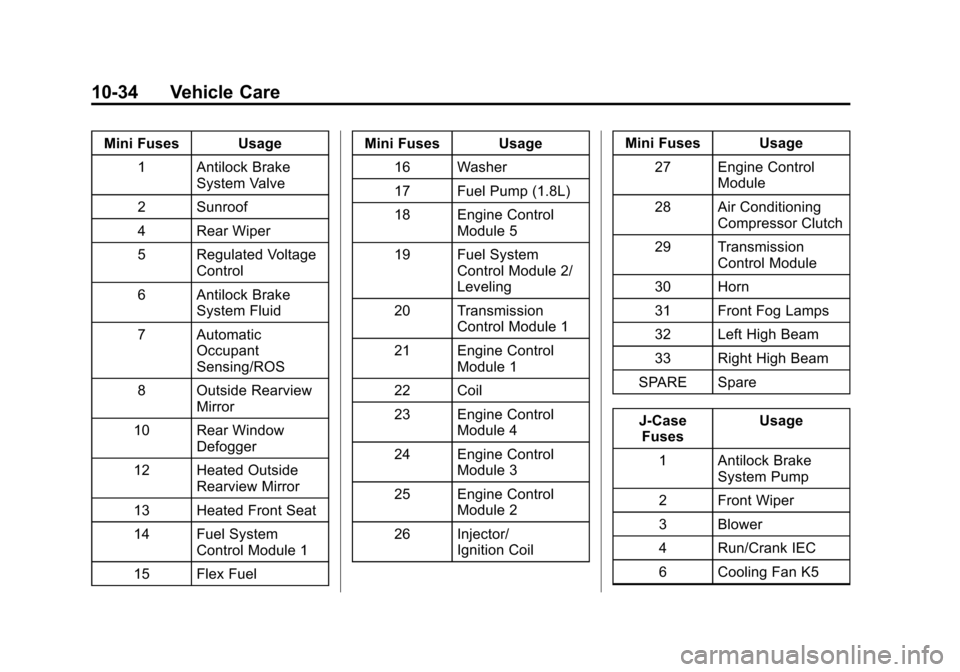
Mini Fuses Usage1 Antilock Brake System Valve
2 Sunroof
4 Rear Wiper
5 Regulated Voltage Control
6 Antilock Brake System Fluid
7 Automatic Occupant
Sensing/ROS
8 Outside Rearview Mirror
10 Rear Window Defogger
12 Heated Outside Rearview Mirror
13 Heated Front Seat
14 Fuel System Control Module 1
15 Flex Fuel Mini Fuses Usage
16 Washer
17 Fuel Pump (1.8L)
18 Engine Control Module 5
19 Fuel System Control Module 2/
Leveling
20 Transmission Control Module 1
21 Engine Control Module 1
22 Coil
23 Engine Control Module 4
24 Engine Control Module 3
25 Engine Control Module 2
26 Injector/ Ignition Coil Mini Fuses Usage
27 Engine Control Module
28 Air Conditioning Compressor Clutch
29 Transmission Control Module
30 Horn
31 Front Fog Lamps
32 Left High Beam
33 Right High Beam
SPARE Spare
J-Case Fuses Usage
1 Antilock Brake System Pump
2 Front Wiper
3 Blower
4 Run/Crank IEC
6 Cooling Fan K5
Page 270 of 382
Black plate (36,1)Chevrolet Sonic Owner Manual - 2013 - 2nd PrintReady - 10/11/12
10-36 Vehicle Care
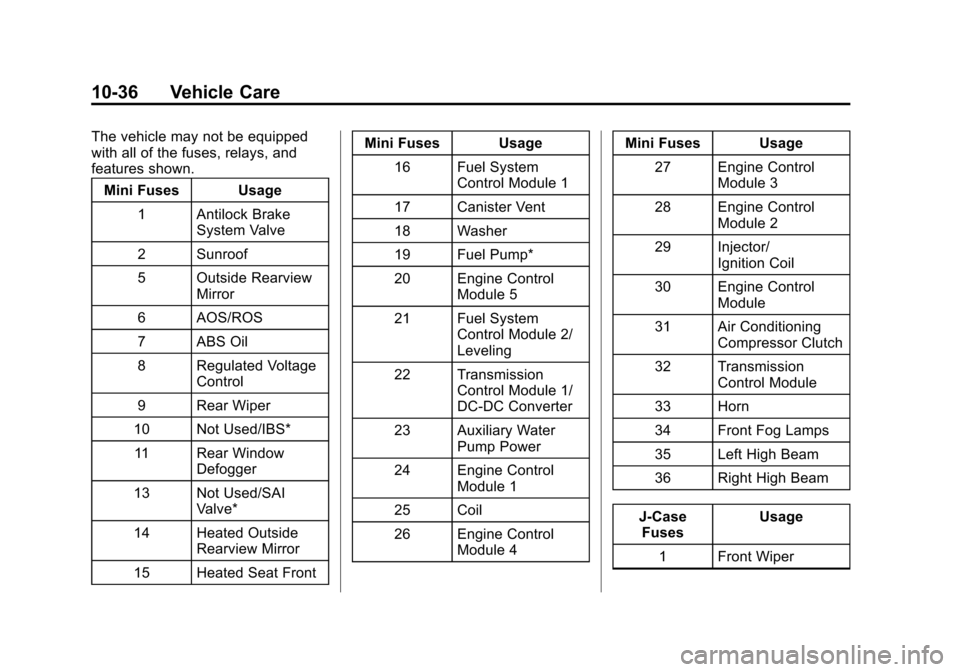
The vehicle may not be equipped
with all of the fuses, relays, and
features shown.Mini Fuses Usage
1 Antilock Brake System Valve
2 Sunroof
5 Outside Rearview Mirror
6 AOS/ROS
7 ABS Oil
8 Regulated Voltage Control
9 Rear Wiper
10 Not Used/IBS* 11 Rear Window Defogger
13 Not Used/SAI Valve*
14 Heated Outside Rearview Mirror
15 Heated Seat Front Mini Fuses Usage
16 Fuel System Control Module 1
17 Canister Vent
18 Washer
19 Fuel Pump*
20 Engine Control Module 5
21 Fuel System Control Module 2/
Leveling
22 Transmission Control Module 1/
DC-DC Converter
23 Auxiliary Water Pump Power
24 Engine Control Module 1
25 Coil
26 Engine Control Module 4 Mini Fuses Usage
27 Engine Control Module 3
28 Engine Control Module 2
29 Injector/ Ignition Coil
30 Engine Control Module
31 Air Conditioning Compressor Clutch
32 Transmission Control Module
33 Horn
34 Front Fog Lamps
35 Left High Beam
36 Right High Beam
J-Case Fuses Usage
1 Front Wiper