2013 CHEVROLET SONIC ignition
[x] Cancel search: ignitionPage 33 of 382
Black plate (7,1)Chevrolet Sonic Owner Manual - 2013 - 2nd PrintReady - 10/11/12
Keys, Doors, and Windows 2-7
.Use the lock knob on the top of
the door panel.
Central Locking System
This system allows for the doors
and liftgate/trunk to be locked and
unlocked from the RKE transmitter
or the central locking switch on the
center stack.
The system can be programed. See
Vehicle Personalization on
page 5‑26.
Door Ajar Reminder
If one of the doors, the trunk, or the
liftgate is not closed properly while
the ignition is on, the door ajar light
on the instrument panel comes on
and stays on until the doors are
closed.
Delayed Locking
PressingQon the central locking
switch or on the RKE transmitter
when this feature is on will delay the
locking of the doors until
five seconds after the last door is
closed. Three chimes will signal that
delayed locking is in use. See
Vehicle Personalization on
page 5‑26.
Automatic Door Locks
The vehicle is programmed so that
when the doors are closed, the
ignition is on, and the shift lever is
moved out of P (Park) for automatic
transmissions, or when the vehicle
speed is above 13 km/h (8 mph) for
manual transmissions, the doors
and the trunk/liftgate will lock.
To unlock the doors and the trunk/
liftgate:
.PressKon the center stack.
.For vehicles with an automatic
transmission, shift the
transmission into P (Park).
.For vehicle with a manual
transmission, remove the key
from the ignition.
This feature can be programmed.
See Vehicle Personalization on
page 5‑26.
Safety Locks
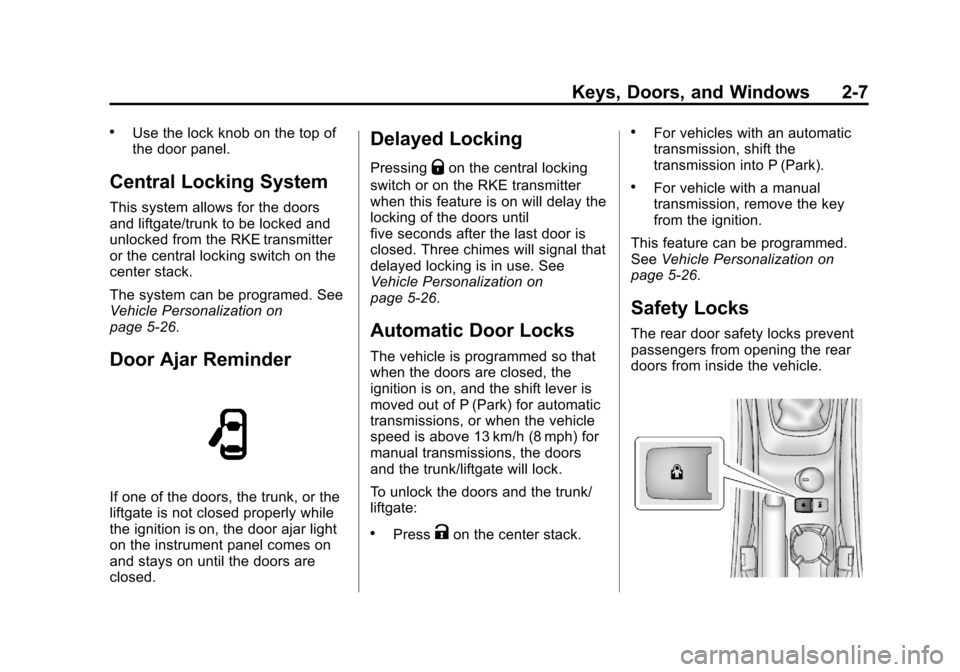
The rear door safety locks prevent
passengers from opening the rear
doors from inside the vehicle.
Page 37 of 382

Black plate (11,1)Chevrolet Sonic Owner Manual - 2013 - 2nd PrintReady - 10/11/12
Keys, Doors, and Windows 2-11
Arming the System
1. Close all doors, liftgate,and hood.
2. Lock the vehicle using the transmitter or the power door
lock button. The indicator on the
instrument panel should come
on and stay on for about
30 seconds.
3. After 30 seconds, the alarm system will arm, and the
indicator will begin to slowly
flash indicating the alarm is
operating.
If a door, the hood, or the liftgate is
opened without first unlocking with
the Remote Keyless Entry (RKE)
transmitter, the turn signals will flash
and the horn will sound for about
30 seconds. The alarm system will
then re-arm to monitor for the next
unauthorized event.
The theft-deterrent alarm system will
not activate if the doors are locked
with the key.
Disarming the System
To disarm the system, either unlock
the doors using the RKE transmitter,
or start the vehicle with a
recognized transmitter in the
vehicle.
To avoid setting off the alarm by
accident:
.Lock the vehicle with the
transmitter after all occupants
have left the vehicle and all
doors are closed.
.Always unlock a door with the
RKE transmitter. Unlocking a
door any other way will not
disarm the alarm.
If you set off the alarm by accident,
turn off the alarm by pressing
Kon
the RKE transmitter or start the
vehicle with a recognized transmitter
in the vehicle. The alarm will not
stop if you unlock the driver door
with the key.
How to Detect a Tamper
Condition
IfKis pressed and the horn chirps
three times, an attempted break-in
occurred while the system was
armed.
Immobilizer
See Radio Frequency Statement on
page 13‑15 for information
regarding Part 15 of the Federal
Communications Commission (FCC)
rules and Industry Canada
Standards RSS-GEN/210/220/310.
Immobilizer Operation
This vehicle has a passive
theft-deterrent system.
The system does not have to be
manually armed or disarmed.
The vehicle is automatically
immobilized when the key is
removed from the ignition.
Page 38 of 382

Black plate (12,1)Chevrolet Sonic Owner Manual - 2013 - 2nd PrintReady - 10/11/12
2-12 Keys, Doors, and Windows
The system is automatically
disarmed when the vehicle is
started with the correct key. The key
uses a transponder that matches an
immobilizer control unit in the
vehicle and automatically disarms
the system. Only an authorized key
starts the vehicle. The vehicle may
not start if the key is damaged.
The security light in the instrument
cluster comes on if there is a
problem with arming or disarming
the theft-deterrent system.When trying to start the vehicle, the
security light comes on briefly when
the ignition is turned on.
If the engine does not start and the
security light stays on, there is a
problem with the system. Turn the
ignition off and try again.
If the engine still does not start, and
the key appears to be undamaged
or the light continues to stay on, try
another ignition key. If the engine
does not start with the other key, the
vehicle needs service. If the vehicle
does start, the first key may be
damaged. See your dealer who can
service the theft-deterrent system
and have a new key made.
Do not leave the key or device that
disarms or deactivates the
theft-deterrent system in the vehicle.
Exterior Mirrors
Convex Mirrors
{WARNING
A convex mirror can make things,
like other vehicles, look farther
away than they really are. If you
cut too sharply into the right lane,
you could hit a vehicle on the
right. Check the inside mirror or
glance over your shoulder before
changing lanes.
The passenger side mirror is convex
shaped. A convex mirror's surface is
curved so more can be seen from
the driver seat.
Page 42 of 382
Black plate (16,1)Chevrolet Sonic Owner Manual - 2013 - 2nd PrintReady - 10/11/12
2-16 Keys, Doors, and Windows
WARNING (Continued)
windows will function and they
could be seriously injured or killed
if caught in the path of a closing
window. Do not leave keys in a
vehicle with children.
When there are children in the
rear seat use the window lockout
button to prevent unintentional
operation of the windows.
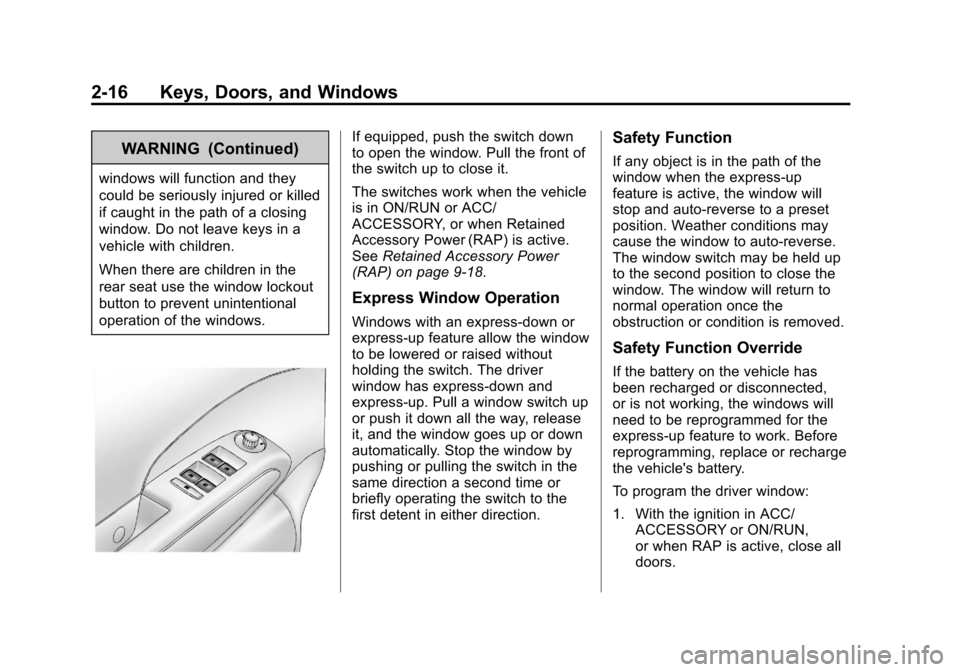
If equipped, push the switch down
to open the window. Pull the front of
the switch up to close it.
The switches work when the vehicle
is in ON/RUN or ACC/
ACCESSORY, or when Retained
Accessory Power (RAP) is active.
SeeRetained Accessory Power
(RAP) on page 9‑18.
Express Window Operation
Windows with an express-down or
express-up feature allow the window
to be lowered or raised without
holding the switch. The driver
window has express-down and
express-up. Pull a window switch up
or push it down all the way, release
it, and the window goes up or down
automatically. Stop the window by
pushing or pulling the switch in the
same direction a second time or
briefly operating the switch to the
first detent in either direction.
Safety Function
If any object is in the path of the
window when the express-up
feature is active, the window will
stop and auto-reverse to a preset
position. Weather conditions may
cause the window to auto-reverse.
The window switch may be held up
to the second position to close the
window. The window will return to
normal operation once the
obstruction or condition is removed.
Safety Function Override
If the battery on the vehicle has
been recharged or disconnected,
or is not working, the windows will
need to be reprogrammed for the
express-up feature to work. Before
reprogramming, replace or recharge
the vehicle's battery.
To program the driver window:
1. With the ignition in ACC/
ACCESSORY or ON/RUN,
or when RAP is active, close all
doors.
Page 43 of 382
Black plate (17,1)Chevrolet Sonic Owner Manual - 2013 - 2nd PrintReady - 10/11/12
Keys, Doors, and Windows 2-17
2. Press and hold the powerwindow switch until the window
is fully open.
3. Pull the power window switch up until the window is fully closed.
4. Continue holding the switch up for approximately two seconds
after the window is completely
closed.
The window is now reprogrammed.
Window Lockout
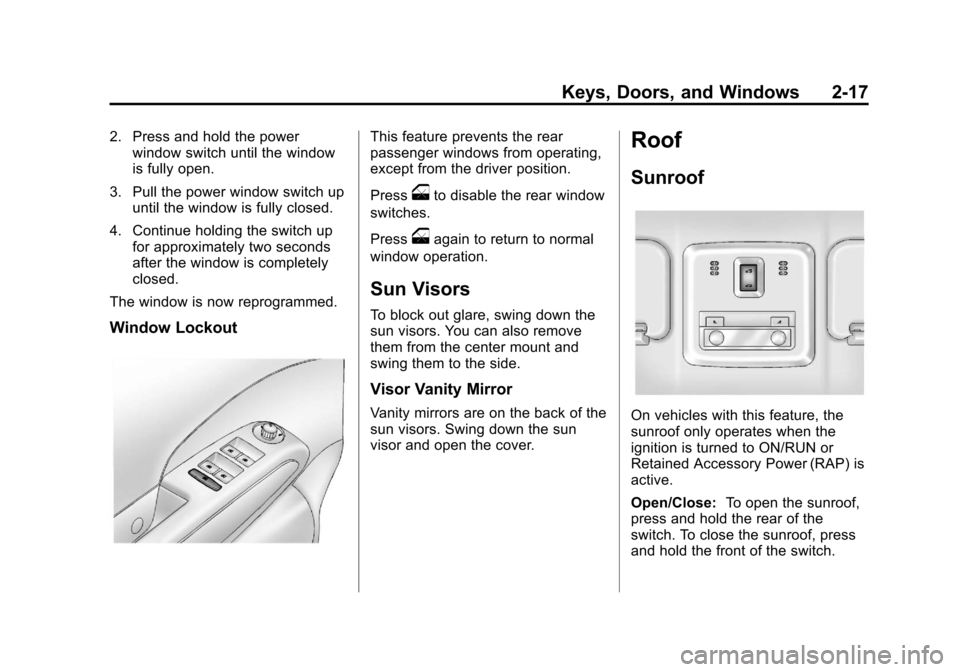
This feature prevents the rear
passenger windows from operating,
except from the driver position.
Press
oto disable the rear window
switches.
Press
oagain to return to normal
window operation.
Sun Visors
To block out glare, swing down the
sun visors. You can also remove
them from the center mount and
swing them to the side.
Visor Vanity Mirror
Vanity mirrors are on the back of the
sun visors. Swing down the sun
visor and open the cover.
Roof
Sunroof
On vehicles with this feature, the
sunroof only operates when the
ignition is turned to ON/RUN or
Retained Accessory Power (RAP) is
active.
Open/Close: To open the sunroof,
press and hold the rear of the
switch. To close the sunroof, press
and hold the front of the switch.
Page 50 of 382

Black plate (6,1)Chevrolet Sonic Owner Manual - 2013 - 2nd PrintReady - 10/11/12
3-6 Seats and Restraints
Heated Front Seats
{WARNING
If you cannot feel temperature
change or pain to the skin, the
seat heater may cause burns. To
reduce the risk of burns, people
with such a condition should use
care when using the seat heater,
especially for long periods of
time. Do not place anything on
the seat that insulates against
heat, such as a blanket, cushion,
cover, or similar item. This may
cause the seat heater to
overheat. An overheated seat
heater may cause a burn or may
damage the seat.
If available, the controls are on the
climate control system. To operate,
the engine must be running.
Press
MorLto heat the driver or
passenger seat. The indicator light
on the control turns on when this
feature is on. Press the control
again to turn this feature off.
The passenger seat may take
longer to heat up.
Remote Start Heated Seats
When it is cold outside, the heated
seats can be turned on
automatically during a remote
vehicle start. The heated seats will
be canceled when the ignition is
turned on. Press the heated seat
controls to use the heated seats
after the vehicle is started.
The heated seat indicator lights do
not turn on during a remote start.
The temperature performance of an
unoccupied seat may be reduced.
This is normal.
The heated seats will not turn on
during a remote start unless the
heated seat feature is enabled in
the vehicle personalization menu.
See Remote Vehicle Start on
page 2‑4 andVehicle
Personalization on page 5‑26.
Page 100 of 382

Black plate (6,1)Chevrolet Sonic Owner Manual - 2013 - 2nd PrintReady - 10/11/12
5-6 Instruments and Controls
3. Select On to display the realtime or Off to display the time
set by the user.
4. Press
4.
Power Outlets
The accessory power outlets can be
used to plug in electrical equipment,
such as a cell phone or MP3 player.
The vehicle has an accessory
power outlet located in front of the
cupholders on the center floor
console.
Remove the cover to access and
replace when not in use.
{WARNING
Power is always supplied to the
outlets. Do not leave electrical
equipment plugged in when the
vehicle is not in use because the
vehicle could catch fire and cause
injury or death. Notice:
Leaving electrical
equipment plugged in for an
extended period of time while the
vehicle is off will drain the
battery. Always unplug electrical
equipment when not in use and
do not plug in equipment that
exceeds the maximum 20 ampere
rating.
Certain accessory power plugs may
not be compatible with the
accessory power outlet and could
overload vehicle or adapter fuses.
If a problem is experienced, see
your dealer.
When adding electrical equipment,
be sure to follow the proper
installation instructions included with
the equipment. See Add-On
Electrical Equipment on page 9‑38.
Notice: Hanging heavy
equipment from the power outlet
can cause damage not covered
by the vehicle warranty. The
power outlets are designed for
accessory power plugs only, such
as cell phone charge cords.
Cigarette Lighter
For vehicles with a cigarette lighter,
it is located in the center floor
console.
The ignition must be turned to ACC/
ACCESSORY or ON/RUN.
To activate the cigarette lighter,
push it into the heating element and
let go. When the lighter is ready it
will pop back out.
Notice: Holding a cigarette lighter
in while it is heating does not let
the lighter back away from the
heating element when it is hot.
Damage from overheating can
occur to the lighter or heating
element, or a fuse could be
blown. Do not hold a cigarette
lighter in while it is heating.
Page 103 of 382
Black plate (9,1)Chevrolet Sonic Owner Manual - 2013 - 2nd PrintReady - 10/11/12
Instruments and Controls 5-9
Speedometer
The speedometer shows the
vehicle's speed in either kilometers
per hour (km/h) or miles per
hour (mph).
Odometer
The odometer shows how far the
vehicle has been driven, in either
kilometers or miles.
Trip Odometer
The trip odometer measures the
distance the vehicle has been
driven since the function was last
reset.
Press the reset stem in the lower
right of the tachometer to toggle
between the odometer and the trip
odometer. To reset the trip odometer
to zero, press and hold the reset
stem while the trip odometer is
being displayed. Be careful not to
reset the engine oil life monitor
accidentally.
Tachometer
The tachometer displays the engine
speed in revolutions per
minute (rpm).
Fuel Gauge
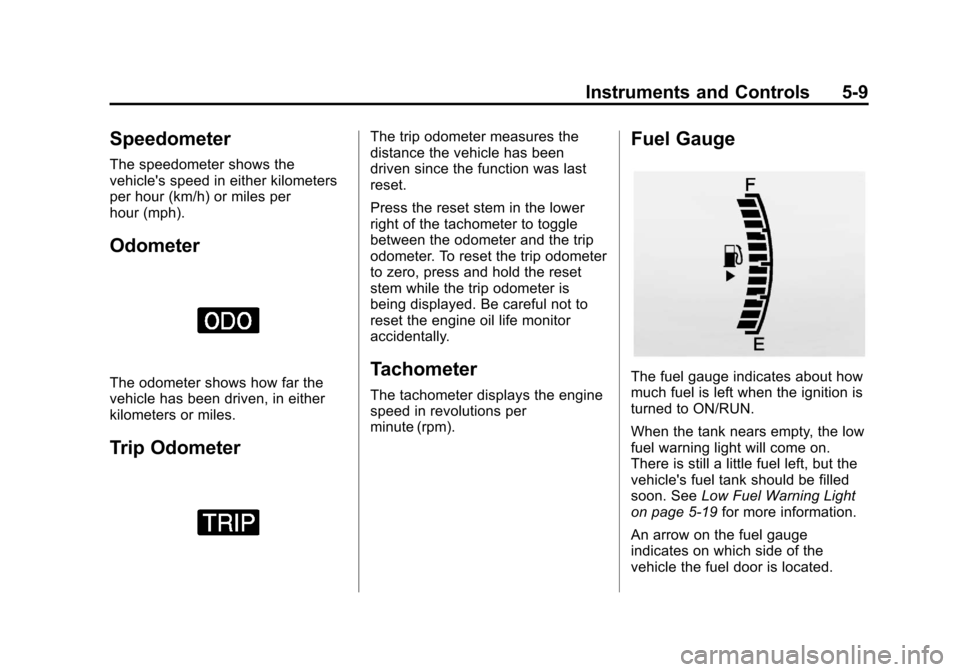
The fuel gauge indicates about how
much fuel is left when the ignition is
turned to ON/RUN.
When the tank nears empty, the low
fuel warning light will come on.
There is still a little fuel left, but the
vehicle's fuel tank should be filled
soon. SeeLow Fuel Warning Light
on page 5‑19 for more information.
An arrow on the fuel gauge
indicates on which side of the
vehicle the fuel door is located.