2013 CHEVROLET SILVERADO buttons
[x] Cancel search: buttonsPage 189 of 542
Black plate (59,1)Chevrolet Silverado Owner Manual - 2013 - crc2 - 8/13/12
Instruments and Controls 5-59
To erase either Rolling Code or
Fixed Code settings on the
Universal Home Remote device:
1. Press and hold the two outsidebuttons at the same time for
approximately 20 seconds, until
the indicator lights, located
directly above the buttons, begin
to blink rapidly.
2. Once the indicator lights begin to blink, release both buttons. The
codes from all buttons will be
erased.
For help or information on the
Universal Home Remote System,
call the customer assistance phone
number under Customer Assistance
Offices (U.S. and Canada) on
page 13‑5 orCustomer Assistance
Offices (Mexico) on page 13‑5.
Page 194 of 542
Black plate (4,1)Chevrolet Silverado Owner Manual - 2013 - crc2 - 8/13/12
6-4 Lighting
in the P (Park) position before the
automatic headlamp system can be
turned off.
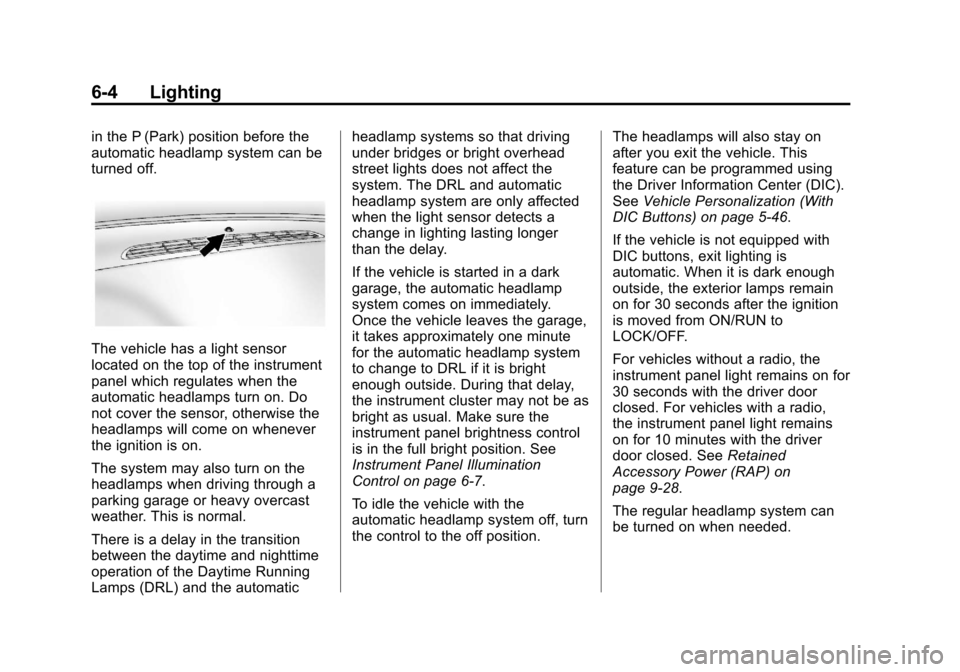
The vehicle has a light sensor
located on the top of the instrument
panel which regulates when the
automatic headlamps turn on. Do
not cover the sensor, otherwise the
headlamps will come on whenever
the ignition is on.
The system may also turn on the
headlamps when driving through a
parking garage or heavy overcast
weather. This is normal.
There is a delay in the transition
between the daytime and nighttime
operation of the Daytime Running
Lamps (DRL) and the automaticheadlamp systems so that driving
under bridges or bright overhead
street lights does not affect the
system. The DRL and automatic
headlamp system are only affected
when the light sensor detects a
change in lighting lasting longer
than the delay.
If the vehicle is started in a dark
garage, the automatic headlamp
system comes on immediately.
Once the vehicle leaves the garage,
it takes approximately one minute
for the automatic headlamp system
to change to DRL if it is bright
enough outside. During that delay,
the instrument cluster may not be as
bright as usual. Make sure the
instrument panel brightness control
is in the full bright position. See
Instrument Panel Illumination
Control on page 6‑7.
To idle the vehicle with the
automatic headlamp system off, turn
the control to the off position.
The headlamps will also stay on
after you exit the vehicle. This
feature can be programmed using
the Driver Information Center (DIC).
See
Vehicle Personalization (With
DIC Buttons) on page 5‑46.
If the vehicle is not equipped with
DIC buttons, exit lighting is
automatic. When it is dark enough
outside, the exterior lamps remain
on for 30 seconds after the ignition
is moved from ON/RUN to
LOCK/OFF.
For vehicles without a radio, the
instrument panel light remains on for
30 seconds with the driver door
closed. For vehicles with a radio,
the instrument panel light remains
on for 10 minutes with the driver
door closed. See Retained
Accessory Power (RAP) on
page 9‑28.
The regular headlamp system can
be turned on when needed.
Page 203 of 542
Black plate (3,1)Chevrolet Silverado Owner Manual - 2013 - crc2 - 8/13/12
Infotainment System 7-3
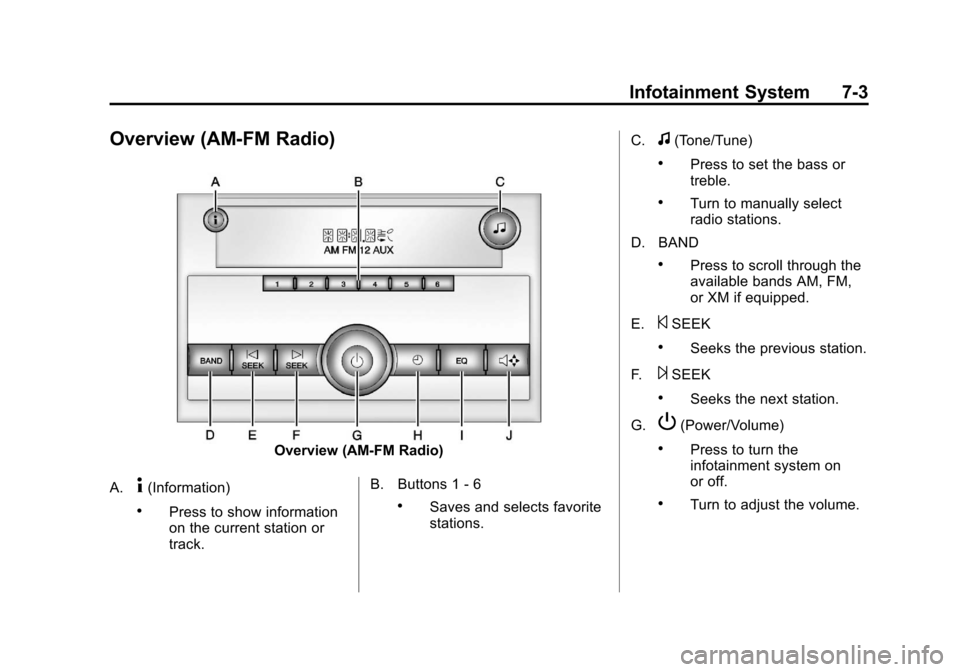
Overview (AM-FM Radio)
Overview (AM-FM Radio)
A.
4(Information)
.Press to show information
on the current station or
track. B. Buttons 1 - 6.Saves and selects favorite
stations.C.
f(Tone/Tune)
.Press to set the bass or
treble.
.Turn to manually select
radio stations.
D. BAND
.Press to scroll through the
available bands AM, FM,
or XM if equipped.
E.
©SEEK
.Seeks the previous station.
F.
¨SEEK
.Seeks the next station.
G.
P(Power/Volume)
.Press to turn the
infotainment system on
or off.
.Turn to adjust the volume.
Page 205 of 542

Black plate (5,1)Chevrolet Silverado Owner Manual - 2013 - crc2 - 8/13/12
Infotainment System 7-5
C. MENU
.Press to open the tone
menu to adjust the bass,
midrange, treble, fade, and
balance.
D. Buttons 1 - 6
.Saves and selects favorite
stations.
E. EQ (Equalizer)
.Press to adjust the
equalizer.
F.
f(Tone/Tune)
.Press to set the bass or
treble.
.Turn to manually select
radio stations.
G. CAT (Category)
.Press to display a list of
XM categories. H.
H(Clock)
.Press to set the clock.
I. BAND
.Press to scroll through the
available bands AM, FM,
or XM if equipped.
J.
©SEEK
.Seeks the previous station.
K.
¨SEEK
.Seeks the next station.
L.
P(Power/Volume)
.Press to turn the
infotainment system on
or off.
.Turn to adjust the volume. M.
sREV (Reverse)
.Press to and hold to go
backward fast through a
track.
N.
\FWD (Forward)
.Press to and hold to fast
forward through a track.
O. CD/AUX
.Press to scroll through
selecting the CD or a
auxiliary device.
P.
ZEject
.Press to eject the
loaded CD.
Page 206 of 542
Black plate (6,1)Chevrolet Silverado Owner Manual - 2013 - crc2 - 8/13/12
7-6 Infotainment System
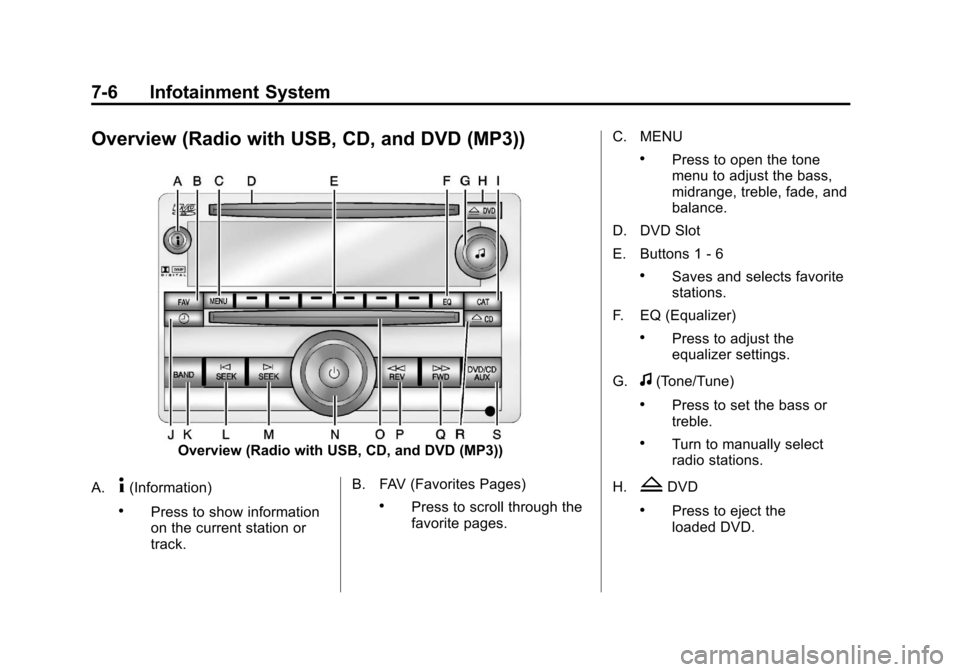
Overview (Radio with USB, CD, and DVD (MP3))
Overview (Radio with USB, CD, and DVD (MP3))
A.
4(Information)
.Press to show information
on the current station or
track. B. FAV (Favorites Pages).Press to scroll through the
favorite pages.C. MENU
.Press to open the tone
menu to adjust the bass,
midrange, treble, fade, and
balance.
D. DVD Slot
E. Buttons 1 - 6
.Saves and selects favorite
stations.
F. EQ (Equalizer)
.Press to adjust the
equalizer settings.
G.
f(Tone/Tune)
.Press to set the bass or
treble.
.Turn to manually select
radio stations.
H.
ZDVD
.Press to eject the
loaded DVD.
Page 211 of 542

Black plate (11,1)Chevrolet Silverado Owner Manual - 2013 - crc2 - 8/13/12
Infotainment System 7-11
display and artist information
displays on the bottom line. When
information is not available,“NO
INFO” displays.
Finding a Station
BAND: Press to switch between
AM, FM, or SiriusXM®, if equipped.
f(Tune): Turn to manually select
radio stations.
©SEEK: Press to seek the
previous radio station. Press and
hold for a few seconds until a beep
sounds to scan for radio stations in
descending order; press the
©
SEEK button again to stop scanning
radio stations. The radio only seeks
and scans stations with a strong
signal that are in the selected band.
For the AM-FM Radio, press and
hold the
©SEEK for four seconds
until a double beep sounds to scan
the preset stations. The station
frequency flashes while the radio is
in the scan mode.
¨SEEK: Press to seek the next
radio station. Press and hold for a
few seconds until a beep sounds to
scan for radio stations in ascending
order; press the
¨SEEK button
again to stop scanning radio
stations. The radio only seeks and
scans stations with a strong signal
that are in the selected band.
For the AM-FM Radio, press and
hold the
¨SEEK for four seconds
until a double beep sounds to scan
the preset stations. The station
frequency flashes while the radio is
in the scan mode.
sREV: Press to manually tune to
a radio station in descending order.
\FWD: Press to manually tune to
a radio station in ascending order.
FAV (Favorites): Press to select
different favorites pages for stored
radio stations.
Storing Radio Stations
Drivers are encouraged to store the
radio station while the vehicle is
parked; see Defensive Driving on
page 9‑3. Tune to stored radio
stations using the presets, favorites
button, and steering wheel controls,
if the vehicle has this feature.
Radios that have a FAV button store
radio stations as favorites. Up to
36 stations can be programmed as
favorites using the six softkeys
below the radio station frequency
tabs and by using the FAV button.
Press the FAV button to go through
up to six pages of favorites, each
having six favorite stations available
per page. Each page of favorites
can contain any combination of AM,
FM, or SiriusXM, if equipped,
stations.
Radios that do not have a FAV
button store radio stations as
presets. Up to 18 stations (6 FM1,
6 FM2, and 6 AM), can be
programmed on the six numbered
pushbuttons.
Page 212 of 542
Black plate (12,1)Chevrolet Silverado Owner Manual - 2013 - crc2 - 8/13/12
7-12 Infotainment System
Setting Preset Stations
To store presets:
1. Tune to a radio station.
2. Press and hold one of the sixnumbered pushbuttons for
three seconds until a beep
sounds.
3. Repeat Steps 1 and 2 to store additional radio stations.
Storing a Radio Station as a
Favorite
To store a station as a favorite:
1. Tune to a radio station.
2. Press the FAV button to display the page where the station will
be stored.
3. Press and hold one of the six softkeys until a beep sounds.
4. Repeat Steps 1 through 3 to store additional radio stations. The number of favorites pages can
be set up using the MENU button.
To set up the number of favorites
pages:
1. Press the MENU button.
2. Press the softkey located below
the FAV 1-6 tab.
3. Select the number of favorites pages by pressing the softkey
located below the displayed
page numbers.
4. Press the FAV button, or let the menu time out, to return to the
original main radio screen
showing the radio station
frequency tabs and to begin the
process of programming
favorites.
Satellite Radio
SiriusXM®Satellite Radio
Service
SiriusXM is a satellite radio service
that is based in the 48 contiguous
United States and 10 Canadian provinces. SiriusXM Satellite Radio
has a wide variety of programming
and commercial-free music,
coast-to-coast, and in digital-quality
sound. A service fee is required to
receive the SiriusXM service. If the
service needs to be reactivated, the
radio will display
“No Subscription
Please Renew on channel XM1.”
For more information, contact
SiriusXM at www.siriusxm.com or
call 1-866-635-2349 (U.S) and
www.xmradio.ca or call
1-877-209-0079 (Canada).
4(Information) (SiriusXM Satellite
Radio Service): For vehicles with
SiriusXM, press
4to display
additional text information related to
the current SiriusXM channel.
If information is available, the song
title information displays on the top
line of the display and artist
information displays on the bottom
line. When information is not
available, “NO INFO” displays.
Page 213 of 542
Black plate (13,1)Chevrolet Silverado Owner Manual - 2013 - crc2 - 8/13/12
Infotainment System 7-13
Finding a Channel
BAND:Press to switch between
AM, FM, or SiriusXM, if equipped.
f(Tune): Turn to manually select
an SiriusXM channel.
©SEEK: Press to go to the
previous SiriusXM channel.
¨SEEK: Press to go to the next
SiriusXM channel.
sREV: Press to go to the
previous SiriusXM category.
\FWD: Press to go to the next
SiriusXM category.
FAV (Favorites): Press to select
different favorites pages for stored
radio stations.
CAT (Category): The CAT button is
used to find SiriusXM channels
when the radio is in the XM mode.
Finding a Category (CAT)
Station
To find XM channels in a category:
1. Press the CAT button to display the category tabs. Continue
pressing the CAT button until the
desired category name displays.
.Radios with CD and DVD
can also navigate the
category list by pressing the
\FWD or thesREV
buttons.
2. Press either of the two softkeys below the desired category tab
to immediately tune to the first
SiriusXM station in that category.
To go to the previous or next
SiriusXM station in the selected
category, do one of the
following:
.Turn thefknob.
.Press the softkey below the
right or left arrows in the
category tab.
.Press©SEEK or¨SEEK.
3. To exit the category search mode, press the FAV button or
BAND button to display the
favorites again.
Adding and Removing Categories
Categories cannot be added or
removed while the vehicle is moving
faster than 8 km/h (5 mph).
To add or remove a category:
1. Press the MENU button.
2. Press the softkey located below the XM CAT tab.
3. Turn the
fknob to display the
category to add or remove.
4. Press the softkey located under the Add or Remove tab.
To restore all removed
categories, press the softkey
under the Restore All tab.
5. Repeat the steps to remove more categories.