2013 CHEVROLET MALIBU radio
[x] Cancel search: radioPage 149 of 436
Black plate (41,1)Chevrolet Malibu Owner Manual - 2013 - CRC - 6/6/12
Instruments and Controls 5-41
When programming a garage door,
park outside of the garage. Park
directly in line with and facing the
garage door opener motor-head or
gate motor-head. Be sure that
people and objects are clear of the
garage door or gate being
programmed.
It is recommended that a new
battery be installed in the hand-held
transmitter for quicker and more
accurate transmission of the
radio-frequency signal.
Programming the Universal
Remote System
For questions or help programming
the Universal Remote system, call
1-800-355-3515 or go to
www.homelink.com.
Programming a garage door opener
involves time-sensitive actions, so
read the entire procedure before
starting. Otherwise, the device will
time out and the procedure will have
to be repeated.To program up to three devices:
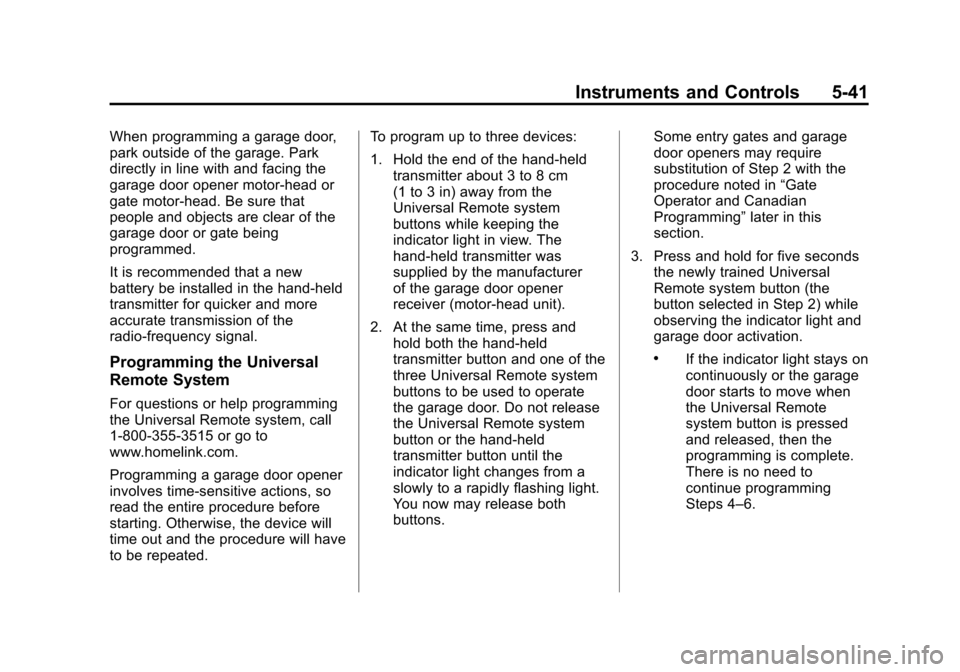
1. Hold the end of the hand-held
transmitter about 3 to 8 cm
(1 to 3 in) away from the
Universal Remote system
buttons while keeping the
indicator light in view. The
hand-held transmitter was
supplied by the manufacturer
of the garage door opener
receiver (motor-head unit).
2. At the same time, press and hold both the hand-held
transmitter button and one of the
three Universal Remote system
buttons to be used to operate
the garage door. Do not release
the Universal Remote system
button or the hand-held
transmitter button until the
indicator light changes from a
slowly to a rapidly flashing light.
You now may release both
buttons. Some entry gates and garage
door openers may require
substitution of Step 2 with the
procedure noted in
“Gate
Operator and Canadian
Programming” later in this
section.
3. Press and hold for five seconds the newly trained Universal
Remote system button (the
button selected in Step 2) while
observing the indicator light and
garage door activation.
.If the indicator light stays on
continuously or the garage
door starts to move when
the Universal Remote
system button is pressed
and released, then the
programming is complete.
There is no need to
continue programming
Steps 4–6.
Page 150 of 436
Black plate (42,1)Chevrolet Malibu Owner Manual - 2013 - CRC - 6/6/12
5-42 Instruments and Controls
.If the Universal Remote
system indicator light blinks
rapidly for two seconds,
then turns to a constant
light and the garage door
does not move, continue
with programming
Steps 4–6.
It may be helpful to have
another person assist with
the remaining Steps 4–6.
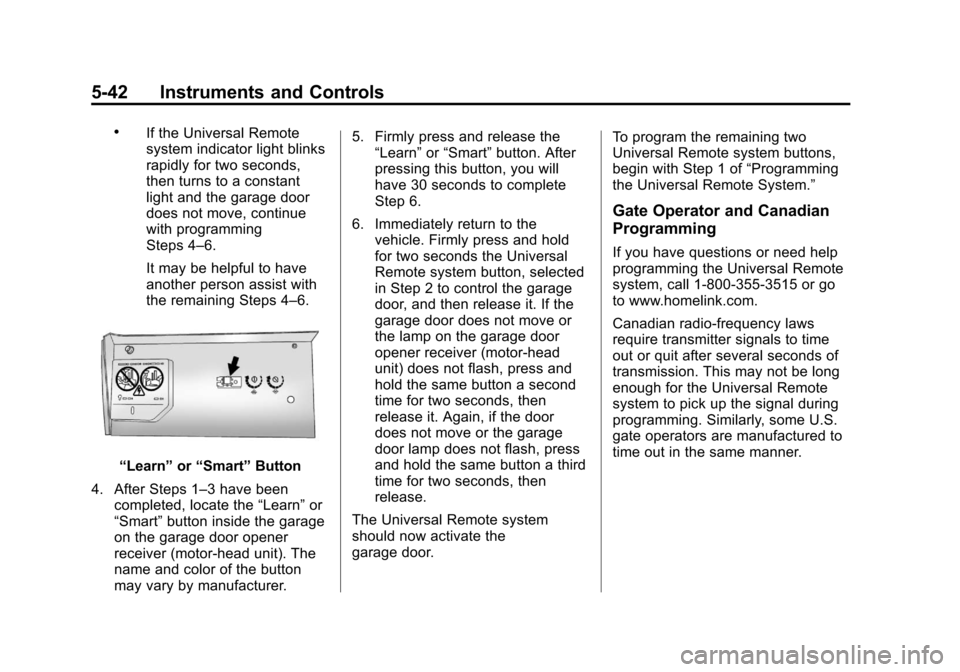
“Learn”or“Smart” Button
4. After Steps 1–3 have been completed, locate the “Learn”or
“Smart” button inside the garage
on the garage door opener
receiver (motor-head unit). The
name and color of the button
may vary by manufacturer. 5. Firmly press and release the
“Learn” or“Smart” button. After
pressing this button, you will
have 30 seconds to complete
Step 6.
6. Immediately return to the vehicle. Firmly press and hold
for two seconds the Universal
Remote system button, selected
in Step 2 to control the garage
door, and then release it. If the
garage door does not move or
the lamp on the garage door
opener receiver (motor-head
unit) does not flash, press and
hold the same button a second
time for two seconds, then
release it. Again, if the door
does not move or the garage
door lamp does not flash, press
and hold the same button a third
time for two seconds, then
release.
The Universal Remote system
should now activate the
garage door. To program the remaining two
Universal Remote system buttons,
begin with Step 1 of
“Programming
the Universal Remote System.”
Gate Operator and Canadian
Programming
If you have questions or need help
programming the Universal Remote
system, call 1-800-355-3515 or go
to www.homelink.com.
Canadian radio-frequency laws
require transmitter signals to time
out or quit after several seconds of
transmission. This may not be long
enough for the Universal Remote
system to pick up the signal during
programming. Similarly, some U.S.
gate operators are manufactured to
time out in the same manner.
Page 161 of 436
Black plate (1,1)Chevrolet Malibu Owner Manual - 2013 - CRC - 6/6/12
Infotainment System 7-1
Infotainment
System
Introduction
Infotainment . . . . . . . . . . . . . . . . . . . 7-1
Theft-Deterrent Feature . . . . . . . 7-2
Overview (Radio with CD) . . . . . 7-2
Overview (Radio with CD andTouchscreen) . . . . . . . . . . . . . . . . 7-5
Operation . . . . . . . . . . . . . . . . . . . . . 7-9
Radio
AM-FM Radio . . . . . . . . . . . . . . . . 7-14
Satellite Radio . . . . . . . . . . . . . . . 7-19
Radio Reception . . . . . . . . . . . . . 7-20
Backglass Antenna . . . . . . . . . . 7-21
Satellite Radio Antenna . . . . . . 7-21
Audio Players
CD Player . . . . . . . . . . . . . . . . . . . 7-22
MP3 . . . . . . . . . . . . . . . . . . . . . . . . . 7-24
Auxiliary Devices . . . . . . . . . . . . 7-25
Phone
Bluetooth (Overview) . . . . . . . . 7-35
Bluetooth (Infotainment Controls) . . . . . . . . . . . . . . . . . . . 7-36
Bluetooth (Voice Recognition) . . . . . . . . . . . . . . . 7-40
Introduction
Infotainment
Determine which radio the vehicle
has. For radios without connectivity,
read the following pages to become
familiar with its features. For radios
with connectivity, see the
infotainment manual.
{WARNING
Taking your eyes off the road for
extended periods could cause a
crash resulting in injury or death
to you or others. Do not give
extended attention to infotainment
tasks while driving.
This system provides access to
many audio and non-audio listings.
Page 162 of 436
Black plate (2,1)Chevrolet Malibu Owner Manual - 2013 - CRC - 6/6/12
7-2 Infotainment System
To minimize taking your eyes off the
road while driving, do the following
while the vehicle is parked:
.Become familiar with the
operation and controls of the
audio system.
.Set up the tone, speaker
adjustments, and preset radio
stations.
See Defensive Driving on page 9‑2.
Notice: Contact your dealer
before adding any equipment.
Adding audio or communication
equipment could interfere with
the operation of the engine, radio,
or other systems, and could
damage them. Follow federal
rules covering mobile radio and
telephone equipment. Notice:
The chime signals related
to safety belts, parking brake, and
other functions of your vehicle
operate through the radio/
entertainment system. If that
equipment is replaced or
additional equipment is added
to your vehicle, the chimes
may not work. Make sure that
replacement or additional
equipment is compatible with
your vehicle before installing it.
See Accessories and
Modifications on page 10‑3.
The vehicle has Retained
Accessory Power (RAP). With RAP,
the audio system can be played
even after the ignition is turned off.
See Retained Accessory Power
(RAP) on page 9‑22.
Theft-Deterrent Feature
The theft-deterrent feature works by
learning a portion of the Vehicle
Identification Number (VIN) to
the infotainment system. The
infotainment system does not
operate if it is stolen or moved to a
different vehicle.
Overview (Radio with CD)
Infotainment System Overview
Radio faceplate examples are
provided to help identify buttons and
to help understand the functions of
the radio. Find the faceplate that
best matches the vehicle for a
description.
Page 163 of 436
Black plate (3,1)Chevrolet Malibu Owner Manual - 2013 - CRC - 6/6/12
Infotainment System 7-3
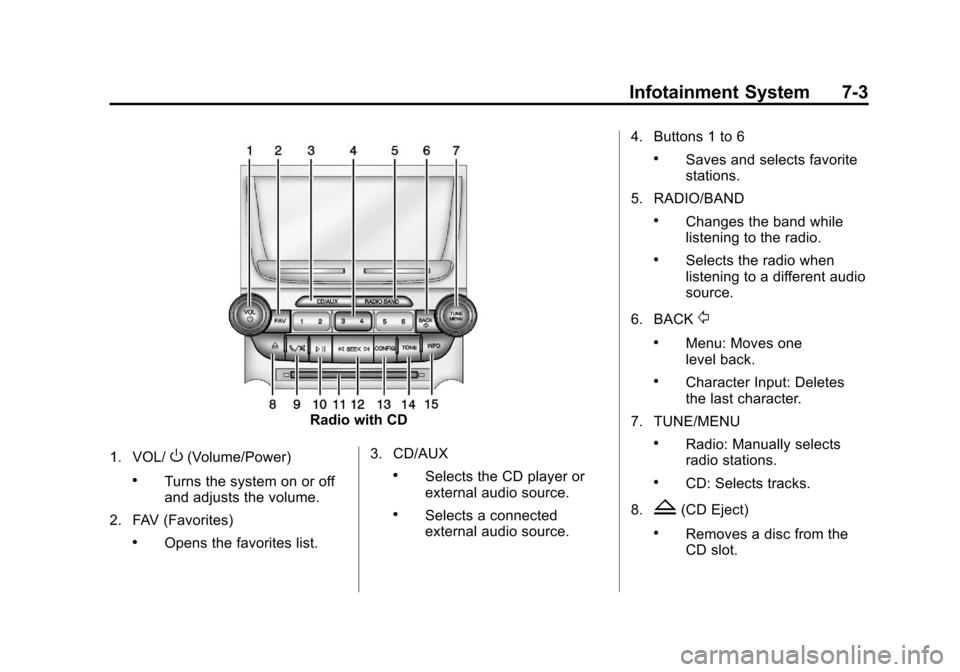
Radio with CD
1. VOL/
O(Volume/Power)
.Turns the system on or off
and adjusts the volume.
2. FAV (Favorites)
.Opens the favorites list. 3. CD/AUX
.Selects the CD player or
external audio source.
.Selects a connected
external audio source.4. Buttons 1 to 6
.Saves and selects favorite
stations.
5. RADIO/BAND
.Changes the band while
listening to the radio.
.Selects the radio when
listening to a different audio
source.
6. BACK
/
.Menu: Moves one
level back.
.Character Input: Deletes
the last character.
7. TUNE/MENU
.Radio: Manually selects
radio stations.
.CD: Selects tracks.
8.
Z(CD Eject)
.Removes a disc from the
CD slot.
Page 164 of 436
Black plate (4,1)Chevrolet Malibu Owner Manual - 2013 - CRC - 6/6/12
7-4 Infotainment System
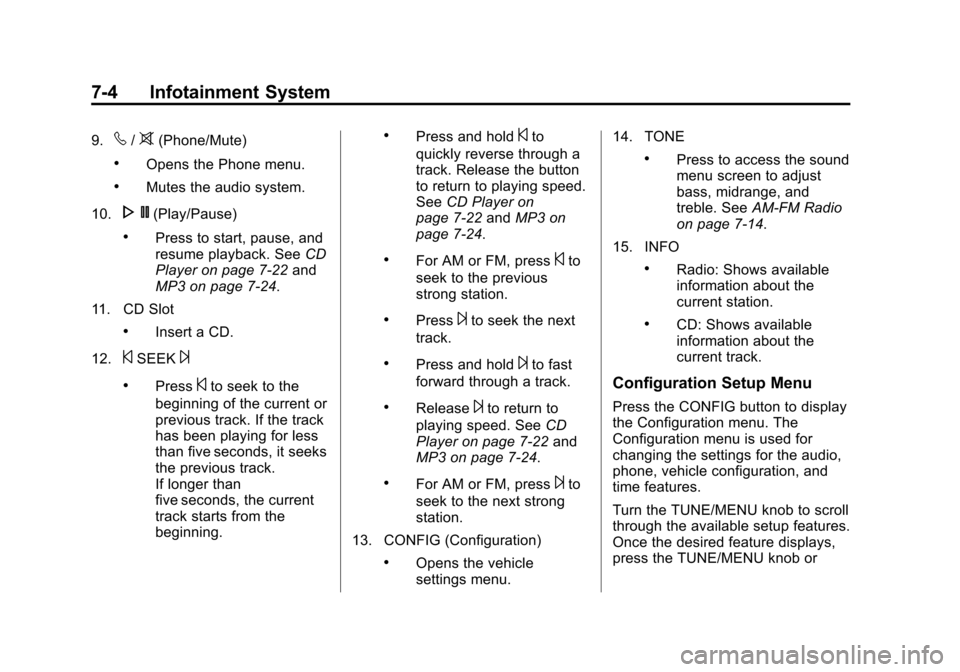
9.v/>(Phone/Mute)
.Opens the Phone menu.
.Mutes the audio system.
10.
N(Play/Pause)
.Press to start, pause, and
resume playback. See CD
Player on page 7‑22 and
MP3 on page 7‑24.
11. CD Slot
.Insert a CD.
12.
©SEEK¨
.Press©to seek to the
beginning of the current or
previous track. If the track
has been playing for less
than five seconds, it seeks
the previous track.
If longer than
five seconds, the current
track starts from the
beginning.
.Press and hold©to
quickly reverse through a
track. Release the button
to return to playing speed.
See CD Player on
page 7‑22 andMP3 on
page 7‑24.
.For AM or FM, press©to
seek to the previous
strong station.
.Press¨to seek the next
track.
.Press and hold¨to fast
forward through a track.
.Release¨to return to
playing speed. See CD
Player on page 7‑22 and
MP3 on page 7‑24.
.For AM or FM, press¨to
seek to the next strong
station.
13. CONFIG (Configuration)
.Opens the vehicle
settings menu. 14. TONE
.Press to access the sound
menu screen to adjust
bass, midrange, and
treble. See
AM-FM Radio
on page 7‑14.
15. INFO
.Radio: Shows available
information about the
current station.
.CD: Shows available
information about the
current track.
Configuration Setup Menu
Press the CONFIG button to display
the Configuration menu. The
Configuration menu is used for
changing the settings for the audio,
phone, vehicle configuration, and
time features.
Turn the TUNE/MENU knob to scroll
through the available setup features.
Once the desired feature displays,
press the TUNE/MENU knob or
Page 165 of 436
Black plate (5,1)Chevrolet Malibu Owner Manual - 2013 - CRC - 6/6/12
Infotainment System 7-5
press the desired feature on the
screen, to display more options
within that feature.
Languages
To change the display language,
seeVehicle Personalization on
page 5‑35.
The vehicle supports English,
French, and Spanish. The default
language is English.
Overview (Radio with CD
and Touchscreen)
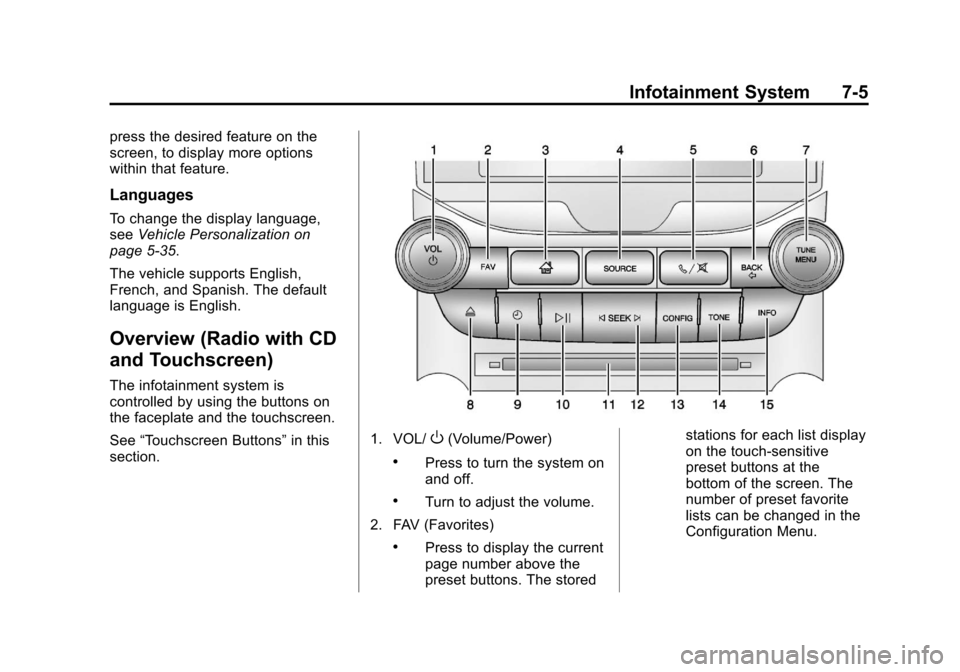
The infotainment system is
controlled by using the buttons on
the faceplate and the touchscreen.
See “Touchscreen Buttons” in this
section.
1. VOL/O(Volume/Power)
.Press to turn the system on
and off.
.Turn to adjust the volume.
2. FAV (Favorites)
.Press to display the current
page number above the
preset buttons. The stored stations for each list display
on the touch-sensitive
preset buttons at the
bottom of the screen. The
number of preset favorite
lists can be changed in the
Configuration Menu.
Page 166 of 436

Black plate (6,1)Chevrolet Malibu Owner Manual - 2013 - CRC - 6/6/12
7-6 Infotainment System
3.F(Home)
.See“Home Page” following
in this section.
4. SOURCE
.Press to change the audio
sources such as AM-FM
Radio, CD, and AUX.
5.
v/>(Phone/Mute)
.Press to access the Phone
menu. See Bluetooth
(Overview) on page 7‑35 or
Bluetooth (Voice
Recognition) on page 7‑40
or Bluetooth (Infotainment
Controls) on page 7‑36.
Press to mute the audio
system.
6. BACK
/
.Press to return to the
previous screen in a menu.
.If on a page accessed
directly by a faceplate
button or Home Page screen button, pressing
/BACK will go to the
previous menu.
7. TUNE/MENU
.Turn to highlight a feature.
Press to activate the
highlighted feature.
.Turn to manually select a
radio station.
8.
Z(Eject)
.Press to eject a disc from
the CD player. See CD
Player on page 7‑22.
9.
H(Clock)
.Press to set the time.
10.
p/j(Play/Pause)
.Press to start, pause, and
resume playback. See CD
Player on page 7‑22 and
MP3 on page 7‑24.
11. CD Slot 12.
©SEEK¨
.Press©to seek to the
beginning of the current or
previous track. If the track
has been playing for less
than five seconds, it
seeks the previous
track. If longer than
five seconds, the current
track starts from the
beginning.
.Press and hold©to
quickly reverse through a
track. Release the button
to return to playing speed.
See CD Player on
page 7‑22 andMP3 on
page 7‑24.
.For AM or FM, press©to
seek to the previous
strong station.
.Press¨to seek the next
track.
.Press and hold¨to fast
forward through a track.