2013 CHEVROLET MALIBU keyless entry
[x] Cancel search: keyless entryPage 41 of 436
Black plate (9,1)Chevrolet Malibu Owner Manual - 2013 - CRC - 6/6/12
Keys, Doors, and Windows 2-9
To lock or unlock the doors from the
outside:
.PressQorKon the Remote
Keyless Entry (RKE) transmitter.
See Remote Keyless Entry
(RKE) System Operation on
page 2‑3.
.Use the key in the driver door.
To lock or unlock the doors from the
inside:
.Push the door lock knob on the
top of the door to lock the
door only.
.Pull the door handle once to
unlock the door. Pulling the
handle again unlatches the door.
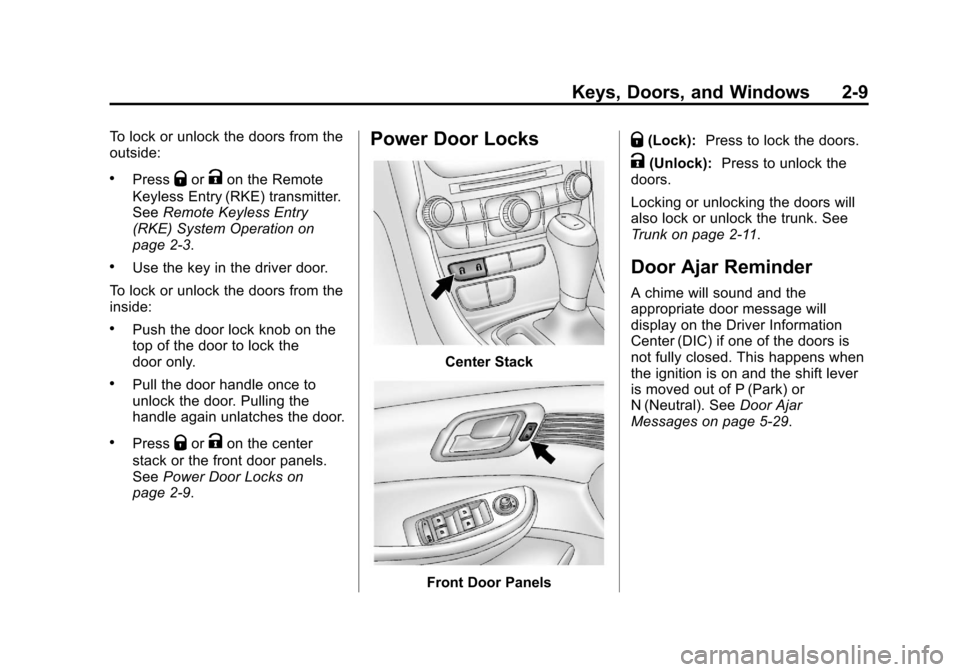
.PressQorKon the center
stack or the front door panels.
See Power Door Locks on
page 2‑9.
Power Door Locks
Center Stack
Front Door Panels
Q(Lock): Press to lock the doors.
K(Unlock): Press to unlock the
doors.
Locking or unlocking the doors will
also lock or unlock the trunk. See
Trunk on page 2‑11.
Door Ajar Reminder
A chime will sound and the
appropriate door message will
display on the Driver Information
Center (DIC) if one of the doors is
not fully closed. This happens when
the ignition is on and the shift lever
is moved out of P (Park) or
N (Neutral). See Door Ajar
Messages on page 5‑29.
Page 42 of 436
Black plate (10,1)Chevrolet Malibu Owner Manual - 2013 - CRC - 6/6/12
2-10 Keys, Doors, and Windows
Automatic Door Locks
The vehicle is programmed to lock
all doors automatically when the
following are met:
.All doors are closed.
.The ignition is on.
.The vehicle is shifted out of
P (Park).
This feature cannot be disabled.
All doors will unlock when the
vehicle is shifted into P (Park).
The power door unlock function can
be programmed through prompts
displayed on the Driver Information
Center (DIC). See Vehicle
Personalization on page 5‑35.
Lockout Protection
If the power door lock switch is
pressed when the key is in the
ignition and any door is open, all
doors will lock and then the driver
door will unlock. Be sure to remove
the key from the ignition when
locking the vehicle. If the Remote Keyless Entry (RKE)
transmitter is used to lock the doors
while the key is in the ignition, a
chime will sound three times. All
doors will then lock.
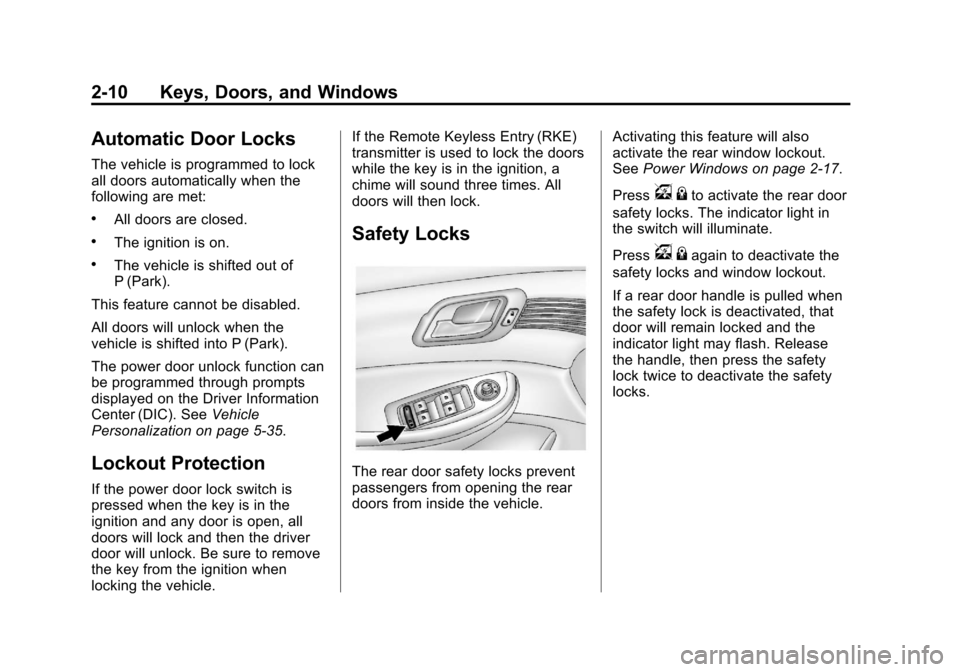
Safety Locks
The rear door safety locks prevent
passengers from opening the rear
doors from inside the vehicle.
Activating this feature will also
activate the rear window lockout.
See
Power Windows on page 2‑17.
Press
v {to activate the rear door
safety locks. The indicator light in
the switch will illuminate.
Press
v {again to deactivate the
safety locks and window lockout.
If a rear door handle is pulled when
the safety lock is deactivated, that
door will remain locked and the
indicator light may flash. Release
the handle, then press the safety
lock twice to deactivate the safety
locks.
Page 43 of 436
Black plate (11,1)Chevrolet Malibu Owner Manual - 2013 - CRC - 6/6/12
Keys, Doors, and Windows 2-11
Doors
Trunk
{WARNING
Exhaust gases can enter the
vehicle if it is driven with the
liftgate, trunk/hatch open, or with
any objects that pass through the
seal between the body and the
trunk/hatch or liftgate. Engine
exhaust contains carbon
monoxide (CO) which cannot be
seen or smelled. It can cause
unconsciousness and even death.
If the vehicle must be driven with
the liftgate or trunk/hatch open:
.Close all of the windows.
.Fully open the air outlets on
or under the instrument
panel.(Continued)
WARNING (CONTINUED)
.Adjust the climate control
system to a setting that
brings in only outside air and
set the fan speed to the
highest setting. See “Climate
Control Systems” in the
Index.
.If the vehicle is equipped with
a power liftgate, disable the
power liftgate function.
For more information about
carbon monoxide, see Engine
Exhaust on page 9‑25.
Trunk Release
The trunk can only be opened while
the vehicle is in P (Park) or when
the ignition is off.
Press
Von the RKE transmitter.
See Remote Keyless Entry (RKE)
System Operation on page 2‑3.
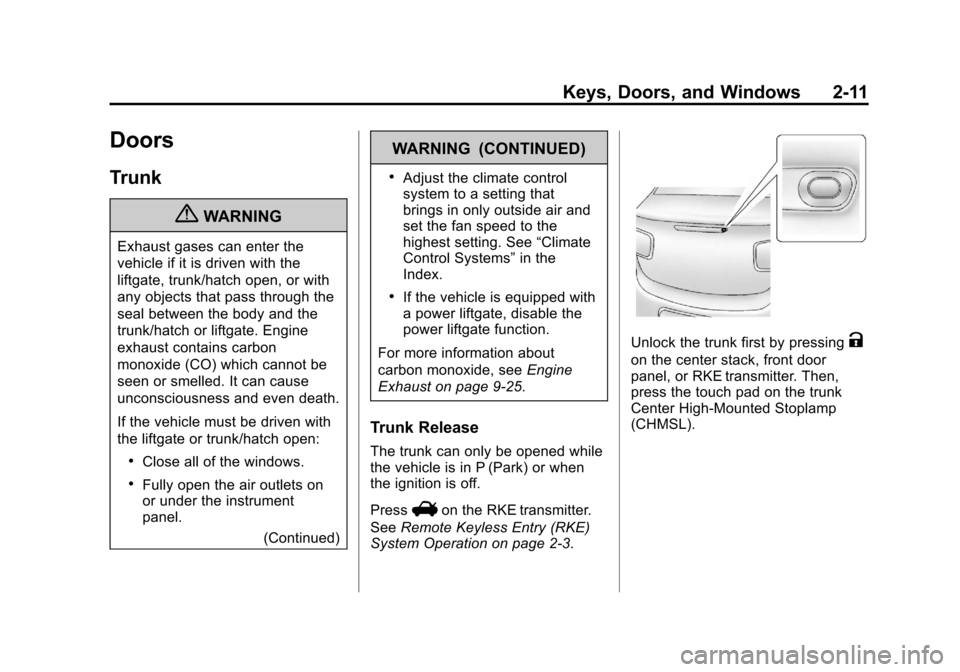
Unlock the trunk first by pressingK
on the center stack, front door
panel, or RKE transmitter. Then,
press the touch pad on the trunk
Center High-Mounted Stoplamp
(CHMSL).
Page 47 of 436
Black plate (15,1)Chevrolet Malibu Owner Manual - 2013 - CRC - 6/6/12
Keys, Doors, and Windows 2-15
If the RKE transmitter appears to be
undamaged, try another transmitter.
Or, you may try placing the
transmitter in the transmitter pocket
in the center console. See“Starting
the Vehicle with a Low Transmitter
Battery” underRemote Keyless
Entry (RKE) System Operation on
page 2‑3.
If the engine does not start with the
other transmitter or when the
transmitter is in the pocket in the
center console, your vehicle needs
service. See your dealer who can
service the theft-deterrent system
and have a new transmitter
programmed to the vehicle.
Do not leave the key or device that
disarms or deactivates the
theft-deterrent system in the vehicle.Exterior Mirrors
Convex Mirrors
{WARNING
A convex mirror can make things,
like other vehicles, look farther
away than they really are. If you
cut too sharply into the right lane,
you could hit a vehicle on the
right. Check the inside mirror or
glance over your shoulder before
changing lanes.
The passenger side mirror is convex
shaped. A convex mirror's surface is
curved so more can be seen from
the driver seat.
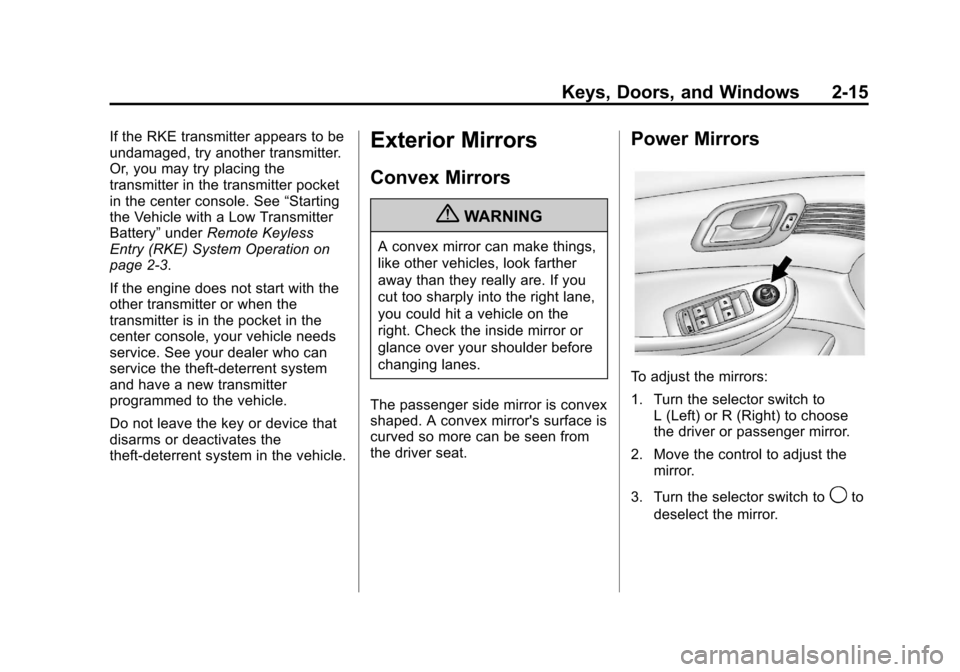
Power Mirrors
To adjust the mirrors:
1. Turn the selector switch to L (Left) or R (Right) to choose
the driver or passenger mirror.
2. Move the control to adjust the mirror.
3. Turn the selector switch to
9to
deselect the mirror.
Page 58 of 436
Black plate (6,1)Chevrolet Malibu Owner Manual - 2013 - CRC - 6/6/12
3-6 Seats and Restraints
Memory Seats
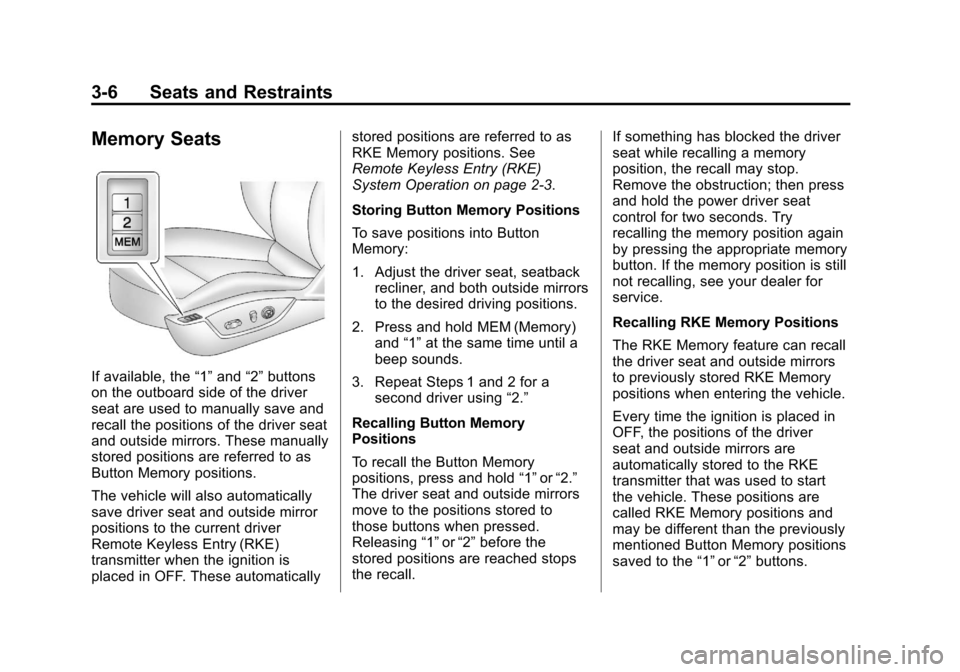
If available, the“1”and “2”buttons
on the outboard side of the driver
seat are used to manually save and
recall the positions of the driver seat
and outside mirrors. These manually
stored positions are referred to as
Button Memory positions.
The vehicle will also automatically
save driver seat and outside mirror
positions to the current driver
Remote Keyless Entry (RKE)
transmitter when the ignition is
placed in OFF. These automatically stored positions are referred to as
RKE Memory positions. See
Remote Keyless Entry (RKE)
System Operation on page 2‑3.
Storing Button Memory Positions
To save positions into Button
Memory:
1. Adjust the driver seat, seatback
recliner, and both outside mirrors
to the desired driving positions.
2. Press and hold MEM (Memory) and “1”at the same time until a
beep sounds.
3. Repeat Steps 1 and 2 for a second driver using “2.”
Recalling Button Memory
Positions
To recall the Button Memory
positions, press and hold “1”or“2.”
The driver seat and outside mirrors
move to the positions stored to
those buttons when pressed.
Releasing “1”or“2” before the
stored positions are reached stops
the recall. If something has blocked the driver
seat while recalling a memory
position, the recall may stop.
Remove the obstruction; then press
and hold the power driver seat
control for two seconds. Try
recalling the memory position again
by pressing the appropriate memory
button. If the memory position is still
not recalling, see your dealer for
service.
Recalling RKE Memory Positions
The RKE Memory feature can recall
the driver seat and outside mirrors
to previously stored RKE Memory
positions when entering the vehicle.
Every time the ignition is placed in
OFF, the positions of the driver
seat and outside mirrors are
automatically stored to the RKE
transmitter that was used to start
the vehicle. These positions are
called RKE Memory positions and
may be different than the previously
mentioned Button Memory positions
saved to the
“1”or“2” buttons.
Page 139 of 436
Black plate (31,1)Chevrolet Malibu Owner Manual - 2013 - CRC - 6/6/12
Instruments and Controls 5-31
message stays on, the vehicle
should be taken to your dealer for
service as soon as possible.
Fuel System Messages
FUEL LEVEL LOW
This message displays when the
vehicle is low on fuel. Refuel as
soon as possible.
TIGHTEN GAS CAP
This message displays when the
fuel cap is not on tight. Tighten the
fuel cap.
Key and Lock Messages
NO REMOTE DETECTED
This message displays when the
transmitter battery is weak on
vehicles with keyless access. See
“Starting the Vehicle with a Low
Transmitter Battery”underRemote
Keyless Entry (RKE) System
Operation on page 2‑3.
REPLACE BATTERY IN
REMOTE KEY
This message displays when the
battery in the Remote Keyless
Entry (RKE) transmitter needs
to be replaced. See “Battery
Replacement” underRemote
Keyless Entry (RKE) System
Operation on page 2‑3.
Lamp Messages
AUTOMATIC LIGHT CONTROL
ON/OFF
This message is displayed when the
automatic light control has been
turned on or off. See Automatic
Headlamp System on page 6‑3.
CHECK XXX TURN
SIGNAL LAMP
When one of the turn signals is out,
this message displays to show
which bulb needs to be replaced.
See Bulb Replacement on
page 10‑28 andReplacement Bulbs
on page 10‑36.
TURN SIGNAL ON
This message is displayed if the
turn signal has been left on. Turn off
the turn signal.
Object Detection System
Messages
LANE DEPARTURE WARNING
UNAVAILABLE
This message may appear if LDW
does not activate due to a
temporary condition.
PARK ASSIST OFF
This message displays when the
park assist system has been turned
off or when there is a temporary
condition causing the system to be
disabled. See Ultrasonic Parking
Assist on page 9‑39.
Page 158 of 436
Black plate (6,1)Chevrolet Malibu Owner Manual - 2013 - CRC - 6/6/12
6-6 Lighting
To operate, press the buttons:
E(Off):Turns the lamps off.
1(Door): Turns the lamps on
when any door is opened.
+(On): Keeps the lamps on all
the time.
Reading Lamps
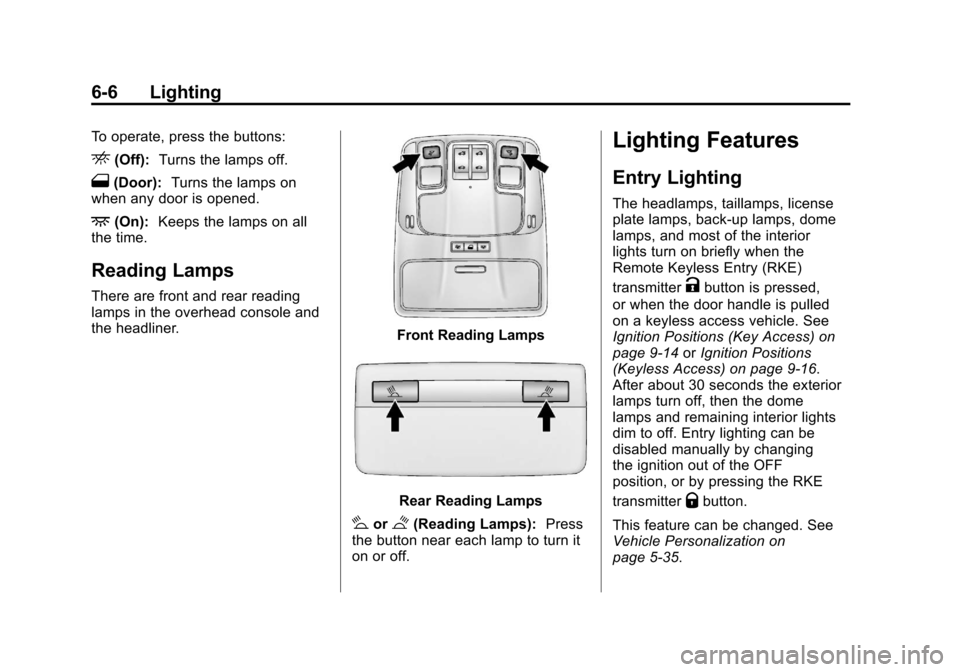
There are front and rear reading
lamps in the overhead console and
the headliner.
Front Reading Lamps
Rear Reading Lamps
#or$(Reading Lamps): Press
the button near each lamp to turn it
on or off.
Lighting Features
Entry Lighting
The headlamps, taillamps, license
plate lamps, back-up lamps, dome
lamps, and most of the interior
lights turn on briefly when the
Remote Keyless Entry (RKE)
transmitter
Kbutton is pressed,
or when the door handle is pulled
on a keyless access vehicle. See
Ignition Positions (Key Access) on
page 9‑14 orIgnition Positions
(Keyless Access) on page 9‑16.
After about 30 seconds the exterior
lamps turn off, then the dome
lamps and remaining interior lights
dim to off. Entry lighting can be
disabled manually by changing
the ignition out of the OFF
position, or by pressing the RKE
transmitter
Qbutton.
This feature can be changed. See
Vehicle Personalization on
page 5‑35.
Page 232 of 436
Black plate (16,1)Chevrolet Malibu Owner Manual - 2013 - CRC - 6/6/12
9-16 Driving and Operating
Key Lock Release
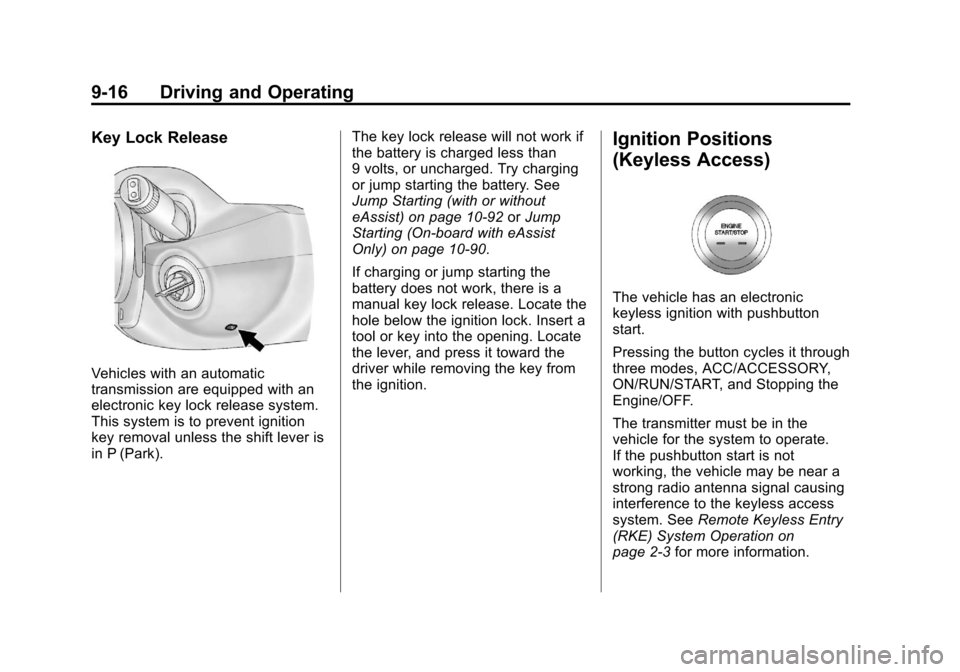
Vehicles with an automatic
transmission are equipped with an
electronic key lock release system.
This system is to prevent ignition
key removal unless the shift lever is
in P (Park).The key lock release will not work if
the battery is charged less than
9 volts, or uncharged. Try charging
or jump starting the battery. See
Jump Starting (with or without
eAssist) on page 10‑92
orJump
Starting (On-board with eAssist
Only) on page 10‑90.
If charging or jump starting the
battery does not work, there is a
manual key lock release. Locate the
hole below the ignition lock. Insert a
tool or key into the opening. Locate
the lever, and press it toward the
driver while removing the key from
the ignition.
Ignition Positions
(Keyless Access)
The vehicle has an electronic
keyless ignition with pushbutton
start.
Pressing the button cycles it through
three modes, ACC/ACCESSORY,
ON/RUN/START, and Stopping the
Engine/OFF.
The transmitter must be in the
vehicle for the system to operate.
If the pushbutton start is not
working, the vehicle may be near a
strong radio antenna signal causing
interference to the keyless access
system. See Remote Keyless Entry
(RKE) System Operation on
page 2‑3 for more information.