2013 CHEVROLET IMPALA change time
[x] Cancel search: change timePage 24 of 350
Black plate (18,1)Chevrolet Impala Owner Manual - 2013 - crc - 8/27/12
1-18 In Brief
The low tire pressure warning light
may come on in cool weather when
the vehicle is first started, and then
turn off as the vehicle is driven. This
may be an early indicator that the
tire pressures are getting low and
the tires need to be inflated to the
proper pressure.
The TPMS does not replace normal
monthly tire maintenance. Maintain
the correct tire pressures.
SeeTire Pressure Monitor System
on page 10‑40.
Engine Oil Life System
The engine oil life system calculates
engine oil life based on vehicle use
and displays a DIC message when
it is necessary to change the engine
oil and filter. The oil life system
should be reset to 100% only
following an oil change. Resetting the Oil Life System
1. Display OIL LIFE REMAINING
on the DIC.
2. Press and hold the SET/RESET button on the DIC for more than
five seconds. The oil life will
change to 100%.
See Engine Oil Life System on
page 10‑8.
Fuel E85 (85% Ethanol)
Vehicles that have a yellow fuel cap
can use either unleaded gasoline or
ethanol fuel containing up to 85%
ethanol (E85). See Fuel E85 (85%
Ethanol) on page 9‑33. For all other
vehicles, use only the unleaded
gasoline described under
Recommended Fuel on page 9‑31.
Driving for Better Fuel
Economy
Driving habits can affect fuel
mileage. Here are some driving tips
to get the best fuel economy
possible.
.Avoid fast starts and accelerate
smoothly.
.Brake gradually and avoid
abrupt stops.
.Avoid idling the engine for long
periods of time.
.When road and weather
conditions are appropriate, use
cruise control.
.Always follow posted speed
limits or drive more slowly when
conditions require.
.Keep vehicle tires properly
inflated.
.Combine several trips into a
single trip.
.Replace the vehicle's tires with
the same TPC Spec number
molded into the tire's sidewall
near the size.
.Follow recommended scheduled
maintenance.
Page 50 of 350
Black plate (6,1)Chevrolet Impala Owner Manual - 2013 - crc - 8/27/12
3-6 Seats and Restraints
To return the seatback to the upright
position:
1. Lift the lever fully withoutapplying pressure to the
seatback, and the seatback will
return to the upright position.
2. Push and pull on the seatback to make sure it is locked.
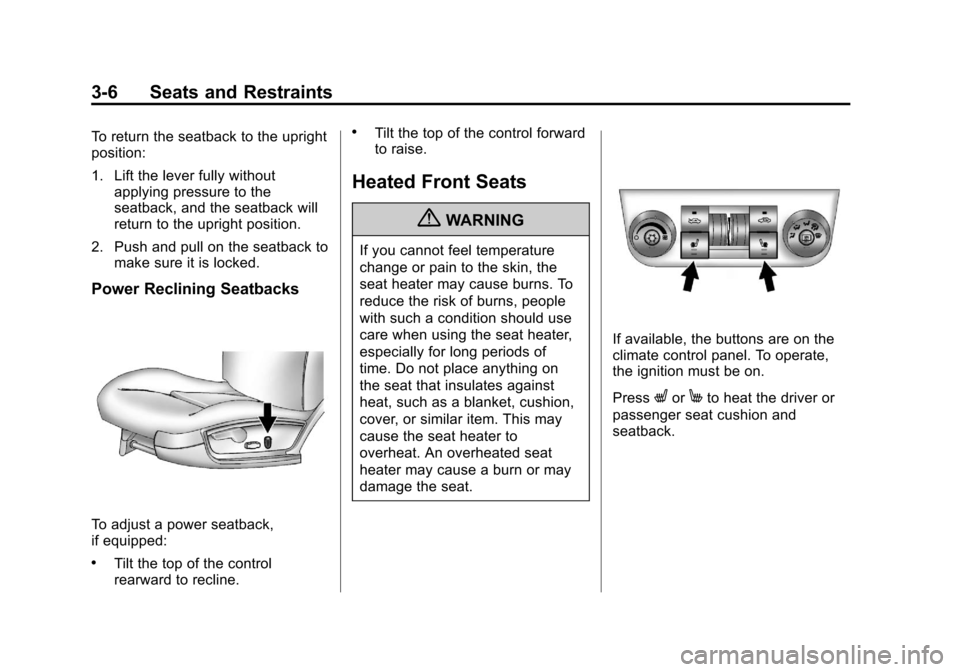
Power Reclining Seatbacks
To adjust a power seatback,
if equipped:
.Tilt the top of the control
rearward to recline.
.Tilt the top of the control forward
to raise.
Heated Front Seats
{WARNING
If you cannot feel temperature
change or pain to the skin, the
seat heater may cause burns. To
reduce the risk of burns, people
with such a condition should use
care when using the seat heater,
especially for long periods of
time. Do not place anything on
the seat that insulates against
heat, such as a blanket, cushion,
cover, or similar item. This may
cause the seat heater to
overheat. An overheated seat
heater may cause a burn or may
damage the seat.
If available, the buttons are on the
climate control panel. To operate,
the ignition must be on.
Press
LorMto heat the driver or
passenger seat cushion and
seatback.
Page 51 of 350
Black plate (7,1)Chevrolet Impala Owner Manual - 2013 - crc - 8/27/12
Seats and Restraints 3-7
Press the button once for the
highest setting. With each press of
the button, the heated seat will
change to the next lower setting,
and then to the off setting. The
lights indicate two for the highest
setting and one for the lowest.
The passenger seat may take
longer to heat up.
The heated seats are canceled
each time the ignition is turned off.
To use this feature after restarting
the vehicle, press the desired button
again.Rear Seats
Rear Seats (Split Folding)
Flip and Fold Feature
On vehicles with this feature, the
seat cushions flip forward and the
seatbacks fold down to create an
extended flat cargo area.
To flip the seat cushion and fold the
seatback:
1. Make sure the front seats arenot reclined. The seat cushion
will not flip forward completely if
the front seats are reclined.
2. Flip the seat cushion forward bypulling up on the tab in the
center of the seat cushion where
the seatback meets the seat
cushion.
Page 78 of 350
Black plate (34,1)Chevrolet Impala Owner Manual - 2013 - crc - 8/27/12
3-34 Seats and Restraints
Infants and Young
Children
Everyone in a vehicle needs
protection! This includes infants and
all other children. Neither the
distance traveled nor the age and
size of the traveler changes the
need, for everyone, to use safety
restraints. In fact, the law in every
state in the United States and in
every Canadian province says
children up to some age must be
restrained while in a vehicle.
{WARNING
Children can be seriously injured
or strangled if a shoulder belt is
wrapped around their neck and
the safety belt continues to
tighten. Never leave children
unattended in a vehicle and never
allow children to play with the
safety belts.Airbags plus lap-shoulder belts offer
protection for adults and older
children, but not for young children
and infants. Neither the vehicle's
safety belt system nor its airbag
system is designed for them. Every
time infants and young children ride
in vehicles, they should have the
protection provided by appropriate
child restraints.
Children who are not restrained
properly can strike other people,
or can be thrown out of the vehicle.
{WARNING
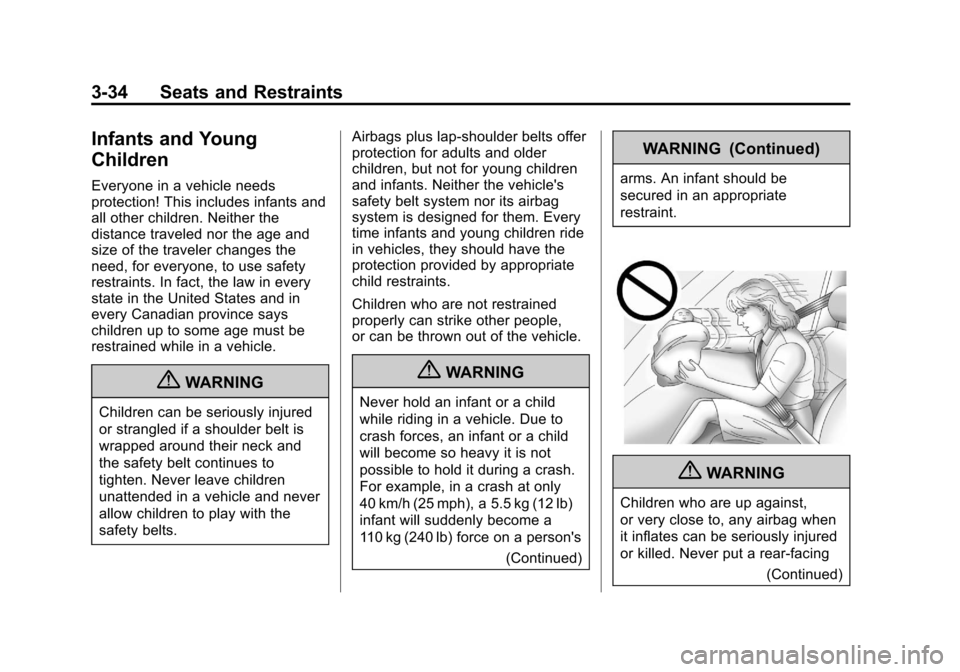
Never hold an infant or a child
while riding in a vehicle. Due to
crash forces, an infant or a child
will become so heavy it is not
possible to hold it during a crash.
For example, in a crash at only
40 km/h (25 mph), a 5.5 kg (12 lb)
infant will suddenly become a
110 kg (240 lb) force on a person's
(Continued)
WARNING (Continued)
arms. An infant should be
secured in an appropriate
restraint.
{WARNING
Children who are up against,
or very close to, any airbag when
it inflates can be seriously injured
or killed. Never put a rear-facing
(Continued)
Page 100 of 350
Black plate (4,1)Chevrolet Impala Owner Manual - 2013 - crc - 8/27/12
5-4 Instruments and Controls
{WARNING
In freezing weather, do not use
the washer until the windshield is
warmed. Otherwise the washer
fluid can form ice on the
windshield, blocking your vision.
When the vehicle is low on washer
fluid, the WASHER FLUID LOW
ADD FLUID displays in the Driver
Information Center (DIC) for
60 seconds. When the ignition is
turned off, this message displays
again for three seconds to remind
you that the fluid level is low.
Until the fluid reservoir is refilled,
every time the vehicle is started, the
WASHER FLUID LOW ADD FLUID
message displays in the Driver
Information Center (DIC) for
60 seconds. See Washer Fluid
Messages on page 5‑33.
Compass
This vehicle may have a compass in
the Driver Information Center (DIC).
Compass Zone
Your dealer will set the correct zone
for your location.
Under certain circumstances, such
as during a long distance
cross-country trip or moving to a
new state or province, it will be
necessary to compensate for
compass variance by resetting the
zone through the DIC if the zone is
not set correctly.
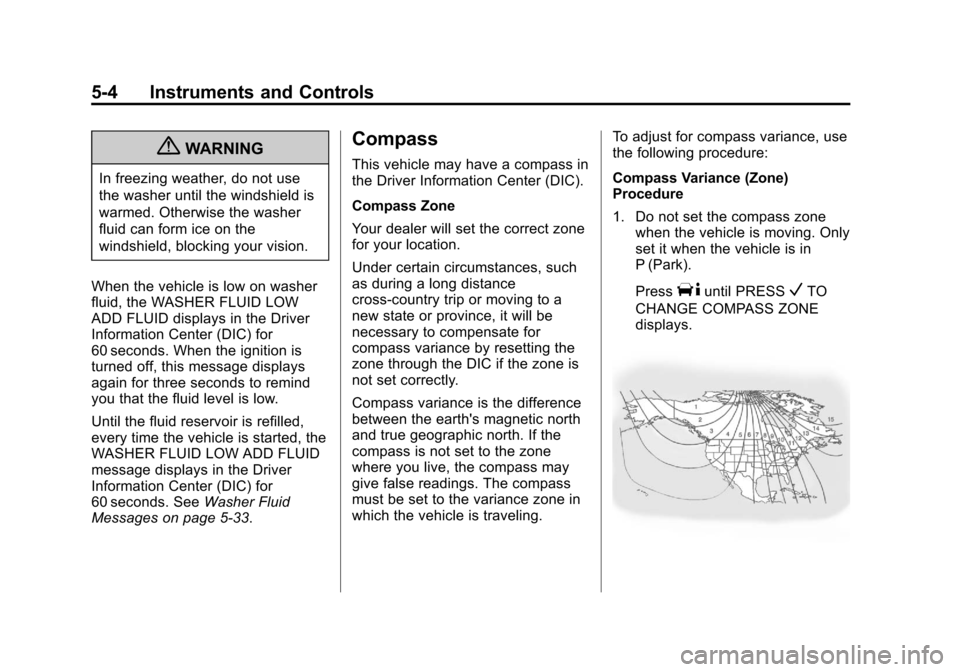
Compass variance is the difference
between the earth's magnetic north
and true geographic north. If the
compass is not set to the zone
where you live, the compass may
give false readings. The compass
must be set to the variance zone in
which the vehicle is traveling. To adjust for compass variance, use
the following procedure:
Compass Variance (Zone)
Procedure
1. Do not set the compass zone
when the vehicle is moving. Only
set it when the vehicle is in
P (Park).
Press
Tuntil PRESSVTO
CHANGE COMPASS ZONE
displays.
Page 102 of 350
Black plate (6,1)Chevrolet Impala Owner Manual - 2013 - crc - 8/27/12
5-6 Instruments and Controls
CALIBRATION COMPLETE for a
few seconds when the
calibration is complete. The DIC
display will then return to
PRESS
VTO CALIBRATE
COMPASS.
Clock
Without Date Display
AM/FM Base Radio with a Single
CD Player
This radio has a
Hbutton for setting
the time.
To set the time:
1. Press the
Hbutton until the hour
begins flashing on the display.
Press
Ha second time and the
minutes begin flashing on the
display.
2. To increase or decrease the time, do one of the following
while the hours or minutes are
flashing:
.Turn thefknob.
.Press¨SEEK or©SEEK.
.Press\FWD orsREV.
3. Press the
Hbutton again until
the clock display stops flashing
to set the currently displayed
time, or wait five seconds until
the flashing stops and the
current time displayed is
automatically set.
To change the time default setting
from 12 hour to 24 hour, press
the
Hbutton until 12H or 24H is
displayed. Once 12H or 24H is
displayed, turn the
fknob to the
desired option to select the setting.
Press the
Hbutton again to apply
the setting, or let the screen
time out.
With Date Display
Single CD (MP3) Player
This radio has a
Hbutton for setting
the time. To set the time and date:
1. Turn the radio on.
2. Press the
Hbutton and the HR,
MIN, MM, DD, and YYYY (hour,
minute, month, day, and year)
display.
3. Press the pushbutton located under any one of the tabs to be
changed.
4. To increase the time or date, do one of the following:
.Press the pushbutton below
the selected tab.
.Turn thefknob clockwise.
.Press¨SEEK.
.Press\FWD.
5. To decrease the time or date, do one of the following:
.Turn thefknob counter‐
clockwise.
.Press©SEEK.
Page 103 of 350
Black plate (7,1)Chevrolet Impala Owner Manual - 2013 - crc - 8/27/12
Instruments and Controls 5-7
.PresssREV.
The date does not automatically
display. To see the date press the
H
button while the radio is on. The
date with display times out after a
few seconds and goes back to the
normal radio and time display.
To change the time default setting
from 12 hour to 24 hour or to
change the date default setting from
month/day/year to day/month/year:
1. Press the
Hbutton and then the
pushbutton located under the
forward arrow tab. The time 12H
and 24H, and the date MM/DD/
YYYY (month, day, and year)
and DD/MM/YYYY (day, month,
and year) displays.
2. Press the pushbutton located under the desired option.
3. Press the
Hor MENU button
again to apply the selected
default, or let the screen
time out.
Power Outlets
The vehicle has three 12‐volt outlets
which can be used to plug in
electrical equipment, such as a cell
phone or MP3 player.
On vehicles with a center console,
one outlet is located inside the
center floor console and two outlets
are located at the front of the
console bin under the instrument
panel.
On vehicles without a center
console, two are located under the
climate controls and another outlet
for the rear seat passengers is at
the rear of the center front seat.
Remove the cover to access and
replace when not in use.
{WARNING
Power is always supplied to the
outlets. Do not leave electrical
equipment plugged in when the
(Continued)
WARNING (Continued)
vehicle is not in use because the
vehicle could catch fire and cause
injury or death.
Notice: Leaving electrical
equipment plugged in for an
extended period of time while the
vehicle is off will drain the
battery. Always unplug electrical
equipment when not in use and
do not plug in equipment that
exceeds the maximum 20 ampere
rating.
Certain accessory plugs may not be
compatible with the accessory
power outlet and could overload
vehicle and adapter fuses. If a
problem is experienced, see your
dealer.
When adding electrical equipment,
be sure to follow the proper
installation instructions included with
the equipment. See Add-On
Electrical Equipment on page 9‑41.
Page 120 of 350
Black plate (24,1)Chevrolet Impala Owner Manual - 2013 - crc - 8/27/12
5-24 Instruments and Controls
The fuel range estimate is based on
an average of the vehicle's fuel
economy over recent driving history
and the amount of fuel remaining in
the fuel tank. This estimate will
change if driving conditions change.
For example, if driving in traffic and
making frequent stops, this display
may read one number, but if the
vehicle is driven on a freeway, the
number may change even though
the same amount of fuel is in the
fuel tank. This is because different
driving conditions produce different
fuel economies. Generally, freeway
driving produces better fuel
economy than city driving.
If your vehicle is low on fuel, the
FUEL LEVEL LOW message
displays. SeeFuel System
Messages on page 5‑29 for more
information.
Average Economy
Press the trip/fuel button until AVG
ECONOMY displays. This display
shows the approximate average
miles per gallon (mpg) or liters per 100 kilometers (L/100 km). This
number is calculated based on the
number of mpg (L/100 km) recorded
since the last time this menu item
was reset. To reset this display to
zero, press and hold the set/reset
button.
Instantaneous Economy
Press the trip/fuel button until INST
ECONOMY displays. This display
shows the current fuel economy at a
particular moment and will change
frequently as driving conditions
change. This display shows the
instantaneous fuel economy in miles
per gallon (mpg) or liters per
100 kilometers (L/100 km). Unlike
average economy, this screen
cannot be reset.
Average Speed
Press the trip/fuel button until
AVERAGE SPEED displays. This
display shows the average speed of
the vehicle in miles per hour (mph)
or kilometers per hour (km/h). This
average is calculated based on the
various vehicle speeds recordedsince the last reset of this value. To
reset the value, press and hold the
set/reset button. The display will
return to zero.
Blank Display
This display shows no information.
Vehicle Information Menu
Items
T(Vehicle Information):
Press
this button to scroll through the
following menu items:
Oil Life
Press the vehicle information button
until OIL LIFE REMAINING
displays. This display shows an
estimate of the oil's remaining useful
life. If you see 99% OIL LIFE
REMAINING on the display, that
means 99% of the current oil life
remains. The engine oil life system
will alert you to change the oil on a
schedule consistent with your
driving conditions.