2013 CHEVROLET IMPALA remote control
[x] Cancel search: remote controlPage 30 of 350
Black plate (4,1)Chevrolet Impala Owner Manual - 2013 - crc - 8/27/12
2-4 Keys, Doors, and Windows
Each vehicle can have up to eight
transmitters programmed to it. See
your dealer to program new
transmitters.
Battery Replacement
Replace the battery if the REPLACE
BATTERY IN REMOTE KEY
message displays in the DIC. See
“REPLACE BATTERY IN REMOTE
KEY”under Key and Lock
Messages on page 5‑29 for
additional information.
Notice: When replacing the
battery, do not touch any of the
circuitry on the transmitter. Static
from your body could damage the
transmitter.
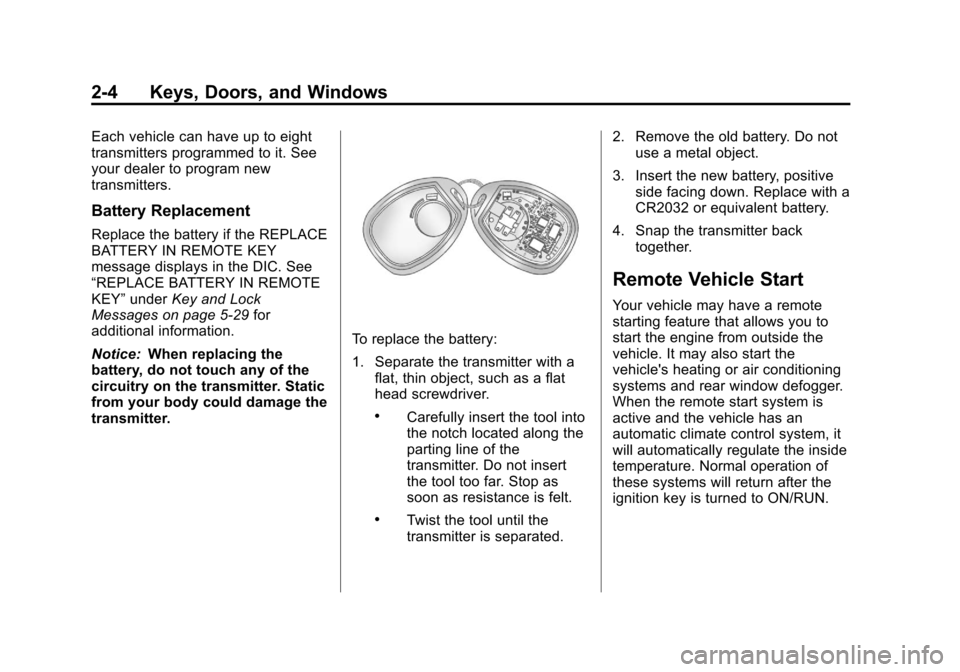
To replace the battery:
1. Separate the transmitter with a flat, thin object, such as a flat
head screwdriver.
.Carefully insert the tool into
the notch located along the
parting line of the
transmitter. Do not insert
the tool too far. Stop as
soon as resistance is felt.
.Twist the tool until the
transmitter is separated. 2. Remove the old battery. Do not
use a metal object.
3. Insert the new battery, positive side facing down. Replace with a
CR2032 or equivalent battery.
4. Snap the transmitter back together.
Remote Vehicle Start
Your vehicle may have a remote
starting feature that allows you to
start the engine from outside the
vehicle. It may also start the
vehicle's heating or air conditioning
systems and rear window defogger.
When the remote start system is
active and the vehicle has an
automatic climate control system, it
will automatically regulate the inside
temperature. Normal operation of
these systems will return after the
ignition key is turned to ON/RUN.
Page 35 of 350
Black plate (9,1)Chevrolet Impala Owner Manual - 2013 - crc - 8/27/12
Keys, Doors, and Windows 2-9
Doors
Trunk
{WARNING
Exhaust gases can enter the
vehicle if it is driven with the
liftgate, trunk/hatch open, or with
any objects that pass through the
seal between the body and the
trunk/hatch or liftgate. Engine
exhaust contains Carbon
Monoxide (CO) which cannot be
seen or smelled. It can cause
unconsciousness and even death.
If the vehicle must be driven with
the liftgate, or trunk/hatch open:
.Close all of the windows.
.Fully open the air outlets on
or under the instrument
panel.(Continued)
WARNING (Continued)
.Adjust the Climate Control
system to a setting that
brings in only outside air and
set the fan speed to the
highest setting. See “Climate
Control Systems” in the
Index.
.If the vehicle is equipped with
a power liftgate, disable the
power liftgate function.
For more information about
carbon monoxide, see Engine
Exhaust on page 9‑19.
Trunk Release
To open the trunk from the outside,
press
Von the RKE transmitter.
See Remote Keyless Entry (RKE)
System Operation on page 2‑2.
Or, use the key in the lock cylinder,
if equipped.
Remote Trunk Release
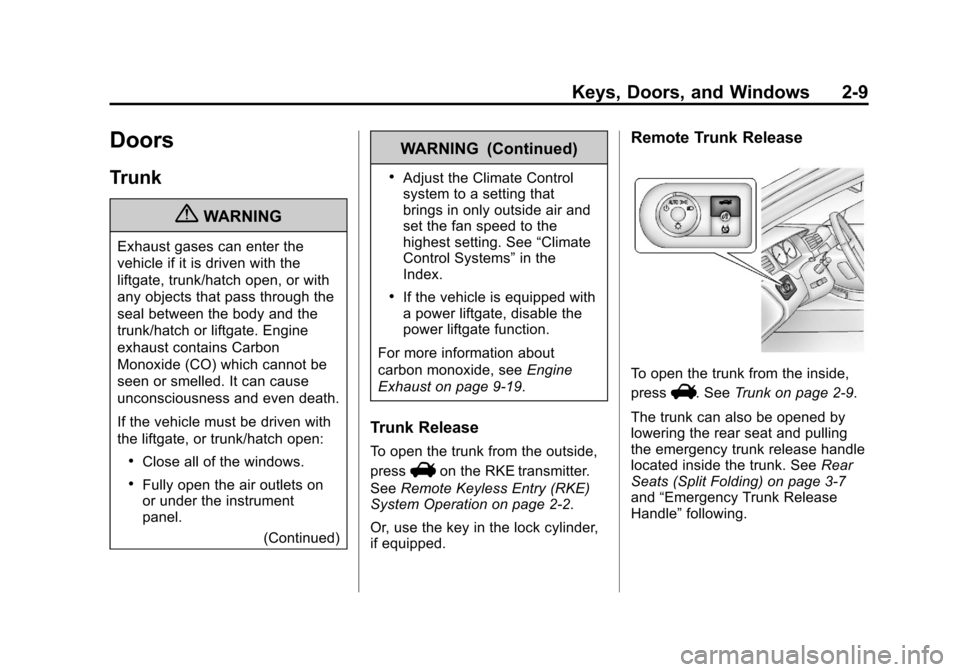
To open the trunk from the inside,
press
V. See Trunk on page 2‑9.
The trunk can also be opened by
lowering the rear seat and pulling
the emergency trunk release handle
located inside the trunk. See Rear
Seats (Split Folding) on page 3‑7
and “Emergency Trunk Release
Handle” following.
Page 98 of 350
Black plate (2,1)Chevrolet Impala Owner Manual - 2013 - crc - 8/27/12
5-2 Instruments and Controls
Vehicle Personalization
Vehicle Personalization . . . . . . 5-33
Universal Remote System
Universal Remote System . . . 5-39
Universal Remote SystemProgramming . . . . . . . . . . . . . . . 5-39
Universal Remote System Operation . . . . . . . . . . . . . . . . . . 5-44
Controls
Steering Wheel
Adjustment
The tilt wheel lever is located on the
left side of the steering column.
To adjust the steering wheel:
1. Hold the wheel and pull the lever
toward you.
2. Move the steering wheel up or down. 3. Release the lever to lock the
steering wheel in place.
Do not adjust the steering wheel
while driving.
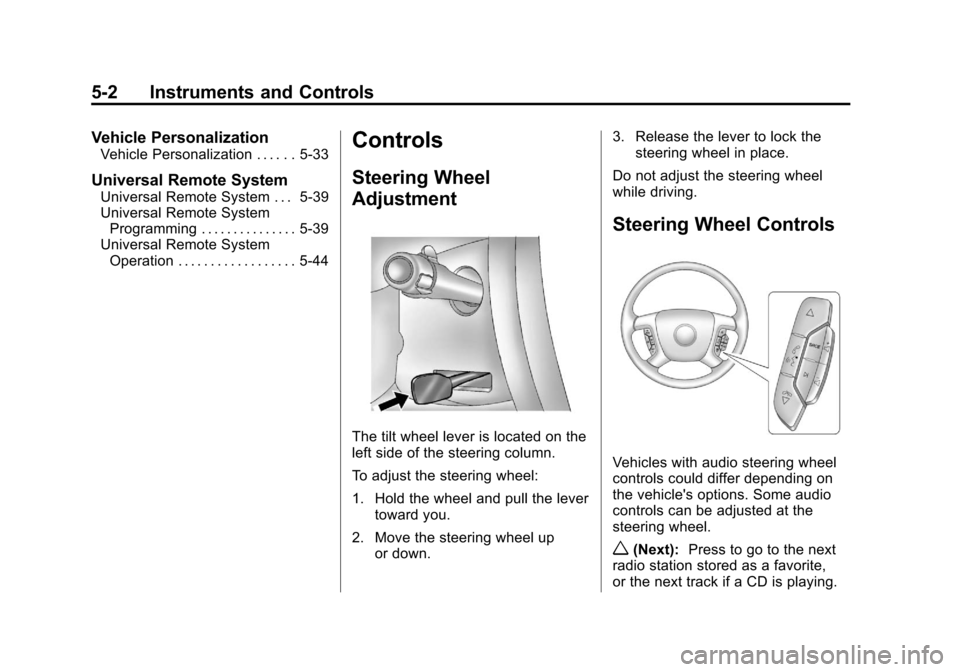
Steering Wheel Controls
Vehicles with audio steering wheel
controls could differ depending on
the vehicle's options. Some audio
controls can be adjusted at the
steering wheel.
w(Next): Press to go to the next
radio station stored as a favorite,
or the next track if a CD is playing.
Page 109 of 350
Black plate (13,1)Chevrolet Impala Owner Manual - 2013 - crc - 8/27/12
Instruments and Controls 5-13
The airbag readiness light comes on
for several seconds when the
vehicle is started. If the light does
not come on then, have it fixed
immediately.
{WARNING
If the airbag readiness light stays
on after the vehicle is started or
comes on while driving, it means
the airbag system might not be
working properly. The airbags in
the vehicle might not inflate in a
crash, or they could even inflate
without a crash. To help avoid
injury, have the vehicle serviced
right away.If there is a problem with the airbag
system, a Driver Information Center
(DIC) message may also come on.
See
Airbag System Messages on
page 5‑31.
Passenger Airbag Status
Indicator
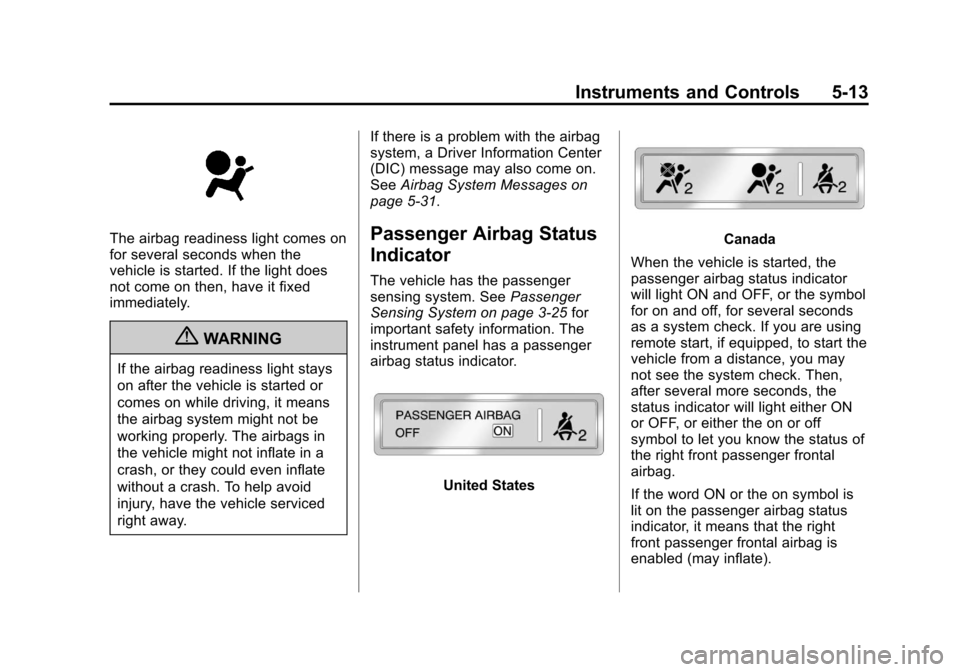
The vehicle has the passenger
sensing system. See Passenger
Sensing System on page 3‑25 for
important safety information. The
instrument panel has a passenger
airbag status indicator.
United States
Canada
When the vehicle is started, the
passenger airbag status indicator
will light ON and OFF, or the symbol
for on and off, for several seconds
as a system check. If you are using
remote start, if equipped, to start the
vehicle from a distance, you may
not see the system check. Then,
after several more seconds, the
status indicator will light either ON
or OFF, or either the on or off
symbol to let you know the status of
the right front passenger frontal
airbag.
If the word ON or the on symbol is
lit on the passenger airbag status
indicator, it means that the right
front passenger frontal airbag is
enabled (may inflate).
Page 123 of 350
Black plate (27,1)Chevrolet Impala Owner Manual - 2013 - crc - 8/27/12
Instruments and Controls 5-27
HOOD OPEN
If your vehicle has the remote start
feature, this message displays when
the hood is not closed properly.
Make sure that the hood is closed
completely. SeeHood on page 10‑4.
LEFT REAR DOOR OPEN
This message displays when the
driver side rear door is not closed
properly. Make sure that the door is
closed completely.
PASSENGER DOOR OPEN
This message displays when the
front passenger door is not closed
properly. Make sure that the door is
closed completely.
RIGHT REAR DOOR OPEN
This message displays when the
passenger side rear door is not
closed properly. Make sure that the
door is closed completely.
TRUNK OPEN
This message displays when the
trunk is not closed completely. Make
sure that the trunk is closed
completely. SeeTrunk on page 2‑9.
Engine Cooling System
Messages
ENGINE HOT A/C (Air
Conditioning) OFF
This message displays when the
engine coolant becomes hotter than
the normal operating temperature.
To avoid added strain on a hot
engine, the air conditioning
compressor is automatically turned
off. When the coolant temperature
returns to normal, the A/C operation
automatically resumes. You can
continue to drive your vehicle. If this
message continues to appear, have
the system repaired by your dealer
as soon as possible to avoid
compressor damage.
ENGINE OVERHEATED IDLE
ENGINE
Notice:If you drive your vehicle
while the engine is overheating,
severe engine damage may
occur. If an overheat warning
appears on the instrument panel
cluster and/or DIC, stop the
vehicle as soon as possible. Do
not increase the engine speed
above normal idling speed. See
Engine Overheating on
page 10‑14 for more information.
This message displays when the
engine coolant temperature is too
hot. Stop and allow the vehicle to
idle until it cools down.
ENGINE OVERHEATED STOP
ENGINE
Notice: If you drive the vehicle
while the engine is overheating,
severe engine damage may
occur. If an overheat warning
Page 125 of 350

Black plate (29,1)Chevrolet Impala Owner Manual - 2013 - crc - 8/27/12
Instruments and Controls 5-29
Engine Power Messages
ENGINE POWER IS REDUCED
This message displays when the
vehicle's engine power is reduced.
Reduced engine power can affect
the vehicle's ability to accelerate.
If this message is on, but there is no
reduction in performance, proceed
to your destination. The
performance may be reduced the
next time the vehicle is driven. The
vehicle may be driven at a reduced
speed while this message is on, but
acceleration and speed may be
reduced. Anytime this message
stays on, the vehicle should be
taken to your dealer for service as
soon as possible.
Fuel System Messages
FUEL LEVEL LOW
This message displays when your
vehicle is low on fuel. Refill the fuel
tank as soon as possible. SeeFuel
Gauge on page 5‑10 andFilling the
Tank on page 9‑34 for more
information.
TIGHTEN GAS CAP
This message may be displayed if
the gas cap is not on, or is not fully
tightened. Check the gas cap to
ensure that it is on properly. See
Filling the Tank on page 9‑34 for
more information.
Key and Lock Messages
REPLACE BATTERY IN
REMOTE KEY
This message displays when the
battery in the Remote Keyless Entry
(RKE) transmitter needs to be
replaced. To replace the battery, see
“Battery Replacement” under
Remote Keyless Entry (RKE)
System Operation on page 2‑2.
Lamp Messages
AUTOMATIC LIGHT
CONTROL OFF
This message displays when the
automatic headlamps are turned off.
See Exterior Lamp Controls on
page 6‑1 for more information.
AUTOMATIC LIGHT
CONTROL ON
This message displays when the
automatic headlamps are turned on.
SeeExterior Lamp Controls on
page 6‑1 for more information.
TURN SIGNAL ON
This message displays as a
reminder to turn off the turn signal
if you drive your vehicle for more
than about 1.2 km (0.75 mile) with a
turn signal on. See Turn and
Lane-Change Signals on page 6‑4.
Page 131 of 350
Black plate (35,1)Chevrolet Impala Owner Manual - 2013 - crc - 8/27/12
Instruments and Controls 5-35
AUTO DOOR UNLOCK
This feature allows you to select
whether or not to turn off the
automatic door unlocking feature.
It also allows you to select which
doors and when the doors will
automatically unlock. See
“Programmable Automatic Door
Unlock”underAutomatic Door
Locks on page 2‑7 for more
information.
Press the customization button until
AUTO DOOR UNLOCK appears on
the DIC display. Press the set/reset
button once to access the settings
for this feature. Then press the
customization button to scroll
through the following settings:
OFF: None of the doors will
automatically unlock.
DRIVER AT KEY OUT: Only the
driver door will unlock when the key
is taken out of the ignition.
DRIVER IN PARK: Only the driver
door will unlock when the vehicle is
shifted into P (Park). ALL AT KEY OUT:
All of the doors
will unlock when the key is taken
out of the ignition.
ALL IN PARK (default): All of the
doors will unlock when the vehicle is
shifted into P (Park).
NO CHANGE: No change will be
made to this feature. The current
setting will remain.
To select a setting, press the set/
reset button while the desired
setting is displayed on the DIC.
REMOTE DOOR LOCK
This feature allows you to select the
type of feedback you will receive
when locking the vehicle with the
Remote Keyless Entry (RKE)
transmitter. You will not receive
feedback when locking the vehicle
with the RKE transmitter if any of
the doors are open. See Remote
Keyless Entry (RKE) System
Operation on page 2‑2 for more
information. Press the customization button until
REMOTE DOOR LOCK appears on
the DIC display. Press the set/reset
button once to access the settings
for this feature. Then press the
customization button to scroll
through the following settings:
HORN & LIGHTS OFF:
There will
be no feedback when you press the
lock button on the RKE transmitter.
LIGHTS ONLY: The exterior lamps
will flash when you press the lock
button on the RKE transmitter.
HORN ONLY: The horn will sound
on the second press of the lock
button on the RKE transmitter.
HORN & LIGHTS ON (default):
The exterior lamps will flash when
you press the lock button on the
RKE transmitter, and the horn will
sound when the lock button is
pressed again within five seconds of
the previous command.
NO CHANGE: No change will be
made to this feature. The current
setting will remain.
Page 132 of 350

Black plate (36,1)Chevrolet Impala Owner Manual - 2013 - crc - 8/27/12
5-36 Instruments and Controls
To select a setting, press the set/
reset button while the desired
setting is displayed on the DIC.
REMOTE DOOR UNLOCK
This feature allows you to select the
type of feedback you will receive
when unlocking the vehicle with the
Remote Keyless Entry (RKE)
transmitter. You will not receive
feedback when unlocking the
vehicle with the RKE transmitter if
the doors are open. SeeRemote
Keyless Entry (RKE) System
Operation on page 2‑2 for more
information.
Press the customization button until
REMOTE DOOR UNLOCK appears
on the DIC display. Press the set/
reset button once to access the
settings for this feature. Then press
the customization button to scroll
through the following settings:
LIGHTS OFF: The exterior lamps
will not flash when you press the
unlock button on the RKE
transmitter. LIGHTS ON (default):
The exterior
lamps will flash when you press the
unlock button on the RKE
transmitter.
NO CHANGE: No change will be
made to this feature. The current
setting will remain.
To select a setting, press the set/
reset button while the desired
setting is displayed on the DIC.
EXIT LIGHTING
This feature allows you to select the
amount of time you want the
exterior lamps to remain on when it
is dark enough outside. This
happens after the key is turned from
ON/RUN to LOCK/OFF.
Press the customization button until
EXIT LIGHTING appears on the DIC
display. Press the set/reset button
once to access the settings for this
feature. Then press the
customization button to scroll
through the following settings:
OFF: The exterior lamps will not
turn on. 30 SECONDS (default):
The
exterior lamps will stay on for
30 seconds.
1 MINUTE: The exterior lamps will
stay on for one minute.
2 MINUTES: The exterior lamps will
stay on for two minutes.
NO CHANGE: No change will be
made to this feature. The current
setting will remain.
To select a setting, press the set/
reset button while the desired
setting is displayed on the DIC.
APPROACH LIGHTING
This feature allows you to select
whether or not to have the exterior
lights turn on briefly during low light
periods after unlocking the vehicle
using the Remote Keyless
Entry (RKE) transmitter.