2013 CHEVROLET EQUINOX service
[x] Cancel search: servicePage 161 of 388

Black plate (9,1)Chevrolet Equinox Owner Manual - 2013 - CRC - 5/21/12
Infotainment System 7-9
3. Select the programming type.A list of stations that transmit
programming of the selected
type displays.
4. Select the station. The category lists are updated
when the station lists are
updated.
Updating Station & Category Lists
If stations stored in the station list
can no longer be received:
1. Press the MENU/SEL knob.
2. Select Update AM or FM Station List, if the stations stored in the
station list are no longer
received. A station search will be
completed and the first station in
the updated list will play.
To cancel the station search, press
the MENU/SEL knob.
Storing a Station as a Favorite
Stations from all bands can be
stored in any order in the favorite
pages. Up to six stations can be stored in
each favorite page and the number
of available favorite pages can
be set.
Storing a Station as a Favorite
To store the station to a position in
the list, press the corresponding
button 1 to 6 until a beep is heard.
Retrieving Stations
Press the FAV button to open a
favorite page or to switch to another
favorite page. Briefly press one of
the 1 to 6 buttons to retrieve the
station.
Satellite Radio
Vehicles with an SiriusXM®Satellite
Radio tuner and a valid SiriusXM
Satellite Radio subscription can
receive SiriusXM programming.
SiriusXM Satellite Radio
Service
SiriusXM is a satellite radio service
based in the 48 contiguous United
States and 10 Canadian provinces. SiriusXM Satellite Radio has a wide
variety of programming and
commercial-free music, coast to
coast, and in digital-quality sound.
If SiriusXM service needs to be
reactivated, the radio will display
“No Subscription Please Renew on
channel XM1.”
A service fee is
required to receive the SiriusXM
service. For more information,
contact SiriusXM at
www.siriusxm.com or
1-866-635-2349 (U.S.), and
www.xmradio.ca or 1-877-209-0079
(Canada).
Control Buttons
The buttons used to control the
SiriusXM radio are:
RADIO/BAND: Press to turn the
radio on and choose between AM,
FM, and SiriusXM, if equipped.
gSEEK orlSEEK: Press to go
to the previous or next station.
FAV: Press to open the
favorites list.
Page 163 of 388
Black plate (11,1)Chevrolet Equinox Owner Manual - 2013 - CRC - 5/21/12
Infotainment System 7-11
Up to six channels can be stored in
each favorite page and the number
of available favorite pages can
be set.
Storing a Channel as a Favorite
To store the channel to a position in
the list, press and hold the
corresponding 1 to 6 button until the
channel can be heard again.
Retrieving Channels
Press the FAV button to open a
favorite page or to change to
another favorite page. Briefly press
one of the 1 to 6 buttons to retrieve
the channel.
Turning SiriusXM Channel
Graphics On or Off
1. From the Home Page press theConfig screen button or the
CONFIG button on the faceplate.
2. Select Radio Settings from the Config Menu list.
3. Select XM Channel Graphics to turn on or off.SiriusXM Messages
XL (Explicit Language
Channels): These channels, or any
others, can be blocked by request,
by calling 1-866-635-2349 (U.S.) or
1-877-209-0079 (Canada).
XM Updating: The encryption code
in the receiver is being updated, no
action is required. This process
should take no longer than
30 seconds.
Loading XM: The audio system is
acquiring and processing audio and
text data; no action is needed. This
message should disappear shortly.
Channel Off Air: This channel is
not currently in service. Tune in to
another channel.
Channel Unauth: This channel is
blocked or cannot be received with
your SiriusXM subscription package.
Channel Unavailable: This
previously assigned channel is no
longer assigned. Tune to another
station. No Artist Info:
The system is
working properly. No artist
information is available at this time
on this channel.
No Title Info: The system is
working properly. No song title
information is available at this time
on this channel.
No CAT Info: The system is
working properly. No category
information is available at this time
on this channel.
No Information: The system is
working properly. No text or
informational messages are
available at this time on this
channel.
No Subscription Please Renew:
The SiriusXM subscription needs to
be reactivated. contact SiriusXM at
www.siriusxm.com or
1-866-635-2349 (U.S.), and
www.xmradio.ca or 1-877-209-0079
(Canada).
Page 164 of 388
Black plate (12,1)Chevrolet Equinox Owner Manual - 2013 - CRC - 5/21/12
7-12 Infotainment System
No XM Signal:The system is
working properly. The vehicle may
be in a location where the XM signal
is being blocked. When the vehicle
is moved into an open area, the
signal should return.
CAT Not Found: The system is
working properly. There are no
channels available for the selected
category.
XM Radio ID: If tuned to channel 0,
this message alternates with the
SiriusXM Radio eight-digit radio ID
label. This label is needed to
activate the service.
Unknown: If this message is
received when tuned to channel 0,
there could be a receiver fault.
Consult with your dealer.
Check Antenna: If this message
does not clear within a short period
of time, the receiver could have a
fault. Consult with your dealer. XM Not Available:
If this message
does not clear within a short period
of time, the receiver could have a
fault. Consult with your dealer.
See the infotainment manual.
Radio Reception
Frequency interference and static
can occur during normal radio
reception if items such as cell phone
chargers, vehicle convenience
accessories, and external electronic
devices are plugged into the
accessory power outlet. If there is
interference or static, unplug the
item from the accessory power
outlet.
FM
FM signals only reach about 16 to
65 km (10 to 40 mi). Although the
radio has a built-in electronic circuit
that automatically works to reduce
interference, some static can occur,
especially around tall buildings or
hills, causing the sound to fade in
and out.
AM
The range for most AM stations is
greater than for FM, especially at
night. The longer range can cause
station frequencies to interfere with
each other. Static can occur when
things like storms and power lines
interfere with radio reception. When
this happens, try reducing the treble
on the radio.
SiriusXM™ Satellite Radio
Service
SiriusXM Satellite Radio Service
gives digital radio reception from
coast to coast in the 48 contiguous
United States, and in Canada. Just
as with FM, tall buildings or hills can
interfere with satellite radio signals,
causing the sound to fade in and
out. In addition, traveling or standing
under heavy foliage, bridges,
garages, or tunnels may cause loss
of the SiriusXM signal for a period
of time.
Page 165 of 388
Black plate (13,1)Chevrolet Equinox Owner Manual - 2013 - CRC - 5/21/12
Infotainment System 7-13
Cellular Phone Usage
Cellular phone usage can cause
interference with the vehicle's radio.
Multi-Band Antenna
The multi-band antenna is on the
roof of the vehicle. The antenna is
used for the AM-FM radio, OnStar,
the SiriusXM Satellite Radio Service
System, and GPS (Global
Positioning System), if the vehicle
has these features. Keep the
antenna clear of obstructions for
clear reception.
Audio Players
CD Player
See the infotainment manual for
more information.
The player can be used for CD and
MP3 audio.
With the vehicle on, insert a disc
into the slot, label side up. The
player pulls it in and begins playing.
While playing, the navigation
system is available.
The system is capable of playing:
.Most audio CDs
.CD-R
.CD-RW
.MP3 or unprotected WMA
formats
When playing any compatible
recordable disc, the sound quality
can be reduced due to disc quality,
the method of recording, the quality of the music that has been
recorded, or the way the disc has
been handled.
There can be increased skipping,
difficulty in recording tracks,
difficulty in finding tracks, and/or
difficulty in loading and ejecting.
If these problems occur, check the
disc for damage or try a known
good disc.
To avoid damage to the CD player:
.Do not use scratched or
damaged discs.
.Do not apply labels to discs. The
labels could get caught in the
player.
.Insert only one disc at a time.
.Keep the loading slot free of
foreign materials, liquids, and
debris.
.Use a marking pen to label the
top of the disc.
Page 178 of 388
Black plate (26,1)Chevrolet Equinox Owner Manual - 2013 - CRC - 5/21/12
7-26 Infotainment System
Accepting or Declining a Call
When an incoming call is received,
the infotainment system mutes and
a ring tone is heard in the vehicle.
Accepting a Call
Turn the MENU/SEL knob to
“Answer”and press the MENU/SEL
knob to accept the call.
Declining a Call
Turn the MENU/SEL knob to
“Decline” and press the MENU/SEL
knob to decline the call.
Call Waiting
Call waiting must be supported on
the Bluetooth phone and enabled by
the wireless service carrier to work.
Accepting a Call
Turn the MENU/SEL knob to
“Answer” and press the MENU/SEL
knob to accept the call. Declining a Call
Turn the MENU/SEL knob to
“Decline”
and press the MENU/SEL
knob to decline the call.
Switching Between Calls (Call
Waiting Calls Only)
To switch between calls:
1. Turn or press the MENU/ SEL knob.
2. Select Switch Call from the menu.
Conference Calling
Conference calling and three-way
calling must be supported on the
Bluetooth phone and enabled by the
wireless service carrier to work.
To start a conference while in a
current call:
1. Turn or press the MENU/SEL knob.
2. Select Enter Number. 3. Enter the character sequence
then select Call. See “Entering a
Character Sequence” in
Operation on page 7‑4 for more
information.
4. After the call has been placed, turn or press the MENU/SEL
knob and choose Merge Calls.
5. To add more callers to the conference call, repeat Steps 1
through 4. The number of callers
that can be added is limited by
your wireless service carrier.Ending a Call
Turn or press the MENU/SEL knob
and select Hang Up.
Muting a Call
To Mute a Call
Turn or press the MENU/SEL knob
and select Mute Call.
To Cancel Mute
Turn or press the MENU/SEL knob
and select Mute Call.
Page 183 of 388
Black plate (31,1)Chevrolet Equinox Owner Manual - 2013 - CRC - 5/21/12
Infotainment System 7-31
followed by a tone. After the last
digit has been entered,
say“Dial.”
Once connected, the person called
will be heard through the audio
speakers.
Using the “Re-dial”Command
1. Press
b/g. The system
responds “Ready,”followed by
a tone.
2. After the tone, say “Re-dial.”The
system dials the last number
called from the connected cell
phone.
Once connected, the person called
will be heard through the audio
speakers.
Receiving a Call
When an incoming call is received,
the audio system mutes and a ring
tone is heard in the vehicle.
.Pressb/gto answer the call.
.Press>/ito ignore a call.
Call Waiting
Call waiting must be supported on
the cell phone and enabled by the
wireless service carrier.
.Pressb/gto answer an
incoming call when another call
is active. The original call is
placed on hold.
.Pressb/gagain to return to
the original call.
.To ignore the incoming call, no
action is required.
.Press>/ito disconnect the
current call and switch to the call
on hold.
Three-Way Calling
Three-way calling must be
supported on the cell phone and
enabled by the wireless service
carrier.
1. While on a call, press
b/g.
2. Say “Three-way call.”
3. Use the dial or call command to dial the number of the third party
to be called.
4. Once the call is connected, press
b/gto link all callers
together.
Page 193 of 388
Black plate (7,1)Chevrolet Equinox Owner Manual - 2013 - CRC - 5/21/12
Climate Controls 8-7
The passenger compartment air
filter can be accessed by removing
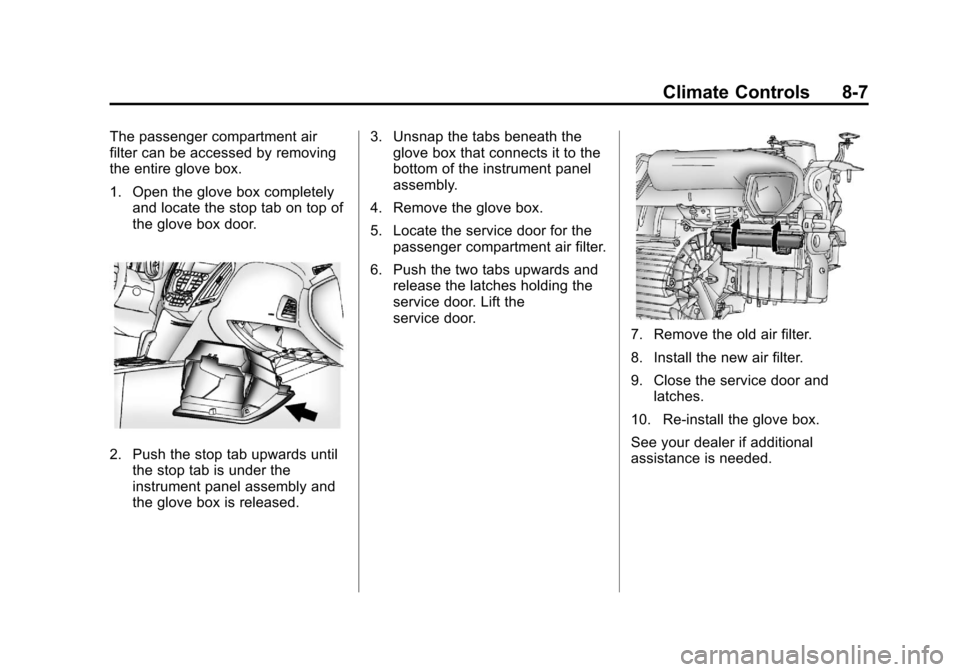
the entire glove box.
1. Open the glove box completelyand locate the stop tab on top of
the glove box door.
2. Push the stop tab upwards untilthe stop tab is under the
instrument panel assembly and
the glove box is released. 3. Unsnap the tabs beneath the
glove box that connects it to the
bottom of the instrument panel
assembly.
4. Remove the glove box.
5. Locate the service door for the passenger compartment air filter.
6. Push the two tabs upwards and release the latches holding the
service door. Lift the
service door.
7. Remove the old air filter.
8. Install the new air filter.
9. Close the service door and
latches.
10. Re‐install the glove box.
See your dealer if additional
assistance is needed.
Page 198 of 388
Black plate (4,1)Chevrolet Equinox Owner Manual - 2013 - CRC - 5/21/12
9-4 Driving and Operating
Helpful braking tips to keep in mind
include:
.Keep enough distance between
you and the vehicle in front
of you.
.Avoid needless heavy braking.
.Keep pace with traffic.
If the engine ever stops while the
vehicle is being driven, brake
normally but do not pump the
brakes. Doing so could make the
pedal harder to push down. If the
engine stops, there will be some
power brake assist but it will be
used when the brake is applied.
Once the power assist is used up, it
can take longer to stop and the
brake pedal will be harder to push.
Steering
Electric Power Steering (2.4L
L4 Engine)
If the vehicle has electric power
steering, it does not have power
steering fluid. Regular maintenance
is not required.
If power steering assist is lost due
to a system malfunction, the vehicle
can be steered, but may require
increased effort.
If the steering wheel is turned until it
reaches the end of its travel and is
held against that position for an
extended period of time, power
steering assist may be reduced.
Normal use of the power steering
assist should return when the
system cools down.
See specific vehicle steering
messages under Service Vehicle
Messages on page 5‑30
Hydraulic Power Steering (3.6L
V6 Engine)
If your vehicle has hydraulic power
steering, it may require
maintenance. See Power Steering
Fluid (2.4L L4 Engine) on
page 10‑19 orPower Steering Fluid
(3.6L V6 Engine) on page 10‑19.
If power steering is lost because the
engine stops or a system
malfunctions, the vehicle can be
steered but may require increased
effort. See your dealer if there is a
problem.
Curve Tips
.Take curves at a reasonable
speed.
.Reduce speed before entering a
curve.
.Maintain a reasonable steady
speed through the curve
.Wait until the vehicle is out of
the curve before accelerating
gently into the straightaway.