2013 CHEVROLET CORVETTE manual radio set
[x] Cancel search: manual radio setPage 21 of 414
Black plate (15,1)Chevrolet Corvette Owner Manual - 2013 - crc2 - 11/8/12
In Brief 1-15
Vehicle Features
Radio(s)
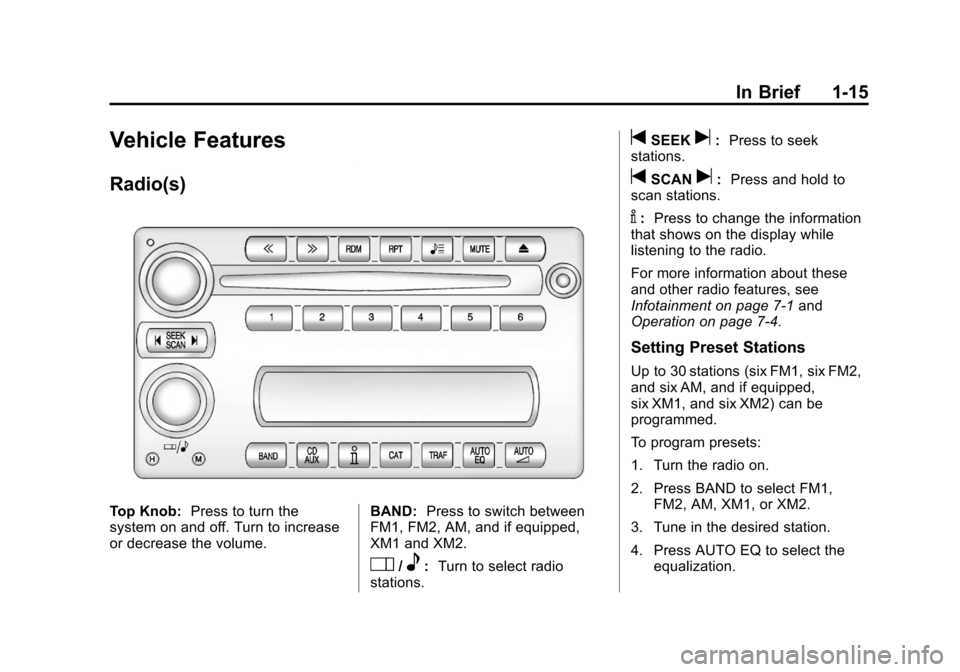
Top Knob:Press to turn the
system on and off. Turn to increase
or decrease the volume. BAND:
Press to switch between
FM1, FM2, AM, and if equipped,
XM1 and XM2.
O/e: Turn to select radio
stations.
tSEEKu: Press to seek
stations.
tSCANu: Press and hold to
scan stations.
V: Press to change the information
that shows on the display while
listening to the radio.
For more information about these
and other radio features, see
Infotainment on page 7‑1 and
Operation on page 7‑4.
Setting Preset Stations
Up to 30 stations (six FM1, six FM2,
and six AM, and if equipped,
six XM1, and six XM2) can be
programmed.
To program presets:
1. Turn the radio on.
2. Press BAND to select FM1,
FM2, AM, XM1, or XM2.
3. Tune in the desired station.
4. Press AUTO EQ to select the equalization.
Page 22 of 414

Black plate (16,1)Chevrolet Corvette Owner Manual - 2013 - crc2 - 11/8/12
1-16 In Brief
5. Press and hold one of the sixnumbered pushbuttons until the
radio beeps once.
6. Repeat the steps for each pushbutton.
See Operation on page 7‑4.
Setting the Clock
To set the clock:
1. Press and hold H until the
correct hour displays.
2. Press and hold M until the correct minute displays.
See Clock on page 5‑6.
Satellite Radio
SiriusXM is a satellite radio service
based in the 48 contiguous United
States and 10 Canadian provinces.
SiriusXM satellite radio has a wide
variety of programming and
commercial-free music, coast to
coast, and in digital-quality sound.
A fee is required to receive the
SiriusXM service. For more information, refer to:
.www.siriusxm.com or call
1-800-929-2100 (U.S.)
.www.xmradio.ca or call
1-877-438-9677 (Canada)
See Satellite Radio on page 7‑8.
Portable Audio Devices
The vehicle has an auxiliary input
jack located on the right side of the
faceplate. External devices such as
iPod
®, MP3 players, etc. can be
connected to the auxiliary input jack
using a 3.5 mm (1/8 in) input jack
cable. This is not an audio output;
do not plug a headphone set into
the auxiliary input jack. See
Auxiliary Devices on page 7‑17.
Bluetooth®
For vehicles with a Bluetooth
system, it allows users with a
Bluetooth-enabled cell phone to
make and receive hands-free calls
using the vehicle’ s audio system
and controls. The Bluetooth-enabled cell phone
must be paired with the Bluetooth
system before it can be used in the
vehicle. Not all phones will support
all functions. For more information,
see www.gm.com/bluetooth and
Bluetooth on page 7‑17.
Steering Wheel Controls
For vehicles with steering wheel
controls, some audio controls can
be adjusted at the steering wheel.
Page 23 of 414

Black plate (17,1)Chevrolet Corvette Owner Manual - 2013 - crc2 - 11/8/12
In Brief 1-17
b/g:Press to turn on and off the
vehicle speakers. Press and hold
longer than two seconds to interact
with the OnStar
®or Bluetooth
systems.
i: Press to reject an incoming
call, or to end a call.
e+ /e−: Press to Increase or
decrease volume.
w/x: Press to change radio
stations or select tracks on a CD.
1 to 6: Press to play stations that
are programmed on the radio preset
pushbuttons.
For more information, see Steering
Wheel Controls on page 5‑3.
Cruise Control
The cruise controls are located at
the end of the multifunction lever.
9: Turns the system off.
R: Turns the system on.
+:Makes the vehicle accelerate or
resume a previously set speed.
T: Press the button at the end of
the lever to set the speed.
See Cruise Control on page 9‑42.
Navigation System
If the vehicle has a navigation
system, there is a separate
navigation manual that includes
information on the radio, audio
players, and navigation system.
The navigation system provides
detailed maps of most major
freeways and roads. After a
destination has been set, the
system provides turn-by-turn
instructions for reaching the
destination. In addition, the system
can help locate a variety of points of
interest (POIs), such as banks,
airports, restaurants, and more.
See the navigation manual for more
information.
Page 43 of 414

Black plate (13,1)Chevrolet Corvette Owner Manual - 2013 - crc2 - 11/8/12
Keys, Doors, and Windows 2-13
door lock switch. The security light
should flash. Remove the RKE
transmitter from inside the vehicle
and close the door. The security
light stops flashing and stays on.
After 30 seconds, the light should
turn off.
The vehicle can be programmed to
automatically lock the doors and
arm the theft-deterrent system when
you exit the vehicle. SeeVehicle
Personalization on page 5‑51.
If a door or the hatch/trunk is
opened without using the RKE
transmitter, the alarm goes off. The
horn sounds for two minutes, then
goes off to save battery power. The
vehicle will not start without a RKE
transmitter present.
The theft-deterrent system does not
arm if the driver door is locked with
the power door lock switch after the
doors are closed.
If the RKE transmitter is removed
from the vehicle while a passenger
is in it, have them lock the doors after they are closed. The alarm will
not arm, so the passenger will not
set it off.
Testing the Alarm
To test the system use the following
procedure.
1. Make sure the trunk lid/hatch is
latched.
2. Lower the window on the driver door.
3. Manually arm the system.
4. Close the doors and wait 30 seconds.
5. Reach through the open window and manually pull the release
lever on the floor.
6. Press the
Kbutton on the
transmitter to turn off the alarm.
If the alarm does not sound, check
to see if the horn works. The horn
fuse may be blown. See Fuses and
Circuit Breakers on page 10‑45.
If the horn works, but the alarm
does not go off, see your dealer.
Disarming the System
Press theKbutton on the RKE
transmitter or squeeze the door
handle sensor while the transmitter
is near the vehicle to unlock a door.
Unlocking a door any other way sets
off the alarm. If the alarm sounds,
press the
Kbutton on the RKE
transmitter to disarm it.
Do not leave the key or device that
disarms or deactivates the
theft-deterrent system in the vehicle.
Immobilizer
See Radio Frequency Statement on
page 13‑20 for information
regarding Part 15 of the Federal
Communications Commission (FCC)
rules and Industry Canada
Standards RSS-GEN/210/220/310.
Page 57 of 414
Black plate (27,1)Chevrolet Corvette Owner Manual - 2013 - crc2 - 11/8/12
Keys, Doors, and Windows 2-27
Lowering the Power
Convertible Top
1. Park on a level surface. Start theengine. Shift an automatic
transmission into P (Park) and
set the parking brake. Shift a
manual transmission into Neutral
and set the parking brake.
2. Make sure the trunk is closed, the rear trunk partition in the rear
storage area is in the fastened
upright position, and no objects
are forward of the divider. See
“Rear Trunk Partition” inRear
Storage on page 4‑1.
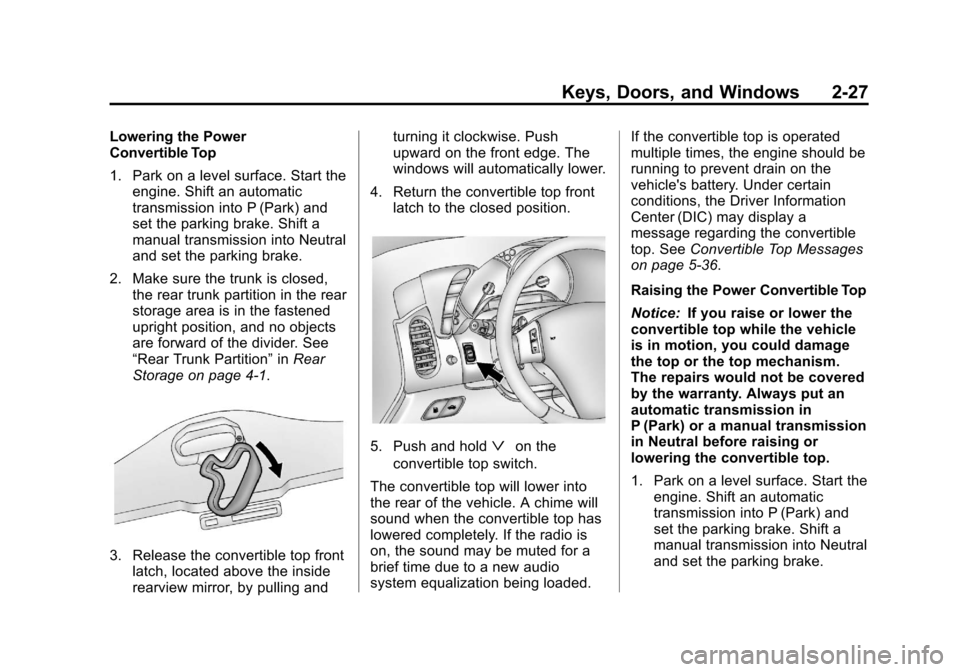
3. Release the convertible top front latch, located above the inside
rearview mirror, by pulling and turning it clockwise. Push
upward on the front edge. The
windows will automatically lower.
4. Return the convertible top front latch to the closed position.
5. Push and holdªon the
convertible top switch.
The convertible top will lower into
the rear of the vehicle. A chime will
sound when the convertible top has
lowered completely. If the radio is
on, the sound may be muted for a
brief time due to a new audio
system equalization being loaded. If the convertible top is operated
multiple times, the engine should be
running to prevent drain on the
vehicle's battery. Under certain
conditions, the Driver Information
Center (DIC) may display a
message regarding the convertible
top. See
Convertible Top Messages
on page 5‑36.
Raising the Power Convertible Top
Notice: If you raise or lower the
convertible top while the vehicle
is in motion, you could damage
the top or the top mechanism.
The repairs would not be covered
by the warranty. Always put an
automatic transmission in
P (Park) or a manual transmission
in Neutral before raising or
lowering the convertible top.
1. Park on a level surface. Start the engine. Shift an automatic
transmission into P (Park) and
set the parking brake. Shift a
manual transmission into Neutral
and set the parking brake.
Page 107 of 414
Black plate (3,1)Chevrolet Corvette Owner Manual - 2013 - crc2 - 11/8/12
Instruments and Controls 5-3
The telescopic steering column
position can be stored with your
memory settings. SeeMemory
Seats on page 3‑4.
Steering Wheel Controls
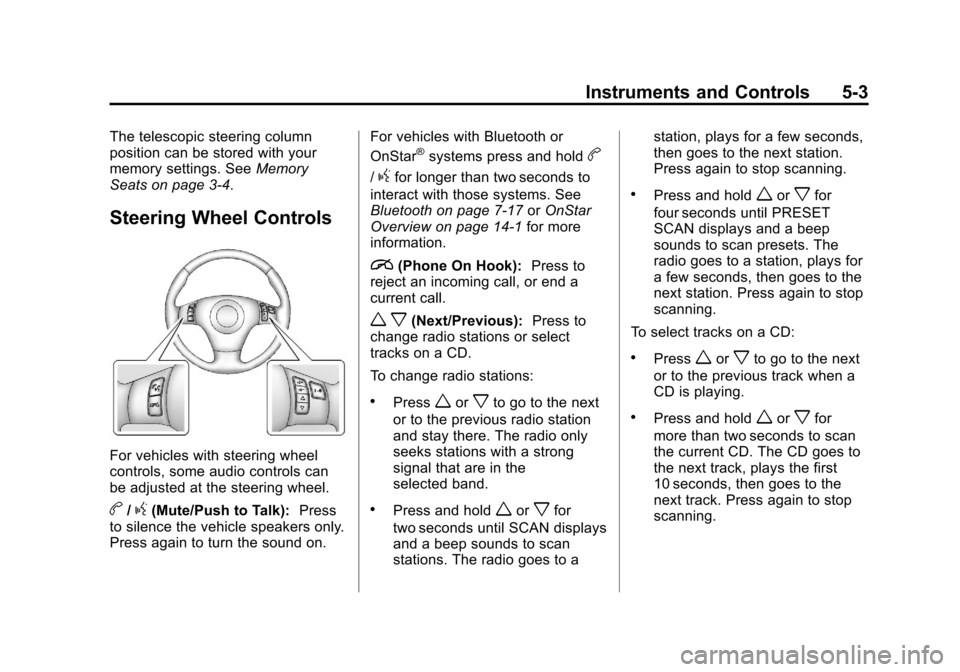
For vehicles with steering wheel
controls, some audio controls can
be adjusted at the steering wheel.
b/g(Mute/Push to Talk): Press
to silence the vehicle speakers only.
Press again to turn the sound on. For vehicles with Bluetooth or
OnStar
®systems press and holdb
/gfor longer than two seconds to
interact with those systems. See
Bluetooth on page 7‑17 orOnStar
Overview on page 14‑1 for more
information.
i(Phone On Hook): Press to
reject an incoming call, or end a
current call.
w x(Next/Previous): Press to
change radio stations or select
tracks on a CD.
To change radio stations:
.Pressworxto go to the next
or to the previous radio station
and stay there. The radio only
seeks stations with a strong
signal that are in the
selected band.
.Press and holdworxfor
two seconds until SCAN displays
and a beep sounds to scan
stations. The radio goes to a station, plays for a few seconds,
then goes to the next station.
Press again to stop scanning.
.Press and holdworxfor
four seconds until PRESET
SCAN displays and a beep
sounds to scan presets. The
radio goes to a station, plays for
a few seconds, then goes to the
next station. Press again to stop
scanning.
To select tracks on a CD:
.Pressworxto go to the next
or to the previous track when a
CD is playing.
.Press and holdworxfor
more than two seconds to scan
the current CD. The CD goes to
the next track, plays the first
10 seconds, then goes to the
next track. Press again to stop
scanning.
Page 108 of 414
Black plate (4,1)Chevrolet Corvette Owner Manual - 2013 - crc2 - 11/8/12
5-4 Instruments and Controls
.Press and holdworxfor
more than four seconds to scan
all of the CDs loaded. The CD
goes to the next CD, plays the
first 10 seconds of each track,
then goes to the next CD. Press
again to stop scanning.
+
e−e(Volume): Press to
increase or to decrease the radio
volume.
1 to 6 (Preset Pushbuttons):
Press to play stations that are
programmed on the radio preset
pushbuttons.
Horn
Press near or on the horn symbols
on the steering wheel pad to sound
the horn.
Windshield Wiper/Washer
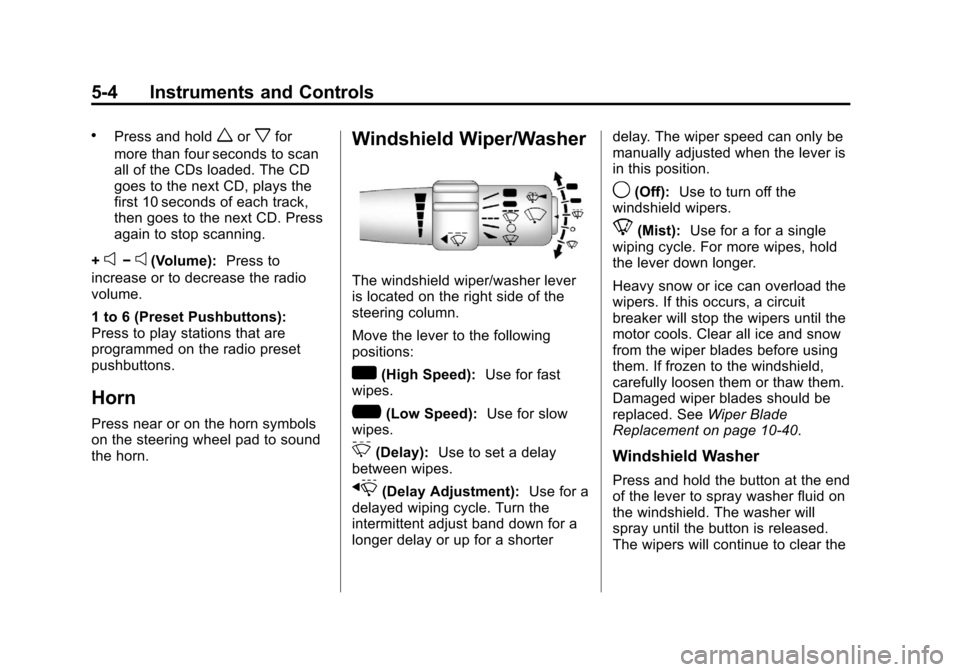
The windshield wiper/washer lever
is located on the right side of the
steering column.
Move the lever to the following
positions:
w(High Speed): Use for fast
wipes.
?(Low Speed): Use for slow
wipes.
3(Delay): Use to set a delay
between wipes.
x(Delay Adjustment): Use for a
delayed wiping cycle. Turn the
intermittent adjust band down for a
longer delay or up for a shorter delay. The wiper speed can only be
manually adjusted when the lever is
in this position.
9(Off):
Use to turn off the
windshield wipers.
8(Mist): Use for a for a single
wiping cycle. For more wipes, hold
the lever down longer.
Heavy snow or ice can overload the
wipers. If this occurs, a circuit
breaker will stop the wipers until the
motor cools. Clear all ice and snow
from the wiper blades before using
them. If frozen to the windshield,
carefully loosen them or thaw them.
Damaged wiper blades should be
replaced. See Wiper Blade
Replacement on page 10‑40.
Windshield Washer
Press and hold the button at the end
of the lever to spray washer fluid on
the windshield. The washer will
spray until the button is released.
The wipers will continue to clear the
Page 134 of 414

Black plate (30,1)Chevrolet Corvette Owner Manual - 2013 - crc2 - 11/8/12
5-30 Instruments and Controls
RESET Button
The RESET button, used along with
other buttons, will reset system
functions and turn off or
acknowledge messages on the DIC.
Head-Up Display (HUD)
{WARNING
If the HUD image is too bright,
or too high in your field of view, it
may take you more time to see
things you need to see when it is
dark outside. Be sure to keep the
HUD image dim and placed low in
your field of view.
For vehicles with the Head-Up
Display (HUD), you can see some
of the driver information that
appears on the instrument panel
cluster. The information may be displayed in
English or metric units and appears
as an image focused out toward the
front of the vehicle. The HUD
consists of the following information:
.Speedometer
.Turn Signal Indicators
.High-Beam Indicator Symbol
.Tachometer
.Manual Paddle Shift Gear
Indicator (If Equipped)
These displays on the HUD are
for use when using the manual
paddle shift controls to shift the
transmission. See
“Manual
Paddle Shift” inAutomatic
Transmission on page 9‑25.
.Shift Light
This light is used for
performance driving to indicate
that the vehicle's best
performance level has been
reached to shift the transmission
into the next higher gear. An
arrow pointing up will light up on the display just prior to reaching
the engine fuel cut-off mode.
This cut-off is about 6,500 rpm
for the LS3 engine, 6,600 rpm
for the LS9 & ZR1 engines, and
7,000 rpm for the LS7 engine.
.Check Gauges Warning
.Engine Coolant Temperature
Gauge
.Transmission Fluid Temperature
Gauge, (Automatic Transmission
Vehicles Only)
.Engine Oil Temperature Gauge
.Engine Oil Pressure Gauge
.G-Force Gauge
.Boost Gauge (If Equipped)
.Audio Functions, Street
Mode Only
.Navigation, Only with Navigation
Radio, Turn-by-Turn Guidance.
Street Mode Only