2013 CHEVROLET AVALANCHE horn
[x] Cancel search: hornPage 9 of 494

Black plate (3,1)Chevrolet Avalanche Owner Manual - 2013 - CRC - 8/27/12
In Brief 1-3
A.Air Vents on page 8‑9.
B. Turn and Lane-Change Lever. See Turn and Lane-Change
Signals on page 6‑5.
Windshield Wiper/Washer on
page 5‑4.
C. Instrument Cluster on
page 5‑10.
D. Hazard Warning Flashers on
page 6‑5 (Out of View).
E. Shift Lever. See Automatic
Transmission on page 9‑29.
F. Tow/Haul Mode on page 9‑33 (If
Equipped).
G. Driver Information Center (DIC) Buttons. See Driver Information
Center (DIC) on page 5‑25.
H. AM-FM Radio on page 7‑10.
I. Exterior Lamp Controls on
page 6‑1. J. Dome Lamp Override. See
Dome Lamps on page 6‑7.
Instrument Panel Illumination
Control on page 6‑7.
Fog Lamps on page 6‑6 (If
Equipped).
K. Automatic Transfer Case Control (If Equipped). See
Four-Wheel Drive (Single
Speed Automatic Transfer
Case) on page 9‑39 or
Four-Wheel Drive (Two Speed
Automatic Transfer Case) on
page 9‑34.
L. Data Link Connector (DLC) (Out of View). See Malfunction
Indicator Lamp on page 5‑17.
M. Cruise Control on page 9‑47.
N. Steering Wheel Adjustment on
page 5‑2. O.
Horn on page 5‑4.
P. Steering Wheel Controls on
page 5‑2.
Q. Climate Control Systems on
page 8‑1 (If Equipped).
Dual Automatic Climate Control
System on page 8‑4 (If
Equipped).
R. Power Outlets on page 5‑8.
S. StabiliTrak
®System on
page 9‑43.
Pedal Adjust Control. See
Adjustable Throttle and Brake
Pedal on page 9‑21.
Ultrasonic Parking Assist on
page 9‑49.
Power Assist Steps on
page 2‑15 (If Equipped).
Page 37 of 494
Black plate (3,1)Chevrolet Avalanche Owner Manual - 2013 - CRC - 8/27/12
Keys, Doors, and Windows 2-3
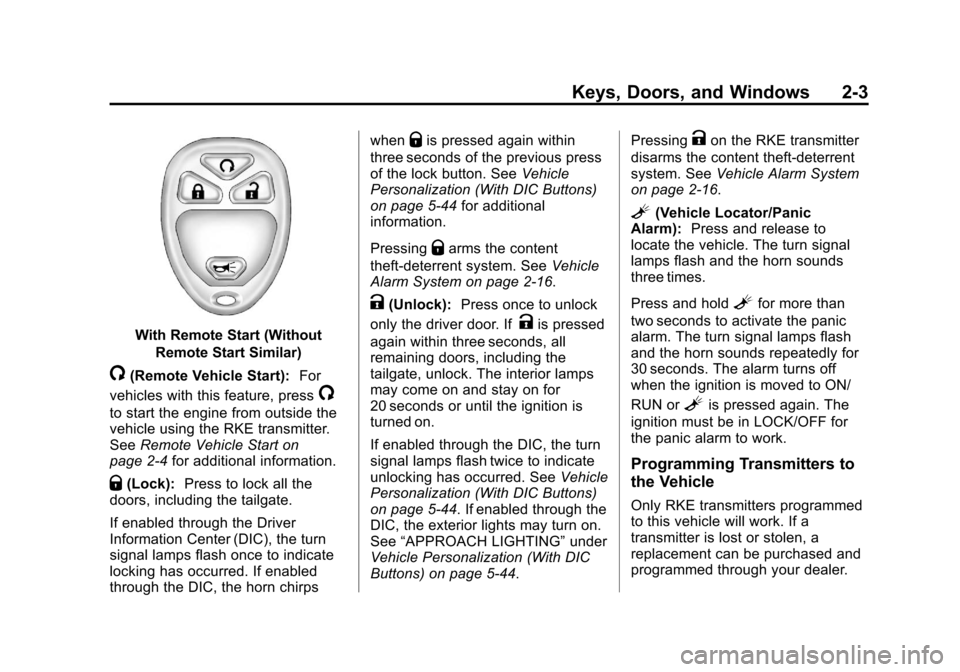
With Remote Start (WithoutRemote Start Similar)
/(Remote Vehicle Start): For
vehicles with this feature, press
/
to start the engine from outside the
vehicle using the RKE transmitter.
See Remote Vehicle Start on
page 2‑4 for additional information.
Q(Lock):Press to lock all the
doors, including the tailgate.
If enabled through the Driver
Information Center (DIC), the turn
signal lamps flash once to indicate
locking has occurred. If enabled
through the DIC, the horn chirps when
Qis pressed again within
three seconds of the previous press
of the lock button. See Vehicle
Personalization (With DIC Buttons)
on page 5‑44 for additional
information.
Pressing
Qarms the content
theft-deterrent system. See Vehicle
Alarm System on page 2‑16.
K(Unlock): Press once to unlock
only the driver door. If
Kis pressed
again within three seconds, all
remaining doors, including the
tailgate, unlock. The interior lamps
may come on and stay on for
20 seconds or until the ignition is
turned on.
If enabled through the DIC, the turn
signal lamps flash twice to indicate
unlocking has occurred. See Vehicle
Personalization (With DIC Buttons)
on page 5‑44. If enabled through the
DIC, the exterior lights may turn on.
See “APPROACH LIGHTING” under
Vehicle Personalization (With DIC
Buttons) on page 5‑44. Pressing
Kon the RKE transmitter
disarms the content theft-deterrent
system. See Vehicle Alarm System
on page 2‑16.
L(Vehicle Locator/Panic
Alarm): Press and release to
locate the vehicle. The turn signal
lamps flash and the horn sounds
three times.
Press and hold
Lfor more than
two seconds to activate the panic
alarm. The turn signal lamps flash
and the horn sounds repeatedly for
30 seconds. The alarm turns off
when the ignition is moved to ON/
RUN or
Lis pressed again. The
ignition must be in LOCK/OFF for
the panic alarm to work.
Programming Transmitters to
the Vehicle
Only RKE transmitters programmed
to this vehicle will work. If a
transmitter is lost or stolen, a
replacement can be purchased and
programmed through your dealer.
Page 50 of 494

Black plate (16,1)Chevrolet Avalanche Owner Manual - 2013 - CRC - 8/27/12
2-16 Keys, Doors, and Windows
Vehicle Security
This vehicle has theft-deterrent
features; however, they do not make
the vehicle impossible to steal.
Vehicle Alarm System
Your vehicle has a content
theft-deterrent alarm system.
This is the security light.To arm the theft-deterrent system:
1. Open the door.
2. Lock the door with the Remote
Keyless Entry (RKE) transmitter
or the power door lock switch.
The security light will come on to
inform the driver the system is
arming. If a door is open when
the doors are locked, the
security light will flash.
If the delayed locking feature is
turned on, the theft‐deterrent
system will not start the arming
process until the last door is
closed and the delay timer has
expired. See Delayed Locking
on page 2‑7.
3. Close all doors. The security light should go off after about
30 seconds. The alarm is not
armed until the security light
goes off.
The content theft deterrent
system does not sense if the
midgate or tailgate are open or ajar, therefore, vehicle contents
may not be protected if the
midgate is left open or ajar.
If a locked driver door is opened
without using the RKE transmitter,
a ten second pre-alarm will occur.
The horn will chirp and the lights will
flash. If the key is not placed in the
ignition and turned to START or the
door is not unlocked by pressing
the unlock button on the RKE
transmitter during the ten second
pre-alarm, the alarm will go off. Your
vehicle's headlamps will flash and
the horn will sound for about
30 seconds, then will turn off to save
the battery power.
The theft-deterrent system will not
activate if the doors are locked with
the vehicle's key or the manual door
lock. It activates only if you use the
power door lock switch with the door
open or the RKE transmitter. You
should also remember that you can
start your vehicle with the correct
ignition key if the alarm has been
set off.
Page 51 of 494
Black plate (17,1)Chevrolet Avalanche Owner Manual - 2013 - CRC - 8/27/12
Keys, Doors, and Windows 2-17
To avoid setting off the alarm by
accident:
.If you do not want to activate the
theft-deterrent system, the
vehicle should be locked with
the door key after the doors are
closed.
.Always unlock the doors with the
RKE transmitter. Unlocking a
door any other way will set off
the alarm if it is armed.
If you set off the alarm by accident,
press unlock on the RKE transmitter
or place the key in the ignition and
turn it to START to turn off the
alarm. The alarm will not stop if you
try to unlock a door any other way.
Testing the Alarm
To test the alarm:
1. From inside the vehicle, lower the driver window and open the
driver door. 2. Activate the system by locking
the doors with the power door
lock switch while the door is
open, or with the RKE
transmitter.
3. Get out of the vehicle, close the door and wait for the security
light to go out.
4. Then reach in through the window, unlock the door with the
manual door lock and open the
door. This should set off the
alarm.
While the alarm is set, the power
door unlock switch will not work.
If the alarm does not sound when it
should but the headlamps flash,
check to see if the horn works. The
horn fuse may be blown. To replace
the fuse, see Instrument Panel Fuse
Block on page 10‑39 andEngine
Compartment Fuse Block on
page 10‑34.
If the alarm does not sound or the
headlamps do not flash, the vehicle
should be serviced by your dealer.
Immobilizer
See Radio Frequency Statement on
page 13‑21 for information
regarding Part 15 of the Federal
Communications Commission (FCC)
rules and Industry Canada
Standards RSS-GEN/210/220/310.
Immobilizer Operation
This vehicle has PASS-Key®III+
(Personalized Automotive Security
System) theft-deterrent system.
PASS-Key III+ is a passive
theft-deterrent system.
The system is automatically armed
when the key is removed from the
ignition.
The system is automatically
disarmed when the key is turned to
ON/RUN, ACC/ACCESSORY,
or START from the LOCK/OFF
position.
You do not have to manually arm or
disarm the system.
Page 127 of 494

Black plate (1,1)Chevrolet Avalanche Owner Manual - 2013 - CRC - 8/27/12
Instruments and Controls 5-1
Instruments and
Controls
Controls
Steering Wheel Adjustment . . . 5-2
Steering Wheel Controls . . . . . . 5-2
Horn . . . . . . . . . . . . . . . . . . . . . . . . . . 5-4
Windshield Wiper/Washer . . . . . 5-4
Compass . . . . . . . . . . . . . . . . . . . . . 5-5
Clock . . . . . . . . . . . . . . . . . . . . . . . . . 5-7
Power Outlets . . . . . . . . . . . . . . . . . 5-8
Warning Lights, Gauges, and
Indicators
Warning Lights, Gauges, andIndicators . . . . . . . . . . . . . . . . . . . . 5-9
Instrument Cluster . . . . . . . . . . . 5-10
Speedometer . . . . . . . . . . . . . . . . 5-11
Odometer . . . . . . . . . . . . . . . . . . . . 5-11
Trip Odometer . . . . . . . . . . . . . . . 5-11
Tachometer . . . . . . . . . . . . . . . . . . 5-11
Fuel Gauge . . . . . . . . . . . . . . . . . . 5-11
Engine Oil Pressure Gauge . . . . . . . . . . . . . . . . . . . . . . 5-12 Engine Coolant Temperature
Gauge . . . . . . . . . . . . . . . . . . . . . . 5-13
Voltmeter Gauge . . . . . . . . . . . . . 5-14
Safety Belt Reminders . . . . . . . 5-14
Airbag Readiness Light . . . . . . 5-15
Passenger Airbag Status Indicator . . . . . . . . . . . . . . . . . . . . 5-16
Charging System Light . . . . . . 5-17
Malfunction Indicator Lamp . . . . . . . . . . . . . 5-17
Brake System Warning Light . . . . . . . . . . . . . . . . . . . . . . . 5-20
Antilock Brake System (ABS) Warning Light . . . . . . . . . . . . . . 5-21
Tow/Haul Mode Light . . . . . . . . 5-21
StabiliTrak
®OFF Light . . . . . . . 5-21
Traction Control System (TCS)/StabiliTrak
®Light . . . . 5-22
Tire Pressure Light . . . . . . . . . . 5-22
Engine Oil Pressure Light . . . . 5-23
Low Fuel Warning Light . . . . . . 5-23
Security Light . . . . . . . . . . . . . . . . 5-23
High-Beam On Light . . . . . . . . . 5-24
Front Fog Lamp Light . . . . . . . . 5-24
Cruise Control Light . . . . . . . . . 5-24
Information Displays
Driver Information Center (DIC) . . . . . . . . . . . . . . . 5-25
Vehicle Messages
Vehicle Messages . . . . . . . . . . . 5-34
Battery Voltage and ChargingMessages . . . . . . . . . . . . . . . . . . 5-34
Brake System Messages . . . . 5-35
Door Ajar Messages . . . . . . . . . 5-35
Engine Cooling System Messages . . . . . . . . . . . . . . . . . . 5-36
Engine Oil Messages . . . . . . . . 5-37
Engine Power Messages . . . . 5-38
Fuel System Messages . . . . . . 5-38
Key and Lock Messages . . . . . 5-38
Lamp Messages . . . . . . . . . . . . . 5-38
Object Detection System Messages . . . . . . . . . . . . . . . . . . 5-39
Ride Control System Messages . . . . . . . . . . . . . . . . . . 5-39
Airbag System Messages . . . . 5-40
Security Messages . . . . . . . . . . 5-41
Tire Messages . . . . . . . . . . . . . . . 5-41
Transmission Messages . . . . . 5-42
Vehicle Reminder Messages . . . . . . . . . . . . . . . . . . 5-43
Washer Fluid Messages . . . . . 5-43
Page 130 of 494

Black plate (4,1)Chevrolet Avalanche Owner Manual - 2013 - CRC - 8/27/12
5-4 Instruments and Controls
3. Press and release¨to move up
one track within the selected
category.
b/g(Mute/Push to Talk): Press
to silence the vehicle speakers only.
Press again to turn the sound on.
For vehicles with Bluetooth or
OnStar systems, press and hold for
longer than two seconds to interact
with those systems. See Bluetooth
on page 7‑48 andOnStar Overview
on page 14‑1 for more information.
SRCE (Source/Voice
Recognition): Press to switch
between the radio and CD, and for
equipped vehicles, the DVD, front
auxiliary, and rear auxiliary.
For vehicles with the navigation
system, press and hold this button
for longer than one second to
initiate voice recognition. See “Voice
Recognition” in the Navigation
System manual for more
information.
¨(Seek): Press to go to the next
radio station while in AM, FM,
or SiriusXM
®.
For vehicles with or without a
navigation system:
Press
¨to go to the next track or
chapter while sourced to the CD or
DVD slot.
Press
¨to select a track or a folder
when navigating folders on an iPod
or USB device.
For vehicles with a navigation
system:
1. Press and hold
¨until a beep is
heard, to place the radio into
SCAN mode. A station will play
for five seconds before moving
to the next station.
2. To stop the SCAN function, press
¨again. While listening to a CD/DVD, press
and hold
¨to quickly move forward
through the tracks. Release to stop
on the desired track.
+
e: Press to increase volume.
−
e: Press to decrease volume.
Horn
To sound the horn, press the center
pad on the steering wheel.
Windshield Wiper/Washer
The front wiper control is located on
the turn and lane-change lever.
The windshield wipers are
controlled by turning the band
with
zon it.
Page 172 of 494
Black plate (46,1)Chevrolet Avalanche Owner Manual - 2013 - CRC - 8/27/12
5-46 Instruments and Controls
ALL AT KEY OUT:All of the doors,
including the tailgate, will unlock
when the key is taken out of the
ignition.
ALL IN PARK (default): All of the
doors, including the tailgate, will
unlock when the vehicle is shifted
into P (Park).
NO CHANGE: No change will be
made to this feature. The current
setting will remain.
To select a setting, press the set/
reset button while the desired
setting is displayed on the DIC.
REMOTE DOOR LOCK
This feature allows you to select the
type of feedback you will receive
when locking the vehicle with the
Remote Keyless Entry (RKE)
transmitter. You will not receive
feedback when locking the vehicle
with the RKE transmitter if the doors
are open. See Remote Keyless
Entry (RKE) System Operation on
page 2‑2 for more information. Press the customization button until
REMOTE DOOR LOCK appears on
the DIC display. Press the set/reset
button once to access the settings
for this feature. Then press the
customization button to scroll
through the following settings:
OFF:
There will be no feedback
when you press the lock button on
the RKE transmitter.
LIGHTS ONLY: The exterior lamps
will flash when you press the lock
button on the RKE transmitter.
HORN ONLY: The horn will sound
on the second press of the lock
button on the RKE transmitter.
HORN & LIGHTS (default): The
exterior lamps will flash when you
press the lock button on the RKE
transmitter, and the horn will sound
when the lock button is pressed
again within five seconds of the
previous command.
NO CHANGE: No change will be
made to this feature. The current
setting will remain. To select a setting, press the set/
reset button while the desired
setting is displayed on the DIC.
REMOTE DOOR UNLOCK
This feature allows you to select the
type of feedback you will receive
when unlocking the vehicle with the
Remote Keyless Entry (RKE)
transmitter. You will not receive
feedback when unlocking the
vehicle with the RKE transmitter if
the doors are open. See
Remote
Keyless Entry (RKE) System
Operation on page 2‑2 for more
information.
Press the customization button until
REMOTE DOOR UNLOCK appears
on the DIC display. Press the set/
reset button once to access the
settings for this feature. Then press
the customization button to scroll
through the following settings:
LIGHTS OFF: The exterior lamps
will not flash when you press the
unlock button on the RKE
transmitter.
Page 370 of 494

Black plate (36,1)Chevrolet Avalanche Owner Manual - 2013 - CRC - 8/27/12
10-36 Vehicle Care
The vehicle may not be equipped
with all of the fuses, relays, and
features shown.Fuses Usage
1 Right Trailer Stop/ Turn Lamp
2 Electronic Stability Suspension
Control, Automatic
Level Control
Exhaust
3 Left Trailer Stop/ Turn Lamp
4 Engine Controls
5 Engine Control Module, Throttle
Control
6 Trailer Brake Controller
7 Front Washer
8 Oxygen Sensors
9 Antilock Brake System 2 Fuses Usage
10 Trailer Back-up Lamps
11 Driver Side Low-Beam
Headlamp
12 Engine Control Module (Battery)
13 Fuel Injectors, Ignition Coils
(Right Side)
14 Transmission Control Module
(Battery)
15 Vehicle Back-up Lamps
16 Passenger Side Low-Beam
Headlamp
17 Air Conditioning Compressor
18 Oxygen Sensors Fuses Usage
19 Transmission Controls (Ignition)
20 Fuel Pump
21 Fuel System Control Module
22 Headlamp Washer
23 Rear Windshield Washer
24 Fuel Injectors, Ignition Coils
(Left Side)
25 Trailer Park Lamps
26 Driver Side Park Lamps
27 Passenger Side Park Lamps
28 Fog Lamps
29 Horn
30 Passenger Side High-Beam
Headlamp