2013 CHEVROLET AVALANCHE lock
[x] Cancel search: lockPage 18 of 494

Black plate (12,1)Chevrolet Avalanche Owner Manual - 2013 - CRC - 8/27/12
1-12 In Brief
With Manual Folding Mirrors
To adjust the mirrors:
1. Move the selector switch located above the four-way control pad
to the left or right to choose
either the driver side or
passenger side mirror.
2. Press one of the four arrows located on the control pad to
move the mirror in the desired
direction. 3. Adjust the outside mirror so that
the side of the vehicle and the
area behind are seen.
See Power Mirrors on page 2‑19.
Keep the selector switch in the
center position when not adjusting
either outside mirror.
To manual fold the mirrors:
Fold the mirrors inward to prevent
damage when going through an
automatic car wash. To fold, pull the
mirror toward the vehicle. Push the
mirror outward, to return to its
original position.
Heated Mirrors
Press
1to heat the mirrors.
See “Rear Window Defogger” under
Dual Automatic Climate Control
System on page 8‑4 orClimate
Control Systems on page 8‑1. Park Tilt Mirrors
If the vehicle has the memory
package, the exterior mirrors tilt to a
preselected position when the
vehicle is in R (Reverse). This
feature lets the driver view the curb
when parallel parking. The mirrors
return to the original position when
the vehicle is shifted out of
R (Reverse), or the ignition is turned
off or to OFF/LOCK.
This feature can be programed
through the Driver Information
Center (DIC). See
Vehicle
Personalization (With DIC Buttons)
on page 5‑44.Interior Mirror
Adjustment
Hold the rearview mirror in the
center and move it to view the area
behind the vehicle.
Page 19 of 494

Black plate (13,1)Chevrolet Avalanche Owner Manual - 2013 - CRC - 8/27/12
In Brief 1-13
Manual Rearview Mirror
For vehicles with a manual rearview
mirror, push the tab forward for
daytime use and pull it for nighttime
use to avoid glare from the
headlamps from behind. See
Manual Rearview Mirror on
page 2‑22
Automatic Dimming Rearview
Mirror
This mirror will automatically reduce
the glare from the headlamps from
behind. The dimming feature comes
on and the indicator light illuminates
each time the ignition is turned to
start.
SeeAutomatic Dimming Rearview
Mirror on page 2‑22.Steering Wheel
Adjustment
To adjust the steering wheel:
1. Hold the steering wheel and pull the lever.
2. Move the steering wheel up or down.
3. Release the lever to lock the wheel in place.
Do not adjust the steering wheel
while driving.
Throttle and Brake Pedal
Adjustment
On vehicles with this feature, you
can change the position of the
throttle and brake pedals.
The control used to adjust the
pedals is located on the instrument
panel below the climate control
system.
Press the bottom of the control to
move the pedals closer to your
body. Press the top of the control to
move the pedals away.
See Adjustable Throttle and Brake
Pedal on page 9‑21.
Page 20 of 494
Black plate (14,1)Chevrolet Avalanche Owner Manual - 2013 - CRC - 8/27/12
1-14 In Brief
Interior Lighting
Dome Lamps
The dome lamps are located in the
overhead console.
They come on when any door is
opened and turn off after all the
doors are closed.
Turn the instrument panel
brightness knob located below the
dome lamp override button,
clockwise to the farthest position to
manually turn on the dome lamps.
The dome lamps remain on until the
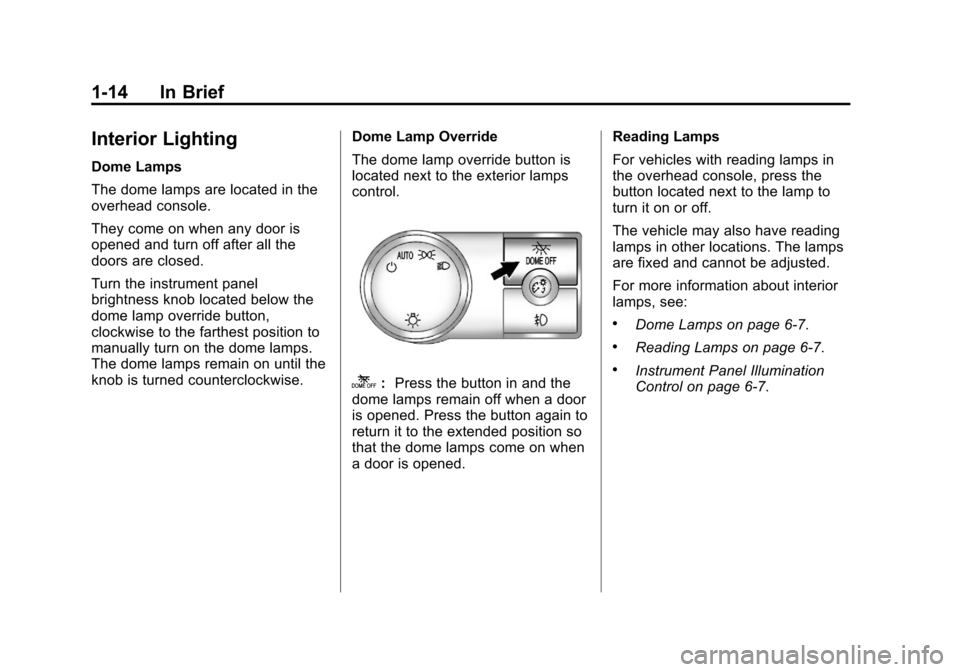
knob is turned counterclockwise.Dome Lamp Override
The dome lamp override button is
located next to the exterior lamps
control.
k:
Press the button in and the
dome lamps remain off when a door
is opened. Press the button again to
return it to the extended position so
that the dome lamps come on when
a door is opened. Reading Lamps
For vehicles with reading lamps in
the overhead console, press the
button located next to the lamp to
turn it on or off.
The vehicle may also have reading
lamps in other locations. The lamps
are fixed and cannot be adjusted.
For more information about interior
lamps, see:
.Dome Lamps on page 6‑7.
.Reading Lamps on page 6‑7.
.Instrument Panel Illumination
Control on page 6‑7.
Page 26 of 494

Black plate (20,1)Chevrolet Avalanche Owner Manual - 2013 - CRC - 8/27/12
1-20 In Brief
f:Turn to manually select radio
stations or press to set the bass or
treble.
©SEEK or¨SEEK: Seek or scan
stations.
4: Press to switch the display
between the radio station frequency
and the time. While the ignition is
off, press this button to display the
time. Press to display additional text
information related to the current
FM-RDS or SiriusXM station; or CD,
MP3, or WMA song. If information is
available during SiriusXM, CD, MP3,
or WMA playback, the song title
information displays on the top line
of the display and artist information
displays on the bottom line. When
information is not available, “NO
INFO” displays.
For more information about these
and other radio features, see
Operation on page 7‑6. For vehicles with a Rear Seat
Entertainment System (RSE) and
Rear Seat Audio System (RSA), see
Rear Seat Entertainment (RSE)
System on page 7‑36
andRear
Seat Audio (RSA) System on
page 7‑46 for more information.
Storing Radio Stations
A maximum of 36 stations can be
stored as favorites using the six
softkeys located below the radio
station frequency tabs and by using
the radio FAV button. Press FAV to
go through up to six pages of
favorites, each having six favorite
stations available per page. Each
page of favorites can contain any
combination of AM, FM, or SiriusXM
stations.
For more information, see “Storing
Radio Stations” inAM-FM Radio on
page 7‑10.
Setting the Clock
To set the time and date:
1. Turn the ignition key to ACC/ ACCESSORY or ON/RUN, then
press
O, to turn the radio on.
2. Press
Hto display HR, MIN,
MM, DD, and YYYY (hour,
minute, month, day, and year).
3. Press the softkey located under any one of the labels to be
changed.
4. To increase or decrease the time or date, turn
fclockwise or
counter-clockwise.
For detailed instructions on setting
the clock for the vehicle's specific
audio system, see Clock on
page 5‑7.
Page 30 of 494

Black plate (24,1)Chevrolet Avalanche Owner Manual - 2013 - CRC - 8/27/12
1-24 In Brief
V:Press to set or reset certain
functions and to turn off or
acknowledge messages on the DIC.
For more information, see Driver
Information Center (DIC) on
page 5‑25.
Vehicle Customization
Some vehicle features can be
programmed by using the DIC
buttons next to the steering wheel.
These features include:
.Language
.Door Lock and Unlock Settings
.RKE Lock and Unlock Feedback
.Lighting
.Chime Volume
.Memory Features
See Vehicle Personalization (With
DIC Buttons) on page 5‑44.
Rear Vision
Camera (RVC)
If available, the RVC displays a
view of the area behind the vehicle
when the vehicle is shifted into
R (Reverse). This is displayed on
the inside rearview mirror or the
navigation screen, if equipped.
To clean the camera lens, near the
tailgate handle, rinse it with water
and wipe it with a soft cloth.
For more information, see Rear
Vision Camera (RVC) on page 9‑51.
Ultrasonic Parking Assist
If available, this system uses
sensors on the rear bumper to
assist with parking and avoiding
objects while in R (Reverse).
It operates at speeds less than
8 km/h (5 mph). URPA uses audible
beeps to provide distance and
system information. Keep the sensors on the vehicle's
rear bumper clean to ensure proper
operation.
See
Ultrasonic Parking Assist on
page 9‑49.
Power Outlets
Accessory power outlets can be
used to plug in electrical equipment,
such as a cell phone or MP3 player.
The vehicle may have two
accessory power outlets located
on the instrument panel and one
inside the center floor console.
The vehicle may also have an outlet
on the rear of the center floor
console above the cupholder door.
The accessory power outlet is
operational at all times.
See Power Outlets on page 5‑8.
Page 32 of 494

Black plate (26,1)Chevrolet Avalanche Owner Manual - 2013 - CRC - 8/27/12
1-26 In Brief
The sunroof also has a sunshade
which can be pulled forward to block
sun rays. The sunshade must be
opened and closed manually.
If an object is in the path of the
sunroof while it is closing, the
anti-pinch feature will detect the
object and stop the sunroof.
SeeSunroof on page 2‑25.Performance and
Maintenance
StabiliTrak®System
The vehicle has a traction control
system that limits wheel spin and
the StabiliTrak system that assists
with directional control of the vehicle
in difficult driving conditions. Both
systems turn on automatically every
time the vehicle is started.
.To turn off traction control, press
and release
gon the instrument
panel. The appropriate DIC
message displays. See Ride
Control System Messages on
page 5‑39.
.To turn off both traction control
and StabiliTrak, press and
hold
guntilgilluminates and
the appropriate DIC message
displays. See Ride Control
System Messages on page 5‑39.
.Press and releasegagain to
turn on both systems. For more information, see
StabiliTrak
®System on page 9‑43.
Tire Pressure Monitor
This vehicle may have a Tire
Pressure Monitor System (TPMS).
The low tire pressure warning light
alerts to a significant loss in
pressure of one of the vehicle's
tires. If the warning light comes on,
stop as soon as possible and inflate
the tires to the recommended
pressure shown on the Tire and
Loading Information label. See
Vehicle Load Limits on page 9‑15.
The warning light will remain on until
the tire pressure is corrected.
Page 35 of 494

Black plate (1,1)Chevrolet Avalanche Owner Manual - 2013 - CRC - 8/27/12
Keys, Doors, and Windows 2-1
Keys, Doors, and
Windows
Keys and Locks
Keys . . . . . . . . . . . . . . . . . . . . . . . . . . 2-1
Remote Keyless Entry (RKE)System . . . . . . . . . . . . . . . . . . . . . . 2-2
Remote Keyless Entry (RKE) System Operation . . . . . . . . . . . 2-2
Remote Vehicle Start . . . . . . . . . 2-4
Door Locks . . . . . . . . . . . . . . . . . . . 2-6
Power Door Locks . . . . . . . . . . . . 2-7
Delayed Locking . . . . . . . . . . . . . . 2-7
Automatic Door Locks . . . . . . . . . 2-7
Lockout Protection . . . . . . . . . . . . 2-8
Safety Locks . . . . . . . . . . . . . . . . . . 2-8
Doors
Midgate®. . . . . . . . . . . . . . . . . . . . . . 2-8
Tailgate . . . . . . . . . . . . . . . . . . . . . . 2-14
Power Assist Steps . . . . . . . . . . 2-15
Vehicle Security
Vehicle Security . . . . . . . . . . . . . . 2-16
Vehicle Alarm System . . . . . . . 2-16
Immobilizer . . . . . . . . . . . . . . . . . . 2-17
Immobilizer Operation . . . . . . . 2-17
Exterior Mirrors
Convex Mirrors . . . . . . . . . . . . . . 2-19
Power Mirrors . . . . . . . . . . . . . . . . 2-19
Folding Mirrors . . . . . . . . . . . . . . . 2-20
Heated Mirrors . . . . . . . . . . . . . . . 2-21
Automatic Dimming Mirror . . . 2-21
Park Tilt Mirrors . . . . . . . . . . . . . . 2-21
Interior Mirrors
Manual Rearview Mirror . . . . . . 2-22
Automatic Dimming Rearview Mirror . . . . . . . . . . . . . . . . . . . . . . . 2-22
Windows
Windows . . . . . . . . . . . . . . . . . . . . . 2-23
Power Windows . . . . . . . . . . . . . 2-23
Sun Visors . . . . . . . . . . . . . . . . . . . 2-24
Roof
Sunroof . . . . . . . . . . . . . . . . . . . . . . 2-25
Keys and Locks
Keys
{WARNING
Leaving children in a vehicle with
the ignition key is dangerous and
children or others could be
seriously injured or killed. They
could operate the power windows
or other controls or make the
vehicle move. The windows will
function with the keys in the
ignition, and children or others
could be caught in the path of a
closing window. Do not leave
children in a vehicle with the
ignition key.
Page 36 of 494

Black plate (2,1)Chevrolet Avalanche Owner Manual - 2013 - CRC - 8/27/12
2-2 Keys, Doors, and Windows
The key can be used for the ignition,
door locks, tailgate, and side
storage boxes.
See your dealer if a replacement
key or additional key is needed.
If the vehicle has an ignition and it
becomes difficult to turn the key,
inspect the key blade for debris.
Periodically clean with a brush
or pick.If locked out of your vehicle, contact
Roadside Assistance. See
Roadside
Assistance Program (Mexico) on
page 13‑7 orRoadside Assistance
Program (U.S. and Canada) on
page 13‑11 for more information.
With an active OnStar subscription,
an OnStar Advisor may remotely
unlock the vehicle. See OnStar
Overview on page 14‑1.
Remote Keyless Entry
(RKE) System
See Radio Frequency Statement on
page 13‑21 for information
regarding Part 15 of the Federal
Communications Commission (FCC)
rules and Industry Canada
Standards RSS-GEN/210/220/310.
If there is a decrease in the RKE
operating range:
.Check the distance. The
transmitter may be too far from
the vehicle.
.Check the location. Other
vehicles or objects may be
blocking the signal.
.Check the transmitter's battery.
See “Battery Replacement” later
in this section.
.If the transmitter is still not
working correctly, see your
dealer or a qualified technician
for service.
Remote Keyless Entry
(RKE) System Operation
The Remote Keyless Entry (RKE)
transmitter functions work up to
60 m (195 ft) away from the vehicle.
There are other conditions which
can affect the performance of the
transmitter. See Remote Keyless
Entry (RKE) System on page 2‑2.