2013 CHEVROLET AVALANCHE air conditioning
[x] Cancel search: air conditioningPage 252 of 494
Black plate (4,1)Chevrolet Avalanche Owner Manual - 2013 - CRC - 8/27/12
8-4 Climate Controls
Dual Automatic Climate Control System
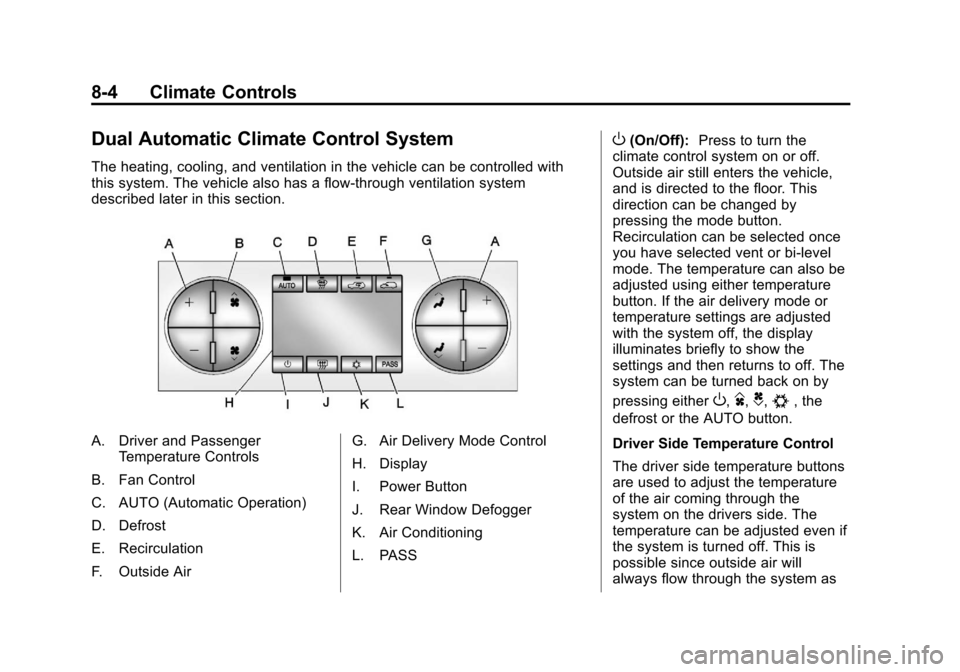
The heating, cooling, and ventilation in the vehicle can be controlled with
this system. The vehicle also has a flow-through ventilation system
described later in this section.
A. Driver and PassengerTemperature Controls
B. Fan Control
C. AUTO (Automatic Operation)
D. Defrost
E. Recirculation
F. Outside Air G. Air Delivery Mode Control
H. Display
I. Power Button
J. Rear Window Defogger
K. Air Conditioning
L. PASS
O(On/Off):
Press to turn the
climate control system on or off.
Outside air still enters the vehicle,
and is directed to the floor. This
direction can be changed by
pressing the mode button.
Recirculation can be selected once
you have selected vent or bi-level
mode. The temperature can also be
adjusted using either temperature
button. If the air delivery mode or
temperature settings are adjusted
with the system off, the display
illuminates briefly to show the
settings and then returns to off. The
system can be turned back on by
pressing either
O,D,C,#, the
defrost or the AUTO button.
Driver Side Temperature Control
The driver side temperature buttons
are used to adjust the temperature
of the air coming through the
system on the drivers side. The
temperature can be adjusted even if
the system is turned off. This is
possible since outside air will
always flow through the system as
Page 253 of 494
Black plate (5,1)Chevrolet Avalanche Owner Manual - 2013 - CRC - 8/27/12
Climate Controls 8-5
the vehicle is moving forward unless
it is set to recirculation mode. See
“Recirculation”later in this section.
Press the + or −buttons to increase
or decrease the cabin temperature.
The driver side temperature display
will show the temperature setting
decreasing or increasing.
Driver and Passenger Side
Temperature Controls
The driver and passenger side
temperature buttons are used to
adjust the temperature of the air
coming through the system on the
driver or passenger side of the
vehicle. The temperature can be
adjusted even if the system is
turned off. This is possible since
outside air always flows through the
system as the vehicle is moving
forward unless it is set to
recirculation mode. See
“Recirculation” later in this section.
Press the + or −buttons to increase
or decrease the cabin temperature.
The driver side or passenger side temperature display shows the
temperature setting decreasing or
increasing.
The passenger side temperature
setting can be set to match the
driver side temperature setting by
pressing the PASS button and
turning off the PASS indicator. When
the passenger side temperature
setting is set different than the driver
side setting, the indicator on the
PASS button illuminates and both
the driver side and passenger side
temperature displays are shown.
When in defrost mode the
passenger temperature setting
cannot be changed.
Automatic Operation
AUTO (Automatic):
When
automatic operation is active the
system will control the inside
temperature, the air delivery, and
the fan speed. Use the steps below to place the
entire system in automatic mode:
1. Press the AUTO button.
When AUTO is selected, the
display will change to show the
current temperature(s) and
AUTO will be lit on the display.
The current delivery mode and
fan speed will also be displayed
for approximately 5 seconds.
When AUTO is selected, the air
conditioning operation and air
inlet will be automatically
controlled. The air conditioning
compressor will run when the
outside temperature is over
about 4°C (40°F). The air inlet
will normally be set to outside
air. If it is hot outside, the air
inlet may automatically switch to
recirculate inside air to help
quickly cool down the vehicle.
The light on the button comes on
in recirculation.
Page 255 of 494

Black plate (7,1)Chevrolet Avalanche Owner Manual - 2013 - CRC - 8/27/12
Climate Controls 8-7
recirculation and runs the air
conditioning compressor unless the
outside temperature is close to
freezing. The recirculation mode
cannot be selected while in the
defrost mode.
0(Defrost):This mode removes
fog or frost from the windshield
more quickly. Air is directed to the
windshield and side window vents,
with some directed to the floor
vents. In this mode, the system
automatically forces outside air into
the vehicle and runs the air
conditioning compressor unless the
outside temperature is close to
freezing. The recirculation mode
cannot be selected while in the
defrost mode.
The passenger temperature control
cannot be activated while in defrost
mode. If the PASS button is
pressed, the button indicator flashes
three times and will not work. If the
passenger temperature buttons are
adjusted, the driver temperature
indicator changes. The passenger
temperature will not be displayed. If vent, bi-level, or floor mode is
selected again, the climate control
system displays the previous
temperature settings.
Do not drive the vehicle until all the
windows are clear.#(Air Conditioning):
Press to
turn the air conditioning (A/C)
compressor on and off. An indicator
light comes on to show that the air
conditioning is on.
If this button is pressed when the
air conditioning compressor is
unavailable, the indicator flashes
three times and then turns off.
If the air conditioning is on and the
outside temperature drops below a
temperature which is too cool for air
conditioning to be effective, the air
conditioning light turns off to show
that the air conditioning mode has
been canceled.
On hot days, open the windows long
enough to let hot inside air escape.
This helps to reduce the time it takes for the vehicle to cool down.
It also helps the system to operate
more efficiently.
The air conditioning system
removes moisture from the air, so a
small amount of water might drip
under the vehicle while idling or
after turning off the engine. This is
normal.
@(Recirculation):
Press to turn
the recirculation mode on. An
indicator light comes on to show
that the recirculation is on.
This mode recirculates and helps to
quickly cool the air inside the
vehicle. It can be used to help
prevent outside air and odors from
entering the vehicle.
The recirculation mode cannot be
used with floor, defog, or defrost
modes. If recirculation is selected
with one of those modes, the
indicator light flashes three times
and then turns off. The air
conditioning compressor also comes
on when this mode is activated.
Page 258 of 494

Black plate (10,1)Chevrolet Avalanche Owner Manual - 2013 - CRC - 8/27/12
8-10 Climate Controls
.Adding outside equipment to the
front of your vehicle, such as
hood-air deflectors, etc., may
affect the performance of the
heating and air conditioning
system. Check with your dealer
before adding equipment to the
outside of your vehicle.
Page 353 of 494
Black plate (19,1)Chevrolet Avalanche Owner Manual - 2013 - CRC - 8/27/12
Vehicle Care 10-19
If Steam Is Coming from the
Engine Compartment
{WARNING
Steam from an overheated engine
can burn you badly, even if you
just open the hood. Stay away
from the engine if you see or hear
steam coming from it. Turn it off
and get everyone away from the
vehicle until it cools down. Wait
until there is no sign of steam or
coolant before you open
the hood.
If you keep driving when the
vehicles engine is overheated,
the liquids in it can catch fire. You
or others could be badly burned.
Stop the engine if it overheats,
and get out of the vehicle until the
engine is cool.(Continued)
WARNING (Continued)
SeeOverheated Engine
Protection Operating Mode on
page 10‑20 for information on
driving to a safe place in an
emergency.
If No Steam Is Coming from
the Engine Compartment
The ENGINE OVERHEATED STOP
ENGINE or the ENGINE
OVERHEATED IDLE ENGINE
message, along with a low coolant
condition, can indicate a serious
problem.
If an engine overheat warning is
displayed but no steam can be seen
or heard, the problem may not be
too serious. Sometimes the engine
can get a little too hot when the
vehicle:
.Climbs a long hill on a hot day.
.Stops after high-speed driving.
.Idles for long periods in traffic.
.Tows a trailer. See Trailer
Towing on page 9‑63.
If the overheat warning is displayed
with no sign of steam:
1. Turn the air conditioning off.
2. Turn the heater on to the highest temperature and to the highest
fan speed. Open the windows as
necessary.
3. In heavy traffic, let the engine idle in N (Neutral) while stopped.
If it is safe to do so, pull off
the road, shift to P (Park) or
N (Neutral) and let the
engine idle.
If the temperature overheat gauge is
no longer in the overheat zone
or an overheat warning no longer
displays, the vehicle can be driven.
Continue to drive the vehicle slowly
for about 10 minutes. Keep a safe
vehicle distance from the vehicle in
front. If the warning does not come
back on, continue to drive normally.
Page 354 of 494
Black plate (20,1)Chevrolet Avalanche Owner Manual - 2013 - CRC - 8/27/12
10-20 Vehicle Care
If the warning continues, pull over,
stop, and park the vehicle
right away.
If there is no sign of steam, idle the
engine for three minutes while
parked. If the warning is still
displayed, turn off the engine until it
cools down. Also, see“Overheated
Engine Protection Operating Mode”
later in this section.
Overheated Engine
Protection
Operating Mode
If an overheated engine condition
exists and the ENGINE POWER IS
REDUCED message is displayed,
an overheat protection mode which
alternates firing groups of cylinders
helps prevent engine damage. In
this mode, a loss in power and
engine performance will be noticed.
This operating mode allows the
vehicle to be driven to a safe place
in an emergency. Driving extended distances and/or towing a trailer in
the overheat protection mode
should be avoided.
Notice:
After driving in the
overheated engine protection
operating mode, to avoid engine
damage, allow the engine to cool
before attempting any repair. The
engine oil will be severely
degraded. Repair the cause of
coolant loss, change the oil and
reset the oil life system. See
Engine Oil on page 10‑6.
Engine Fan
The vehicle has electric cooling
fans. The fans spinning at low
speed during most everyday driving
might be heard. The fans can turn
off if no cooling is required. Under
heavy vehicle loading, trailer towing,
and/or high outside temperatures,
or if operating the air conditioning
system, the fans can change to high
speed and an increase in fan noise
might be heard. This is normal and
indicates that the cooling system is functioning properly. The fans
change to low speed when
additional cooling is no longer
required.
Power Steering Fluid
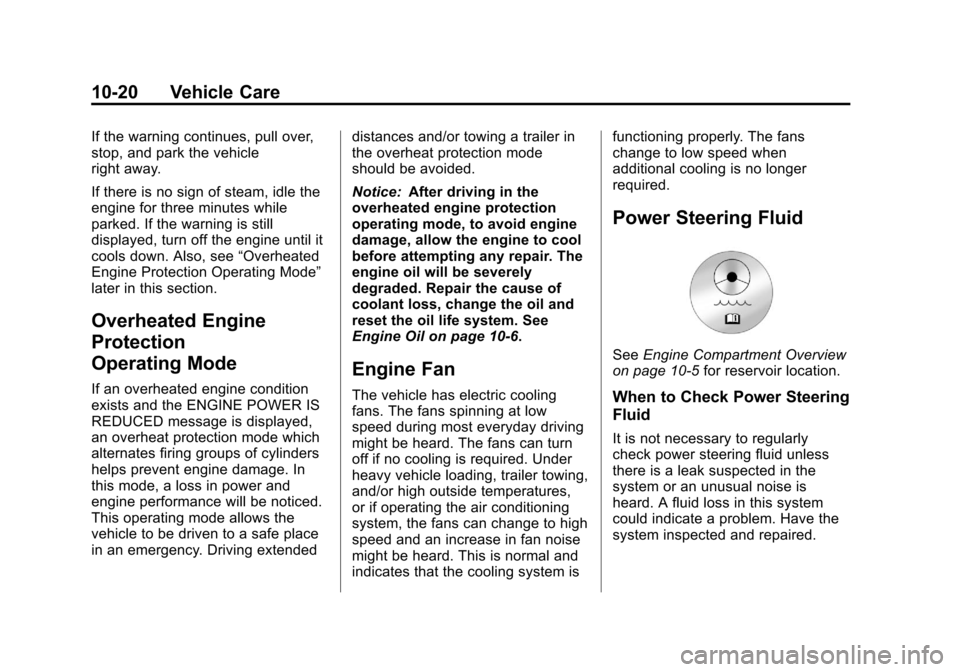
See
Engine Compartment Overview
on page 10‑5 for reservoir location.
When to Check Power Steering
Fluid
It is not necessary to regularly
check power steering fluid unless
there is a leak suspected in the
system or an unusual noise is
heard. A fluid loss in this system
could indicate a problem. Have the
system inspected and repaired.
Page 370 of 494

Black plate (36,1)Chevrolet Avalanche Owner Manual - 2013 - CRC - 8/27/12
10-36 Vehicle Care
The vehicle may not be equipped
with all of the fuses, relays, and
features shown.Fuses Usage
1 Right Trailer Stop/ Turn Lamp
2 Electronic Stability Suspension
Control, Automatic
Level Control
Exhaust
3 Left Trailer Stop/ Turn Lamp
4 Engine Controls
5 Engine Control Module, Throttle
Control
6 Trailer Brake Controller
7 Front Washer
8 Oxygen Sensors
9 Antilock Brake System 2 Fuses Usage
10 Trailer Back-up Lamps
11 Driver Side Low-Beam
Headlamp
12 Engine Control Module (Battery)
13 Fuel Injectors, Ignition Coils
(Right Side)
14 Transmission Control Module
(Battery)
15 Vehicle Back-up Lamps
16 Passenger Side Low-Beam
Headlamp
17 Air Conditioning Compressor
18 Oxygen Sensors Fuses Usage
19 Transmission Controls (Ignition)
20 Fuel Pump
21 Fuel System Control Module
22 Headlamp Washer
23 Rear Windshield Washer
24 Fuel Injectors, Ignition Coils
(Left Side)
25 Trailer Park Lamps
26 Driver Side Park Lamps
27 Passenger Side Park Lamps
28 Fog Lamps
29 Horn
30 Passenger Side High-Beam
Headlamp
Page 372 of 494

Black plate (38,1)Chevrolet Avalanche Owner Manual - 2013 - CRC - 8/27/12
10-38 Vehicle Care
J-CaseFuses Usage
57 Cooling Fan 1
58 Automatic Level Control
Compressor
59 Heavy Duty Antilock Brake
System
60 Cooling Fan 2
61 Antilock Brake System 1
62 Starter
63 Stud 2 (Trailer Brakes)
64 Left Bussed Electrical Center 1 J-Case
Fuses Usage
65 Electric Running Boards
66 Not Used
67 Transfer Case
68 Stud 1 (Trailer Connector Battery
Power)
69 Mid-Bussed Electrical Center 1
70 Climate Control Blower
71 Power Liftgate Module
72 Left Bussed Electrical Center 2 Relays Usage
FAN HI Cooling Fan High Speed
FAN LO Cooling Fan Low Speed
FAN CNTRL Cooling Fan Control
HDLP
LO/HID Low-Beam
Headlamp
FOG LAMP Front Fog Lamps
A/C
CMPRSR Air Conditioning
Compressor
STRTR Starter
PWR/TRN Powertrain
FUEL PMP Fuel Pump
PRK LAMP Parking Lamps
REAR
DEFOG Rear Defogger
RUN/CRNK Switched Power