2013 CADILLAC XTS Instrument panel
[x] Cancel search: Instrument panelPage 288 of 438

Black plate (60,1)Cadillac XTS Owner Manual - 2013 - 1st - 4/13/12
9-60 Driving and Operating
Towing
General Towing
Information
Only use towing equipment that has
been designed for the vehicle.
Contact your dealer or trailering
dealer for assistance with preparing
the vehicle for towing a trailer. Read
the entire section before towing a
trailer.
For towing a disabled vehicle, see
Towing the Vehicle on page 10‑74.
For towing the vehicle behind
another vehicle such as a motor
home, seeRecreational Vehicle
Towing on page 10‑74.
Driving Characteristics
and Towing Tips
Driving with a Trailer
When towing a trailer:
.Become familiar with the state
and local laws that apply
specifically to trailer towing.
.Do not tow a trailer during the
first 800 km (500 miles), to
prevent damage to the engine,
axle or other parts.
.Then, during the first 800 km
(500 miles) trailer towing, do not
drive over 80 km/h (50 mph) and
do not make starts at full throttle.
.The vehicle can tow in D (Drive)
but M (Manual Mode) is
recommended. See Manual
Mode on page 9‑24. Use a lower
gear if the transmission shifts
too often.
{WARNING
When towing a trailer, exhaust
gases may collect at the rear of
the vehicle and enter if the
liftgate, trunk/hatch, or rear-most
window is open.
(Continued)
WARNING (CONTINUED)
When towing a trailer:
.Do not drive with the liftgate,
trunk/hatch, or rear-most
window open.
.Fully open the air outlets on
or under the instrument
panel.
.Also adjust the Climate
Control system to a setting
that brings in only outside air.
See Climate Control System
in the Index.
For more information about
Carbon Monoxide, see Engine
Exhaust on page 9‑21.
Towing a trailer requires a certain
amount of experience. The
combination you are driving is
longer and not as responsive as the
vehicle itself. Get acquainted with
the handling and braking of the rig
before setting out for the open road.
Page 295 of 438

Black plate (1,1)Cadillac XTS Owner Manual - 2013 - 1st - 4/13/12
Vehicle Care 10-1
Vehicle Care
General Information
General Information . . . . . . . . . . 10-2
California Proposition65 Warning . . . . . . . . . . . . . . . . . 10-2
California Perchlorate Materials Requirements . . . . 10-3
Accessories and Modifications . . . . . . . . . . . . . . . 10-3
Vehicle Checks
Doing Your OwnService Work . . . . . . . . . . . . . . . 10-3
Hood . . . . . . . . . . . . . . . . . . . . . . . . 10-4
Engine Compartment Overview . . . . . . . . . . . . . . . . . . . 10-5
Engine Cover . . . . . . . . . . . . . . . . 10-6
Engine Oil . . . . . . . . . . . . . . . . . . . 10-6
Engine Oil Life System . . . . . . 10-9
Automatic Transmission Fluid . . . . . . . . . . . . . . . . . . . . . . 10-10
Engine Air Cleaner/Filter . . . . 10-10
Cooling System . . . . . . . . . . . . . 10-11
Engine Coolant . . . . . . . . . . . . . 10-12
Engine Overheating . . . . . . . . 10-14 Overheated Engine
Protection
Operating Mode . . . . . . . . . . . 10-16
Power Steering Fluid . . . . . . . 10-16
Washer Fluid . . . . . . . . . . . . . . . 10-17
Brakes . . . . . . . . . . . . . . . . . . . . . 10-18
Brake Fluid . . . . . . . . . . . . . . . . . 10-19
Battery . . . . . . . . . . . . . . . . . . . . . 10-20
All-Wheel Drive . . . . . . . . . . . . . 10-20
Starter Switch Check . . . . . . . 10-20
Automatic Transmission Shift Lock Control Function
Check . . . . . . . . . . . . . . . . . . . . . 10-21
Park Brake and P (Park) Mechanism Check . . . . . . . . 10-21
Wiper Blade Replacement . . . . . . . . . . . . . . 10-22
Windshield Replacement . . . 10-22
Headlamp Aiming
Headlamp Aiming . . . . . . . . . . 10-23
Bulb Replacement
Bulb Replacement . . . . . . . . . . 10-23
High Intensity Discharge (HID) Lighting . . . . . . . . . . . . . 10-23
LED Lighting . . . . . . . . . . . . . . . 10-23 Back-Up Lamps . . . . . . . . . . . . 10-23
License Plate Lamp . . . . . . . . 10-24
Replacement Bulbs . . . . . . . . . 10-25
Electrical System
Electrical System
Overload . . . . . . . . . . . . . . . . . . 10-25
Fuses and Circuit Breakers . . . . . . . . . . . . . . . . . . 10-26
Engine Compartment Fuse Block . . . . . . . . . . . . . . . . . . . . . 10-26
Instrument Panel Fuse Block . . . . . . . . . . . . . . . . . . . . . 10-30
Rear Compartment Fuse Block . . . . . . . . . . . . . . . . . . . . . 10-32
Wheels and Tires
Tires . . . . . . . . . . . . . . . . . . . . . . . . 10-34
All-Season Tires . . . . . . . . . . . . 10-35
Winter Tires . . . . . . . . . . . . . . . . 10-35
Summer Tires . . . . . . . . . . . . . . 10-35
Tire Sidewall Labeling . . . . . . 10-36
Tire Designations . . . . . . . . . . . 10-38
Tire Terminology andDefinitions . . . . . . . . . . . . . . . . 10-38
Tire Pressure . . . . . . . . . . . . . . . 10-41
Tire Pressure for High-Speed Operation . . . . . . . . . . . . . . . . . 10-43
Page 298 of 438
Black plate (4,1)Cadillac XTS Owner Manual - 2013 - 1st - 4/13/12
10-4 Vehicle Care
This vehicle has an airbag system.
Before attempting to do your own
service work, seeServicing the
Airbag-Equipped Vehicle on
page 3‑38.
Keep a record with all parts receipts
and list the mileage and the date of
any service work performed. See
Maintenance Records on
page 11‑15.
Notice: Even small amounts of
contamination can cause damage
to vehicle systems. Do not allow
contaminants to contact the
fluids, reservoir caps,
or dipsticks.Hood
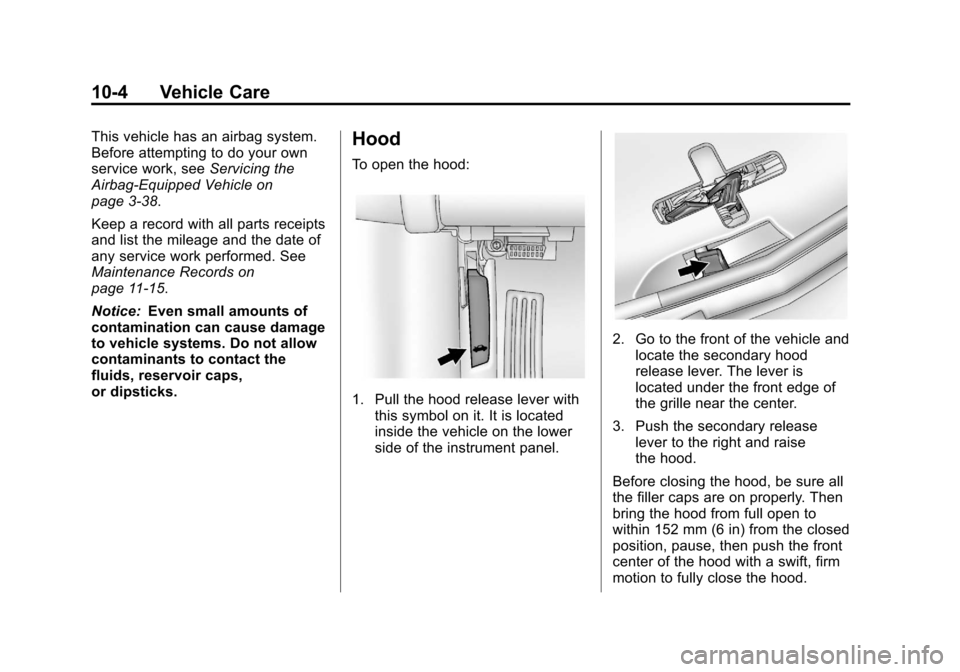
To open the hood:
1. Pull the hood release lever with this symbol on it. It is located
inside the vehicle on the lower
side of the instrument panel.
2. Go to the front of the vehicle andlocate the secondary hood
release lever. The lever is
located under the front edge of
the grille near the center.
3. Push the secondary release lever to the right and raise
the hood.
Before closing the hood, be sure all
the filler caps are on properly. Then
bring the hood from full open to
within 152 mm (6 in) from the closed
position, pause, then push the front
center of the hood with a swift, firm
motion to fully close the hood.
Page 320 of 438
Black plate (26,1)Cadillac XTS Owner Manual - 2013 - 1st - 4/13/12
10-26 Vehicle Care
Fuses and Circuit
Breakers
The wiring circuits in the vehicle are
protected from short circuits by a
combination of fuses and circuit
breakers. This greatly reduces the
chance of damage caused by
electrical problems.
To check a fuse, look at the
silver-colored band inside the fuse.
If the band is broken or melted,
replace the fuse. Be sure to replace
a bad fuse with a new one of the
identical size and rating.Fuses of the same amperage can
be temporarily borrowed from
another fuse location, if a fuse goes
out. Replace the fuse as soon as
possible.
To identify and check fuses, circuit
breakers, and relays, see
Engine
Compartment Fuse Block on
page 10‑26, Instrument Panel Fuse
Block on page 10‑30, and Rear
Compartment Fuse Block on
page 10‑32.
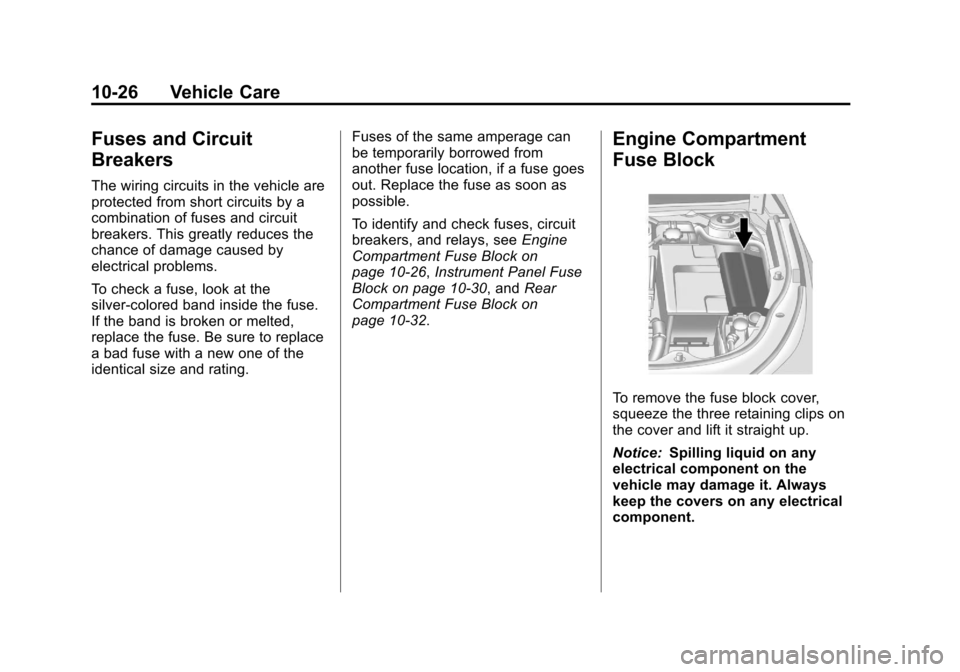
Engine Compartment
Fuse Block
To remove the fuse block cover,
squeeze the three retaining clips on
the cover and lift it straight up.
Notice: Spilling liquid on any
electrical component on the
vehicle may damage it. Always
keep the covers on any electrical
component.
Page 324 of 438

Black plate (30,1)Cadillac XTS Owner Manual - 2013 - 1st - 4/13/12
10-30 Vehicle Care
Instrument Panel Fuse
Block
The instrument panel fuse block is
located in the instrument panel, on
the driver side of the vehicle. To
access the fuses, open the fuse
panel door by pulling down at
the top.
Press in on the sides of the door to
release it from the instrument panel.
Pull the door toward you to release
it from the hinge.
The vehicle may not be equipped
with all of the fuses, relays, and
features shown.Fuses Usage
1 OnStar
2 Body Control
Module 7
3 Body Control
Module 5
4 Radio Fuses
Usage
5 Infotainment and
Center Stack
Displays, Head-up
Display, Instrument
Cluster, Rear Seat
Entertainment
6 Power Outlet 1
7 Power Outlet 2
8 Body Control
Module 1
9 Body Control
Module 4
10 Body Control
Module 8
(J-Case Fuse)
11 Front Heater
Ventilation Air
Conditioning/Blower
(J-Case Fuse)
12 Passenger Seat
(Circuit Breaker)
13 Driver Seat (Circuit
Breaker)
Page 375 of 438

Black plate (81,1)Cadillac XTS Owner Manual - 2013 - 1st - 4/13/12
Vehicle Care 10-81
Fabric/Carpet/Suede
Start by vacuuming the surface
using a soft brush attachment. If a
rotating brush attachment is being
used during vacuuming, only use it
on the floor carpet. Before cleaning,
gently remove as much of the soil
as possible using one of the
following techniques:
.Gently blot liquids with a paper
towel. Continue blotting until no
more soil can be removed.
.For solid soils, remove as much
as possible prior to vacuuming.
To clean:
1. Saturate a clean lint-free colorfast cloth with water or club
soda. Microfiber cloth is
recommended to prevent lint
transfer to the fabric or carpet.
2. Remove excess moisture by gently wringing until water does
not drip from the cleaning cloth. 3. Start on the outside edge of the
soil and gently rub toward the
center. Fold the cleaning cloth to
a clean area frequently to
prevent forcing the soil in to the
fabric.
4. Continue gently rubbing the soiled area until there is no
longer any color transfer from
the soil to the cleaning cloth.
5. If the soil is not completely removed, use a mild soap
solution followed only by club
soda or plain water.
If the soil is not completely
removed, it may be necessary to
use a commercial upholstery
cleaner or spot lifter. Test a small
hidden area for colorfastness before
using a commercial upholstery
cleaner or spot lifter. If ring
formation occurs, clean the entire
fabric or carpet.
Following the cleaning process, a
paper towel can be used to blot
excess moisture.
Cleaning High Gloss Surfaces
and Vehicle Information and
Radio Displays
For vehicles with high gloss
surfaces or vehicle displays, use a
microfiber cloth to wipe surfaces.
Before wiping the surface with the
microfiber cloth, use a soft bristle
brush to remove dirt that could
scratch the surface. Then use the
microfiber cloth by gently rubbing to
clean. Never use window cleaners
or solvents. Periodically hand wash
the microfiber cloth separately,
using mild soap. Do not use bleach
or fabric softener. Rinse thoroughly
and air dry before next use.
Instrument Panel, Leather,
Vinyl, & Other Plastic Surfaces
Use a soft microfiber cloth
dampened with water to remove
dust and loose dirt. For a more
thorough cleaning, use a soft
microfiber cloth dampened with a
mild soap solution.
Page 376 of 438

Black plate (82,1)Cadillac XTS Owner Manual - 2013 - 1st - 4/13/12
10-82 Vehicle Care
Notice:Soaking or saturating
leather, especially perforated
leather, as well as other interior
surfaces, may cause permanent
damage. Wipe excess moisture
from these surfaces after
cleaning and allow them to dry
naturally. Never use heat, steam,
spot lifters, or spot removers. Do
not use cleaners that contain
silicone or wax-based products.
Cleaners containing these
solvents can permanently change
the appearance and feel of leather
or soft trim and are not
recommended.
Do not use cleaners that increase
gloss, especially on the instrument
panel. Reflected glare can decrease
visibility through the windshield
under certain conditions.
Notice: Use of air fresheners may
cause permanent damage to
plastics and painted surfaces.
If an air freshener comes in
contact with any plastic or
painted surface in the vehicle,
blot immediately and clean with a soft cloth dampened with a mild
soap solution. Damage caused by
air fresheners would not be
covered by the vehicle warranty.
Cargo Cover and
Convenience Net
Wash with warm water and mild
detergent. Do not use chlorine
bleach. Rinse with cold water, and
then dry completely.
Care of Safety Belts
Keep belts clean and dry.
{WARNING
Do not bleach or dye safety belts.
It may severely weaken them. In
a crash, they might not be able to
provide adequate protection.
Clean safety belts only with mild
soap and lukewarm water.
Floor Mats
{WARNING
If a floor mat is the wrong size or
is not properly installed, it can
interfere with the pedals.
Interference with the pedals can
cause unintended acceleration
and/or increased stopping
distance which can cause a crash
and injury. Make sure the floor
mat does not interfere with the
pedals.
Use the following guidelines for
proper floor mat usage.
.The original equipment floor
mats were designed for your
vehicle. If the floor mats need
replacing, it is recommended
that GM certified floor mats be
purchased. Non-GM floor mats
may not fit properly and may
interfere with the pedals. Always
check that the floor mats do not
interfere with the pedals.
Page 395 of 438

Black plate (1,1)Cadillac XTS Owner Manual - 2013 - 1st - 4/13/12
Technical Data 12-1
Technical Data
Vehicle Identification
Vehicle IdentificationNumber (VIN) . . . . . . . . . . . . . . 12-1
Service Parts Identification Label . . . . . . . . . . . . . . . . . . . . . . . 12-1
Vehicle Data
Capacities andSpecifications . . . . . . . . . . . . . . 12-2
Engine Drive Belt Routing . . . 12-3
Vehicle Identification
Vehicle Identification
Number (VIN)
This legal identifier is in the front
corner of the instrument panel, on
the left side of the vehicle. It can be
seen through the windshield from
outside. The VIN also appears on
the Vehicle Certification and Service
Parts labels and certificates of title
and registration.
Engine Identification
The eighth character in the VIN is
the engine code. This code
identifies the vehicle's engine,
specifications, and replacement
parts. See “Engine Specifications”
under Capacities and Specifications
on page 12‑2 for the vehicle's
engine code.
Service Parts
Identification Label
This label, on the load floor under
the spare tire cover in the trunk, has
the following information:
.Vehicle Identification
Number (VIN).
.Model designation.
.Paint information.
.Production options and special
equipment.
Do not remove this label from the
vehicle.