2013 CADILLAC XTS ECU
[x] Cancel search: ECUPage 113 of 438
Black plate (57,1)Cadillac XTS Owner Manual - 2013 - 1st - 4/13/12
Seats and Restraints 3-57
Securing Child Restraints
(Front Passenger Seat)
This vehicle has airbags. A rear
seat is a safer place to secure a
forward-facing child restraint. See
Where to Put the Restraint on
page 3‑47
In addition, the vehicle has a
passenger sensing system which is
designed to turn off the front
passenger frontal airbag under
certain conditions. SeePassenger
Sensing System on page 3‑34 and
Passenger Airbag Status Indicator
on page 5‑17 for more information,
including important safety
information.
A label on the sun visor says,
“Never put a rear-facing child seat in
the front.” This is because the risk to
the rear-facing child is so great,
if the airbag deploys.
{WARNING
A child in a rear-facing child
restraint can be seriously injured
or killed if the front passenger
airbag inflates. This is because
the back of the rear-facing child
restraint would be very close to
the inflating airbag. A child in a
forward-facing child restraint can
be seriously injured or killed if the
front passenger airbag inflates
and the passenger seat is in a
forward position.
Even if the passenger sensing
system has turned off the front
passenger frontal airbag, no
system is fail-safe. No one can
guarantee that an airbag will not
deploy under some unusual
circumstance, even though it is
turned off.
(Continued)
WARNING (CONTINUED)
Secure rear-facing child restraints
in a rear seat, even if the airbag
is off. If you secure a
forward-facing child restraint in
the front seat, always move the
front passenger seat as far back
as it will go. It is better to secure
the child restraint in a rear seat.
SeePassenger Sensing System
on page 3‑34 for additional
information.
If the child restraint has the LATCH
system, see Lower Anchors and
Tethers for Children (LATCH
System) on page 3‑48 for how and
where to install the child restraint
using LATCH. If a child restraint is
secured using a safety belt and it
uses a top tether, see Lower
Anchors and Tethers for Children
(LATCH System) on page 3‑48 for
top tether anchor locations.
Page 114 of 438
Black plate (58,1)Cadillac XTS Owner Manual - 2013 - 1st - 4/13/12
3-58 Seats and Restraints
Do not secure a child seat in a
position without a top tether anchor
if a national or local law requires
that the top tether be anchored, or if
the instructions that come with the
child restraint say that the top strap
must be anchored.
In Canada, the law requires that
forward-facing child restraints have
a top tether, and that the tether be
attached.
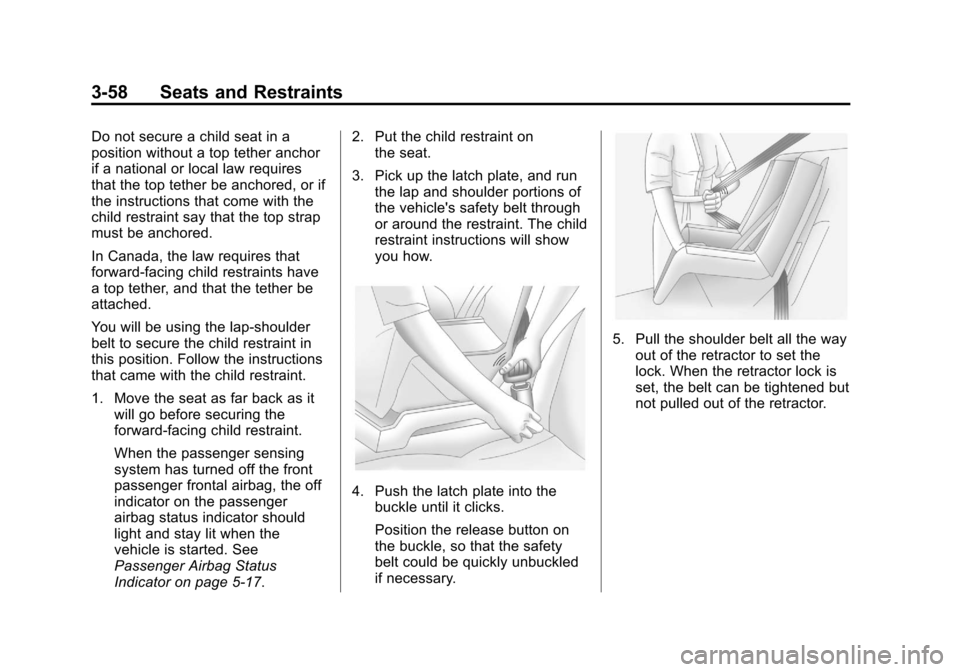
You will be using the lap-shoulder
belt to secure the child restraint in
this position. Follow the instructions
that came with the child restraint.
1. Move the seat as far back as itwill go before securing the
forward-facing child restraint.
When the passenger sensing
system has turned off the front
passenger frontal airbag, the off
indicator on the passenger
airbag status indicator should
light and stay lit when the
vehicle is started. See
Passenger Airbag Status
Indicator on page 5‑17. 2. Put the child restraint on
the seat.
3. Pick up the latch plate, and run the lap and shoulder portions of
the vehicle's safety belt through
or around the restraint. The child
restraint instructions will show
you how.
4. Push the latch plate into thebuckle until it clicks.
Position the release button on
the buckle, so that the safety
belt could be quickly unbuckled
if necessary.
5. Pull the shoulder belt all the wayout of the retractor to set the
lock. When the retractor lock is
set, the belt can be tightened but
not pulled out of the retractor.
Page 115 of 438

Black plate (59,1)Cadillac XTS Owner Manual - 2013 - 1st - 4/13/12
Seats and Restraints 3-59
6. To tighten the belt, push downon the child restraint, pull the
shoulder portion of the belt to
tighten the lap portion of the belt,
and feed the shoulder belt back
into the retractor. When installing
a forward-facing child restraint, it
may be helpful to use your knee
to push down on the child
restraint as you tighten the belt.
Try to pull the belt out of the
retractor to make sure the
retractor is locked. If the
retractor is not locked, repeat
Steps 5 and 6. 7. Before placing a child in the
child restraint, make sure it is
securely held in place. To check,
grasp the child restraint at the
safety belt path and attempt to
move it side to side and back
and forth. When the child
restraint is properly installed,
there should be no more than
2.5 cm (1 in) of movement.
If the airbag is off, the off indicator in
the passenger airbag status
indicator will come on and stay on
when the vehicle is started.
If a child restraint has been installed
and the on indicator is lit, see “If the
On Indicator Is Lit for a Child
Restraint” underPassenger Sensing
System on page 3‑34.
To remove the child restraint,
unbuckle the vehicle safety belt and
let it return to the stowed position.
Page 120 of 438
Black plate (4,1)Cadillac XTS Owner Manual - 2013 - 1st - 4/13/12
4-4 Storage
There is storage in the rear of the
center console; lift the cover to
access.
The center console has a storage
area in the rear of the console.
Press and release the door to
access. Push the door to close.
There is a power outlet inside the
storage areas. SeePower Outlets
on page 5‑6.Additional Storage
Features
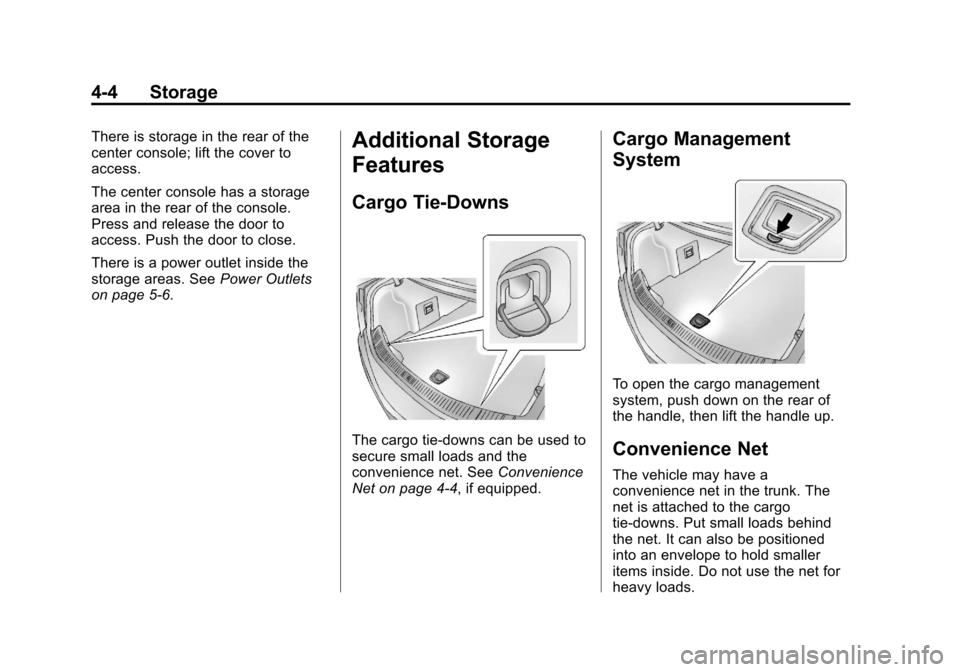
Cargo Tie-Downs
The cargo tie-downs can be used to
secure small loads and the
convenience net. See Convenience
Net on page 4‑4, if equipped.
Cargo Management
System
To open the cargo management
system, push down on the rear of
the handle, then lift the handle up.
Convenience Net
The vehicle may have a
convenience net in the trunk. The
net is attached to the cargo
tie-downs. Put small loads behind
the net. It can also be positioned
into an envelope to hold smaller
items inside. Do not use the net for
heavy loads.
Page 121 of 438

Black plate (1,1)Cadillac XTS Owner Manual - 2013 - 1st - 4/13/12
Instruments and Controls 5-1
Instruments and
Controls
Controls
Steering Wheel Adjustment . . . 5-2
Steering Wheel Controls . . . . . . 5-2
Heated Steering Wheel . . . . . . . 5-3
Horn . . . . . . . . . . . . . . . . . . . . . . . . . . 5-3
Windshield Wiper/Washer . . . . . 5-3
Compass . . . . . . . . . . . . . . . . . . . . . 5-5
Clock . . . . . . . . . . . . . . . . . . . . . . . . . 5-5
Power Outlets . . . . . . . . . . . . . . . . . 5-6
Cigarette Lighter . . . . . . . . . . . . . . 5-7
Warning Lights, Gauges, and
Indicators
Warning Lights, Gauges, andIndicators . . . . . . . . . . . . . . . . . . . . 5-8
Instrument Cluster . . . . . . . . . . . . 5-9
Speedometer . . . . . . . . . . . . . . . . 5-13
Odometer . . . . . . . . . . . . . . . . . . . . 5-13
Trip Odometer . . . . . . . . . . . . . . . 5-13
Tachometer . . . . . . . . . . . . . . . . . . 5-13
Fuel Gauge . . . . . . . . . . . . . . . . . . 5-13
Engine Coolant Temperature Gauge . . . . . . . . . . . . . . . . . . . . . . 5-15
Safety Belt Reminders . . . . . . . 5-15 Airbag Readiness Light . . . . . . 5-16
Passenger Airbag Status
Indicator . . . . . . . . . . . . . . . . . . . . 5-17
Charging System Light . . . . . . 5-18
Malfunction Indicator Lamp . . . . . . . . . . . . . 5-18
Brake System Warning Light . . . . . . . . . . . . . . . . . . . . . . . 5-20
Electric Parking Brake Light . . . . . . . . . . . . . . . . . . . . . . . 5-21
Service Electric Parking Brake Light . . . . . . . . . . . . . . . . . . . . . . . 5-21
Antilock Brake System (ABS) Warning Light . . . . . . . . . . . . . . 5-22
Lane Departure Warning (LDW) Light . . . . . . . . . . . . . . . . 5-22
Forward Collision Alert (FCA) Warning Light . . . . . . . . . . . . . . 5-23
Traction Off Light . . . . . . . . . . . . 5-23
StabiliTrak®OFF Light . . . . . . . 5-23
Traction Control System (TCS)/StabiliTrak
®Light . . . . 5-24
Engine Coolant Temperature Warning Light . . . . . . . . . . . . . . 5-24
Tire Pressure Light . . . . . . . . . . 5-25
Engine Oil Pressure Light . . . . 5-25
Low Fuel Warning Light . . . . . . 5-25
Security Light . . . . . . . . . . . . . . . . 5-26
High-Beam On Light . . . . . . . . . 5-26 Adaptive Forward Lighting
(AFL) Light . . . . . . . . . . . . . . . . . 5-26
Lamps On Reminder . . . . . . . . . 5-27
Cruise Control Light . . . . . . . . . 5-27
Information Displays
Driver Information Center (DIC) . . . . . . . . . . . . . . . 5-27
Head-Up Display (HUD) . . . . . 5-30
Vehicle Messages
Vehicle Messages . . . . . . . . . . . 5-34
Battery Voltage and Charging Messages . . . . . . . . . . . . . . . . . . 5-34
Brake System Messages . . . . 5-35
Compass Messages . . . . . . . . . 5-35
Cruise Control Messages . . . . 5-35
Door Ajar Messages . . . . . . . . . 5-36
Engine Cooling System Messages . . . . . . . . . . . . . . . . . . 5-36
Engine Oil Messages . . . . . . . . 5-37
Engine Power Messages . . . . 5-37
Fuel System Messages . . . . . . 5-37
Key and Lock Messages . . . . . 5-38
Lamp Messages . . . . . . . . . . . . . 5-38
Object Detection System Messages . . . . . . . . . . . . . . . . . . 5-39
Ride Control System Messages . . . . . . . . . . . . . . . . . . 5-41
Page 122 of 438

Black plate (2,1)Cadillac XTS Owner Manual - 2013 - 1st - 4/13/12
5-2 Instruments and Controls
Airbag System Messages . . . . 5-42
Security Messages . . . . . . . . . . 5-42
Service Vehicle Messages . . . 5-42
Starting the VehicleMessages . . . . . . . . . . . . . . . . . . 5-42
Tire Messages . . . . . . . . . . . . . . . 5-42
Transmission Messages . . . . . 5-43
Vehicle Reminder Messages . . . . . . . . . . . . . . . . . . 5-43
Vehicle Speed Messages . . . . 5-44
Washer Fluid Messages . . . . . 5-44
Window Messages . . . . . . . . . . . 5-44
Vehicle Personalization
Vehicle Personalization . . . . . . 5-44
Universal Remote System
Universal Remote System . . . 5-50
Universal Remote System Programming . . . . . . . . . . . . . . . 5-50
Universal Remote System Operation . . . . . . . . . . . . . . . . . . 5-53
Controls
Steering Wheel
Adjustment
Press the control to move the tilt
and telescoping steering wheel up
and down or forward and rearward.
Do not adjust the steering wheel
while driving.
Steering Wheel Controls
For vehicles with audio steering
wheel controls, some audio controls
can be adjusted at the steering
wheel.
g(Push to Talk): For vehicles with
OnStar® or a Bluetooth system,
press to talk or interact with those
systems. See OnStar Overview on
page 14‑1 or“Bluetooth” in the
separate infotainment manual.
Page 146 of 438
Black plate (26,1)Cadillac XTS Owner Manual - 2013 - 1st - 4/13/12
5-26 Instruments and Controls
This light is located near the fuel
gauge and comes on briefly when
the ignition is turned on as a check
to show it is working. For vehicles
with a reconfigurable cluster, this
light is located in the display area
and it may not come on when the
ignition is turned on.
It also comes on when the fuel tank
is low on fuel. The light turns off
when fuel is added. If it does not,
have the vehicle serviced.
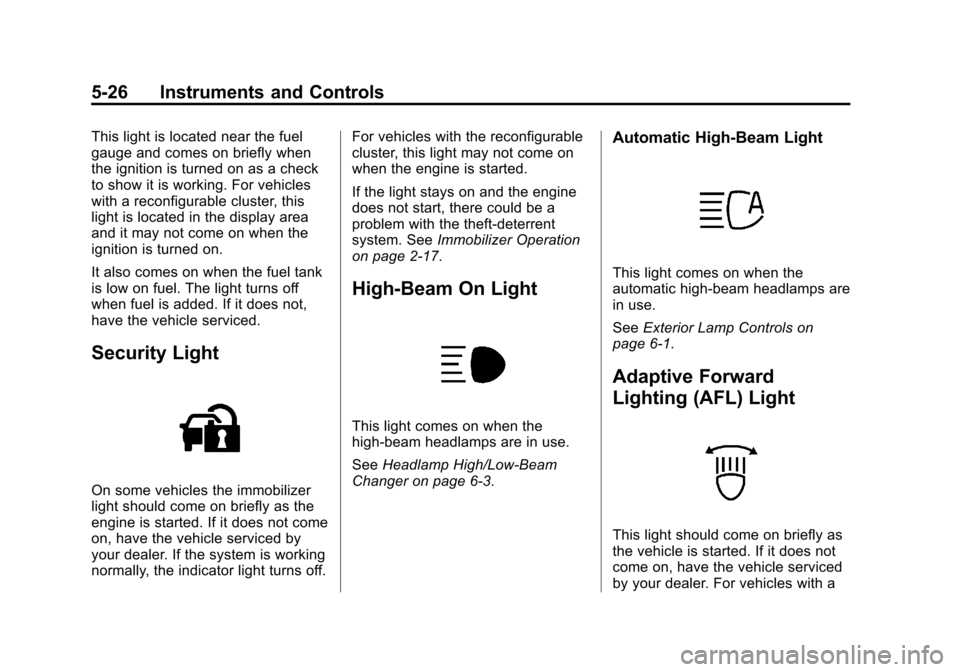
Security Light
On some vehicles the immobilizer
light should come on briefly as the
engine is started. If it does not come
on, have the vehicle serviced by
your dealer. If the system is working
normally, the indicator light turns off.For vehicles with the reconfigurable
cluster, this light may not come on
when the engine is started.
If the light stays on and the engine
does not start, there could be a
problem with the theft-deterrent
system. See
Immobilizer Operation
on page 2‑17.
High-Beam On Light
This light comes on when the
high-beam headlamps are in use.
See Headlamp High/Low-Beam
Changer on page 6‑3.
Automatic High-Beam Light
This light comes on when the
automatic high-beam headlamps are
in use.
See Exterior Lamp Controls on
page 6‑1.
Adaptive Forward
Lighting (AFL) Light
This light should come on briefly as
the vehicle is started. If it does not
come on, have the vehicle serviced
by your dealer. For vehicles with a
Page 162 of 438

Black plate (42,1)Cadillac XTS Owner Manual - 2013 - 1st - 4/13/12
5-42 Instruments and Controls
Airbag System Messages
SERVICE AIRBAG
This message displays if there is a
problem with the airbag system.
Take the vehicle to your dealer for
service.
Security Messages
THEFT ATTEMPTED
This message displays if the vehicle
detects a tamper condition.
Service Vehicle Messages
SERVICE AC SYSTEM
This message is displayed if there is
a problem with the air conditioning
system. Take the vehicle to your
dealer for service.
SERVICE POWER STEERING
This message is displayed if there is
a problem with the power steering
system and a chime may sound.
Take the vehicle to your dealer for
service.
SERVICE VEHICLE SOON
This message is displayed if there is
a problem with the vehicle. Take the
vehicle to your dealer for service.
Starting the Vehicle
Messages
PRESS BRAKE TO START
VEHICLE
This message is displayed when
attempting to start the vehicle
without first pressing the brake
pedal.
SERVICE KEYLESS START
SYSTEM
This message is displayed if there is
a problem with the pushbutton start
system. Take the vehicle to your
dealer for service.
Tire Messages
SERVICE TIRE MONITOR
SYSTEM
This message displays if there is a
problem with the Tire Pressure
Monitor System (TPMS). SeeTire
Pressure Monitor Operation on
page 10‑44.
TIRE LEARNING ACTIVE
This message displays when the
system is learning new tires. See
Tire Pressure Monitor Operation on
page 10‑44.