2013 CADILLAC SRX steering
[x] Cancel search: steeringPage 211 of 432
Black plate (15,1)Cadillac SRX Owner Manual - 2013 - CRC - 11/9/12
Driving and Operating 9-15
.Between the first 1 000 km
(600 mi) and 5 000 km
(3,000 mi), heavy
acceleration in lower gears
can be used. Vehicle speeds
above 110 km/h (68 mph)
should be limited to
five minutes per use.
.Avoid making hard stops for
the first 322 km (200 mi) or
so. During this time the new
brake linings are not yet
broken in. Hard stops with
new linings can mean
premature wear and earlier
replacement. Follow this
breaking-in guideline every
time you get new brake
linings.
.Do not tow a trailer during
break-in. SeeDriving
Characteristics and Towing
Tips on page 9‑65 for the
trailer towing capabilities of
your vehicle and more
information. Following break‐in, engine speed
and load can be gradually
increased.
Adjustable Throttle and
Brake Pedal
If the vehicle has this feature, the
position of the throttle and brake
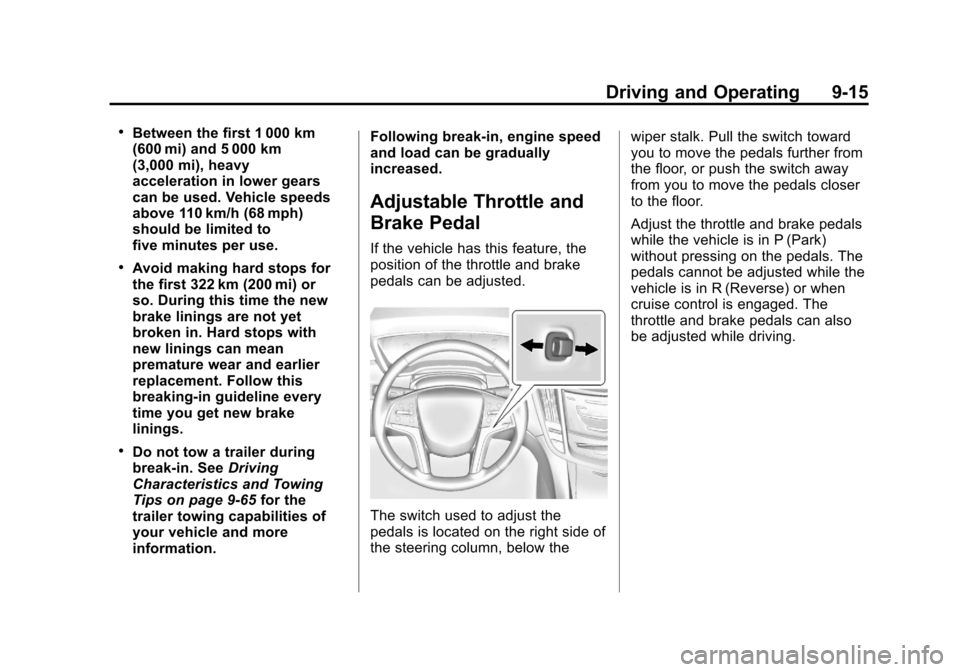
pedals can be adjusted.
The switch used to adjust the
pedals is located on the right side of
the steering column, below the
wiper stalk. Pull the switch toward
you to move the pedals further from
the floor, or push the switch away
from you to move the pedals closer
to the floor.
Adjust the throttle and brake pedals
while the vehicle is in P (Park)
without pressing on the pedals. The
pedals cannot be adjusted while the
vehicle is in R (Reverse) or when
cruise control is engaged. The
throttle and brake pedals can also
be adjusted while driving.
Page 212 of 432

Black plate (16,1)Cadillac SRX Owner Manual - 2013 - CRC - 11/9/12
9-16 Driving and Operating
Ignition Positions
The vehicle has an electronic
keyless ignition with pushbutton
start.
Pressing the button cycles it through
three modes, ACC/ACCESSORY,
ON/RUN/START and STOPPING
THE ENGINE/OFF.
If the pushbutton start is not
working, the vehicle may be near a
strong radio antenna signal causing
interference to the keyless entry
system. SeeKey and Lock
Messages on page 5‑34. To shift out of P (Park), the vehicle
must be in ON/RUN mode and the
brake pedal must be applied.
STOPPING THE ENGINE/OFF
(No Indicator Light):
When the
vehicle is stopped, press the engine
START/STOP button once to turn
the engine off.
If the vehicle is in P (Park), the
ignition will turn off, and Retained
Accessory Power (RAP) will remain
active. See Retained Accessory
Power (RAP) on page 9‑19.
If the vehicle is not in P (Park),
the ignition will return to ACC/
ACCESSORY and display the
message SHIFT TO PARK in the
Driver Information Center (DIC).
See Driver Information Center (DIC)
on page 5‑27. When the vehicle is
shifted into P (Park), the ignition
system will switch to OFF.
Do not turn the engine off when the
vehicle is moving. This will cause a
loss of power assist in the brake
and steering systems and disable
the airbags. If the vehicle must be shut off in an
emergency:
1. Brake using a firm and steady
pressure. Do not pump the
brakes repeatedly. This may
deplete power assist, requiring
increased brake pedal force.
2. Shift the vehicle to N (Neutral). This can be done while the
vehicle is moving. After shifting
to N (Neutral), firmly apply the
brakes and steer the vehicle to a
safe location.
3. Come to a complete stop, shift to P (Park), and turn the ignition
to OFF. On vehicles with an
automatic transmission, the shift
lever must be in P (Park) to turn
the ignition switch to the OFF
position.
4. Set the parking brake. See Parking Brake on page 9‑28.
Page 213 of 432

Black plate (17,1)Cadillac SRX Owner Manual - 2013 - CRC - 11/9/12
Driving and Operating 9-17
{WARNING
Turning off the vehicle while
moving may cause loss of power
assist in the brake and steering
systems and disable the airbags.
While driving, only shut the
vehicle off in an emergency.
If the vehicle cannot be pulled over,
and must be shut off while driving,
press and hold the engine START/
STOP button for longer than
two seconds, or press twice in
five seconds.
ACC/ACCESSORY (Amber
Indicator Light): This mode
allows you to use some electrical
accessories when the engine is off.
With the ignition off, pressing the
button one time without the brake
pedal applied, will place the ignition
system in ACC/ACCESSORY. The ignition will switch from ACC/
ACCESSORY to OFF after
ten minutes to prevent battery
run down.
ON/RUN/START (Green Indicator
Light):
This mode is for driving and
starting. With the ignition off, and
the brake pedal applied, pressing
the button once will place the
ignition system in ON/RUN/START.
Once engine cranking begins,
release the button. Engine cranking
will continue until the engine starts.
See Starting the Gasoline Engine
on page 9‑17. The ignition will then
remain in ON/RUN.
Service Only Mode
This power mode is available for
service and diagnostics, and to
verify the proper operation of the
malfunction indicator lamp as may
be required for emission inspection
purposes. With the vehicle off,
and the brake pedal not applied,
pressing and holding the button for
more than five seconds will place
the vehicle in Service Only Mode. The instruments and audio systems
will operate as they do in ON/RUN,
but the vehicle will not be able to be
driven. The engine will not start in
Service Only Mode. Push the button
again to turn the vehicle off.
Starting the Gasoline
Engine
Place the transmission in the proper
gear by moving the shift lever to
P (Park) or N (Neutral). To restart
the engine when the vehicle is
already moving, use N (Neutral).
Notice:
Do not try to shift to
P (Park) if the vehicle is moving.
If you do, you could damage the
transmission. Shift to P (Park)
only when the vehicle is stopped.
The keyless access transmitter must
be inside the vehicle for the ignition
to work.
Page 224 of 432

Black plate (28,1)Cadillac SRX Owner Manual - 2013 - CRC - 11/9/12
9-28 Driving and Operating
Remember: ABS does not change
the time needed to get a foot up to
the brake pedal or always decrease
stopping distance. If you get too
close to the vehicle in front of you,
there will not be enough time to
apply the brakes if that vehicle
suddenly slows or stops. Always
leave enough room up ahead to
stop, even with ABS.
Using ABS
Do not pump the brakes. Just hold
the brake pedal down firmly and let
ABS work. You might hear the ABS
pump or motor operating and feel
the brake pedal pulsate, but this is
normal.
Braking in Emergencies
ABS allows you to steer and brake
at the same time. In many
emergencies, steering can help
more than even the very best
braking.
Parking Brake
The vehicle has an Electric
Parking Brake (EPB). The switch
for the EPB is in the center
console. The EPB can always be
activated, even if the ignition is off.To avoid draining the battery, do not
cycle the EPB too often without the
engine running. The EPB can be left
applied while the vehicle is parked.
The system has a parking brake
status light and a parking brake
warning light. See
Brake System
Warning Light on page 5‑20. There
are also three Driver Information
Center (DIC) messages. See Driver
Information Center (DIC) on
page 5‑27. In case of insufficient
electrical power, the EPB cannot be
applied or released.
Before leaving the vehicle, check
the parking brake status light to
ensure the parking brake is applied.
Page 230 of 432

Black plate (34,1)Cadillac SRX Owner Manual - 2013 - CRC - 11/9/12
9-34 Driving and Operating
Both StabiliTrak and Traction
Control can be turned off if needed
by pressing and holding
guntilg
andiilluminate in the instrument
cluster. This will also disable the
TSC feature. When StabiliTrak is
turned off, the system will not assist
with directional control of the vehicle
or limit wheel spin. Driving should
be adjusted accordingly. The
Traction Control Off message is
displayed in the DIC. See Ride
Control System Messages on
page 5‑37.
Press and release
gagain to turn
the systems back on.
gandigo
out in the instrument cluster. The
Traction Control On message is
displayed in the DIC. See Ride
Control System Messages on
page 5‑37. If cruise control is being used when
StabiliTrak activates, the cruise
control will automatically disengage.
Press the cruise control button to
re-engage when road conditions
allow. See
Cruise Control on
page 9‑35.
Limited-Slip Rear Axle
Vehicles with a limited-slip rear axle
can give more traction on snow,
mud, ice, sand, or gravel. When
traction is low, this feature allows
the drive wheel with the most
traction to move the vehicle. The
limited-slip rear axle also gives the
driver enhanced control when
cornering hard or completing a
maneuver, such as a lane change.
Selective Ride Control
The vehicle may have a ride control
system called Selective Ride
Control. The setting can be changed
at any time. Based on road
conditions, steering wheel angle,
and the vehicle speed, the system
automatically adjusts to provide the
best handling while providing a
smooth ride. The Tour and Sport
modes will feel similar on a
smooth road.
Tour: Use for normal city and
highway driving. This setting
provides a smooth, soft ride.
Sport: Use where road conditions
or personal preference demand
more control. This setting provides
more “feel,” or response to road
conditions through increased
steering effort and suspension
control. Transmission shift points
and shift firmness are also
enhanced.
Page 236 of 432

Black plate (40,1)Cadillac SRX Owner Manual - 2013 - CRC - 11/9/12
9-40 Driving and Operating
To begin using ACC again, move
the control up toward +RES briefly.
The vehicle returns to the previous
set speed.
Increasing Speed While ACC is at
a Set Speed
If ACC is already activated, do one
of the following:
.Use the accelerator to get to the
higher speed. Move the control
toward SET–, then release it and
the accelerator pedal. The
vehicle will now cruise at the
higher speed.
When the accelerator pedal is
pressed, ACC will not brake
because it is overridden.
A warning message will appear
on the Driver Information Center
(DIC). SeeCruise Control
Messages on page 5‑31.
.Move the control toward +RES
and hold until the desired set
speed appears on the display,
then release it.
.To increase vehicle speed in
small amounts, move the control
toward +RES and then release
it. Each time this is done, the
vehicle goes 1.6 km/h (1 mph)
faster.
When it is determined that there is
no vehicle in front of your vehicle
slower than the set speed, then the
vehicle speed will increase to the
set speed.
Reducing Speed While ACC is at a
Set Speed
If ACC is already activated, do one
of the following:
.Use the brake to get to the
desired lower speed. Move the
control toward SET– and release
the accelerator pedal. The
vehicle will now cruise at the
lower speed.
.Move the control toward
SET− and hold until the desired
lower speed is reached, then
release it.
.To decrease the vehicle speed in
small amounts, move the control
toward SET− briefly. Each time
this is done, the vehicle goes
about 1.6 km/h (1 mph) slower.
Selecting the Follow Distance
When a slower moving vehicle is
detected ahead, ACC will adjust the
vehicle's speed and attempt to
maintain the follow distance gap
selected.
Press
3on the steering wheel to
adjust the following gap. Each press
cycles the gap button through three
settings: Far, Medium, or Near.
When pressed, the current gap
setting displays briefly on the
instrument cluster. The gap setting
will be maintained until it is
changed.
Page 248 of 432

Black plate (52,1)Cadillac SRX Owner Manual - 2013 - CRC - 11/9/12
9-52 Driving and Operating
Collision Alert
When the vehicle is started, this
series of red lights will come on to
indicate the system is operating.
When your vehicle approaches
another vehicle too rapidly, the red
lights will flash on the windshield.
Either eight beeps will sound from
the front, or both sides of the Safety
Alert Seat will pulse five times. If a
collision alert occurs when cruise
control is activated, cruise control is
disengaged.Tailgating AlertThe vehicle-ahead indicator will
display amber when you are
following a vehicle ahead much too
closely.
Selecting the Alert Timing
With Adaptive Cruise Control
Without Adaptive Cruise Control
Press the collision alert/following
gap button on the steering wheel to
set the FCA timing to far, medium,
near, or on some vehicles, off. The
first button press shows the current
setting on the DIC. Additional button
presses will change this setting.
The chosen setting will remain until
it is changed and will affect the
timing of both the Collision Alert
and the Tailgating Alert features.
Page 262 of 432

Black plate (66,1)Cadillac SRX Owner Manual - 2013 - CRC - 11/9/12
9-66 Driving and Operating
Towing a trailer requires a certain
amount of experience. The
combination you are driving is
longer and not as responsive as the
vehicle itself. Get acquainted with
the handling and braking of the rig
before setting out for the open road.
Before starting, check all trailer hitch
parts and attachments, safety
chains, electrical connectors, lamps,
tires and mirrors. If the trailer
has electric brakes, start the
combination moving and then apply
the trailer brake controller by hand
to be sure the brakes work.
During the trip, check occasionally
to be sure that the load is secure
and the lamps and any trailer
brakes still work.Towing with a Stability Control
System
When towing, the sound of the
stability control system might be
heard. The system is reacting to the
vehicle movement caused by the
trailer, which mainly occurs during
cornering. This is normal when
towing heavier trailers.
Following Distance
Stay at least twice as far behind the
vehicle ahead as you would when
driving the vehicle without a trailer.
This can help to avoid situations
that require heavy braking and
sudden turns.
Passing
More passing distance is needed
when towing a trailer. Because the
rig is longer, it is necessary to go
farther beyond the passed vehicle
before returning to the lane.
Backing Up
Hold the bottom of the steering
wheel with one hand. To move the
trailer to the left, move your hand to
the left. To move the trailer to the
right, move your hand to the right.
Always back up slowly and,
if possible, have someone
guide you.
Making Turns
Notice:Making very sharp turns
while trailering could cause the
trailer to come in contact with the
vehicle. The vehicle could be
damaged. Avoid making very
sharp turns while trailering.
When turning with a trailer, make
wider turns than normal so the
trailer will not strike soft shoulders,
curbs, road signs, trees or other
objects. Use the turn signal well in
advance and avoid jerky or sudden
maneuvers.