2013 CADILLAC SRX center console
[x] Cancel search: center consolePage 113 of 432

Black plate (1,1)Cadillac SRX Owner Manual - 2013 - CRC - 11/9/12
Storage 4-1
Storage
Storage Compartments
Glove Box . . . . . . . . . . . . . . . . . . . . 4-1
Cupholders . . . . . . . . . . . . . . . . . . . 4-1
Front Storage . . . . . . . . . . . . . . . . . 4-2
Armrest Storage . . . . . . . . . . . . . . 4-2
Center Console Storage . . . . . . 4-2
Additional Storage Features
Cargo Cover . . . . . . . . . . . . . . . . . . 4-3
Cargo Tie-Downs . . . . . . . . . . . . . 4-4
Cargo ManagementSystem . . . . . . . . . . . . . . . . . . . . . . 4-4
Cargo Net . . . . . . . . . . . . . . . . . . . . . 4-9
Convenience Net . . . . . . . . . . . . 4-10
Roof Rack System
Roof Rack System . . . . . . . . . . . 4-11
Storage
Compartments
Glove Box
Lift the glove box handle up to open
it. Use the key to lock and unlock
the glove box.
The glove box is air conditioned and
can be used to store items at a
lower temperature. The vehicle air
conditioning must be turned on for the maximum cool air to enter the
glove box. Move the slide control to
allow cool air into the glove box.
After opening the air flow, close the
glove box door to keep the cold air
from entering the vehicle.
Cupholders
This vehicle has a cupholder
equipped with a divider that can be
adjusted to accommodate large
containers or small containers.
Page 114 of 432

Black plate (2,1)Cadillac SRX Owner Manual - 2013 - CRC - 11/9/12
4-2 Storage
For large containers, push the
button to move aside the divider and
make the cupholder deeper. For
small containers, push down on the
top edge of the divider to lock it
back in place and make the
cupholder shorter.
Front Storage
If equipped with storage behind the
climate control system, touch and
hold the chrome bar at the bottom of
the climate control system panel toopen. There is a USB port inside.
See
“USB/SD Port” in the
infotainment manual.
Keep the storage area closed when
not in use.
Touch and hold the chrome bar at
the bottom of the climate control
system panel again to close.A storage area is located in front of
the shift lever. Push upward on the
top of the door and release; the
door automatically opens. There is an accessory power outlet
inside. See
Power Outlets on
page 5‑7.
Armrest Storage
For vehicles with a rear seat
armrest, pull the rear seat armrest
forward to access cupholders with
removable liners. For vehicles with
a rear storage area, pull the lever to
access.
Center Console Storage
The center console has an armrest,
upper storage tray, and a lower
storage area.
The armrest can be adjusted, slide
the top of the armrest to adjust to
the desired position.
Push the driver side button to
access the upper storage tray. Push
the passenger side button to access
the lower storage area.
Page 115 of 432
Black plate (3,1)Cadillac SRX Owner Manual - 2013 - CRC - 11/9/12
Storage 4-3
There is an accessory power outlet
inside the center console and two
USB ports. SeePower Outlets on
page 5‑7 and the separate
infotainment manual.
Push the button to open the storage
area on the rear of the center
console. If equipped with rear seat
entertainment (RSE), the audio/
video jacks, USB port, and SD port
will be inside. See the separate
infotainment manual.
Additional Storage
Features
Cargo Cover
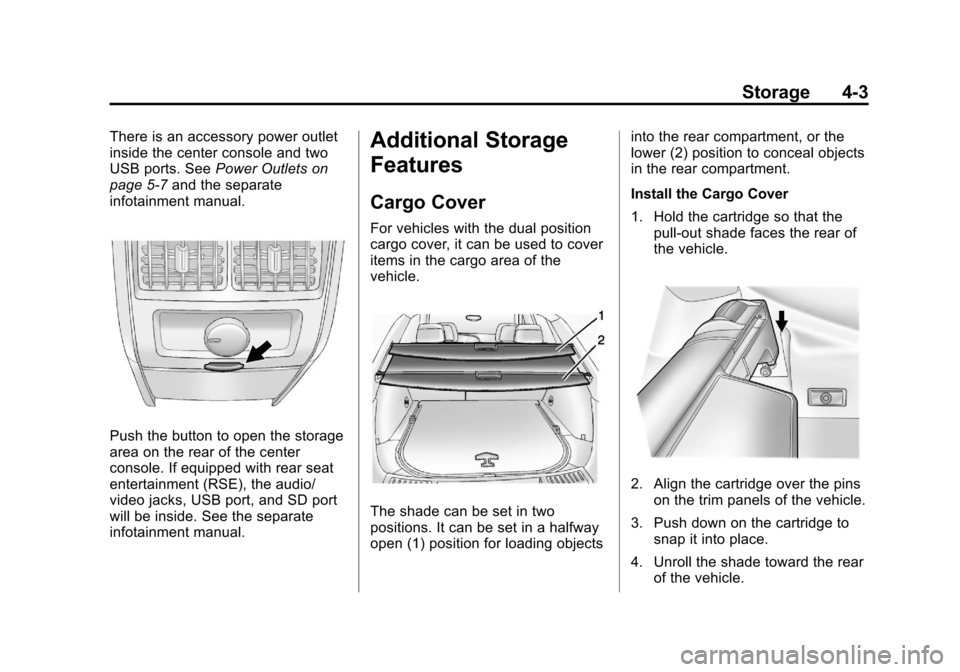
For vehicles with the dual position
cargo cover, it can be used to cover
items in the cargo area of the
vehicle.
The shade can be set in two
positions. It can be set in a halfway
open (1) position for loading objects into the rear compartment, or the
lower (2) position to conceal objects
in the rear compartment.
Install the Cargo Cover
1. Hold the cartridge so that the
pull-out shade faces the rear of
the vehicle.
2. Align the cartridge over the pinson the trim panels of the vehicle.
3. Push down on the cartridge to snap it into place.
4. Unroll the shade toward the rear of the vehicle.
Page 131 of 432

Black plate (7,1)Cadillac SRX Owner Manual - 2013 - CRC - 11/9/12
Instruments and Controls 5-7
Compass
The vehicle may have a compass
display on the Driver Information
Center (DIC). The compass
receives its heading and other
information from the Global
Positioning System (GPS) antenna,
StabiliTrak
®, and vehicle speed
information.
The compass system is designed to
operate for a certain number of
miles or degrees of turn before
needing a signal from the GPS
satellites. When the compass
display shows CAL, drive the
vehicle for a short distance in an
open area where it can receive a
GPS signal. The compass system
will automatically determine when a
GPS signal is restored and provide
a heading again. See Compass
Messages on page 5‑31 for the
messages that may be displayed for
the compass.
Clock
The infotainment system controls
are used to access the time and
date settings through the menu
system. See “Home Page” in the
infotainment manual for information
about how to use the menu system.
Setting the Time
To set the time:
1. From the Home Page, press the SETTINGS screen button and
press Time and Date.
2. Press Set Time and press + or−to increase or decrease
hours, minutes, and AM or PM.
Press 12Hr or 24Hr for 12 or
24 hour clock.
3. Press
}to go back to the
previous menu. To set the date:
1. Press the SETTINGS screen
button and press Time and Date.
2. Press Set Date and press + or−to increase or decrease
month, day, or year.
3. Press
}to go back to the
previous menu.
Power Outlets
The accessory power outlets can be
used to plug in electrical equipment,
such as a cell phone or MP3 player.
The vehicle may have five
accessory power outlets.
The accessory power outlets are:
.Below the climate control system
inside the front storage bin.
.Inside the center floor console.
Page 132 of 432

Black plate (8,1)Cadillac SRX Owner Manual - 2013 - CRC - 11/9/12
5-8 Instruments and Controls
.On the rear of the center floor
console. For vehicles with a rear
climate control system, there will
be two accessory power outlets
on the rear of the center floor
console.
.In the rear cargo area.
These are powered while the
vehicle is in ON/RUN/START or
ACC/ACCESSORY mode, or until
the driver door is opened within
10 minutes of turning off the vehicle.
The power outlet located in the rear
cargo area is powered at all times.
There is a small cap that must be
removed to access the accessory
power outlet. When not using the
outlet be sure to cover it with the
protective cap.
Notice: Leaving electrical
equipment plugged in for an
extended period of time while
the vehicle is off will drain the
battery. Power is always supplied to the rear cargo outlet. Always
unplug electrical equipment when
not in use and do not plug in
equipment that exceeds the
maximum 20 ampere rating.
Certain accessory power plugs
may not be compatible with the
accessory power outlet and could
overload vehicle or adapter fuses.
If a problem is experienced, see
your dealer.
When adding electrical equipment,
be sure to follow the proper
installation instructions included
with the equipment. See
Add-On
Electrical Equipment on page 9‑72.
Notice: Hanging heavy
equipment from the power outlet
can cause damage not covered
by the vehicle warranty. The
power outlets are designed for
accessory power plugs only, such
as cell phone charge cords.
Cigarette Lighter
There may be a cigarette lighter
located under the climate control
system, inside the front storage bin.
To activate the cigarette lighter,
push it into the heating element and
let go. The lighter pops out when it
is ready to be used.
Notice: Holding a cigarette lighter
in while it is heating does not let
the lighter back away from the
heating element when it is hot.
Damage from overheating can
occur to the lighter or heating
element, or a fuse could be
blown. Do not hold a cigarette
lighter in while it is heating.
Ashtrays
There may be an ashtray located
under the climate control system on
the instrument panel. Press the door
to release the ashtray.
Page 133 of 432

Black plate (9,1)Cadillac SRX Owner Manual - 2013 - CRC - 11/9/12
Instruments and Controls 5-9
To empty the ashtray, remove it from
the instrument panel by holding the
edges and pulling straight out. To
reinstall, push the tray back into
place.
There may also be ashtrays located
on the center floor console behind
the shift lever and in the rear doors.
Notice:If papers, pins, or other
flammable items are put in the
ashtray, hot cigarettes or other
smoking materials could ignite
them and possibly damage the
vehicle. Never put flammable
items in the ashtray.Warning Lights,
Gauges, and
Indicators
Warning lights and gauges can
signal that something is wrong
before it becomes serious enough
to cause an expensive repair or
replacement. Paying attention to the
warning lights and gauges could
prevent injury.
Warning lights come on when there
could be a problem with a vehicle
function. Some warning lights come
on briefly when the engine is started
to indicate they are working. Gauges can indicate when there
could be a problem with a vehicle
function. Often gauges and warning
lights work together to indicate a
problem with the vehicle.
When one of the warning lights
comes on and stays on while
driving, or when one of the gauges
shows there may be a problem,
check the section that explains what
to do. Follow this manual's advice.
Waiting to do repairs can be costly
and even dangerous.
Page 224 of 432

Black plate (28,1)Cadillac SRX Owner Manual - 2013 - CRC - 11/9/12
9-28 Driving and Operating
Remember: ABS does not change
the time needed to get a foot up to
the brake pedal or always decrease
stopping distance. If you get too
close to the vehicle in front of you,
there will not be enough time to
apply the brakes if that vehicle
suddenly slows or stops. Always
leave enough room up ahead to
stop, even with ABS.
Using ABS
Do not pump the brakes. Just hold
the brake pedal down firmly and let
ABS work. You might hear the ABS
pump or motor operating and feel
the brake pedal pulsate, but this is
normal.
Braking in Emergencies
ABS allows you to steer and brake
at the same time. In many
emergencies, steering can help
more than even the very best
braking.
Parking Brake
The vehicle has an Electric
Parking Brake (EPB). The switch
for the EPB is in the center
console. The EPB can always be
activated, even if the ignition is off.To avoid draining the battery, do not
cycle the EPB too often without the
engine running. The EPB can be left
applied while the vehicle is parked.
The system has a parking brake
status light and a parking brake
warning light. See
Brake System
Warning Light on page 5‑20. There
are also three Driver Information
Center (DIC) messages. See Driver
Information Center (DIC) on
page 5‑27. In case of insufficient
electrical power, the EPB cannot be
applied or released.
Before leaving the vehicle, check
the parking brake status light to
ensure the parking brake is applied.
Page 305 of 432

Black plate (37,1)Cadillac SRX Owner Manual - 2013 - CRC - 11/9/12
Vehicle Care 10-37
Mini Fuses Usage54 Sensing Diagnostic Module Ignition
55 High-Beam Headlamp-Right
56 High-Beam Headlamp-Left
57 Ignition Steering Column Lock
65 Trailer Right Stoplamp
66 Trailer Left Stoplamp
67 Spare
68 Spare
69 Spare
70 Spare
71 Spare
72 Spare Mini Relays Usage
7 Powertrain
9 Cooling Fan 2
13 Cooling Fan 1
15 Run/Crank
Micro
Relays Usage
2 Vacuum Pump
4 Wiper Control
5 Wiper Speed
10 Starter
12 Cool Fan 3
14 Low Beam/HID
U Micro Relays Usage
3 Air Conditioning Compressor Clutch
8 Headlamp WasherInstrument Panel Fuse
Block
The instrument panel fuse block is
located in the center console
between the driver and passenger
seats. To access the fuses, open
the fuse panel door from the
passenger side by pulling it out.
To reinstall the door, push the door
back into its original location.
The vehicle may not be equipped
with all of the fuses, relays and
features shown.