2013 CADILLAC ESCALADE warning
[x] Cancel search: warningPage 275 of 532

Black plate (93,1)Cadillac Escalade/Escalade ESV Owner Manual - 2013 - CRC 2nd Edition - 10/
9/12
Infotainment System 7-93
t(Accident):Roadway obstructed
due to accident.
s(Road Works): Delayed traffic
due to construction.
Category 4, Advisories:
j/r(Road Condition): Delayed
or stopped traffic, lane blocked or
closed due to a road condition.
k(Weather): Heavy rain, snow,
or fog weather condition.
m(Parking): Available
parking area.
l(Information): Special event,
general information, or warning. Detailed Traffic Event Screens
Traffic Event Screen
The detailed Traffic Event screens
are used to display additional details
of a traffic event condition. This
screen may display if:
.Scrolling to an event on the map
and then pressing INFO.
.Selecting a traffic event listed on
the Traffic Event List screen.
The Traffic Event screen may
display when approaching a traffic
event. Back, Map, More, and Avoid
These buttons have common
functions across all three Detailed
Traffic Event screens.
Back:
Press to return to the
previous screen.
Map: If available, press to display
the related traffic event on the map.Map Traffic Event Icon with Back
Screen
More: Press to display more of the
traffic event description, if the whole
event does not fit in the given
display.
Page 276 of 532
Black plate (94,1)Cadillac Escalade/Escalade ESV Owner Manual - 2013 - CRC 2nd Edition - 10/
9/12
7-94 Infotainment System
Avoid:This button is used to avoid
the location of an event on the
route. If pressed, a new route is
calculated and the related traffic
event is avoided. After the new
route has been calculated, the
navigation system goes to the full
map screen and shows the new
route.
The Avoid button is only available if
the event is on the route ahead.
Traffic Voice Prompts
The traffic voice prompts are part of
the current navigation voice
prompts. If the navigation voice
prompts are turned off, all traffic
prompts are also turned off.
If the voice prompts are on,
whenever an Alert for Approaching
Traffic is displayed, the system
gives the related voice prompt. The
content of the voice prompt
depends on actual traffic event data.
The RPT (Repeat) button is for
navigation traffic maneuvers only.
It is not used to repeat traffic prompts. During a traffic voice
prompt, if RPT is pressed, the
current prompt playback cancels.
Traffic prompts are disabled during
OnStar (if equipped) or Voice
Recognition activity.
XM Weather (If Equipped)
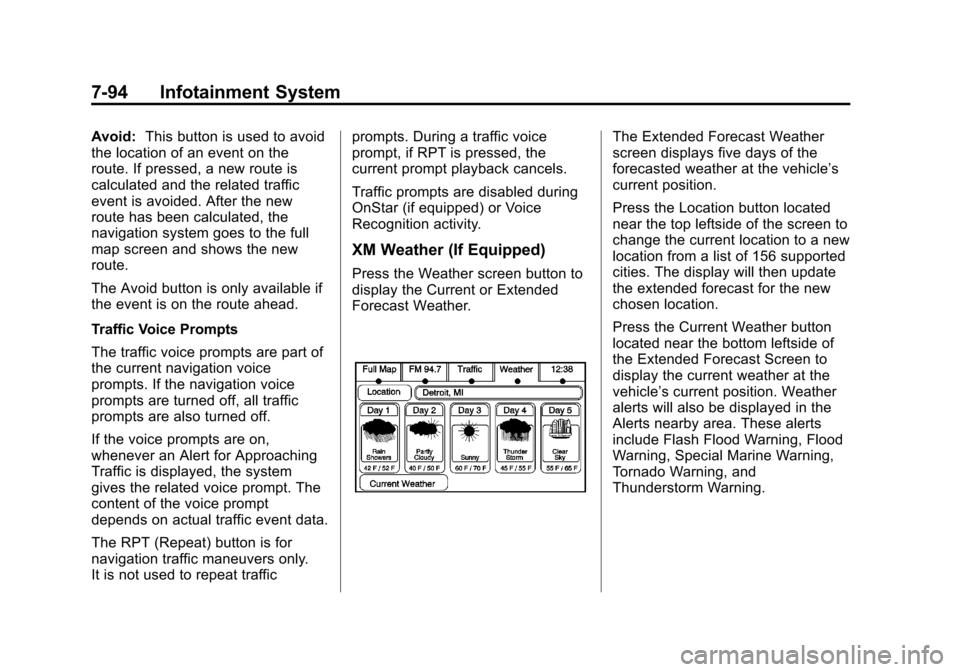
Press the Weather screen button to
display the Current or Extended
Forecast Weather.
The Extended Forecast Weather
screen displays five days of the
forecasted weather at the vehicle’s
current position.
Press the Location button located
near the top leftside of the screen to
change the current location to a new
location from a list of 156 supported
cities. The display will then update
the extended forecast for the new
chosen location.
Press the Current Weather button
located near the bottom leftside of
the Extended Forecast Screen to
display the current weather at the
vehicle’s current position. Weather
alerts will also be displayed in the
Alerts nearby area. These alerts
include Flash Flood Warning, Flood
Warning, Special Marine Warning,
Tornado Warning, and
Thunderstorm Warning.
Page 277 of 532
Black plate (95,1)Cadillac Escalade/Escalade ESV Owner Manual - 2013 - CRC 2nd Edition - 10/
9/12
Infotainment System 7-95
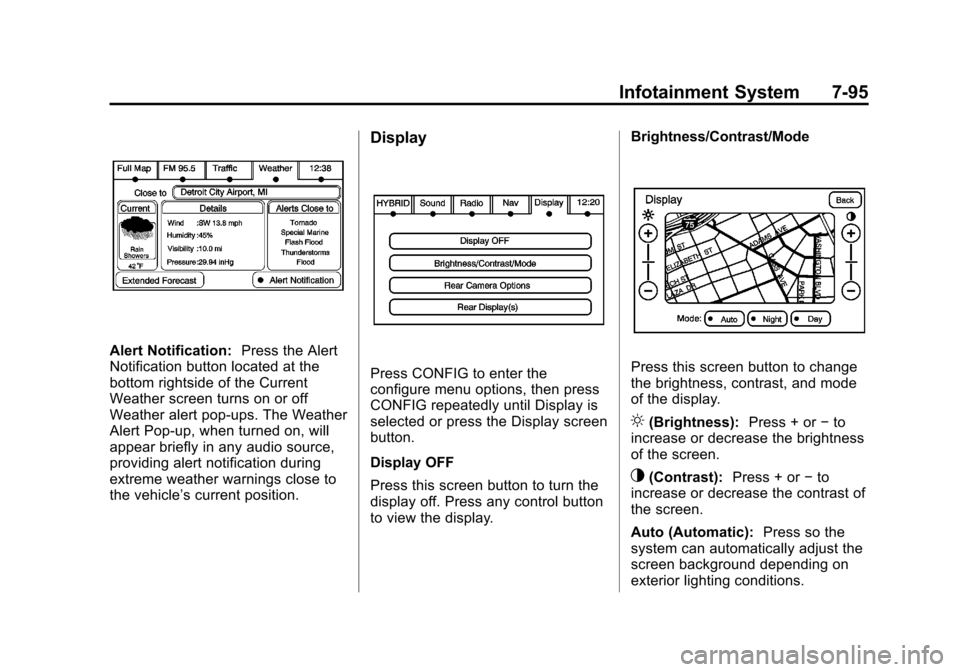
Alert Notification:Press the Alert
Notification button located at the
bottom rightside of the Current
Weather screen turns on or off
Weather alert pop-ups. The Weather
Alert Pop-up, when turned on, will
appear briefly in any audio source,
providing alert notification during
extreme weather warnings close to
the vehicle’ s current position.
Display
Press CONFIG to enter the
configure menu options, then press
CONFIG repeatedly until Display is
selected or press the Display screen
button.
Display OFF
Press this screen button to turn the
display off. Press any control button
to view the display. Brightness/Contrast/ModePress this screen button to change
the brightness, contrast, and mode
of the display.
](Brightness):
Press + or−to
increase or decrease the brightness
of the screen.
_(Contrast): Press + or−to
increase or decrease the contrast of
the screen.
Auto (Automatic): Press so the
system can automatically adjust the
screen background depending on
exterior lighting conditions.
Page 285 of 532

Black plate (103,1)Cadillac Escalade/Escalade ESV Owner Manual - 2013 - CRC 2nd Edition - 10/
9/12
Infotainment System 7-103
CD, DVD, Disc select previous
folder:Use this command to select
the previous folder on the MP3 or
audio DVD.
CD help, DVD help, Disc help:
Instructs the system to assist with
CD and DVD commands.
Auxiliary Commands
The following auxiliary commands
can be accessed by clearly stating
the commands exactly as they are
written. The commands are
available when the auxiliary source
is available.
Aux, Auxiliary: Use this command
to select the auxiliary device, when
a device is connected.
Voice Help
Provides a description of help
commands that can be used.Phone
Bluetooth
For vehicles equipped with
Bluetooth capability, the system can
interact with many cell phones,
allowing:
.Placement and receipt of calls in
a hands-free mode.
.Sharing of the cell phone’s
address book or contact list with
the vehicle.
To minimize driver distraction,
before driving, and with the vehicle
parked:
.Become familiar with the
features of the cell phone.
Organize the phone book and
contact lists clearly and delete
duplicate or rarely used entries.
If possible, program speed dial
or other shortcuts.
.Review the controls and
operation of the infotainment
system.
.Pair cell phone(s) to the vehicle.
The system may not work with
all cell phones. See “Pairing”in
this section for more information.
.If the cell phone has voice
dialing capability, learn to use
that feature to access the
address book or contact list. See
“Voice Pass-Thru” in this section
for more information.
.See “Storing and Deleting Phone
Numbers” in this section for
more information.
{WARNING
When using a cell phone, it can
be distracting to look too long or
too often at the screen of the
phone or the infotainment
(navigation) system. Taking your
eyes off the road too long or too
often could cause a crash
resulting in injury or death. Focus
your attention on driving.
Page 303 of 532
Black plate (3,1)Cadillac Escalade/Escalade ESV Owner Manual - 2013 - CRC 2nd Edition - 10/
9/12
Driving and Operating 9-3
{WARNING
Taking your eyes off the road too
long or too often could cause a
crash resulting in injury or death.
Focus your attention on driving.
Refer to the Infotainment section for
more information on using that
system, including pairing and using
a cell phone.
Refer to the Navigation section for
information on that system,
including pairing and using a cell
phone.
Defensive Driving
Defensive driving means “always
expect the unexpected.” The first
step in driving defensively is to wear
the safety belt. See Safety Belts on
page 3‑16.
.Assume that other road users
(pedestrians, bicyclists, and
other drivers) are going to be
careless and make mistakes.
Anticipate what they might do
and be ready.
.Allow enough following distance
between you and the driver in
front of you.
.Focus on the task of driving.
Drunk Driving
Death and injury associated with
drinking and driving is a global
tragedy.
{WARNING
Drinking and then driving is very
dangerous. Your reflexes,
perceptions, attentiveness, and
judgment can be affected by even
a small amount of alcohol. You
can have a serious —or even
fatal —collision if you drive after
drinking.
Do not drink and drive or ride with
a driver who has been drinking.
Ride home in a cab; or if you are
with a group, designate a driver
who will not drink.
Control of a Vehicle
Braking, steering, and accelerating
are important factors in helping to
control a vehicle while driving.
Page 305 of 532
Black plate (5,1)Cadillac Escalade/Escalade ESV Owner Manual - 2013 - CRC 2nd Edition - 10/
9/12
Driving and Operating 9-5
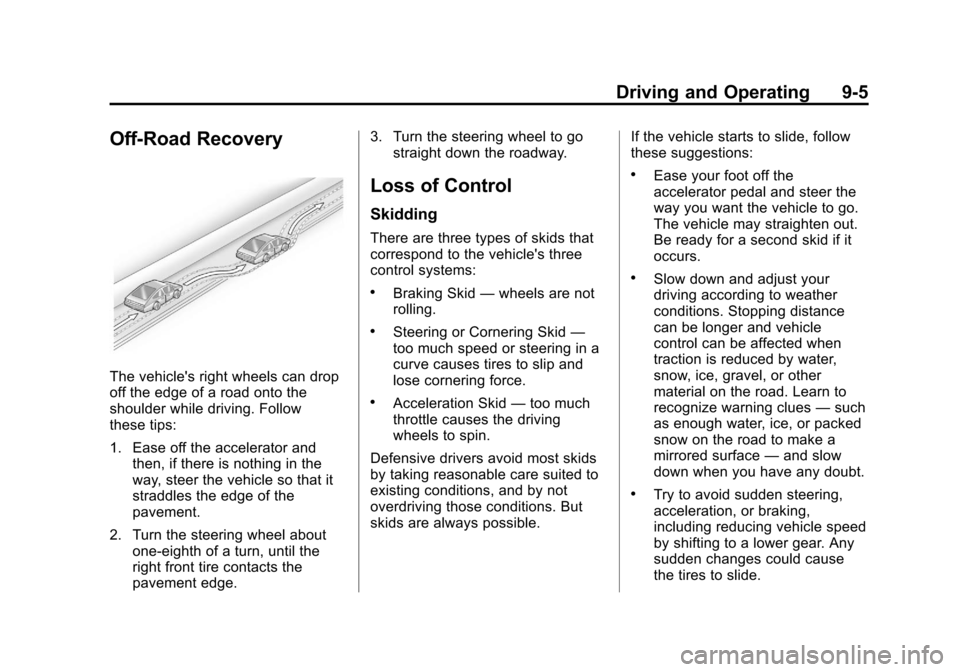
Off-Road Recovery
The vehicle's right wheels can drop
off the edge of a road onto the
shoulder while driving. Follow
these tips:
1. Ease off the accelerator andthen, if there is nothing in the
way, steer the vehicle so that it
straddles the edge of the
pavement.
2. Turn the steering wheel about one-eighth of a turn, until the
right front tire contacts the
pavement edge. 3. Turn the steering wheel to go
straight down the roadway.
Loss of Control
Skidding
There are three types of skids that
correspond to the vehicle's three
control systems:
.Braking Skid —wheels are not
rolling.
.Steering or Cornering Skid —
too much speed or steering in a
curve causes tires to slip and
lose cornering force.
.Acceleration Skid —too much
throttle causes the driving
wheels to spin.
Defensive drivers avoid most skids
by taking reasonable care suited to
existing conditions, and by not
overdriving those conditions. But
skids are always possible. If the vehicle starts to slide, follow
these suggestions:
.Ease your foot off the
accelerator pedal and steer the
way you want the vehicle to go.
The vehicle may straighten out.
Be ready for a second skid if it
occurs.
.Slow down and adjust your
driving according to weather
conditions. Stopping distance
can be longer and vehicle
control can be affected when
traction is reduced by water,
snow, ice, gravel, or other
material on the road. Learn to
recognize warning clues
—such
as enough water, ice, or packed
snow on the road to make a
mirrored surface —and slow
down when you have any doubt.
.Try to avoid sudden steering,
acceleration, or braking,
including reducing vehicle speed
by shifting to a lower gear. Any
sudden changes could cause
the tires to slide.
Page 306 of 532

Black plate (6,1)Cadillac Escalade/Escalade ESV Owner Manual - 2013 - CRC 2nd Edition - 10/
9/12
9-6 Driving and Operating
Remember: Antilock brakes help
avoid only the braking skid.
Off-Road Driving
Four-wheel-drive and all-wheel-drive
vehicles can be used for off-road
driving. Vehicles without four-wheel
drive, all-wheel-drive and vehicles
not equipped with All Terrain (AT) or
On-Off Road (OOR) tires must not
be driven off-road except on a level,
solid surface. To contact the tire
manufacturer for more information
about the original equipment tires,
see the Limited Warranty and
Owner Assistance Information
manual.
Controlling the vehicle is the key to
successful off-road driving. One of
the best ways to control the vehicle
is to control the speed.
{WARNING
When driving off-road, bouncing
and quick changes in direction
can easily throw you out of
position. This could cause you to
lose control and crash. You and
your passengers should always
wear safety belts.
Before Driving Off-Road
.Have all necessary maintenance
and service work completed.
.Fuel the vehicle, fill fluid levels,
and check inflation pressure in
all tires, including the spare,
if equipped.
.Read all the information about
four-wheel-drive and
all-wheel-drive vehicles in this
manual.
.Make sure all underbody
shields, if equipped, are properly
attached.
.Know the local laws that apply to
off-road driving.
To gain more ground clearance if
needed, it may be necessary to
remove the front fascia lower
air dam.
Notice: Operating the vehicle for
extended periods without the
front fascia lower air dam
installed can cause improper air
flow to the engine. Re‐attach the
front fascia air dam after off-road
driving.
Loading the Vehicle for
Off-Road Driving
{WARNING
.Unsecured cargo on the load
floor can be tossed about
when driving over rough
terrain. You or your
passengers can be struck by
flying objects. Secure the
cargo properly.
(Continued)
Page 307 of 532

Black plate (7,1)Cadillac Escalade/Escalade ESV Owner Manual - 2013 - CRC 2nd Edition - 10/
9/12
Driving and Operating 9-7
WARNING (Continued)
.Keep cargo in the cargo area
as far forward and as low as
possible. The heaviest things
should be on the floor,
forward of the rear axle.
.Heavy loads on the roof raise
the vehicle's center of gravity,
making it more likely to roll
over. You can be seriously or
fatally injured if the vehicle
rolls over. Put heavy loads
inside the cargo area, not on
the roof.
For more information about loading
the vehicle, see Vehicle Load Limits
and Tires.
Environmental Concerns
.Always use established trails,
roads, and areas that have been
set aside for public off-road
recreational driving and obey all
posted regulations.
.Do not damage shrubs, flowers,
trees, or grasses or disturb
wildlife.
.Do not park over things that
burn. See Parking Over Things
that Burn.
Driving on Hills
Driving safely on hills requires good
judgment and an understanding of
what the vehicle can and cannot do.
{WARNING
Many hills are simply too steep
for any vehicle. Driving up hills
can cause the vehicle to stall.
Driving down hills can cause loss
of control. Driving across hills can
cause a rollover. You could be
injured or killed. Do not drive on
steep hills.
Before driving on a hill, assess the
steepness, traction, and
obstructions. If the terrain ahead cannot be seen, get out of the
vehicle and walk the hill before
driving further.
When driving on hills:
.Use a low gear and keep a firm
grip on the steering wheel.
.Maintain a slow speed.
.When possible, drive straight up
or down the hill.
.Slow down when approaching
the top of the hill.
.Use headlamps even during the
day to make the vehicle more
visible.
{WARNING
Driving to the top of a hill at high
speed can cause an accident.
There could be a drop-off,
embankment, cliff, or even
another vehicle. You could be
seriously injured or killed. As you
near the top of a hill, slow down
and stay alert.