2013 CADILLAC CTS phone
[x] Cancel search: phonePage 1 of 478

Black plate (1,1)Cadillac CTS/CTS-V Owner Manual - 2013 - crc2 - 8/22/12
2013 Cadillac CTS/CTS-V Owner ManualM
In Brief. . . . . . . . . . . . . . . . . . . . . . . . 1-1
Instrument Panel . . . . . . . . . . . . . . 1-2
Initial Drive Information . . . . . . . . 1-4
Vehicle Features . . . . . . . . . . . . . 1-16
Performance and Maintenance . . . . . . . . . . . . . . . . 1-22
Keys, Doors, and Windows . . . . . . . . . . . . . . . . . . . . 2-1
Keys and Locks . . . . . . . . . . . . . . . 2-1
Doors . . . . . . . . . . . . . . . . . . . . . . . . 2-17
Vehicle Security . . . . . . . . . . . . . . 2-22
Exterior Mirrors . . . . . . . . . . . . . . . 2-26
Interior Mirrors . . . . . . . . . . . . . . . . 2-27
Windows . . . . . . . . . . . . . . . . . . . . . 2-27
Roof . . . . . . . . . . . . . . . . . . . . . . . . . . 2-30
Seats and Restraints . . . . . . . . . 3-1
Head Restraints . . . . . . . . . . . . . . . 3-2
Front Seats . . . . . . . . . . . . . . . . . . . . 3-3
Rear Seats . . . . . . . . . . . . . . . . . . . 3-11
Safety Belts . . . . . . . . . . . . . . . . . . 3-12
Airbag System . . . . . . . . . . . . . . . . 3-20
Child Restraints . . . . . . . . . . . . . . 3-33 Storage
. . . . . . . . . . . . . . . . . . . . . . . 4-1
Storage Compartments . . . . . . . . 4-1
Additional Storage Features . . . 4-2
Roof Rack System . . . . . . . . . . . . . 4-6
Instruments and Controls . . . . 5-1
Controls . . . . . . . . . . . . . . . . . . . . . . . 5-2
Warning Lights, Gauges, and
Indicators . . . . . . . . . . . . . . . . . . . 5-10
Information Displays . . . . . . . . . . 5-27
Vehicle Messages . . . . . . . . . . . . 5-31
Vehicle Personalization . . . . . . . 5-45
Universal Remote System . . . . 5-53
Lighting . . . . . . . . . . . . . . . . . . . . . . . 6-1
Exterior Lighting . . . . . . . . . . . . . . . 6-1
Interior Lighting . . . . . . . . . . . . . . . . 6-6
Lighting Features . . . . . . . . . . . . . . 6-7
Infotainment System . . . . . . . . . 7-1
Introduction . . . . . . . . . . . . . . . . . . . . 7-1
Radio . . . . . . . . . . . . . . . . . . . . . . . . . . 7-8
Audio Players . . . . . . . . . . . . . . . . 7-16
Phone . . . . . . . . . . . . . . . . . . . . . . . . 7-36
Trademarks and License
Agreements . . . . . . . . . . . . . . . . . 7-44 Climate Controls
. . . . . . . . . . . . . 8-1
Climate Control Systems . . . . . . 8-1
Air Vents . . . . . . . . . . . . . . . . . . . . . . . 8-6
Maintenance . . . . . . . . . . . . . . . . . . . 8-6
Driving and Operating . . . . . . . . 9-1
Driving Information . . . . . . . . . . . . . 9-2
Starting and Operating . . . . . . . 9-14
Engine Exhaust . . . . . . . . . . . . . . 9-24
Automatic Transmission . . . . . . 9-25
Manual Transmission . . . . . . . . . 9-29
Drive Systems . . . . . . . . . . . . . . . . 9-31
Brakes . . . . . . . . . . . . . . . . . . . . . . . 9-31
Ride Control Systems . . . . . . . . 9-35
Cruise Control . . . . . . . . . . . . . . . . 9-39
Object Detection Systems . . . . 9-41
Fuel . . . . . . . . . . . . . . . . . . . . . . . . . . 9-47
Towing . . . . . . . . . . . . . . . . . . . . . . . 9-51
Conversions and Add-Ons . . . 9-57
Vehicle Care . . . . . . . . . . . . . . . . . 10-1
General Information . . . . . . . . . . 10-3
Vehicle Checks . . . . . . . . . . . . . . . 10-4
Headlamp Aiming . . . . . . . . . . . 10-31
Bulb Replacement . . . . . . . . . . 10-31
Electrical System . . . . . . . . . . . . 10-34
Page 23 of 478

Black plate (17,1)Cadillac CTS/CTS-V Owner Manual - 2013 - crc2 - 8/22/12
In Brief 1-17
coast, and in digital-quality sound.
A fee is required to receive the
SiriusXM service.
Refer to:
.www.siriusxm.com or call
1-866-635-2349 (U.S.).
.www.xmradio.ca or call
1-877-209-0079 (Canada).
See Satellite Radio on page 7‑11.
Portable Audio Devices
Some vehicles have a 3.5 mm
(1/8 in) auxiliary input and a USB
port in the center console bin.
External devices such as iPods
®,
laptop computers, MP3 players, CD
changers, and USB drives may be
connected, depending on the audio
system.
See Auxiliary Devices on page 7‑34.
Bluetooth®
The Bluetooth®system allows users
with a Bluetooth-enabled mobile
phone to make and receive
hands-free calls using the vehicle
audio system and controls.
The Bluetooth-enabled mobile
phone must be paired with the
in-vehicle Bluetooth system before it
can be used in the vehicle. Not all
phones will support all functions.
See Bluetooth on page 7‑36.
Steering Wheel Controls
Some audio steering wheel controls
could differ depending on the
vehicle's options. Controls that can
be adjusted at the steering wheel
may include:
SRCE: Press to switch between
AM, FM, or SiriusXM (if equipped)
radio, CD, HDD (if equipped),
auxiliary input jack, DVD (if
equipped), and USB (if equipped).
Page 24 of 478

Black plate (18,1)Cadillac CTS/CTS-V Owner Manual - 2013 - crc2 - 8/22/12
1-18 In Brief
yorc/z:Press to go to the
next or previous radio station stored
as a favorite, or the previous or next
track of a CD.
Press to interact with the Bluetooth
®
system. See Bluetooth on
page 7‑36 for more information.
+
e−: Press to increase or to
decrease the volume.
b/g: Press and release to
silence the vehicle speakers only.
The audio of the wireless and wired
headphones, if the vehicle has
these features, does not mute.
Press and release
b/gagain, to
turn the sound on.
.For vehicles with a navigation
system, press and hold
b/gfor
two seconds to initiate speech
recognition.
.For vehicles without a navigation
system, press and hold
b/gfor
two seconds to interact with
OnStar
®or Bluetooth.
.For vehicles with a navigation
system, OnStar, or Bluetooth,
press and hold
b/gfor
two seconds and say “hands
free” to interact with OnStar or
Bluetooth.
For more information, see Steering
Wheel Controls on page 5‑3.
Cruise Control
CTS Shown, CTS-V Similar
I: Press to turn the system on or
off. The indicator light on the button
turns on when cruise control is on. +RES:
Press to make the vehicle
accelerate or resume to a previously
set speed.
−SET: Press to set the speed or
make the vehicle decelerate.
[: Press to cancel cruise control
without erasing the set speed from
memory.
See Cruise Control on page 9‑39.
Navigation System
If the vehicle has a navigation
system, there is a separate
navigation manual that includes
information on the radio, audio
players, and navigation system.
The navigation system provides
detailed maps of most major
freeways and roads. After a
destination has been set, the
system provides turn-by-turn
instructions for reaching the
destination. In addition, the system
can help locate a variety of points of
interest (POIs), such as banks,
airports, restaurants, and more.
Page 26 of 478
Black plate (20,1)Cadillac CTS/CTS-V Owner Manual - 2013 - crc2 - 8/22/12
1-20 In Brief
Ultrasonic Parking Assist
If available, this system uses
sensors on the rear bumper to
assist with parking and avoiding
objects while in R (Reverse).
It operates at speeds less than
8 km/h (5 mph). URPA uses audible
beeps to provide distance and
system information.
Keep the sensors on the vehicle's
rear bumper clean to ensure proper
operation.
SeeUltrasonic Parking Assist on
page 9‑41.
Storage Compartments
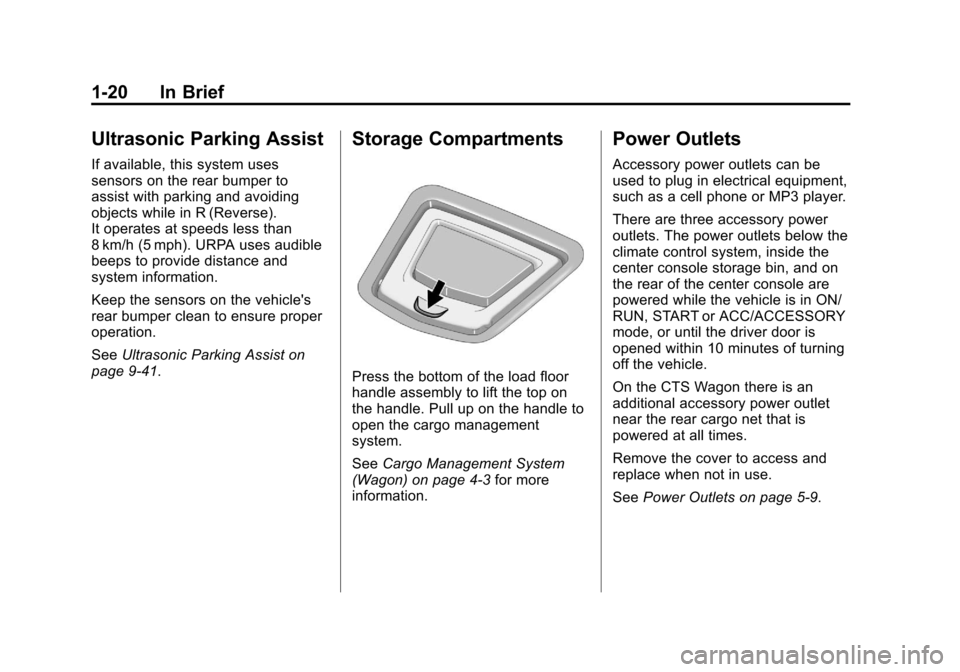
Press the bottom of the load floor
handle assembly to lift the top on
the handle. Pull up on the handle to
open the cargo management
system.
See Cargo Management System
(Wagon) on page 4‑3 for more
information.
Power Outlets
Accessory power outlets can be
used to plug in electrical equipment,
such as a cell phone or MP3 player.
There are three accessory power
outlets. The power outlets below the
climate control system, inside the
center console storage bin, and on
the rear of the center console are
powered while the vehicle is in ON/
RUN, START or ACC/ACCESSORY
mode, or until the driver door is
opened within 10 minutes of turning
off the vehicle.
On the CTS Wagon there is an
additional accessory power outlet
near the rear cargo net that is
powered at all times.
Remove the cover to access and
replace when not in use.
See Power Outlets on page 5‑9.
Page 94 of 478

Black plate (32,1)Cadillac CTS/CTS-V Owner Manual - 2013 - crc2 - 8/22/12
3-32 Seats and Restraints
device, installed under or on top
of the seat fabric, could also
interfere with the operation of
the passenger sensing system.
This could either prevent proper
deployment of the passenger
airbag(s) or prevent the
passenger sensing system from
properly turning off the
passenger airbag(s). See
Passenger Sensing System on
page 3‑26.
If you have questions, call
Customer Assistance. The
phone numbers and addresses
for Customer Assistance are in
Step Two of the Customer
Satisfaction Procedure in this
manual. SeeCustomer
Satisfaction Procedure (U.S. and
Canada) on page 13‑1 or
Customer Satisfaction
Procedure (Mexico) on
page 13‑3. If the vehicle has rollover
roof-rail airbags, see
Different
Size Tires and Wheels on
page 10‑77 for additional
important information.
Q: Because I have a disability, I have to get my vehicle
modified. How can I find out
whether this will affect my
airbag system?
A: If you have questions, call
Customer Assistance. The
phone numbers and addresses
for Customer Assistance are in
Step Two of the Customer
Satisfaction Procedure in this
manual. See Customer
Satisfaction Procedure (U.S. and
Canada) on page 13‑1 or
Customer Satisfaction
Procedure (Mexico) on
page 13‑3.
In addition, your dealer and the
service manual have information
about the location of the airbag
sensors, sensing and diagnostic
module and airbag wiring.Airbag System Check
The airbag system does not need
regularly scheduled maintenance or
replacement. Make sure the airbag
readiness light is working. See
Airbag Readiness Light on
page 5‑17.
Notice: If an airbag covering is
damaged, opened, or broken, the
airbag may not work properly. Do
not open or break the airbag
coverings. If there are any
opened or broken airbag covers,
have the airbag covering and/or
airbag module replaced. For the
location of the airbags, see
Where Are the Airbags? on
page 3‑22. See your dealer for
service.
Page 125 of 478
Black plate (3,1)Cadillac CTS/CTS-V Owner Manual - 2013 - crc2 - 8/22/12
Instruments and Controls 5-3
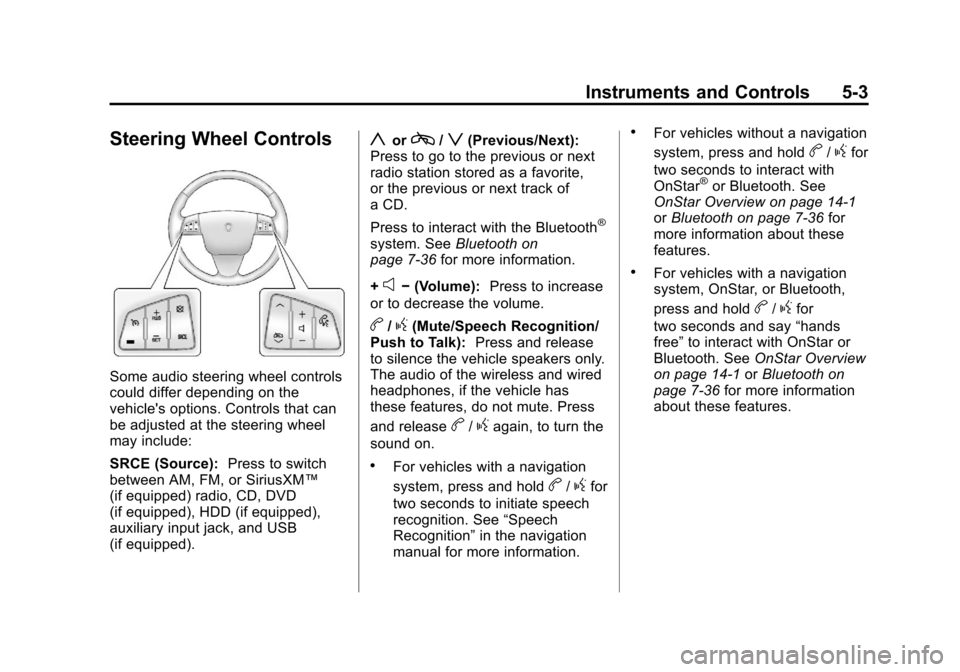
Steering Wheel Controls
Some audio steering wheel controls
could differ depending on the
vehicle's options. Controls that can
be adjusted at the steering wheel
may include:
SRCE (Source):Press to switch
between AM, FM, or SiriusXM™
(if equipped) radio, CD, DVD
(if equipped), HDD (if equipped),
auxiliary input jack, and USB
(if equipped).
yorc/z(Previous/Next):
Press to go to the previous or next
radio station stored as a favorite,
or the previous or next track of
a CD.
Press to interact with the Bluetooth
®
system. See Bluetooth on
page 7‑36 for more information.
+
e− (Volume): Press to increase
or to decrease the volume.
b/g(Mute/Speech Recognition/
Push to Talk): Press and release
to silence the vehicle speakers only.
The audio of the wireless and wired
headphones, if the vehicle has
these features, do not mute. Press
and release
b/gagain, to turn the
sound on.
.For vehicles with a navigation
system, press and hold
b/gfor
two seconds to initiate speech
recognition. See “Speech
Recognition” in the navigation
manual for more information.
.For vehicles without a navigation
system, press and hold
b/gfor
two seconds to interact with
OnStar
®or Bluetooth. See
OnStar Overview on page 14‑1
or Bluetooth on page 7‑36 for
more information about these
features.
.For vehicles with a navigation
system, OnStar, or Bluetooth,
press and hold
b/gfor
two seconds and say “hands
free” to interact with OnStar or
Bluetooth. See OnStar Overview
on page 14‑1 orBluetooth on
page 7‑36 for more information
about these features.
Page 131 of 478

Black plate (9,1)Cadillac CTS/CTS-V Owner Manual - 2013 - crc2 - 8/22/12
Instruments and Controls 5-9
Compass Calibration Procedure
1. Before calibrating the compass,check that the compass is set to
the correct variance zone. See
“Compass Variance (Zone)
Procedure” earlier in this
section.
Do not operate any switches
such as window, sunroof,
climate controls, seats, etc.
during the calibration procedure.
2. Press
Tuntil PRESSVTO
CALIBRATE COMPASS
displays.
3. Press
Vto start the compass
calibration.
4. The DIC will display CALIBRATING DRIVE IN
CIRCLES. Drive the vehicle in
tight circles at less than
8 km/h (5 mph) to complete the
calibration. The DIC will display
CALIBRATION COMPLETE for a
few seconds then returns to the
PRESS
VTO CALIBRATE
COMPASS display.
Clock
The analog clock is on the
instrument panel above the radio.
The clock is not connected with any
other vehicle system and runs by
itself. To adjust the clock:
1. Locate the adjustment buttons directly below the clock.
2. Push and release the right adjustment button to move the
clock hands forward or the left
adjustment button to make the
clock hands go backward.
Holding either button down will
cause the clock to advance
faster. Release the button before
the desired time is reached.
3. Push and release either button to adjust the time by one minute
increments.
Power Outlets
Accessory power outlets can be
used to plug in electrical equipment,
such as a cell phone or MP3 player. There are three accessory power
outlets. The power outlets below the
climate control system, inside the
center console storage bin, and on
the rear of the center console are
powered while the vehicle is in ON/
RUN, START or ACC/ACCESSORY
mode, or until the driver door is
opened within 10 minutes of turning
off the vehicle.
On the CTS Wagon there is an
additional accessory power outlet
near the rear cargo net that is
powered at all times.
Remove the cover to access and
replace when not in use.
Notice:
Leaving electrical
equipment plugged in for an
extended period of time while the
vehicle is off will drain the
battery. Always unplug electrical
equipment when not in use and
do not plug in equipment that
exceeds the maximum 20 ampere
rating.
Page 132 of 478

Black plate (10,1)Cadillac CTS/CTS-V Owner Manual - 2013 - crc2 - 8/22/12
5-10 Instruments and Controls
Certain electrical accessories may
not be compatible with the
accessory power outlet and could
overload vehicle or adapter fuses.
If a problem is experienced, see
your dealer.
When adding electrical equipment,
be sure to follow the proper
installation instructions included with
the equipment. SeeAdd-On
Electrical Equipment on page 9‑57.
Notice: Hanging heavy
equipment from the power outlet
can cause damage not covered
by the vehicle warranty. The
power outlets are designed for
accessory power plugs only, such
as cell phone charge cords.Warning Lights,
Gauges, and
Indicators
Warning lights and gauges can
signal that something is wrong
before it becomes serious enough
to cause an expensive repair or
replacement. Paying attention to the
warning lights and gauges could
prevent injury.
Warning lights come on when there
could be a problem with a vehicle
function. Some warning lights come
on briefly when the engine is started
to indicate they are working. Gauges can indicate when there
could be a problem with a vehicle
function. Often gauges and warning
lights work together to indicate a
problem with the vehicle.
When one of the warning lights
comes on and stays on while
driving, or when one of the gauges
shows there may be a problem,
check the section that explains what
to do. Follow this manual's advice.
Waiting to do repairs can be costly
and even dangerous.