2013 BUICK REGAL light
[x] Cancel search: lightPage 21 of 412

Black plate (15,1)Buick Regal Owner Manual - 2013 - crc - 11/5/12
In Brief 1-15
4. Press the Multifunction knob toselect the next value.
5. To save the time and return to the Time Settings menu, press
the BACK button at any time or
press the Multifunction button
after adjusting the minutes.
Setting the 12/24 Hour Format
1. Press the CONFIG button and select Time and Date Settings.
2. Highlight 12/24 Hour Format.
3. Press the Multifunction knob to select the 12 hour or 24 hour
display format.
Setting the Clock (Radio with
CD and Touchscreen)
From the Time and Date Settings
screen button, press to display the
Time and Date Settings menu.
Set Time: Press + or−to increase
or decrease the Hours and Minutes
displayed on the clock. Set Date:
Press + or−to increase
or decrease the day.
Set Time Format: Press the 12 HR
screen button for standard time;
press the 24 HR screen button for
military time.
Set Date Format: Depending on
the region, the following date
formats may be available:
MM/DD/YYYY, DD.MM.YYYY,
or YYYY/MM/DD.
See Clock on page 5‑5.
Satellite Radio
Vehicles with a SiriusXM®satellite
radio tuner and a valid SiriusXM
satellite radio subscription can
receive SiriusXM programming.
SiriusXM Satellite Radio
Service
SiriusXM is a satellite radio service
based in the 48 contiguous United
States and 10 Canadian provinces. SiriusXM satellite radio has a wide
variety of programming and
commercial-free music, coast to
coast, and in digital-quality sound.
A fee is required to receive the
SiriusXM service.
Refer to:
.www.siriusxm.com or call
1-866-635-2349 (U.S.).
.www.xmradio.ca or call
1-877-209-0079 (Canada).
See Satellite Radio on page 7‑11.
Portable Audio Devices
Some vehicles have a 3.5 mm
(1/8 in) auxiliary input and a USB
port in the center console bin.
External devices such as iPods
®,
laptop computers, MP3 players, CD
changers, and USB drives may be
connected, depending on the audio
system.
See Auxiliary Devices on page 7‑18.
Page 23 of 412

Black plate (17,1)Buick Regal Owner Manual - 2013 - crc - 11/5/12
In Brief 1-17
5:Press to turn the cruise control
system on and off.
*: Press to disengage cruise
control without erasing the set
speed from memory.
RES/+: Move the thumbwheel up to
make the vehicle resume to a
previously set speed or to
accelerate.
SET/−: Move the thumbwheel down
toward SET/- to set a speed and
activate cruise control, or to make
the vehicle decelerate.
See Cruise Control on page 9‑41.
Infotainment System
See the infotainment manual for
information on the radio, audio
players, phone, navigation system,
and voice or speech recognition.
There is also information on settings
and downloadable applications (if
equipped).
Driver Information
Center (DIC)
The DIC display is in the center of
the instrument cluster. It shows the
status of many vehicle systems. The
controls for the DIC are on the turn
signal lever.
1.SET/CLR: Press to set, or press
and hold to clear, the menu item
displayed.
2.
w/x: Use the thumbwheel to
scroll through the items in
each menu.
3. MENU: Press to display the DIC
menus. This button is also used
to return to or exit the last
screen displayed on the DIC.
See Driver Information Center (DIC)
on page 5‑24.
Vehicle Personalization
The audio system controls are used
to access the personalization
menus for customizing vehicle
features.
To enter the personalization menus:
1. Press CONFIG to access the Configuration Settings menu.
2. Turn the Multifunction knob to highlight Vehicle Settings.
3. Press the center of the Multifunction knob to select the
Vehicle Settings menu.
The following list of menu items will
be available:
.Climate and Air Quality
.Comfort and Convenience
.Language
.Lighting
.Power Door Locks
.Remote Lock/Unlock/Start
.Return to Factory Settings
Page 25 of 412

Black plate (19,1)Buick Regal Owner Manual - 2013 - crc - 11/5/12
In Brief 1-19
ACCESSORY or in Retained
Accessory Power (RAP). See
Retained Accessory Power (RAP)
on page 9‑23.
To open or close the sunroof, press
switch (1) to the first detent position.
To express open or close the
sunroof with the safety function
enabled, press the open or close
sunroof switch (1) to the second
detent position and release. To stop
the movement, press the switch
again.
To automatically tilt or close the
sunroof, press the tilt open or close
sunroof switch (2).
If an object is in the path of the
sunroof while it is closing, the
anti-pinch feature will detect the
object and stop the sunroof. The
sunroof will then return to the
full-open or vent position.
The sunroof glass panel cannot be
opened or closed if the vehicle has
an electrical failure.
SeeSunroof on page 2‑19.eAssist Features
eAssist®Overview
If the vehicle has eAssist, there are
several additional features which
contribute to increased efficiency.
Vehicles with eAssist have an
automatic engine start/stop feature.
This feature saves fuel by shutting
the engine off when the vehicle is
stopped. When the engine shuts off
automatically, all the accessories
will continue to operate normally. In
very hot or cold conditions, the
engine will only shut off
automatically part of the time. See
Starting the Engine on page 9‑19.
There are two air conditioning
settings available. The comfort
setting maximizes cabin comfort.
The eco setting maximizes
efficiency allowing more frequent,
and longer engine stops than the
comfort setting. See Dual Automatic
Climate Control System on
page 8‑1. This vehicle has a Hill Start Assist
(HSA) feature, which may be useful
when the vehicle is stopped on a
grade. See
Hill Start Assist (HSA)
on page 9‑35.
Vehicles with eAssist have a slightly
different instrument cluster, which
includes an efficiency gauge, and
an AUTO STOP indicator on the
tachometer. See Instrument Cluster
on page 5‑9. There is also a Power
Flow Gauge in the Driver
Information Center (DIC). See
Driver Information Center (DIC) on
page 5‑24.
The eAssist system uses a high
voltage battery, which is cooled with
air drawn from the vehicle interior.
Page 28 of 412

Black plate (22,1)Buick Regal Owner Manual - 2013 - crc - 11/5/12
1-22 In Brief
StabiliTrak®System
The StabiliTrak system assists with
directional control of the vehicle in
difficult driving conditions. The
system turns on automatically every
time the vehicle is started.
.To turn off both traction control
and StabiliTrak, press and hold
the TCS/StabiliTrak button, on
the center stack, until
iandg
illuminate in the instrument
cluster and the appropriate DIC
message is displayed. SeeRide
Control System Messages on
page 5‑32.
.Press and release the TCS/
StabiliTrak button to turn on both
systems.
See StabiliTrak
®System on
page 9‑36.
Tire Pressure Monitor
This vehicle may have a Tire
Pressure Monitor System (TPMS).
The low tire pressure warning light
alerts to a significant loss in
pressure of one of the vehicle's
tires. If the warning light comes on,
stop as soon as possible and inflate
the tires to the recommended
pressure shown on the Tire and
Loading Information label. See
Vehicle Load Limits on page 9‑10.
The warning light will remain on until
the tire pressure is corrected.
The low tire pressure warning light
may come on in cool weather when
the vehicle is first started, and then
turn off as the vehicle is driven. This
may be an early indicator that the
tire pressures are getting low and
the tires need to be inflated to the
proper pressure. The TPMS does not replace normal
monthly tire maintenance. Maintain
the correct tire pressures.
See
Tire Pressure Monitor System
on page 10‑50.Tire Sealant and
Compressor Kit
This vehicle may come with a spare
tire and tire changing equipment or
a tire sealant and compressor kit.
The kit can be used to temporarily
seal small punctures in the tread
area of the tire. See Tire Sealant
and Compressor Kit on page 10‑64
or Tire Sealant and Compressor Kit
on page 10‑71.
If the vehicle came with a spare tire
and tire changing equipment, see If
a Tire Goes Flat on page 10‑62.
Page 33 of 412
Black plate (3,1)Buick Regal Owner Manual - 2013 - crc - 11/5/12
Keys, Doors, and Windows 2-3
.Check the location. Other
vehicles or objects may be
blocking the signal.
.Check the transmitter's battery.
See“Battery Replacement” later
in this section.
.If the transmitter is still not
working correctly, see your
dealer or a qualified technician
for service.
Remote Keyless Entry
(RKE) System Operation
The transmitter functions may work
up to 60 m (195 ft) away from the
vehicle.
Keep in mind that other conditions,
such as those previously stated, can
impact the performance of the
transmitter.
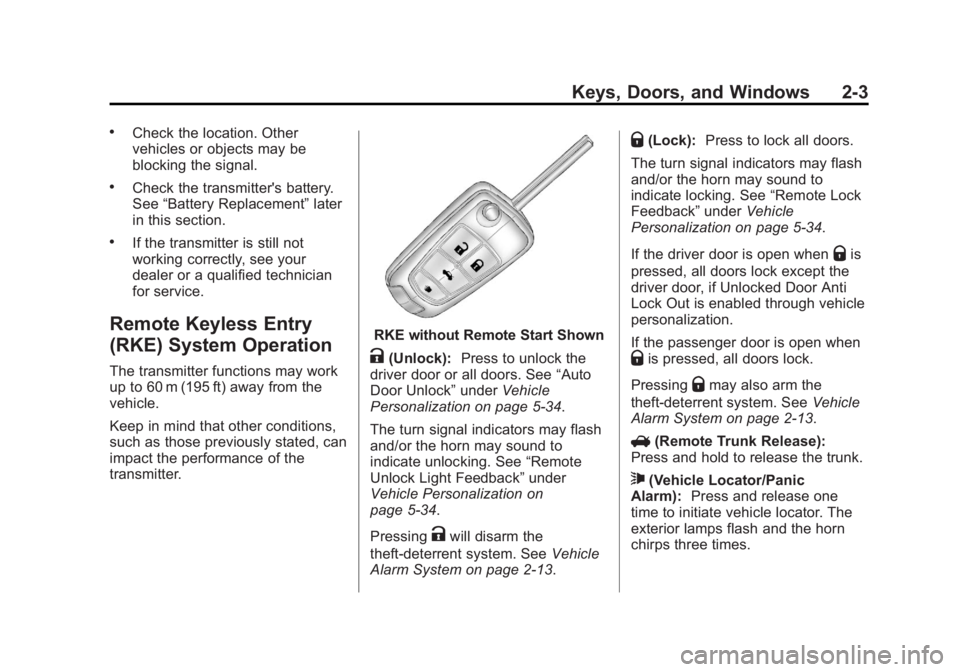
RKE without Remote Start Shown
K(Unlock): Press to unlock the
driver door or all doors. See “Auto
Door Unlock” underVehicle
Personalization on page 5‑34.
The turn signal indicators may flash
and/or the horn may sound to
indicate unlocking. See “Remote
Unlock Light Feedback” under
Vehicle Personalization on
page 5‑34.
Pressing
Kwill disarm the
theft-deterrent system. See Vehicle
Alarm System on page 2‑13.
Q(Lock): Press to lock all doors.
The turn signal indicators may flash
and/or the horn may sound to
indicate locking. See “Remote Lock
Feedback” underVehicle
Personalization on page 5‑34.
If the driver door is open when
Qis
pressed, all doors lock except the
driver door, if Unlocked Door Anti
Lock Out is enabled through vehicle
personalization.
If the passenger door is open when
Qis pressed, all doors lock.
Pressing
Qmay also arm the
theft-deterrent system. See Vehicle
Alarm System on page 2‑13.
V (Remote Trunk Release):
Press and hold to release the trunk.
7(Vehicle Locator/Panic
Alarm): Press and release one
time to initiate vehicle locator. The
exterior lamps flash and the horn
chirps three times.
Page 38 of 412

Black plate (8,1)Buick Regal Owner Manual - 2013 - crc - 11/5/12
2-8 Keys, Doors, and Windows
3. With the vehicle in P (Park) orN (Neutral), press the brake
pedal and the START STOP
button. See Starting the Engine
on page 9‑19 for additional
information about the vehicle's
keyless ignition with pushbutton
start.
Replace the transmitter battery
as soon as possible.
Battery Replacement
Replace the battery if the REPLACE
BATTERY IN REMOTE KEY
message displays in the DIC. See
“Replace Battery in Remote Key”
under Key and Lock Messages on
page 5‑31.
The battery is not rechargeable. To
replace the battery:
1. Push the button on the transmitter to extend the key.
2. Remove the battery cover by prying it with a finger. 3. Remove the battery by pushing
on the battery and sliding it
toward the key blade.
4. Insert the new battery, positive side facing up. Push the battery
down until it is held in place.
Replace with a CR2032 or
equivalent battery.
5. Snap the battery cover back on to the transmitter.Remote Vehicle Start
The vehicle may have this feature
that allows you to start the engine
from outside the vehicle.
/(Remote Vehicle Start): This
button will be on the RKE
transmitter if the vehicle has remote
start.
The climate control system will use
the previous settings during a
remote start. The rear defog may
come on during remote start based
on cold ambient conditions. The
rear fog indicator light does not
come on during remote start. If the vehicle has heated seats, they may
come on during a remote start. See
Heated Front Seats on page 3‑6.
Laws in some local communities
may restrict the use of remote
starters. For example, some laws
require a person using remote start
to have the vehicle in view. Check
local regulations for any
requirements.
Other conditions can affect the
performance of the transmitter. See
Remote Keyless Entry (RKE)
System on page 2‑2.
Starting the Vehicle
To start the engine using the remote
start feature:
1. Aim the RKE transmitter at the
vehicle.
2. Press and release
Q.
Page 41 of 412

Black plate (11,1)Buick Regal Owner Manual - 2013 - crc - 11/5/12
Keys, Doors, and Windows 2-11
Safety Locks
The vehicle has power safety locks.
Power safety locks will lock the rear
windows and not allow the rear
doors to be opened from the inside.
Power Safety Locks
Pressvto activate the safety locks
on the rear doors. The indicator light
will illuminate. This switch also disables the power
window controls on the rear doors.
Press
vagain to deactivate the
safety locks on the rear doors.
If a rear door handle is pulled when
the safety lock is deactivated, that
door will remain locked and the
indicator light may flash. Release
the handle, then press the safety
lock twice to deactivate the safety
locks. See “Rear Window Lockout”
under Power Windows on
page 2‑17.
Doors
Trunk
{WARNING
Exhaust gases can enter the
vehicle if it is driven with the
liftgate, trunk/hatch open, or with
any objects that pass through the
seal between the body and the
trunk/hatch or liftgate. Engine
exhaust contains carbon
monoxide (CO) which cannot be
seen or smelled. It can cause
unconsciousness and even death.
If the vehicle must be driven with
the liftgate, or trunk/hatch open:
.Close all of the windows.
.Fully open the air outlets on
or under the instrument
panel.
(Continued)
Page 43 of 412

Black plate (13,1)Buick Regal Owner Manual - 2013 - crc - 11/5/12
Keys, Doors, and Windows 2-13
There is an emergency trunk
release handle located inside the
trunk on the trunk latch. On some
vehicles, the release handle can be
accessed by folding the rear seat
center seatback. SeeRear Seats on
page 3‑7. Pull the release handle to
open the trunk from the inside.
Vehicle Security
This vehicle has theft-deterrent
features; however, they do not make
the vehicle impossible to steal.
Vehicle Alarm System
This vehicle has an anti-theft alarm
system.
Arming the System
To arm the system, pressQon the
RKE transmitter.
The alarm automatically arms after
about 30 seconds. The security
light, on the instrument cluster,
flashes.
Press
Von the RKE transmitter to
open the trunk without setting off the
alarm. The system rearms when the
trunk is closed.
Disarming the System
To disarm the system, do one of the
following:
.PressKon the RKE transmitter.
.Approach the vehicle with the
RKE transmitter (keyless
access).
.Start the engine.
The alarm automatically disarms.
How to Detect a Tamper
Condition
IfKis pressed and the horn
sounds, an attempted break-in
occurred while the system was
armed.
If the alarm has been activated, a
message will appear on the DIC.
See Security Messages on
page 5‑33.