2013 BUICK REGAL Locks
[x] Cancel search: LocksPage 40 of 412

Black plate (10,1)Buick Regal Owner Manual - 2013 - crc - 11/5/12
2-10 Keys, Doors, and Windows
Door Locks
{WARNING
Unlocked doors can be
dangerous.
.Passengers, especially
children, can easily open the
doors and fall out of a moving
vehicle. The chance of being
thrown out of the vehicle in a
crash is increased if the
doors are not locked. So, all
passengers should wear
safety belts properly and the
doors should be locked
whenever the vehicle is
driven.
.Young children who get into
unlocked vehicles may be
unable to get out. A child can
be overcome by extreme heat
and can suffer permanent
injuries or even death from
heat stroke. Always lock the
vehicle whenever leaving it.(Continued)
WARNING (Continued)
.Outsiders can easily enter
through an unlocked door
when slowing or stopping the
vehicle. Lock the doors to
help prevent this from
happening.
To lock and unlock the door, use the
Remote Keyless Entry (RKE)
transmitter or the key from the
outside, and the door lock knob or
switch from the inside.
From inside the vehicle with the
doors locked, pull once on the door
handle to unlock it, and a second
time to open it.
Manually locking the driver door
also automatically locks all other
doors.
For more information see:
.Remote Keyless Entry (RKE)
System Operation on page 2‑3.
.Power Door Locks on
page 2‑10.
.Vehicle Personalization on
page 5‑34.
Power Door Locks
K(Unlock): Press to unlock the
doors.
Q(Lock): Press to lock the doors.
See “Power Door Locks” inVehicle
Personalization on page 5‑34.
Page 41 of 412

Black plate (11,1)Buick Regal Owner Manual - 2013 - crc - 11/5/12
Keys, Doors, and Windows 2-11
Safety Locks
The vehicle has power safety locks.
Power safety locks will lock the rear
windows and not allow the rear
doors to be opened from the inside.
Power Safety Locks
Pressvto activate the safety locks
on the rear doors. The indicator light
will illuminate. This switch also disables the power
window controls on the rear doors.
Press
vagain to deactivate the
safety locks on the rear doors.
If a rear door handle is pulled when
the safety lock is deactivated, that
door will remain locked and the
indicator light may flash. Release
the handle, then press the safety
lock twice to deactivate the safety
locks. See “Rear Window Lockout”
under Power Windows on
page 2‑17.
Doors
Trunk
{WARNING
Exhaust gases can enter the
vehicle if it is driven with the
liftgate, trunk/hatch open, or with
any objects that pass through the
seal between the body and the
trunk/hatch or liftgate. Engine
exhaust contains carbon
monoxide (CO) which cannot be
seen or smelled. It can cause
unconsciousness and even death.
If the vehicle must be driven with
the liftgate, or trunk/hatch open:
.Close all of the windows.
.Fully open the air outlets on
or under the instrument
panel.
(Continued)
Page 48 of 412

Black plate (18,1)Buick Regal Owner Manual - 2013 - crc - 11/5/12
2-18 Keys, Doors, and Windows
Express Window Operation
Windows with an express-up or
down feature allow the front
windows to be lowered or raised
without holding the switch. Rear
windows only have express down.
Pull a window switch up or push it
down all the way, release it, and the
window goes up or down
automatically. Stop the window by
pushing or pulling the switch.
Rear Window Lockout
This feature prevents the rear
passenger windows from operating,
except from the driver position.
Press
v{to activate the rear
window lockout switch. An indicator
light comes on when activated.
This switch also disables the door
locks on the rear doors. See Safety
Locks on page 2‑11.
Press
v {again to deactivate the
lockout switch.
If the indicator light flashes, the
feature may not be working properly.
Programming the Power
Windows
If the battery on the vehicle has
been recharged, disconnected, or is
not working, you will need to
reprogram each front power window
for the express-up feature to work.
Before reprogramming, replace or
recharge the vehicle's battery. To program each front window:
1. The ignition is in ACC/
ACCESSORY or ON/RUN,
or Retained Accessory
Power (RAP).
2. Press and hold the power window switch until the window
is fully open.
3. Pull the power window switch up until the window is fully closed.
4. Continue holding the switch up for approximately two seconds
after the window is completely
closed.
The window is now reprogrammed.
Repeat the process for the other
windows.
Page 60 of 412

Black plate (10,1)Buick Regal Owner Manual - 2013 - crc - 11/5/12
3-10 Seats and Restraints
Also, in nearly all states and in
all Canadian provinces, the law
requires wearing safety belts.
How to Wear Safety Belts
Properly
This section is only for people of
adult size.
There are special things to know
about safety belts and children. And
there are different rules for smaller
children and infants. If a child will be
riding in the vehicle, seeOlder
Children on page 3‑29 orInfants
and Young Children on page 3‑31.
Follow those rules for everyone's
protection.
It is very important for all occupants
to buckle up. Statistics show that
unbelted people are hurt more often
in crashes than those who are
wearing safety belts.
There are important things to know
about wearing a safety belt properly.
.Sit up straight and always keep
your feet on the floor in front
of you.
.Always use the correct buckle
for your seating position.
.Wear the lap part of the belt low
and snug on the hips, just
touching the thighs. In a crash,
this applies force to the strong
pelvic bones and you would be
less likely to slide under the lap
belt. If you slid under it, the belt
would apply force on your
abdomen. This could cause
serious or even fatal injuries.
.Wear the shoulder belt over the
shoulder and across the chest.
These parts of the body are best
able to take belt restraining
forces. The shoulder belt locks if
there is a sudden stop or crash.
{WARNING
You can be seriously injured,
or even killed, by not wearing
your safety belt properly.
.Never allow the lap or
shoulder belt to become
loose or twisted.
.Never wear the shoulder belt
under both arms or behind
your back.
.Never route the lap or
shoulder belt over an
armrest.
Page 139 of 412

Black plate (35,1)Buick Regal Owner Manual - 2013 - crc - 11/5/12
Instruments and Controls 5-35
3. Press the center of theMultifunction knob to select the
Vehicle Settings menu.
The following list of menu items will
be available:
.Climate and Air Quality
.Comfort and Convenience
.Languages
.Lighting
.Power Door Locks
.Remote Lock/Unlock/Start
.Return to Factory Settings
Turn the Multifunction knob to
highlight the menu. Press the knob
to select it. Each of the menus is
detailed in the following information.
Climate and Air Quality
Select the Climate and Air Quality
menu and the following may be
displayed:
.Auto Fan Speed
.Auto Compartment Zone Temp
.Remote Start Auto Heat Seats
.Auto Defog
.Auto Rear Defog
Auto Fan Speed
This allows selection of the
automatic fan speed to run lower or
higher than normal.
Press the Multifunction knob when
Auto Fan Speed is highlighted to
open the menu. Turn the knob to
highlight High, Medium, or Low.
Press the knob to confirm the
selection and move back to the
last menu.
Auto Compartment Zone Temp
This allows the selection of how the
climate control system will operate
upon vehicle start. Selecting Single
Zone automatically resets the
passenger temperature setting the
same as the driver's for every
vehicle start. The climate control
system will operate using only the
driver's setting until the passenger
temperature setting is changed. Selecting Dual Zone or Last Setting
will keep the passenger temperature
adjustment separate from the
driver's setting all the time.
Press the Multifunction knob when
Auto Compartment Zone Temp is
highlighted. Turn the knob to
highlight Single Zone, Dual Zone,
or Last Setting. Press the knob to
confirm the selection and go back to
the last menu.
Remote Start Auto Heat Seats
When on, this feature will turn the
heated seats on when using remote
start on cold days.
Press the Multifunction knob when
Remote Start Auto Heat Seats is
highlighted. Turn the knob to
highlight On or Off. Press the knob
to confirm the selection and go back
to the last menu.
Auto Defog
This allows the auto defog function
to be turned on or off.
Page 141 of 412

Black plate (37,1)Buick Regal Owner Manual - 2013 - crc - 11/5/12
Instruments and Controls 5-37
Power Door Locks
Select Power Door Locks and the
following will be displayed:
.Open Door Anti Lock Out
.Auto Door Unlock
.Delay Door Lock
Open Door Anti Lock Out
When on, this feature will keep the
driver door from locking when the
door is open. If Off is selected, the
Delayed Door Lock menu will be
available and the door will lock as
programmed through this menu.
Press the Multifunction knob when
Open Door Anti Lock Out is
highlighted to select On or Off. Turn
the knob to confirm and go back to
the last menu.
Auto Door Unlock
This allows selection of which doors
will automatically unlock when the
vehicle is shifted into P (Park). Press the Multifunction knob when
Auto Door Unlock is highlighted.
Turn the knob to select All Doors,
Driver Door, or Off. Press the knob
to confirm and go back to the
last menu.
Delay Door Lock
When on, this feature will delay the
locking of the doors until
five seconds after the last door is
closed. You will hear three chimes
to signal delayed locking is in use.
Press either the power door lock
button or
Qon the RKE transmitter
twice to override the delayed locking
feature and immediately lock all of
the doors.
Press the Multifunction knob when
Delay Door Lock is highlighted to
select On or Off. Press BACK to
return to the last menu.
Remote Lock/Unlock/Start
Select Remote Lock/Unlock/Start
and the following will be displayed:
.Remote Unlock Light Feedback
.Remote Lock Feedback
.Remote Door Unlock
.Passive Door Unlock
.Passive Door Lock
.Remote Left In Vehicle
Remote Unlock Light Feedback
When on, the exterior lamps will
flash when unlocking the vehicle
with the RKE transmitter.
Press the Multifunction knob when
Remote Unlock Light Feedback is
highlighted to select On or Off. Turn
the knob to confirm and go back to
the last menu.
Remote Lock Feedback
This allows selection of what type of
feedback is given when locking the
vehicle with the RKE transmitter.
Page 211 of 412
Black plate (15,1)Buick Regal Owner Manual - 2013 - crc - 11/5/12
Driving and Operating 9-15
Following break‐in, engine speed
and load can be gradually
increased.
Ignition Positions (Key
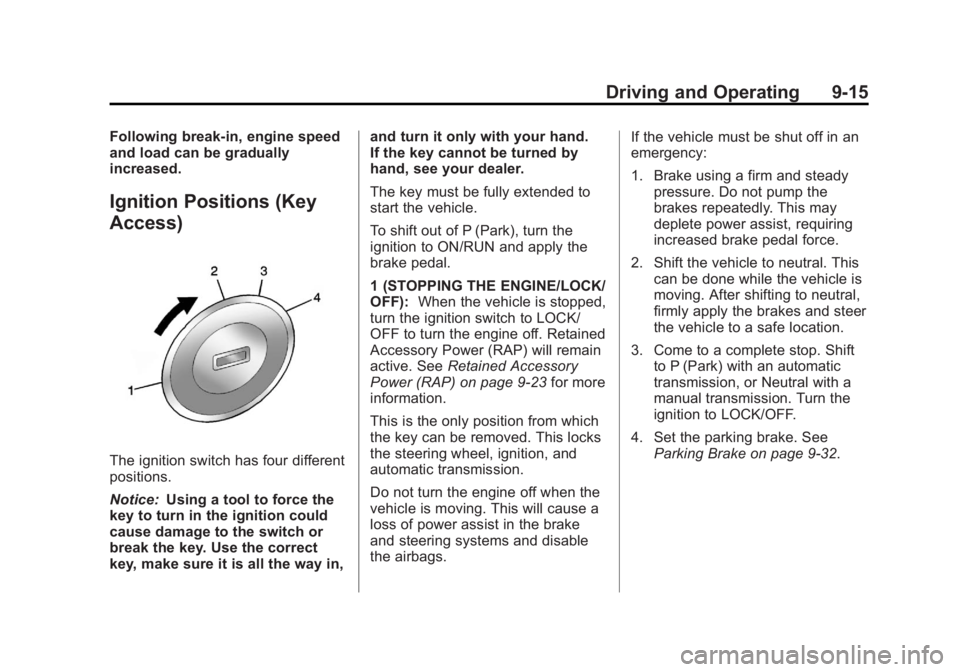
Access)
The ignition switch has four different
positions.
Notice:Using a tool to force the
key to turn in the ignition could
cause damage to the switch or
break the key. Use the correct
key, make sure it is all the way in, and turn it only with your hand.
If the key cannot be turned by
hand, see your dealer.
The key must be fully extended to
start the vehicle.
To shift out of P (Park), turn the
ignition to ON/RUN and apply the
brake pedal.
1 (STOPPING THE ENGINE/LOCK/
OFF):
When the vehicle is stopped,
turn the ignition switch to LOCK/
OFF to turn the engine off. Retained
Accessory Power (RAP) will remain
active. See Retained Accessory
Power (RAP) on page 9‑23 for more
information.
This is the only position from which
the key can be removed. This locks
the steering wheel, ignition, and
automatic transmission.
Do not turn the engine off when the
vehicle is moving. This will cause a
loss of power assist in the brake
and steering systems and disable
the airbags. If the vehicle must be shut off in an
emergency:
1. Brake using a firm and steady
pressure. Do not pump the
brakes repeatedly. This may
deplete power assist, requiring
increased brake pedal force.
2. Shift the vehicle to neutral. This can be done while the vehicle is
moving. After shifting to neutral,
firmly apply the brakes and steer
the vehicle to a safe location.
3. Come to a complete stop. Shift to P (Park) with an automatic
transmission, or Neutral with a
manual transmission. Turn the
ignition to LOCK/OFF.
4. Set the parking brake. See Parking Brake on page 9‑32.
Page 212 of 412

Black plate (16,1)Buick Regal Owner Manual - 2013 - crc - 11/5/12
9-16 Driving and Operating
{WARNING
Turning off the vehicle while
moving may cause loss of power
assist in the brake and steering
systems and disable the airbags.
While driving, only shut the
vehicle off in an emergency.
If the vehicle cannot be pulled over,
and must be shut off while driving,
turn the ignition to ACC/
ACCESSORY.
The ignition switch can bind in the
LOCK/OFF position with the wheels
turned off center. If this happens,
move the steering wheel from right
to left while turning the key to ACC/
ACCESSORY. If this does not work,
then the vehicle needs service.
2 (ACC/ACCESSORY): This
position unlocks the steering wheel.
Some accessories can be used in
this position. 3 (ON/RUN):
The ignition switch
stays in this position when the
engine is running. This position can
be used to operate the electrical
accessories, as well as to display
some warning and indicator lights.
This position can also be used for
service and diagnostics, and to
verify the proper operation of the
malfunction indicator lamp as may
be required for emission inspection
purposes.
The battery could be drained if the
key is left in the ON/RUN position
with the engine off. The vehicle
might not start if the battery is
allowed to drain for an extended
period of time.
4 (START): This position starts the
engine. When the engine starts,
release the key. The ignition switch
will return to ON/RUN for normal
driving.
If the ignition becomes difficult to
turn, see Keys on page 2‑1.
Key Lock Release
Vehicles with an automatic
transmission are equipped with an
electronic key lock release system.
This system is to prevent ignition
key removal unless the shift lever is
in P (Park).