2013 BUICK LACROSSE wheel
[x] Cancel search: wheelPage 130 of 422

Black plate (26,1)Buick LaCrosse Owner Manual - 2013 - crc - 9/7/12
5-26 Instruments and Controls
DIC Buttons
1.SET/CLR: Press to set or clear
the menu item when it is
displayed.
2.
w/x(Thumbwheel): Use to
scroll through the items in each
menu. A small marker will move
across the bottom of the page as
you scroll through the items.
This shows where each page is
in the menu.
3. MENU: Press to get to the Trip/
Fuel Menu and the Vehicle
Information Menu.
Trip/Fuel Menu Items
Press MENU on the turn signal
lever until Trip/Fuel Information
Menu is displayed. Use
w/xto
scroll through the following menu
items:
.Digital Speedometer
.Trip 1
.Trip 2
.Power Flow Gauge
(eAssist Only)
.Fuel Range
.Average Fuel Economy/
Instantaneous Fuel Economy
.Average Vehicle Speed
.Timer
.Navigation
Digital Speedometer
The speedometer shows how fast
the vehicle is moving in either
kilometers per hour (km/h) or miles
per hour (mph). The speedometer
cannot be reset. Trip 1 and Trip 2
This display shows the current
distance traveled, in either
kilometers (km) or miles (mi), since
the last reset for the trip odometer.
The trip odometer can be reset to
zero by pressing SET/CLR while the
trip odometer display is showing.
Power Flow Gauge (eAssist Only)
This display shows the operating
mode of the eAssist system and the
high voltage battery charge level.
The animation indicates the
direction of energy flow.
Fuel Range
This display shows the approximate
distance the vehicle can be driven
without refueling. The fuel range
estimate is based on an average of
the vehicle's fuel economy over
recent driving history and the
amount of fuel remaining in the fuel
tank. Fuel range cannot be reset.
Page 134 of 422

Black plate (30,1)Buick LaCrosse Owner Manual - 2013 - crc - 9/7/12
5-30 Instruments and Controls
The following indicator lights come
on in the instrument panel when
activated and also appear on
the HUD:
.Turn Signal Indicators
.High-Beam Indicator Symbol
The HUD temporarily displays some
vehicle warnings, such as CHECK
TIRE PRESSURE and FUEL
LEVEL LOW when these messages
are on the DIC trip computer.
The HUD also displays the following
messages on vehicles with these
systems, when they are active:
.TRACTION CONTROL ACTIVE
.STABILITRAK ACTIVE
When the HUD is on, the
speedometer reading is continually
displayed. The current radio station
or CD track number will display for a
short period of time after the radio
or CD track status changes. This
happens whenever radio information
is changed. The speedometer size
is reduced when radio, CD
information, warnings, or turn-by-turn navigation
information are displayed on
the HUD.The HUD control is located to the
left of the steering wheel.
To adjust the HUD image so that
items are properly displayed, do the
following:
1. Adjust the driver seat to a
comfortable position.
2. Start the engine.
3. Adjust the HUD controls. Use the following settings to adjust
the HUD.
OFF:
To turn HUD off, turn the HUD
dimming knob fully counterclockwise
until the HUD display turns off.
Brightness: Turn the dimming knob
clockwise or counterclockwise to
brighten or dim the display.
«(Up) orª(Down): Press the
up or down arrows to center the
HUD image in your view. The HUD
image can only be adjusted up and
down, not side to side.
PAGE: Press to select the display
formats. Release the PAGE button
when the format number with the
desired display is shown on the
HUD. If vehicle messages are
displayed, pressing PAGE may clear
the message.
Page 141 of 422

Black plate (37,1)Buick LaCrosse Owner Manual - 2013 - crc - 9/7/12
Instruments and Controls 5-37
heavy rain or due to road spray. The
vehicle does not need service. For
cleaning, seeExterior Care on
page 10‑92.
Ride Control System
Messages
ALL WHEEL DRIVE OFF
This message displays when the
All-Wheel Drive (AWD) System has
been turned off. See All-Wheel
Drive on page 9‑30.
SERVICE ALL WHEEL DRIVE
SYSTEM
This message displays when there
is a problem with the All-Wheel
Drive (AWD) System. See your
dealer for service.
SERVICE REAR AXLE
This message displays when there
is a problem with the All-Wheel
Drive (AWD) System. See your
dealer for service.
SERVICE TRACTION
CONTROL
This message displays when there
is a problem with the Traction
Control System (TCS). When this
message is displayed, the system
will not limit wheel spin. Adjust your
driving accordingly. See your dealer
for service.
SERVICE STABILITRAK
This message displays if there is a
problem with the StabiliTrak system.
If this message appears, try to reset
the system. Stop; turn off the engine
for at least 15 seconds; then start
the engine again. If this message
still comes on, it means there is a
problem. See your dealer for
service. The vehicle is safe to drive,
however, you do not have the
benefit of StabiliTrak, so reduce
your speed and drive accordingly.
SPORT MODE ON
This message displays when using
the selective ride control. See
Selective Ride Control on page 9‑37
for more information.
TRACTION CONTROL OFF
This message displays when the
Traction Control System (TCS) is
turned off. Adjust your driving
accordingly.
Security Messages
THEFT ATTEMPTED
This message displays if the vehicle
detects a tamper condition.
Starting the Vehicle
Messages
JUMP START ACTIVE WAIT TO
START
This message displays while
performing an on-board jump start
of the vehicle. See “Jump Starting
(On-board with eAssist Only).”
Page 146 of 422

Black plate (42,1)Buick LaCrosse Owner Manual - 2013 - crc - 9/7/12
5-42 Instruments and Controls
Chime Volume
This allows selection of the chime
volume level.
Press SELECT when Chime Volume
is highlighted. Turn the Multifunction
knob to select Normal or High.
Press SELECT to confirm the
selection. Press
/BACK to move to
the last menu.
Driver Seat Easy Exit
When on, this feature will move the
driver seat rearward upon turning
the ignition off and opening the
driver door. This may be performed
to make it easier to exit the vehicle.
See “Easy Exit Driver Seat” under
Memory Seats on page 3‑6.
This allows you to turn the easy exit
seat feature on or off.
Press SELECT when Driver Seat
Easy Exit is highlighted. Turn the
Multifunction knob to select On or
Off. Press SELECT to confirm the
selection. Press
/BACK to move to
the last menu. Park Tilt Mirrors
When on, both the driver and
passenger mirrors will tilt downward
when the vehicle is shifted to
R (Reverse) to improve visibility of
the ground near the rear wheels.
They will return to their previous
driving position when the vehicle is
shifted out of R (Reverse), the
ignition is turned to OFF, or the
vehicle is left in R (Reverse). See
Park Tilt Mirrors on page 2‑16.
This allows you to turn the park tilt
mirrors feature on or off.
Press SELECT when Park Tilt
Mirrors is highlighted. Turn the
Multifunction knob to select Driver &
Passenger or Off. Press SELECT to
confirm the selection. Press
/
BACK to move to the last menu.
Collision/Detection Systems
Select the Collision/Detection
Systems menu and the following will
be displayed:
.Side Blind Zone Alert System
Side Blind Zone Alert System
If equipped, this feature allows the
Side Blind Zone Alert System
feature to be turned on or off.
Press SELECT when Side Blind
Zone Alert System is highlighted.
Turn the Multifunction knob to select
On or Off. Press SELECT to confirm
the selection. Press
/BACK to
move to the last menu.
Language
Select the Language menu and the
following will be displayed:
.English
.French
.Spanish
Turn the Multifunction knob to select
the language. Press SELECT to
confirm the selection. Press
/
BACK to move to the last menu.
Page 155 of 422

Black plate (1,1)Buick LaCrosse Owner Manual - 2013 - crc - 9/7/12
Lighting 6-1
Lighting
Exterior Lighting
Exterior Lamp Controls . . . . . . . . 6-1
Exterior Lamps OffReminder . . . . . . . . . . . . . . . . . . . . 6-2
Headlamp High/Low-Beam Changer . . . . . . . . . . . . . . . . . . . . . 6-2
Flash-to-Pass . . . . . . . . . . . . . . . . . 6-2
Daytime Running Lamps (DRL) . . . . . . . . . . . . . . . . 6-2
Automatic Headlamp System . . . . . . . . . . . . . . . . . . . . . . 6-3
Adaptive Forward Lighting (AFL) . . . . . . . . . . . . . . . 6-3
Hazard Warning Flashers . . . . . 6-4
Turn and Lane-Change Signals . . . . . . . . . . . . . . . . . . . . . . 6-4
Fog Lamps . . . . . . . . . . . . . . . . . . . . 6-4
Interior Lighting
Instrument Panel Illumination Control . . . . . . . . . . . . . . . . . . . . . . 6-5
Dome Lamps . . . . . . . . . . . . . . . . . 6-5
Reading Lamps . . . . . . . . . . . . . . . 6-6
Sun Visor Lamps . . . . . . . . . . . . . . 6-6
Lighting Features
Entry Lighting . . . . . . . . . . . . . . . . . 6-6
Exit Lighting . . . . . . . . . . . . . . . . . . . 6-7
Battery Load Management . . . . 6-7
Battery Power Protection . . . . . . 6-8
Exterior Lighting
Exterior Lamp Controls
The exterior lamp control is located
on the instrument panel on the
outboard side of the steering wheel.
Turn the control to the following
positions:
O(Off): Turns off the exterior
lamps. The knob returns to the
AUTO position after it is released.
Turn to off again to reactivate the
AUTO mode.
AUTO (Automatic): Automatically
turns the exterior lamps on and off,
depending on outside lighting.
Page 158 of 422

Black plate (4,1)Buick LaCrosse Owner Manual - 2013 - crc - 9/7/12
6-4 Lighting
transmission is in R (Reverse). AFL
is not immediately operable after
starting the vehicle; driving a short
distance is required to calibrate the
AFL. SeeExterior Lamp Controls on
page 6‑1.
Hazard Warning Flashers
|(Hazard Warning Flashers):
Press this button to make the front
and rear turn signal lamps flash on
and off. Press again to turn the
flashers off. The hazard warning flashers turn on
if the airbags deploy.
Turn and Lane-Change
Signals
Move the lever all the way up or
down to signal a turn.
An arrow on the instrument panel
cluster flashes in the direction of the
turn or lane change.
Raise or lower the lever until the
arrow starts to flash to signal a lane
change. Hold it there until the lane
change is completed. If the lever is
briefly pressed and released, the
turn signal flashes three times.The turn and lane-change signal
can be turned off manually by
moving the lever back to its original
position.
If after signaling a turn or lane
change the arrow flashes rapidly or
does not come on, a signal bulb
might be burned out.
Have any burned out bulbs
replaced. If the bulb is not burned
out, check the fuse. See
Fuses and
Circuit Breakers on page 10‑35.
Fog Lamps
For vehicles with fog lamps, the
button is on the exterior lamp
control, left of the steering wheel.
Page 159 of 422
Black plate (5,1)Buick LaCrosse Owner Manual - 2013 - crc - 9/7/12
Lighting 6-5
To turn on the fog lamps, the ignition
and the headlamps or parking lamps
must be on.
If the fog lamps are turned on while
the exterior lamp switch is in the
AUTO position, the headlamps
come on automatically.
#(Fog Lamps):Press to turn on
or off. An indicator light on the
instrument cluster comes on when
the fog lamps are on.
Some localities have laws that
require the headlamps to be on
along with the fog lamps.
Interior Lighting
Instrument Panel
Illumination Control
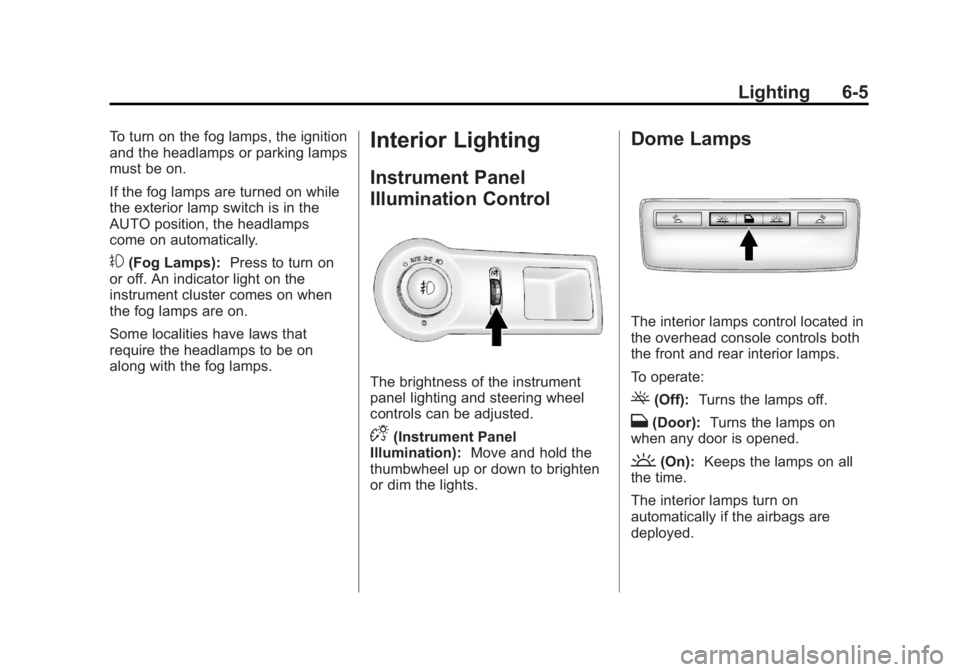
The brightness of the instrument
panel lighting and steering wheel
controls can be adjusted.
D(Instrument Panel
Illumination): Move and hold the
thumbwheel up or down to brighten
or dim the lights.
Dome Lamps
The interior lamps control located in
the overhead console controls both
the front and rear interior lamps.
To operate:
((Off): Turns the lamps off.
H(Door): Turns the lamps on
when any door is opened.
'(On): Keeps the lamps on all
the time.
The interior lamps turn on
automatically if the airbags are
deployed.
Page 166 of 422

Black plate (4,1)Buick LaCrosse Owner Manual - 2013 - crc - 9/7/12
7-4 Infotainment System
7.g
.Radio: Seeks the previous
station.
.CD: Select the previous
track or rewinds within a
track.
8.
X
.Removes a disc from the
CD slot.
9.
l
.Radio: Seeks the next
station.
.CD: Select the next track or
fast forwards within a track.
10. RADIO/BAND
.Changes the band while
listening to the radio.
.Selects the radio when
listening to a different
audio source. 11. Multifunction Knob
.Opens menus, highlights
menu items, or sets
numeric values while in
a menu.
12. SELECT
.Selects menu items.
13. CONFIG
.Opens the Settings menu.
14.
/BACK
.Menu: Moves one
level back.
.Character Input: Deletes
the last character.
15.
H
.Opens the Clock menu.
16. TONE
.Opens the Tone menu. 17.
5
.Opens the Phone
main menu.
.Mutes the audio system.
Operation
Controls
The infotainment system is operated
by using the pushbuttons,
multifunction knobs, menus shown
on the display, and steering wheel
controls, if equipped.
Turning the System On or Off
VOL/O(Volume/Power):
Press to
turn the system on and off.
Automatic Switch-Off
If the infotainment system has been
turned on after the ignition is turned
off, the system will turn off
automatically after 10 minutes.