Breakdown assistanceVehicle equipment
All standard, country-specific and optional
equipment that is offered in the model series is
described in this chapter. Therefore, equipment
is also described that is not available in a vehicle,
e. g., because of the selected optional equip‐
ment or country variant. This also applies for
safety-related functions and systems.
Hazard warning flashers
The button is located in the center console.
Emergency Request
Requirements
▷Equipment version with full preparation
package mobile phone.
An Emergency Request can be made, even
if no mobile phones are paired with the ve‐
hicle.▷BMW Assist is activated.▷The radio ready state is switched on.▷The BMW Assist system is logged into a
wireless communications network sup‐
ported by BMW Assist.▷The Assist system is functional.▷A ConnectedDrive contract is available.General information
Only press the SOS button in an emergency.
Hints Emergency Request not guaranteed
For technical reasons, the Emergency Re‐
quest cannot be guaranteed under unfavorable
conditions.◀
Service contract▷After your contract with BMW Assist has ex‐
pired, the BMW Assist system can be deac‐
tivated by the service center without you
having to visit a workshop.
After deactivation, an Emergency Request
is no longer possible.▷Under certain circumstances, the system
can be reactivated by a service center after
you sign a new contract.
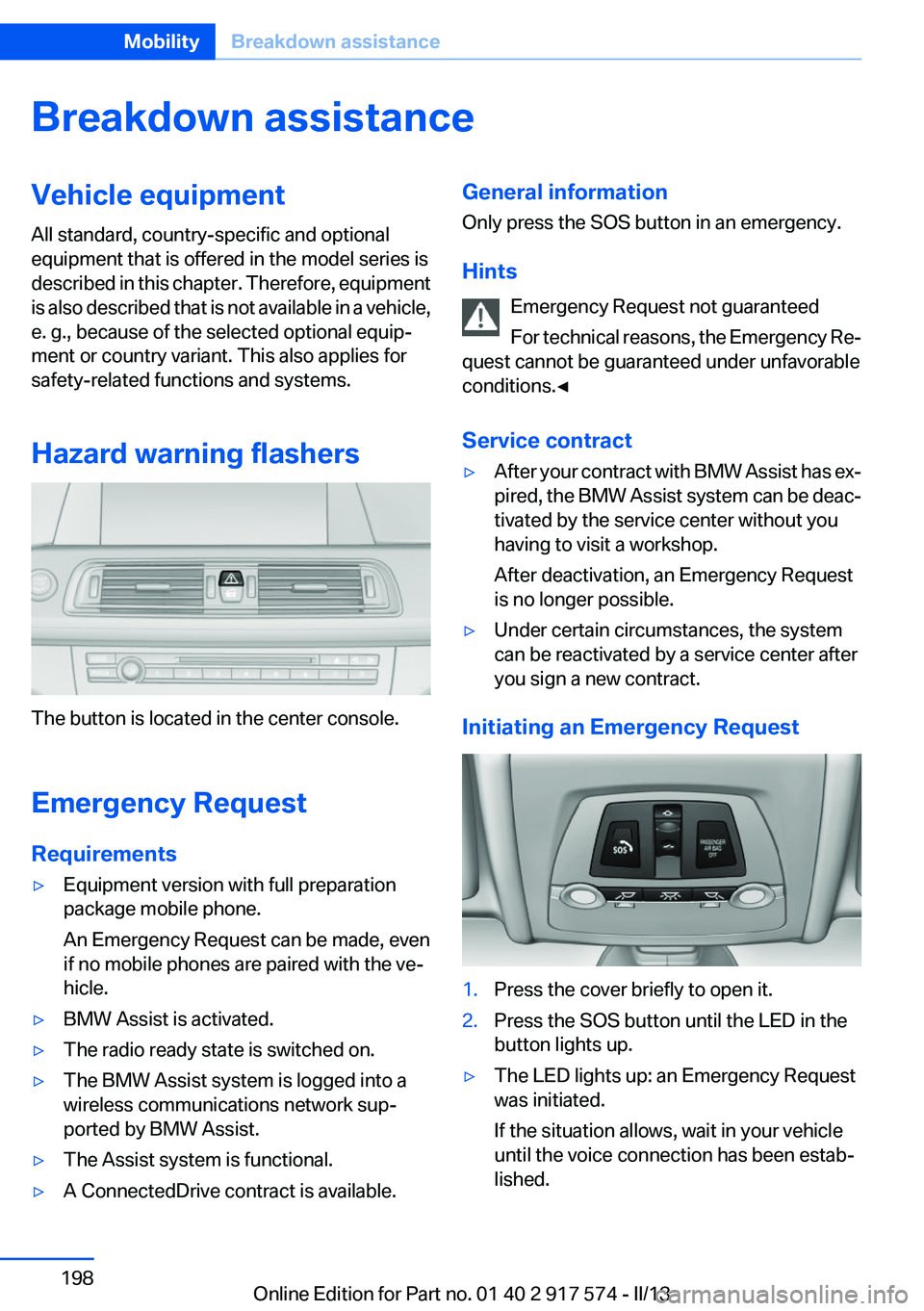
Initiating an Emergency Request
1.Press the cover briefly to open it.2.Press the SOS button until the LED in the
button lights up.▷The LED lights up: an Emergency Request
was initiated.
If the situation allows, wait in your vehicle
until the voice connection has been estab‐
lished.Seite 198MobilityBreakdown assistance198
Online Edition for Part no. 01 40 2 917 574 - II/13
Do not touch live parts
To avoid the risk of potentially fatal injury,
always avoid all contact with electrical compo‐
nents while the engine is running.◀
Preparation1.Check whether the battery of the other ve‐
hicle has a voltage of 12 volts. This informa‐
tion can be found on the battery.2.Switch off the engine of the assisting vehi‐
cle.3.Switch off any electronic systems/power
consumers in both vehicles.
Bodywork contact between vehicles
Make sure that there is no contact be‐
tween the bodywork of the two vehicles; other‐
wise, there is the danger of short circuits.◀
Starting aid terminals Connecting order
Connect the jumper cables in the correct
order; otherwise, there is the danger of injury
from sparking.◀
The so-called starting aid terminal in the engine
compartment acts as the battery's positive ter‐
minal.
The body ground or a special nut acts as the
battery negative terminal.
Connecting the cables Be careful not to swap over the positive
and negative connector terminals
Do not swap over the positive and negative ter‐
minals of the connectors, otherwise there is a
danger that components of the hybrid system or
the vehicle electronics may be irreparably dam‐
aged.
Take note of the label next to the positive ter‐
minal.◀
Before you begin, switch off all unnecessary
electronic systems/power consumers, such as
the radio, on the assisting and receiving vehi‐
cles.
1.Pull off the cap of the BMW starting aid ter‐
minal.2.Attach one terminal clamp of the positive
jumper cable to the positive terminal of the
battery, or to the corresponding starting aid
terminal of the vehicle providing assistance.3.Attach the terminal clamp on the other end
of the cable to the positive terminal of the
battery, or to the corresponding starting aid
terminal of the vehicle to be started.4.Attach one terminal clamp of the negative
jumper cable to the negative terminal of the
battery, or to the corresponding engine or
body ground of assisting vehicle.5.Attach the second terminal clamp to the
negative terminal of the battery, or to theSeite 200MobilityBreakdown assistance200
Online Edition for Part no. 01 40 2 917 574 - II/13
Plastic, care 206
Power failure 197
Power sunroof, glass 49
Power windows 47
Pressure, tire air pres‐ sure 175
Pressure warning FTM, tires 105
Profile, refer to Personal Pro‐ file 35
Programmable memory but‐ tons, iDrive 22
Protective function, glass sun‐ roof 50
Protective function, win‐ dows 48
Push-and-turn switch, refer to Controller 18
R
Radiator fluid 187
Radio-operated key, refer to Remote control 34
Radio ready state 66
Radio, see user's manual for Navigation, Entertainment
and Communication
Rain sensor 74
Rear automatic climate con‐ trol 142
Rear lamps 194
Rear socket 150
Rearview mirror 59
Rear window defroster 140
Recirculated-air mode 140
Recommended tire brands 180
Refueling 172
Remaining range 84
Remote control/key 34
Remote control, auxiliary air conditioning, key 145
Remote control, button as‐ signment 34 Remote control, malfunc‐
tion 40
Remote control, universal 146
Replacement fuse 197
Replacing parts 190
Replacing wheels/tires 179
Reporting safety defects 9
Reserve warning, refer to Range 84
Reset, Tire Pressure Monitor TPM 103
Residual cooling 143
Residual heat, automatic cli‐ mate control 140
Retaining straps, securing cargo 164
Retreaded tires 180
Reversing lamp, bulb replace‐ ment 195
Roadside parking lamps 95
Roller sunblinds 48
RON gasoline quality 174
Roof load capacity 211
Roof-mounted luggage rack 164
Rope for tow-starting/tow‐ ing 202
RSC Run Flat System Compo‐ nent, refer to Run-flat
tires 181
Rubber components, care 206
Run-flat tires 181
S
Safe braking 161
Safety 7
Safety belt reminder for driv‐ er's seat and front passenger
seat 56
Safety belts 55
Safety belts, care 206
Safety of the hybrid sys‐ tem 202 Safety Package, refer to Active
Protection 115
Safety switch, windows 48
Safety systems, airbags 99
Saving fuel 166
Screen, refer to Control Dis‐ play 18
Screwdriver 190
Screw thread for tow fit‐ ting 202
Seat belts, refer to Safety belts 55
Seat heating, front 54
Seat heating, rear 54
Seating position for chil‐ dren 62
Seat, mirror, and steering wheel memory 58
Seats 51
Seat ventilation, front 54
Selection list in instrument cluster 88
Selector lever, automatic transmission 76
Sensors, care 207
Service and warranty 8
Service requirements, Condi‐ tion Based Service CBS 188
Service requirements, dis‐ play 86
Service, Roadside Assis‐ tance 199
Settings on Control Dis‐ play 91
Settings, storing for seat, mir‐ rors, steering wheel 58
Shifting, automatic transmis‐ sion 76
Shift paddles on steering wheel 78
Shoulder support 53
Side airbags 99
Side View 130
Signaling, horn 14
Signals when unlocking 39 Seite 220ReferenceEverything from A to Z220
Online Edition for Part no. 01 40 2 917 574 - II/13