2013 BMW ACTIVEHYBRID3 sunroof
[x] Cancel search: sunroofPage 109 of 220

After travel has begun, the system is trained
about the driver, so that increasing lack of alert‐
ness or fatigue can be detected.
This procedure takes the following criteria into
account:▷Personal driving style, for example, steering
behavior.▷Driving conditions, for example, length of
trip.
Starting at approximately 43 mph/70 km/h, the
system is active and can display a recommen‐
dation to take a break.
Break recommendation
If the driver becomes increasingly less alert or
fatigued, a message is displayed in the Control
Display with the recommendation to take a
break.
A recommendation to take a break is displayed
only once during an uninterrupted trip.
After a break, another recommendation to take
a break cannot be displayed until after approxi‐
mately 45 minutes.
System limits
The function may be limited in the following sit‐
uations, for instance, and will either output an
incorrect warning or no warning at all:
▷When the clock is set incorrectly.▷When the vehicle speed is mainly below
about 43 mph/70 km/h.▷With a sporty driving style, such as during
rapid acceleration or when cornering
quickly.▷In active driving situations, such as when
changing lanes frequently.▷When the road surface is poor.▷In the event of strong side winds.PreCrash
The concept
The system is used to detect critical driving sit‐
uations that might lead to an accident. In these
situations, preventative protection measures
are automatically undertaken to minimize the
risk in the event of an accident as much as pos‐
sible.
Critical driving situations may include:▷Full brake applications.▷Severe understeering.▷Severe oversteering.
If the vehicle includes the collision warning or
collision warning with braking feature, impend‐
ing collisions with vehicles driving ahead or
stopped in front of you can also be detected
within the system's range.
Personal responsibility
The system cannot serve as a substitute
for the driver's personal judgment of the traffic
situation. The system may not always detect
critical situations reliably and in a timely manner.
Adapt speed to traffic situation and drive alertly;
otherwise, a risk to safety may result.◀
Function
After the safety belt is buckled, the front belts
are automatically pretensioned once after the
vehicle is driven is away.
In critical driving situations, the following indi‐
vidual functions become active as needed:
▷The front belts are automatically preten‐
sioned.▷Automatic closing of the windows.▷Automatic closing of the glass sunroof.▷For vehicles equipped with power seat ad‐
justment: automatic positioning of the back‐
rest for the front passenger seat.
After a critical driving situation without an acci‐
dent, the front belts are loosened again. All other
systems can be restored to the desired setting.
Seite 109SafetyControls109
Online Edition for Part no. 01 40 2 917 825 - II/13
Page 154 of 220
3.Press and hold down brake pedal.4.Use the accelerator pedal to maintain an en‐
gine speed of approx. 2,000 rpm.
After a few minutes, the high-voltage battery is
fully charged again.
The battery charge indicator in the instrument
cluster, refer to page 79, is used to check the
status.
General driving notes
Closing the trunk lid Drive with the trunk lid closed
Only drive with the tailgate closed; other‐
wise, in the event of an accident or braking or
evasive maneuvers, passengers or other road
users may be injured or the vehicle may be dam‐
aged. In addition, exhaust fumes may enter the
passenger compartment.◀
If driving with the tailgate open cannot be
avoided:
▷Close all windows and the glass sunroof.▷Greatly increase the blower speed.▷Drive moderately.
Hot exhaust system
Hot exhaust system
High temperatures are generated in the
exhaust system.
Do not remove the heat shields installed and
never apply undercoating to them. When driv‐
ing, standing at idle and while parking, take care
to avoid possible contact between the hot ex‐
haust system and any highly flammable materi‐
als such as hay, leaves, grass, etc. Such contact
could lead to a fire, and with it the risk of serious
personal injury as well as property damage.
Do not touch hot exhaust pipes; otherwise, there
is the danger of getting burned.◀
Mobile communication devices in the
vehicle
Mobile communication devices in the ve‐
hicle
It is advised that you do not use mobile commu‐
nication devices, e.g., mobile phones, inside the
vehicle without connecting them directly to the
external antenna. Otherwise, the vehicle elec‐
tronics and mobile communication devices can
interfere with each other. In addition, there is no
assurance that the radiation generated during
transmission will be discharged from the vehicle
interior.◀
Hydroplaning
On wet or slushy roads, a wedge of water can
form between the tires and road surface.
This phenomenon is referred to as hydroplan‐
ing. It is characterized by a partial or complete
loss of contact between the tires and the road
surface, ultimately undermining your ability to
steer and brake the vehicle.
Hydroplaning
When driving on wet or slushy roads, re‐
duce your speed to prevent hydroplaning.◀
Driving through water
Drive though calm water only if it is not deeper
than 9.8 inches/25 cm and at this height, no
faster than walking speed, up to 6 mph/10 km/h.
Adhere to water depth and speed limita‐
tions
Do not exceed this water depth and walking
speed; otherwise, the vehicle's engine, the elec‐
trical systems and the transmission may be
damaged.◀
Braking safely
Your vehicle is equipped with ABS as a standard
feature.Seite 154Driving tipsThings to remember when driving154
Online Edition for Part no. 01 40 2 917 825 - II/13
Page 158 of 220
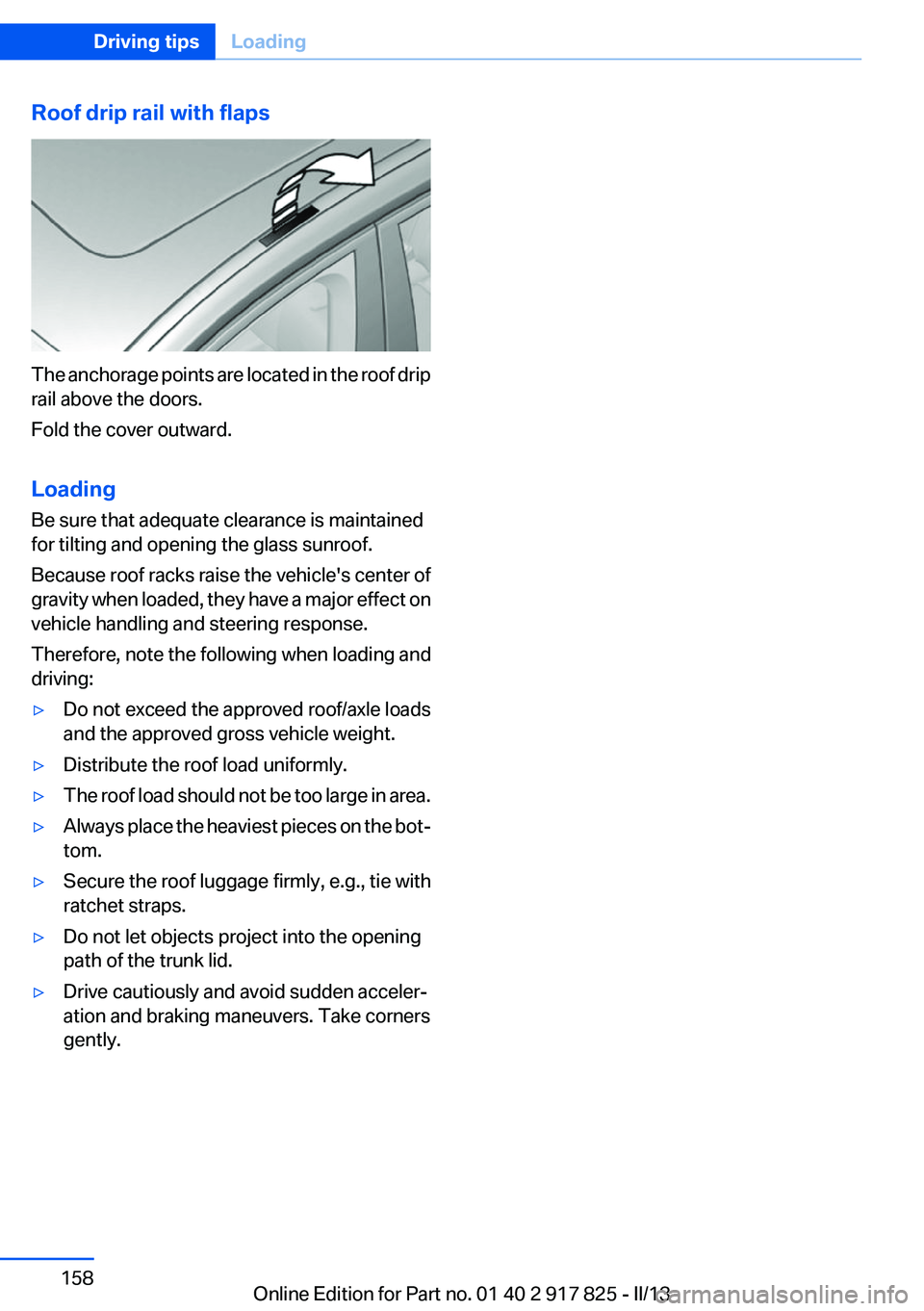
Roof drip rail with flaps
The anchorage points are located in the roof drip
rail above the doors.
Fold the cover outward.
Loading
Be sure that adequate clearance is maintained
for tilting and opening the glass sunroof.
Because roof racks raise the vehicle's center of
gravity when loaded, they have a major effect on
vehicle handling and steering response.
Therefore, note the following when loading and
driving:
▷Do not exceed the approved roof/axle loads
and the approved gross vehicle weight.▷Distribute the roof load uniformly.▷The roof load should not be too large in area.▷Always place the heaviest pieces on the bot‐
tom.▷Secure the roof luggage firmly, e.g., tie with
ratchet straps.▷Do not let objects project into the opening
path of the trunk lid.▷Drive cautiously and avoid sudden acceler‐
ation and braking maneuvers. Take corners
gently.Seite 158Driving tipsLoading158
Online Edition for Part no. 01 40 2 917 825 - II/13
Page 159 of 220
Saving fuelVehicle equipment
All standard, country-specific and optional
equipment that is offered in the model series is
described in this chapter. Therefore, equipment
is also described that is not available in a vehicle,
e. g., because of the selected optional equip‐
ment or country variant. This also applies for
safety-related functions and systems.
General information
Your vehicle contains advanced technology for
the reduction of fuel consumption and emis‐
sions.
Fuel consumption depends on a number of dif‐
ferent factors.
The implementation of certain measures, driv‐
ing style and regular maintenance can have an
influence on fuel consumption and on the envi‐
ronmental impact.
Remove unnecessary cargo
Additional weight increases fuel consumption.
Remove attached parts
following use
Remove auxiliary mirrors, roof or rear luggage
racks which are no longer required following
use.
Attached parts on the vehicle impair the aero‐
dynamics and increase the fuel consumption.Close the windows and glass
sunroof
Driving with the glass sunroof and windows
open results in increased air resistance and
raises fuel consumption.
Tires
General information
Tires can affect consumption values in various
ways, for instance consumption can be influ‐
enced by the size of the tires.
Check the tire inflation pressure
regularly
Check and, if necessary, correct the tire inflation
pressure at least twice a month and before start‐
ing on a long trip.
Low tire inflation pressure increases rolling re‐
sistance and thus raises fuel consumption and
tire wear.
Drive away without delay
Do not wait for the engine to warm up while the
vehicle remains stationary. Start driving right
away, but at moderate engine speeds.
This is the fastest way for the cold engine to
reach its operating temperature.
Look well ahead when driving
Avoid unnecessary acceleration and braking.
By maintaining a suitable distance to the vehicle
driving ahead of you.
Driving smoothly and looking ahead reduces
fuel consumption.Seite 159Saving fuelDriving tips159
Online Edition for Part no. 01 40 2 917 825 - II/13
Page 199 of 220
with appropriately trained personnel. Other‐
wise, there is the risk of fatal injury from electric
shock due to the hybrid system's high voltage. ◀
Hybrid system: contact with water
The hybrid system is typically safe even in the
following example situations:▷Water in the footwell, for instance after a
rainstorm when the glass sunroof is open.▷Vehicle is in the water, such as in the event
of high water levels.▷Liquid escapes in the trunk.
In these cases there is no risk of injury from elec‐
tric shock. Other damage to the vehicle is pos‐
sible.
Hybrid system: automatic deactivation
If an accident occurs, the hybrid system is
switched off automatically to prevent risk of dan‐
ger to occupants and other road users.
Read the information on What to do after an ac‐
cident, refer to page 199.
What to do after an accident
General information After an accident
After an accident, do not touch any high-
voltage components such as orange colored
high-voltage cables or parts that are in contact
with exposed high-voltage cables. Otherwise,
there is the risk of fatal injury from electric shock
due to the hybrid system's high voltage.◀
Escaping fluids
Do not touch any fluids escaping from the
high-voltage battery, or the skin can sustain
chemical burns.◀
If you are involved in an accident with your ve‐
hicle, compliance with the following additional
safety precautions is required with regard to the
hybrid system.
▷Secure the crash site.▷Immediately notify rescue forces, police, or
firefighters of the fact that your vehicle is
equipped with a hybrid system.▷Engage transmission position P, apply the
parking brake, and switch off the ignition.▷Lock the vehicle after exiting.▷Do not inhale any gases escaping from the
high-voltage battery; if necessary, maintain
a safe distance from the vehicle.Seite 199Breakdown assistanceMobility199
Online Edition for Part no. 01 40 2 917 825 - II/13
Page 200 of 220

CareVehicle equipment
All standard, country-specific and optional
equipment that is offered in the model series is
described in this chapter. Therefore, equipment
is also described that is not available in a vehicle,
e. g., because of the selected optional equip‐
ment or country variant. This also applies for
safety-related functions and systems.
Car washes
Hints Steam jets or high-pressure washers
When using steam jets or high-pressure
washers, hold them a sufficient distance away
and use a maximum temperature of
140 ℉/60 ℃.
Ensure that a distance of at least 31.5 in‐
ches/80 cm from the glass sunroof is maintained
at all times. Holding them too close or using ex‐
cessively high pressures or temperatures can
cause damage or preliminary damage that may
then lead to long-term damage.
Follow the user's manual for the high-pressure
washer.◀
Cleaning sensors/cameras with high-
pressure washers
When using high-pressure washers, do not
spray the exterior sensors and cameras, e.g.,
Park Distance Control, for extended periods of
time and only from a distance of at least
12 in/30 cm.◀
Regularly remove foreign items such as leaves
in the area below the windshield when the hood
is raised.
Wash your vehicle frequently, particularly in win‐
ter.Intense soiling and road salt can damage the ve‐
hicle.
Automatic car washes
Hints
Note the following:▷Give preference to cloth car washes or those
that use soft brushes in order to avoid paint
damage.▷Make sure that the wheels and tires are not
damaged by the transport mechanisms.▷Fold in the exterior mirrors; otherwise, they
may be damaged, depending on the width of
the vehicle.▷Deactivate the rain sensor, refer to page 69,
to avoid unintentional wiper activation.▷In some cases, an unintentional alarm can be
triggered by the interior motion sensor of the
alarm system. Follow the instructions on
avoiding an unintentional alarm, refer to
page 45.
Guide rails in car washes
Avoid car washes with guide rails higher
than 4 in/10 cm; otherwise, the vehicle body
could be damaged.◀
Before driving into a car wash
In order to ensure that the vehicle can roll in a car
wash, take the following steps:
Automatic transmission:
1.Release the parking brake, refer to page 67.2.Drive into the car wash.3.Depress the brake pedal as needed.4.Engage transmission position N.5.Switch the engine off. In this way, the igni‐
tion remains switched on, and a Check-Con‐
trol message is displayed.Seite 200MobilityCare200
Online Edition for Part no. 01 40 2 917 825 - II/13
Page 213 of 220

F
Failure message, refer to Check Control 75
False alarm, refer to Uninten‐ tional alarm 45
Fan, refer to Air flow 134
Fault displays, refer to Check Control 75
Filler neck for engine oil 179
Fine wood, care 202
First aid kit 195
Fitting for towing, refer to Tow fitting 198
Flat tire, changing wheels 191
Flat Tire Monitor FTM 101
Flat tire, Tire Pressure Monitor TPM 98
Flat tire, warning lamp 99, 102
Flooding 154
Floor carpet, care 202
Floor mats, care 202
Fold down the rear seat back‐ rest, see Though-loading
system 144
Fold-out position, windshield wipers 70
Foot brake 154
Front airbags 95
Front fog lamps 93
Front fog lamps, front, bulb re‐ placement 188
Front lamps 184
Front passenger airbags, au‐ tomatic deactivation 97
Front passenger airbags, indi‐ cator lamp 97
FTM Flat Tire Monitor 101
Fuel cap 166
Fuel consumption, refer to Average fuel consump‐
tion 85
Fuel filler flap 166
Fuel gauge 77
Fuel quality 168 Fuel, tank capacity 208
Functions, hybrid system 30
Fuse 192
G
Garage door opener, refer to Integrated universal remote
control 138
Gasoline 168
Gasoline quality 168
Gear change, automatic trans‐ mission 72
General driving notes 154
Glass sunroof, powered 47
Glove compartment 146
Gross vehicle weight, ap‐ proved 207
H
Handbrake, refer to parking brake 67
Hand-held transmitter, alter‐ nating code 139
Hazard warning flashers 194
Head airbags 95
Headlamp control, auto‐ matic 91
Headlamp courtesy delay fea‐ ture 91
Headlamp flasher 68
Headlamp glass 184
Headlamps 184
Headlamps, care 201
Headlamp washer system 69
Headliner 17
Head restraints 49
Head restraints, front 53
Head restraints, rear 54
Head-up Display 126
Head-up Display, care 203
Heavy cargo, stowing 157
Height, vehicle 206
High-beam Assistant 92
High beams 68 High beams/low beams, refer
to High-beam Assistant 92
High-voltage battery, charge indicator 79
Hills 155
Hill start assistant, refer to Drive-off assistant 115
Hints 6
Holder for beverages 148
Homepage 6
Hood 177
Horn 14
Hotel function, trunk lid 42
Hot exhaust system 154
HUD Head-up Display 126
Hybrid system, at a glance 30
Hybrid system, automatic de‐ activation 199
Hybrid system, contact with water 199
Hybrid system, displays 79
Hybrid system, driving tips 152
Hybrid system, safety 198
Hydroplaning 154
I
Ice warning, refer to External temperature warning 78
Icy roads, refer to External temperature warning 78
Identification marks, tires 171
Identification number, refer to Important features in the en‐
gine compartment 176
iDrive 18
Ignition key, refer to Remote control 34
Ignition off 63
Ignition on 63
Indication of a flat tire 99, 102
Individual air distribution 134
Individual settings, refer to Personal Profile 35
Inflation pressure, tires 169 Seite 213Everything from A to ZReference213
Online Edition for Part no. 01 40 2 917 825 - II/13
Page 215 of 220

Maximum speed, wintertires 174
Measure, units of 88
Medical kit 195
Memory, seat, mirror 55
Menu in instrument cluster 84
Menus, operating, iDrive 18
Menus, refer to iDrive operat‐ ing concept 20
Messages, refer to Check Control 75
Microfilter 134
Minimum tread, tires 173
Mirror 56
Mirror memory 55
Mobile communication devi‐ ces in the vehicle 154
Modifications, technical, refer to Safety 7
Moisture in headlamp 184
Monitor, refer to Control Dis‐ play 18
Mounting of child restraint fix‐ ing systems 59
Multifunction steering wheel, buttons 14
N
Navigation, see user's manual for Navigation, Entertain‐
ment and Communication
Neck restraints, front, refer to Head restraints 53
Neck restraints, rear, refer to Head restraints 54
New wheels and tires 173
No Passing Information 82
Nylon rope for tow-starting/ towing 198
O
OBD Onboard Diagnos‐ tics 182 Obstacle marking, backup
camera 122
Octane rating, refer to Gaso‐ line quality 168
Odometer 78
Office, see user's manual for Navigation, Entertainment
and Communication
Oil 178
Oil, adding 179
Oil additives 179
Oil change 179
Oil change interval, service re‐ quirements 81
Oil filler neck 179
Oil types, alternative 179
Oil types, approved 179
Old batteries, disposal 192
Onboard Diagnostics OBD 182
Onboard monitor, refer to Control Display 18
Onboard vehicle tool kit 183
Opening/closing from in‐ side 41
Opening/closing via door lock 40
Opening/closing with remote control 38
Opening the trunk lid with no- touch activation 43
Operating concept, iDrive 18
Optional equipment, standard equipment 6
Outside air, refer to Automatic recirculated-air control 133
Overheating of engine, refer to Coolant temperature 78
Overtaking prohibitions 82
P
Paint, vehicle 201
Parallel parking assistant 127
Park Distance Control PDC 118 Parked-car ventilation 135
Parked vehicle, condensa‐ tion 155
Parking aid, refer to PDC 118
Parking assistant 127
Parking brake 67
Parking lamps 90
Passenger side mirror, tilting downward 57
Pathway lines, backup cam‐ era 122
PDC Park Distance Con‐ trol 118
Personal Profile 35
Pinch protection system, glass sunroof 48
Pinch protection system, win‐ dows 46
Plastic, care 202
Power failure 192
Power sunroof, glass 47
Power windows 45
Pressure, tire air pres‐ sure 169
Pressure warning FTM, tires 101
Profile, refer to Personal Pro‐ file 35
Programmable memory but‐ tons, iDrive 23
Protective function, glass sun‐ roof 48
Protective function, win‐ dows 46
Push-and-turn switch, refer to Controller 18, 19
R
Radiator fluid 180
Radio-operated key, refer to Remote control 34
Radio ready state 63
Radio, see user's manual for Navigation, Entertainment
and Communication Seite 215Everything from A to ZReference215
Online Edition for Part no. 01 40 2 917 825 - II/13