Camera
The camera is located near the base of the mir‐
ror.
Keep the windshield in the area behind the in‐
terior rear view mirror clean and clear.
Switching on/off Press the button
▷On: the LED lights up.▷Off: the LED goes out.
The state is stored for the remote control cur‐
rently in use.
Display in the instrument cluster
▷Lines: system is activated.▷Arrows: at least one lane marking
was detected and warnings can be
issued.
Issued warning
If you leave the lane and if a lane marking has
been detected, the steering wheel begins vi‐
brating.
If the turn signal is set before changing the lane,
a warning is not issued.
End of warning
The warning ends:
▷Automatically after approx. 3 seconds.▷When returning to your own lane.▷When braking hard.▷When using the turn signal.
System limits
The system may not be fully functional in the
following situations:
▷In heavy fog, rain or snowfall.▷In the event of worn, poorly visible, merging,
diverging, or multiple lane markings such as
in construction areas.▷When lane markings are covered in snow,
ice, dirt or water.▷In tight curves or on narrow lanes.▷When the lane markings are covered by ob‐
jects.▷When driving very close to the vehicle in
front of you.▷When driving toward bright lights.▷When the windshield behind the interior
rearview mirror is fogged over, dirty or cov‐
ered with stickers, etc.▷During calibration of the camera immedi‐
ately after vehicle shipment.
Active Blind Spot Detection
The concept
Two radar sensors below the rear bumper mon‐
itor the area behind and next to the vehicle at
speeds above approx. 30 mph/50 km/h.
The system indicates whether there are vehicles
in the blind spot, arrow 1, or approaching from
behind on the adjacent lane, arrow 2.
Seite 106ControlsSafety106
Online Edition for Part no. 01 40 2 917 825 - II/13
Ventilation
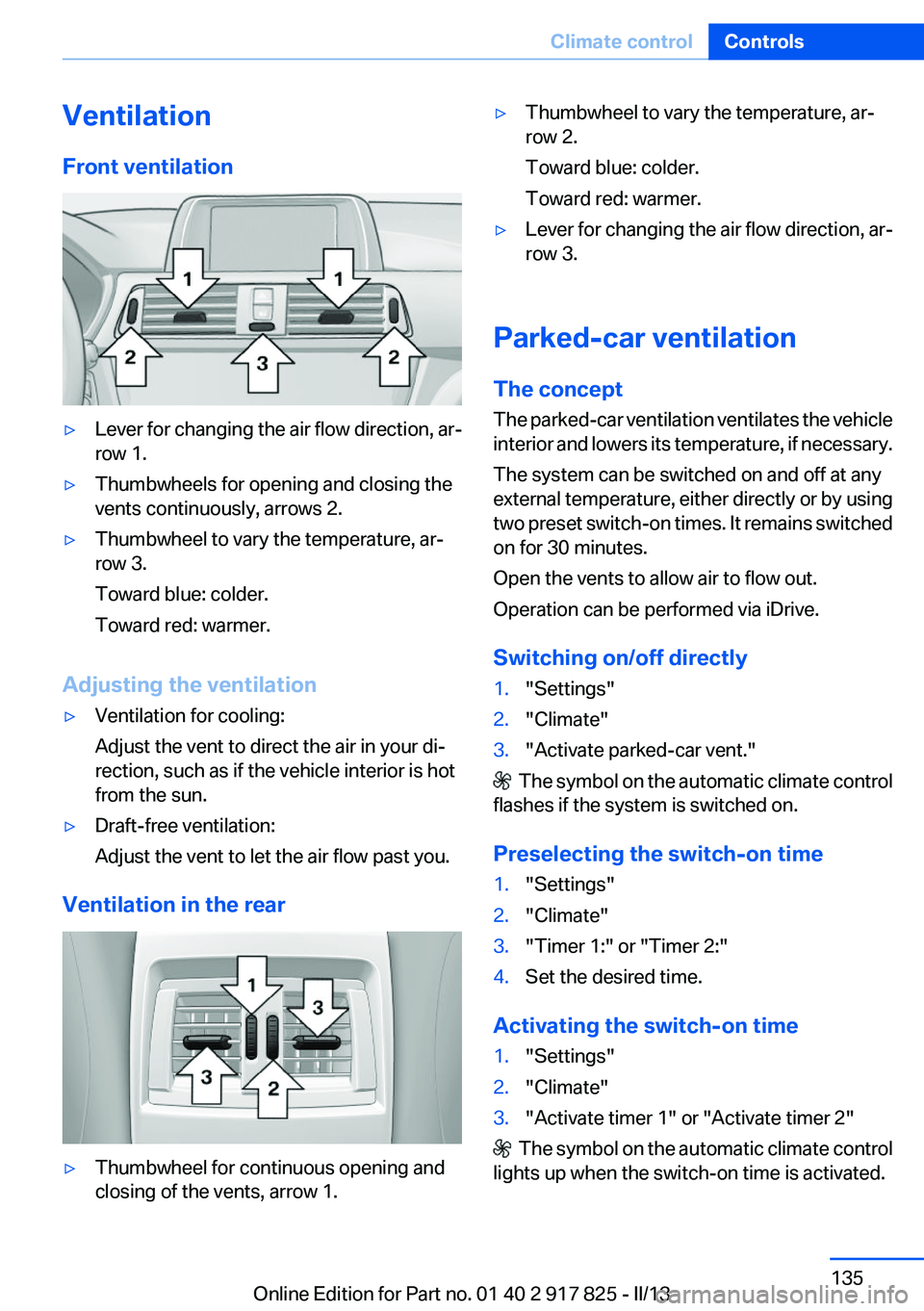
Front ventilation▷Lever for changing the air flow direction, ar‐
row 1.▷Thumbwheels for opening and closing the
vents continuously, arrows 2.▷Thumbwheel to vary the temperature, ar‐
row 3.
Toward blue: colder.
Toward red: warmer.
Adjusting the ventilation
▷Ventilation for cooling:
Adjust the vent to direct the air in your di‐
rection, such as if the vehicle interior is hot
from the sun.▷Draft-free ventilation:
Adjust the vent to let the air flow past you.
Ventilation in the rear
▷Thumbwheel for continuous opening and
closing of the vents, arrow 1.▷Thumbwheel to vary the temperature, ar‐
row 2.
Toward blue: colder.
Toward red: warmer.▷Lever for changing the air flow direction, ar‐
row 3.
Parked-car ventilation
The concept
The parked-car ventilation ventilates the vehicle
interior and lowers its temperature, if necessary.
The system can be switched on and off at any
external temperature, either directly or by using
two preset switch-on times. It remains switched
on for 30 minutes.
Open the vents to allow air to flow out.
Operation can be performed via iDrive.
Switching on/off directly
1."Settings"2."Climate"3."Activate parked-car vent."
The symbol on the automatic climate control
flashes if the system is switched on.
Preselecting the switch-on time
1."Settings"2."Climate"3."Timer 1:" or "Timer 2:"4.Set the desired time.
Activating the switch-on time
1."Settings"2."Climate"3."Activate timer 1" or "Activate timer 2"
The symbol on the automatic climate control
lights up when the switch-on time is activated.
Seite 135Climate controlControls135
Online Edition for Part no. 01 40 2 917 825 - II/13
D
Damage, tires 173
Damping control, dy‐ namic 112
Data, technical 206
Date 78
Daytime running lights 91
Deactivating drive readi‐ ness 65
Defrosting, refer to Windows, defrosting 134
Dehumidifying, air 133
Destination distance 85
Digital clock 78
Digital compass 140
Dimensions 206
Dimmable exterior mirrors 57
Dimmable interior rearview mirror 57
Direction indicator, refer to Turn signals 68
Display, electronic, instrument cluster 75
Display in windshield 126
Display lighting, refer to Instru‐ ment lighting 93
Displays 74
Displays, cleaning 203
Displays, hybrid system 79
Disposal, coolant 180
Disposal, vehicle battery 192
Distance control, refer to PDC 118
Distance to destination 85
Divided screen view, split screen 23
Door lock, refer to Remote control 34
DRIVE 66
Drive-off assistant 115
Drive-off assistant, refer to DSC 111
Drive readiness in detail 64
Drive readiness states 63 Driving experience
switch 113
Driving instructions, breaking in 152
Driving mode 113
Driving notes, general 154
Driving stability control sys‐ tems 111
Driving tips 154
Driving tips, hybrid sys‐ tem 152
Driving with the combustion engine 66
DSC Dynamic Stability Con‐ trol 111
DTC Dynamic Traction Con‐ trol 112
Dynamic Damping Con‐ trol 112
Dynamic Stability Control DSC 111
Dynamic Traction Control DTC 112
E
eBOOST 67
ECO PRO 160
ECO PRO, bonus range 161
ECO PRO display 160
ECO PRO driving mode 160
ECO PRO mode 160
ECO PRO Tip - driving instruc‐ tion 162
eDRIVE, electric driving 30
Electric drive readiness, Silent Start 64
Electric driving, eDRIVE 30
Electronic displays, instru‐ ment cluster 75
Electronic Stability Program ESP, refer to DSC 111
Emergency detection, remote control 35
Emergency release, door lock 41 Emergency release, fuel filler
flap 166
Emergency Request 194
Emergency service, refer to Roadside Assistance 195
Emergency start function, en‐ gine start 35
Emergency unlocking, trunk lid 42
Energy recovery, CHARGE 67
Engine, automatic off 65
Engine compartment 176
Engine compartment, working in 177
Engine coolant 180
Engine oil 178
Engine oil, adding 179
Engine oil additives 179
Engine oil change 179
Engine oil filler neck 179
Engine oil temperature 78
Engine oil types, alterna‐ tive 179
Engine oil types, ap‐ proved 179
Engine start during malfunc‐ tion 35
Engine start, jump-start‐ ing 195
Engine temperature 78
Entering a car wash 200
Equipment, interior 138
ESP Electronic Stability Pro‐ gram, refer to DSC 111
Exchanging wheels/tires 173
Exhaust system 154
Exterior mirror, automatic dim‐ ming feature 57
Exterior mirrors 56
External start 195
External temperature dis‐ play 78
External temperature warn‐ ing 78
Eyes for securing cargo 157 Seite 212ReferenceEverything from A to Z212
Online Edition for Part no. 01 40 2 917 825 - II/13