2013 BMW ACTIVEHYBRID3 brake light
[x] Cancel search: brake lightPage 115 of 220
Drive-off assistant
This system supports driving away on gradients.
The parking brake is not required.1.Hold the vehicle in place with the foot brake.2.Release the foot brake and drive away with‐
out delay.
After the foot brake is released, the vehicle is
held in place for approx. 2 seconds.
Depending on the vehicle load, the vehicle may
roll back slightly.
Driving off without delay
After releasing the foot brake, start driving
without delay, since the drive-off assistant will
not hold the vehicle in place for more than ap‐
prox. 2 seconds and the vehicle will begin rolling
back.◀
Seite 115Driving stability control systemsControls115
Online Edition for Part no. 01 40 2 917 825 - II/13
Page 127 of 220

▷Cruise control.▷Selection list from the instrument cluster.
Some of this information is only displayed briefly
as needed.
Selecting displays in the Head-up
Display
1."Settings"2."Head-Up Display"3."Displayed information"4.Select the desired displays in the Head-up
Display.
The settings are stored for the remote control
currently in use.
Setting the brightness
The brightness is automatically adjusted to the
ambient light.
The basic setting can be adjusted manually.
1."Settings"2."Head-Up Display"3."Brightness"4.Turn the controller.
When the low beams are switched on, the
brightness of the Head-up Display can be addi‐
tionally influenced using the instrument lighting,
refer to page 93.
The setting is stored for the remote control cur‐
rently in use.
Adjusting the height
1."Settings"2."Head-Up Display"3."Height"4.Turn the controller.
The setting is stored for the remote control cur‐
rently in use.
Setting the rotation1."Settings"2."Head-Up Display"3."Rotation"4.Turn the controller.
The setting is stored for the remote control cur‐
rently in use.
Special windshield
The windshield is part of the system.
The shape of the windshield makes it possible
to display a precise image.
A film in the windshield prevents double images
from being displayed.
Therefore, have the special windshield replaced
by a service center only.
Parking assistant
The concept
This system assists the driver in parking parallel
to the road.
Ultrasound sensors measure parking spaces on
both sides of the vehicle.
The parking assistant calculates the best pos‐
sible parking line and takes control of steering
during the parking procedure.
When parking, also take note of the visual and
acoustic information issued by the PDC and the
parking assistant and accelerate or brake ac‐
cordingly.
Seite 127Driving comfortControls127
Online Edition for Part no. 01 40 2 917 825 - II/13
Page 153 of 220

When coasting to a halt without pressing the
brake pedal.
Average energy recovery:
During a slight deceleration by gently pressing
the brake pedal.
Maximum energy recovery:
By pressing the brake pedal harder.
Brake according to the situation
Brake in accordance with the traffic con‐
ditions, or there is the risk of accident.◀
Optimum energy recovery
As soon as the display shows the maximum en‐
ergy recovery, only press the brake pedal harder
if required by the situation.
Driving situation examples for fuel
economy
In many driving situations, the hybrid system al‐
lows for a particularly efficient energy manage‐
ment.
▷Stop-and-go traffic:The combustion engine is switched on or
over automatically by the hybrid system.▷Driving with constant speed:
The electric motor relieves the combustion
engine periodically by also being switched
on.
Discharge of the high-voltage battery
In normal operation, a sufficient charging of the
high-voltage battery is ensured by energy re‐
covery. Longer idle periods can reduce the
charge state of the high-voltage battery.
Do not allow the vehicle to sit idle for ex‐
tended periods with a low charging state
Before storing the vehicle for an extended pe‐
riod, check the battery charge indicator to en‐
sure that the high-voltage battery is fully
charged. If necessary, charge the high-voltage
battery by driving the vehicle. Check the charge
level regularly, and if necessary recharge the
high-voltage battery by driving the vehicle. Al‐
lowing the high-voltage battery charge to drop
too low will damage the battery.◀
Charging by driving
In order to charge the high-voltage battery most
effectively when driving, activated the transmis‐
sion's Sport program DS, refer to page 72.
Coasting to a standstill and braking phases are
used more often to recover energy.
eDRIVE electric driving and the Auto Start Stop
function will also be deactivated.
Fast charging
In exceptional cases it can be charged in place,
such as before extended idle phases in order to
prevent damage to the high-voltage battery.
1.Start the engine.2.Engage transmission position P and set
parking brake.Seite 153Things to remember when drivingDriving tips153
Online Edition for Part no. 01 40 2 917 825 - II/13
Page 155 of 220

Applying the brakes fully is the most effective
way of braking in situations when this is neces‐
sary.
The vehicle maintains steering responsiveness.
You can still avoid any obstacles with a minimum
of steering effort.
Pulsation of the brake pedal and sounds from
the hydraulic circuits indicate that ABS is in its
active mode.
Objects in the area around the pedals No objects in the area around the pedals
Keep floor mats, carpets, and any other
objects out of the area of motion of the pedals;
otherwise, the function of the pedals could be
impeded while driving
Do not place additional floor mats over existing
mats or other objects.
Only use floor mats that have been approved for
the vehicle and can be properly fixed in place.
Ensure that the floor mats are securely fastened
again after they were removed for cleaning, for
example.◀
Driving in wet conditions
When roads are wet or there is heavy rain, briefly
exert gentle pressure on the brake pedal every
few miles.
Ensure that this action does not endanger other
road users.
The heat generated in this process helps dry the
brake discs and pads.
In this way braking efficiency will be available
when you need it.
Hills
Drive long or steep downhill gradients in the gear
in which the least braking is required. Otherwise,
the brake system may overheat, resulting in a
reduction in the brake system efficiency.You can increase the engine's braking effect by
shifting down, going all the way to first gear, if
necessary.
Avoid load on the brakes
Avoid placing excessive load on the brake
system. Light but consistent brake pressure can
lead to high temperatures, brake wear and pos‐
sibly even brake failure.◀
Do not drive in neutral
Do not drive in neutral or with the engine
stopped, as doing so disables engine braking. In
addition, steering and brake assist is unavailable
with the engine stopped.◀
Brake disc corrosion
Corrosion on the brake discs and contamination
on the brake pads are furthered by:▷Low mileage.▷Extended periods when the vehicle is not
used at all.▷Infrequent use of the brakes.
Corrosion occurs when the minimum pressure
that must be exerted by the pads during brake
applications to clean the discs is not reached.
Should corrosion form on the brake discs, the
brakes will tend to respond with a pulsating ef‐
fect that generally cannot be corrected.
Condensation under the parked vehicle
When using the automatic climate control, con‐
densation water develops that exits underneath
the vehicle.
Traces of water under the vehicle like this are
normal.
Seite 155Things to remember when drivingDriving tips155
Online Edition for Part no. 01 40 2 917 825 - II/13
Page 189 of 220
Tail lamps, bulb replacement
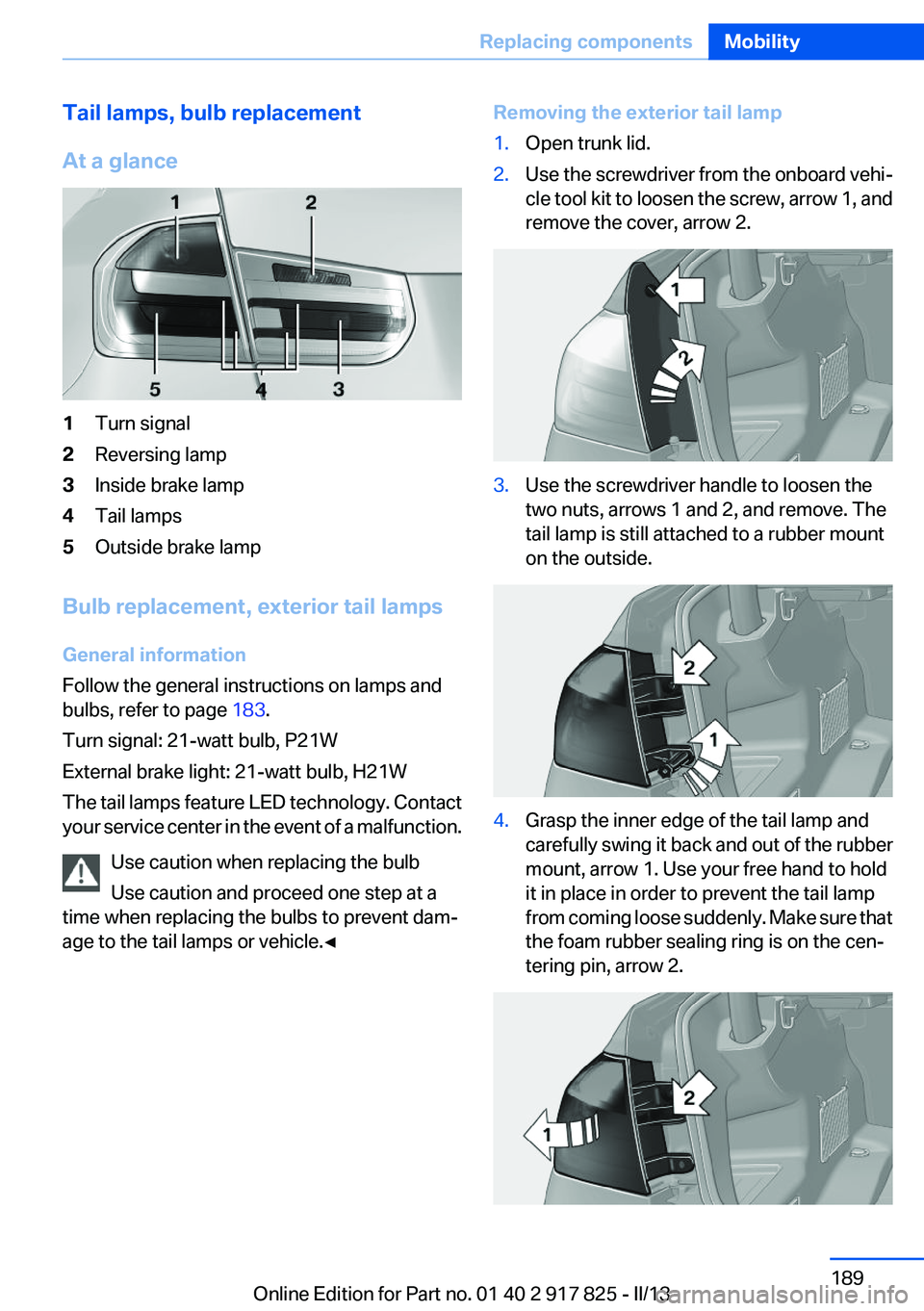
At a glance1Turn signal2Reversing lamp3Inside brake lamp4Tail lamps5Outside brake lamp
Bulb replacement, exterior tail lamps
General information
Follow the general instructions on lamps and
bulbs, refer to page 183.
Turn signal: 21-watt bulb, P21W
External brake light: 21-watt bulb, H21W
The tail lamps feature LED technology. Contact
your service center in the event of a malfunction.
Use caution when replacing the bulb
Use caution and proceed one step at a
time when replacing the bulbs to prevent dam‐
age to the tail lamps or vehicle.◀
Removing the exterior tail lamp1.Open trunk lid.2.Use the screwdriver from the onboard vehi‐
cle tool kit to loosen the screw, arrow 1, and
remove the cover, arrow 2.3.Use the screwdriver handle to loosen the
two nuts, arrows 1 and 2, and remove. The
tail lamp is still attached to a rubber mount
on the outside.4.Grasp the inner edge of the tail lamp and
carefully swing it back and out of the rubber
mount, arrow 1. Use your free hand to hold
it in place in order to prevent the tail lamp
from coming loose suddenly. Make sure that
the foam rubber sealing ring is on the cen‐
tering pin, arrow 2.Seite 189Replacing componentsMobility189
Online Edition for Part no. 01 40 2 917 825 - II/13
Page 201 of 220

Transmission position P with the igni‐
tion off
When the ignition is switched off, position P
is engaged automatically. When in an auto‐
matic car wash, for example, ensure that the
ignition is not switched off accidentally.◀
The vehicle cannot be locked from the outside
when in transmission position N.
A signal is sounded when an attempt is made to
lock the vehicle.
Transmission position
Transmission position P is engaged automati‐
cally:
▷When the ignition is switched off.▷After approx. 15 minutes.
Headlamps
▷Do not rub dry and do not use abrasive or
caustic cleansers.▷Soak areas that have been soiled e.g. due to
insects, with shampoo and wash off with
water.▷Thaw ice with deicing spray; do not use an
ice scraper.
After washing the vehicle
After washing the vehicle, apply the brakes
briefly to dry them; otherwise, braking action can
be reduced and corrosion of the brake discs can
occur.
Completely remove all residues on the windows,
to minimize loss of visibility due to smearing and
to reduce wiper noises and wiper blade wear.
Vehicle care
Car care products
BMW recommends using cleaning and care
products from BMW, since these have been
tested and approved.
Car care and cleaning products
Follow the instructions on the container.
When cleaning the interior, open the doors or
windows.
Only use products intended for cleaning vehi‐
cles.
Cleansers can contain substances that are dan‐
gerous and harmful to your health.◀
Vehicle paint
Regular care contributes to driving safety and
value retention. Environmental influences in
areas with elevated air pollution or natural con‐
taminants, such as tree resin or pollen can affect
the vehicle's paintwork. Tailor the frequency
and extent of your car care to these influences.
Aggressive substances such as spilled fuel, oil,
grease or bird droppings must be removed im‐
mediately to prevent the finish from being al‐
tered or discolored.
Leather care
Remove dust from the leather often, using a
cloth or vacuum cleaner.
Otherwise, particles of dust and road grime
chafe in pores and folds, and lead to increased
wear and premature degradation of the leather
surface.
To guard against discoloration, such as from
clothing, provide leather care roughly every two
months.
Clean light-colored leather more frequently be‐
cause soiling on such surfaces is substantially
more visible.
Use leather care products; otherwise, dirt and
grease will gradually break down the protective
layer of the leather surface.
Suitable care products are available from the
service center.
Upholstery material care
Vacuum regularly with a vacuum cleaner.Seite 201CareMobility201
Online Edition for Part no. 01 40 2 917 825 - II/13
Page 210 of 220

Everything from A to Z
IndexA
ABS, Antilock Brake Sys‐ tem 111
Activated-charcoal filter 134
Activate drive readiness 64
Active Blind Spot Detec‐ tion 106
ActiveHybrid, system 30
Active Protection 108
Adaptive brake lights, refer to Brake force display 108
Adaptive light control 92
Additives, oil 179
Adjustments, seats/head re‐ straints 49
After washing vehicle 201
Airbags 95
Airbags, indicator/warning light 96
Air circulation, refer to Recir‐ culated-air mode 133
Air, dehumidifying, refer to Cooling function 133
Air distribution, manual 134
Air flow, automatic climate control 134
Air pressure, tires 169
Air vents, refer to Ventila‐ tion 135
Alarm system 44
Alarm, unintentional 45
All around the center con‐ sole 16
All around the headliner 17
All around the steering wheel 14
All-season tires, refer to Win‐ ter tires 174
Alternating-code hand-held transmitter 139 Alternative oil types 179
Antifreeze, washer fluid 70
Antilock Brake System, ABS 111
Anti-slip control, refer to DSC 111
Approved axle load 207
Approved engine oils 179
Arrival time 85
Ash tray 142
Assistance for the combustion engine 67
Assistance, Roadside Assis‐ tance 195
Assistance when driving off 115
ASSIST, Hybrid system 67
Assist system information, on Control Display 88
Attentiveness assistant 108
AUTO intensity 133
Automatic car wash 200
Automatic climate control with enhanced features 132
Automatic Curb Monitor 57
Automatic deactivation, front passenger airbags 97
Automatic deactivation of the hybrid system 199
Automatic engine start-stop function 65
Automatic headlamp con‐ trol 91
Automatic locking 41
Automatic recirculated-air control 133
Automatic transmission with Steptronic 71
AUTO program, automatic cli‐ mate control 133
AUTO program, intensity 133 Auxiliary air conditioning 136
Average fuel consumption 85
Average speed 85
Axle loads, weights 207
B
Backrest curvature, refer to Lumbar support 51
Backrest, width 51
Backup camera 120
Band-aids, refer to First aid kit 195
Bar for tow-starting/tow‐ ing 197
Battery replacement, vehicle battery 192
Battery replacement, vehicle remote control 34
Battery, vehicle 191
Belts, safety belts 52
Beverage holder, cu‐ pholder 148
Blinds, sun protection 47
BMW ActiveHybrid 30
BMW Assist, see user's manual for Navigation, Enter‐
tainment and Communica‐
tion
BMW Homepage 6
BMW Internet page 6
BMW maintenance sys‐ tem 181
Bonus range, ECO PRO 161
Bottle holder, refer to Cu‐ pholder 148
Brake assistant 111
Brake discs, breaking in 152
Brake force display 108
Brake lamps, brake force dis‐ play 108 Seite 210ReferenceEverything from A to Z210
Online Edition for Part no. 01 40 2 917 825 - II/13
Page 211 of 220

Brake lights, adaptive 108
Brake pads, breaking in 152
Braking, notes 154
Breakdown assis‐ tance 194, 195
Breaking in 152
Brightness of Control Dis‐ play 88
Bulb replacement 183
Bulb replacement, front 184
Bulb replacement, halogen headlamps 184
Bulb replacement, rear 189
Bulb replacement, xenon headlamps 187
Bulbs and lamps 183
Button, Start/Stop 63
Bypassing, refer to Jump- starting 195
C
California Proposition 65 Warning 7
Camera, backup camera 121
Camera, care 203
Camera, Side View 125
Camera, Top View 123
Can holder, refer to Cu‐ pholder 148
Car battery 191
Car care products 201
Care, displays 203
Care, vehicle 201
Cargo 156
Cargo area, enlarging 144
Cargo area lid 41
Cargo area, storage compart‐ ments 149
Cargo straps, securing cargo 157
Car key, refer to Remote con‐ trol 34
Carpet, care 202
Car wash 200 Catalytic converter, refer to
Hot exhaust system 154
CBS Condition Based Serv‐ ice 181
CD/Multimedia, see user's manual for Navigation, Enter‐
tainment and Communica‐
tion
Center armrest 147
Center console 16
Central locking system 37
Central screen, refer to Control Display 18
Changes, technical, refer to Safety 7
Changing parts 183
Changing wheels 191
Changing wheels/tires 173
CHARGE, energy recovery 67
Charge indicator, high-voltage battery 79
Check Control 75
Children, seating position 59
Children, transporting safely 59
Child restraint fixing sys‐ tem 59
Child restraint fixing system LATCH 60
Child restraint fixing systems, mounting 59
Child safety locks 62
Child seat, mounting 59
Child seats 59
Chrome parts, care 202
Cigarette lighter 142
Cleaning, displays 203
Climate control 132
Clock 78
Closing/opening from in‐ side 41
Closing/opening via door lock 40
Closing/opening with remote control 38
Clothes hooks 148 Coasting 66
Collision warning 103
Combination switch, refer to Turn signals 68
Combination switch, refer to Wiper system 69
Combustion engine, start‐ ing 65
Comfort Access 42
COMFORT program, Dynamic Driving Control 114
Compartments in the doors 147
Compass 140
Computer 84
Condensation on win‐ dows 134
Condensation under the vehi‐ cle 155
Condition Based Service CBS 181
Confirmation signal 39
ConnectedDrive, see user's manual for Navigation, Enter‐
tainment and Communica‐
tion
Contact with water, hybrid system 199
Control Display 18
Control Display, settings 87
Controller 18, 19
Control systems, driving sta‐ bility 111
Convenient opening 38
Coolant 180
Coolant temperature 78
Cooling function 133
Cooling, maximum 133
Cooling system 180
Corrosion on brake discs 155
Cruise control 116
Cruising range 78
Cupholder 148
Current fuel consumption 81 Seite 211Everything from A to ZReference211
Online Edition for Part no. 01 40 2 917 825 - II/13