2013 BMW ACTIVE HYBRID 7 wheel
[x] Cancel search: wheelPage 6 of 253

Addendum
6.At page 59, under the heading:
“Active head restraint,” the
paragraph beginning, “Only attach
accessories . . .” should be
disregarded and the following text
should be read in lieu thereof:
“BMW recommends that you attach
accessories approved by BMW to
the seat or head restraint.”
7.At page 158, under the heading:
“Special windshield,” the paragraph
beginning, “Therefore, have the
special windshield . . .” should be
disregarded and the following text
should be read in lieu thereof:
“BMW recommends that you have
the special windshield replaced by
the service center.”
8.At page 183 under the heading:
“Objects in the area around the
pedals” and at page 230 under the
heading: “Carpets and floor mats,”
the paragraph that begins: “Only
use floor mats . . .” should be
disregarded and the following
language should be read in lieu
thereof: “The manufacturer of your
vehicle recommends that you use
floor mats that have been identified
by it as appropriate for use in your
vehicle and that can be properly
fixed in place.”
9.At page 189, under the heading:
“Have maintenance carried out,” the
sentence beginning, “Have the
maintenance carried out . . .” should
be disregarded and the following
text should be read in lieu thereof:
“BMW recommends that you have
the maintenance carried out by your
service center.”
10.At page 203, under the heading:
“Mounting,” the paragraph
beginning, “Have mounting and
balancing . . .” should be
disregarded and the following text
should be read in lieu thereof:
“BMW recommends that you have
mounting and balancing performed
by your service center or a tire
mounting specialist.”
11.At page 204, under the heading:
“Approved wheels and tires,” the
term “Approved” should be
disregarded and in lieu thereof, the
term “Recommended” should be
read in its place. In addition, the
text of that section should be
disregarded and the following text
should be read in lieu thereof:
The manufacturer of your vehicle
strongly suggests that you use
wheels and tires that have been
recommended by the vehicle
manufacturer for your vehicle type;
otherwise, for example, despite
having the same official size ratings,
variations can lead to body contact
and with it, the risk of severe
accidents.
The manufacturer of your vehicle
does not evaluate non-
recommended wheels and tires to
determine if they are suitable for
use on your vehicle.
12.At page 205, under the heading:
“Snow Chains,” the text should be
disregarded and the following text
should be read in lieu thereof:
Page 9 of 253

ContentsThe fastest way to find information on a partic‐
ular topic or item is by using the index, refer to
page 238.6Notes
At a glance
14Cockpit18iDrive25Voice activation system28Integrated Owner's Manual in the vehicle30BMW ActiveHybrid
Controls
34Opening and closing52Adjusting66Transporting children safely70Driving85Displays100Lamps105Safety130Driving stability control systems136Driving comfort159Climate control167Interior equipment173Storage compartments
Driving tips
180Things to remember when driving185Loading188Saving fuelMobility196Refueling198Fuel199Wheels and tires206Engine compartment208Engine oil210Coolant212Maintenance214Replacing components221Breakdown assistance227Care
Reference
234Technical data238Everything from A to Z
Online Edition for Part no. 01 40 2 909 774 - VI/13
Page 12 of 253

California Proposition 65 WarningCalifornia laws require us to state the following
warning:
Engine exhaust and a wide variety of automo‐
bile components and parts, including compo‐
nents found in the interior furnishings in a vehi‐
cle, contain or emit chemicals known to the State of California to cause cancer and birth
defects and reproductive harm. In addition,
certain fluids contained in vehicles and certain
products of component wear contain or emit
chemicals known to the State of California to
cause cancer and birth defects or other repro‐
ductive harm. Battery posts, terminals and re‐
lated accessories contain lead and lead com‐
pounds. Wash your hands after handling. Used
engine oil contains chemicals that have caused
cancer in laboratory animals. Always protect
your skin by washing thoroughly with soap and
water.
Service and warranty
We recommend that you read this publication
thoroughly. Your vehicle is covered by the fol‐
lowing warranties:▷New Vehicle Limited Warranty.▷Rust Perforation Limited Warranty.▷Federal Emissions System Defect War‐
ranty.▷Federal Emissions Performance Warranty.▷California Emission Control System Lim‐
ited Warranty.
Detailed information about these warranties is
listed in the Service and Warranty Information
Booklet for US models or in the Warranty and
Service Guide Booklet for Canadian models.
Your vehicle has been specifically adapted and
designed to meet the particular operating con‐
ditions and homologation requirements in your
country and continental region in order to de‐
liver the full driving pleasure while the vehicle
is operated under those conditions. If you wish
to operate your vehicle in another country or
region, you may be required to adapt your ve‐
hicle to meet different prevailing operating
conditions and homologation requirements.
You should also be aware of any applicable
warranty limitations or exclusions for such
country or region. In such case, please contact
Customer Relations for further information.
Maintenance
Maintain the vehicle regularly to sustain the
road safety, operational reliability and the New
Vehicle Limited Warranty.
Specifications for required maintenance meas‐
ures:▷BMW Maintenance system▷Service and Warranty Information Booklet
for US models▷Warranty and Service Guide Booklet for
Canadian models
If the vehicle is not maintained according to
these specifications, this could result in seri‐
ous damage to the vehicle. Such damage is
not covered by the BMW New Vehicle Limited
Warranty.
Data memory
Many electronic components on your vehicle
are equipped with data memories that tempo‐
rarily or permanently store technical informa‐
tion about the condition of the vehicle, events
and faults. This technical information generally
documents the state of a component, a mod‐ ule, a system or the environment:
▷Operating states of system components,
fill levels for instance.▷Status messages for the vehicle and from
its individual components, e.g., wheel rota‐
tion speed/ vehicle speed, deceleration,
transverse acceleration.▷Malfunctions and faults in important sys‐
tem components, e.g., lights and brakes.Seite 8Notes8
Online Edition for Part no. 01 40 2 909 774 - VI/13
Page 18 of 253

CockpitVehicle equipment
All standard, country-specific and optional
equipment that is offered in the model series is
described in this chapter. Therefore, equip‐ment is also described that is not available in a
vehicle, e. g., because of the selected optional
equipment or country variant. This also applies
for safety-related functions and systems.
All around the steering wheel
1Seating comfort functionsGentleman function 53Seat, mirror, steering wheel
memory 61Active seat 542Roller sunblind for rear window 493Safety switch for the windows and the
roller sunblind in the rear 484Power windows 475Exterior mirror operation 626Driver assistance systemsActive Blind Spot Detec‐
tion 125Intelligent Safety 113Lane departure warning 124Night Vision with pedestrian de‐
tection 121Head-up Display 157Seite 14At a glanceCockpit14
Online Edition for Part no. 01 40 2 909 774 - VI/13
Page 19 of 253

7LampsFront fog lamps 103Parking lamps 100Low beams 100Automatic headlamp con‐
trol 101
Daytime running lights 101
Adaptive Light Control 101
High-beam Assistant 102Instrument lighting 1038Steering column stalk, leftTurn signal 78High beams, head‐
lamp flasher 78High-beam Assistant 102Roadside parking lamps 101Computer 939Steering wheel buttons, leftStore speed 143, 138Resume speed 144, 139Cruise control on/off, inter‐
rupt 143, 137Reducing distance 136Increasing distance 136Cruise control rocker switch 143 13810Instrument cluster 8511Steering wheel buttons, rightEntertainment sourceVolumeVoice activation 25Telephone, see user's manual for
Navigation, Entertainment and
Communication
Thumbwheel for selection lists 93
12Steering column stalk, rightWindshield wipers 79Rain sensor 79Clean the windshields and head‐
lamps 7913Starting/stopping the engine,
switching drive readiness modes
and the ignition on/off 7014Horn15Steering wheel heating 6516Adjust steering wheel 64Seite 15CockpitAt a glance15
Online Edition for Part no. 01 40 2 909 774 - VI/13
Page 29 of 253

Voice activation systemVehicle equipment
All standard, country-specific and optional
equipment that is offered in the model series is
described in this chapter. Therefore, equip‐
ment is also described that is not available in a
vehicle, e. g., because of the selected optional
equipment or country variant. This also applies
for safety-related functions and systems.
The concept▷Most functions that are displayed on the
Control Display can be operated by spoken
commands via the voice activation system.
The system prompts you to make your en‐
tries.▷Functions that can only be used when the
vehicle is stationary cannot be operated
using the voice activation system.▷The system uses a special microphone on
the driver's side.▷›...‹ Verbal instructions in the Owner's
Manual to use with the voice activation
system.
Requirements
Via the Control Display, set a language that is
also supported by the voice activation system
so that the spoken commands can be identi‐
fied.
Set the language, refer to page 96.
Using voice activation
Activating the voice activation system1. Press the button on the steering
wheel.2.Wait for the signal.3.Say the command.
The command is displayed in the instru‐
ment cluster.
This symbol in the instrument cluster indi‐
cates that the voice activation system is active.
If no other commands are available, operate
the function in this case via iDrive.
Terminating the voice activation
system
Briefly press the button on the steer‐
ing wheel or ›Cancel‹.
Possible commands Most menu items on the Control Display can
be voiced as commands.
The available commands depend on which
menu is currently displayed on the Control Dis‐
play.
Short commands exist for many functions.
Some list entries, e.g., Phone book entries, can
also be selected via the voice activation sys‐
tem. Speak these list entries exactly as they
are displayed in the respective list.
Having possible commands read aloud
You can have the available commands read out
loud for you: ›Voice commands‹
For example, if the "Settings" menu is dis‐
played, the commands for the settings are
read out loud.
Seite 25Voice activation systemAt a glance25
Online Edition for Part no. 01 40 2 909 774 - VI/13
Page 30 of 253
Executing functions using short
commands
Functions on the main menu can be performed
directly by means of short commands, nearly
irrespective of which menu item is currently
selected, e.g., ›Vehicle status‹.
List of short commands of the voice activation
system, see Navigation, Entertainment, Com‐
munication Owner's Manual.
Help dialog for the voice activation
system
Calling up help dialog: ›Help‹
Additional commands for the help dialog:▷›Help with examples‹: information about the
current operating options and the most im‐
portant commands for them are an‐
nounced.▷›Help with voice activation‹: information
about the principle of operation for the
voice activation system is announced.
Example: playing back a CD
Via the main menu The commands of the menu items are spoken
just as they are selected via the controller.
1.Switch on the Entertainment sound output
if necessary.2. Press the button on the steering
wheel.3.›Multimedia‹
The medium last played is played back.4.›C D‹5.›C D drive‹6.›Track ...‹, e.g., CD track 4.Via short command
Playback of the CD can also be started via a
short command.1.Switch on the Entertainment sound output
if necessary.2. Press the button on the steering
wheel.3.›C D drive track ...‹, e.g., CD track 4.
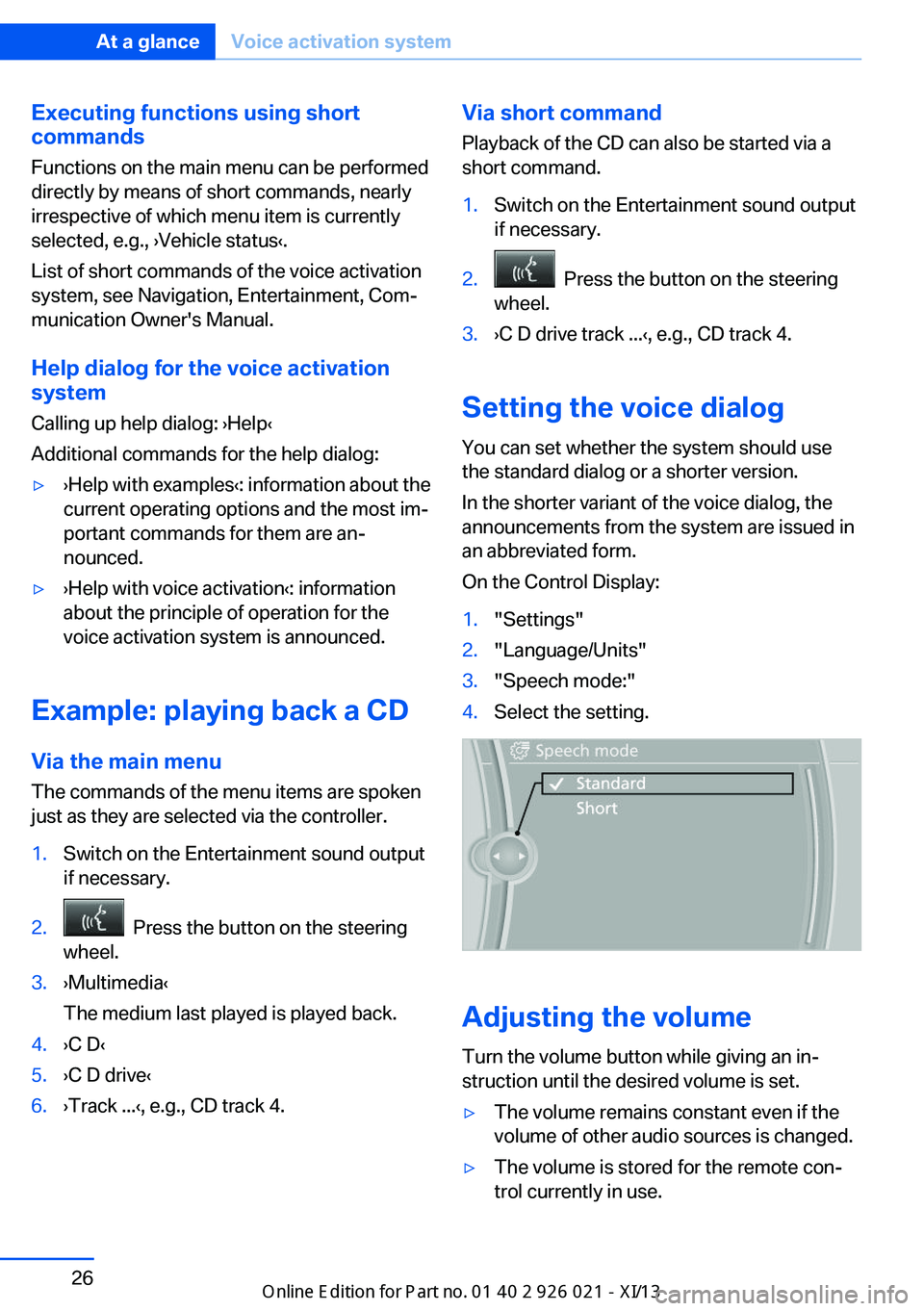
Setting the voice dialog
You can set whether the system should use
the standard dialog or a shorter version.
In the shorter variant of the voice dialog, the
announcements from the system are issued in
an abbreviated form.
On the Control Display:
1."Settings"2."Language/Units"3."Speech mode:"4.Select the setting.
Adjusting the volume
Turn the volume button while giving an in‐
struction until the desired volume is set.
▷The volume remains constant even if the
volume of other audio sources is changed.▷The volume is stored for the remote con‐
trol currently in use.Seite 26At a glanceVoice activation system26
Online Edition for Part no. 01 40 2 909 774 - VI/13
Page 41 of 253

▷Headlamp courtesy delay feature: time set‐
ting.▷Tone: tone settings.▷Automatic climate control: settings.▷Steering wheel position.▷Navigation: map views, route criteria, voice
output on/off.▷Night Vision with pedestrian detection.▷Intelligent Safety: individual settings.▷Park Distance Control PDC: adjusting the
signal tone volume.▷Radio: stored stations, station listened to
last, special settings.▷Rearview camera: selection of functions
and type of display.▷Side View: selection of the display type.▷Language on the Control Display.▷Lane departure warning: last setting, on/
off.▷Active Blind Spot Detection: last setting,
on/off.▷Daytime running lights: current setting.▷Triple turn signal activation.▷Locking the vehicle: after a brief period or
after starting to drive.
Central locking system
The concept The central locking system becomes active
when the driver's door is closed.
The system simultaneously engages and re‐
leases the locks on the following:
▷Doors.▷Trunk lid.▷Fuel filler flap.
Operating from the outside
▷Via the remote control.▷Via the driver's door lock.▷Via the door handles.▷Via the button in the trunk lid.
The following takes place simultaneously
when locking/unlocking the vehicle via the re‐
mote control:
▷Depending on how the vehicle is equipped,
the theft protection is activated/deacti‐
vated. Theft protection prevents the doors
from being unlocked using the lock but‐
tons or the door opener.▷The welcome lamps, interior lamps and
courtesy lamps are switched on and off.▷The alarm system, refer to page 46, is
armed or disarmed.
Operating from the inside
Via the button for the central locking system.
If the vehicle has been locked from inside, the
fuel filler flap remains unlocked.
If an accident of a certain severity occurs, the
central locking system unlocks automatically.
The hazard warning system and interior lamps
come on.
Seite 37Opening and closingControls37
Online Edition for Part no. 01 40 2 909 774 - VI/13