2013 BMW 640I GRAN COUPE ECO mode
[x] Cancel search: ECO modePage 262 of 305
MaintenanceVehicle equipment
All standard, country-specific and optional
equipment that is offered in the model series is
described in this chapter. Therefore, equipment
is also described that is not available in a vehicle,
e. g., because of the selected optional equip‐
ment or country variant. This also applies for
safety-related functions and systems.
BMW Maintenance System
The maintenance system directs you to re‐
quired maintenance measures and thereby sup‐
ports you in maintaining road safety and the op‐
erational reliability of the vehicle.
Condition Based Service CBS
Sensors and special algorithms take into ac‐
count the driving conditions of your vehicle.
Based on this, Condition Based Service deter‐
mines the maintenance requirements.
The system makes it possible to adapt the
amount of maintenance you need to your user
profile.
Details on the service requirements, refer to
page 75, can be displayed on the Control Dis‐
play.
Service data in the remote control
Information on the required maintenance is con‐
tinuously stored in the remote control. Your
service center will read out this data and suggest
the right array of service procedures for your ve‐
hicle.
Therefore, hand your service specialist the re‐
mote control that you used most recently.Storage periods
Storage periods during which the vehicle bat‐
tery was disconnected are not taken into ac‐
count.
If this occurs, have a service center update the
time-dependent maintenance procedures,
such as checking brake fluid and, if necessary,
changing the engine oil and the microfilter/acti‐
vated-charcoal filter.
Service and Warranty
Information Booklet for US
models and Warranty and
Service Guide Booklet for
Canadian models
Please consult your Service and Warranty Infor‐
mation Booklet for US models and Warranty and
Service Guide Booklet for Canadian models for
additional information on service requirements.
Maintenance and repair should be performed by
your service center. Make sure to have regular
maintenance procedures recorded in the vehi‐
cle's Service and Warranty Information Booklet
for US models, and in the Warranty and Service
Guide Booklet for Canadian models. These en‐
tries are proof of regular maintenance.Seite 262MobilityMaintenance262
Online Edition for Part no. 01 40 2 900 405 - 03 12 490
Page 263 of 305

Socket for OBD Onboard
Diagnosis
Position
There is an OBD socket on the driver's side for
checking the primary components in the vehicle
emissions.
Emissions
▷The warning lamp lights up:
Emissions are deteriorating. Have
the vehicle checked as soon as pos‐
sible.
Canadian model: warning light indi‐
cates the engine symbol.▷The warning lamp flashes under certain cir‐
cumstances:
This indicates that there is excessive misfir‐
ing in the engine.
Reduce the vehicle speed and have the sys‐
tem checked immediately; otherwise, seri‐
ous engine misfiring within a brief period can
seriously damage emission control compo‐
nents, in particular the catalytic converter.
Fuel cap
The indicator lamp lights up.
If the fuel cap is not properly tightened,
the OBD system may conclude that fuel
vapor is escaping. If the cap is then tightened,
the display should go out in a short time.
Data memory
Your vehicle records data relating to vehicle op‐
eration, faults and user settings. These data are
stored in the remote control and can be read out
with suitable devices, particularly when the ve‐
hicle is serviced. The data obtained in this way
provide valuable information for service proc‐
esses and repair or for optimizing and develop‐
ing vehicle functions further.
In addition, if you signed a service contract for
BMW Assist, certain vehicle data can be sent
directly from the vehicle to facilitate the desired
services.Seite 263MaintenanceMobility263
Online Edition for Part no. 01 40 2 900 405 - 03 12 490
Page 264 of 305
Replacing componentsVehicle equipment
All standard, country-specific and optional
equipment that is offered in the model series is
described in this chapter. Therefore, equipment
is also described that is not available in a vehicle,
e. g., because of the selected optional equip‐
ment or country variant. This also applies for
safety-related functions and systems.
Onboard vehicle tool kit
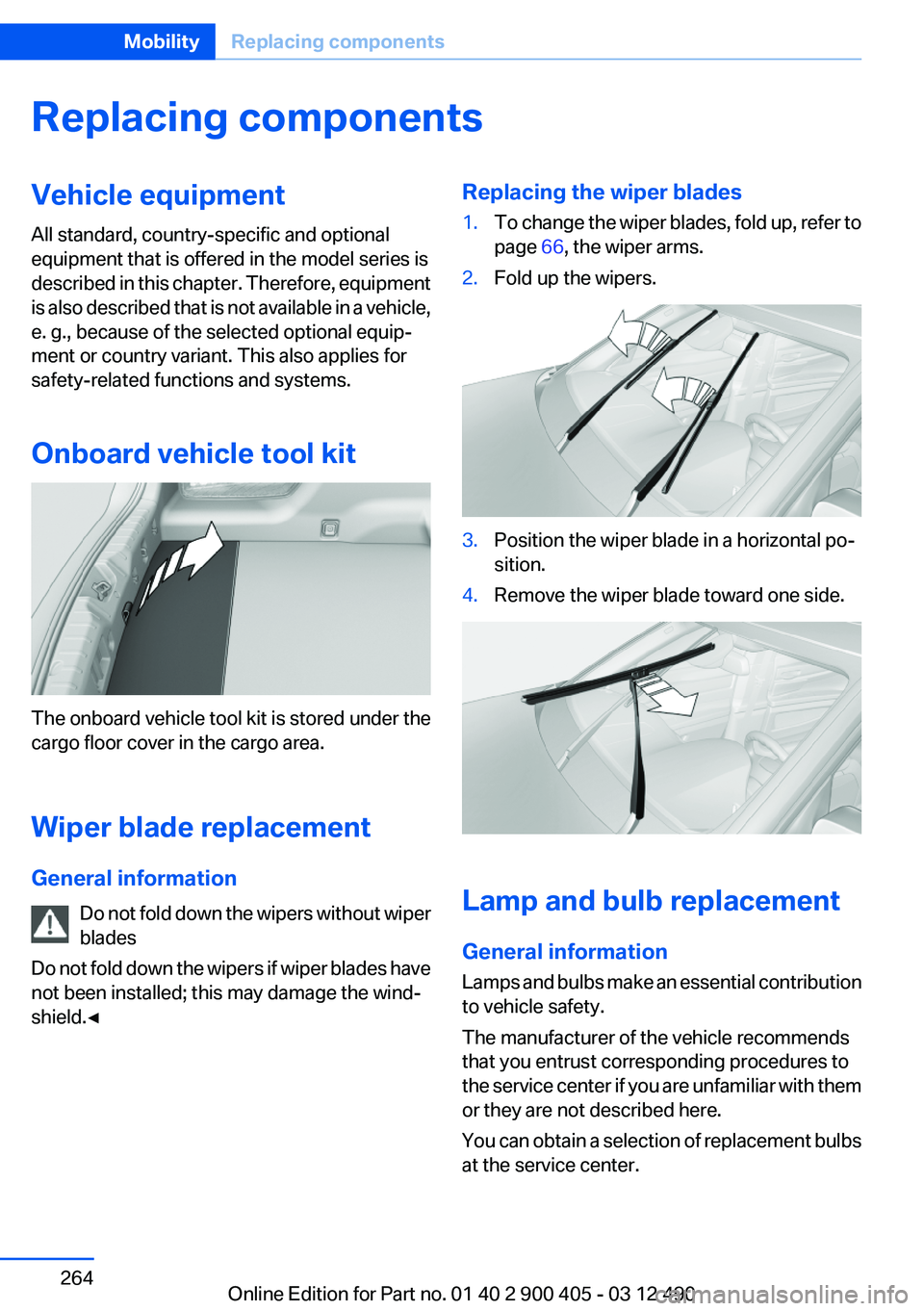
The onboard vehicle tool kit is stored under the
cargo floor cover in the cargo area.
Wiper blade replacement
General information Do not fold down the wipers without wiper
blades
Do not fold down the wipers if wiper blades have
not been installed; this may damage the wind‐
shield.◀
Replacing the wiper blades1.To change the wiper blades, fold up, refer to
page 66, the wiper arms.2.Fold up the wipers.3.Position the wiper blade in a horizontal po‐
sition.4.Remove the wiper blade toward one side.
Lamp and bulb replacement
General information
Lamps and bulbs make an essential contribution
to vehicle safety.
The manufacturer of the vehicle recommends
that you entrust corresponding procedures to
the service center if you are unfamiliar with them
or they are not described here.
You can obtain a selection of replacement bulbs
at the service center.
Seite 264MobilityReplacing components264
Online Edition for Part no. 01 40 2 900 405 - 03 12 490
Page 286 of 305
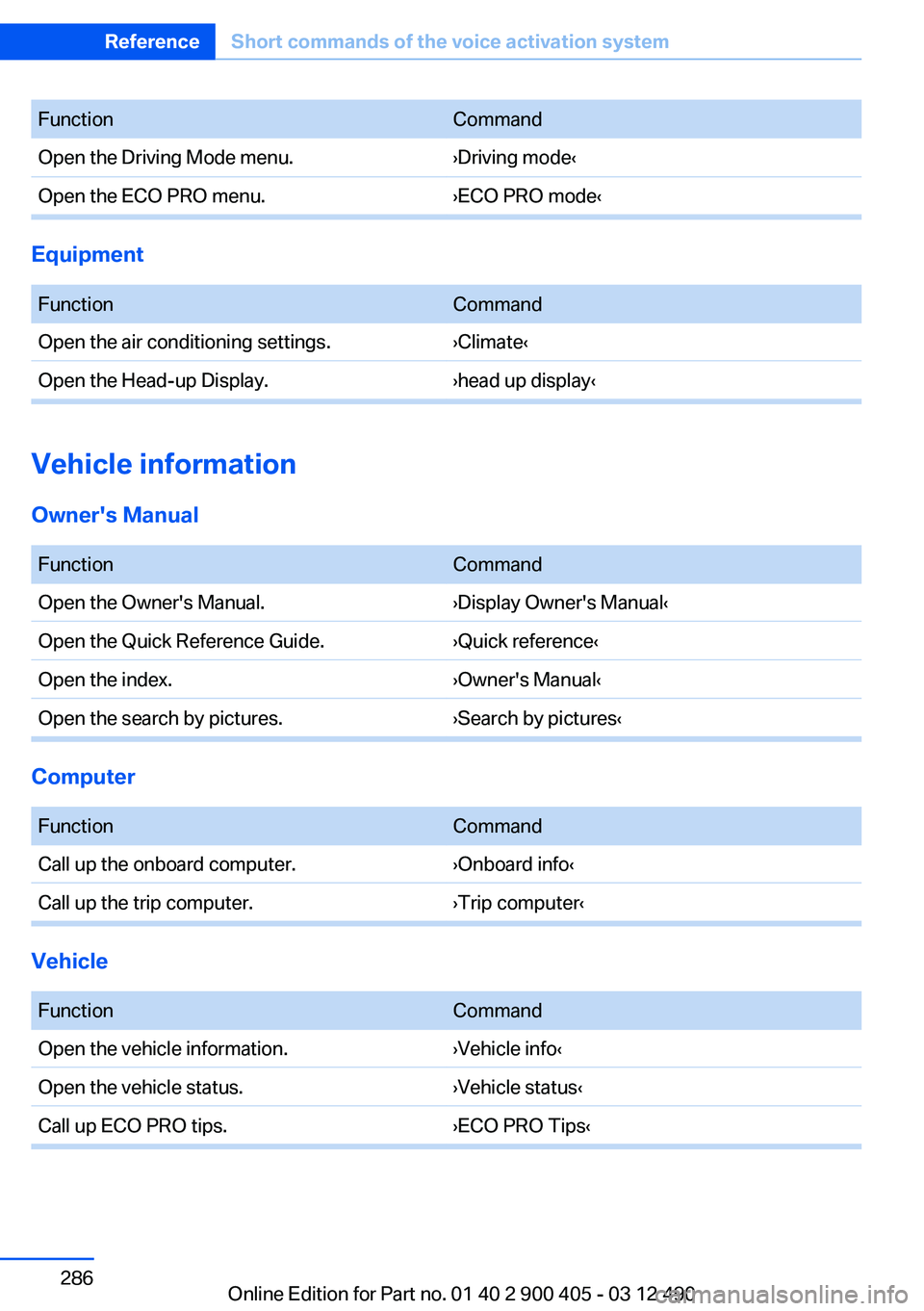
FunctionCommandOpen the Driving Mode menu.›Driving mode‹Open the ECO PRO menu.›ECO PRO mode‹
Equipment
FunctionCommandOpen the air conditioning settings.›Climate‹Open the Head-up Display.›head up display‹
Vehicle information
Owner's Manual
FunctionCommandOpen the Owner's Manual.›Display Owner's Manual‹Open the Quick Reference Guide.›Quick reference‹Open the index.›Owner's Manual‹Open the search by pictures.›Search by pictures‹
Computer
FunctionCommandCall up the onboard computer.›Onboard info‹Call up the trip computer.›Trip computer‹
Vehicle
FunctionCommandOpen the vehicle information.›Vehicle info‹Open the vehicle status.›Vehicle status‹Call up ECO PRO tips.›ECO PRO Tips‹Seite 286ReferenceShort commands of the voice activation system286
Online Edition for Part no. 01 40 2 900 405 - 03 12 490
Page 299 of 305
M
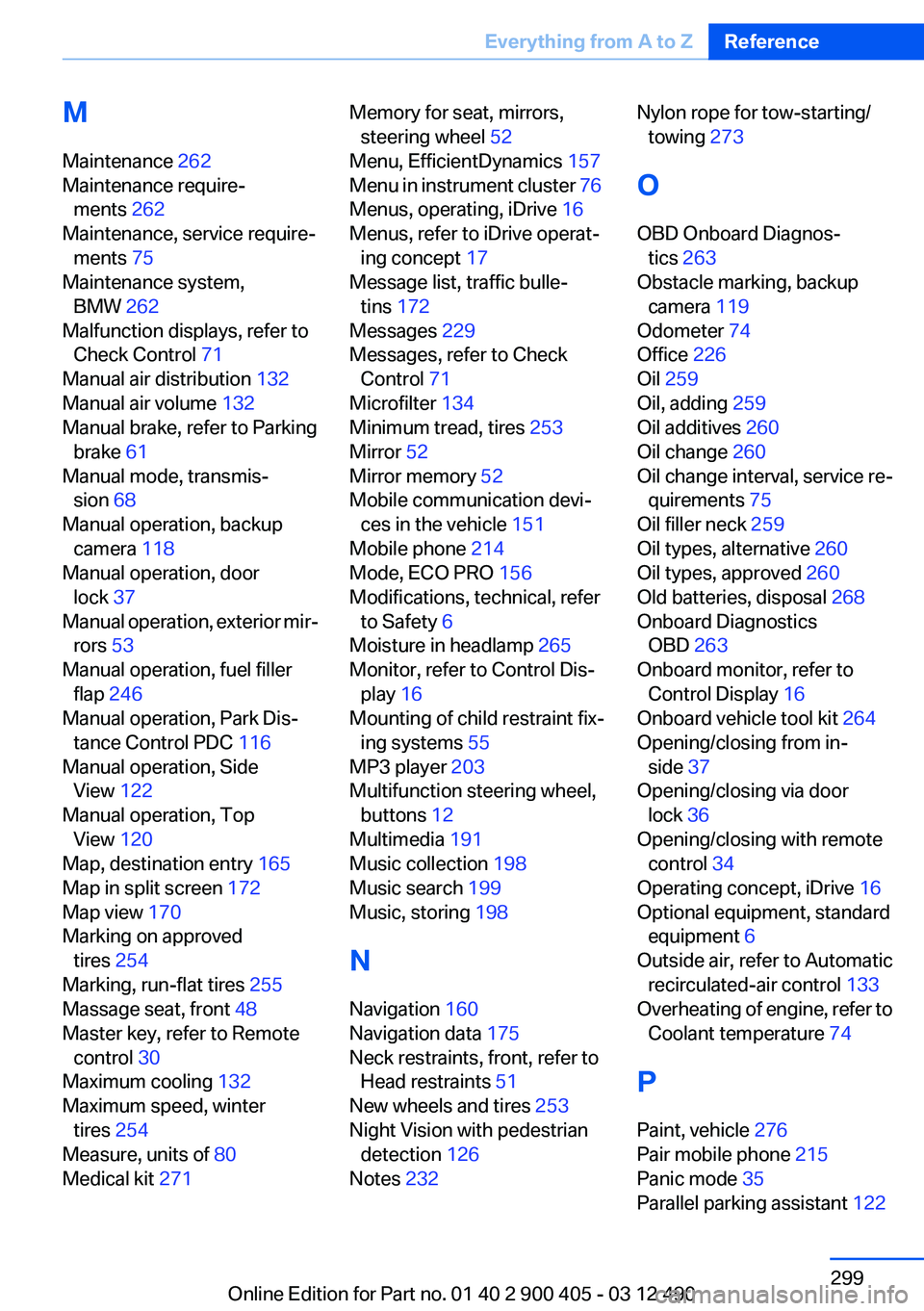
Maintenance 262
Maintenance require‐ ments 262
Maintenance, service require‐ ments 75
Maintenance system, BMW 262
Malfunction displays, refer to Check Control 71
Manual air distribution 132
Manual air volume 132
Manual brake, refer to Parking brake 61
Manual mode, transmis‐ sion 68
Manual operation, backup camera 118
Manual operation, door lock 37
Manual operation, exterior mir‐ rors 53
Manual operation, fuel filler flap 246
Manual operation, Park Dis‐ tance Control PDC 116
Manual operation, Side View 122
Manual operation, Top View 120
Map, destination entry 165
Map in split screen 172
Map view 170
Marking on approved tires 254
Marking, run-flat tires 255
Massage seat, front 48
Master key, refer to Remote control 30
Maximum cooling 132
Maximum speed, winter tires 254
Measure, units of 80
Medical kit 271 Memory for seat, mirrors,
steering wheel 52
Menu, EfficientDynamics 157
Menu in instrument cluster 76
Menus, operating, iDrive 16
Menus, refer to iDrive operat‐ ing concept 17
Message list, traffic bulle‐ tins 172
Messages 229
Messages, refer to Check Control 71
Microfilter 134
Minimum tread, tires 253
Mirror 52
Mirror memory 52
Mobile communication devi‐ ces in the vehicle 151
Mobile phone 214
Mode, ECO PRO 156
Modifications, technical, refer to Safety 6
Moisture in headlamp 265
Monitor, refer to Control Dis‐ play 16
Mounting of child restraint fix‐ ing systems 55
MP3 player 203
Multifunction steering wheel, buttons 12
Multimedia 191
Music collection 198
Music search 199
Music, storing 198
N
Navigation 160
Navigation data 175
Neck restraints, front, refer to Head restraints 51
New wheels and tires 253
Night Vision with pedestrian detection 126
Notes 232 Nylon rope for tow-starting/
towing 273
O
OBD Onboard Diagnos‐ tics 263
Obstacle marking, backup camera 119
Odometer 74
Office 226
Oil 259
Oil, adding 259
Oil additives 260
Oil change 260
Oil change interval, service re‐ quirements 75
Oil filler neck 259
Oil types, alternative 260
Oil types, approved 260
Old batteries, disposal 268
Onboard Diagnostics OBD 263
Onboard monitor, refer to Control Display 16
Onboard vehicle tool kit 264
Opening/closing from in‐ side 37
Opening/closing via door lock 36
Opening/closing with remote control 34
Operating concept, iDrive 16
Optional equipment, standard equipment 6
Outside air, refer to Automatic recirculated-air control 133
Overheating of engine, refer to Coolant temperature 74
P
Paint, vehicle 276
Pair mobile phone 215
Panic mode 35
Parallel parking assistant 122 Seite 299Everything from A to ZReference299
Online Edition for Part no. 01 40 2 900 405 - 03 12 490
Page 300 of 305
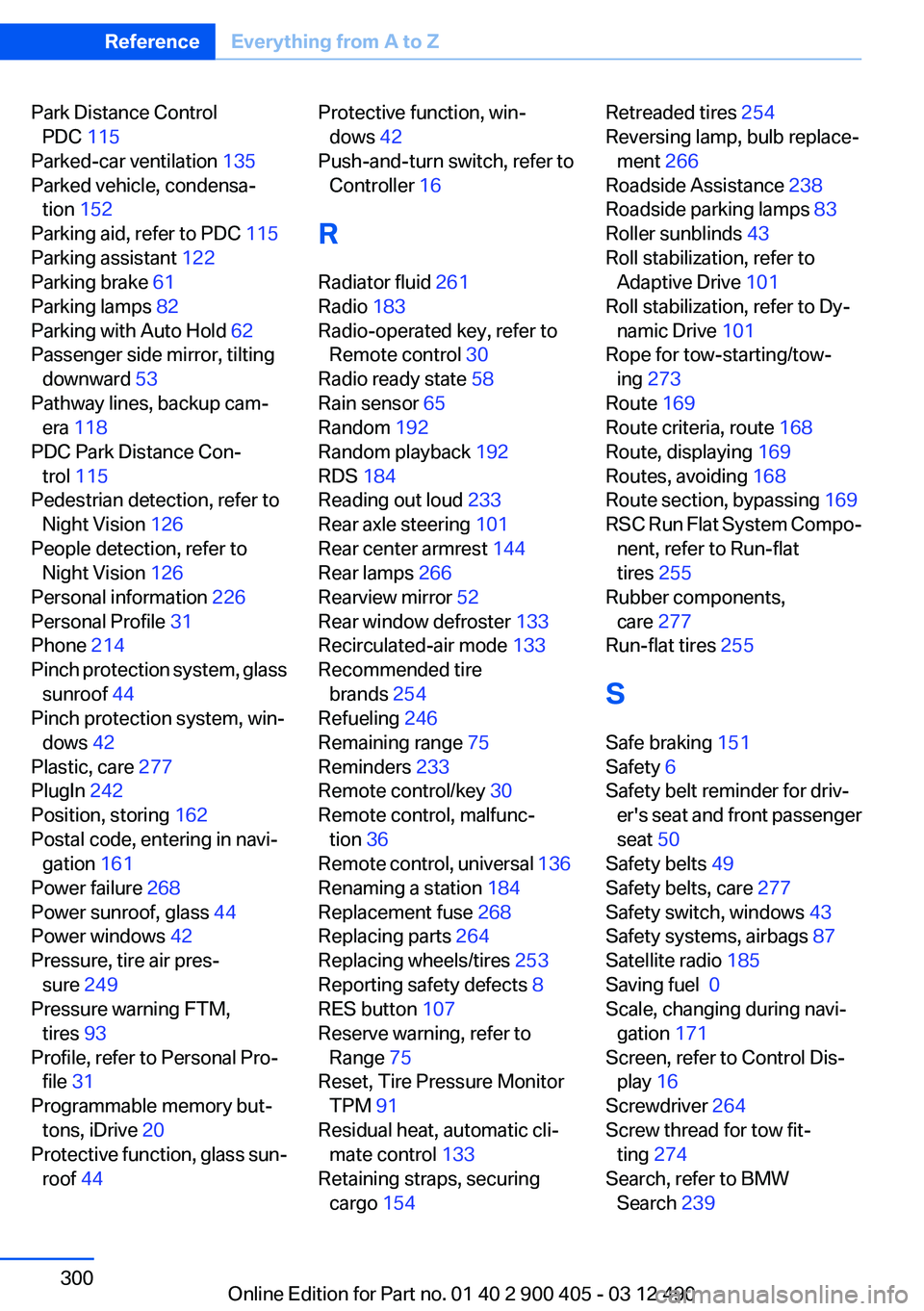
Park Distance ControlPDC 115
Parked-car ventilation 135
Parked vehicle, condensa‐ tion 152
Parking aid, refer to PDC 115
Parking assistant 122
Parking brake 61
Parking lamps 82
Parking with Auto Hold 62
Passenger side mirror, tilting downward 53
Pathway lines, backup cam‐ era 118
PDC Park Distance Con‐ trol 115
Pedestrian detection, refer to Night Vision 126
People detection, refer to Night Vision 126
Personal information 226
Personal Profile 31
Phone 214
Pinch protection system, glass sunroof 44
Pinch protection system, win‐ dows 42
Plastic, care 277
PlugIn 242
Position, storing 162
Postal code, entering in navi‐ gation 161
Power failure 268
Power sunroof, glass 44
Power windows 42
Pressure, tire air pres‐ sure 249
Pressure warning FTM, tires 93
Profile, refer to Personal Pro‐ file 31
Programmable memory but‐ tons, iDrive 20
Protective function, glass sun‐ roof 44 Protective function, win‐
dows 42
Push-and-turn switch, refer to Controller 16
R
Radiator fluid 261
Radio 183
Radio-operated key, refer to Remote control 30
Radio ready state 58
Rain sensor 65
Random 192
Random playback 192
RDS 184
Reading out loud 233
Rear axle steering 101
Rear center armrest 144
Rear lamps 266
Rearview mirror 52
Rear window defroster 133
Recirculated-air mode 133
Recommended tire brands 254
Refueling 246
Remaining range 75
Reminders 233
Remote control/key 30
Remote control, malfunc‐ tion 36
Remote control, universal 136
Renaming a station 184
Replacement fuse 268
Replacing parts 264
Replacing wheels/tires 253
Reporting safety defects 8
RES button 107
Reserve warning, refer to Range 75
Reset, Tire Pressure Monitor TPM 91
Residual heat, automatic cli‐ mate control 133
Retaining straps, securing cargo 154 Retreaded tires 254
Reversing lamp, bulb replace‐ ment 266
Roadside Assistance 238
Roadside parking lamps 83
Roller sunblinds 43
Roll stabilization, refer to Adaptive Drive 101
Roll stabilization, refer to Dy‐ namic Drive 101
Rope for tow-starting/tow‐ ing 273
Route 169
Route criteria, route 168
Route, displaying 169
Routes, avoiding 168
Route section, bypassing 169
RSC Run Flat System Compo‐ nent, refer to Run-flat
tires 255
Rubber components, care 277
Run-flat tires 255
S
Safe braking 151
Safety 6
Safety belt reminder for driv‐ er's seat and front passenger
seat 50
Safety belts 49
Safety belts, care 277
Safety switch, windows 43
Safety systems, airbags 87
Satellite radio 185
Saving fuel 0
Scale, changing during navi‐ gation 171
Screen, refer to Control Dis‐ play 16
Screwdriver 264
Screw thread for tow fit‐ ting 274
Search, refer to BMW Search 239 Seite 300ReferenceEverything from A to Z300
Online Edition for Part no. 01 40 2 900 405 - 03 12 490