Deleting all entries1.›Delete phonebook‹
The dialog for deleting the phone book is
opened.2.Confirm the query with ›Yes‹.3.Confirm the query again with ›Yes‹.
Reading and selecting entries
1.›Read phonebook‹
The dialog for reading the phone book is
opened.2.Say ›Dial number‹ when the desired entry is
read.
Selecting an entry
1.›Dial name‹2.Say the name after being prompted to do so.3.Confirm the query with ›Yes‹.
Adjusting the volume
Turn the knob during an announcement.
▷The volume remains constant even if the
volume of other audio sources is changed.▷The volume is stored for the remote control
currently in use.
Notes
Do not use the voice operation to initiate an
Emergency Request. In stressful situations, the
voice and vocal pitch can change. This can un‐
necessarily delay the establishment of a tele‐
phone connection.
Instead, use the SOS button, refer to
page 270, in the vicinity of the interior mirror.
Environmental conditions
▷Say the commands, numbers, and letters
smoothly and with normal volume, empha‐
sis, and speed.▷Always say commands in the language of
the system. The language for the mobilephone voice operation is preset and cannot
be changed in the Control Display.▷Keep the doors, windows, and glass sun‐
roof closed to prevent noise interference.▷Avoid making other noise in the vehicle
while speaking.
Snap-in adapter
General information
Detailed information about snap-in adapters,
which support the functions of the mobile
phone, is available from the service center.
Notes
At high temperatures, the charge functions of
the mobile phone can be limited under certain
circumstances, and the functions are no longer
executed.
When the mobile phone is used via the vehicle,
heed the operating manual of the mobile phone.
Installation position
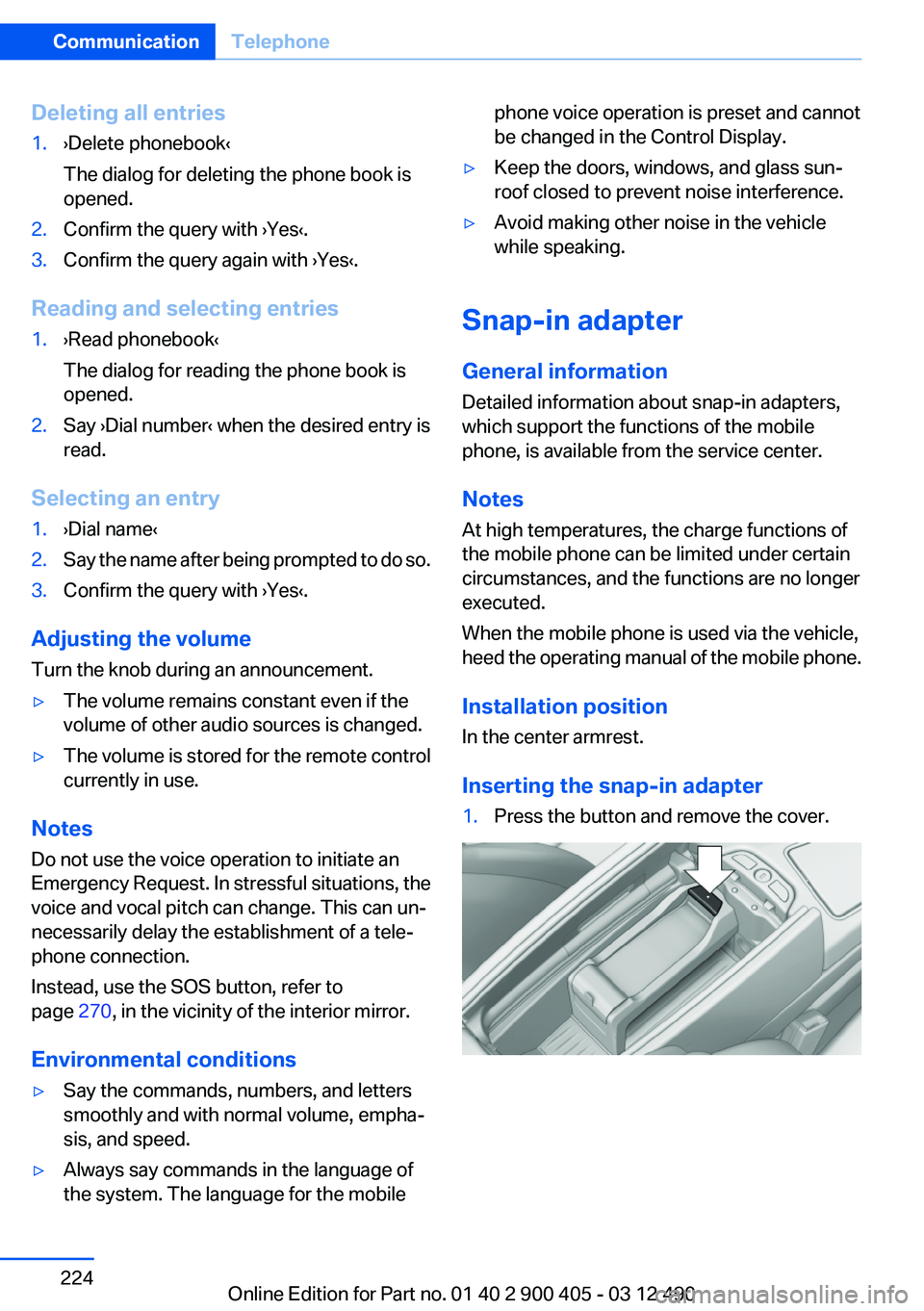
In the center armrest.
Inserting the snap-in adapter
1.Press the button and remove the cover.Seite 224CommunicationTelephone224
Online Edition for Part no. 01 40 2 900 405 - 03 12 490
Short commands of the voice activation
systemVehicle equipment
All standard, country-specific and optional
equipment that is offered in the model series is
described in this chapter. Therefore, equipment
is also described that is not available in a vehicle,
e. g., because of the selected optional equip‐
ment or country variant. This also applies for
safety-related functions and systems.
General information
Instructions for voice activation system, refer to
page 22.To have the available spoken instructions read
out loud: ›Voice commands‹
The following short commands are valid for ve‐
hicles with voice activation system. They do not
work in equipment packages with which only the
mobile phone can be operated by voice activa‐
tion.
Adjusting
Vehicle
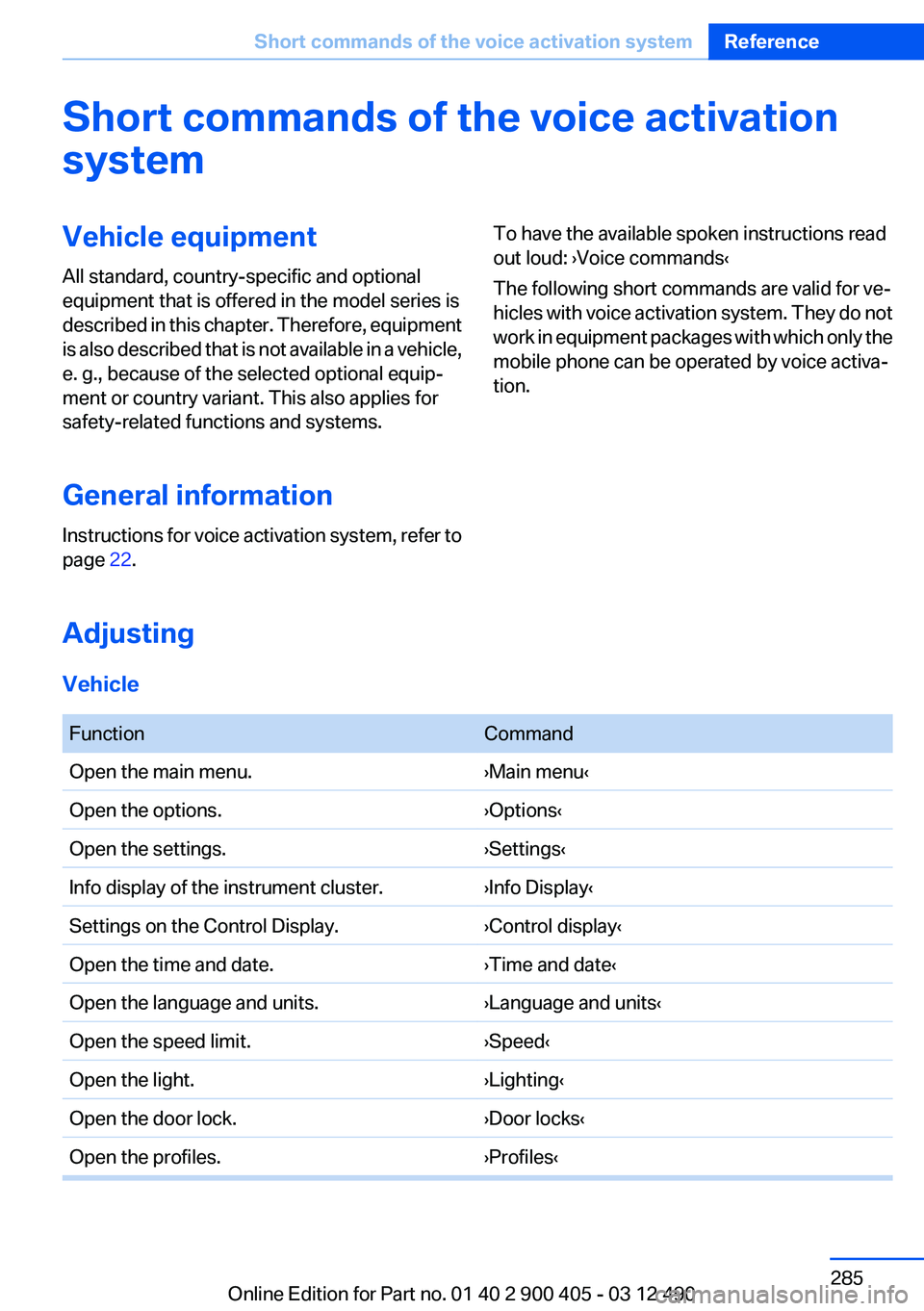
FunctionCommandOpen the main menu.›Main menu‹Open the options.›Options‹Open the settings.›Settings‹Info display of the instrument cluster.›Info Display‹Settings on the Control Display.›Control display‹Open the time and date.›Time and date‹Open the language and units.›Language and units‹Open the speed limit.›Speed‹Open the light.›Lighting‹Open the door lock.›Door locks‹Open the profiles.›Profiles‹Seite 285Short commands of the voice activation systemReference285
Online Edition for Part no. 01 40 2 900 405 - 03 12 490
Homepage 6
Hood 257
Horn 12
Hotel function, trunk lid 39
Hot exhaust system 150
House number, entering for navigation 161
HUD Head-Up Display 129
Hydroplaning 151
I
Ice warning, refer to External temperature warning 74
Icy roads, refer to External temperature warning 74
Identification marks, tires 251
Identification number, refer to Important in the engine com‐
partment 257
iDrive 16
Ignition key, refer to Remote control 30
Ignition off 58
Ignition on 58
Indication of a flat tire 91, 94
Individual air distribution 132
Individual settings, refer to Personal Profile 31
Inflation pressure, tires 249
Inflation pressure warning FTM, tires 93
Info display, refer to Com‐ puter 77
Information on the navigation data 175
Initialization, Integral Active Steering 102
Initialize, Tire Pressure Moni‐ tor TPM 91
Initializing, Flat Tire Monitor FTM 94
Instrument cluster 70
Instrument cluster, electronic displays 71
Instrument lighting 85 Integral Active Steering 101
Integrated key 30
Integrated universal remote control 136
Intensity, AUTO program 132
Interactive map 165
Interior equipment 136
Interior lamps 86
Interior lamps via remote con‐ trol 35
Interior motion sensor 41
Interior rearview mirror, auto‐ matic dimming feature 54
Intermediate destinations 167
Internet page 6
Intersection, entering for navi‐ gation 161
Interval display, service re‐ quirements 75
iPod/iPhone 203
J
Jacking points for the vehicle jack 267
Jack, refer to Vehicle jack 267
Joystick, automatic transmis‐ sion 67
Jump-starting 271
K
Key/remote control 30
Keyless Go, refer to Comfort Access 39
Key Memory, refer to Personal Profile 31
Kickdown, automatic trans‐ mission 67
Knee airbag 87
L
Lamp replacement 264
Lamp replacement, front 265
Lamp replacement, rear 266 Lamps 82
Lamps and bulbs 264
Lane departure warning 95
Lane margin, warning 95
Language on Control Dis‐ play 80
Lashing eyes, securing cargo 154
LATCH child restraint fixing system 56
Leather, care 276
LED headlamps 265
LEDs, light-emitting di‐ odes 265
Length, vehicle 283
Letters and numbers, enter‐ ing 21
License plate lamp, bulb re‐ placement 266
Light-alloy wheels, care 277
Light control 84
Light-emitting diodes, LEDs 265
Lighting 82
Lighting, speaker 181
Lighting via remote control 35
Light switch 82
Load 153
Loading 153
Lock, door 36
Locking/unlocking from in‐ side 37
Locking/unlocking via door lock 36
Locking/unlocking with re‐ mote control 34
Locking, automatic 37
Locking, central 33
Locking via trunk lid 39
Lock, power window 43
Low beams 82
Low beams, automatic, refer to High-beam Assistant 84
Lower back support 47
Lug bolt lock 267
Lumbar support 47 Seite 298ReferenceEverything from A to Z298
Online Edition for Part no. 01 40 2 900 405 - 03 12 490