2013 BMW 640I COUPE maintenance
[x] Cancel search: maintenancePage 169 of 232
Mobility
To ensure that you remain mobile at all times, this chapter supplies you with important information
on the topics of fuels and lubricants, wheels and tires, service, maintenance, and Roadside Assistance.Online Edition for Part no. 01 40 2 903 329 - 07 12 490
Page 189 of 232
MaintenanceVehicle equipment
All standard, country-specific and optional
equipment that is offered in the model series is
described in this chapter. Therefore, equipment
is also described that is not available in a vehicle,
e. g., because of the selected optional equip‐
ment or country variant. This also applies for
safety-related functions and systems.
BMW Maintenance System
The maintenance system directs you to re‐
quired maintenance measures and thereby sup‐
ports you in maintaining road safety and the op‐
erational reliability of the vehicle.
Condition Based Service CBS
Sensors and special algorithms take into ac‐
count the driving conditions of your vehicle.
Based on this, Condition Based Service deter‐
mines the maintenance requirements.
The system makes it possible to adapt the
amount of maintenance you need to your user
profile.
Details on the service requirements, refer to
page 78, can be displayed on the Control Dis‐
play.
Service data in the remote control
Information on the required maintenance is con‐
tinuously stored in the remote control. Your
service center will read out this data and suggest
the right array of service procedures for your ve‐
hicle.
Therefore, hand your service specialist the re‐
mote control that you used most recently.Storage periods
Storage periods during which the vehicle bat‐
tery was disconnected are not taken into ac‐
count.
If this occurs, have a service center update the
time-dependent maintenance procedures,
such as checking brake fluid and, if necessary,
changing the engine oil and the microfilter/acti‐
vated-charcoal filter.
Service and Warranty
Information Booklet for US
models and Warranty and
Service Guide Booklet for
Canadian models
Please consult your Service and Warranty Infor‐
mation Booklet for US models and Warranty and
Service Guide Booklet for Canadian models for
additional information on service requirements.
Maintenance and repair should be performed by
your service center. Make sure to have regular
maintenance procedures recorded in the vehi‐
cle's Service and Warranty Information Booklet
for US models, and in the Warranty and Service
Guide Booklet for Canadian models. These en‐
tries are proof of regular maintenance.Seite 189MaintenanceMobility189
Online Edition for Part no. 01 40 2 903 329 - 07 12 490
Page 190 of 232
Socket for OBD Onboard
Diagnosis
Position
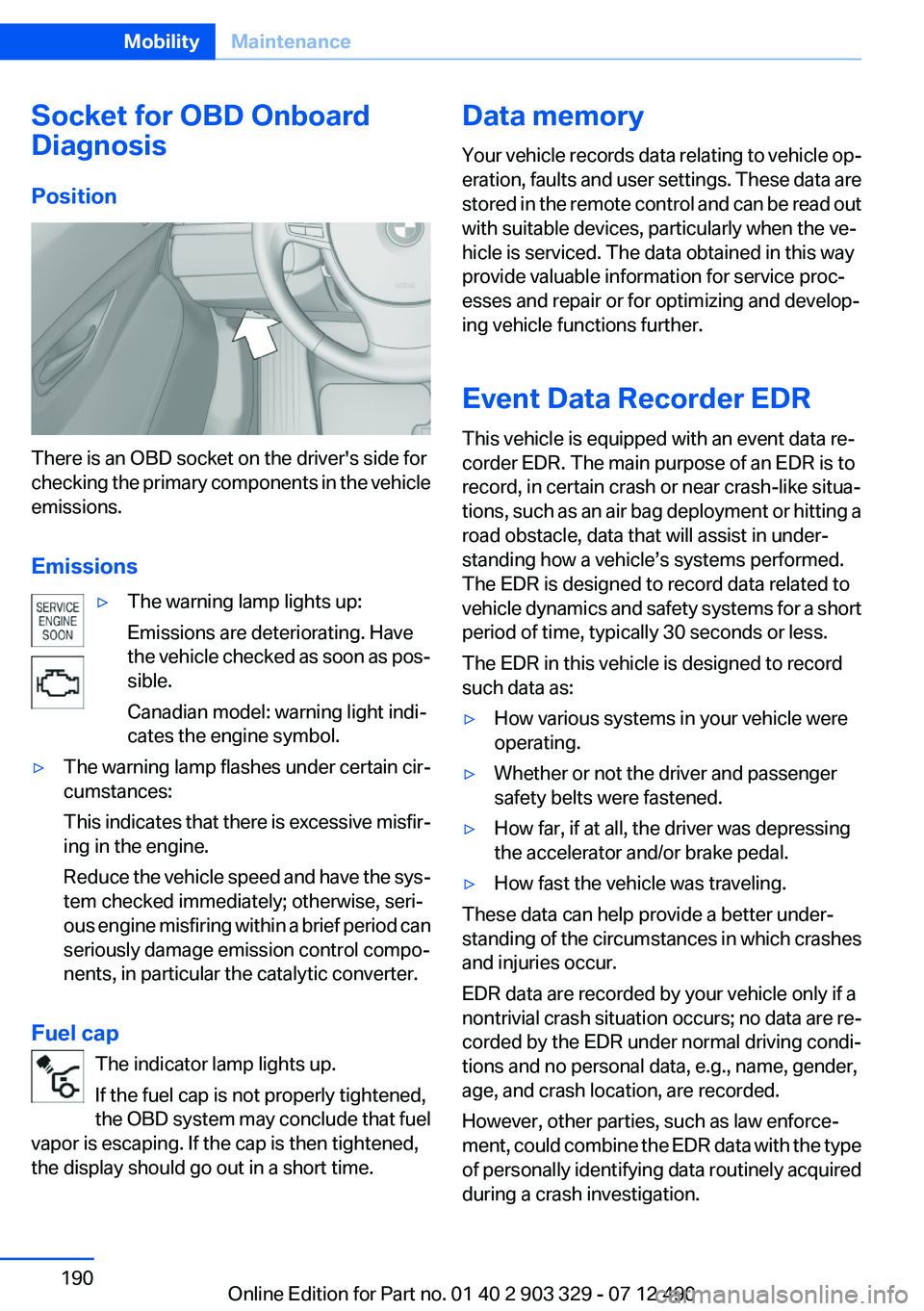
There is an OBD socket on the driver's side for
checking the primary components in the vehicle
emissions.
Emissions
▷The warning lamp lights up:
Emissions are deteriorating. Have
the vehicle checked as soon as pos‐
sible.
Canadian model: warning light indi‐
cates the engine symbol.▷The warning lamp flashes under certain cir‐
cumstances:
This indicates that there is excessive misfir‐
ing in the engine.
Reduce the vehicle speed and have the sys‐
tem checked immediately; otherwise, seri‐
ous engine misfiring within a brief period can
seriously damage emission control compo‐
nents, in particular the catalytic converter.
Fuel cap
The indicator lamp lights up.
If the fuel cap is not properly tightened,
the OBD system may conclude that fuel
vapor is escaping. If the cap is then tightened,
the display should go out in a short time.
Data memory
Your vehicle records data relating to vehicle op‐
eration, faults and user settings. These data are
stored in the remote control and can be read out
with suitable devices, particularly when the ve‐
hicle is serviced. The data obtained in this way
provide valuable information for service proc‐
esses and repair or for optimizing and develop‐
ing vehicle functions further.
Event Data Recorder EDR
This vehicle is equipped with an event data re‐
corder EDR. The main purpose of an EDR is to
record, in certain crash or near crash-like situa‐
tions, such as an air bag deployment or hitting a
road obstacle, data that will assist in under‐
standing how a vehicle’s systems performed.
The EDR is designed to record data related to
vehicle dynamics and safety systems for a short
period of time, typically 30 seconds or less.
The EDR in this vehicle is designed to record
such data as:▷How various systems in your vehicle were
operating.▷Whether or not the driver and passenger
safety belts were fastened.▷How far, if at all, the driver was depressing
the accelerator and/or brake pedal.▷How fast the vehicle was traveling.
These data can help provide a better under‐
standing of the circumstances in which crashes
and injuries occur.
EDR data are recorded by your vehicle only if a
nontrivial crash situation occurs; no data are re‐
corded by the EDR under normal driving condi‐
tions and no personal data, e.g., name, gender,
age, and crash location, are recorded.
However, other parties, such as law enforce‐
ment, could combine the EDR data with the type
of personally identifying data routinely acquired
during a crash investigation.
Seite 190MobilityMaintenance190
Online Edition for Part no. 01 40 2 903 329 - 07 12 490
Page 191 of 232
To read data recorded by an EDR, special equip‐
ment is required, and access to the vehicle or the
EDR is needed. In addition to the vehicle manu‐
facturer, other parties, such as law enforcement,
that have the special equipment, can read the
information if they have access to the vehicle or
the EDR.Seite 191MaintenanceMobility191
Online Edition for Part no. 01 40 2 903 329 - 07 12 490
Page 196 of 232
Vehicle battery
Maintenance
The battery is maintenance-free, i.e., the elec‐
trolyte will last for the life of the battery.
Your service center will be glad to advise you on
questions regarding the battery.
Battery replacement Use approved vehicle batteries only
Only use vehicle batteries that have been
approved for your vehicle by the manufacturer;
otherwise, the vehicle could be damaged and
systems or functions may not be fully availa‐
ble.◀
After a battery replacement, have the battery
registered on the vehicle by your service center
to ensure that all comfort functions are fully
available and that any Check Control messages
are no longer displayed.
Charging the battery
Note Do not plug the charger into the socket
Do not connect battery chargers to the
factory-installed sockets in the vehicle. Doing so
may result in damage to the vehicle.◀
Starting aid terminals
In the vehicle, only charge the battery via the
starting aid terminals, refer to page 200, in the
engine compartment with the engine off.
Power failure
After a temporary power loss, some equipment
needs to be reinitialized.
Individual settings need to be reprogrammed:▷Seat, mirror, and steering wheel memory:
store the positions again.▷Time: update.▷Date: update.▷Radio station: save again.▷Navigation system: wait for the operability of
the navigation.
Disposing of old batteries
Have old batteries disposed of by your
service center or bring them to a recy‐
cling center.
Maintain the battery in an upright position for
transport and storage. Secure the battery so
that it does not tip over during transport.
Fuses
Notes Replacing fuses
Never attempt to repair a blown fuse and
do not replace a defective fuse with a substitute
of another color or amperage rating; this could
lead to a circuit overload, ultimately resulting in
a fire in the vehicle.◀
Plastic tweezers and information on the fuse
types and locations are stored in the fuse box in
the cargo area.
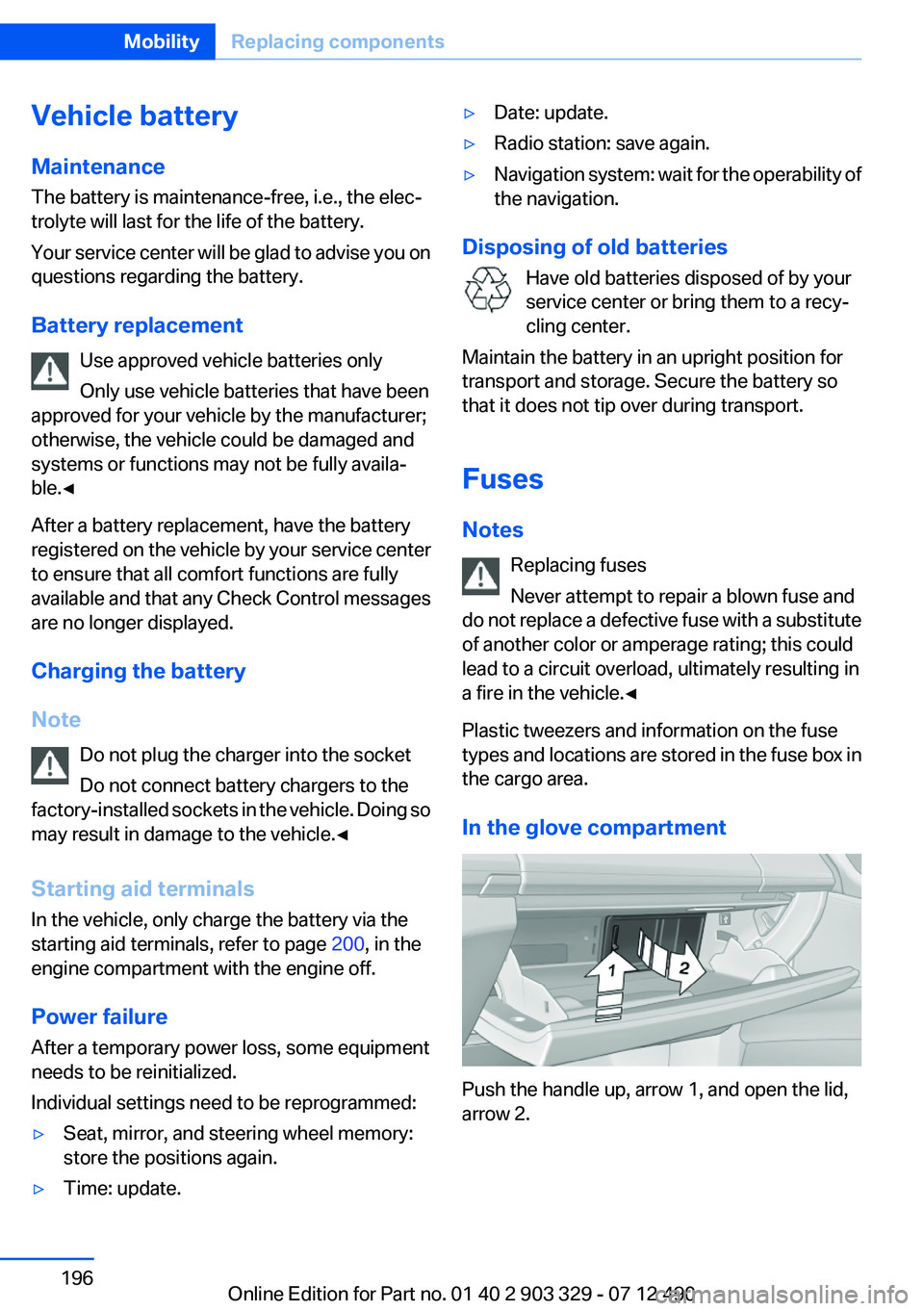
In the glove compartment
Push the handle up, arrow 1, and open the lid,
arrow 2.
Seite 196MobilityReplacing components196
Online Edition for Part no. 01 40 2 903 329 - 07 12 490
Page 223 of 232

BMW Maintenance Sys‐tem 189
Bottle holder, refer to Cu‐ pholder 153
Brake assistant 111
Brake assistant, adaptive 111
Brake discs, breaking in 158
Brake force display 110
Brake lamps, brake force dis‐ play 110
Brake lamps, bulb replace‐ ment 194
Brake lights, adaptive 110
Brake pads, breaking in 158
Braking, notes 159
Breakdown assis‐ tance 198, 199
Breaking in 158
Brightness of Control Dis‐ play 85
Bulb replacement 192
Bulb replacement, front 0
Bulb replacement, rear 194
Bulbs and lamps 192
Button, RES 121
Button, Start/Stop 57
Bypassing, refer to Jump- starting 200
C
California Proposition 65 Warning 7
Camera, backup camera 130
Camera, care 207
Camera, Side View 134
Camera, Top View 132
Can holder, refer to Cu‐ pholder 153
Car battery 196
Car care products 205
Care, displays 207
Care, vehicle 205
Cargo 161
Cargo area lid 37 Cargo area, storage compart‐
ments 153
Cargo straps, securing cargo 162
Car key, refer to Remote con‐ trol 30
Carpet, care 206
Car wash 204
Catalytic converter, refer to Hot exhaust system 159
CBS Condition Based Serv‐ ice 189
CD/Multimedia, see user's manual for Navigation, Enter‐
tainment and Communica‐
tion
Center console 14
Central locking system 33
Central screen, refer to Control Display 16
Changes, technical, refer to Safety 7
Changing parts 192
Changing wheels 195
Changing wheels/tires 180
Check Control 74
Children, seating position 54
Children, transporting safely 54
Child restraint fixing sys‐ tem 54
Child restraint fixing system LATCH 55
Child restraint fixing systems, mounting 54
Child seat, mounting 54
Child seats 54
Chrome parts, care 206
Cigarette lighter 148
Cleaning, displays 207
Climate control 141
Climate control wind‐ shield 159
Clock 77
Closing/opening from in‐ side 37 Closing/opening via door
lock 36
Closing/opening with remote control 34
Clothes hooks 152
Collision warning 100, 102
Combination switch, refer to Turn signals 63
Combination switch, refer to Wiper system 64
COMFORT+ program, Driving Experience Switch 117
Comfort Access 39
COMFORT program, Driving Experience Switch 117
Computer 81
Condensation on win‐ dows 142
Condensation under the vehi‐ cle 160
Condition Based Service CBS 189
Configure driving mode 117
Confirmation signal 35
ConnectedDrive, see user's manual for Navigation, Enter‐
tainment and Communica‐
tion
Control Display 16
Control Display, settings 84
Controller 16
Control systems, driving sta‐ bility 111
Convenient opening 35
Coolant 188
Coolant temperature 77
Cooling function 143
Cooling, maximum 142
Cooling system 188
Corrosion on brake discs 160
Cruise control 125
Cruise control, active with Stop & Go 119
Cruising range 78
Cupholder 153
Current fuel consumption 78 Seite 223Everything from A to ZReference223
Online Edition for Part no. 01 40 2 903 329 - 07 12 490
Page 226 of 232

Instrument cluster 70
Instrument cluster, electronic displays 71
Instrument display, multifunc‐ tional 71
Instrument lighting 90
Integral Active Steering 114
Integrated key 30
Integrated universal remote control 146
Intensity, AUTO program 142
Interior equipment 146
Interior lamps 91
Interior lamps via remote con‐ trol 35
Interior motion sensor 41
Interior rearview mirror, auto‐ matic dimming feature 52
Internet page 6
Interval display, service re‐ quirements 78
J
Jacking points for the vehicle jack 195
Jack, refer to Vehicle jack 195
Joystick, automatic transmis‐ sion 67
Jump-starting 200
K
Key/remote control 30
Keyless Go, refer to Comfort Access 39
Key Memory, refer to Personal Profile 31
Kickdown, automatic trans‐ mission 67
Knee airbag 93
L
Lamp replacement 192
Lamp replacement, front 0 Lamp replacement, rear 194
Lamps 87
Lamps and bulbs 192
Lane departure warning 107
Lane margin, warning 107
Language on Control Dis‐ play 85
Lashing eyes, securing cargo 162
LATCH child restraint fixing system 55
Leather, care 205
LED headlamps, Bulb replace‐ ment 194
LED light 194
LEDs, light-emitting di‐ odes 193
Length, vehicle 211
Letters and numbers, enter‐ ing 21
License plate lamp, bulb re‐ placement 194
Light-alloy wheels, care 206
Light control 89
Light-emitting diodes, LEDs 193
Lighting 87
Lighting, speaker 91
Lighting via remote control 35
Light switch 87
Load 161
Loading 161
Lock, door 36
Locking/unlocking from in‐ side 37
Locking/unlocking via door lock 36
Locking/unlocking with re‐ mote control 34
Locking, automatic 37
Locking, central 33
Locking via trunk lid 38
Low beams 87
Low beams, automatic, refer to High-beam Assistant 89
Lower back support 46 Lumbar support 46
M
Maintenance 189
Maintenance require‐ ments 189
Maintenance, service require‐ ments 78
Maintenance system, BMW 189
Malfunction displays, refer to Check Control 74
Manual air distribution 142
Manual air flow 142
Manual brake, refer to Parking brake 61
Manual mode, transmis‐ sion 68
Manual operation, backup camera 130
Manual operation, door lock 37
Manual operation, exterior mir‐ rors 52
Manual operation, fuel filler flap 170
Manual operation, Park Dis‐ tance Control PDC 128
Manual operation, Side View 134
Manual operation, Top View 133
Manual transmission 66
Marking on approved tires 180
Marking, run-flat tires 181
Massage seat, front 47
Master key, refer to Remote control 30
Maximum cooling 142
Maximum speed, display 79
Maximum speed, winter tires 181
Measure, units of 85
Medical kit 199 Seite 226ReferenceEverything from A to Z226
Online Edition for Part no. 01 40 2 903 329 - 07 12 490