2013 AUDI A6 recommend a rest
[x] Cancel search: recommend a restPage 4 of 306

2 Table of contents Vehicle literature .. .. .. .. .. ... .
5
About this Owner's Manual . . . 6
Controls and equipment .. ... .
Instruments and controls .. . .
General illustration ......... .. ... .
Instruments and warning/
indicator lights ........ .. .. .. . .
Instruments ............ ... .. ... .
Warning/indicator lights .......... .
Driver information display .. .. .. ... .
On-Board Diagnostic system (OBD) . . .
Opening and closing .. .. .... . .
Keys .. ...... ........... .. .. ... .
Power locking system ..... .. .. .. . .
Rear lid .. .. ........ ..... .. ..... .
Child safety lock for the rear doors .. .
Power windows . .......... ... .. . .
Valet park ing . ........... .. .. ... .
Sliding/tilting sun roof ... .. .. .. .. . .
Clear vision .. ....... ... .. .. ... .
Lights . .. .. .. . .......... .. .. .. . .
I nter ior lights ............ .. .. .. . .
V1s 1on .......... ......... ... ... .
Wiper and washer system ... .... .. . 8
8
8
11
11
12
23
29
31
31
33
37
38
38
39
40
41
41
44
45
46
Mirrors . . . . . . . . . . . . . . . . . . . . . . . . . 48
Seats and storage ......... ... .
General recommendations ... .... . .
Front seats .............. .. .. ... .
Head restraints .............. ... .
Seat memory . ........... .... ... .
Ashtray .. .. ... .... ...... .. .. .. . .
C igarette lighter .............. .. . .
12-vo lt sockets ... ..... ... .. .. .. . .
Storage ................. .. .. ... .
Roof rack ............... .. .. .. . .
L uggage compartment ........... .
Pass-through with ski sack ... .. ... .
so
so
51
53
54
56
56
56
57
59
6 1
63
Warm and cold . . . . . . . . . . . . . . . . 64
Climate controls . . . . . . . . . . . . . . . . . . 64
Three-zone climate control . . . . . . . . . 65 Four-zone
automatic climate control .
Steering wheel heating ........... . 67
69
On the road
. . . . . . . . . . . . . . . . . . . 70
Steering . . . . . . . . . . . . . . . . . . . . . . . . 70
Starting and stopping the engine . . . . 71
E lectromechanical parking brake . . . . 74
Start-Stop-System . . . . . . . . . . . . . . . . 76
Speed warning system . . . . . . . . . . . . . 79
Cruise control . . . . . . . . . . . . . . . . . . . . 79
Audi adaptive cruise control
and braking guard . . . . . . . . . . . .
8 2
Introduction . . . . . . . . . . . . . . . . . . . . . 82
Genera l information . . . . . . . . . . . . . . 82
Audi adaptive cruise control . . . . . . . . 84
Audi braking gua rd . . . . . . . . . . . . . . . 88
Messages . . . . . . . . . . . . . . . . . . . . . . . 89
Audi active lane assist . . . . . . . . 91
Active lane assist . . . . . . . . . . . . . . . . . 91
Audi side assist . . . . . . . . . . . . . . . 94
Lane Change Assistant. . . . . . . . . . . . . 94
Audi drive select . . . . . . . . . . . . . . 98
Driving settings . . . . . . . . . . . . . . . . . . 98
Raising/lowering the vehicle . . . . . . . . 100
Driver messages . . . . . . . . . . . . . . . . . . 100
Night vision assistant . . . . . . . . . 101
Night vision assistant with detected
pedestrian marking . . . . . . . . . . . . . . . 101
Automatic Transmission . . . . . . 105
multitronic ®, S tronic ®, tiptronic . . . . . 105
Parking systems . . . . . . . . . . . . . . 112
General information . . . . . . . . . . . . . . 112
Parking system plus . . . . . . . . . . . . . . . 113
Rear view camera . . . . . . . . . . . . . . . . . 114
Peripheral cameras . . . . . . . . . . . . . . . 117
Adjusting the d isplay and the warning
tones. . . . . . . . . . . . . . . . . . . . . . . . . . . 122
Page 52 of 306

50 Seat s a nd s tor ag e
Seats and storage
General recommen
dations
Why is your seat adjustment so
important?
The safety belts and the airbag system can
only provide maximum protection if the front
seats are correctly adjusted.
There are various ways of adjust ing the front
seats to provide safe and comfortable support
for the driver and the front passenger . Adjust
you r seat prope rly so that :
- you can easily and quick ly reach all the
switches and controls in the instrument
panel
-your body is prope rly supported thus reduc
ing physical stress and fatigue
- the safety be lts and a irbag system can offer
maximum protection
¢ page 145 .
In the following sec tions, you will see exactly
how you can best adjust you r seats .
There are special regulations and instructions
for insta lling a child seat on the front pas
senger's seat. Always fo llow the information
regarding ch ild safety provided in
q page 171, Child Safety.
A WARNING
Incorrect seating position of the driver and
all other passengers can result in serious
personal in jury.
- Always keep your feet on the floor when
the vehicle is in motion -never p ut your
f eet on top of the instrument panel, out
of the w indow or on top of the seat cush
ion . Th is app lies especially to the passen
gers .
If your seating posi tion is incorrect,
yo u increase the r isk of injury in the case
of sudden braking or an acc ident.
If the
a irbag infla tes and the seating positio n
is incorrect, this could result in personal
injury o r even death.
- It is import ant for bo th the driver and
front passenger to keep a distance of at least 10 inches (25 cm) between them
selves and the steering wheel and/or in
strument panel. If you're s itting any
closer than th is, the a irbag system can
not protect you properly . In addition, the
front seats and head restraints must be
adjusted to your body height so that they
can give you max imum protect ion.
- Always try to keep as much distance as
possible between yourself and the steer
ing wheel o r inst rument pane l.
- Do not adjust the driver's o r front pas
senger's seat whi le the vehicle is moving.
Your sea t may move unexpected ly, caus
ing sudden loss of vehicle cont rol and
personal injury . If you adjust yo ur seat
while the veh icle is moving, yo u are out
of posit ion.
Driver's seat '
The correct seat position is important for safe
and relaxed driving.
We recommend tha t you adjus t the dr iver's
seat in the fo llowing manner :
.,. Adjust t he seat in fo re and aft direction so
t ha t you can eas ily pus h the peda ls to the
floor w hile keeping your knees sl igh tly bent
q A in Why is your seat adjustment so im
portant? on page 50.
.. Adjust the back rest so that when you sit
w ith your back against t he backrest, you can
still grasp the top of the steering wheel.
.. Adjust the head restraint so the upper edge
is as even as poss ible with the top of your
head . If that is not poss ible , try to adjust
t he head restraint so that it is as close to
t his pos it ion as possib le
q page 53.
A WARNING
Neve r place any objects in the dr iver's foot
well. An object could get into the pedal
area and interfere with pedal function . In
case of sudden braking or an acc ident, you
would not be able to brake or accelerate .
Page 53 of 306

Front passenger's seat
Always move the front passenger seat into the rearmost position .
To avoid contact with the airbag while it is de
ploying, do not sit any closer to the instru
ment panel than necessary and always wear
the three-point safety belt provided adjusted correctly . We recommend that you adjust the
passenger's seat in the following manner:
.. Bring the backrest up to an (almost) upright
pos it ion .
Do not ride with the seat reclined .
.. Adjust the head restra int so the upper edge
i s as even as possib le wit h the top of you r
head.
If that is not possib le, try to adjust
the head restraint so that it is as close to
this position as possible
r::!> page 53.
.. Place your feet on the floor in front of the
passenger's seat.
Front seats
Controls
Moving the seat forward or back and adjust
ing the height, backrest angle and seat an
gle.
F ig . 46 Fron t seat: adjus ting the sea t
@-Mov ing the seat forward/back: press the
button forward/back
c::> .&, .
@ -Mov ing the sea t up/down: p ress the but
ton up/down
r::!> ,& . To ad just the front sect ion
of the seat, press the front button up/down
c::> .&, . To adjust the rear section of the seat,
press the rear button up/down
c> ,& .
@ -Turn the massage function* on/off. Yo u
can select the type of massage using the mu l
tifunction button
c> page 52.
S ea ts a nd s to rage 51
© -Backrest forward/back: press the button
forward/back
r::!> .&, .
(!)-Lumbar support* : press the button in the
corresponding position
r::!> .& or multifunction
button*
c::> .& , c::> page 52.
A WARNING
-
-Never adjust the driver's or front pas
senger's seat whi le the vehicle is moving.
If you do this while the veh icle is moving,
you will be out of position. A lways adjust
the dr iver's or front passenger's seat
when the vehicle is not moving .
- Be careful when adjusting the seat
he ight. Check to see that no one is in the
way, or serious injury cou ld result!
- Because the seats can be e lectrically ad
justed with the ignition off, never leave
children unattended in the veh icle. Unsu
perv ised use of the electric sea t ad just
ments may cause serious injury.
- To reduce the risk of injury in the case of
sudden braking or accident, front pas
sengers mus t never r ide in a moving ve
hicle with the backrest reclined. Safety
be lts and the airbag system on ly offer
maximum protection when the backrest
is upright and the safety belts are prop
erly positioned on the body. The more
the backrest is reclined, the greater the risk of personal injury from an incorrect
seating position and improperly posi
tioned safety belts.
Page 56 of 306

54 Seats and storage
Adjusting the head restraints
.. To move the head restraint up, hold it at the
sides with both hands and slide it upward
until you feel it lock into p lace .
.. To move the head restraint down, press the
button -arrow- ¢
fig. 50 and slide the head
restraint downward .
Removing the head restraints
.. Move the head restraint upward as far as it
can go .
.. Press the release¢
fig. 51 with the me
chanical key¢
page 32 and the button
-arrow-
¢ fig . SO. Pull the head restraint out
of the backrest at the same ti me
c> _& .
Installing the head restraints
.. Slide the posts on the head restraint down
into the guides until you feel the posts lock
into place.
.. Press the button -arrow-¢
fig. SO and slide
the head restraint all the way down . You
should not be able to pull the head restraint
out of the backrest .
So that the driver can have a better view to
the rear, the head restraints should be pushed
down completely when the rear seats are not
occupied.
.&_ WARNING
- Only remove the rear seat head restraints
when necessary in order to install a child
seat. Install the head restraint again im
mediately once the child seat is removed.
Driving without head restra ints or with
head restraints that are not properly ad
justed increases the risk of serious or fa
tal neck injury dramatically .
- Read and heed all WARNINGS
i=>page 130.
Seat memory
Description
Ap plies to vehicles: with memo ry function
The memory function allows you to quickly
and easi ly sto re and recall personal seating profiles for
the driver and front passenger*.
The memory function is operated through the
master key and the memory buttons in the
driver's/front passenger's* doors.
T he driver's seating profile is stored and as
signed to the master key each time the vehicle
is locked . The seating profile is reca lled auto
matically when the vehicle is unlocked. If two
people use one vehicle, it is recommended
that each person always uses "their own" master key .
Two seating profiles can be stored in each of
the driver's/front passenger's* doors. Once
stored, these seating profiles can be recalled at any time.
The following sett ings are stored:
- --Remote Memory button
control
master key
Driver Driver Front
I
passen
ger
Seat
-Steering
wheel*
Both exterior
rearv iew mir
rors*
X
X
X
Remote control key
X
X
X
Applies to vehicles: wi th memory fun ctio n
X
-
To assign the driver's seat settings to the re
mote control key when locking the vehicle, the
f unction must be switched on.
.. Select:
!CAR ! function button> (Car)* sys
tems
control button > Vehicle settings >
Seats > Driver seat > Remote control key >
On.
(D Tips
If you do not want another driver's set-
tings to be assigned to the remote control .,.
Page 60 of 306
58 Seats and storage
vehicle movement, hot liquid could spill,
causing scalding burns. Spilled hot liquid
can also cause an accident and personal
injury .
- Use only soft cups in the cupholder. Hard
cups and glasses can cause injury in an
accident .
- Never use the cupholder or adapter as an
ashtray- risk of fire.
([) Note
Only drink containers with lids should be
carried in the cupholder. Liquid could spill
out and damage your vehicle's electronic
equipment or stain the upholstery, etc.
Cooled glove compartment
Ap plies to vehicles: with coole d glove compa rtm ent
The cooled glove compartment only functions
when the AIC system is switched on.
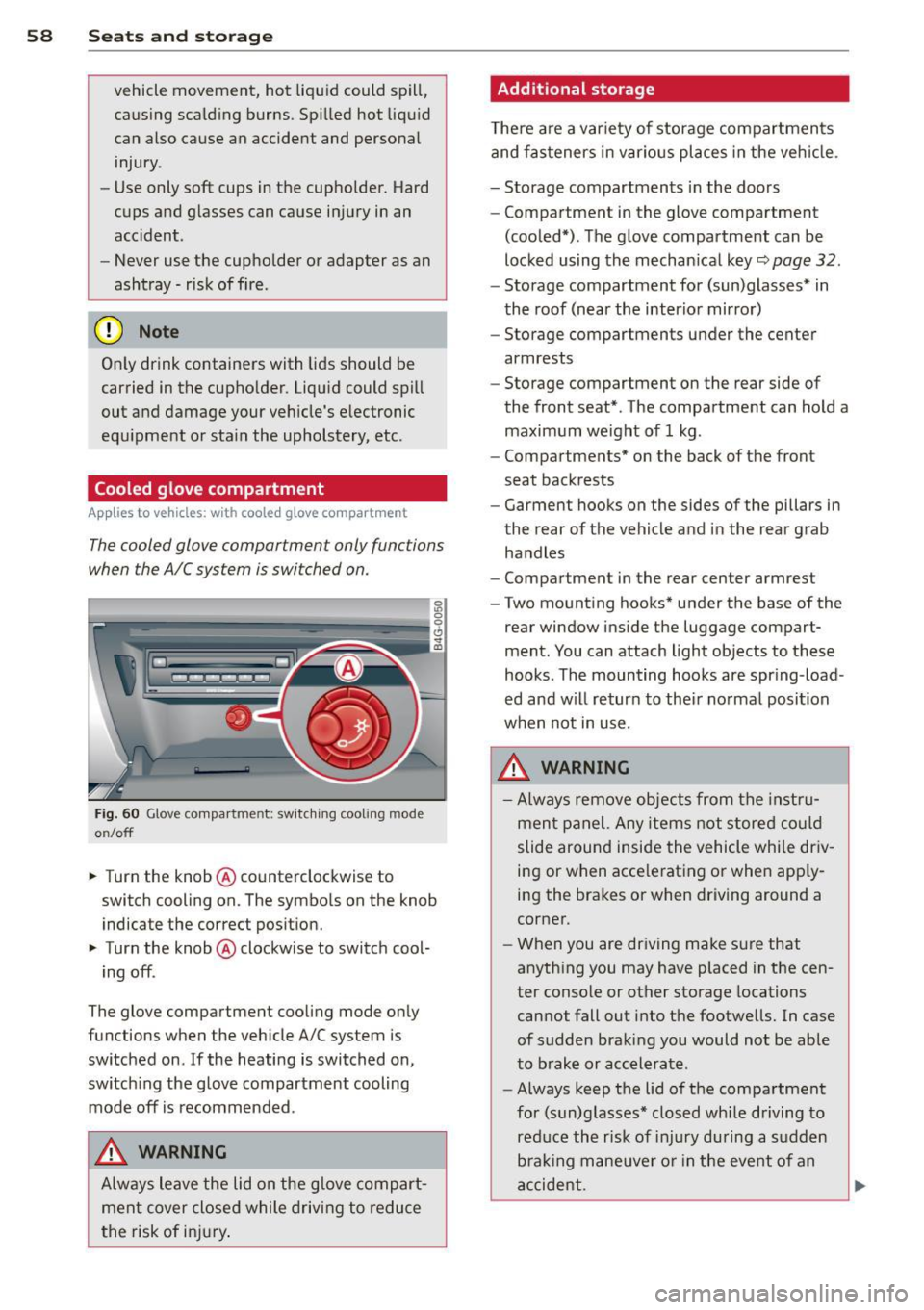
Fig. 60 Glove compa rtment: switc hing cooling mode
o n/off
~ Turn the knob@ counterclockwise to
switch cooling on. The symbols on the knob
indicate the correct position.
~ Turn the knob @ clockwise to switch cool-
ing off .
The glove compartment cooling mode only
functions when the vehicle A/C system is
switched on .
If the heating is switched on,
switching the glove compartment cooling
mode
off is recommended .
_& WARNING
Always leave the lid on the glove compart
ment cover closed while driving to reduce
th e risk of injury.
Additional storage
Ther e are a variety of storage compartments
and fasteners in various places in the vehicle.
- Storage compartments in the doors
- Compartment in the glove compartment
(cooled*) . The glove compartment can be
locked using the mechanical key
r::;, page 32.
-Storage compartment for (sun)glasses* in
the roof (near the interior mirror)
- Storage compartments under the center
armrests
- Storage compartment on the rear side of
the front seat* . The compartment can hold a
maximum weight of 1 kg .
- Compartments* on the back of the front
seat backrests
- Garment hooks on the sides of the pillars in
the rear of the vehicle and in the rear grab
handles
- Compartment in the rear center armrest
- Two mounting hooks* under the base of the
rear window inside the luggage compart
ment. You can attach light objects to these
hooks . The mounting hooks are spring -load
ed and will return to their normal position
when not in use.
_& WARNING
- Always remove objects from the instru
ment panel. Any items not stored could
slide around inside the vehicle while driv
ing or when accelerating or when apply
ing the brakes or when driving around a
corner.
- When you are driving make sure that
anything you may have placed in the cen
ter console or other storage locations
cannot fall out into the footwells. In case
of sudden braking you would not be able
to brake or accelerate.
- Always keep the lid of the compartment
for (sun)glasses* closed while driving to
reduce the risk of injury during a sudden
braking maneuver or in the event of an
accident.
-
Page 81 of 306

Messages in the instrument cluster
display
Applies to vehicles: with Start-Stop-System
Start-Stop system deactivated: Please re
start engine manually
This message appears when specific condi
tions are not met dur ing a s top phase and the
Start -Stop-System w ill
not be able to restart
the eng ine.
If the Dor R selector lever posi
tions were engaged, P will be selected auto mat ica lly. The engine must be started with
the
! START ENGINE STOP I button .
Start-Stop system: System fault! Function
unavailable
There is a malf unctio n in t he Star t-Stop-Sys
tem . Dr ive the veh icle to an authorized repair
fac ility for servicing as soon as possible to cor
rect the malfunction .
Speed warning system
Introduction
The speed warning system helps you to stay
under a specified maximum speed.
The speed warning system warns you if you
a re exceeding the max imum speed that you
have set. You w ill hear a warn ing tone when
your speed exceeds the stored va lue by ap
p rox ima tely 3 mph (3 km/h) . An indicato r
l ight . (USA models)/ . (Canada mode ls) in
t he ins trumen t cluster display also turns on at
the same time. The indicator light
a;m
turns off when the speed decreases below the
stored maximum speed.
Setting a threshold is recommended if you
wou ld like to be reminded when you reach a
certain maximum speed . Situations where you
may want to do so include driving in a country
with a general speed limit or if there is a
specif ied max imum speed for winter tires.
(D Tips
Even tho ugh your vehicle is equipped with
a speed warning system, you should st ill
On the road 79
watch the speedometer to make sure you
are not driving faster than the speed limit.
Setting the threshold
You can set, chang e and delete the threshold
in the MMI.
.,. Select: I CAR I function button > (Car)* sys
tems
control button > Driver assist > Speed
warning.
You can set any threshold between 20 mph
(30 km/h) and lS0 mph (240 km/h). Sett ings
can eac h be adjusted in increments of 6 mph
(10 km/h).
Cruise control
Switching on
Applies to vehicles: with cruise control
The cruise control system makes it possible to
drive at a constant speed starting at
20 mph
(30kmlh).
0
f
®t
0
Fig. 80 Contro l lever with set button
Fig . 81 Display: Selected speed
.,. Pull the lever to position © c::> fig. 80 to
sw itch the system on.
.,. Drive at the speed you w is h to set.
.,. Press button @ to set that speed.
Page 129 of 306

.. Make sure to use the right child restraint
correct ly to protect children
Q page 171,
Child Safety.
.. Sit properly in your seat and make sure that
your passengers do the same¢
page SO,
General recommendations .
.. Faste n your safety belt and wear it properly.
Also instruct your passengers to fasten their
safety belts properly ¢
page 136.
What impairs driving safety?
Safe driving is directly related to the condi
tion of the vehicle, the driver as well as the
driver 's ability to concentrate on the road
without being distracted.
The driver is respons ible for the safety of the
veh icle and all of its occupants.
If your ability
to drive is impai red, safety r isks for everybody
in the vehicle increase and you also become a
hazard to everyone else on the road ¢ _&. .
Therefore:
.. Do not let yourself be dist racted by passen
gers or by using a cellular telephone.
.. NEVER drive when your driving ability is im
paired (by medications, alcohol, drugs, etc.).
.. Observe all traffic laws, rules of the road
and speed limits and plain common sense .
.. ALWAYS adjust your speed to road, traffic
and weather conditions .
.,. Take frequent breaks on long trips . Do not
drive for more than two hours at a stretch.
.. Do NOT drive when you are tired, under
pressure or when you are stressed.
A WARNING
Impaired driving safety increases the risk
of serious personal injury and death when
ever a vehicle is being used.
Driving Safely 12 7
Proper occupant
seating positions
Proper seating position for the driver
The proper driver seating position is impor
tant for safe, relaxed driving .
Fig. 143 Correct seat ing pos it ion
For your own safety and to reduce the risk of
injury in the event of an accident, we recom
mend that you adjust the driver's seat to the
follow ing pos ition:
.. Adjust the driver's seat so that you can easi
ly push the pedals all the way to the floor
wh ile keeping your knee(s) slightly bent
¢ _&. .
.. Adjust the angle of the seatback so that it is
in an upr ight position so that your back
comes in full contact w ith it when you drive.
.. Adjust the steering wheel so that there is a
distance of at least 10 inches (25 cm) be
tween the steering wheel and yo ur breast
bone
Q fig. 143. If not possible, see your au
thorized Audi dealership about adaptive
equipment .
.. Adjust the steer ing wheel so that the steer
ing wheel and airbag cover points at your
chest and not at your face.
.,. Grasp the top of the steering whee l with
your elbow(s) slightly bent.
.. Applies to vehicles with adjustable head re
straints: Ad just the head restraint so the up
per edge is as even as possible with the top
of your head. If that is not possible, try to
adjust the head restraint so that it is as
close to this posit ion as possible .
.. Fasten and wear safety be lts correctly
¢ page 139. .,.
Page 135 of 306

A WARNING ,~
To help prevent poisonous exhaust gas
from being drawn into the vehicle, always
keep the rear lid closed while driving .
- Never transport objects larger than
those fitting completely into the luggage
area because the rear lid cannot be fully
closed.
- If you absolutely must drive with the rear
lid open, observe the following notes to
reduce the risk of poisoning:
- Close all windows,
- Close the power roof*,
- Open all air outlets in the instrument
panel,
- Switch off the air recirculation,
- Set the fresh air fan to the highest
speed.
A WARNING
Always make sure that the doors, all win dows, the power roof* and the rear lid are
securely closed and locked to reduce the
risk of injury when the vehicle is not being
used.
- After closing the rear lid, always make
sure that it is properly closed and locked.
- Never leave your vehicle unattended es
pecially with the rear lid left open. A
child could crawl into the vehicle through
the luggage compartment and close the
rear lid becoming trapped and unable to
get out. Being trapped in a vehicle can
lead to serious personal injury.
- Never let children play in or around the
vehicle .
- Never let passengers ride in the luggage
compartment. Vehicle occupants must
always be properly restrained in one of
the vehicle's seating positions.
Gj) Tips
-Air circulation helps to reduce window fogging. Stale air escapes to the outside
through vents in the trim panel. Be sure
to keep these slots free and open .
-
Driving Safely 133
-The tire pressure must correspond to the
load. The tire pressure is shown on the
tire pressure label. The tire pressure la
bel is located on the driver's side B-pillar.
The tire pressure label lists the recom
mended cold tire inflation pressures for
the vehicle at its maximum capacity
weight and the tires that were on your
vehicle at the time it was manufactured. For recommended tire pressures for nor
mal load conditions, please see chapter
~page 244.
Tie-downs
The luggage compartment is equipped with
four tie-downs to secure luggage and other
items.
Use the tie-downs to secure your cargo prop
erly<>
page 132, Loading the luggage com
partment.
In a collision, the laws of physics mean that
even smaller items that are loose in the vehi
cle will become heavy missiles that can cause
serious injury. Items in the vehicle possess en
ergy which vary with vehicle speed and the
weight of the item. Vehicle speed is the most
significant factor.
For example , in a frontal collision at a speed
of 30 mph (48 km/h), the forces acting on a 10-lb (4.5 kg) object are about 20 times the
normal weight of the item. This means that
the weight of the item would suddenly be about 200 lbs. (90 kg) . You can imagine the
injuries that a 200 lbs . (90 kg) item flying
freely through the passenger compartment
could cause in a collision like this.
A WARNING
Weak, damaged or improper straps used
to secure items to tie-downs can fail dur
ing hard braking or in a collision and cause
serious personal injury.
-Always use suitable mounting straps and properly secure items to the tie-downs in
'
•
•