2013 AUDI A5 COUPE fuel
[x] Cancel search: fuelPage 28 of 294
26 Driver in formation d isplay
¢fig . 10 . The data from the single -trip mem
ory (memory leve l 1) is being displayed if a
D
appears in the display . If a II is shown, then
the data from the total -trip memory is being
d isplayed (memory leve l 2). The fuel pump
nozzle
iii indicates the efficiency program*
¢ page 27.
Single-tr ip m emory (Trip computer 1 )
The single-trip memory stores the trip infor
mat ion from the time the ignition is turned o n
until it is turned off. If the trip is continued
w ithin 2 hours from the t ime the ignition was
turned off, the new data will be included in
the calcu lation of the current trip i nfo rma
tion .
If the t rip is inte rrupted fo r more than 2
hours the memory is reset automati ca lly.
Total -trip memory (Trip computer 2)
Unlike the sing le-trip memory, the tota l- tr ip
memory is not reset automatically . Th is per
mits you to evaluate your d riving data for the
enti re pe riod be tween manual rese ts.
Efficiency program*
The effic iency program can help you to use
less fuel ¢
page 2 7.
Operation
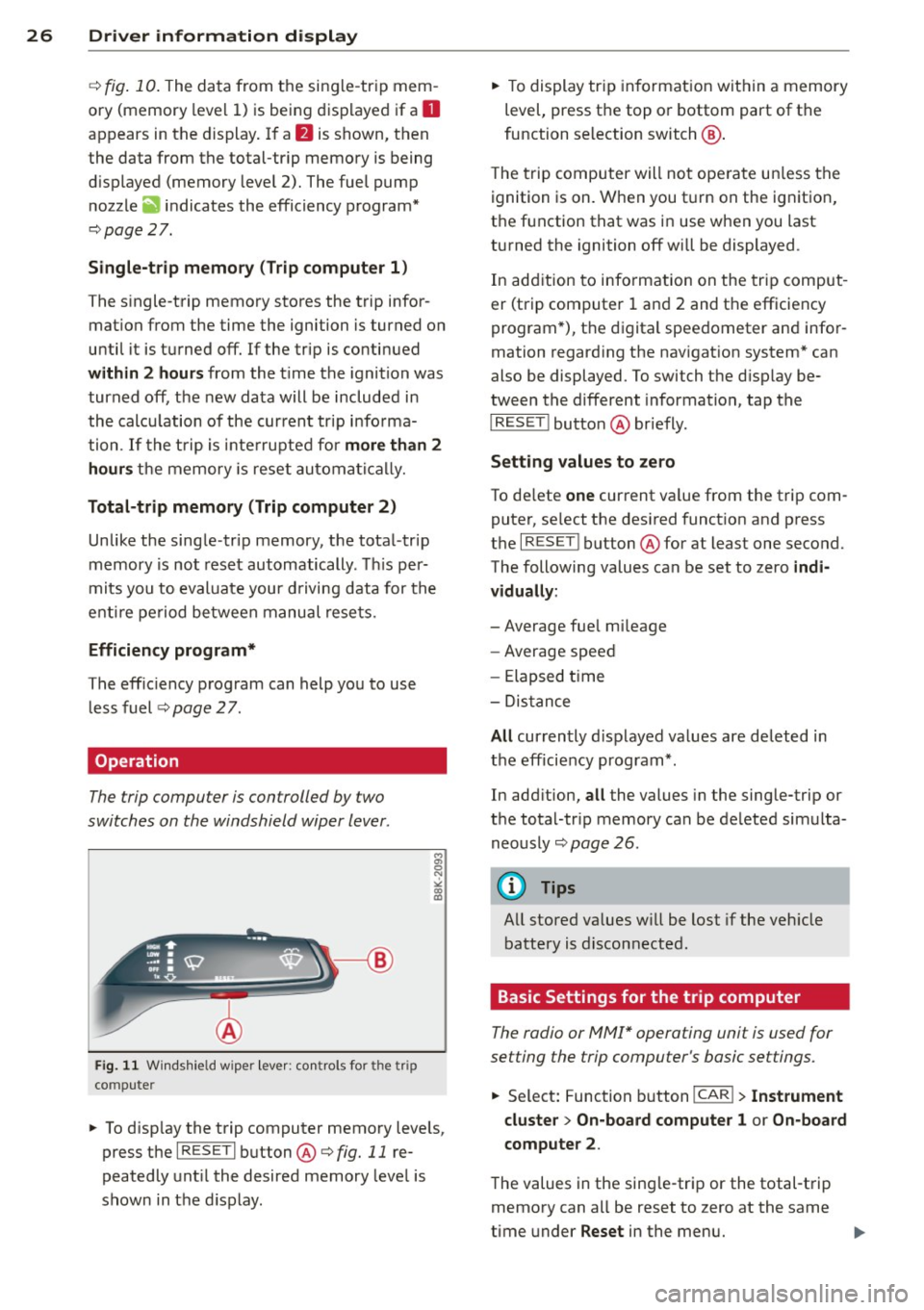
The trip compu ter is controlled by two
switches on the windshield wiper lever.
F ig . 11 W ind sh ie ld wipe r lever: co ntro ls fo r the tri p
co mp ute r
.. To d isp lay the trip computer memory levels,
press t he
I RES ET I button @¢ fig. 11 re
peatedly unt il the desired memory leve l is
shown in the d isplay. ..
To display tr ip in format ion wit hin a memory
level, press the top or bottom part of the
function se lection switch @.
T he trip computer will not ope rate un less the
ignition is on. W hen you t urn on the ignition,
the function that was in use when you last
turned the ignition off will be displayed .
In add ition to info rmation on the trip comput
er (trip computer 1 and 2 and the efficiency
program *), the digital speedometer and infor
mation regard ing the nav igat ion system* can
also be displayed. To switch the d isp lay be
tween the different information, tap the
I RESET ! button@ briefly.
Sett ing values to zero
To de lete one current va lue from the trip com
puter, se lect the des ired funct ion and press
t h e
I RES ET I button @for at least one second.
The following values can be set to zero
indi
vidually :
- Average fue l mi leage
- Average speed
- Elapsed t ime
- Dis tance
All cur rently d isplayed va lues are deleted in
the eff iciency program*.
In add it ion,
all the values in the single-trip or
the total-tr ip memory can be de leted simulta
neously ¢
page 26.
(D Tips
All stored va lues w ill be lost if the veh icle
battery is discon nected .
Basic Settings for the trip computer
The radio or MMI* operating unit is used for
setting the trip computer's basic se ttings.
.. Select: Function b utton ICAR ! > Instrument
cluster > On-board computer 1 or On -board
computer 2 .
The values in the sing le-trip or the total -t rip
memory can all be reset to zero at the same
time under
Reset in the menu. ...
Page 29 of 294

In addition, you can determine what informa
tion from the trip computer should be shown
in the instrument cluster display. If one of the
pieces of driver information is turned
O ff , that
driver information will not be shown in the
d isp lay. The information will continue to be
calculated by the trip computer and can be
turned back
On at any time .
(D Tips
-This function is not availab le on all
vehicles.
- The driving information in the efficiency
program is also reset to zero with t he
s ingle-trip memo ry.
Gearshift Indicator
Applies to vehicles: with manual transmission and gear·
shift indica tor
This indicator can help conserve fuel.
Fig. 12 D isplay : Gea rs hi ft indicator
The radio or MMI* can be used to activate or
deactivate the gearshift indicator.
Driving informat ion -fa ding in and out
~ Select: ICARlfunction button> In st rum ent
clu ster
> S hifting r eco mm endati on. Or
~ Se lect: ICARI funct ion button> Car syste m s
control button > Driv er as sist > G ear reco m
m en dation .
In order to become familiar with the gearshift
i ndictor, at first just drive the way you a re
used to.
If the cu rrent gear· and the d riving
situation· is not the best one for conse rv ing
fuel, then the indicator will display the recom
mended gear. The disp lay shows the current
Dri ver inform ation di spl ay 2 7
gear and the gear that is recommended
~ fig. 12.
-Up shifting T he disp lay w ill l igh t up to the
right of the gear c urrently selected if i t is
recommending a higher gear .
-Down shifting : The display will ligh t up to
the
left of the gear currently se lected if it is
recommend ing a lower gear.
Somet imes the indi cator will recommend
skipping a gear (3 > S).
If there is no gearshift recommendation, then
just drive in the appropriate gear for conserv
i ng fuel.
(D Note
This indicator can help you conserve fuel.
This indicator is not meant to show you
which gear you should a lways be in in all
driving situations. Sometimes, in situa
tions s uch as passing, driving through
mountains or when towing a t railer, there
won't be any gears hift recommendation.
a) Tips
The display does not light up when the
clutch pedal is being depressed.
Efficiency program
Description
Applies to vehicles: with trip computer with efficiency
program
Fi g. 1 3 Display: eff iciency program
~ Press the I RESET I button @~ page 26,
fig. 11
r epeatedly unt il the effic iency p ro
gram appears in the display.
Page 30 of 294

28 Driver information d isplay
The efficiency program can help you to use
less fuel.
It evaluates driving information in
reference to fue l consumption and shows oth
er equipment influencing consumption as well
as shift recommendations. Fuel economy
messages
¢ page 29 provide tips for effi
cient dr iv ing .
The efficiency program uses distance and con
sumption data from trip computer
1. If the
data are deleted in the efficiency program,
those values are also reset in trip computer
1.
Enhanced shift indicator
Applies to vehicles: with manua l transmission and trip
co mpute r with efficiency program
Fig. 14 Dis play : enh ance d shi ft ind icato r
.. In the efficiency program, press the func
tion selection switch
r=> page 26, fig. 11 @
repeated ly until the enhanced shift indicator
appears in the display .
The effic iency program also has an enhanced
shift indicator. This enhanced shift indicator
follows the same concept as the "standard"
shift indicator ¢
page 27. The selected and
the recommended gears are highlighted in
colors like a traffic light .
The color of the circle indicates if the most
suitable gear is engaged or if you should sh ift
up or down.
Green circle without No gear or the most
or with a gear suitable gear is en
gaged
Yellow circle¢
fig. 14 Shift up or down one
gear
Red circle Shift up two gears
(D Note
This enhanced shift indicator can help you
conserve fuel. It is not designed to recom
mend the correct gear in all driving situa
tions. Only the dr iver can decide wh ich
gear is correct in certa in driving situations
such as when passing another vehicle,
driving on hills or towing a trailer.
(0 Tips
-The enhanced shift indicator display is
different in vehicles with a monochrome
display .
- The "standard" shift indicator* disap
pears when the enhanced shift indicator
is displayed.
Other equipment
Applies to vehicles: with trip computer with efficiency
program
Fig. 1 5 Display : other eq uipm en t
.. In the efficiency program, press the func
tion selection switch¢
page 26, fig. 11 @
repeatedly until the other equ ipment ap
pears in the display.
Other equipment that is currently affecting
fuel consumption is listed in the efficiency
program. The display shows up to three other
items of equipment @. The equipment using
the most fuel is listed first . If more than three
items using fuel are switched on, the equip
ment that is currently using the most fuel is
displayed .
A scale @also shows the current total con
sumption of all other equipment .
Page 31 of 294

Fuel economy messages
App lies to vehicles: with trip computer w it h eff ic iency
p rogram
Fig . 16 Display: fuel economy message
Fue l economy messages are disp layed when
fuel consumption is increased by certain con
ditions. If you follow these fuel economy mes
sages, you can reduce your vehicle's consump
tion of fuel. The messages appear automati
cally and are only displayed in the effic iency
program. The fuel economy messages turn off
automatically after a certain period of time.
• To turn a fuel economy message off imme
diately after it appears, press the
I RESE TI
button ¢ page 26, fig. 11 @ , or
• Press the function selection switch
¢ page 26, fig. 11 @.
(D Tips
- Once you have turned a fuel economy
message off, it will only appear again af
te r you turn the ignition on aga in.
- The fuel economy messages are not dis
played in every instance, but rathe r in in
te rva ls over a period of time.
Dri ver inform ation di spl ay 29
Service interval display
The service interval display reminds you when
your next service is due.
Fig. 17 Disp lay: Service i nterval display
The schedule for the next oi l change or inspec
tion is ca lculated automatica lly and disp layed
accord ingly. The d isp lay works in two stages:
Service reminde r
30 days before the next service is due, a serv
ice reminder appears in the display whe n you
turn on the ignition¢
fig. 17 .
After about S seconds the display switches
back to normal. The distance and time re
main ing are updated each time the ignition is
tu rned on unt il th e date due for service is
reached.
Service due
When the due date for service is reached, the
message
Ser vice due! appears in the instru
ment cluster immediately after you turn on
the ignit ion. Add it iona lly, a warning tone
sou nds. After about S seconds the disp lay
switches bac k to normal.
Calling up the service schedule s
If or when an oil change or inspection is due,
can be shown in the rad io or
MMI* disp lay by
selecting the service interva l display in the car
menu. Select !CAR ! func tion button>
Servic e
interval d ispl ay
o r! CAR ! function button> C ar
sys te m s
cont ro l bu tton > S ervic ing & check s.
Resetting the servic e interval display
Your author ized Audi dealer will reset the cor
responding service schedule after pe rforming .,.
Page 32 of 294

30 Driver information display
the approp riate service on your vehicle. You
a lso have the possibility to reset the oil
change schedule after having performed an
oil change according to Audi specifications.
Select
I CAR I function button > Service interval
display > Reset oil change interval
or ICARI
function button> Car systems control button
> Servicing & checks > Reset oil change inter
val.
(CT;) Note
If you disconnect the battery terminals, no
calculations can be made for the service
interva l display during this time and no
service reminder will appear. Remember
that observing the proper serv ice interva ls
is vitally important to extending the life of
your vehicle, particularly the engine, and
maintaining its value. Even if the mileage
driven is low, the maximum period of one
year from one serv ice to the next must not
be exceeded.
@ Tips
-Do not reset the display between oil
changes, otherw ise the display will be in
correct.
- The information in the Service Reminder
remains stored even when the vehicle
battery is disconnected.
On-Board Diagnostic
system (OBD)
Malfunction Indicator Lamp (MIL)
The Malfunction Indicator Lamp (MIL) II in
the instrument cluster is part of the On-Board
Diagnostic (OBD II) system.
The warning/indicator light illuminates when
the ignition is switched on and goes out after
the engine starts and the idle has stabi lized .
This indicates that the MIL is working proper
l y.
If the light does not go out after the engine
is started, or illuminates while you are driv
ing, a malfunction may exist in the engine sys- tern.
If the
light illuminates, the catalytic con
verter could be damaged.
Continue driving
with reduced power (avoid
ing sustained high speeds and/or rapid accel
erations) and have the condition corrected.
Contact your authorized Audi dea ler.
If the light illuminates, the electronic speed
limiter may also be malfunct ioning. For more
information
q page 31, El ectronic speed
limiter .
An improperly closed fuel filler cap may also
cause the MIL light to illuminate
~page 213.
On-Board Diagnostics
Fig. 18 Locat ion of Data L ink Connector (DLC)
On-Board Diagnostics monitors the compo
nents of your em ission control system . Each
monitored component in your engine system
has been assigned a code . In case o f a mal
function, the component will be identified
and the fault stored as a code in the control
module memory.
T he MIL light may also illuminate if there is a
leak in the on-board fuel vapor recovery sys
tem.
If the light illuminates after a refueling,
stop the vehicle and make sure the fuel filler
cap is properly closed
q page 213.
In order to make an accurate diagnosis, the
stored data can on ly be displayed using spe
cial diagnostic equipment (generic scan tool
for OBD).
In order to connect the special diagnostic
equipment, push the plug into the Data Link ..,.
Page 64 of 294

62 Seat s a nd s tor ag e
- We recommend that you keep the installa
tion instructions for your roof rack system
together with your Owner's literature in the
vehicle.
Wh en shoul d th e roof rack b e re mo ved?
-Before going th rough an automatic car wash
(it is best to ask the car wash operator for
advice).
- When not in use, to reduce fuel consump
tion, wind no ise and to guard against theft.
A WARNING
- Use of an unapproved roof rack or incor
rect mount ing of an approved roof rack
can cause the roof rack or the items at
tached to it to fall off the roof onto the road .
- Objects fall ing from the roof of a vehicle
can cause a crash and personal injury .
- Only mount the roof rack on the desig
nated locations on the roof¢ fig. 63.
- The roof rack system must be insta lled
exactly according to the instructions pro
vided.
- When driving w ith a roof rack system,
changes to the center of gravity and wind
resistance can change the veh icle han
dling and lead to a collision . Always
adapt you r driv ing and you r speed to the
cu rrent conditions.
@ Note
- Your vehicle warranty does not cover any
damages to the veh icle caused by using
roof racks or mo unt ing structures not
approved by Audi for yo ur vehicle . T he
same applies to damage resulting from
i ncorrect roof rack installation.
- Always check the roof rack moun tings
and hardware before each trip and dur ing a trip to make sure everything is se
curely tightened . If necessary, retighten
the mount ings and check the ent ire sys
tem from t ime to t ime.
- After mounting a roof rac k system, or
when you transport objects on the roof
of your veh icle, the height of the vehicle is naturally increased
. Be careful when
driving under low bridges or in parking
garages for example . This cou ld cause
damage to the load and even the vehicle
itself.
- Make sure that the open rear lid and the sunroof do not come into contact with
objects on the roof.
Loading the roof rack
Always distribute loads evenly. Make sure anything on the roof rack is securely tied
down.
.. Always distribute the loads on the roof rack
even ly.
.,. Always attach items to the roof rack secure-
ly before you drive off .
The maxim um permissible roof weight is
165 lb (75 kg ). The roof we ight is the total of
the weight of the roof rack, the attachments and the ca rgo you a re carrying. You must also
not exceed the max imum load we ight for the
r oof rack yo u are using.
When using a roof rack system which has a lower load carrying capacity, you must not use
up the tota l maximum permiss ible load carry
ing capac ity specif ied above. Ins tead, you
sho uld load the roof rack system only to the
maximum capacity specified by the manufac
turer of the roof rack system.
A WARNING
Weak, damaged or improper straps used
to secure items to the roof rack can fail
during hard braking or in a coll is ion and
cause ser ious persona l injury.
- Make sure the roof rack is installed exact ly as specified above¢ page 61.
- Always use s uitable mount ing straps for
secur ing items to the roof rack to help
prevent items from s hifting or flying for
ward .
- Items on the roof rack must always be
securely mounted.
Page 88 of 294

86 Transmis sion
Dynamic shift program (DSP)
App lies to vehicles: with tiptronic
The automatic transmission is el ectron ically
controlled .
The transmission is self adapting a nd will au
toma tically
select t he best shift prog ram suit
ed to the driving conditions and driving style .
The transmission will se lect one of the
econo
my
programs when you drive at a steady
speed or a gradually changing speed without
heavy acceleration . This achieves optimum
fuel efficiency, with early upsh ifting and de
l ayed downshifting.
The transmission will automatically select the
sporty shift programs whe n you drive at high
e r speeds, or w ith heavy acceleration and fre
quent ly chang ing speeds. Upshifts are de layed
t o make f ull use of eng ine power. D owns hift
i ng takes p lace a t higher engine speeds than
in the economy programs.
The se lection of the most s uitable shift p ro
g ram is a con tinuous, automa tic process. The
d river can also make the t ransmission switch
to a sporty prog ram by
quickly pressing down
the gas peda l.
T his causes the tran smission to shift down to
a lower gear to achieve ra pid acceler ation, e.g.
for q uickly passing another veh icle. You do not
need to press the gas peda l into the kick -down
range. After the transmission has ups hifted,
the original program is se lected according to
your driving style.
When driv ing on hills and mountains, the gear
selection adapts to the grade. This prevents
constant upsh ifting and downshifting when
driving uph il l.
Manual shift program
Applies to vehicles: wit h tiptronic
Using the manual shift prog ram you can
manually select gears .
'
Fig. 86 Center co nsole: s hiftin g t he m ult itr onic/t ip ·
tro nic man ually
Fig. 87 Steer ing w hee l: Sh ift b utto ns
Gear select ion with select or leve r
.,. N
N
~ m Ill
The tiptronic mode ca n be selected either w ith
the vehicle stat ionary or on the move.
.,. Push the se lec tor lever to the r ight from D/
S. As soon as the t ransm ission has switched
over , the se lected gear a ppears in the dis
p lay .
.,. To upshift, push the se lector lever forward
to the plus position
0 ¢ fig. 86.
.,. To downsh ift, pus h the lever to the mi nus
position
0 .
Gear select ion w ith paddle lever s*
The shift buttons are activated when these
lector lever is in D/S or the tiptronic manua l
shift program .
.,. To upshift, touch the button on the r ight
0
¢ fig. 87 .
.,. To downshift, touch the button on the left
0-~
Page 89 of 294

When accelerating, the transmission wi ll au
tomatically shift into the next gear before the
engine reaches its maximum RPM.
I f yo u app ly a ligh t throt tle when acce lera t
ing, tiptronic will a utomatically shift from 1st
to 2nd gear to save fuel. If you apply a heavy
thrott le, the transmission will stay in 1st gear
until near maximum RPM is reached, or unt il
the dr iver shifts into 2nd gear.
If you take your foot off the accelerator peda l
when dr iving down a steep incline, tiptronic
will downshift from the selected gear into the
next lower gear until it reaches 1st gear,
based on road speed and eng ine RPM . Auto
mat ic downshifting is interrupted as soon as
you apply the thrott le aga in .
(D Tips
- When you shift into the next lower gear,
t h e transmiss io n will downshift only
when there is no possibility of over-rev
v ing the engine.
- When the k ick-down comes on, the
transmission will sh ift down to a lower
gear, depending on vehicle and engine speeds.
- Tiptronic is inope rat ive when the trans
mission is in the fail-sa fe mode.
Transmission malfunction
Ap plies to vehicles: with tiptro nic
[O] Tran smi ssion: Press brake pedal and se
lect gear again.
P ress the brake pedal and se lec t th e des ired
selec tor lever pos it io n a gain. You can then
continue dr iv ing.
[O] Trans mission overh eating : Ple ase drive
c onserv atively.
The transmission temperature has increased
significantly due to the sporty dr iving manner .
D rive in a less spo rty manne r until the tem
pe rat ure retu rns to the norma l range a nd the
in dicator light switches of.
[O] Tran smission malfunct ion: You can con
tinue driving Tran
sm iss ion 87
There is a system mal function in the t ransmis
sion . You may contin ue driving . Drive to yo ur
authorized Aud i dea ler o r qualified repa ir fa
c ility soon to have the ma lfunction corrected.
[O] Transmi ssion malfunction: Lim ited driv
ing functionality
T he re is a system malfunc tion in the t ransmis
s ion. The transm ission is swi tching to emer
gency mode. This mode on ly shifts into cer
tain gears or will no longer shift at al l. The en
gine may sta ll. Drive to your authorized Audi
dealer or qualified repair facility immediately
to have the malfunction corrected.
[O] Transmi ssion malfunction : Stop vehicle
and shift to park.
Do not con tinue dr iving. Se lect the P selector
lever position and see your au thori zed A udi
dealer or qualified repair facility for assis
tance.
Q) Note
If the transmission swi tches to emergency
mode, you should ta ke t he ve hicle to an
a uthorized Audi dea lership as soon as pos
sib le to have the condition corrected.