2013 AUDI A5 CABRIOLET fuel
[x] Cancel search: fuelPage 28 of 290

26 Driver in formation d isplay
¢fig . 10 . The data from the single -trip mem
ory (memory leve l 1) is being displayed if a
D
appears in the display . If a II is shown, then
the data from the total -trip memory is being
d isplayed (memory leve l 2). The fuel pump
nozzle
iii indicates the efficiency program*
¢ page 27.
Single-tr ip m emory (Trip computer 1 )
The single-trip memory stores the trip infor
mat ion from the time the ignition is turned o n
until it is turned off. If the trip is continued
w ithin 2 hours from the t ime the ignition was
turned off, the new data will be included in
the calcu lation of the current trip i nfo rma
tion .
If the t rip is inte rrupted fo r more than 2
hours the memory is reset automati ca lly.
Total -trip memory (Trip computer 2)
Unlike the sing le-trip memory, the tota l- tr ip
memory is not reset automatically . Th is per
mits you to evaluate your d riving data for the
enti re pe riod be tween manual rese ts.
Efficiency program*
The effic iency program can help you to use
less fuel ¢
page 2 7.
Operation
The trip compu ter is controlled by two
switches on the windshield wiper lever.
F ig . 11 W ind sh ie ld wipe r lever: co ntro ls fo r the tri p
co mp ute r
.. To d isp lay the trip computer memory levels,
press t he
I RES ET I button @¢ fig. 11 re
peatedly unt il the desired memory leve l is
shown in the d isplay. ..
To display tr ip in format ion wit hin a memory
level, press the top or bottom part of the
function se lection switch @.
T he trip computer will not ope rate un less the
ignition is on. W hen you t urn on the ignition,
the function that was in use when you last
turned the ignition off will be displayed .
In add ition to info rmation on the trip comput
er (trip computer 1 and 2 and the efficiency
program *), the digital speedometer and infor
mation regard ing the nav igat ion system* can
also be displayed. To switch the d isp lay be
tween the different information, tap the
I RESET ! button@ briefly.
Sett ing values to zero
To de lete one current va lue from the trip com
puter, se lect the des ired funct ion and press
t h e
I RES ET I button @for at least one second.
The following values can be set to zero
indi
vidually :
- Average fue l mi leage
- Average speed
- Elapsed t ime
- Dis tance
All cur rently d isplayed va lues are deleted in
the eff iciency program*.
In add it ion,
all the values in the single-trip or
the total-tr ip memory can be de leted simulta
neously ¢
page 26.
(D Tips
All stored va lues w ill be lost if the veh icle
battery is discon nected .
Basic Settings for the trip computer
Applies to vehicles: with trip computer
The radio or MMI* operating unit is used for
setting the trip computer's basic settings.
.. Select: Function b utton ICAR ! > In strument
cluster > On -board computer 1 or On-board
computer 2 . .,.
Page 29 of 290

The values in the single-t rip or the total-trip
memory can a ll be reset to zero at the same
time under
Reset in the menu .
I n addition, you can determine what informa
tion from the trip computer should be shown
in the instrument cluster display. If one of the
p ieces of driver information is turned
Off , that
driver information w ill not be shown in the
display. The information will continue to be
calculated by the trip computer and can be
turned back
On at any t ime.
(D Tips
- This function is not avai lab le on all
vehicles.
- The driving information in the efficiency
program is also reset to zero with the
s ingle-trip memory.
Efficiency program
Description
Applies to vehicles: with trip compu ter with effic iency
program
F ig. 12 Display : efficiency program
... Press the !RESET I button @c::> fig. 11 re
peatedly until the efficiency program ap
pears in the display .
The eff iciency program can help you to use
less fuel. It evaluates driving information in
reference to fuel consumption and shows oth
er equipment influencing consumption as well
as shift recommendations . Fue l economy
messages c::>
page 2 7 provide tips for effi
cient driv ing.
The eff ic iency program uses d istance and con
sumption data from trip computer
1. If the
Driver information display 2 7
data are deleted in the efficiency program,
those values are also reset in trip computer
1.
Other equipment
Applies to vehicles: with trip computer with efficiency
program
Fig. 13 Display: othe r equ ipment
.,. In the efficiency program, press the func
tion selection switch
c::> fig . 11 @ repeatedly
until the other equipment appears in the
disp lay.
Other equipment th at is currently affecti ng
fuel consumptio n is listed in the efficiency
program. The display shows up to three othe r
items of equipm ent@. T he equ ipme nt using
the most fuel is lis ted first .
If more than three
items using fuel are switched on, the equip
ment that is currently using the most fuel is
displayed.
A scale @also shows the current total con
sumption of all other equipment .
Fuel economy messages
Applies to vehicles: with trip compute r with efficiency
program
Fig. 14 Display : fu el econo my message
Page 30 of 290
28 Driver in formation d isplay
Fue l economy messages are disp layed when
fuel consumption is increased by certain con
d itions. If you follow these fuel economy mes
sages, you can reduce your vehicle's consump
tion of fuel. The messages appear automati
cally and are on ly displayed in the eff ic iency
program. The fuel economy messages turn off
automatically after a certain pe riod of time .
.,. To turn a fuel economy message off imme-
diately after it appears, press the
I RES ET I
button r:::;, fig . 11 @ , or
.,. Press the function selection switch
r:::;, fig . 11
® ·
(D Tips
- Once you have t urned a fuel economy
message off, it will only appear again af
te r you tu rn the ignition on aga in.
- The fuel economy messages are not dis
played in eve ry instance, but rat her in in
terv als over a period of time.
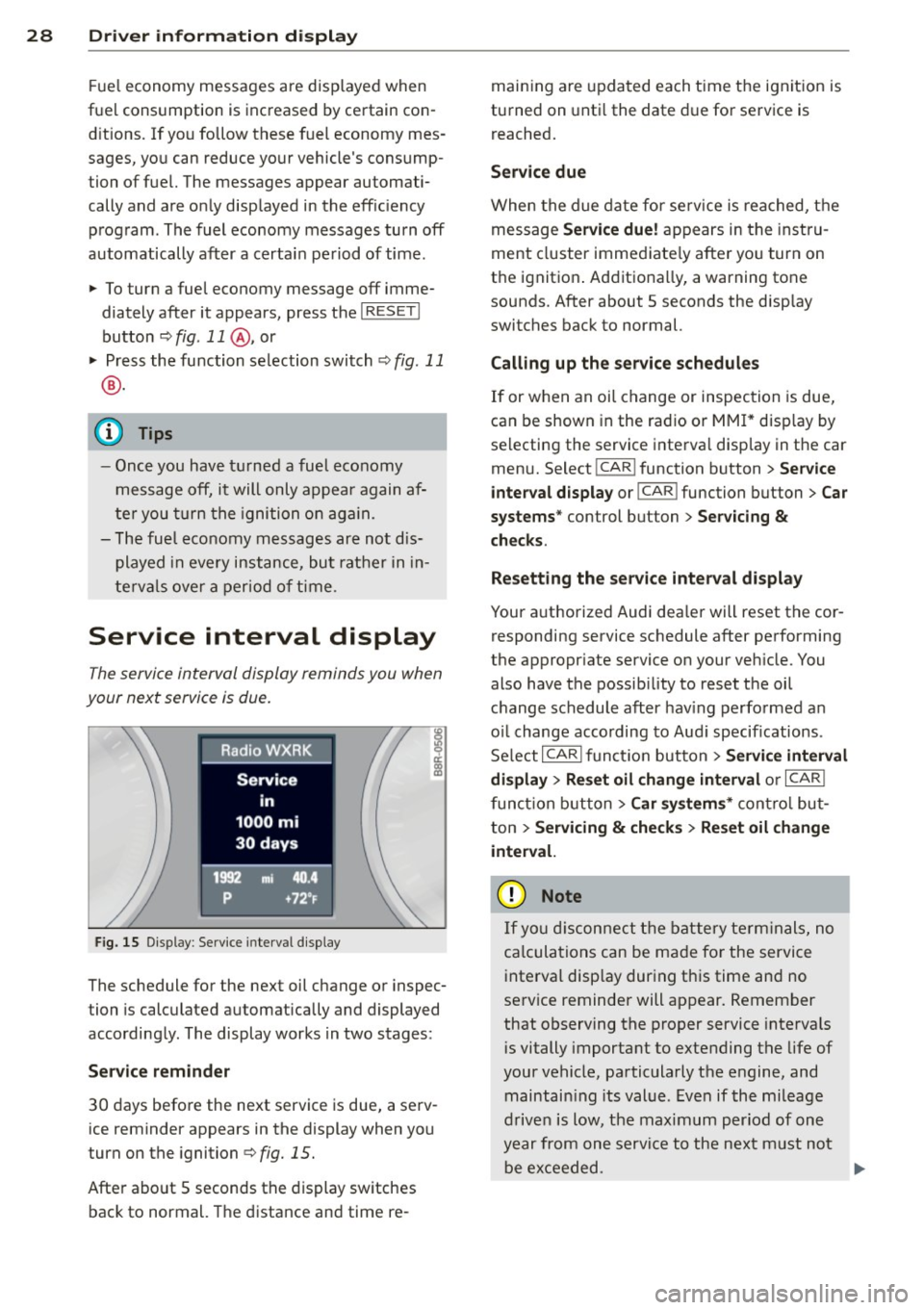
Service interval display
The service interval display reminds you when
your next service is due.
F ig. 15 D is p lay : Serv ice interval d isplay
The schedule for the next oil change or inspec
tion is calculated automatically and displayed
accordingly . The display works in two stages :
Service reminder
30 days before the next service is due, a serv
ice reminder appears in the display when you
turn on the ignition
c:> fig. 15.
Afte r abo ut 5 seconds the display sw itches
back to normal. The distance and time re- main
ing are upda ted each t ime the ignit ion is
turned on unt il the date d ue for service is
reached.
Service due
When the d ue date fo r se rv ice is reached, t he
message
Service due ! appears in the instru
ment cluster immediate ly after yo u turn on
the ignition . Additiona lly, a warning tone
sounds. After about 5 seconds the disp lay
switches back to normal.
Calling up the service schedule s
If or when an oi l change or inspec tion is due,
can be shown in the rad io or
MM I* disp lay by
selecting the service interva l display in the car
menu. Select
! CAR ! function button > Service
inte rval d isplay
or !CAR ! function button> Car
s ystems *
control button > Servicing &
checks .
Resett ing the se rv ice interval display
Your authorized Audi dea ler will reset the cor
responding service schedule after performing
the appropr iate service on your veh icle. You
also have the possib ility to reset the oil
change schedule after hav ing perfo rmed a n
o il change acco rding to Aud i specif ications .
Select
I CAR ! functio n button > Se rvi ce interval
di splay
> Re set oil change int erval or I CAR I
funct ion b utt on > Car sy stem s* cont ro l bu t
ton
> Servicing & check s > Reset oil ch ange
inte rval.
(D Note
If you di sconnect the battery term inals, no
ca lcula tions can be made for the service
i nterva l disp lay dur ing this time an d no
se rvice reminder will appear. Remember
that observing the proper service intervals
i s vitally important to extending the life of
your vehicle, particularly the engine, and maintain ing its value . Even if the mileage
d rive n is low, the maximum period of one
year from one servi ce to the next m ust not
be ex ceeded. .,..
Page 31 of 290

@ Tips
-Do not reset the display between oil
changes, otherwise the display will be in
correct.
- The information in the Service Reminder
remains stored even when the vehicle
battery is disconnected.
On-Board Diagnostic
system (OBD)
Malfunction Indicator Lamp (MIL)
The Malfunction Indicator Lamp (MIL)¢• in
the instrument cluster is part of the On-Board
Diagnostic (OBD II) system .
The warning/indicator light illuminates when
the ignition is switched on and goes out after
the engine starts and the idle has stabilized.
This indicates that the MIL is work ing proper
ly.
If the light does not go out after the engine
is started, or illuminates while you are driv
ing, a ma lfunction may ex ist in the engine sys
tem. If the light illuminates, the catalytic con
verter could be damaged.
Continue driving
with reduced power (avoid
ing sustained high speeds and/or rapid acce l
erat ions) and have the condition corrected.
Contact your author ized Audi dealer .
If the lig ht illuminates, the electronic speed
limiter may also be malfunctioning. For more
information
~ page 29, Electronic speed
limiter .
An improperly closed fuel filler cap may also
cause the MIL light to illuminate
~page 210.
Driver information display 29
On-Board Diagnostics
Fig. 1 6 Locat io n of Data Li nk Co nnector (DLC)
On-Board D iagnostics monitors the compo
nents of your em ission contro l system. Each
monitored component in your engine system
has been ass igned a code. In case of a mal
funct ion, the component will be identified
and the fault stored as a code in the control
module memo ry.
The MIL light may also illuminate if there is a
l eak in the on-board fuel vapor recovery sys
tem. If the light illuminates after a refueling,
stop the vehicle and make sure the fuel filler
cap is properly closed ~page 210.
In order to make an accurate diagnosis, the
stored data can only be disp layed using spe
cial diagnostic equipment (generic scan tool
for OBD).
In order to connect the specia l diagnostic
equipment, p ush the plug into the Data Link
Connector (DL C). The DLC is located to the
rig ht of the hood release
~ fig. 16.
Your authorized Audi dealer or qualified work
shop can interpret the code and perform the
necessary repair.
A WARNING
Do not use the diagnostic connector for
personal use . Incorrect usage can cause
malfunctions , whic h can increase the risk
of a collision!
Electronic speed limiter
Your vehicle may be factory equ ipped with
-
tires that are rated for a maximum speed of .,..
Page 72 of 290
70 Warm and cold
Warm and cold Climate controls
Description
The climate control system warms, cools and
adds humidity to the air in the vehicle interior.
It is the most effect ive when the windows and
sunroof are closed . If there is a build-up of
heat inside the vehicle, ventilation can help to
speed up the cooling process.
I n all heating mode functions except
defrost,
the blower on ly switches to a higher speed
once the engine coolant has reached a certain
temperature.
Condensat ion from the cooling system can
drip and form a puddle of water under the ve
hicle. This is normal and does not mean there
is a leak.
Pollutant filter
The pollutant filter removes pollutants s uch
as dust and pollen from the air.
The air pollutants filter must be changed at
the intervals spec ified in you r Warranty
&
Maintenance booklet, so that the air condi
tioner can properly work.
If you drive your vehicle in an area with h igh
a ir po llution, the fi lter may need to be
changed more frequently than specified in
your Aud i Wa rranty
& Ma intenance booklet. If
in doubt, ask your authorized Audi Service Ad
visor for advice .
Key coded settings
The climate control settings are automat ically
stored and assigned to the remote control key
that is in use. These settings are different
when the power top is open or closed .
A WARNING
Reduced visibility is dangerous and can
cause accidents. -
- For safe driving it is very important that
all windows be free of ice, snow and con
densation.
- Comp letely familiarize yourself with the
proper use and function of the heating
and ventilation system and especially how to defog and defrost the windows.
- Never use the windshield wiper/washer
system in freez ing weather unt il you
have warmed the windshield first, using
the heating and ventilation system. The
washer solution may freeze on the wind shie ld and reduce visib ility.
(D Note
- If you suspect that the air conditioner has been damaged, switch the system
off to avoid further damage and have it
inspected by a qualified dealership.
- Repairs to the Audi air conditioner re
quire special technical know ledge and
special tools. Contact an authorized Aud i
dea ler fo r assistance.
@ For the sake of the environment
By reducing the amount of fuel you use,
you also reduce the amount of pollutants
emitted into the air.
(D Tips
- Keep the air intake s lots (in fro nt of the
w indshield) free from ice, snow and de
bris in order to maintain the proper func
tion of the climate control system.
- The energy management system may
switch the seat heating* or rear window
defroster off temporarily . These systems
are available again as soon as the energy
balance has been restored.
- Air escapes through vents under the rear
window. When placing items of clothing
on the luggage compartment cover, en
sure that the openings are not covered.
Page 88 of 290
86 Transmi ssion
Transmission
multitronic ®, S tronic ®,
tiptronic
Introduction
Appl ies to vehicles: with multitronic/5 tronic/tiptronic
The automatic transmission is controlled elec
tronically. The transmission ups hifts or down
shifts automatically depending on which drive program is se lected.
When a
moderate driving style is used, the
transmission se lects the most economical
driving mode. It wi ll then change up early and
de lay the downshifts to g ive better f uel econ
omy.
The transmission switches to a sporty mode after a k ick-down or when the dr iver uses a
sporty driv ing style characterized by qu ick ac
celerator peda l movements, heavy accelera
tion, frequent changes in speed and traveling
at the maximum speed .
If desired, the driver can a lso sel ect the gears
manually (tiptronic mode ) q page 86.
Various a utomatic transmissions may be in
stalled, depend ing on the mode l:
multitronic ® transmission
The mult it ron ic® transm ission is a co nti nuous
l y var iable transmission. Power is transferred
using a m ultidisk clutch. In contrast to con
ventiona l automatic transmissions using sh ift
ing operat ions, the transmission ratio in the
continuously variable transm ission is changed
continuously. This optimizes the comfort level
and conserves fuel.
S tronic ® transmission
The 5 tronic ® is a d ual-clutch transmission .
Power is transferred using two clutches that
work independently from one another. They
replace the to rque conve rter used in conven
tional automa tic transm iss ions and allow the
ve hicle to acc elerate without a noticeable in
ter ruption in traction.
tiptronic transmission
In the t ipt ro ni c transm iss ion, powe r is trans
f erred by a torque converter .
Selector lever positions
Applies to vehicles: with multitronic/5 tronic/tiptronic
i--...~~-----------..,.-~ -... N
N
N
" :ll
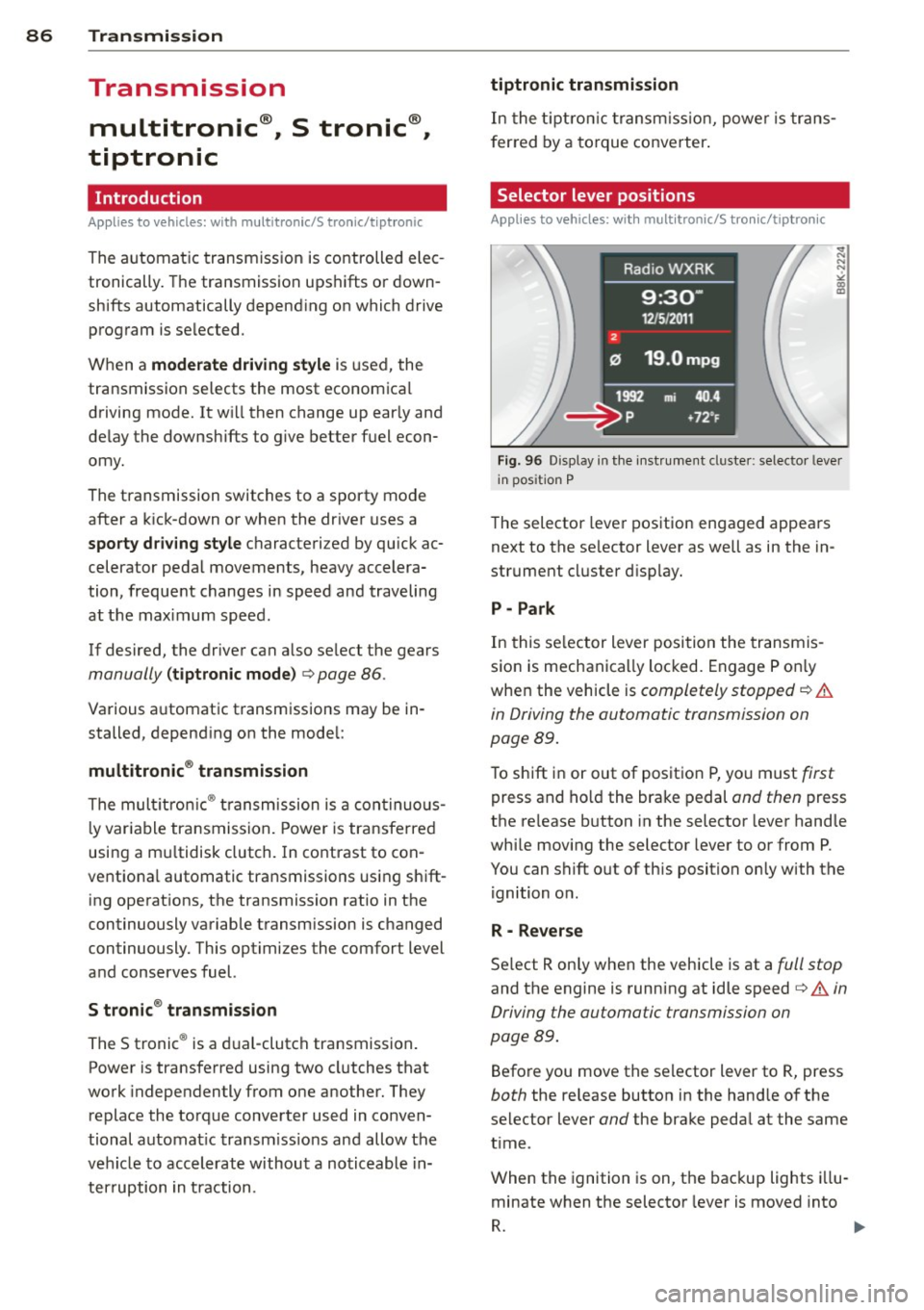
Fig. 96 Display in t he inst ru m ent cluster: selecto r lever
in pos ition P
The selector leve r pos ition engaged appea rs
next to the se lector lever as well as in the in
strument cluster d isp lay.
P -Park
In this se lector lever posi tion the transmis
sio n is mechanica lly loc ked. Engage P o nly
whe n the vehicle is
completely stopped q .&.
in Driving the automatic transmission on
page
89.
To shift i n or out of posit ion P, yo u must first
press and ho ld the bra ke pedal and then press
the re lease b utton in the selector lever hand le
whi le movi ng the selector lever to or from P.
You can shift out of th is position only with the
ignition o n.
R - Reverse
Se lect R on ly when the vehicle is at a full stop
and the engine is running at idle speed q .&. in
Driving the automatic transmission on
page
89.
Befo re you move the se lector lever to R, press
both the release button in the hand le of the
select or lever
and the brake peda l at the same
t ime .
When the ignition is on, the bac kup lights illu
minate when t he selector lever is moved into
R. 1111-
Page 190 of 290

188 Driving and en vironm ent
8_ WARNING
After driving through water, mud, slush,
etc ., the brakes may be slow to take effect
because of wet brake rotors and pads. Dry
the brakes first by braking carefully to re
store the full braking effect.
CD Note
Vehicle components such as the engine,
transmiss ion, suspension or electrical sys
tem can be severely damaged by driving
through wate r.
@ Tips
- Check the depth of the water before dr iv
i ng through it.
- Do not stop the veh icle, dr ive in reverse
or switc h the engine off when driving
t hr ough water.
- Keep in mind that oncoming vehicles
may c reate waves that raise the water
l evel and make it too deep fo r you r vehi
cle to dr ive through safely.
-
- Avoid dr iving thro ugh salt water because
i t can ca use corrosion.
Catalytic converter
It is very important that your emission con
trol system (catalytic converter) is function
ing properly to ensure that your vehicle is run
ning in on environmentally sound manner.
,,. Always use lead-free gasoli ne¢ page 207,
Fuel supply .
,,. Never run the tank down a ll the way to
empty.
,,. Never put too much motor oil in your en-
gine ¢
page 217, "t':::r. Adding engine oil.
,,. Never t ry to push- o r tow-start your veh icle.
The catalytic converter is an effic ient "clean
up" device built into the exhaust system of
the vehicle. The catalytic converter burns
many of the polluta nts in the exhaust gas be
fore they are released into the atmosphe re. The exclusive
use of unleaded f uel is critica lly
important for the life of the catalytic convert
er and proper funct ion ing of the eng ine .
A WARNING
= -
-Do not park or operate the vehicle in
areas where the hot exhaust system may
come in co ntact with dry grass, brush,
fuel spill or other material wh ich can
cause a fire .
- Do not app ly additional undercoating or
r u stp roofing on or nea r the exhaust
manifold, exhaust pipes, cataly tic con
ver ter or heat shields. Dur ing driv ing, the
substance used for under coa ting co uld
overhea t and cause a fire.
CD Note
- Be aware that just o ne tank filling with
leaded fu el w ill already ser io usly de
gr ad e the per form ance o f the catalytic
c onverte r.
- Do not ex ceed t he corre ct engine oil level
r:;!) page 217.
- Do not drive until the fuel tank be co m es
completely emp ty. The engine co uld mis
fire . Unburned fuel could also get in to
the exhaust system and this co uld cause
the cata lytic converter to overheat .
- Do not turn off the igni tion whi le the ve
hicle is mov ing.
- Do not contin ue to ope rate your veh icle
unde r these conditions, as otherwise fuel
can reach the catalyt ic converte r. T his
co uld resu lt in overheating of the con
verter, requir ing its replacement.
- To assure efficient operation of the Emis
sion Control System:
- H ave you r vehicle maintained p rope rly
and in accordance w ith the se rvi ce rec
ommen dat ions in yo ur Warranty &
M ain tenance boo klet.
- L ack of prope r maintenan ce as we ll as
i mprope r use of t he ve hicl e wi ll impair
the func tion of the em ission cont ro l
system and could lea d to damage .
Ill>
Page 191 of 290

@ For the sake of the environment
Even when the Emission Control System is
operating properly, the exhaust gas can
have a sulfur-like exhaust gas smell under
some operating states. This depends on
the sulfur content of the fuel being used.
Using a different brand of fuel may help,
or filling the tank w ith lead-free super
grade gasoline.
Operate your vehicle
economically and minimize pollution
General
Your personal style of driving will determine
the economy of your vehicle, as well as ex
haust and noise levels.
Fuel economy, environmental impact, and
wear on you r engine, bra kes and t ires largely
depend on th ree factors:
= your persona l dr iving style
- operating conditions
- technica l lim itations
I f you anticipate what yo u need to do next and
drive economically, you can easi ly cut your
fuel consumption by 10-15 percent. This sec
tion will give you some t ips on how you can
he lp the environment and your pocketbook.
@ Tips
The consumpt ion estimates as published
by ENVIRONMENTAL PROTECTION AGENCY
(EPA) and Transport Canada may not corre
spond to your actual consumption on the
road, wh ich will vary depending upon vehi
cle load and speed, road and weather con
ditions, tr ip length, etc.
Drive smoothly and keep a lookout
ahead
Vehicles use the most fuel when they are ac
celerating.
" Avoid unnecessary accele rat ing and braking.
Dri vin g and en vironm ent 18 9
Vehicles use the most fue l when they a re ac
ce lerating. If you anticipate what is going to
happen next, you will need to brake less and,
th us, acce lerate less. Let the vehicle coast
whenever possible -for example when you see
that the next traff ic light is red.
Avoid full throttle
Driving at moderate speeds saves fuel and
improves your mileage.
" Try and keep well below your car's maxi-
mum speed.
Acce lerating gently red uces fue l cons ump
tion, engine wear, and does not disturb the environment.
Fuel consumpt ion, exhaust emiss ions and en
gine noise increase disproportionately at high
speeds . If you drive at approximately th ree
quarters of top speed, fuel consumption w ill
be reduced by one half. Never drive faster
than the posted speed limit and weather con
ditions perm it.
Reducing unnecessary idling
Even when your car is just idling it burns up
fuel .
" Shut the eng ine off when you are not driv
ing the vehicle.
" Do not warm up the ve hicle by letting the
eng ine run at idle .
It makes sense to shut off the engine in traffic
jams, when wa it ing for tra ins to pass at rail
road crossings, or at traffic lig hts t hat have
long waits on red . T ur ning the eng ine off for
just 30-40 seconds saves mo re fuel than is
bur ned star ting the e ngine again.
It takes a long t ime for the engine to warm up
fully when it is run ning at idle . However, wea r
and noxious emissions are espec ia lly high
whe n the eng ine is wa rm ing up. So yo u shou ld
drive away as soon a s you start the e ngine and
avo id r unning at high rpms whi le the engine is
still warming up.
Ill-
•
•