2013 AUDI A4 SEDAN wheel
[x] Cancel search: wheelPage 74 of 294
7 2 On the road
On the road
Steering
Manually adjustable steering wheel
The steering wheel position is fully adjustable
up and down and forward and bock .
" a, a,
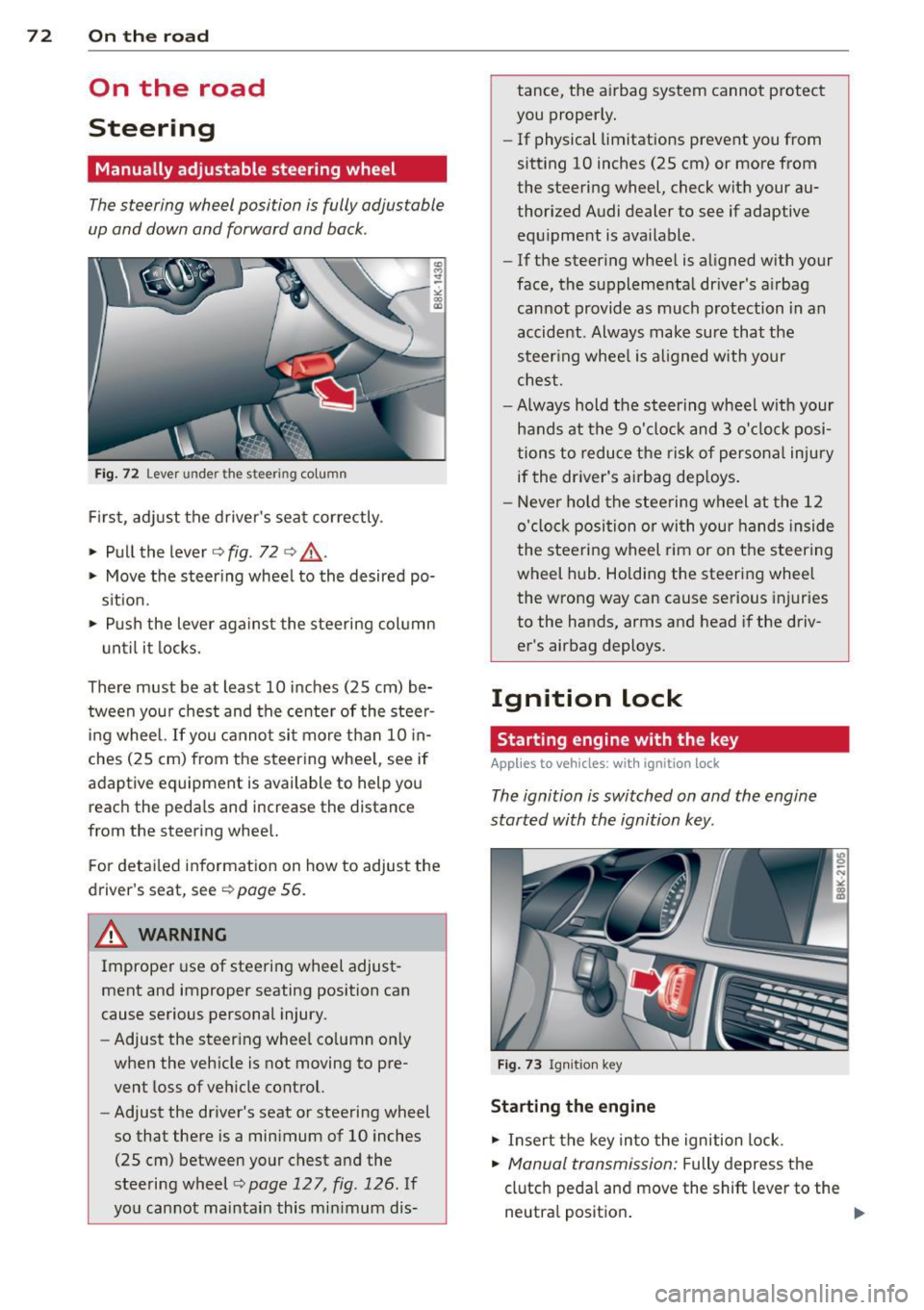
Fig. 72 Lever under the steer ing colu mn
First, adjust the driver's seat correctly .
• Pull the lever
o fig . 72 o ,& .
• Move the steer ing whee l to the desired po
s it ion.
~ Push the lever aga inst the steering column
u ntil it locks.
There must be at least 10 inches (25 cm) be tween your chest and the center of the steer
ing wheel. If you cannot sit more than 10 in
ches (25 cm) from the steering whee l, see if
adaptive equipment is available to help you
reach the pedals and increase the distance
from the steering whee l.
F or detai led information on how to adjust the
driver's seat, see
o poge 56.
A WARNING
Improper use of steering wheel adjust
ment and improper seating position can
cause serious personal injury.
- Adjust the steer ing whee l co lumn on ly
when the veh icle is not moving to pre
vent loss of veh icle control.
- Adjust the driver's seat or steering wheel
so that there is a minimum of 10 inches
(25 cm) between your chest and the
steering wheel
c;, page 12 7, fig . 126 . If
yo u cannot maintain this min imum dis- tance, the airbag system cannot protect
you proper ly.
- If physical limitations prevent you from
sitting 10 inches (25 cm) or more from
the steering wheel, check with your au
thorized Audi dealer to see if adaptive equ ipment is ava ilable .
- If the steer ing wheel is aligned with your
face, the supplemental driver's a irbag
cannot provide as much protection in an
accident . Always make sure that the
steer ing wheel is aligned with your
chest.
- Always hold the steering wheel w ith your
hands at the 9 o'clock and 3 o'clock posi
tions to reduce the risk of persona l injury
if the driver's airbag dep loys .
- Never hold the stee ring wheel at the 12
o'clock position or with your hands inside
the steeri ng wheel rim or on the steering
wheel hub . Holding the steering wheel
the wrong way can cause se rious injuries
to the hands, arms and head if the driv
er's airbag deploys.
Ignition lock
Starting engine with the key
Applies to vehicles : w ith ign ition lock
The ignition is switched on and the engine
started with the ignition key .
Fig. 73 Igni tion k ey
Sta rting the engine
• Insert the key into the ignition lock.
• Manual transmission: Fully depress the
clutch pedal and move the shift lever to the
neutra l position .
Page 80 of 294

78 On the road
Emerg ency b rake function
An emergency brake ensures t hat the vehicle
can be slowed down even if the
normal brakes
fail c::>
page 79, Emergency broking.
Indicat or light s
-If the par king b rake is closed w ith the igni
t ion
s witc hed on the . (USA models) /
• (Canada mode ls) indica tor lights come
on in the instrum ent cluster and the switch .
-If the parking brake is closed w ith the igni
tion
s witc hed off the . (USA models) /
• (Canada mode ls) indicator lights come
on in the instrument clust er and th e switch
for about 20 seconds .
A WARNING
If a gear or a drive range (automat ic trans
m ission) is engaged with the vehicle sta
tionary and the engine runn ing, you must
in no instance accelerate o r release the
cl utch carelessly. Otherwise the vehicle
w ill sta rt to move immediately- r isk of an
accident .
@ Note
If the . symbol in the display or the
.. (USA models) . (Canada models)
ind icator light in the instr ume nt cl uster
flashes, there is a ma lf u nction in the brake
system. By pressing the
ISETI button, you
can bring up a driver message which ex
plains the malfunction in more detail. If
the driver message
Pa rking brake! ap
pears, there is an operating malfunction in
the park ing brake which you should have
repaired immediately by an authorized
Aud i deale r or other qualified workshop
c::>
page 15.
(D Tips
- You can apply the parking brake at any time - even w ith the ignition switched
off . Th e ignit ion must be t urned on in o r
der to release the par king brake. - Occasional noises when the parking
bra ke is applied and released are normal
and are not a cause for concern.
- When the vehicle is parked , the parking
brake goes through a self-test cycle at
regu lar interva ls. Any associated noises
are normal.
Parking
Parking
"' Press the br ake ped al to s top the veh icle .
"' Pull the button @ c::>
page 77, fig. 77 to set
the parking brake.
"' Automatic transmission: Move the selector
lever to P.
.,. Turn t he engine off c::>
,& .
.,. Man ual transmission: Shift into 1st gear.
In addition on inclines and gr ades
.,. Turn the steering wheel so that your vehicle
w ill roll aga inst the curb in case it shou ld
start to move.
A WARNING
- When you leave yo ur vehicle -even if on
ly briefly -always remove the igni tion
key. This app lies particularly when chi l
dren remain in the vehicle. Otherwise the
children could start the eng ine, release
the park ing brake or operate electrical
equ ipme nt (e .g . power windows). There
is the risk of an acc ident .
- When the veh icle is locked, no one -par
ticularly not children should rema in in
the vehicle . Locked doors make it mo re
d ifficult for emergency worke rs to get in
to the vehicle -putting lives at r isk .
Starting from rest
The starting assist function ensures that the
parking brake is released automatically upon starting.
Stopping and applying parking brake
"' Pull the switch @c::> page 77, fig . 77 to ap-
ply the parking brake . .,.
Page 81 of 294

Starting and autom ati call y relea sing the
pa rking b rake
~ When you start to drive as usua l, the park
ing brake is automatically re leased and your
vehicle begins to move.
When stopping at a traffic signa l or stopp ing
in city traffic on vehicles with an automatic
transmission, the parking brake can be ap plied. The vehicle does not have to be held
w ith the footbrake . The park ing brake elimi
nates the tendency to creep with a drive range
engaged. As soon as you dr ive off as usual,
the park ing brake is released automatically
and the vehicle starts to move .
Starting on slop es
When starting on inclines, the start ing ass ist
prevents the vehicle from unintentionally roll
ing back. The braking force of the parking
brake is not released until sufficient dr iving
force has been b uilt up at the whee ls.
(D Tips
For safety reasons, the park ing brake is re
leased automatically only when the dr iv
er 's safety belt is engaged in the bu ckle.
Starting off with a trailer
To prevent rolling back unintentionally on an
incline, do the following:
~ Keep the switch@¢ page 77, fig. 77
pulled and depress the accelerator . The
park ing b rake stays app lied and p revents
the vehi cle from rolling backward.
~ You can release the switch @once you are
s u re that yo u are developing enough driving
force at the wheels by depressing the accel erator.
D epending on the weight of the rig (vehicle
and trai ler) and the severity of the incline, you
may roll backwards as you start. Yo u can pre
vent roll ing backwards by holding the parking
brake switch @pulled out and accelerating -
just as you would when starting on a hill wit h
a conventional hand brake .
On the ro ad 79
Emergency braking
In the event that the conventional brake sys
tem fails or locks .
~ In an emergency, pull the sw itch @
¢
page 77, fig. 77 and continue to pull it to
slow your vehicle down with the parking
brake .
~ As soon as you release the switch @ or ac-
celerate, the b ra ki ng process s tops.
If you pull the switch @and hold it above a
speed of about 5 mph (8 km/h), the eme rgen
cy bra king funct ion is initia ted . T he ve hicle is
braked at all four whee ls by activating the hy
draulic brake system. The brake performa nce
is similar to making an emergency stop¢&..
In order not to act ivate the eme rgency brak
ing by mis take, an audib le warning tone (buz
zer) so unds when the switch @is pulled. As
soon as the switch @ is re leased, or the acce l
erato r peda l is depressed, emergency braking
stops.
A WARNING
...--
Emergency braking should only be used in
an emergency, when the normal foot brake has fa iled or the brake pedal is obstructed .
Using the par king b rake to pe rform eme r
gency brak ing will slow your vehicle down
as if you had made a full bra ke application.
The laws of physics cannot be suspended
even with ESC and its associated compo
nents (ABS, ASR, EDS) . In corners and
when road or weather conditions are bad,
a full brake application can ca use the vehi
cle to sk id or the rear end to break away -
risking an accident.
Speed warning system
Overview
The speed warning system helps you to keep
your driving speed below a set speed limit.
The speed warn ing system warns if the driver
exceeds a p reviously sto red max imum speed .
A warn ing tone w ill sound as soon as the
Ill>
Page 86 of 294

84 Transmi ssion
Driving the automatic transmission
App lies to vehicles: with multitron ic or tiptro nic
Fig. 82 Sh ift gate on the center co nso le : selector lever
with release button
Starting the engine
• The selector lever must be in N or P.
St arting off
• Press and hold the brake pedal.
• Press and hold the release button in these
lector lever handle and move the selector
lever from P or
N to D/S and release the but
ton¢ ,&..
> Wait briefly until the transmission has shift
ed (you will feel a slight movement).
> Remove your foot from the brake pedal and
acce lerate .
Rocking back and forth to become
un stuc k
• Sh ift on ly between D/S and R when the ve
hicle is at a full stop and the engine is run
ning at idle speed .
Stopp ing
> Press and ho ld the brake pedal unt il the ve
hicle has come to a complete stop.
• Keep the brake pedal depressed so that the
vehicle cannot roll forward or backward
whi le it is idling ¢,&. .
• Once stopped,
do not depress the accelera-
tor pedal to rev up the engine¢,&..
Parking
If the selector lever is not in the P position
when you open the driver's door, the vehicle
could ro ll. The message
Tra nsmi ssio n: C ar
m ay roll! Shift to p ark!
appears. •
Press and hold the brake peda l until the ve
hicle has come to a comp lete stop.
• Set the park ing brake firm ly ¢
page 78,
Parking.
• Press and hold the release button in these
lector lever handle, move the se lector lever
into P and then let go of the release button
¢ ,&. .
The eng ine can only be
s ta rt e d when these
lector lever is in the P or N positions .
On s lopes, activate the parking brake first and
then move the selector lever to the P position.
This prevents too much stress from being
placed on the locking mechanism.
Vehicles with multitronic transmission: Your
vehicle is equ ipped with
hill hold as sist allow
ing you to start while on an incline . The sys
tem is activated when the brake pedal is
pressed down and held
f or a few s econd s. The
brake p ressu re will hold for
a moment after
the b rake peda l loosens to p reven t the veh icle
from roll ing bac kwards wh ile s tarting up .
_& WARNING
-= -
- Unintended vehicle movement can cause
serio us injury .
- When the se lector lever is in a driving
pos ition, the vehicle may creep, even at
idle speed. Therefore do not release
the pa rking bra ke o r foot brake u ntil
you are ready to move, beca use power
is transmitted to the wheels as soon as
a driving position is engaged.
- Do no t accelerate wh ile selecting a
driv ing position. At this time the en
gine must be at idle speed so that un
due stress is not placed on the clutches
in the transmiss ion.
- Remember: Even when stopped briefly
with the automatic transmission in 0/5
or R, engine power is being transmit
ted to the wheels. Your veh icle cou ld
"creep" forward or backward . Whe n
stopped, keep the brake pedal fu lly de
pressed and use the parking brake if
Page 90 of 294

88 Transmission
Manual shift program
Applies to vehicles: with multitronic or tiptron ic
Using the manual shift program you can
manually select gears .
Fig. 85 Center console : shift ing t he multitro nic/t ip ·
tronic manual ly
Fig . 86 Steering wheel: Shift buttons
Gear selection with selector lever
"' N
N
~
" a> CD
The tiptronic mode can be selected either with
the vehicle stationary or on the move .
.,. Push the selector lever to the right from
DI
S. As soon as the transmission has switched
over , the selected gear appears in the dis
play.
.,. To upshift, push the selector lever forward
to the plus position
0 ¢ fig. 85 .
.,. To downshift, push the lever to the minus
position
0 -
Gear selection with paddle levers*
The shift buttons are activated when these
lector lever is in D/S or the tiptronic manual
shift program.
.,. To upshift, touch the button on the right
0
¢fig . 86.
.,. To downshift, touch the button on the left
0-
When accelerating, the transmission will au
tomatically shift into the next gear before the
engine reaches its maximum RPM .
If you apply a light throttle when accelerat
ing, tiptronic will automatically shift from 1st
to 2nd gear to save fuel. If you apply a heavy
throttle, the transm iss ion will stay in 1st gear
until near maximum RPM is reached, or until
the driver shifts into 2nd gear .
If you take your foot off the accelerator pedal
when driving down a steep incline, tiptronic
will downshift from the selected gear into the
next lower gear until it reaches 1st gear,
based on road speed and engine RPM . Auto ·
matic downshifting is interrupted as soon as
you apply the throttle again .
(D Tips
-When you shift into the next lower gear,
the transmission will downshift only
when there is no possibility of over-rev
ving the engine.
- When the kick-down comes on, the
transmission will shift down to a lower
gear, depending on vehicle and engine
speeds .
- Tiptronic is inoperative when the trans
m ission is in the fail-saf e mode.
Transmission malfunction
Applies to vehicles: with mult itronic or tiptronic
[O] Transmission: Press brake pedal and se
lect gear again .
Press the brake pedal and select the desired
selector lever position again. You can then
continue driving.
[O] Transmission overheating: Please drive
conservatively.
The transmission temperature has increased
s ignificantly due to the sporty driving manner.
Drive in a less sporty manner until the tern·
perature returns to the normal range and the
indicator light switches of.
[O] Transmission malfunction: You can con-
tinue driving ..,.
Page 92 of 294

90 Transmi ssion
You can a lso shift the gears manually using
tiptron ic, if you like ¢page 93.
Selector lever positions
Appl ies to vehicles: with S tro nic t ransmission
F ig . 89 Display : Selector lever posit io ns
The inst rument cluster display shows the cur
rent selector lever position and current gear .
P-Park
The wheels are mechanically locked in this po
sition . You can only sh ift into Park when the
vehicle is
stationary ¢,&. .
To shift in and out of P, press the inter lock
button in the selector lever
while pressing the
brake pedal.
R - Re verse
Only shift into reverse gear when the vehicle is
stationary and the engine is running at idle
speed ¢.&. .
To select R, press the interlock button
while
pressing the brake pedal. The back-up lights
switch on in the R posit ion if the ignition is
switched on.
N -N eutral
The transmission is in id le in this position.
0 /5 -Normal position for driving forward
In t he D/S position, the transmiss io n can be
ope rated e ither in the normal D mode or i n
the S sport mode . To select the S sport mode,
pu ll the se lector lever back brief ly . Pulling the
l ever back again will select the normal D
mode. The instrument cluster disp lay shows
the selected driving mode. In the
n
o rmal mode D, the transmission auto
matically selects the best gear ratio.
It de
pends on engine load, vehicle speed and the
dynamic contro l program (DRP).
Se lect the
s port m ode S for sporty driving.
T he vehicle makes full use of the engine's
power . Shift ing is more noticeable when accel
erating.
When the vehicle is stationary or at speeds below 3 mph (5 km/h), you must always app ly
the foot brake before and while moving the l ever to D/S out of N.
In certain circumstances it may be advanta
geous to temporari ly switch to the manua l
shift program to manua lly select gear ratios
to match specific driving conditions
¢ page 93.
A WARNING
-- Never select R or P whi le driving .
- Power is still transmitted to the wheels
when the engine is runn ing at idle . To
prevent the vehicle from "creeping", you
m ust keep your foot on the brake in a ll
selecto r lever posit ions (except P) whe n
the eng ine is ru nning. Do not inadver
t en tly press the a ccelera tor pedal when
the vehicle is s topped if a gear is engag
ed . Otherwise the vehicle will start to
move immediate ly . This could happen
even if the park ing brake is act ivated.
- Before opening the hood and working on
a running engine, select P w ith the selec
tor lever and activate the parking brake. Always read and follow the applicable
war nings
c>page 208, Engine compart
ment.
@ Tips
- On vehicles with Audi dr ive select* , yo u
can adjust the sporty shift character istics
in the
Dynami c driving mode.Swill ap-
pear in the ins trument cluster display in-
stead of D. ..,.
Page 96 of 294

94 Transmi ssion
When acce lerating, the transmiss ion will au
tomatically shift into the next gear before the
engine reaches its maximum RPM.
I f you apply a ligh t throttle when accelerat
ing, tiptronic will automatically shift from 1st
to 2nd gear to save fuel. If you app ly a heavy
thrott le, the transmission will stay in 1st gear
unti l near maximum RPM is reached, or unt il
the dr iver shifts into 2nd gear.
If you take your foot off the accelerator peda l
when dr iving down a steep incline, tiptronic
will downshift from the selected gear into the next lower gear until it reaches 1st gear,
based on road speed and eng ine RPM . Auto
mat ic downshifti ng is interrupted as soon as
you apply the th rottle aga in .
(D} Tips
- When you sh ift into the next lower gear,
the transmiss ion will downshift only
when there is no possibility of over-rev
v ing the engine.
- When the kick-down comes on, the
transmission will sh ift down to a lower
gear, depending on vehicle and engine
speeds.
- Tiptronic is inope rat ive when the t rans
mission is in the fail-sa fe mode.
Kick-down
A pp lies to vehicles: with S tro nic tr ansmiss ion
Kick-down enables maximum acceleration.
When you press the acce lerator pedal down
beyond the resistance po int, the automatic
transmission downshifts into a lower gear, de
pending on vehicle speed and engine RP M.
It
shifts up into the next h igher ge ar once the
max imum specified engine RPM is reached.
& WARNING
Please note that the wheels could spin on
slick or slippery roads when kick-down is
active.
Launch Control Program
App lies to vehicles : wit h S tronic tra nsmi ssio n
The Launch Control Program provides the
best acceleration possible when starting from
a stop .
Requirement: The engine must be at operat
ing temperature and the steering wheel must
not be t urned .
.. Press the
I~ OF F! button c::;, page 186 while
the engine is running. The
fl ind icator light
illuminates in the instrument cluster and
Traction control (ASR ): Off . Warning! Re
stricted stability
appea rs in the driver infor
mat io n system display .
.. Move the se lector lever to the D/S posit ion
or select the
d ynamic dr iv ing mode in Audi
drive select*
c::;, page 112 .
.. Press the brake peda l strongly with your left
foot and ho ld it down for at least one sec
ond.
.. At the same time, press the accelerator
pedal down complete ly w ith your r ight foot
until t he e ngine reaches and mainta ins a
h igh RP M.
.. Remove yo ur foot from the brake pedal
w ith in S seconds
c::;, A, .
& WARNING
-Always adapt your driving to the traffic
f low .
- On ly use the Launch Cont ro l Program
when road and traffic conditions a llow it
and other drivers w ill not be endangered
or annoyed by your driving and the vehi
cle's acceleration.
- Please note that the d riving wheels can
spin and the vehicle can break away
when ASR is switched off , especially
when the road is slippery .
- Once you have accelerated, you shou ld
sw itch the ASR back on by pressing the
lfl O FF ! button . .__ _____________ _J ...
Page 100 of 294

98 Audi adaptive cruise control and braking guard
confirmed by the video camera, an acute
collision warning.
- For safety reasons, do not use adaptive
cruise control when driving on roads with
many curves, when the road surface is in
poor condition and/or in bad weather
(such as ice, fog, gravel, heavy rain and
hydroplaning). Using the system under
these conditions could result in a colli
sion.
- Switch adaptive cruise control off tempo
rarily when driving in turning lanes, on
expressway exits or in construction
zones. This prevents the vehicle from ac
celerating to the set speed when in these
situations.
- The adaptive cruise control system will
not brake by itself if you put your foot on
the accelerator pedal. Doing so can over
ride the speed and distance regulation.
- When approaching stationary objects
such as stopped traffic, adaptive cruise
control will not respond and braking
guard will have limited function.
- The adaptive cruise control system and
braking guard do not react to people, an
imals, objects crossing the road or on
coming objects .
- The function of the radar sensor can be
affected by reflective objects such as
guard rails, the entrance to a tunnel,
heavy rain or ice.
- Never follow a vehicle so closely that you cannot stop your vehicle safely. The
adaptive cruise control cannot slow or
brake the vehicle safely when you follow
another vehicle too closely . Always re
member that the automatic braking
function cannot bring the vehicle to a sudden or emergency stop under these
conditions.
- To prevent unintended operation, always
switch ACC
off when it is not being used.
{[) Note
The sensor can be displaced by impacts or
damage to the bumper, wheel housing and
underbody. That could affect the adaptive cruise control system and braking guard.
Have your authorized Audi dealer or au
thorized Audi Service Facility check their
function.
, In curves
App lies to vehicles: wi th Audi ada ptive c ruise contro l
Fig. 97 Example: d riving i nto a curve
When driving into a curve ~ fig. 97 and out of
a curve, the adaptive cruise control may react
to a vehicle in the next lane and apply the
brakes. You can override or prevent the brak
ing by pressing the accelerator pedal briefly.
Stationary objects
Applies to vehicles : wi th Audi adapt ive crui se contro l
Fig. 98 Example: object changing lanes a nd stat ionary
object
The adaptive cruise control system only reacts
to objects that are moving or that the system
has already detected as moving. For example,
if a vehicle @, which has already been detect
ed by the adaptive cruise control, turns or
changes lanes and another stationary vehicle
@ is located in front of that vehicle, the sys
tem will not react to the stationary vehicle.