Page 78 of 324
77
uuIndicatorsu
Continued
Instrument Panel
Indicator
Name
On/Blinking
Explanation
Message
Forward
Collision
Warning
(FCW)
Indicator
●Comes on for a few seconds when
you change the power mode to
ON, then goes off.●Comes on when you have
customized FCW to turn off.●Comes on if there is a problem
with the FCW system.
●Stays on constantly without FCW off - Have the
vehicle checked by a dealer.
●Comes on when the FCW system
shuts itself off.
●Stays on - The temperature inside the FCW system
is too high. The system activates when the
temperature inside the system cools down.
2Automatic shutoff P. 197
—
●Stays on - The radar sensor or the area around the
camera is blocked by dirt, mud, etc. Stop your vehicle
in a safe place, and wipe it off with a soft cloth.●Have your vehicle checked by a dealer if:
The indicator and message come back on after you
cleaned the area around the camera.
2Automatic shutoff P. 197
Page 79 of 324
78
uuIndicatorsu
Instrument Panel
Indicator
Name
On/Blinking
Explanation
Message
Lane
Departure
Warning
(LDW)
Indicator
●Comes on for a few seconds when
you change the power mode to
ON, then goes off.●Comes on if there is a problem
with the LDW system.
●Stays on constantly - Have the vehicle checked by
a dealer.
●Blinks when your vehicle is too
close to the lane lines. The beeper
sounds.
●Blinks while driving - Take appropriate action to
keep your vehicle within the lane lines.
—
●Comes on when the LDW system
shuts itself off.
●Stays on - The temperature inside the LDW camera
is too high.
The system activates when the temperature inside
the camera cools down.
2LDW Camera P. 200
●Stays on - The area around the camera is blocked by
dirt, mud, etc. Stop your vehicle in a safe place, and
wipe it off with a soft cloth.●Have your vehicle checked by a dealer if the indicator
and message come back on after you cleaned the
area around the camera.
2LDW Camera P. 200
Page 84 of 324
83
uuIndicatorsuMulti-Information Display Warning and Information Messages
Continued
Instrument Panel
Message
Condition
Explanation
●Appears after you unlock and open the driver’s door.
2Starting the Engine P. 185
●Appears three seconds after the TO START ENGINE
message appears.
2Starting the Engine P. 185
●Appears when the steering wheel is locked.
●Move the steering wheel left and right while pressing
the ENGINE START/STOP button at the same time.
●Appears if you push the ENGINE START/STOP button
to turn the engine off without the shift lever in
(P.
●Push the ENGINE START/STOP button twice after
moving the shift lever to
(P.
●Appears when the power mode is in ACCESSORY.
—
●Appears when you start customize settings of the multi-
information display with the shift lever in any position
other than
(P.
2How to customize P. 92
Page 85 of 324
84
uuIndicatorsuMulti-Information Display Warning and Information Messages
Instrument Panel
Message
Condition
Explanation
●Appears after the driver’s door is opened when the
power mode is in ACCESSORY.
●Press the ENGINE START/STOP button twice with your
foot off the brake pedal to change the power mode to
VEHICLE OFF (LOCK).
●Appears when you take the keyless access remote out
of the vehicle and close the door while the power mode
is ON. The beeper sounds inside and outside the vehicle.
●Bring the keyless access remote back inside the vehicle,
and close the door.
2If the Keyless Access Remote Battery is Weak
P. 285
●Appears when the keyless access remote battery
becomes weak.
●Replace the battery as soon as possible.
2Replacing the Button Battery P. 268
Page 93 of 324
uuGauges and Multi-Information DisplayuMulti-Information Display
92Instrument Panel
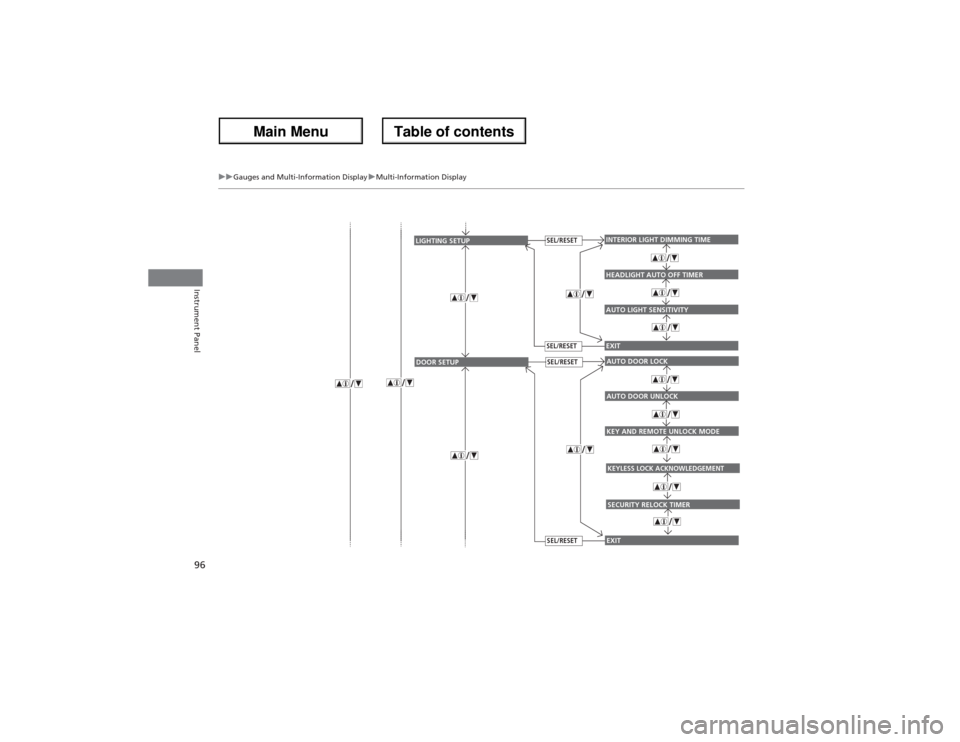
Use the multi-information display to customize certain features.■How to customize
Press the button to select CUSTOMIZE SETTINGS while the power mode
is in ON.■Customized Features
1Customized Features
To customize other features, press the
button.
2List of customizable options P. 98
2Example of customization settings P. 102
Customization is possible when you see the driver’s
ID (DRIVER 1 or DRIVER 2) on the CHANGE
SETTINGS screen.
The driver’s ID indicates which remote transmitter
you have used to unlock the driver’s door.The
customized settings are recalled every time you
unlock the driver’s door with that remote.
When you customize settings: Shift to
(P
Button:
Changes the customize
menus and items.
Multi-Information Display:
Goes to customize settings.
SEL/RESET button:
Enters the selected item
Page 96 of 324
95
uuGauges and Multi-Information DisplayuMulti-Information Display
Continued
Instrument Panel
EXITMEMORY POSITION LINKAUTO TILT AND TELESCOPE STEERING WHEEL
POSITION SETUP
SEL/RESETSEL/RESET
EXITDOOR UNLOCK MODEKEYLESS ACCESS BEEP
KEYLESS ACCESS SETUP
SEL/RESETSEL/RESET
KEYLESS ACCESS LIGHT FLASH
Page 97 of 324
96
uuGauges and Multi-Information DisplayuMulti-Information Display
Instrument Panel
AUTO LIGHT SENSITIVITYINTERIOR LIGHT DIMMING TIMEHEADLIGHT AUTO OFF TIMEREXIT
LIGHTING SETUP
SEL/RESETSEL/RESET
KEY AND REMOTE UNLOCK MODEAUTO DOOR LOCKAUTO DOOR UNLOCKEXIT
DOOR SETUP
SEL/RESETSEL/RESET
KEYLESS LOCK ACKNOWLEDGEMENTSECURITY RELOCK TIMER
Page 100 of 324

99
uuGauges and Multi-Information DisplayuMulti-Information Display
Continued
Instrument Panel
*1: Default SettingSetup Group Customizable Features Description Selectable settings
POSITION
SETUPMEMORY POSITION LINKChanges the driver’s seat, the steering wheel,
and the outside mirror positions to a stored
setting.ON
*1, OFF
AUTO TILT AND
TELESCOPE STEERING
WHEELMoves the steering wheel fully up when you
get in/get out of the vehicle.ON*1, OFF
KEYLESS
ACCESS
SETUP
DOOR UNLOCK MODE
Changes which doors unlock when you grab
the driver’s door handle.
DRIVER DOOR
*1, ALL DOORS
KEYLESS ACCESS LIGHT
FLASH
Causes some exterior lights to blink when you
unlock/lock the doors.
ON
*1, OFF
KEYLESS ACCESS BEEP
Causes the beeper to sound when you
unlock/lock the doors.
ON
*1, OFF
LIGHTING
SETUPINTERIOR LIGHT
DIMMING TIMEChanges the length of time the interior lights
stay on after you close the doors.60 sec, 30 sec
*1, 15 sec
HEADLIGHT AUTO OFF
TIMERChanges the length of time the exterior lights
stay on after you close the driver’s door.60 sec, 30 sec, 15 sec
*1, 0 sec
AUTO LIGHT SENSITIVITYChanges the timing for the headlights to
come on.MAX, HIGH, MID
*1, LOW, MIN