Page 143 of 650

�µ
�µ
�Î
�Î
Push down on the
lef t lever to signal a lef t turn and up
to signal a right turn. To signal a lane
change, push lightly on the lever and
hold it. The lever will return to the
center when you release it or
complete a turn.
Turning the switch to
the ‘‘ ’’ position turns on the
parking lights, taillights, instrument
panel lights, side-marker lights, and
rear license plate lights.
Turning the switch to the ‘‘ ’’
position turns on the headlights.
When the light switch is in either of
these positions, the lights on
indicator comes on as a reminder. This indicator stays on if you leave
the light switch on and turn the
ignition switch to the ACCESSORY
(I) or LOCK (0) position.
If you leave the lights on with the
key removed f rom the ignition
switch, or with the power mode in
VEHICLE OFF (LOCK), you will
hear reminder beeps when you open
the driver’s door.
Turn signal
Of f
Parking and instrument panel
lights
AUTO
Headlights on
High beams
Flashhighbeams
Fog lights of f
Fog lights on
1.
2.
3.
4.
5.
6.
7.
8.
9.
CONT INUED
Turn Signals and Headlights
Turn Signal
Headlights
Inst rument s and Cont rols
139
12/07/20 10:47:08 31TK4640_144
�Î
Models equipped with the
keyless access system have an engine
start/stop button instead of
an ignition switch. VEHICLE OFF
(LOCK) Mode is the equivalent of
LOCK (0) and ACCESSORY Mode
is the equivalent of ACCESSORY (I).
For more information, see pages
and .
:
184 187
2013 TL
Page 144 of 650

�µ�µ
The automatic lighting
f eature turns on the headlights and
all other exterior lights when it
senses low ambient light.
To turn on automatic lighting, turn
the light switch to AUTO. The lights
will come on automatically when the
outside light level becomes low (at
dusk, f or example). The lights on
indicator comes on as a reminder.
The lights and indicator will turn of f
automatically when the system
senses high ambient light. Push the lef t lever
f orward until you hear a click. The
blue high beam indicator will come
on (see page ). Pull the lever back
to return to the low beams.
To f lash the high beams, pull the
lever back lightly, then release it.
The high beams will stay on as long
as you hold the lever back. The lights will remain on when you
turn of f the ignition switch. They will
turn of f automatically when you
remove the key and open the driver’s
door. To turn them on again, either
turn the ignition switch to the ON
(II) position or turn the light switch
to the position.Even with the automatic lighting
f eature turned on, we recommend
thatyouturnonthelightsmanually
when driving at night or in a dense
f og, or when you enter dark areas
such as long tunnels or parking
f acilities.
The lights will remain on when you
set the power mode to VEHICLE
OFF (LOCK). They will turn of f
automatically when you open the
driver’s door and take the remote
with you. To turn them on again,
either set the power mode to ON or
turn the light switch to the position. To change the ‘‘AUTO LIGHT
SENSITIVITY’’ setting, see
page
.
Do not leave the light switch in
AUTO if you will not be driving the
vehicle f or an extended period (a
weekormore).Youshouldalsoturn
of f the lights if you plan to leave the
engine idling or of f f or a long time.
71
123
On all models
On models without
keyless access system
On models with keyless access system
AUTO High Beams
Headlights
140
12/07/20 10:47:15 31TK4640_145
Inst rument s and Cont rols
2013 TL
Page 145 of 650

�Î�Î
�Î
The automatic lighting f eature is
controlledbyasensorlocatedontop
of the dashboard. Do not cover this
sensor or spill liquids on it.The automatic lighting of f f eature
turns off the headlights, all other
exterior lights, and the instrument
panel lights within 15 seconds af ter
youremovethekeyandclosethe
driver’s door, or on models with
keyless access system, set the power
mode to VEHICLE OFF (LOCK),
take the remote with you, and close
the driver’s door.
If you remove the key (or the vehicle
is in VEHICLE OFF mode on models
with keyless access system), and the
driver’s door is opened and closed,
the automatic lighting of f f eature
activates with the headlight switch in
the ‘‘ ’’ or ‘‘ ’’ position, or
the lights turned on by setting the
switch in the ‘‘AUTO’’ position.
To change the ‘‘HEADLIGHT AUTO
OFF TIMER’’ setting, see page . If you turn the ignition switch to the
LOCK (0) position with the
headlight switch on, but do not open
the door and get out, the lights turn
of f af ter 10 minutes (3 minutes, if
the switch is in the ‘‘AUTO’’
position).
Your vehicle has the engine start/stop
button instead of an ignition switch. For
more information on how to select the
power mode, see page .
On models with keyless access
system
:
184
122
CONT INUED
Automatic Lighting Of f Feature
Headlights
Inst rument s and Cont rols
141
LIGHT SENSOR
12/07/20 10:47:22 31TK4640_146
�ÎModels equipped with the
keyless access system have an engine
start/stop button instead of
an ignition switch. VEHICLE OFF
(LOCK) Mode is the equivalent of
LOCK (0) and ACCESSORY Mode
is the equivalent of ACCESSORY (I).
For more information, see pages
and .
:
184 187
2013 TL
Page 146 of 650

�Î
If you see a ‘‘CHECK DRL
SYSTEM’’ message on the multi-
inf ormation display, there is a
problem with the daytime running
light system. Take your vehicle to a
dealer to have it checked.
The headlights revert to normal
operation when you turn them on
with the switch. With the headlight switch of f or in
the position, the high beam
headlights and the high beam
indicator come on with reduced
brightness when you turn the
ignition switch to the ON (II)
position and release the parking
brake. They remain on until you turn
the ignition switch of f , even if you
set the parking brake.
The lights will turn on again when
you unlock or open the driver’s door.
If you unlock the door, but do not
open it within 15 seconds, the lights
will go off. With the driver’s door
open, you will hear a lights on
reminder beeper.
Headlights
Daytime Running L ights
142
12/07/20 10:47:29 31TK4640_147
Inst rument s and Cont rols
�Î
Mod els eq uip ped wit h th e keyless
a cce ss sy ste m have an en gin e sta rt/
s to p butto n in ste ad of an ignition
s w it c h .O N Mod e is th e eq uiv ale n t of
O N (II) . F or m ore in fo rm atio n ,se e
p ag es
and .
:
184 187
2013 TL
Page 147 of 650
�´
�µ
�´ �µ
�Î
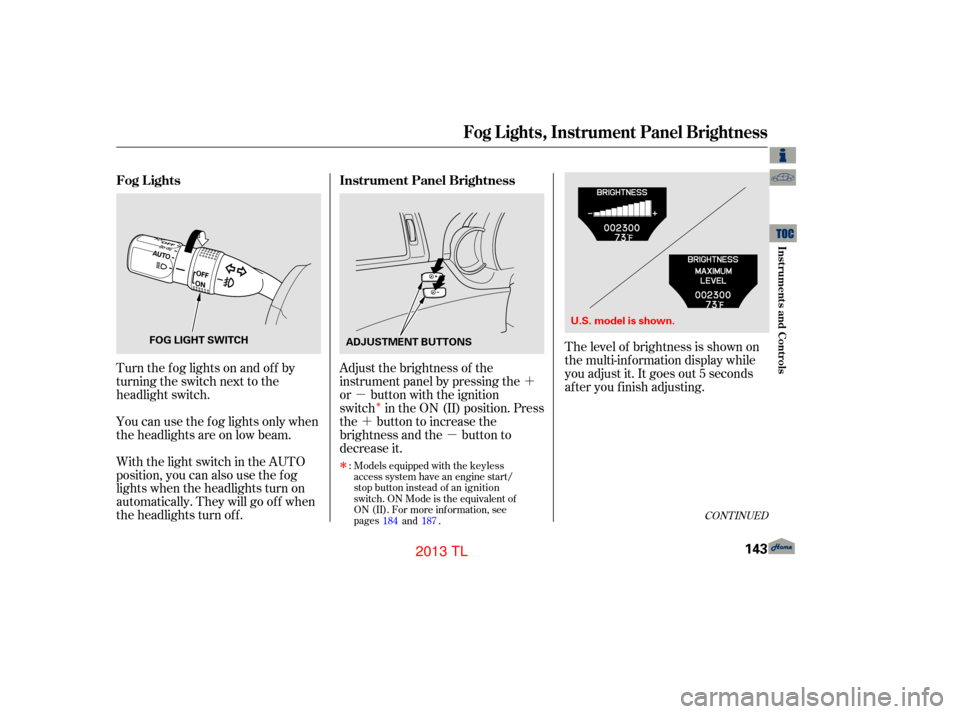
Turn the f og lights on and of f by
turning the switch next to the
headlight switch.
You can use the f og lights only when
the headlights are on low beam.
With the light switch in the AUTO
position, you can also use the f og
lights when the headlights turn on
automatically. They will go of f when
the headlights turn of f . Adjust the brightness of the
instrument panel by pressing the
or button with the ignition
switch in the ON (II) position. Press
the button to increase the
brightness and the button to
decrease it.
CONT INUED
Fog L ights
Instrument Panel Brightness
Fog L ights, Instrument Panel Brightness
Inst rument s and Cont rols
143
FOG LIGHT SWITCH
ADJUSTMENT BUTTONS
12/07/20 10:47:37 31TK4640_148
�ÎModels equipped with the keyless
access system have an engine start/
stop button instead of an ignition
switch. ON Mode is the equivalent of
ON (II). For more information, see
pages
and .
:
184 187
The level of brightness is shown on
the multi-information display while
you adjust it. It goes out 5 seconds
af ter you f inish adjusting.
U.S. model is shown.
2013 TL
Page 148 of 650
�´
To reduce glare at night, the
instrument panel illumination dims
when you turn the light switch to
or . To cancel the glare
reduction f unction, set the
brightness to the highest level, then
press the button. You will hear a
beep when it is canceled.
When the brightness reaches the
maximum level, ‘‘BRIGHTNESS
MAXIMUM LEVEL’’ appears on the
display. If your vehicle is equipped with the
navigation system, the navigation
system screen will also go to f ull
brightness. This can be helpf ul when
using the headlights during daylight
hours.
Instrument Panel Brightness
144
12/07/20 10:47:42 31TK4640_149
Inst rument s and Cont rols
2013 TL
Page 171 of 650
Make sure all items in the trunk and
those extending through the pass-
through are secured.
Keeptheinsideandoutsidemirrors
clean and adjusted f or best visibility.
Be sure to adjust the mirrors bef ore
you start driving.
For security, this cover can be
locked and unlocked only with the
master key(the built-in key on
models with keyless access system).
To lock the cover, insert the key, and
turn it clockwise.
Never drive with this cover open and
the trunk lid open.
See
onpage .57
CONT INUED
Mirrors
Carbon Monoxide Hazard
Seats, Mirrors
Inst rument s and Cont rols
167
12/07/20 10:50:48 31TK4640_172
SENSOR
INDICATOR
There is also a sensor on the back of the mirror. Items hung on the mirrormay block this sensor and af f ect itsperf ormance. When driving after dark, the automatic dimming rearview mirror
reduces the glare from headlights behind you.
2013 TL
Page 399 of 650

�Î
CONT INUED
The security system helps to protect
your vehicle and valuables from
theft. The horn sounds and a
combination of headlights,
parking lights, side marker lights and
taillights flashes if someone
attempts to break into your vehicle or
remove the audio unit. This alarm
continues for two minutes, then the
system resets. To deactivate the
system before the two minutes have
elapsed, unlock the driver’s door
with the key or use the remote
transmitter/keyless access remote.
You can also deactivate the system
by grabbing either f ront door handle
while carrying the keyless access
remote to unlock the door.
The security system automatically
sets 15 seconds after you lock the
doors, hood, and trunk. For the
system to activate, you must lock the
doors f rom the outside with the key,or use driver’s lock tab, master door
lock switch, or remote transmitter
(keyless access remote on models
with keyless access system). The
security system indicator on the
instrument panel starts blinking
immediately to show you the system
is setting itself .Once the security system sets,
opening any door, the trunk, or hood
without using the key or the remote
transmitter/keyless access remote,
will cause the alarm to activate. It
also activates if the ignition switch
is turned to the ON (II) position, the
audio unit is removed f rom the
dashboard, or the wiring is cut.
You can also set the security system
by pressing the lock button on either
f ront door handle while carrying the
keyless access remote.
On models with keyless access system
On models with keyless access system
Security System
Features
395
SECURITY SYSTEM INDICATOR
A/T model is shown.
12/07/20 11:20:37 31TK4640_400
�ΠModels equipped with the keyless
access system have an engine start/
stop button instead of an ignition
switch. ON Mode is the equivalent of
ON (II). For more information, see
pages
and .
:
184 187
2013 TL

