Page 63 of 364

62
uuChild Safety uSafety of Larger Children
Safe Driving
Safety of Larger ChildrenThe following pages give instructions on how to check proper seat belt fit, what kind
of booster seat to use if one is needed, and important precautions for a child who
must sit in front.
When a child is too big for a child seat, secure the child in a rear seat using the lap/
shoulder seat belt. Have the child sit upright and all the way back, then answer the
following questions.
■
Checklist
• Do the child's knees bend comfortably over
the edge of the seat?
• Does the shoulder belt cross between the
child's neck and arm?
• Is the lap part of the seat belt as low as
possible, touching the child's thighs?
• Will the child be able to stay seated like this
for the whole trip?
If you answer yes to all these questions, the child is ready to wear the lap/shoulder
seat belt correctly. If you answer no to any question, the child needs to ride on a
booster seat until the seat belt fits properly without a booster seat.
■
Protecting Larger Children
■
Checking Seat Belt Fit
1 Safety of Larger Children
3
WARNING
Allowing a child age 12 or under to sit in
front can result in injury or death if the
passenger's front airbag inflates.
If a larger child must ride in front, move the
vehicle seat as far to the rear as possible,
have the child sit up properly and wear the
seat belt properly, using a booster seat if
needed.
Page 64 of 364

63
uuChild Safety uSafety of Larger Children
Safe Driving
If a lap/shoulder seat belt cannot be used
properly, position the child in a booster seat in
a rear seating position. For the child's safety,
check that the child meets the booster seat
manufacturer's recommendations.
Your vehicle has a rear seat where children can be properly restrained. If you ever
have to carry a group of children, and a child must ride in front:
• Make sure you read and fully understand the instructions and safety information
in this manual.
• Move the front passenger seat as far back as possible.
• Have the child sit upright and well back in the seat.
• Check that the seat belt is properly positioned so that the child is secure in the
seat.
■
Monitoring child passengers
We strongly recommend that you keep an eye on child passengers. Even older, more
mature children sometimes need to be reminded to fasten their seat belts and sit up
properly.
■
Booster Seats
1 Booster Seats
When installing a booster seat, make sure to read the
instructions that came with it, and install the seat
accordingly.
There are high- and low-type booster seats. Choose a
booster seat that allows the child to wear the seat
belt correctly.
Some U.S. states and Canadian provinces and
territories require children to use a booster seat until
they reach a given age or weight (e.g. 6 years or 60
lbs). Be sure to check current laws in the state or
province, or territory where you intend to drive.
■
Protecting Larger Children-Final Checks
Page 69 of 364

68Instrument Panel
IndicatorsIndicator
Name
On/Blinking
Explanation
Message
Parking Brake
and Brake
System Indicator
(Red)
●Comes on for a few seconds when
you set the power mode to ON,
then goes off.●Comes on when the parking brake
is applied, and goes off when it is
released.●Comes on when the brake fluid
level is low.●Comes on if there is a problem with
the brake system.●The beeper sounds and the
indicator comes on if you drive with
the parking brake not fully released.
●Comes on while driving - Make sure the
parking brake is released. Check the brake
fluid level.
2 Wh at to d o w hen t he in di cat o r co mes
on while driving P. 335
●Comes on along with the ABS indicator
- Have the vehicle checked by a dealer.
2 If the Brake System Indicator (Red)
Comes On P. 335
Brake System
Indicator
(Amber)
●Comes on for a few seconds when
you set the power mode to ON,
then goes off.●Comes on if there is a problem with
hydraulic brake boost system.
●Stays on constantly - Have the vehicle
checked by a dealer.
U.S.Canada(Red)U.S.Canada(Amber)
U.S.Canada
Page 70 of 364
69
uuIndicators u
Continued
Instrument Panel
Indicator
Name
On/Blinking
Explanation
Message
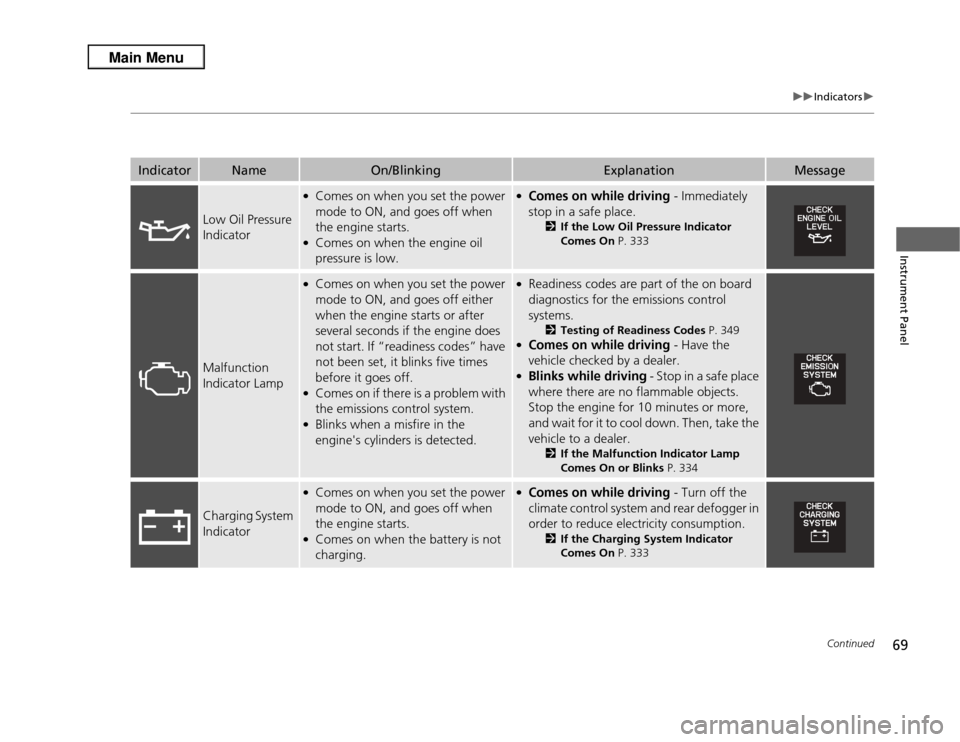
Low Oil Pressure
Indicator
●Comes on when you set the power
mode to ON, and goes off when
the engine starts.●Comes on when the engine oil
pressure is low.
●Comes on while driving - Immediately
stop in a safe place.
2 If the Low Oil Pressure Indicator
Comes On P. 333
Malfunction
Indicator Lamp
●Comes on when you set the power
mode to ON, and goes off either
when the engine starts or after
several seconds if the engine does
not start. If “readiness codes” have
not been set, it blinks five times
before it goes off.●Comes on if there is a problem with
the emissions control system.●Blinks when a misfire in the
engine's cylinders is detected.
●Readiness codes are part of the on board
diagnostics for the emissions control
systems.
2Testing of Readiness Codes P. 349
●Comes on while driving - Have the
vehicle checked by a dealer.●Blinks while driving - Stop in a safe place
where there are no flammable objects.
Stop the engine for 10 minutes or more,
and wait for it to cool down. Then, take the
vehicle to a dealer.
2 If the Malfunction Indicator Lamp
Comes On or Blinks P. 334
Charging System
Indicator
●Comes on when you set the power
mode to ON, and goes off when
the engine starts.●Comes on when the battery is not
charging.
●Comes on while driving - Turn off the
climate control system and rear defogger in
order to reduce electricity consumption.
2 If the Charging System Indicator
Comes On P. 333
Page 71 of 364
70
uuIndicators u
Instrument Panel
Indicator
Name
On/Blinking
Explanation
Message
Shift Lever
Position
Indicator
●Indicates current shift lever
position.
2Shifting P. 244
—
Transmission
Indicator
●Blinks if the transmission system has
a problem.
●Blinks while driving - Avoid sudden
starts and acceleration and have the vehicle
checked by a dealer immediately.
M (sequential
shift mode)
Indicator/Gear
Position
Indicator
●Comes on when the manual
sequential shift mode is applied.
2 Sequential Shift Mode P. 246
—
Page 72 of 364

71
uuIndicators u
Continued
Instrument Panel
Indicator
Name
On/Blinking
Explanation
Message
Seat Belt
Reminder
Indicator
●Comes on and the beeper sounds if
you are not wearing a seat belt
when you set the power mode to
ON.●If the front passenger is not
wearing a seat belt, the indicator
comes on about a few seconds
later.●Blinks while driving if either you or
the front passenger has not
fastened a seat belt. The beeper
sounds and the indicator blinks at
regular intervals.
●The beeper stops and the indicator goes off
when you and the front passenger fasten
their seat belts.●Stays on after you or the front
passenger has fastened the seat belt -
A detection error may have occurred in the
sensor. Have the vehicle checked by a
dealer.
2 Seat Belt Reminder P. 30
Low Fuel
Indicator
●Comes on when the fuel reserve is
running low (approximately 2.5
U.S. gal./9.2 Liter left).●Blinks if there is a problem with the
fuel gauge.
●Comes on - Refuel your vehicle as soon as
possible.●Blinks - Have the vehicle checked by a
dealer.
ABS (Anti-lock
Brake System)
Indicator
●Comes on for a few seconds when
you set the power mode to ON,
then goes off.●If it comes on at any other time,
there is a problem with the ABS.
●Stays on constantly - Have the vehicle
checked by a dealer. With this indicator on,
your vehicle still has normal braking ability
but no anti-lock function.
2 ABS (Anti-lock Brake System) P. 259
Page 73 of 364
72
uuIndicators u
Instrument Panel
Indicator
Name
On/Blinking
Explanation
Message
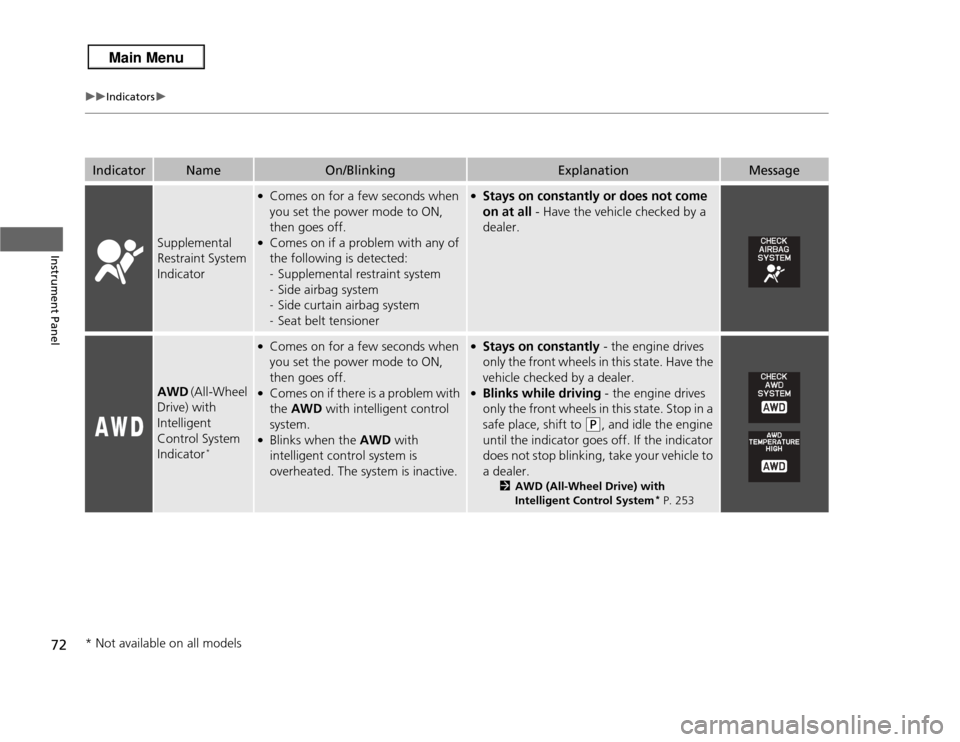
Supplemental
Restraint System
Indicator
●Comes on for a few seconds when
you set the power mode to ON,
then goes off.●Comes on if a problem with any of
the following is detected:
-Supplemental restraint system
- Side airbag system
- Side curtain airbag system
- Seat belt tensioner
●Stays on constantly or does not come
on at all - Have the vehicle checked by a
dealer.
AWD (All-Wheel
Drive) with
Intelligent
Control System
Indicator
*
●Comes on for a few seconds when
you set the power mode to ON,
then goes off.●Comes on if there is a problem with
the AWD with intelligent control
system.●Blinks when the AWD with
intelligent control system is
overheated. The system is inactive.
●Stays on constantly - the engine drives
only the front wheels in this state. Have the
vehicle checked by a dealer.●Blinks while driving - the engine drives
only the front wheels in this state. Stop in a
safe place, shift to
(P
, and idle the engine
until the indicator goes off. If the indicator
does not stop blinking, take your vehicle to
a dealer.
2 AWD (All-Wheel Drive) with
Intelligent Control System
* P. 253
* Not available on all models
Page 74 of 364

73
uuIndicators u
Continued
Instrument Panel
Indicator
Name
On/Blinking
Explanation
Message
VSA® (Vehicle
Stability Assist)
System Indicator
●Comes on for a few seconds when
you set the power mode to ON,
then goes off.●Blinks when VSA ® is active.●Comes on if there is a problem with
the VSA® system or hill start assist
system.
●Stays on constantly - Have the vehicle
checked by a dealer.
2 VSA ® (Vehicle Stability Assist), aka
ESC (Electronic Stability Control),
System P. 251
VSA® (Vehicle
Stability Assist)
OFF Indicator
●Comes on for a few seconds when
you set the power mode to ON,
then goes off.●Comes on when you deactivate
VSA®.
2 VSA ® On and Off P. 252
—
Door and
Tailgate Open
Indicator
●Comes on for a few seconds if you
set the power mode to ON, then
goes off.●Comes on if any door or the tailgate
is not completely closed.●The beeper sounds and the
indicator comes on if any door or
the tailgate is opened while driving.
●Goes off when all doors and the tailgate
are closed.
