2013 Acura MDX BSI
[x] Cancel search: BSIPage 10 of 617

ᤳ1: To use the horn, press the center pad of the steering wheel.
ᤳ2: If equipped
ᤳ3: Refer to the navigation system manual. For how to operate
Bluetooth
®HandsFreeLink by voice, see page 383.
ᤳ4: Switch location varies on models.
BLIND SPOT
INFORMATION SYSTEM
(BSI) OFF BUTTON
ᤳ2
(P. 482)VEHICLE STABILITY
ASSIST SYSTEM OFF
BUTTON (P. 474) MIRROR CONTROLS
(P. 166)BSI ALERT INDICATOR
ᤳ2
(P. 479)
COLLISION MITIGATION
BRAKING SYSTEM™(CMBS™)
OFF BUTTON
ᤳ2(P.467)
HEADLIGHT WASHER
BUTTON
ᤳ2(P. 127)
HORN
ᤳ1
STEERING WHEEL
ADJUSTMENTS
(P. 134)HEADLIGHT/TURN SIGNAL/
FRONT FOG LIGHTS
(P. 128)
STEERING WHEEL
AUDIO CONTROLS
(P. 305)WINDSHIELD
WIPERS/WASHERS
(P. 126)INSTRUMENT PANEL
BRIGHTNESS
(P. 133)
PASSENGER AIRBAG
OFF INDICATOR
(P. 37)
HAZARD WARNING
BUTTON
(P. 132)
REAR WINDOW
DEFOGGER
(P. 132)
ACCESSORY POWER
SOCKETS
(P. 177)
SEAT HEATER SWITCHES
(P. 157) /
SEAT HEATER AND SEAT
VENTILATION BUTTONS
ᤳ2
(P. 158)
ACTIVE DAMPER
SYSTEM BUTTON
ᤳ2
(P. 484) CRUISE CONTROL BUTTONS (P. 345) /
ADAPTIVE CRUISE CONTROL (ACC)
BUTTONS
ᤳ2(P. 353) PADDLE SHIFTERS
(P. 447)
DISTANCE
BUTTONᤳ2
(P. 357)
BLUETOOTH
HANDSFREELINK
BUTTONS (P. 365)VOICE CONTROL
BUTTONS
ᤳ3 ᤳ4
Your Vehicle at a Glance412/07/18 16:12:02 13 ACURA MDX MMC North America Owner's M 50 31STX660 enu
Page 82 of 617

If the indicator comes on at any other
time, there is a problem with the
CMBS. You will also see a‘‘CHECK
CMBS SYSTEM’’message on the
multi-information display. If this
happens, take your vehicle to your
dealer, and have it checked. For
more information, see page 463.
When this indicator is on, the CMBS
is not working.
Door/Tailgate Open
Indicator
This indicator comes on red if any
door or the tailgate is not closed
tightly.
You will also see a corresponding
indicator(s) on the multi-information
display to indicate which door and/
or the tailgate is not closed tightly
(see page 12).
Blind Spot Information
System (BSI) Indicator
On models with blind spot information
system (BSI)This indicator normally comes on for
a few seconds when you turn the
ignition switch to the ON (II)
position.
The BSI indicator also comes on if
the rear bumper becomes dirty while
driving. You will see a‘‘BLIND SPOT
NOT AVAILABLE’’message on the
multi-information display.
When you clean the rear bumper, the
indicator should go off after you
begin driving again.
When you turn the system on, the
indicator will turn off.If the indicator comes on at any other
time, there is a problem with BSI.
You will also see a‘‘CHECK BLIND
SPOT SYSTEM’’message on the
multi-information display. If this
happens, take your vehicle to a
dealer, and have it checked (For
more information, see page 482).
When this indicator is on, BSI is not
working.
Instrument Panel Indicators7612/07/17 18:10:57 13 ACURA MDX MMC North America Owner's M 50 31STX660 enu
Page 131 of 617

ᤳ1: If equipped
ᤳ2: To use the horn, press the center pad of the steering wheel.
ᤳ3: Refer to the navigation system manual. For how to operate
Bluetooth
®HandsFreeLink by voice, see page 383.
ᤳ4: Switch location varies on models.
BLIND SPOT
INFORMATION SYSTEM
(BSI) OFF BUTTON
ᤳ1
(P. 482) VEHICLE STABILITY
ASSIST SYSTEM OFF
BUTTON (P. 474) MIRROR CONTROLS
(P. 166)HEADLIGHT/TURN SIGNAL/
FRONT FOG LIGHTS
(P. 128)
STEERING WHEEL
ADJUSTMENTS (P. 134)CRUISE CONTROL BUTTONS (P. 345)/
ADAPTIVE CRUISE CONTROL (ACC)
BUTTONS
ᤳ1(P. 353) STEERING WHEEL
AUDIO CONTROLS
(P. 305)WINDSHIELD
WIPERS/WASHERS
(P. 126)INSTRUMENT PANEL
BRIGHTNESS
(P. 133)
PASSENGER AIRBAG
OFF INDICATOR
(P. 37)
HAZARD WARNING
BUTTON
(P. 132)
REAR WINDOW
DEFOGGER
(P. 132)
ACCESSORY POWER
SOCKETS
(P. 177)
SEAT HEATER SWITCHES
(P. 157)/
SEAT HEATER AND SEAT
VENTILATION BUTTONS
ᤳ1
(P. 158)
ACTIVE DAMPER
SYSTEM BUTTON
ᤳ1
(P. 484) HORN
ᤳ2
BSI ALERT INDICATOR
ᤳ1
(P. 479)
COLLISION MITIGATION
BRAKING SYSTEM™(CMBS™)
OFF BUTTON
ᤳ1(P. 467)
HEADLIGHT WASHER
BUTTON
ᤳ1(P. 127)
DISTANCE
BUTTON
ᤳ1
(P. 357) PADDLE SHIFTERS
(P. 447)
BLUETOOTH
HANDSFREELINK
BUTTON (P. 365)VOICE CONTROL
BUTTONS
ᤳ3 ᤳ4
Controls Near the Steering Wheel
125
Instruments and Controls
12/07/18 16:12:02 13 ACURA MDX MMC North America Owner's M 50 31STX660 enu
Page 411 of 617
Delete-Select this option to delete
the current message.
Voice-Select this option to hear a
voice read the entire message. This
gives you more information than the
screen can display at one time. When
you select the Voice option, it
changes to a Stop Reading option.
Select the option again to stop the
voice.
Call-Select this option to call a
phone number embedded in the
message. When you selectCall,theBluetooth
®HandsFreeLink
®(HFL)
dials the number for you.
To make a call, your
Bluetooth
®
compatible phone must be paired to
the vehicle's HandsFreeLink system,
powered on, and located within the
vehicle (see page 383).Find Acura Dlr.-Select this
option to find the nearest Acura
dealer using the navigation system.
Call Your Dealer-Select this
option to call the Acura dealer you
purchased your vehicle from.
AcuraLink also directs you to this
dealer so you can schedule a
maintenance appointment or receive
information about a message. If your
assigned servicing dealer changes,
AcuraLink will reset to call that
dealer.Diagnostic Info-Select this option
to get more information about the
current diagnostic message. To use
this option, your cellphone must be
paired with the HFL. In addition, the
paired phone must have a compatible
data service and be set up with the
AcuraLink system to make a data
connection. Access the
handsfreelink.com website to find
out which data services are currently
compatible with AcuraLink.
Message Preferences
To set your AcuraLink preferences
(the types of messages you want to
receive, if any), visit the My Acura
website at
www.owners.acura.com,
and
choose what you would like to
receive. If you do not have internet
access, call Acura Client Relations at
(800) 382-2238; they can set your
message preferences for you.
CONTINUED
AcuraLink
®(U.S. models only)
405
Features
12/07/17 18:10:57 13 ACURA MDX MMC North America Owner's M 50 31STX660 enu
Page 414 of 617

Maintenance Minder™These messages provide detailed
information about the service needed
for your vehicle. When a
maintenance message appears on the
multi-information display, a list of
needed maintenance items is
provided through an AcuraLink
message. These messages tell you
the exact maintenance needed,
helping you to avoid unnecessary
maintenance costs.You can use the following message
options:
●Make an appointment from the
schedule at the dealer.●Reschedule the appointment with
the dealer.●Call your dealer for an
appointment.●Find the nearest dealer.
Automated AppointmentYou can make an appointment with
your dealer through AcuraLink when
you receive a Maintenance Minder
message.
To use the automated appointment
function, you should visit the My
Acura website atwww.owners.acura.com
, register some
required settings, and complete the
Phone-Data Connection set-up (see
page 416). Your
Bluetooth
®
compatible phone should also be
paired and linked to your vehicle'sBluetooth
®HFL (see page 389).
AcuraLink
®(U.S. models only)
40812/07/17 18:10:57 13 ACURA MDX MMC North America Owner's M 50 31STX660 enu
Page 420 of 617

When viewing a diagnostic info
message through the INFO menu,
you can select the Diagnostic Info
option to connect to the Acura server
and retrieve the latest information
regarding the problem.
NOTE:There may not be any
additional information, depending on
the time elapsed since the previous
time you retrieved the information
from the Acura server.Reminder Massage
When you make an appointment
through My Acura's online
Scheduling Service Appointment,
you can be reminded in advance
about that appointment through
AcuraLink.
If you need to reschedule or cancel
the appointment, see page 410.Turning the Automated Appointment
preference off will disable
appointment notifications in the
vehicle based on appointments
created or changed at My Acura's
online scheduling website.
Appointments can still be created,
rescheduled, and canceled from the
vehicle; however, the appointment
information stored in the vehicle will
not be updated. Any changes to
those appointments should be made
from the My Acura website.
AcuraLink
®(U.S. models only)
41412/07/17 18:10:57 13 ACURA MDX MMC North America Owner's M 50 31STX660 enu
Page 421 of 617
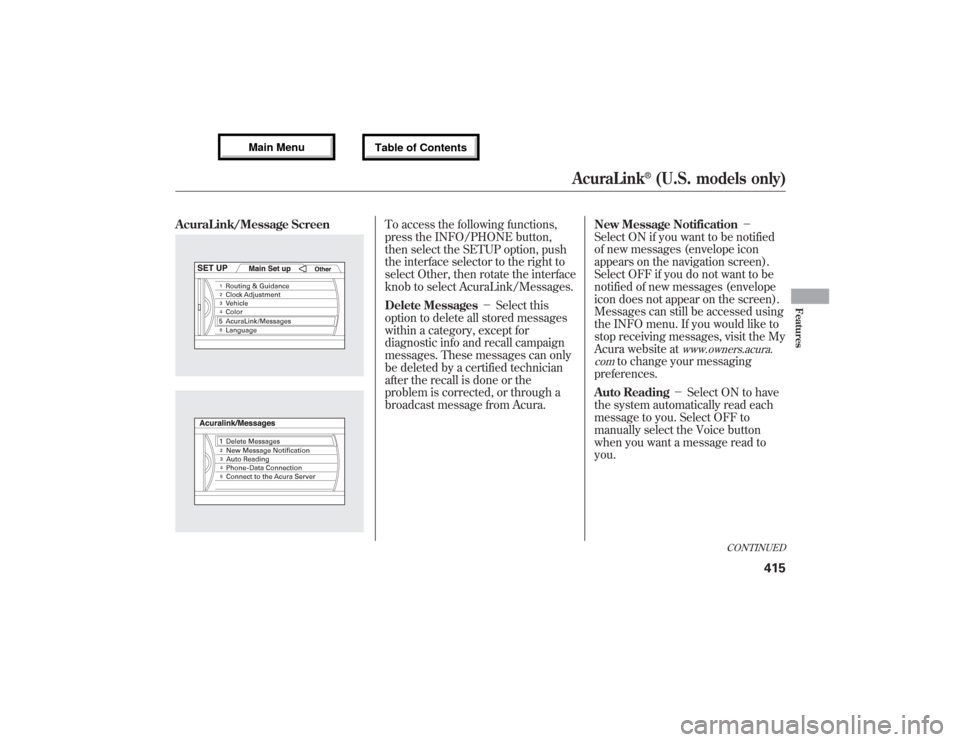
AcuraLink/Message Screen
To access the following functions,
press the INFO/PHONE button,
then select the SETUP option, push
the interface selector to the right to
select Other, then rotate the interface
knob to select AcuraLink/Messages.
Delete Messages-Select this
option to delete all stored messages
within a category, except for
diagnostic info and recall campaign
messages. These messages can only
be deleted by a certified technician
after the recall is done or the
problem is corrected, or through a
broadcast message from Acura.New Message Notification-
Select ON if you want to be notified
of new messages (envelope icon
appears on the navigation screen).
Select OFF if you do not want to be
notified of new messages (envelope
icon does not appear on the screen).
Messages can still be accessed using
the INFO menu. If you would like to
stop receiving messages, visit the My
Acura website at
www.owners.acura.
com
to change your messaging
preferences.
Auto Reading-Select ON to have
the system automatically read each
message to you. Select OFF to
manually select the Voice button
when you want a message read to
you.
CONTINUED
AcuraLink
®(U.S. models only)
415
Features
12/07/17 18:10:57 13 ACURA MDX MMC North America Owner's M 50 31STX660 enu
Page 445 of 617

This section gives you tips on
starting the engine under various
conditions, and how to operate the
automatic transmission. It also
includes important information on
parking your vehicle, the braking
system, the Super Handling-All
Wheel Drive™(SH-AWD
®) system,
the vehicle stability assist (VSA
®)
system, active damper system (If
equipped), the tire pressure
monitoring system (TPMS), the
collision mitigation braking system™
(CMBS™), the blind spot information
system (BSI) and facts you need if
you are planning to tow a trailer or
drive off-high way.Driving Guidelines
......................
440
Preparing to Drive
......................
441
Starting the Engine
.....................
442
Check Starting System
Message
.............................
443
Automatic Transmission
.............
443
Driving with the Paddle
Shifters
................................
447
Using the Paddle Shifters in
the D position (D-Paddle
Shift Mode)
.....................
447
Using the Paddle Shifters in
the S position (Sequential
Shift Mode)
.....................
449
Super Handling-All Wheel
Drive™(SH-AWD
®)
System
................................
452
Parking
.......................................
454
Tire Pressure Monitoring System
(TPMS)
...................................
455
Braking System
..........................
460
Anti-lock Brakes (ABS)
...............
461
Collision Mitigation Braking
System™(CMBS™)
...............
463Vehicle Stability Assist (VSA
®),
aka Electronic Stability Control
(ESC), System
.....................
473
Blind Spot Information System
(BSI)
.......................................
476
Active Damper System
................
484
Towing a Trailer
..........................
487
Trailer Stability Assist
.................
498
Off-Highway Driving
Guidelines
...............................
500
Driving
439
Driving
12/07/17 18:10:57 13 ACURA MDX MMC North America Owner's M 50 31STX660 enu