2013.5 Citroen BERLINGO steering wheel
[x] Cancel search: steering wheelPage 94 of 240

Airbags
92
Front airbags
The front airbags are fi tted in the
centre of the steering wheel for the
driver and in the dashboard for the
front passenger(s).
Deployment
They are deployed simultaneously,
unless the passenger's front airbag
has been deactivated, in the event of
a serious front impact applied to all or
part of the front impact zone A in the
longitudinal centreline of the vehicle
on a horizontal plane directed from the
front towards the rear of the vehicle.
The front airbag infl ates between the
front occupant of the vehicle and the
dashboard to cushion their forward
movement. Deactivation
Only the passenger's front airbag can
be deactivated:
- With the ignition switched off ,
insert the key into the passenger's
airbag deactivation switch,
- turn it to the "OFF" position,
- then remove the key keeping the switch in the new position.
The airbag warning lamp in the
instrument panel remains on
while the airbag is deactivated. If the two airbag warning lamps
are on continuously, do not
install a rear-facing child seat.
Contact a CITROËN or a qualifi ed
workshop.
Front airbag fault
To ensure the safety of your child,
it is essential to deactivate the
passenger airbag when you install
a rear-facing child seat on the front
passenger seat. Otherwise, the child
would risk being killed or seriously
injured if the airbag were to infl ate. Reactivation
In the
"OFF" position, the passenger airbag
will not be deployed in the event of an impact.
As soon as the child seat is removed, turn
the airbag switch to the "ON" position to
reactivate the airbag and thus ensure the
safety of your passenger in the event of an
impact.
If this warning lamp comes
on, accompanied by an
audible signal and a message
in the screen, consult a
CITROËN dealer or a
qualifi ed workshop to have
the system checked.
Page 105 of 240
Equipment
103
ACCESSORIES
5
Audio equipment, hands-free kit,
speakers, CD changer, satellite navigation
system, USB Box, Video kit, ...
Regardless of the audio and telematic
equipment offered on the market, the
technical constraints associated with the
fi tting of equipment of these families of
products mean that the special features of
the equipment and its compatibility with the
capacities of the your vehicle's standard
equipment must be taken into account.
Please contact a CITROËN dealer for more
information before fi tting such equipment.
To prevent the mat from becoming
caught under the pedals:
- ensure that the mat and its fi xings are positioned correctly,
- never fi t one mat on top of another.
Maximum weights on bars
- Roof rack: 120 Kg.
- Transverse bars on roof: 100 Kg.
- Transverse bars on longitudinal bars: 75 Kg. Installation of radiocommunication
transmitters
Before installing accessory
radiocommunication transmitters with
an external aerial on your vehicle, you
are advised to contact a representative
of the CITROËN marque.
The CITROËN dealer network will
inform you of the specifi cations
(frequency band, maximum output
power, aerial position, specifi c
installation conditions) of the
transmitters which can be fi tted, in
accordance with the Motor Vehicle
Electromagnetic Compatibility Directive
(2004/104/CE).
Front mud fl aps, rear mud fl aps,
15/17 inch alloy wheels, wheelarch
trim, leather steering wheel, ...
Screenwash, interior and exterior
cleaning and maintenance products,
replacement bulbs, ... The fi tting of electrical equipment
or accessories which are not
recommended by Automobiles
CITROËN may result in the failure
of your vehicle's electronic system.
Please note this specifi c warning. You
are advised to contact a representative
of the Marque to be shown the range
of recommended equipment and
accessories.
Depending on the country in which
the vehicle is sold or operated, it is
compulsory to have a high visibility
safety jacket, warning triangle and
replacement bulbs available in the
vehicle.
"Active Fleet Data" Telematic unit
Connected directly to the heart of
the vehicle ("Full CAN" multiplexed
network), as part of a comprehensive
service, the telematic unit allows the
sending in real time of information such
as:
- distance travelled,
- distance remaining before the next service,
- warnings and faults (oil level, coolant level, oil temperature,
coolant temperature, etc...).
This enables Fleet managers
to optimise the monitoring and
management of their business
vehicles.
Availability according to country;
contact a CITROËN dealer for more
information.
Page 132 of 240

Changing a fuse
130
FUSES UNDER THE BONNET
After opening the bonnet, unclip and tilt
the box to gain access to the fuses. Fuses
F Amperes
A Allocation
1 20 Engine management
2 15 Horn
3 10 Front and rear screenwash pump
4 20 Headlamp wash pump or LED
5 15 Engine components
6 10 Steering wheel angle sensor, DSC
7 10 Brake switch, clutch switch
8 25 Starter
9 10 Headlamp beam motor, parc management
unit
10 30 Engine components
11 40 Spare
12 30 Wipers
13 40 Built-in systems interface
14 30 Pump
15 10 Right-hand main beam headlamp
16 10 Left-hand main beam headlamp
17 15 Right-hand dipped beam headlamp
18 15 Left-hand dipped beam headlamp
Page 134 of 240

Having your vehicle towed
132
Without lifting
(4 wheels on the road)
You should always use a towing bar.
BEING TOWED From the front
- Unclip the cover by pressing the bottom part.
- Fully screw in the removable towing eye.
From the rear
- Unclip the cover using a coin or the fl at part of the towing eye,
- Fully screw in the removable towing eye. When towing with the engine
switched off, there is no braking or
steering assistance.
Lifting
(2 wheels on the road only)
It is preferable to raise the vehicle
using professional lifting equipment.
The towing eye is stored in the tool kit,
located under the left-hand seat.
Vehicles fitted with a manual
gearbox (Diesel version)
In the case of vehicles fi tted with a
manual gearbox, the gear lever must
be in the neutral position, failure to
observe this special condition may
result in damage to transmission and
braking components and the absence
of braking assistance when the engine
is started again.
Page 181 of 240
9.39
08 RADIO
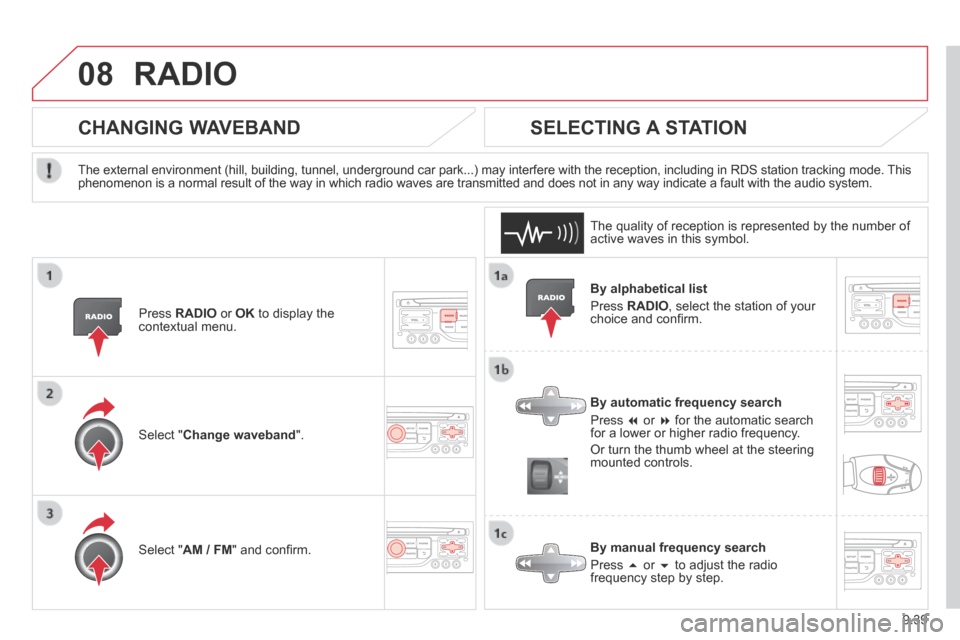
By alphabetical list
Press RADIO , select the station of your choice and confi rm.
By automatic frequency search
Press or for the automatic search for a lower or higher radio frequency.
Or turn the thumb wheel at the steering mounted controls.
By manual frequency search
Press or to adjust the radio frequency step by step.
SELECTING A STATION
The external environment (hill, building, tunnel, underground car park.\
..) may interfere with the reception, including in RDS station tracking mode. This phenomenon is a normal result of the way in which radio waves are transm\
itted and does not in any way indicate a fault with the audio system.
The quality of reception is represented by the number of active waves in this symbol.
Press RADIO or OK to display the contextual menu.
CHANGING WAVEBAND
Select " Change waveband ".
Select " AM / FM " and confi rm.
Page 182 of 240

9.40
08
Press the button on the numerical keypad to recall a preset station.
Or press then turn the thumb wheel at the steering mounted controls.
PRESETTING A STATION
After selecting a station, press one of the buttons on the numerical keypad for 2 seconds to preset the current station.
An audible signal confi rms that the station has been preset.
Press RADIO .
ACTIVATE / DEACTIVATE RDS
RDS, if activated, allows you to continue listening to the same station by automatic retuning to alternative frequencies. However, in certain conditions, coverage of an RDS station may not be assured throughout the entire country as radio stations do not cover 100 % of the territory. This explains the loss of reception of the station during a journey.
Select " Guidance options " then confi rm.
Activate or deactivate " RDS " then confi rm.
RADIO
Page 228 of 240

142
Instruments and controls
DSC 84
Parking sensors 81-82
Electric mirrors 77-78
Headlamp beam height adjustment 49
Stop & Start 42-44 Starter motor, ignition switch 45 Wipers controls
50-51
Automatic wiping 50
Windscreen / headlamp wash 51, 109
Trip computer Section 9
Cruise control 52-54
Speed limiter 55-57
Lighting controls
47-49
Automatic illumination of headlamps 48-49
Foglamps 48
LED daytime runing lamps 48
INSTRUMENTS AND CONTROLS
Dashboard, passenger compartment fuses 127-129
Opening the bonnet 105
Parking brake, handbrake 80 Instrument panels,
screens, dials 25-26
Warning lamps, indicator lamps 27-32
Indicators, gauge 33, 36-37
Setting the time in the instrument panel 26
Lighting dimmer 37
Gear shift indicator 38-39
Audio equipment steering mounted controls Section 9
Steering wheel adjustment 41
Horn 80
Gearbox
38
Page 229 of 240

143
Instruments and controls
VISUAL SEARCH
10
INSTRUMENTS AND CONTROLS
Parking brake, handbrake 80 Instrument panels,
screens, dials 25-26
Warning lamps, indicator lamps 27-32
Indicators, gauge 33, 36-37
Setting the time in the instrument panel 26
Lighting dimmer 37
Gear shift indicator 38-39
Passenger's airbag deactivation 92
DSC 84
Parking sensors 81-82
Electric mirrors 77-78
Headlamp beam height
adjustment 49 Stop & Start 42-44
Starter motor, ignition switch 45 Wiper controls
50-51
Automatic wiping 50
Windscreen / headlamp wash 51, 109
Trip computer Section 9
Audio equipment steering mounted controls Section 9
Steering wheel adjustment 41
Horn 80
Cruise control
52-54
Speed limiter 55-57
Lighting controls
47-49
Automatic illumination of headlamps 48-49
Front foglamps 48
LED daytime running lamps 48
Gearboxes 38