2012 YAMAHA YZ450F fuel
[x] Cancel search: fuelPage 184 of 228
6-6
THROTTLE BODY
CHECKING THE INJECTOR
Replace the fuel injector with a
new one if you have dropped or im-
pacted it.
1. Check:
• Injectors
Damage → Replace.
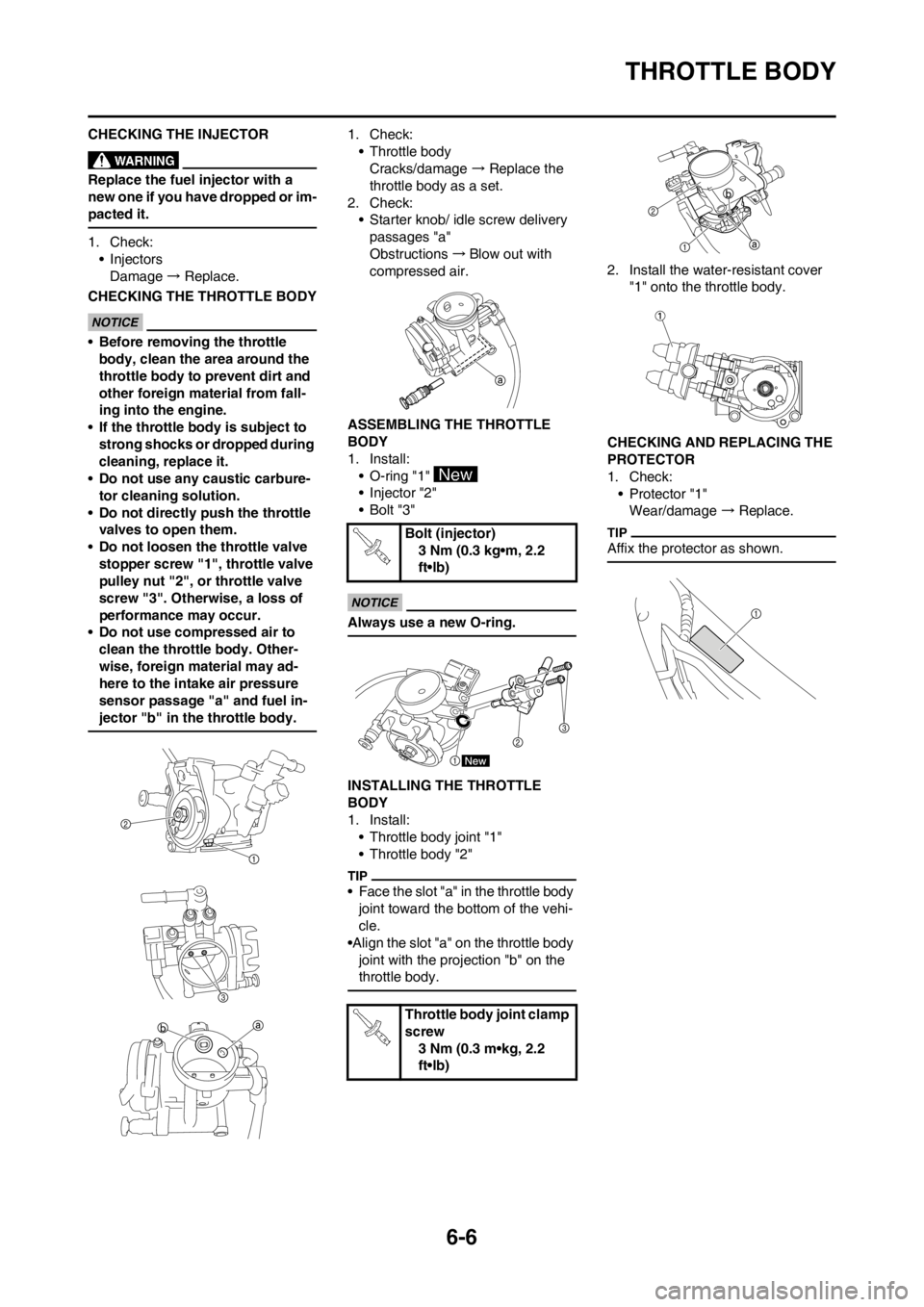
CHECKING THE THROTTLE BODY
•Before removing the throttle
body, clean the area around the
throttle body to prevent dirt and
other foreign material from fall-
ing into the engine.
•If the throttle body is subject to
strong shocks or dropped during
cleaning, replace it.
•Do not use any caustic carbure-
tor cleaning solution.
•Do not directly push the throttle
valves to open them.
•Do not loosen the throttle valve
stopper screw "1", throttle valve
pulley nut "2", or throttle valve
screw "3". Otherwise, a loss of
performance may occur.
•Do not use compressed air to
clean the throttle body. Other-
wise, foreign material may ad-
here to the intake air pressure
sensor passage "a" and fuel in-
jector "b" in the throttle body.
1. Check:
• Throttle body
Cracks/damage → Replace the
throttle body as a set.
2. Check:
• Starter knob/ idle screw delivery
passages "a"
Obstructions →Blow out with
compressed air.
ASSEMBLING THE THROTTLE
BODY
1. Install:
• O-ring "1"
• Injector "2"
•Bolt "3"
Always use a new O-ring.
INSTALLING THE THROTTLE
BODY
1. Install:
• Throttle body joint "1"
• Throttle body "2"
• Face the slot "a" in the throttle body
joint toward the bottom of the vehi-
cle.
•Align the slot "a" on the throttle body
joint with the projection "b" on the
throttle body.
2. Install the water-resistant cover
"1" onto the throttle body.
CHECKING AND REPLACING THE
PROTECTOR
1. Check:
• Protector "1"
Wear/damage → Replace.
Affix the protector as shown.Bolt (injector)
3 Nm (0.3 kg•m, 2.2
ft•lb)
Throttle body joint clamp
screw
3 Nm (0.3 m•kg, 2.2
ft•lb)
Page 185 of 228

7-1
ELECTRICAL COMPONENTS AND WIRING DIAGRAM
ELECTRICAL
This section is intended for those who have basic knowledge and skill concerning the servicing of Yamaha motorcycles
(e.g., Yamaha dealers, service engineers, etc.) Those who have little knowledge and skill concerning servicing are request-
ed not to undertake inspection, adjustment, disassembly, or reassembly only by reference to this manual. It may lead to
servicing trouble and mechanical damage.
ELECTRICAL COMPONENTS AND WIRING DIAGRAM
ELECTRICAL COMPONENTS
1. Crankshaft position sensor
2. AC magneto
3. Rectifier/regulator
4. Condenser
5. Fuel pump
6. Engine stop switch
7. ECU
8. Ignition coil9. Spark plug
10. Fuel injector
11. Intake air temperature sensor
12. Intake air pressure sensor
13. Throttle position sensor
14. Atmospheric pressure sensor
15. Coolant temperature sensor
16. Coupler for connecting optional part
7
Page 186 of 228

7-2
ELECTRICAL COMPONENTS AND WIRING DIAGRAM
WIRING DIAGRAM
1. Crankshaft position sensor
2. AC magneto
3. Rectifier/regulator
4. Condenser
5. Fuel pump
6. Engine stop switch
7. ECU
8. Ignition coil
9. Spark plug
10. Fuel injector
11. Intake air temperature sensor
12. Intake air pressure sensor
13. Throttle position sensor
14. Atmospheric pressure sensor
15. Coolant temperature sensor
16. Coupler for connecting optional part COLOR CODE
BBlack
Br Brown
Gy Gray
LBlue
Lg Light green
O Orange
PPink
RRed
WWhite
YYellow
B/L Black/Blue
B/R Black/Red
B/W Black/White
B/Y Black/Yellow
Br/W Brown/White
P/W Pink/White
R/B Red/Black
R/W Red/White
STOPON
Gy
Gy
B
B/L
W1
W2
W2 O
R/B
R RR
R
R
R R
Lg
Lg Lg L
P/W
P
YB/RB
B B
BB BB
BB/W
B/W B/W Br/WGyB/L
W1 W1
W2 W2 B/Y
B/Y Br
B/R
R/W
OO
R/B RR
R
L
P/W
PYL
L
LY
Br/WB/L
B/L B/L
B
B/L
B/L
Br
W1
Br/W
W2
R
R O
B/L
L
Y
B/L
Br
R
P
Gy
Gy
B/R
B/R
R/WB/Y
B/L
W1
W2
W1 R
R R
B
B/Y
Lg Lg
O
R/B R/B
Br/W
P/W P/W
LL
Y
B/L B/L
B/L
Br
B
B/W
B/W
B
B
B L
B/L P
Page 187 of 228

7-3
IGNITION SYSTEM
IGNITION SYSTEM
INSPECTION STEPS
Use the following steps for checking the possibility of the malfunctioning engine being attributable to ignition system failure
and for checking the spark plug which will not spark.
*marked: Only when the ignition checker is used.
• Remove the following parts before inspection.
1. Seat
2. Fuel tank
• Use the following special tools in this inspection.
Spark gap testSpark→• *Clean or replace spark plug.
• Check the connection of the spark plug cap to the
spark plug.
No spark↓
Check entire ignition system for connection.
(couplers, leads and ignition coil)No good→
Repair or replace.
OK↓
Check engine stop switch. No good→Replace.
OK↓
Check ignition coil. (primary coil and secondary
coil)No good→
Replace.
OK↓
Check AC magneto. (crankshaft position sensor
and stator coil)No good→
Replace.
OK↓
Replace ECU.
Dynamic spark tester:
YM-34487
Ignition checker:
90890-06754
Pocket tester:
YU-03112-C/90890-03112
Page 193 of 228

7-9
FUEL INJECTION SYSTEM
FUEL INJECTION SYSTEM
TROUBLESHOOTING METHOD
Engine starting problems, engine
idling speed problems, and medium
and high-speed performance prob-
lems
1. CHECK:
• Refer to "TROUBLESHOOTING"
section in the chapter 3.
2. Connect the FI diagnostic tool.
(Refer to "CONNECTING THE FI
DIAGNOSTIC TOOL".)
3. Check the fault code number.
(Refer to "TROUBLESHOOTING
DETAILS".)
• Check the fault code number that is
displayed on the LCD of the FI diag-
nostic tool.
• Identify the system with the mal-
function.(Refer to "TROUBLE-
SHOOTING DETAILS".)
4. Checking and repair the probable
case of malfunction.
• Fault code No. YES.
Check and repair.
Refer to "TROUBLESHOOTING
DETAILS".
Refer to "SENSOR OPERATION
TABLE".
• Fault code No. NO.
Check each sensor and actuator
in the diagnostic mode.
Refer to "SETTING THE DIAG-
NOSTIC MODE".
Refer to "SENSOR OPERATION
TABLE".
If the sensors or actuators are
damaged, check and, if neces-
sary, repair or replace all faulty
parts.
If the sensors or actuators are not
damaged, check and, if neces-
sary, repair or replace the engine
inner parts.5. Perform ECU reinstatement ac-
tion.
Refer to "Reinstatement method"
of table in "TROUBLESHOOTING
DETAILS".
6. Set the switch on the FI diagnostic
tool sub-wire harness from "OFF"
to "ON", and then check whether
a fault code number is displayed
again.
If other fault code displayed, repeat
steps (2) to (5) until all fault code
number is not displayed.
7. Set the switch on the FI diagnostic
tool sub-wire harness to "OFF",
and then disconnect the FI diag-
nostic tool, FI diagnostic tool sub-
wire harness, and battery. Place
the accessory coupler in its origi-
nal position.
The malfunction history is stored
even if the switch on the FI diagnostic
tool sub-wire harness is set to "OFF".
Erase the malfunction history in the
diagnostic mode. (Refer to "DIAG-
NOSTIC CODE TABLE (Diagnostic
code No. D62)".)
CONNECTING THE FI
DIAGNOSTIC TOOL
1. Connect the following items to the
accessory coupler as shown.
• FI diagnostic tool "1"
• FI diagnostic tool sub-wire har-
ness "2"
• Battery "3"
• Because this vehicle is not
equipped with a battery, a 12 V
battery is required to use the FI di-
agnostic tool.
• Make sure that the switch on the
FI diagnostic tool sub-wire har-
ness is set to "OFF".
• The "POWER" LED (green)
comes on.
CHECKING THE FAULT CODES
1. Set the switch on the FI diagnostic
tool subwire harness to "ON".
When the switch on the FI diagnostic
tool sub-wire harness is set to "ON",
make sure that "Waiting for connec-
tion" is displayed on the LCD of the FI
diagnostic tool.
2. Check:
• Fault code number
• If a malfunction is detected in the
system, the fault code appears on
the LCD of the FI diagnostic tool
and the "WARNING" LED (orange)
comes on.
• To start the engine, set the switch
on the FI diagnostic tool sub-wire
harness to "OFF".
• When the engine is running, fault
code numbers will not be displayed
on the LCD of the FI diagnostic tool
even if a malfunction is detected in
the system. The "WARNING" LED
(orange) comes on.
3. Set the switch on the FI diagnostic
tool subwire harness to "OFF". FI diagnostic tool
YU-03182/90890-03182
FI diagnostic tool sub-
wire harness
YU-03212/90890-03212
2100 60
60
Page 194 of 228

7-10
FUEL INJECTION SYSTEM
SETTING THE DIAGNOSTIC MODE
When the FI diagnostic tool is set to
the diagnostic mode, the sensor out-
put data can be displayed and the op-
eration of the actuators can be
checked.
1. While pressing the "MODE" but-
ton, set the switch on the FI diag-
nostic tool sub-wire harness to
"ON".
• When the switch on the FI diagnos-
tic tool sub-wire harness is set to
"ON", make sure that "Waiting for
connection" is displayed on the
LCD of the FI diagnostic tool.
• "DIAG" appears on the LCD of the
FI diagnostic tool.
2. Select the diagnostic mode "DI-
AG" by pressing the "UP" button.
3. After selecting "DIAG", press the
"MODE" button.
4. Select the diagnostic code num-
ber corresponding to the fault
code number by pressing the
"UP" and "DOWN" buttons.
• Select the diagnostic code number
corresponding to the fault code
number by pressing the "UP" and
"DOWN" buttons.
• To decrease the selected diagnos-
tic code number, press the "DOWN"
button. Press the "DOWN" button
for 1 second or more to automati-
cally decrease the diagnostic code
numbers.
• To increase the selected diagnostic
code number, press the "UP" but-
ton. Press the "UP" button for 1 sec-
ond or more to automatically
increase the diagnostic code num-
bers.
5. Check the operation of the sensor
or actuator.
• Sensor display: Data indicating
the sensor status is displayed on
the LCD of the FI diagnostic tool.
• Actuator operation: Press the
"MODE" button to operate the ac-
tuator.
6. Set the switch on the FI diagnostic
tool sub-wire harness to "OFF".
Page 195 of 228

7-11
FUEL INJECTION SYSTEM
SENSOR OPERATION TABLE
Diagnos-
tic code
No.ItemActuation or
displayChecking methodActuation or LCD standard display
values
D01 Throttle angle DisplayDisplays the throttle angle. 0–125°
Check with throttle fully closed. When throttle is fully closed:15–19°
Check with throttle fully open. When throttle is fully
opened:95–101 °
D02 Atmosphere DisplayDisplays the atmospheric pres-
sure.
• Measure the atmospheric pres-
sure.0–126 kPa
Displays the atmospheric pressure
according to the elevation and
weather.
Example
0 m above sea level: Approx: 101
kPa
3000 m above sea level:Approx: 70
kPa
D03 Intake air pressure DisplayDisplays the intake air pressure.
• Check the intake manifold pres-
sure.
• Check that the intake air pres-
sure changes while the engine is
being cranked.0–126 kPa
While the engine is stopped: Dis-
plays the atmospheric pressure ac-
cording to the elevation and
weather.
Example
0 m above sea level: Approx: 101
kPa
3000 m above sea level:Approx: 70
kPa
While the engine is being cranked:
Displays the intake air pressure.
D05 Intake air temperature DisplayDisplays the intake air tempera-
ture.
• Check the temperature in the in-
take manifold.-20–100°C
Cold engine: Displayed tempera-
ture is close to the ambient temper-
ature.
Warm engine: Displayed tempera-
ture is approximately 20 °C higher
than the ambient temperature.
D06 Coolant temperature DisplayDisplays the coolant temperature.
• Check the coolant temperature.-20–150°C
Cold engine: Displayed tempera-
ture is close to the ambient temper-
ature.
Warm engine: Displayed tempera-
ture is the current coolant tempera-
ture.
D08 Lean angle sensor DisplayDisplays the lean angle sensor
output voltage.
Remove the ECU and incline it 45°
or more.0–5.0 V
1.0 V: Upright
4.0 V: Overturned
D30 Ignition coil ActuationCheck that power is supplied to
the ignition coil.
• Check that a spark is generated.
• Illuminates the engine trouble
warning light.Actuates the ignition coil for five
times every second.
The "WARNING" LED on the FI di-
agnostic tool comes on each time
the fuel injector is actuated.
Page 196 of 228

7-12
FUEL INJECTION SYSTEM
D36 Injectors ActuationCheck that power is supplied to
the fuel injector.
• Check the fuel injector operation
by listening for the operating
sound or by confirming the oper-
ation visually.Actuates the injector for five times
every second.
The "WARNING" LED on the FI di-
agnostic tool comes on each time
the fuel injector is actuated.
D60EEPROM fault code
display.DisplayDisplays the abnormal portion of
the data in the EEPROM that has
been detected as a fault code No.
44.
If code numbers more than one
are detected, the display alter-
nates every two seconds to show
all the detected code numbers.
When all code numbers are
shown, the display repeats the
same process.00: No fault
01: CO adjustment valve
07: Power Tuner adjustment val-
ues 0–8 for fuel injection amount or
ignition timing
D61Malfunction history
code display.DisplayDisplays the fault code numbers
that are stored in the malfunction
history.
If code numbers more than one
are detected, the display alter-
nates every two seconds to show
all the detected code numbers.
When all code numbers are
shown, the display repeats the
same process.00: No history
12–50: History exists
• Refer to the fault code number.
D62Malfunction history
code erasureActuation
and displayDisplays the total number of mal-
functions, including the current
malfunction, that have occurred
since the history was last erased.
In addition, deletes the fault code
numbers from the history if the cor-
responding items are currently op-
erating normally.00: No history
1–15: History exists
When this diagnostic code number
is selected, fault code numbers for
previously detected malfunctions
are deleted from the history if the
corresponding items are currently
operating normally.
D64 Setting history display DisplayDisplays whether or not history ex-
ists for settings that were made us-
ing the Power Tuner.00: There is no setting history.
01: There is setting history.
02: Whether or not setting history
data exists cannot be determined
(damage to history data).
D65 Setting map erasure DisplayErases the settings that were
made using the Power Tuner.00: There are no settings that were
made using the Power Tuner.
01: There are settings that were
made using the Power Tuner.
D70Program version
numberDisplayCheck the version number of the
program.0–254 Diagnos-
tic code
No.ItemActuation or
displayChecking methodActuation or LCD standard display
values