2012 YAMAHA VMAX warning
[x] Cancel search: warningPage 23 of 110

INSTRUMENT AND CONTROL FUNCTIONS
3-8
3
Shift timing indicator light
See page 3-10 for an explanation and
settings for this indicator light.
EAU4658C
Multi-function display
WARNING
EWA12312
Be sure to stop the vehicle before
making any setting changes to the
multi-function display. Changing
settings while riding can distract the
operator and increase the risk of an
accident.A “SELECT” button and a “RESET”
button are located on the handlebar
holder. These buttons allow you to con-
trol or change the settings in the multi-
function display. The multi-function display is set to the
Normal mode every time the key is
turned to “ON”.
Normal mode
The following functions are available in
the Normal mode:
●
an odometer
●
a clock
●
two tripmeters (which show the
distance traveled since they were
last set to zero)
●
a fuel reserve tripmeter (which
shows the distance traveled since
the fuel level warning light came
on)
●
a fuel meter
1. Multi-function display
1
1. “SELECT” button
2. “RESET” button
12
U2S3E3E0.book Page 8 Monday, September 19, 2011 8:42 AM
Page 24 of 110

INSTRUMENT AND CONTROL FUNCTIONS
3-9
3
●
a transmission gear indicator
●
a coolant temperature meter
●
a self-diagnosis device
TIPFor the U.K. only:
The speedometer and odometer/trip-
meter displays can be switched be-
tween kilometers and miles. To switch
the speedometer and odometer/tripme-
ter displays, press “SELECT” for at
least two seconds.
TripmetersTurn the key to “ON”. Push “SELECT”
to switch the display between the trip-
meters “TRIP-1” and “TRIP-2” in the fol-
lowing order:
TRIP-1 → TRIP-2 → TRIP-1
When the fuel amount in the fuel tank
decreases to 3.9 L (1.03 US gal,
0.86 Imp.gal), the fuel level warning
light comes on, and the tripmeter auto-
matically changes to the fuel reserve
tripmeter “TRIP-F” and starts counting
the distance traveled from that point. In
that case, push “SELECT” to switch the
display between the various tripmeters
in the following order:
TRIP-F → TRIP-1 → TRIP-2 → TRIP-F
If you continue to ride the vehicle after
the fuel reserve tripmeter “TRIP-F” ap-
pears, the fuel meter and fuel level
warning indicator “ ” start flashing.
To reset a tripmeter, select it by push-
ing “SELECT”, and then push “RESET”
for at least one second. If you do not re-
set the fuel reserve tripmeter manually,
it resets itself automatically and the dis-
play returns to the prior meter after re-
fueling and traveling 5 km (3 mi). Fuel meter
The fuel meter indicates the amount of
fuel in the fuel tank. The fuel level dis-
played decreases towards “E” (Empty)
as the fuel tank level decreases. When
the fuel amount in the fuel tank de-
creases to 3.9 L (1.03 US gal,
0.86 Imp.gal), the fuel level warning
light comes on. If this occurs, refuel as
soon as possible.
If you continue to ride the vehicle after
the fuel reserve tripmeter “TRIP-F” ap-
pears, the fuel meter and fuel level
warning indicator “ ” start flashing.
Transmission gear indicatorThis indicator shows the selected gear.
The neutral position is indicated by “ ”
and by the neutral indicator light.
Coolant temperature meterWith the key in the “ON” position, the
coolant temperature meter indicates
the temperature of the coolant. The
coolant temperature varies with chang-
es in the weather and engine load. If
the coolant temperature warning light
comes on, and the top segment and the
1. Odometer
2. Clock
3. Tripmeter/fuel reserve tripmeter
4. Coolant temperature warning indicator “ ”
5. Coolant temperature meter
6. Transmission gear indicator
7. Fuel level warning indicator “ ”
8. Fuel meter
123
865
7
4
U2S3E3E0.book Page 9 Monday, September 19, 2011 8:42 AM
Page 25 of 110

INSTRUMENT AND CONTROL FUNCTIONS
3-10
3
coolant temperature warning indicator
flash, stop the vehicle and let the en-
gine cool. (See page 6-42.)
NOTICE
ECA10021
Do not continue to operate the en-
gine if it is overheating.Select mode
The various functions of this multi-func-
tion display are adjusted in the Select
mode.TIP●
The transmission must be in neu-
tral to change settings in this
mode.
●
Shifting the transmission into gear
saves all settings made, then can-
cels the Select mode and displays
the Normal mode in all screens.
●
Depending on the screen, pushing
“RESET” saves settings or can-
cels the Select mode to display the
Normal mode.
Push and hold “SELECT” and “RESET”
for at least three seconds to enter the
Select mode. The following items can be set/adjusted
in this mode:
●
brightness
●
shift timing indicator light
●
clock
●
stopwatch
●
countdown clock
●
system status
●
maintenance counters
TIPTo return to the Normal mode, push
“SELECT” to scroll to “ ”, then push
“RESET”.Adjusting the brightnessThis function allows you to adjust the
brightness of the tachometer panel and
speedometer (“Meter panel”), the ta-
chometer needle (“Needle”), and the
multi-function display (“Display”) to suit
the outside lighting conditions.
1. Push “SELECT” to highlight “Brightness”. 2. Push “RESET”, then push “SE-
LECT” to scroll through the func-
tions and to highlight an item.
3. Push “RESET”; the brightness lev- el segments for the selected item
starts flashing.
4. Push “SELECT” to highlight the desired brightness level.
5. Push “RESET” to set the bright- ness level.
6. Push “SELECT” to scroll to “ ”, then push “RESET” to return to the
previous menu.
U2S3E3E0.book Page 10 Monday, September 19, 2011 8:42 AM
Page 30 of 110
INSTRUMENT AND CONTROL FUNCTIONS
3-15
3Select mode again by pushing and
holding “SELECT” and “RESET” for at
least three seconds.
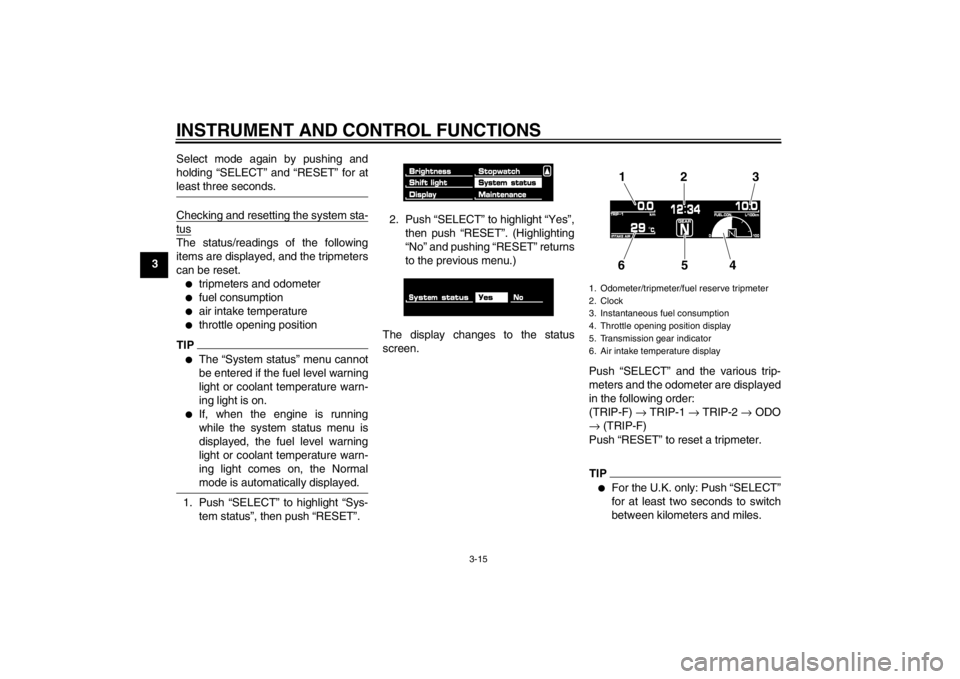
Checking and resetting the system sta-tusThe status/readings of the following
items are displayed, and the tripmeters
can be reset.●
tripmeters and odometer
●
fuel consumption
●
air intake temperature
●
throttle opening position
TIP●
The “System status” menu cannot
be entered if the fuel level warning
light or coolant temperature warn-
ing light is on.
●
If, when the engine is running
while the system status menu is
displayed, the fuel level warning
light or coolant temperature warn-
ing light comes on, the Normal
mode is automatically displayed.
1. Push “SELECT” to highlight “Sys-
tem status”, then push “RESET”. 2. Push “SELECT” to highlight “Yes”,
then push “RESET”. (Highlighting
“No” and pushing “RESET” returns
to the previous menu.)
The display changes to the status
screen. Push “SELECT” and the various trip-
meters and the odometer are displayed
in the following order:
(TRIP-F) → TRIP-1 → TRIP-2 → ODO
→ (TRIP-F)
Push “RESET” to reset a tripmeter.
TIP●
For the U.K. only: Push “SELECT”
for at least two seconds to switch
between kilometers and miles.
1. Odometer/tripmeter/fuel reserve tripmeter
2. Clock
3. Instantaneous fuel consumption
4. Throttle opening position display
5. Transmission gear indicator
6. Air intake temperature display
12 3
654
U2S3E3E0.book Page 15 Monday, September 19, 2011 8:42 AM
Page 31 of 110

INSTRUMENT AND CONTROL FUNCTIONS
3-16
3
●
Pushing “RESET” displays the
Normal mode for five seconds.
Pushing “SELECT” and “RESET”
for at least three seconds, chang-
es the display to the Normal mode.
●
To perform further multi-function
display settings, enter the Select
mode again by pushing and hold-
ing “SELECT” and “RESET” for at
least three seconds.
Resetting the maintenance countersThis function allows you to reset the
maintenance counters for the tires, the
engine oil, and an item of your choice.1. Push “SELECT” to highlight “Main- tenance”.
2. Push “RESET”.
3. Push “SELECT” to highlight the item to reset. 4. Push “RESET” to reset the item.
TIP●
The bottom area was left blank for
another item the rider cares to
check the distance of since it has
been changed, replaced or
checked (i.e., air filter element, en-
gine parts, etc.).
●
Letters and numbers cannot be
entered in the blank area.
5. Push “SELECT” to scroll to “ ”.
6. Push “RESET” to return to the pre-
vious menu. Self-diagnosis device
TIPThe display indicates error codes only
in the Normal mode.This model is equipped with a self-diag-
nosis device for various electrical cir-
cuits.1. Immobilizer system indicator light
2. Engine trouble warning light “ ”
1. Error code display
2
1
1
U2S3E3E0.book Page 16 Monday, September 19, 2011 8:42 AM
Page 32 of 110

INSTRUMENT AND CONTROL FUNCTIONS
3-17
3If a problem is detected in any of those
circuits, the engine trouble warning light
comes on and the display indicates an
error code.
If the display indicates any error codes,
note the code number, and then have a
Yamaha dealer check the vehicle. The self-diagnosis device also detects
problems in the immobilizer system cir-
cuits.
If a problem is detected in any of the im-
mobilizer system circuits, the immobi-
lizer system indicator light flashes and
the display indicates an error code.
TIPIf the display indicates error code 52,
this could be caused by transponder in-
terference. If this error code appears,
try the following.1. Use the code re-registering key to start the engine.TIPMake sure there are no other immobi-
lizer keys close to the main switch, and
do not keep more than one immobilizer
key on the same key ring! Immobilizer system keys may cause signal interfer-
ence, which may prevent the engine
from starting.
2. If the engine starts, turn it off and
try starting the engine with the
standard keys.
3. If one or both of the standard keys do not start the engine, take the
vehicle, the code re-registering
key and both standard keys to a
Yamaha dealer and have the stan-
dard keys re-registered.NOTICE
ECA11590
If the display indicates an error
code, the vehicle should be checked
as soon as possible in order to avoid
engine damage.
EAU12331
Anti-theft alarm (optional) This model can be equipped with an
optional anti-theft alarm by a Yamaha
dealer. Contact a Yamaha dealer for
more information.
U2S3E3E0.book Page 17 Monday, September 19, 2011 8:42 AM
Page 33 of 110

INSTRUMENT AND CONTROL FUNCTIONS
3-18
3
EAU1234A
Handlebar switches LeftRight
EAU12350
Pass switch “ ”
Press this switch to flash the headlight.
EAU12400
Dimmer switch “ / ”
Set this switch to “ ” for the high
beam and to “ ” for the low beam.
EAU12460
Turn signal switch “ / ”
To signal a right-hand turn, push this
switch to “ ”. To signal a left-hand
turn, push this switch to “ ”. When re-
leased, the switch returns to the center position. To cancel the turn signal
lights, push the switch in after it has re-
turned to the center position.
EAU12500
Horn switch “ ”
Press this switch to sound the horn.
EAU12660
Engine stop switch “ / ”
Set this switch to “ ” before starting
the engine. Set this switch to “ ” to
stop the engine in case of an emergen-
cy, such as when the vehicle overturns
or when the throttle cable is stuck.
EAU12711
Start switch “ ”
Push this switch to crank the engine
with the starter. See page 5-1 for start-
ing instructions prior to starting the en-
gine.
EAU42340
The engine trouble warning light and
ABS warning light will come on when
the key is turned to “ON” and the start
switch is pushed, but this does not indi-
cate a malfunction.
1. Pass switch “ ”
2. Dimmer switch “ / ”
3. Hazard switch “ ”
4. Horn switch “ ”
5. Turn signal switch “ / ”
5
43
2
1
1. Engine stop switch “ / ”
2. Start switch “ ”
1
2
U2S3E3E0.book Page 18 Monday, September 19, 2011 8:42 AM
Page 36 of 110

INSTRUMENT AND CONTROL FUNCTIONS
3-21
3
EAU12941
Brake pedal The brake pedal is on the right side of
the motorcycle. To apply the rear
brake, press down on the brake pedal.
EAU51670
ABS The Yamaha ABS (Anti-lock Brake
System) features a dual electronic con-
trol system, which acts on the front and
rear brakes independently.
Operate the brakes with ABS as you
would conventional brakes. If the ABS
is activated, a pulsating sensation may
be felt at the brake lever or brake pedal.
In this situation, continue to apply the
brakes and let the ABS work; do not
“pump” the brakes as this will reduce
braking effectiveness.
WARNING
EWA16050
Always keep a sufficient distance
from the vehicle ahead to match the
riding speed even with ABS.●
The ABS performs best with
long braking distances.
●
On certain surfaces, such as
rough or gravel roads, the brak-
ing distance may be longer with
the ABS than without.
The ABS is monitored by an ECU,
which will revert the system to conven-
tional braking if a malfunction occurs.
TIP●
The ABS performs a self-diagno-
sis test each time the vehicle first
starts off after the key is turned to
“ON” and the vehicle has traveled
at a speed of 10 km/h (6 mi/h) or
higher. During this test, a “clicking”
noise can be heard from under the
seat, and if the brake lever or
brake pedal is even slightly ap-
plied, a vibration can be felt at the
lever and pedal, but these do not
indicate a malfunction.
●
This ABS has a test mode which
allows the owner to experience the
pulsation at the brake lever or
brake pedal when the ABS is oper-
ating. However, special tools are
required, so please consult your
Yamaha dealer when performing
this test.
NOTICE
ECA16120
Keep any type of magnets (including
magnetic pick-up tools, magnetic
screwdrivers, etc.) away from the
front and rear wheel hubs, otherwise
the magnetic rotors equipped in the
1. Brake pedal
1
U2S3E3E0.book Page 21 Monday, September 19, 2011 8:42 AM