Page 192 of 302
07 Wheels and tires
Changing wheels
07
192
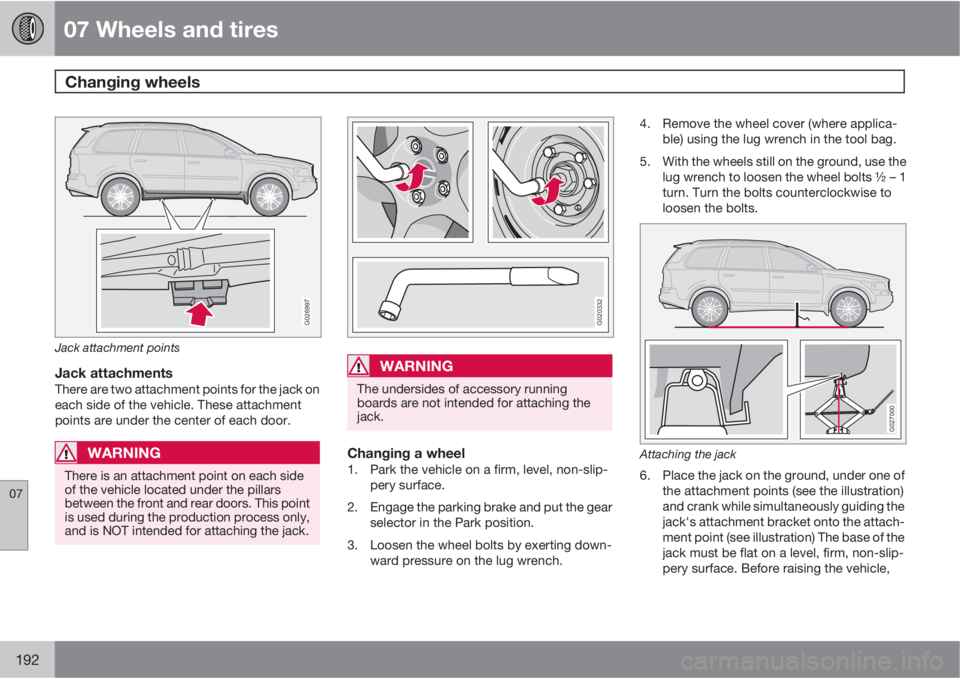
G026997
Jack attachment points
Jack attachmentsThere are two attachment points for the jack on
each side of the vehicle. These attachment
points are under the center of each door.
WARNING
There is an attachment point on each side
of the vehicle located under the pillars
between the front and rear doors. This point
is used during the production process only,
and is NOT intended for attaching the jack.
G020332
WARNING
The undersides of accessory running
boards are not intended for attaching the
jack.
Changing a wheel1. Park the vehicle on a firm, level, non-slip-
pery surface.
2. Engage the parking brake and put the gear
selector in the Park position.
3. Loosen the wheel bolts by exerting down-
ward pressure on the lug wrench.4. Remove the wheel cover (where applica-
ble) using the lug wrench in the tool bag.
5. With the wheels still on the ground, use the
lug wrench to loosen the wheel bolts ½ – 1
turn. Turn the bolts counterclockwise to
loosen the bolts.
G027000
Attaching the jack
6. Place the jack on the ground, under one of
the attachment points (see the illustration)
and crank while simultaneously guiding the
jack's attachment bracket onto the attach-
ment point (see illustration) The base of the
jack must be flat on a level, firm, non-slip-
pery surface. Before raising the vehicle,
Page 224 of 302
09 Maintenance and servicing
Replacing bulbs 09
224* Option/accessory, for more information, see Introduction.
G027083
Location of the bulbs in the headlight
housing
G027082
Low beam headlight/Active Bending
Lights*
High beam headlight (daytime running light
on models with Active Bending Lights*)
Turn signal
Parking light
Side marker light
Replacing the low beam bulb (halogen
headlights)
G027088
1. Remove the plastic cover over the bulb by
turning it counterclockwise.
2. Pull the connector from the lamp housing.
3. Loosen the bulb's retaining spring by first
moving it to the right and then moving it out
of the way.
4. Pull out the bulb from the holder.
5. Insert the new bulb (without touching the
glass) in the holder.
6. Move the retaining spring up and push it
slightly to the left until it seats properly.
Page 225 of 302

09 Maintenance and servicing
Replacing bulbs09
��
* Option/accessory, for more information, see Introduction.225
7. Press the bulb holder into place on the
headlight housing.
8. Reinstall the plastic cap. The let-
ters "HAUT" on the cap must be upward.
Replacing the high beam bulb (halogen
headlights)
G027085
1. Remove the rubber cover by pulling it off.
2. Pull the connector from the lamp housing.
3. Loosen the bulb's retaining spring by first
moving it to the right and then moving it out
of the way.
4. Pull out the bulb from the holder.5. Insert the new bulb (without touching the
glass) in the holder.
6. Move the retaining spring up and push it
slightly to the left until it seats properly.
7. Press the bulb holder into place on the
headlight housing.
8. Press the rubber cover into place.
Replacing the daytime running light
bulb (models with Active Bending
Lights* only)
G027090
1. Remove the rubber cover over the bulb by
pulling it off.2. Turn the bulb holder counterclockwise and
pull it out of the headlight housing.
3. Remove the connector from the bulb unit
by pressing the lock tab out and pulling.
4. Connect the connector to the new bulb unit
until it clicks into place.
5. Press a new bulb unit into the headlight
housing and turn it clockwise into place.
6. Reinstall the plastic cover.
Replacing parking light/side marker
light bulbs
G028409
Page 226 of 302

09 Maintenance and servicing
Replacing bulbs 09
226
1. Turn the lamp holder approximately 1/4
turn counterclockwise and pull it out of the
headlight housing.
2. Pull the bulb straight out.
3. Align the guide lugs on the side of the base
of the new bulb in the grooves in the holder
and press it into place.
4. Press the lamp holder into the place in the
headlight housing and turn it approxi-
mately 1/4 turn clockwise.
Replacing the turn signal bulb
G027089
1. Turn the lamp holder approximately 1/4
turn counterclockwise and pull it out of the
headlight housing.2. Press in the bulb slightly and pull it out of
the holder.
3. Align the guide lugs on the side of the base
of the new bulb in the grooves in the holder.
Press it in and turn it slightly clockwise.
4. Press the lamp holder into the place in the
headlight housing and turn it approxi-
mately 1/4 turn clockwise.
Front fog lights
G027078
NOTE
Avoid touching the glass on the bulb with
your fingers.
1. Switch off the ignition.
2. Turn the bulb holder slightly counterclock-
wise to release it.
3. Replace the bulb. The shape of the foot of
the bulb corresponds to the shape of the
bulb holder.
4. Reinstall the bulb holder by turning it
slightly clockwise. The side of the holder
marked TOP should face upward.
Location of tail light bulbs
G027094
Parking light
Turn signal
Page 228 of 302

09 Maintenance and servicing
Replacing bulbs 09
228
Replacing bulbs in the taillight cluster
G027077
1. Switch off all lights and turn ignition key to
position 0.
2. Fold down the lower section of the tailgate,
and fold up the rear section of the cargo
area floor.
3. If the vehicle is equipped with the optional
grocery bag holder, detach the holder's
bands.
4. Remove the corner panel.
5. Open the cover in the side panel by pulling
the tab upward/outward.
6. Loosen the bolts.
7. Pull the entire tail light housing straight out.8. Disconnect the wiring.
9. Place the tail light housing on a soft cloth
to avoid scratching the lens.
10. Turn the lamp holder(s) counterclockwise
and pull out.
11. Turn signal, back-up light, brake light
bulbs: Turn the bulb counterclockwise and
remove it.
12. Parking light bulbs: Pull the bulb straight
out.
13. Insert a new bulb.
14. Place the lamp holder in the groove and
turn clockwise.15. Press wiring back into place.
16. Align the tail light housing with the holes for
the retaining bolts and press it into place.
17. Tighten the retaining bolts.
18. Reinsert the side and corner panels.
Page 229 of 302
09 Maintenance and servicing
Replacing bulbs09
��
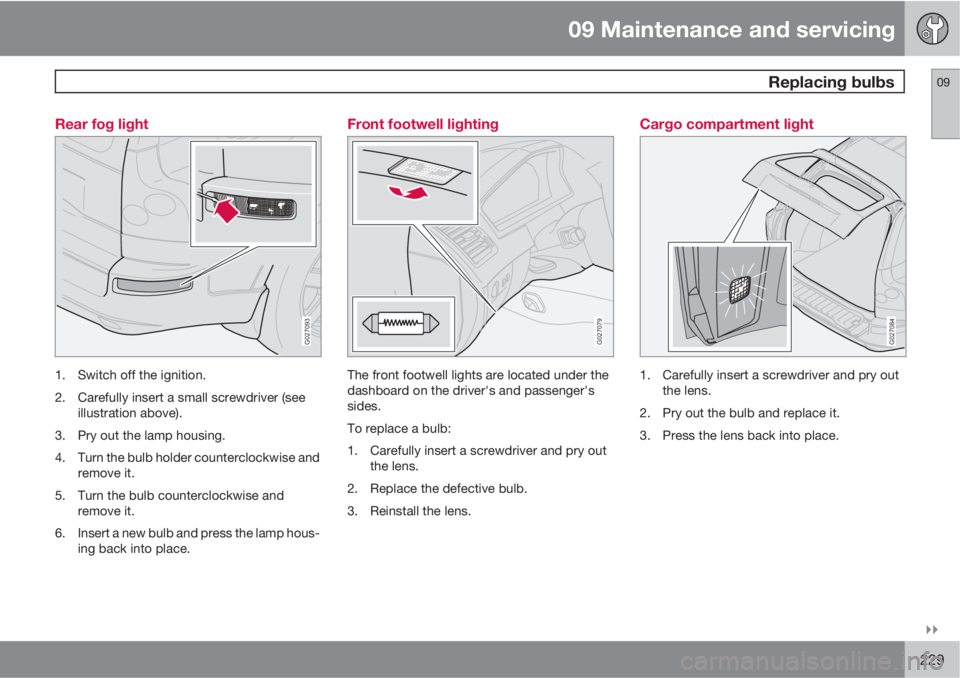
229 Rear fog light
G027093
1. Switch off the ignition.
2. Carefully insert a small screwdriver (see
illustration above).
3. Pry out the lamp housing.
4. Turn the bulb holder counterclockwise and
remove it.
5. Turn the bulb counterclockwise and
remove it.
6. Insert a new bulb and press the lamp hous-
ing back into place.
Front footwell lighting
G027079
The front footwell lights are located under the
dashboard on the driver's and passenger's
sides.
To replace a bulb:
1. Carefully insert a screwdriver and pry out
the lens.
2. Replace the defective bulb.
3. Reinstall the lens.
Cargo compartment light
G027084
1. Carefully insert a screwdriver and pry out
the lens.
2. Pry out the bulb and replace it.
3. Press the lens back into place.
Page 230 of 302
09 Maintenance and servicing
Replacing bulbs 09
230
Vanity mirror lights
G027080
1. Carefully insert a screwdriver and pry out
the lens.
2. Pry out the bulb and replace it.3. Carefully press the lower edge of lens onto
the four tabs and press the upper edge of
the lens into place.
License plate lights
G030886
1. Switch off the ignition.
2. Loosen the screws with a Torx screw-
driver.
3. Turn the bulb holder counterclockwise and
pull it out.
4. Pull out the defective bulb and insert a new
one.
5. Reinsert the bulb holder into the housing
and turn it clockwise.
6. Reinstall the housing and screw it into
place.
NOTE
Other bulbs may be difficult for you to
replace yourself. Let a trained and qualified
Volvo service technician replace these
bulbs if necessary.
Bulb specifications
Lighting functionWattageBulb
Low beam (halogen)55H11 LL
High beam (halogen)55H7 LL
Page 249 of 302

10 Audio
Audio system controls
10
��
* Option/accessory, for more information, see Introduction.249
To activate the system:
1.
Turn the ignition key to position I.
NOTE
If you switch off the ignition while the audio
system is on, the system will be on when the
ignition is switched on again.
2.
Press the POWER button (3) to switch the
audio system on or off.
Volume control
Turn the knob (2) clockwise or counterclock-
wise to raise or lower the volume. The volume
control is electronic and has no end position.
Volume can also be raised (+) or lowered (–)
using the steering wheel keypad.
Pause modeIf the volume is turned off, the CD player will go
into pause mode. Re-activate the player by
turning up the volume.
Selecting a sound source
•Press AM/FM (4) repeatedly to toggle
between FM1, FM2, and AM
•Press the CD button (1) to change to the
CD player or optional CD changer
•Turn the SELECTOR control (5) to choose
FM1, FM2, AM, CD, CD changer*, AUX*,
Sirius satellite radio* or BT
1 (see
page 262).
The selected sound source will be shown in the
display.
Sound settings
G027147
1.
Press the SOUND button (2) repeatedly
until you come to the setting that you wish
to change. Choose
BASS, TREBLE,
FADER, BALANCE, , CENTER* orSURROUND*.
2.
Use the SELECTOR control (1) to adjust
the level of the setting you have selected.
The display shows a scale from min. to
max. position. The center indicates the
normal position.
NOTE
Sound level for the center speaker can only
be set if Dolby Pro Logic II (DPL II) or three-
channel stereo (3-CH) is selected in the
menu.
SettingShown in the dis-
play
BassBASS
TrebleTREBLE
Balance between
the right and left
speakersBALANCE
1BluetoothŸ streaming audio