2012 VOLVO V60 wheel
[x] Cancel search: wheelPage 243 of 400

05 Infotainment system
External audio source via AUX/USB* input
05
* Option/accessory, for more information, see Introduction.241
Playback and navigation3
Turn TUNE to access the playlist/folder struc-
ture and navigate in the list/structure. Use OK/
MENU to either confirm selection of subfolder
or start of playback of the selected audio/video
file. Press EXIT to either stop and exit the play-
list or go up (back) in the folder structure. A long
press on EXIT leads to the playlist's root level.
Audio/video files can also be changed by
pressing
/ on the centre console or the
steering wheel keypad*.
Audio files have the symbol
, video files4
have the symbol and folders have the
symbol
.
When playback of a file is complete the play-
back of the other files (of the same type) in that
particular folder continues. Change
5 of folder
takes place automatically when all the files in
the current folder have been played back. The
system automatically detects and changes
setting when a device containing only audio
files or only video files is connected to the USB
port and then it plays back these files. How-
ever, the system does not change setting if a
device containing a mixture of audio and video
files is connected to the USB port, but insteadthe player continues to play back the previous
file type.
Fast forward/reverse3
See page 237.
Scan3
See page 238.
Random3
See page 238.
Search function3
The keypad on the control panel in the centre
console can be used to find a filename in the
current folder.
The search function is accessed either by turn-
ing TUNE (to access the folder structure) or by
pressing one of the letter keys. As a letter or
character in a search string is entered you get
closer to your search target.
Start playback of a file by pressing OK/
MENU.
Repeat folder6
See page 238.
Audio sources
USB memory
To facilitate the use of a USB memory stick,
only store music files on it. It takes a lot longer
for the system to load storage media that con-
tains anything other than compatible music
files.
NOTE
The system supports mobile media compli-
ant with USB 2.0 and the FAT32 file system
and can handle 1000 folders with a maxi-
mum of 254 subfolders/files in every folder.
The top level, which can handle up to 1000
subfolders/files, is an exception to this.
NOTE
When using a longer model USB memory
stick the use of a USB adapter cable is rec-
ommended. This is to avoid mechanical
wear to the USB input and the connected
USB memory stick.
USB hubIt is possible to connect a USB hub to the USB
connection and thereby connect multiple USB
devices simultaneously. Selection of USB
3Only applies to USB and iPodŸ.4Applies to High Performance Multimedia and Premium Sound Multimedia.5If Repeat folder is activated then this does not take place.6Only applies to USB.
ProCarManuals.com
Page 245 of 400

05 Infotainment system
Media BluetoothŸŸ*
05
* Option/accessory, for more information, see Introduction.243 Streaming audio
GeneralThe car's media player is equipped with
BluetoothŸ1 and can wirelessly play streaming
audio files from external devices with
Bluetooth
Ÿ, such as mobile phones and PDAs.
Navigation and control of the sound can be
carried out via the centre console buttons or via
the steering wheel keypad*. In some external
devices it is also possible to change tracks
from the device.
To play back the audio the car's media player
must first be set in
Bluetooth mode.
NOTE
The BluetoothŸ media player must support
the Audio/Video Remote Control Profile
(AVRCP) and Advanced Audio Distribution
Profile (A2DP). The player should use
AVRCP version 1.3, A2DP 1.2. Otherwise
some functions may not work.
Not all mobile phones and external media
players available in the market are fully com-
patible with the Bluetooth
Ÿ function in the
car's media player. Volvo recommends that
you contact an authorised Volvo dealer or
visit www.volvocars.com for information on
compatible phones and external media
players.
NOTE
The car's media player can only play the
audio files via the BluetoothŸ function.
Overview
Centre console control panel.
VOL – volume
MEDIA key
Navigate in the menu by turning TUNE.
Confirm your selection or go to the menu
by pressing OK/MENU.
EXIT - leads up in the menu system, stops
the function in progress.
Short presses are used to scroll between
audio files. Long presses are used to fast
forward and rewind audio files.
1Applies to High Performance, High Performance Multimedia and Premium Sound Multimedia.
ProCarManuals.com
Page 246 of 400

05 Infotainment system
Media BluetoothŸŸ*
05
244* Option/accessory, for more information, see Introduction.
NOTE
If the car is equipped with a steering wheel
keypad* and/or remote control* then in
many cases these can be used instead of
the buttons in the centre console. For a
description of the buttons in the steering
wheel, see page 224. For a description of
the remote control, see page 249.
MenusThe menus inMEDIA are controlled from the
centre console and the steering wheel key-
pad*. For general information on menu naviga-
tion and menu structures, see page 263.
Pair and connect external deviceThe connection of an external device takes
place in different ways depending on whether
or not it has been previously paired. A maxi-
mum of 10 external devices can be paired.
Pairing takes place once per external device.
To connect a device for the first time, follow the
instructions below:
1.
Repeatedly press on MEDIA until
Bluetooth is shown, release and wait a
second or press OK/MENU.
2.
Press OK/MENU.
3.
When
Add device is shown, press OK/
MENU.4. Check that the external device is searcha-
ble/visible via Bluetooth
Ÿ, see the manual
for the external device.
5.
Press OK/MENU.
> The infotainment system searches for
external devices in the vicinity. The
search may take a little while. The devi-
ces detected are specified with their
respective Bluetooth
Ÿ name in the cen-
tre console TV screen.
6. Select the external device you want to pair
with and press OK/MENU.
7. Enter the series of numbers that is shown
in the centre console TV screen via the
external device's keypad and press the
external device's button to confirm the
selection.
The external device is paired and connected
automatically to the infotainment system.
Change audio file by pressing
/ on the
centre console or the steering wheel keypad*.
Automatic connection
When the BluetoothŸ function is active and the
last external device connected is in range it is
connected automatically. When the infotain-
ment system searches for the last device con-
nected its name is shown in the TV screen. To
connect to another device, press EXIT. Con-nect a new external device, see "Change to
another external device" below.
Change to another external deviceIt is possible to change a connected device
with another device if there are several devices
in the car. However, the device must first have
been paired, see "Pair and connect external
device" above. To change to another device:
1.
Repeatedly press on MEDIA until
Bluetooth is shown, release and wait a
second or press OK/MENU.
2. Check that the external device is searcha-
ble/visible via Bluetooth
Ÿ, see the manual
for the external device.
3.
Press OK/MENU.
4.
Turn TUNE to
Change device, and con-
firm with OK/MENU.
> After a while, the external device's name
is shown in the TV screen. If several
external devices have been paired then
these are also shown.
5. Select the device to be connected by turn-
ing TUNE and confirm with OK/MENU.
> Connection of the external device takes
place.
Change audio file by pressing
/ on the
centre console or the steering wheel keypad*.
ProCarManuals.com
Page 247 of 400

05 Infotainment system
Media BluetoothŸŸ*
05
* Option/accessory, for more information, see Introduction.245
Remove the connected device1.
Press Bluetooth mode on OK/MENU.
2.
Turn TUNE to
Remove Bluetooth
device and confirm with OK/MENU.
3. Select the device to be removed by turning
TUNE, and confirm with OK/MENU.
> A prompt asking whether or not you
want to remove the connection is shown
in the TV screen.
4.
Press OK/MENU to confirm.
EXIT cancels.
Disconnecting the deviceAutomatic disconnection takes place if the
external device moves out of the infotainment
system's range. For more information on con-
nection, see page 244.
RandomThis function plays back the audio files on the
external device in random order. Activate/
deactivate the random function in Bluetooth
mode under Bluetooth menu
Random.
Change audio file by pressing
/ on the
centre console or the steering wheel keypad*.
Scanning of audio files in external deviceThis function play backs the first ten seconds
of each audio file. Activate/deactivate the func-tion in Bluetooth mode under Bluetooth menu
Scan.
Cancel scanning with EXIT.
Version information BluetoothŸ
The car's current BluetoothŸ version can be
seen in Bluetooth mode under Bluetooth
menu
Bluetooth software version in car.
ProCarManuals.com
Page 248 of 400

05 Infotainment system
TV*
05
246* Option/accessory, for more information, see Introduction.
TV*
General
NOTE
This system only supports TV transmissions
in countries which transmit signals in
mpeg-2 format and follow the DVB-T stand-
ard. The system does not support TV trans-
missions in mpeg-4 format or analogue
transmissions.
NOTE
The TV picture is only shown when the car
is stationary. When the car is moving at a
speed over about 6 km/h the picture disap-
pears,
No visual media available during
driving appears on the display screen,
although the audio is heard during this time.
The picture reappears when the car has
stopped.
NOTE
The reception is dependent both on how
good the signal strength and signal quality
are. The transmission may be disturbed by
various factors such as tall buildings or the
TV transmitter being far away. Coverage
level can also vary depending on where in
the country you are located.
IMPORTANT
A TV licence is required for this product in
some countries.
Overview
Centre console control panel.
MEDIA key.
Station presets, numeric input
Navigate in channel lists or menus by turn-
ing TUNE.
Confirm your selection or go to the menu
by pressing OK/MENU.
EXIT - leads up in the menu system, stops
the function in progress.
The next available channel is shown by
pressing
/ .
NOTE
If the car is equipped with a steering wheel
keypad* and/or remote control* then in
many cases these can be used instead of
the buttons in the centre console. For a
description of the buttons in the steering
wheel, see page 224. For a description of
the remote control, see page 249.
MenusThe menus inMEDIA are controlled from the
centre console and the steering wheel key-
pad*. For general information on menu naviga-
tion and menu structures, see page 263.
Watch TVIf this is the first time the TV function is used or
the country of residence has changed then the
setting of TV channels must first be carried out.
To set the TV channels to see the sec-
tion "Searching TV channels/Preset list" page
247.
–
Repeatedly press on MEDIA until
TV is
shown in the TV screen, release the button
and wait a second or press OK/MENU.
> A search starts and after a short while
the most recently used channel is
shown.
Changing channelIt is possible to change channel as follows:
ProCarManuals.com
Page 251 of 400
05 Infotainment system
Remote control*
05
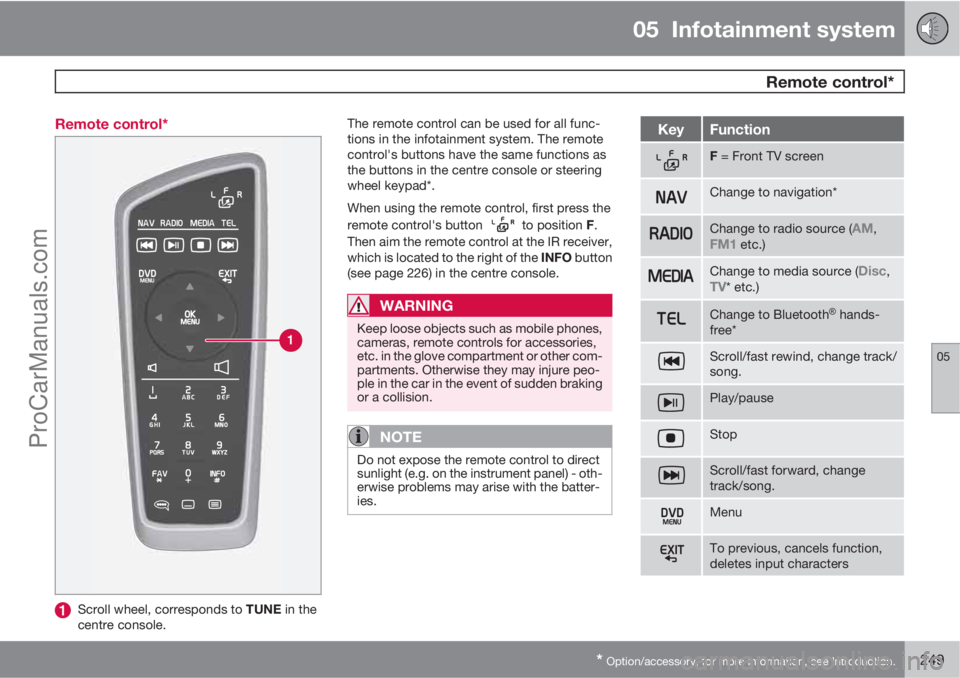
* Option/accessory, for more information, see Introduction.249 Remote control*
Scroll wheel, corresponds to TUNE in the
centre console.The remote control can be used for all func-
tions in the infotainment system. The remote
control's buttons have the same functions as
the buttons in the centre console or steering
wheel keypad*.
When using the remote control, first press the
remote control's button
to position F.
Then aim the remote control at the IR receiver,
which is located to the right of the INFO button
(see page 226) in the centre console.
WARNING
Keep loose objects such as mobile phones,
cameras, remote controls for accessories,
etc. in the glove compartment or other com-
partments. Otherwise they may injure peo-
ple in the car in the event of sudden braking
or a collision.
NOTE
Do not expose the remote control to direct
sunlight (e.g. on the instrument panel) - oth-
erwise problems may arise with the batter-
ies.
KeyFunction
F = Front TV screen
Change to navigation*
Change to radio source (AM,FM1 etc.)
Change to media source (Disc,TV* etc.)
Change to BluetoothŸ hands-
free*
Scroll/fast rewind, change track/
song.
Play/pause
Stop
Scroll/fast forward, change
track/song.
Menu
To previous, cancels function,
deletes input characters
ProCarManuals.com
Page 253 of 400

05 Infotainment system
BluetoothŸŸ handsfree*
05
* Option/accessory, for more information, see Introduction.251 General
System overview.
Mobile phone
Microphone
Steering wheel keypad
Centre console control panel
BluetoothŸ1
A mobile phone equipped with BluetoothŸ can
be connected wirelessly to the Infotainment
system. The infotainment system then works
handsfree, with the option to control a range of
the mobile phone's functions remotely. The
microphone used is located by the driver's sun
visor (2). The mobile phone can be operated byits own keys irrespective of whether or not it is
connected.
NOTE
Only a selection of mobile phones are fully
compatible with the handsfree function.
Volvo recommends that you seek assis-
tance from an authorised Volvo dealer or
visit www.volvocars.com for information on
compatible phones.
MenusThe menus in TEL are controlled from the cen-
tre console and the steering wheel keypad*.
For general information on menu navigation
and menu structures, see page 263.
Phone functions, controls overview
Centre console control panel.
Number and letter buttons
TEL - Activate/Disconnect
TUNE - Turn in normal view to the right to
access the phone book, and to the left for
the call register for all calls; also used for
navigation among the options on the TV
screen.
Accept incoming calls, confirm your selec-
tion or go to the Phone menu by pressing
OK/MENU.
EXIT - Cancels/rejects phone calls, deletes
input characters, leads up in the menu sys-
tem and cancels the current function.
1Applies to High Performance, High Performance Multimedia and Premium Sound Multimedia.
ProCarManuals.com
Page 254 of 400

05 Infotainment system
BluetoothŸŸ handsfree*
05
252* Option/accessory, for more information, see Introduction.
NOTE
If the car is equipped with a steering wheel
keypad* and/or remote control* then in
many cases these can be used instead of
the buttons in the centre console. For a
description of the buttons in the steering
wheel, see page 224. For a description of
the remote control, see page 249.
Remember
Activate/deactivateA short press on TEL activates the handsfree
function. The
symbol indicates that the
handsfree function is active.
Connect mobile phoneA mobile phone is connected in different ways
depending on whether or not it has been con-
nected previously. To connect a mobile phone
for the first time, follow the instructions below:
There are two options for connecting a mobile
phone, either via the car's menu system or via
the mobile phone's menu system. If one option
does not work then try with the other.
Alternative 1 - via the car's menu system
1. Make the mobile phone detectable/visible
via Bluetooth
Ÿ, see the mobile phone's
manual or www.volvocars.com.2. Activate the vehicle's handsfree function
by pressing TEL. Continue by pressing
OK/MENU.
3.
Select,
Change phone, press OK/
MENU.
>
The menu option
Add phone is shown
on the TV screen. If one or more mobile
phones have already been paired then
these are also shown. Press OK/
MENU.
4. Check that the mobile phone's
Bluetooth
Ÿ function is switched on and
press OK/MENU.
> The audio system searches for mobile
phones in the vicinity. The search takes
approximately 30 seconds. The mobile
phones detected are specified with their
respective Bluetooth
Ÿ name in the TV
screen. The handsfree function's
Bluetooth
Ÿ name is shown in the mobile
phone as My Volvo Car.
5. Choose one of the mobile phones in the
centre console TV screen.
6. Enter the series of numbers that is shown
in the centre console TV screen via the
mobile phone's keypad and press the
mobile phone's button to confirm the
selection.Alternative 2 - via the mobile phone's menu
system
1. Activate the handsfree function by press-
ing TEL in the centre console. If there is a
phone connected, disconnect the con-
nected phone.
2. Make the car detectable/visible via
Bluetooth
Ÿ, press OK/MENU and activate
the Phone settings
Discoverable
option.
3. Search with the mobile phone's
Bluetooth
Ÿ function, see the mobile phone
manual.
4.
Select
My Volvo Car in the list of units
detected in your mobile phone.
5. Enter an optional PIN code on your mobile
phone via the mobile phone's keypad
when prompted to enter the PIN code.
Then key in the same PIN code via the car's
keypad.
6.
Select to connect to
My Volvo Car from
the mobile phone.
The mobile phone is paired (registered) and
connects automatically to the audio system.
For more information about how mobile
phones are paired, see page 254.
When the connection is established the mobile
phone's Bluetooth
Ÿ name is shown in the TV
ProCarManuals.com