2012 VOLVO V60 engine
[x] Cancel search: enginePage 165 of 400

04 Comfort and driving pleasure
Fuel-driven engine block heater and passenger compartment heater*
04
* Option/accessory, for more information, see Introduction.163 Operation
READ button
Thumbwheel
RESET - resets/selects
For more information on the information dis-
play and READ, see page 142.
Symbols and display messages
When one of the timer's settings orDirect start is activated, the infor-
mation symbol in the combined instrument
panel illuminates while the information display
shows an explanatory text and a further illumi-
nated symbol. The table shows symbols and
display texts that appear.
NOTE
G02510
2 - Figure 2 in the symbol means the
second climate control system in the car,
where the normal climate control system is
the first. The figure 2 has nothing to do with
TIMER 1 or TIMER 2.
Sym-
bolDisplaySpecification
G02510
2
Fuel
heater
ONThe heater is
switched on and
running.
G02510
2
Timer is
set for
Fuel
heaterThe heater's timer
is activated after
the remote control
key has been
removed from the
ignition switch and
leaving the car -
the engine and
passenger com-
partment are
heated at the set
time.
Sym-
bolDisplaySpecification
G025102
Heater
stopped
Low bat-
teryThe heater has
been stopped by
the car's electron-
ics in order to facil-
itate starting the
engine.
G025102
Heater
unavail.
Low fuel
levelSetting the heater
is not possible due
to fuel level being
too low
(approx. 7 litres) -
this is in order to
facilitate starting
the engine as well
as approx. 50 km
driving.
G025102
Park
heater
Service
requiredHeater not work-
ing. Contact a
workshop for
repair. Volvo rec-
ommends that you
contact an author-
ised Volvo work-
shop.
ProCarManuals.com
Page 166 of 400

04 Comfort and driving pleasure
Fuel-driven engine block heater and passenger compartment heater*
04
164* Option/accessory, for more information, see Introduction.
A display text clears automatically after a time
or after one press on the indicator stalk
READ button.
Direct start and immediate stop
1.
Scroll with the thumbwheel to Direct start
Park heat.
2.
Press RESET to select between
ON andOFF.
ON: Parking heater switched on manually or
with programmed timer.
OFF: Parking heater switched off.
Following the direct start of the heater it will be
activated for 50 minutes.
Heating of the passenger compartment will
begin as soon as the engine coolant has
reached the correct temperature.
NOTE
The car can be started and driven while the
parking heater is running.
Setting the timer
The time when the car shall be used and heated
is specified with the timer.
Select between
TIMER 1 and TIMER 2.
NOTE
The timer can only be programmed when
the remote control key is in key position I,
see page 80 - programming must therefore
be carried out before starting the engine.
1.
Scroll with the thumbwheel to Park heat
timer 1.
2.
Briefly press RESET to move to the flash-
ing hours setting.
3. Select the required hour using the thumb-
wheel.
4.
Briefly press RESET to move to the flash-
ing minutes setting.
5. Select the required minute using the
thumbwheel.
6.
Briefly press RESET to confirm the setting.
7.
Press RESET to activate the timer.
After setting
Park heat timer 1 a second start
time can be programmed with Park heat timer
2 by scrolling to it with the thumbwheel.Set the alternative time in the same way as
Park heat timer 1.
Deactivating a timer-started heaterA timer-started heater can be switched off
manually before the set time has elapsed. Pro-
ceed as follows:
1.
Press READ.
2. Use the thumbwheel to scroll to the text
Park heat timer 1 or 2.
>
The text
ON flashes on the display.
3.
Press RESET.
>
The text
OFF is shown with a constant
glow and the heater is switched OFF.
A timer-started heater can be switched off in
accordance with the instructions in the section
"Direct start and immediate stop", see
page 164.
Clock/timerThe heater's time is connected to the car's
clock.
NOTE
All timer programming will be cleared if the
car's clock is reset.
ProCarManuals.com
Page 167 of 400

04 Comfort and driving pleasure
Additional heater*
04
* Option/accessory, for more information, see Introduction.165 General information about the
additional heater
In cold climate zones1 an additional heater may
be required to obtain the correct operating
temperature in the engine and to obtain suffi-
cient heating in the passenger compartment.
Fuel-driven additional heater
A fuel-driven additional heater is fitted in cars
with diesel engines.
The heater starts automatically when extra
heat is required when the engine is running.
The heater is switched off automatically when
the correct temperature is reached or when the
engine is switched off.
NOTE
When the additional heater is active there
may be smoke from the right-hand wheel
housing which is perfectly normal.
Auto mode or shutdownThe additional heater's automatic start
sequence can be switched off if required.
READ button
Thumbwheel
RESET button
1. Before starting the engine: Select key posi-
tion I, see page 80.
2.
Scroll with the thumbwheel to
Additional
heat auto.
3.
Press RESET to select between
ON andOFF.
NOTE
The menu options are only visible in key
position I - any adjustments must therefore
be made before starting the engine.
Passenger compartment heater*If the additional heater is supplemented with
timer function then it can be used as a fuel-
driven passenger compartment heater, see
page 162.
Electric additional heater
Cars with certain petrol engines2 have an elec-
tric additional heater integrated into the car's
climate control system.
In a semi-cold
1 climate zone diesel-driven cars
have an electric additional heater instead of a
fuel-driven version.
The heater cannot be controlled manually but
is instead activated automatically after the
engine has been started in outside tempera-
tures below 14 °C and is switched off after the
set passenger compartment temperature has
been reached.
1An authorised Volvo dealer has information regarding the geographical areas concerned.2An authorised Volvo dealer has information regarding the engines concerned.
ProCarManuals.com
Page 170 of 400

04 Comfort and driving pleasure
DSTC – Stability and traction control system
04
168* Option/accessory, for more information, see Introduction.
General information on DSTC
The stability and traction control system, DSTC
(Dynamic Stability & Traction Control) helps the
driver to avoid skidding and improves the car's
traction.
The activation of the system during braking
may be noticed as a throbbing sound. The car
may accelerate slower than expected when the
accelerator pedal is depressed.
Active Yaw ControlThe function limits the driving and brake force
of the wheels individually in order to stabilise
the car.
Spin ControlThe function prevents the driving wheels from
spinning against the road surface during accel-
eration.
Traction control systemThe function is active at low speed and trans-
fers power from the driving wheel that is spin-
ning to the one that is not.
Engine drag control - EDCEDC (Engine Drag Control) prevents involun-
tary wheel locking, e.g. after shifting down or
engine braking when driving in low gears on
slippery road surfaces.Involuntary wheel locking while driving can,
amongst other things, impair the driver's ability
to steer the car.
Corner Traction Control – CTCCTC compensates for understeer and allows
higher than normal acceleration in a bend with-
out wheelspin on the inner wheel, e.g. on an
arcing motorway entrance road to quickly
reach the prevailing traffic speed.
Trailer Stability Assist* - TSAThe function serves to stabilise the car and
trailer combination if it begins to snake, see
page 288.
NOTE
The function is deactivated if the driver
selects Sport mode.
Operation
Selection of level - Sport modeThe DSTC system is always activated - it can-
not be deactivated.However, the driver can select the Sport mode,
which allows for a more active driving experi-
ence. In Sport mode the system detects
whether the accelerator pedal, steering wheel
movements and cornering are more active than
in normal driving and then allows controlled
skidding with the rear section up to a certain
level before it intervenes and stabilises the car.
If the driver stops a controlled skid by releasing
the accelerator pedal then the DSTC system
intervenes and stabilises the car.
With Sport mode, maximum traction is
obtained if the car has become stuck, or when
driving on a loose surface - e.g. sand or deep
snow.
Proceed as follows to select Sport mode:
1.
Press the centre console button MY CAR
and search in the display screen's menu
system and locate My V60
DSTC. (For
information on the menu system, see
page 144).
2. Uncheck the box and back out of the menu
system with EXIT.
> The system then allows a more sporty
driving style.
The Sport mode is active until the driver dese-
lects it or until the engine is switched off - after
the engine is started the next time the DSTC
system is back in its normal mode again.
ProCarManuals.com
Page 171 of 400

04 Comfort and driving pleasure
DSTC – Stability and traction control system
04
169 Symbols and messages in the display
SymbolMessageSpecification
DSTC Temporarily OFFDSTC system temporarily reduced due to excessive brake disc temperature. - The function is reac-
tivated automatically when the brakes have cooled.
DSTC Service requiredDSTC system disengaged.
•Stop the car in a safe place, switch off the engine and start it again.
•Visit a workshop if the message remains - an authorised Volvo workshop is recommended.
and
"Message"There is a message on the speedometer's display - Read it!
Constant glow for
2 seconds.System check when the engine is started.
Flashing light.DSTC system is being activated.
Sport mode is activated.
ProCarManuals.com
Page 172 of 400
04 Comfort and driving pleasure
Adapting driving characteristics
04
170* Option/accessory, for more information, see Introduction.
Active chassis - Four-C*
Active chassis, Four-C (Continously Controlled
Chassis Concept), regulates the characteris-
tics of the shock absorbers so that the car's
driving characteristics can be adjusted. There
are three settings: Comfort, Sport and
Advanced.
ComfortThis setting means that the car is perceived as
being more comfortable on rough and uneven
road surfaces. Shock absorption is soft and the
movement of the body is smooth and gentle.
SportThis setting means that the car is perceived as
being more sporty and is recommended for
more active driving. Steering response is faster
than in the Comfort mode. Shock absorption is
harder and the body follows the road in order
to reduce rolling during cornering.
AdvancedThis setting is only recommended on very even
and smooth road surfaces.
The shock absorbers are optimised for maxi-
mum roadholding and rolling in bends is further
minimised.
Operation
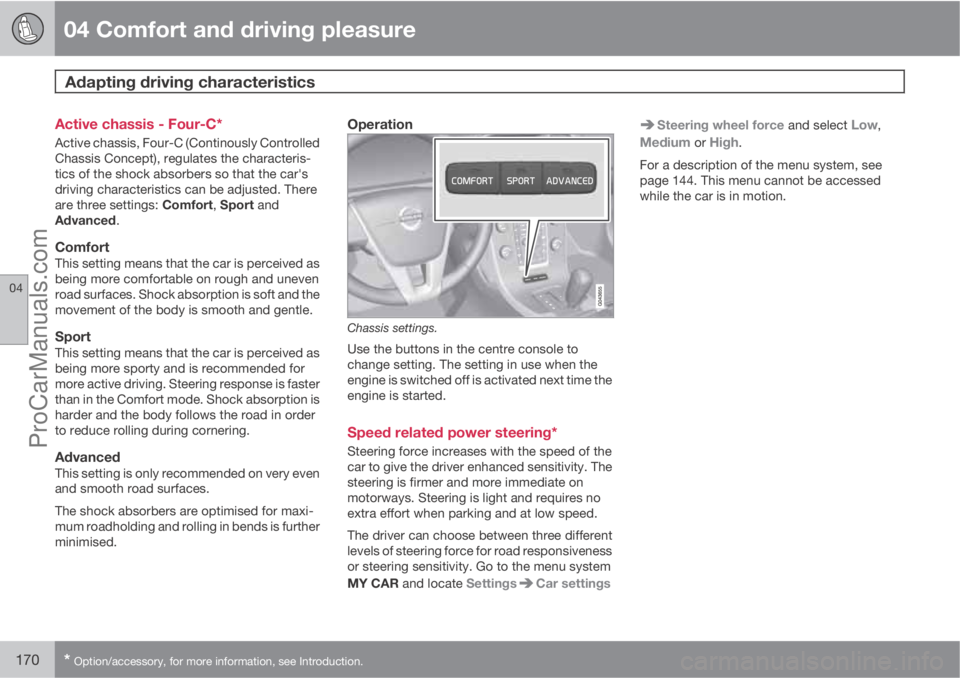
Chassis settings.
Use the buttons in the centre console to
change setting. The setting in use when the
engine is switched off is activated next time the
engine is started.
Speed related power steering*
Steering force increases with the speed of the
car to give the driver enhanced sensitivity. The
steering is firmer and more immediate on
motorways. Steering is light and requires no
extra effort when parking and at low speed.
The driver can choose between three different
levels of steering force for road responsiveness
or steering sensitivity. Go to the menu system
MY CAR and locate Settings
Car settings
Steering wheel force and select Low,
Medium or High.
For a description of the menu system, see
page 144. This menu cannot be accessed
while the car is in motion.
ProCarManuals.com
Page 173 of 400

04 Comfort and driving pleasure
Cruise control*
04
* Option/accessory, for more information, see Introduction.171 Operation
Steering wheel keypad and display.
Cruise control - On/Off.
Standby mode ceases and the stored
speed is resumed.
Standby mode
Activate and adjust the speed.
Selected speed (in brackets = Standby
mode).
Activating and setting the speedSwitch on the cruise control with one press on
the steering wheel button
- the symbol
is illuminated in the display (5) and the brackets
around (---) km/h show that the cruise control
is set in standby mode.The cruise control is then activated with
or
, after which the current speed is stored in
the memory - the display text
(---) km/hchanges to show the selected speed, e.g. 100
km/h.
NOTE
Cruise control cannot be engaged at
speeds below 30 km/h.
Changing the speedIn active mode the speed is adjusted with long
or short presses on
or - the last press is
stored in the memory.
A temporary increase in speed with the accel-
erator pedal, e.g. during overtaking, does not
affect the cruise control setting - the car returns
to the set speed when the accelerator pedal is
released.
NOTE
If any cruise control button is held
depressed for more than approx. 1 minute
then cruise control is disengaged. The
engine must be switched off in order to reset
cruise control.
Temporary deactivation - standby mode
Press to temporarily disengage the cruise
control and set it in standby mode - set speed
is shown in brackets in the display (5), e.g.
(100) km/h.
Automatic standby modeCruise control is temporarily disengaged and
set in standby mode if:
•wheels lose traction
•the foot brake is used
•speed falls below approx. 30 km/h
•the clutch pedal is depressed
•the gear selector is moved to neutral posi-
tion (automatic gearbox)
•the driver maintains a speed higher than
the set speed for longer than 1 minute.
The driver must then regulate the speed.
Resume set speedCruise control in standby mode is re-activated
with one press on the steering wheel button
- the speed is then set to the last stored
speed.
NOTE
A significant increase in speed may arise
after the speed has been resumed with .
ProCarManuals.com
Page 174 of 400
04 Comfort and driving pleasure
Cruise control*
04
172* Option/accessory, for more information, see Introduction.
DeactivateThe cruise control is switched off with the
steering wheel button
or by switching off
the engine - the set speed is deleted from the
memory and cannot be resumed with the
button.
ProCarManuals.com