2012 VOLVO V60 warning
[x] Cancel search: warningPage 209 of 400

04 Comfort and driving pleasure
Park assist syst*
04
* Option/accessory, for more information, see Introduction.207
IMPORTANT
When fitting auxiliary lamps: Remember that
they must not obscure the sensors – the
auxiliary lamps could then be detected as
obstacles.
Fault indicator
If the information symbol illuminates
with constant glow and the informa-
tion display shows
Park assist syst Service
required then parking assistance is disen-
gaged.
IMPORTANT
In certain conditions the parking assistance
system may produce incorrect warning sig-
nals that are caused by external audio
sources that emit the same ultrasonic fre-
quencies that the system works with.
Examples of such sources include horns,
wet tyres on asphalt, pneumatic brakes and
exhaust noises from motorcycles etc.
Cleaning the sensors
Sensor location, front.
Sensor location, rear.
The sensors must be cleaned regularly to
ensure that they work properly. Clean them
with water and car shampoo.
NOTE
Dirt, ice and snow covering the sensors may
cause incorrect warning signals.
ProCarManuals.com
Page 210 of 400

04 Comfort and driving pleasure
Park assist camera*
04
208* Option/accessory, for more information, see Introduction.
General
The parking camera is an assist system and is
activated when reverse gear is engaged (can
be changed in the settings menu, see
page 144).
The camera image is shown on the centre con-
sole's screen.
WARNING
•The parking camera serves as an aid. It
does not relieve the driver of responsi-
bility when reversing.
•The camera has blind spots, where
obstacles cannot be detected.
•Be aware of people and animals in the
vicinity of the car.
CAM button location.
The camera shows what is behind the car and
if something appears from the sides.
The camera shows a wide area behind the car
and part of the bumper and any towbar.
Objects on the screen may appear to tilt slightly
- this is normal.
NOTE
Objects on the display screen may be closer
to the car than they appear to be on the
screen.
If another view is active the parking camera
system takes over automatically and the cam-
era image is displayed on the screen.When reverse gear is engaged two unbroken
lines are shown graphically which illustrate
where the car's rear wheels will roll with the
current steering wheel angle, this facilitates
tight parking, reversing into tight spaces and
for hitching a trailer. The car's approximate
exterior dimensions are also illustrated by two
dashed lines, the park assist lines can be deac-
tivated in the settings menu.
If the car is also equipped with parking assis-
tance sensors* then their information is dis-
played graphically as coloured fields in order to
illustrate the distance to detected obstacles,
see page 205.
The camera is active approx. 5 seconds after
reverse gear has been disengaged or until the
car's speed exceeds 10 km/h.
Camera location next to the opening handle.
ProCarManuals.com
Page 213 of 400

04 Comfort and driving pleasure
BLIS* – Blind Spot Information System
04
* Option/accessory, for more information, see Introduction.211 General information on BLIS
G021426
BLIS camera1
Indicator lamp
BLIS symbol
BLIS is an information system based on cam-
era technology that under certain conditions
can help the driver to notice vehicles moving in
the same direction as the host vehicle in the so-
called "blind spot".
WARNING
The system is a supplement to, not a
replacement for, a safe driving style and use
of the rearview mirrors. It can never replace
the driver's attention and responsibility. The
responsibility for changing lanes safely
always rests with the driver.
The system is designed to work most effec-
tively when driving in dense traffic on multi-lane
highways.
When a camera (1) has detected a vehicle
inside the blind spot zone the indicator lamp (2)
illuminates with a constant glow.
NOTE
The lamp illuminates on the side of the car
where the system has detected the vehicle.
If the car is overtaken on both sides at the
same time then both lamps illuminate.
BLIS advises the driver with a message if a fault
arises in the system. If for example the sys-
tem's cameras are obscured then the BLIS
indicator lamp flashes and a message is shown
on the information display. In such cases,
check and clean the lenses.If necessary, the system can be switched off
temporarily, see the section "Activate/deacti-
vate".
Blind spots
A = approx. 9.5 m and B = approx. 3.0 m.
1NOTE: The illustration is schematic - details may vary depending on car model.
ProCarManuals.com
Page 214 of 400

04 Comfort and driving pleasure
BLIS* – Blind Spot Information System
04
212* Option/accessory, for more information, see Introduction.
Activate/deactivate
Button for activating/deactivating.
BLIS is activated when the engine is started.
The indicator lamps in the door panels flash
three times when BLIS is activated.
The system can be deactivated/activated after
starting the engine with one press on the
BLIS button.
Some combinations of the selected equipment
leave no vacant space for a button in the centre
console - in which case the function is handled
by the car's menu system MY CAR under
Settings
Car settingsBLIS. (For a
description of the menu system - see
page 144).When BLIS is deactivated, the lamp in the but-
ton goes out and a message is shown in the
instrument panel display.
When BLIS is activated the light in the button
illuminates, a new text message is shown on
the display and the indicator lamps in the door
panels flash 3 times. Press the READ button to
delete the text message. (For a description of
messages - see page 142).
When BLIS operates
The system operates when the car is driven at
a speed above 10 km/h.
OvertakingThe system is designed to react if:
•you overtake another vehicle at a speed of
up to 10 km/h faster than the other vehicle
•you are overtaken by a vehicle travelling up
to 70 km/h faster than you are travelling.
WARNING
BLIS does not work in sharp bends.
BLIS does not work when the car is revers-
ing.
A wide trailer coupled to the car can conceal
other vehicles in adjacent lanes. It can pre-
vent the vehicle in the screened area from
being detected by BLIS.
Daylight and darknessIn daylight the system reacts to the shape of
the surrounding vehicles. The system is
designed to detect motor vehicles such as
cars, trucks, buses and motorcycles.
In darkness the system reacts to the head-
lamps of surrounding vehicles. If the head-
lamps of surrounding vehicles are not switched
on then the system does not detect the vehi-
cles. This means for example that the system
does not react to a trailer without headlamps
which is towed behind a car or truck.
WARNING
The system does not react to cyclists or
moped riders.
The BLIS cameras have limitations similar to
those of the human eye, i.e. they do not
"see" as well e.g. in heavy snowfall, against
strong light or in thick fog.
ProCarManuals.com
Page 218 of 400

04 Comfort and driving pleasure
Comfort inside the passenger compartment
04
216* Option/accessory, for more information, see Introduction.
Storage compartment in door panel
Storage pocket* on front edge of front seat
cushions
Ticket clip
Glovebox
Storage compartment
Jacket holder
Storage compartment, cup holder
Cup holder* in armrest, rear seat
Storage pocket
Jacket holderThe jacket holder is only designed for light
clothing.
WARNING
Keep loose objects such as mobile phones,
cameras, remote controls for accessories,
etc. in the glove compartment or other com-
partments. Otherwise they may injure peo-
ple in the car in the event of sudden braking
or a collision.
Tunnel console
Storage compartment (e.g. for CDs) and
USB*/AUX input under the armrest.
Includes cup holder for driver and passen-
ger. (If ashtray and cigarette lighter are
specified then there is a cigarette lighter in
the 12 V socket for the front seat, see
page 217, and a detachable ashtray in the
cup holder.)
Cigarette lighter and ashtray*The ashtray in the tunnel console is detached
by lifting the tray straight up.
Activate the lighter by pushing in the button.
The button pops out when the lighter is hot. Pull
out the lighter and light a cigarette on the
heated coils.
Glovebox
The owner's manual and maps can be kept
here for example. There are also holders for
pens on the inside of the lid. The glovebox can
be locked with the key blade, see page 50.
Inlay mats*
Volvo supplies specially manufactured inlay
mats.
WARNING
Before setting off check that the inlaid mat
in the driver area is firmly affixed and
secured in the pins in order to avoid getting
caught adjacent to and under the pedals.
ProCarManuals.com
Page 219 of 400

04 Comfort and driving pleasure
Comfort inside the passenger compartment
04
* Option/accessory, for more information, see Introduction.217 Vanity mirror
G021438
Vanity mirror with lighting.
The light illuminates automatically when the
cover is lifted.
12 V socket
12 V socket in tunnel console, front seat.
The electrical socket can be used for various
accessories designed for 12 V, e.g. TV screens,
music players and mobile phones. For the
socket to supply current, the remote control
key must be in at least key position I, see
page 80.
IMPORTANT
Max. socket is 10 A (120 W) if one socket is
used at a time. If both sockets are used
simultaneously, 7.5 A (90 W) per socket is
applicable.
WARNING
Always leave the plug in the socket when
the socket is not in use.
NOTE
Optional equipment and accessories - e.g.
TV screens, music players and mobile
phones - which are connected to one of the
passenger compartment's 12V electrical
sockets, could be activated by the climate
control system, even when the remote con-
trol key has been removed or when the car
is locked, for example, when the parking
heater is activated at a preset time.
For this reason remove the plugs from the
electrical sockets for optional equipment or
accessories when not in use because the
battery could be drained in the event of such
an occurrence!
Electrical socket in cargo area*For more information, see page 279.
ProCarManuals.com
Page 251 of 400
05 Infotainment system
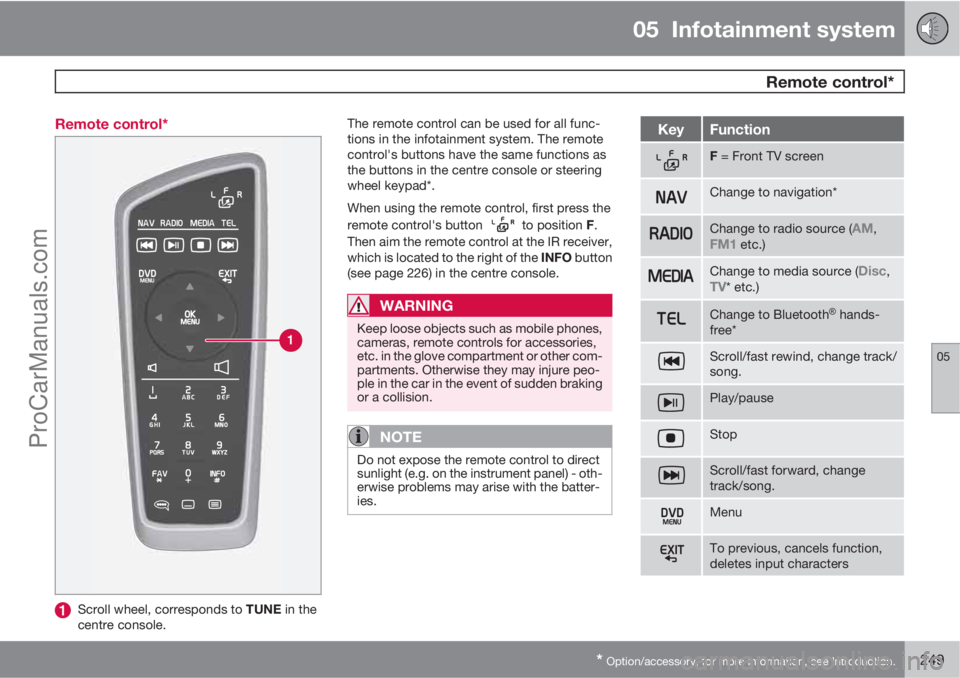
Remote control*
05
* Option/accessory, for more information, see Introduction.249 Remote control*
Scroll wheel, corresponds to TUNE in the
centre console.The remote control can be used for all func-
tions in the infotainment system. The remote
control's buttons have the same functions as
the buttons in the centre console or steering
wheel keypad*.
When using the remote control, first press the
remote control's button
to position F.
Then aim the remote control at the IR receiver,
which is located to the right of the INFO button
(see page 226) in the centre console.
WARNING
Keep loose objects such as mobile phones,
cameras, remote controls for accessories,
etc. in the glove compartment or other com-
partments. Otherwise they may injure peo-
ple in the car in the event of sudden braking
or a collision.
NOTE
Do not expose the remote control to direct
sunlight (e.g. on the instrument panel) - oth-
erwise problems may arise with the batter-
ies.
KeyFunction
F = Front TV screen
Change to navigation*
Change to radio source (AM,FM1 etc.)
Change to media source (Disc,TV* etc.)
Change to BluetoothŸ hands-
free*
Scroll/fast rewind, change track/
song.
Play/pause
Stop
Scroll/fast forward, change
track/song.
Menu
To previous, cancels function,
deletes input characters
ProCarManuals.com
Page 261 of 400

05 Infotainment system
Voice recognition* mobile phone
05
* Option/accessory, for more information, see Introduction.259 Introduction
The infotainment system's voice recognition1
allows the driver to voice-activate certain func-
tions in a BluetoothŸ-connected mobile phone
or in Volvo's navigation system - RTI (Road and
Traffic Information System).
NOTE
•The information in this section
describes the use of voice commands
to control a mobile phone connected
using Bluetooth
Ÿ. For detailed infor-
mation on using a mobile phone con-
nected using Bluetooth
Ÿ with the car's
Infotainment system see page 251.
•The Volvo navigation system RTI (Road
and Traffic Information System) has a
separate user manual which contains
more information on voice control and
voice commands to control that sys-
tem.
Voice commands offer convenience and help
the driver to avoid being distracted, and
instead concentrate on driving and focus
attention on the road and traffic conditions.
WARNING
The driver always holds overall responsibil-
ity for driving the vehicle in a safe manner
and complying with all applicable rules of
the road.
The voice recognition system allows the driver
to voice-activate certain functions of a
Bluetooth
Ÿ-connected mobile phone and in
Volvo's navigation system - RTI (Road and
Traffic Information System), while the driver
can keep his/her hands on the wheel at the
same time. The input data are in dialogue form
with spoken commands from the user and ver-
bal replies from the system. The voice recog-
nition system uses the same microphone as
the Bluetooth
Ÿ handsfree system (see illustra-
tion on page 251) and the voice recognition
system's replies come via the car's speakers.
Language
Language list.
Voice recognition is not possible for all lan-
guages. Languages available for voice recog-
nition are marked with an icon in the language
list -
. Changing the language is performed
in the menu system MY CAR, see page 146.
1Only applies to vehicles equipped with Volvo's navigation system - RTI (Road and Traffic Information System).
ProCarManuals.com