2012 VOLKSWAGEN TOUAREG Front head set
[x] Cancel search: Front head setPage 67 of 684
Function Switch position Action
To stop the one-
touch feature:
(4) or (5) Push or pull switch again briefly.
To set an interme-
diate position: (4) to (5)
Pull or push the rear part of the
switch briefly until the desired
position is reached.
To close fully: (5) Pull the rear part of the switch
briefly.
The power sunroof only works when the ignition is on. You can still open or close the power sunroof for several minutes after you switch off the ignition, as long as the driver or front passenger door has not been opened.
All procedures are interrupted as soon as the rotary switch is operated.
The sunshade opens automatically when the power sunroof opens if the shade was previously com-pletely closed or in front of the glass roof. The sunshade remains in the previous position and does not close automatically with the sunroof. The sunshade cannot be closed completely until the power sunroof is closed.
If your power sunroof will not close properly, do not try to close it yourself, doing so can cause serious and expensive damage that will not be covered by any Volkswagen Limited Warranty. Special knowledge and tools are required to close the power sunroof if it will not close on its own. To help prevent damage to the sunroof, have an authorized Volkswagen dealer or an authorized Volkswagen Service Facility help you close and repair the power sunroof.
The comfort position (2) provides sufficient ventilation without loud wind noise.
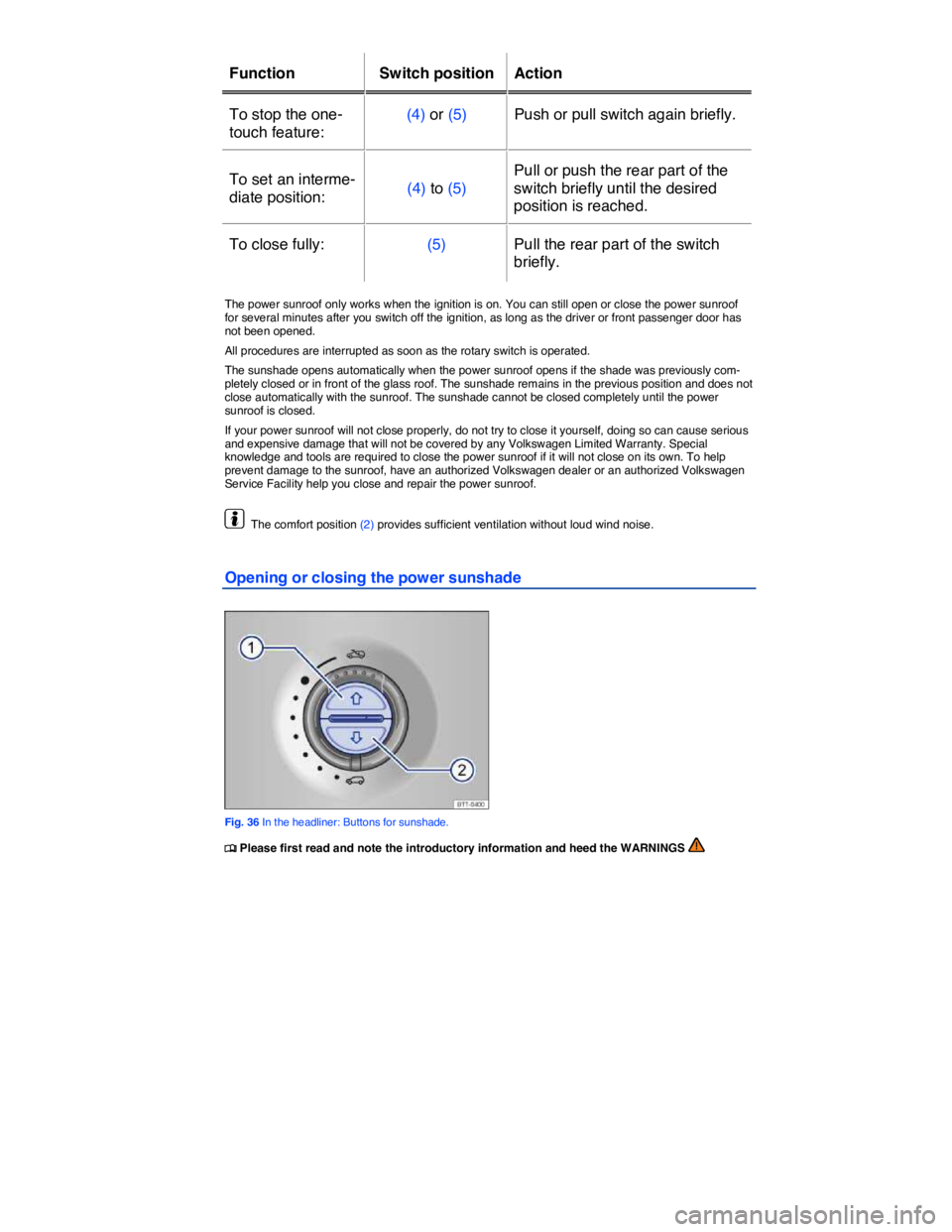
Opening or closing the power sunshade
Fig. 36 In the headliner: Buttons for sunshade.
Page 122 of 684

Adaptive Front Lighting System (AFS)
The Adaptive Front Lighting System works only with the low beams switched on and only at speeds about 6 mph (10 km/h). The swivel-mounted lamps automatically improve road illumination during cornering.
The Adaptive Front Lighting System can be switched on and off in the Infotainment System.
x Switch on the ignition.
x Press the CAR Infotainment button.
x Tap the Settings function key on the screen.
x Select the menu item Lights and vision from the list.
x Tap Adaptive front lighting system (AFS) to enable or disable this feature.
The feature is enabled when the check box in the Adaptive front lighting system (AFS) function key is checked =.
Lights with LED-technology
You cannot replace the LEDs. Contact your authorized Volkswagen dealer or an authorized Volkswagen Service Facility for assistance.
WARNING
Crashes and other accidents can happen when you cannot see the road ahead and when you cannot be seen by other motorists.
x Never use daytime running lights (DRL) to see where you are going. (DRL) are not bright enough to light up the roadway and be seen by other motorists. You will not be able to see far enough ahead for safety, especially at dusk or when it is dark. Always switch on the low beam headlights at dusk or when it is dark.
x If automatic headlight control (!54/) is switched on, the low beam headlights still may not be switched on in fog or heavy rain. You have to switch on the low beam headlights yourself.
x The taillights do not come on when the daytime running lights are switched on. A vehicle without taillights on cannot be seen by others in bad weather, at dusk, or when it is dark.
In cool or humid weather, the insides of the headlights, rear lights, and turn signals can tempo-rarily fog up. This is normal and does not affect the service life of the vehicle's lighting system.
“Coming home” and “Leaving home” feature (orientation lighting)
Page 168 of 684

Headlight settings
Towing a trailer can raise the front end of the vehicle enough for the low beams to blind other road users. Use the headlight range adjustment feature to lower the light cones as required. If your vehicle does not have headlight range adjustment, have the headlights adjusted by an authorized Volkswagen dealer or authorized Volkswagen Service Facility. Vehicles with Xenon headlights self-adjust to vehicle load and do not need manual adjustment.
Special towing considerations
x If the trailer has an overrun brake, apply the brakes gently at first and then firmly. This helps to prevent sudden brake shock and helps prevent trailer wheels from locking up.
x Due to the combined towing weight including the higher gross vehicle weight, the stopping distance is longer.
x Before driving downhill, especially on hills that are long or steep, shift into a lower gear so that the engine helps to brake the vehicle. Otherwise, the brake system could overheat and might fail.
x The vehicle's center of gravity and, in turn, the vehicle's handling, will change because of the trailer load and the increased combined towing weight of the vehicle and trailer.
x Weight distribution is especially bad if the towing vehicle is empty and the trailer is loaded. If you absolutely must drive with this combination, drive with extra care and at a reduced speed.
Starting off with a trailer on hills
Depending on how steep the hill is and the combined towing weight, a parked vehicle with trailer can roll backwards when you first start moving.
When starting off with a trailer on a hill:
x Depress and hold the brake pedal.
x Put the transmission in Drive (D).
x Press the G button once to deactivate the electronic parking brake ⇒ page 411, Braking and parking.
x Pull and hold the G button to hold the vehicle and trailer with the electronic parking brake ⇒ Braking and parking.
x At the same time, release the brake pedal and gradually depress the accelerator. Do not release the G button until the engine starts to move the vehicle forward. If your vehicle has an automatic transmission, you can also depress and hold the brake pedal for added braking and then let up on the brake pedal when you feel that the vehicle “wants” to move forward.
x Drive ahead slowly.
Page 454 of 684

WARNING
Always remember that the Adaptive Cruise Control has limits – Using Adaptive Cruise Con-trol when it is not possible to drive safely at a constant speed can be dangerous and can lead to an accident and serious personal injury.
x Adaptive Cruise Control will not slow the vehicle down or maintain the set distance when you drive towards an obstacle or something on or near the road that is not moving, such as vehicles stopped in a traffic jam, a stalled or disabled vehicle.
x Always adjust your speed and the distance you keep between you and the vehicles ahead of you to the road, traffic, weather, and visibility conditions.
x Never use Adaptive Cruise Control on steep, winding, or slippery roads (such gravel roads, wet roads, or snowy or icy roads) or on roads with standing water.
x Never use Adaptive Cruise Control when driving in heavy or varying stop-and-go traffic.
x Never use Adaptive Cruise Control when driving off-road or on unpaved roads.
x Always remember that the Adaptive Cruise Control cannot detect a vehicle that is driving towards you in your traffic lane and that it cannot detect narrow vehicles such as motorcy-cles and bicycles.
x Never follow a vehicle so closely that you cannot stop your vehicle safely. The Adaptive Cruise Control cannot slow or brake the vehicle safely when you follow another vehicle too closely. Always remember that the Adaptive Cruise Control has a braking power that is only about 30% of the vehicle's maximum braking ability, under certain circumstances the auto-matic braking function cannot bring the vehicle to a stop in time.
x Always turn off Adaptive Cruise Control when entering turn lanes, exit lanes and construc-tion zones or in similar situations because the vehicle will automatically accelerate to the stored speed when the road ahead is clear.
x To help prevent unintended operation of Adaptive Cruise Control, switch the system off when it is not being used.
x It is dangerous to use the Resume feature when the previously set speed is too high for the existing road, traffic, or weather conditions.
x When traveling downhill, the Adaptive Cruise Control may not be able to maintain a con-stant speed. The vehicle will speed up because of its own weight. Downshift and/or use the foot brake to slow the vehicle.
x Never allow the closing speed between you and other vehicles to be so high that the Adaptive Cruise Control may not be able to slow your vehicle safely. If closing speed is too high, you must apply the brakes yourself to reduce the risk of a rear-end crash.
x If a driver intervention warning appears in the instrument cluster display, immediately takeover the control of the brake and gas pedals and low down the vehicle or bring it to stop when necessary and according to the traffic situation.
x If a Forward Collision Warning system (Front Assist) collision warning appears in the instrument cluster display, immediately takeover the control of the brake and gas pedals and low down the vehicle or bring it to stop when necessary and according to the traffic situation.
x Always be prepared to takeover the control of the brake and the gas pedal in every situa-tion.
NOTICE
If you suspect that ACC and the Forward Collision Warning system (Front Assist) don't work properly or the sensors are damaged, switch off ACC immediately.
x Go see an authorized Volkswagen dealer or Volkswagen Service Facility for assistance and have the ACC system checked.
Page 473 of 684

Vehicles with oversize loads
Under certain circumstances vehicles carrying oversize loads or loads that exceed the vehicle dimen-sions, like flat-bed trailer trucks, can't be recognized correctly by the ACC. Switch off ACC when driving behind such vehicles.
Other vehicles changing lanes
Vehicles that change into your lane within a short distance can only be detected by the radar sensor
once they are within sensor range ⇒ fig. 278 (C). The result is a delayed reaction by the Adaptive Cruise Control.
Stationary vehicles
If a vehicle detected by Adaptive Cruise Control turns or changes lanes and there is a stationary vehicle in front of that vehicle, the system will not react to the stationary vehicle (D).
Narrow vehicles
Narrow vehicles, such as motorcycles traveling ahead, are often detected late or not at all under some circumstances.
Oncoming vehicles
ACC does not detect oncoming vehicles on your lane.
Metal objects on the road
Metal objects on the road, such as tracks, can cause irritations for the ACC due to falsely reflected radar signals and therefore lead to unwanted reactions of the system, such as abrupt braking maneu-vers.
Radar sensor impaired by rain and dirt
If the radar sensor function is impaired by heavy rain, spray, snow or mud, Adaptive Cruise Control switches off temporarily. ACC not available. No sensor view! appears in the instrument cluster display.
When Adaptive Cruise Control is reactivated after this message is displayed, it functions like a “stand-ard” cruise control system. It maintains the set speed but it does not regulate the distance to the vehicle ahead.
Overheated brakes
Adaptive Cruise Control may switch off temporarily if the brakes overheat significantly, for example from braking maneuvers or driving down steep slopes. ACC not available appears in the instru-ment cluster display. Adaptive Cruise Control cannot be activated.
Adaptive Cruise Control can be activated again once the temperature of the brakes decreases suffi-ciently. The message ACC not available in the instrument cluster switches off.
If the message ACC not available does not switch off, there is a malfunction. Contact your au-thorized Volkswagen dealer.
Trailer towing
When towing a trailer, ACC and the Forward Collision Warning system (Front Assist) may work only with limited functionality.
Text messages in the instrument cluster display
Text message Meaning
Page 629 of 684

Description Possible causes
among others Possible remedy
when vehicle is
unlocked. Memory-seat settings
are stored.
– Reassign seat setting
– Clear memory-seat
memory
Front seats cannot
be adjusted with
power controls.
Vehicle battery dead. Charge vehicle battery
Fuse blown. Check fuse and replace if
necessary
No jack in vehicle
or no collapsible
spare tire or tire
mobility set in ve-
hicle.
Equipment differs
depending on vehicle.
No direct corrective action
possible because this de-
pends on the equipment.
Contact an authorized
Volkswagen dealer or an
authorized Volkswagen Ser-
vice Facility for assistance
Vehicle has mobility
tires.
Features do not
work as described
in this Manual.
Settings were
changed in the
Volkswagen Infor-
mation System or
Infotainment System.
Check and reset to factory
settings if necessary or
Headlights do not
light up the road as
they should.
– Headlights incorrect-
ly adjusted.
– Light bulbs burned
out.
– Low beams not
switched on.
– Adjust headlight range
– Change light bulbs
– Switch on low beams
Electrical appli-
ances do not work.
Vehicle battery charge
too low. Charge vehicle battery
Remaining fuel level
too low. Refuel
Fuse blown. Check fuse and replace if
necessary