Page 180 of 400

180 2-5. Driving information
Trailer towing tipsYour vehicle will handle differently w hen towing a trailer. In order to
avoid accident, death or serious in jury, keep the following in mind
when towing:
● Before starting out, check the trailer lights and the vehicle-trailer
connections. Recheck after driving a short distance.
● Practice turning, stopping and reve rsing with the trailer attached in
an area away from traffic until you become accustomed to the feel
of the vehicle.
● Reversing with a trailer attached is difficult and requires practice.
Grip the bottom of the steering wheel and move your hand to the
left to move the trailer to the left. Move your hand to the right to
move the trailer to the right. (This is generally opposite to reversing
without a trailer attached.) Avoid sharp or prolonged turning. Have
someone guide you when reversing to reduce the risk of an acci-
dent.
● As stopping distance is increased when towing a trailer, vehicle-to-
vehicle distance should be increased. For each 10 mph (16 km/h)
of speed, allow at least o ne vehicle and trailer length.
● Avoid sudden braking as you may skid, resulting in jackknifing and
loss of control. This is especiall y true on wet or slippery surfaces.
● Avoid jerky starts or sudden acceleration. Vehicles with a manual
transmission, prevent excessive cl utch slippage by keeping engine
rpm low and not racing the engine. Always start out in first gear.
● Avoid jerky steering and sharp turns, and slow down before mak-
ing turn.
● Note that when making a turn, th e trailer wheels will be closer than
the vehicle wheels to the inside of the turn. Compensate by making
a larger than normal turning radius.
Page 181 of 400

181
2-5. Driving information
2
When driving
●
Crosswinds and rough roads will adversely affect handling of your
vehicle and trailer, causing sway . Periodically check the rear to
prepare for being passed by large trucks or buses, which may
cause your vehicle and trailer to sway. If swaying occurs, firmly grip
the steering wheel, reduce speed immediately but gradually, and
steer straight ahead. Never increase speed. If you make no
extreme correction with the stee ring or brakes, your vehicle and
trailer will stabilize.
● Take care when passing other vehicles. Passing requires consider-
able distance. After passing a vehicle, do not forget the length of
your trailer, and be sure you hav e plenty of room before changing
lanes.
● To maintain engine braking efficiency and charging system perfor-
mance when using engine braking, do not use the transmission in
D (vehicles with an automatic transmission) or 5 (vehicles with a
manual transmission).
● Due to the added load of the trailer, your vehicle’s engine may
overheat on hot days (at temperatures over 85°F [30°C]) when
driving up a long or steep grade. If the high engine coolant temper-
ature warning light flashes or co mes on overheating, immediately
turn off the air conditioning (if in use), pull your vehicle off the road
and stop in a safe place. ( P. 334)
Page 189 of 400
189
2-5. Driving information
2
When driving
NOTICE
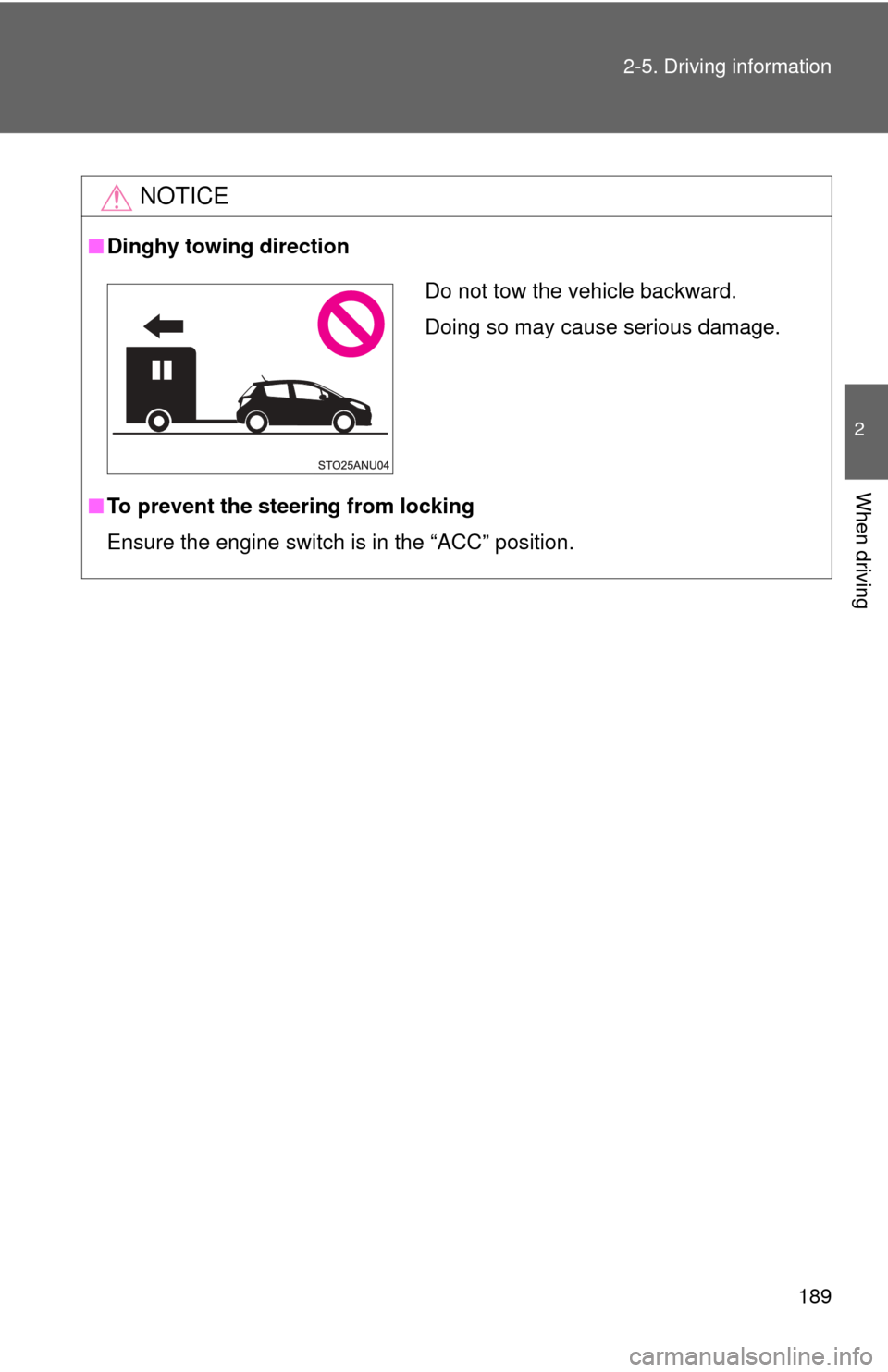
■
Dinghy towing direction
■ To prevent the steering from locking
Ensure the engine switch is in the “ACC” position.
Do not tow the vehicle backward.
Doing so may cause serious damage.
Page 191 of 400

Interior features3
191
3-1. Using the air conditioning system and defogger
Air conditioning system .... 192
Rear window and outside rear view mirror
defoggers ....................... 199
3-2. Using the audio system Using the AUX port/USB port ........................ 200
Using the steering wheel audio switches ............... 201
3-3. Using the interior lights Interior lights list ............... 202
• Personal lights ................ 203
• Interior light .................... 203
3-4. Using the storage features List of storage features .... 204
• Glove box....................... 205
• Cup holders ................... 205
• Bottle holders ................. 207 3-5. Other interior features
Sun visors ........................ 208
Vanity mirrors ................... 209
Clock ................................ 210
Outside temperature display............................ 211
Power outlet ..................... 213
Floor mat .......................... 214
Luggage compartment features .......................... 216
Page 201 of 400
201
3-2. Using the audio system
3
Interior features
Using the steering wheel audio switches
: If equipped
CAUTION
■To reduce the risk of an accident
Exercise care when operating the audio switches on the steering wheel.
Some audio features (aud io volume control, radio, CD player etc.)
can be controlled using the switches on the steering wheel.
For more information, please refe r to the ”Toyota Audio System
Owner’s Manual” or “Toyota Navigation System Owner’s Manual”.
Page 230 of 400
230 4-2. Maintenance
Indicators/buzzers• Do the indicators and buzzers
function properly?
Lights • Do all the lights come on?
Parking brake • Does the parking brake lever
move smoothly?
• When parked on a slope and the parking brake is on, is the vehicle
securely stopped?
Seat belts • Do the seat belts operate
smoothly?
• The seat belts should not be dam- aged.
Seats • Do the seat controls operate
properly?
Steering wheel • Does the steering wheel rotate
smoothly?
• Does the steering wheel have the correct amount of free play?
• There should not be any strange sounds coming from the steering
wheel.
ItemsCheck points
Page 279 of 400
279
4-3. Do-it-yourself maintenance
4
Maintenance and care
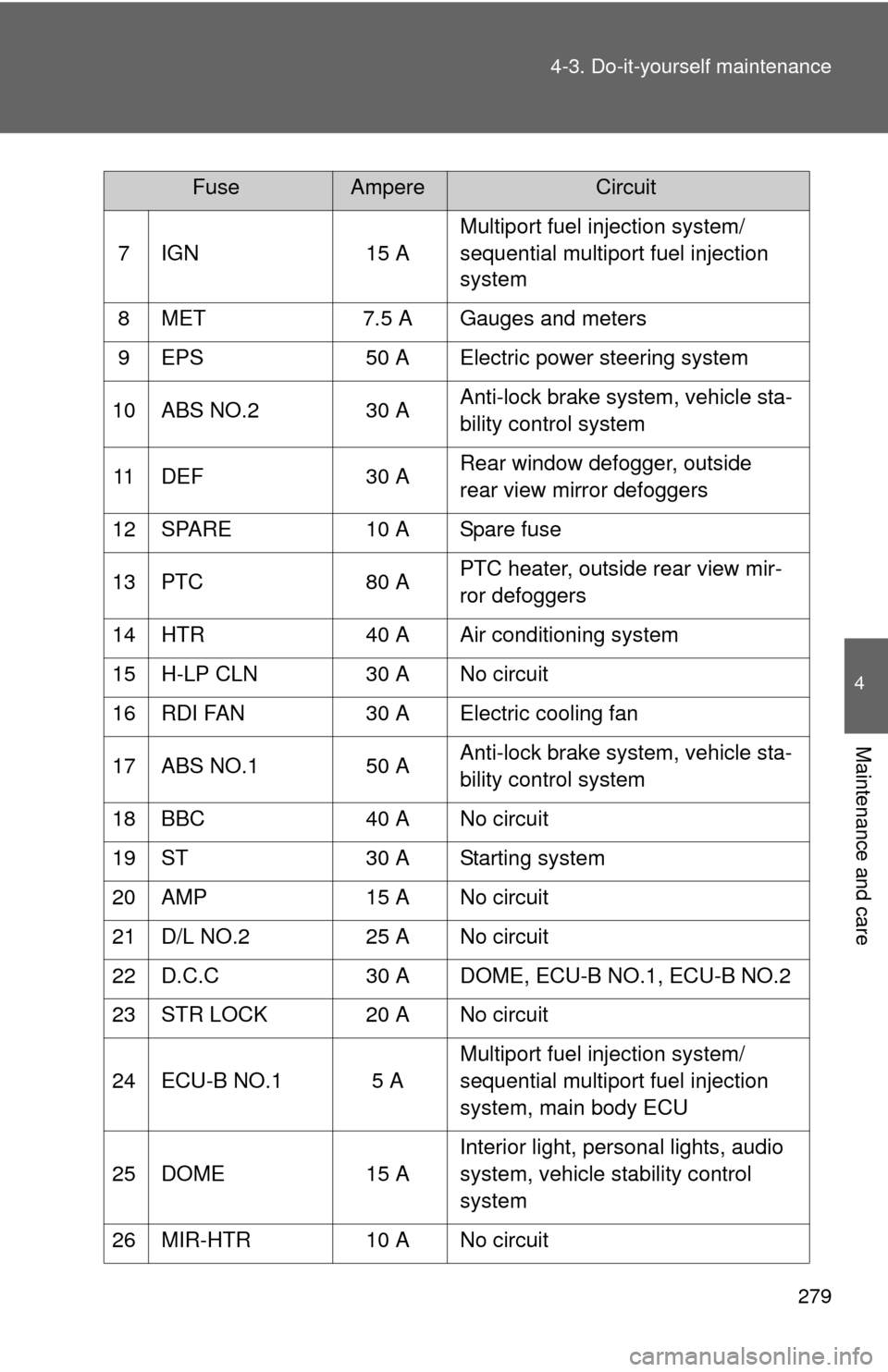
7 IGN
15 AMultiport fuel injection system/
sequential multiport fuel injection
system
8 MET 7.5 A Gauges and meters
9 EPS 50 A Electric power steering system
10 ABS NO.2 30 AAnti-lock brake system, vehicle sta-
bility control system
11 DEF 30 ARear window defogger, outside
rear view mirror defoggers
12 SPARE 10 A Spare fuse
13 PTC 80 APTC heater, outside rear view mir-
ror defoggers
14 HTR 40 A Air conditioning system
15 H-LP CLN 30 A No circuit
16 RDI FAN 30 A Electric cooling fan
17 ABS NO.1 50 AAnti-lock brake system, vehicle sta-
bility control system
18 BBC 40 A No circuit
19 ST 30 A Starting system
20 AMP 15 A No circuit
21 D/L NO.2 25 A No circuit
22 D.C.C 30 A DOME, ECU-B NO.1, ECU-B NO.2
23 STR LOCK 20 A No circuit
24 ECU-B NO.1 5 A Multiport fuel injection system/
sequential multiport fuel injection
system, main body ECU
25 DOME 15 AInterior light, personal lights, audio
system, vehicle stability control
system
26 MIR-HTR 10 A No circuit
FuseAmpereCircuit
Page 283 of 400
283
4-3. Do-it-yourself maintenance
4
Maintenance and care
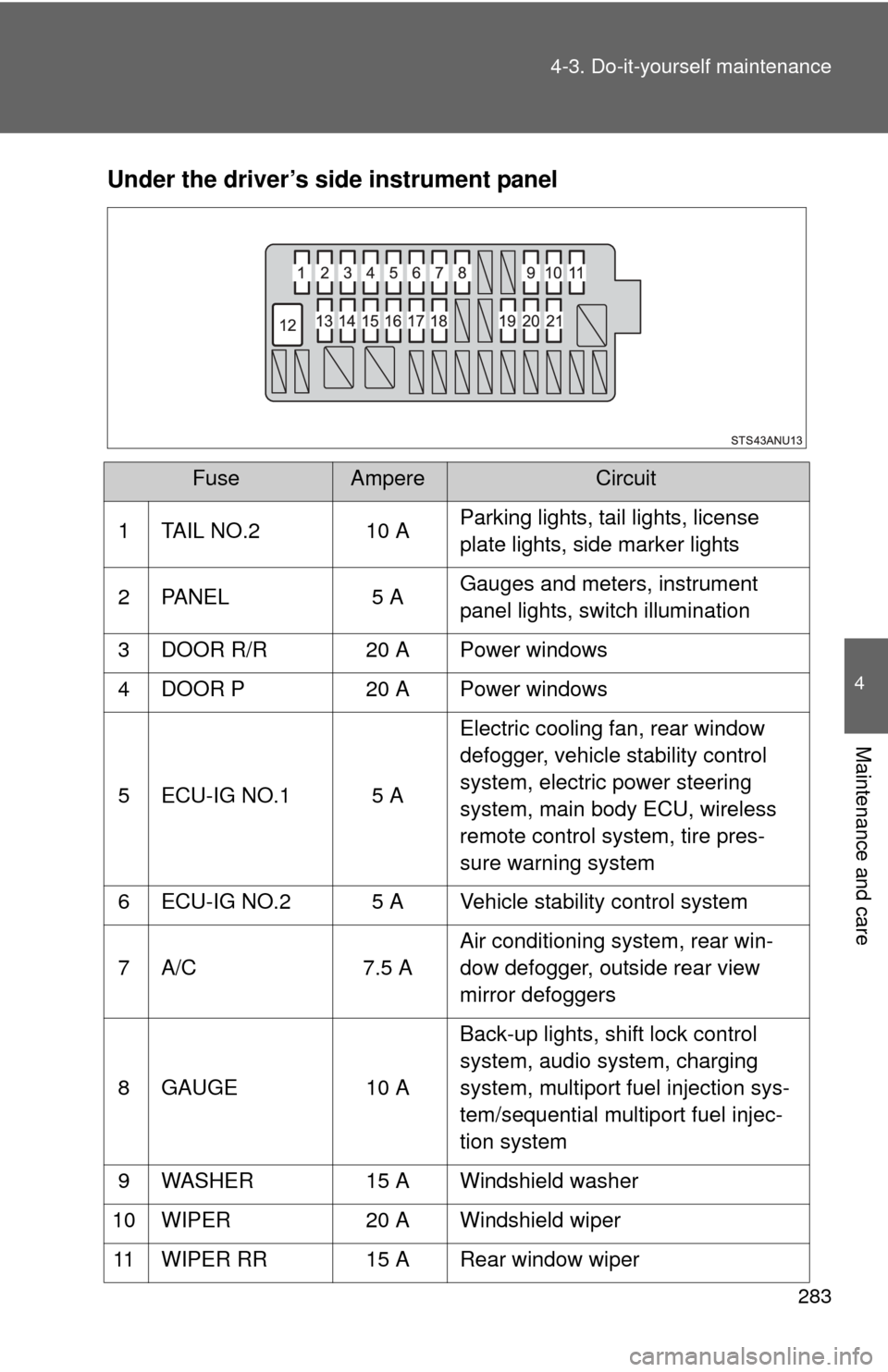
Under the driver’s side instrument panel
FuseAmpereCircuit
1 TAIL NO.2 10 A Parking lights, tail lights, license
plate lights, side marker lights
2 PANEL 5 A Gauges and meters, instrument
panel lights, switch illumination
3 DOOR R/R 20 A Power windows
4 DOOR P 20 A Power windows
5 ECU-IG NO.1 5 A Electric cooling fan, rear window
defogger, vehicle stability control
system, electric power steering
system, main body ECU, wireless
remote control system, tire pres-
sure warning system
6 ECU-IG NO.2 5 A Vehicle stability control system
7 A/C 7.5 AAir conditioning system, rear win-
dow defogger, outside rear view
mirror defoggers
8 GAUGE 10 ABack-up lights, shift lock control
system, audio system, charging
system, multiport fuel injection sys-
tem/sequential multiport fuel injec-
tion system
9 WASHER 15 A Windshield washer
10 WIPER 20 A Windshield wiper
11 WIPER RR 15 A Rear window wiper