Page 33 of 400

33
1-2. Opening, closing and locking the doors
1
Before driving
■
Key battery depletion
If the wireless remote control function does not operate, the battery may be
depleted. Replace the battery when necessary. ( P. 270)
■ Customization that can be co nfigured at Toyota dealer
Settings (e.g. wireless remote control system) can be changed.
(Customizable features P. 368)
■Certification for wireless remote control
U.S.A.
FCC ID: HYQ12BBY
FCC ID: HYQ23AAA
NOTE:
This device complies with part 15 of the FCC Rules. Operation is subject to
the following two conditions: (1) This device may not cause harmful interfer-
ence, and (2) this device must accept any interference received, including
interference that may cause undesired operation.
FCC WARNING:
Changes or modifications not expressly approved by the party responsible
for compliance could void the user’s authority to operate the equipment.
Canada
NOTE:
Operation is subject to the following two conditions: (1) this device may not
cause interference, and (2) this device must accept any interference, includ-
ing interference that may cause undesired operation of the device.
Page 34 of 400
34
1-2. Opening, closing and locking the doors
Side doors
The vehicle can be locked and unlocked using the key, wireless
remote control or door lock switch.
■Wireless remote control (if equipped)
P. 3 1
■ Key
Turning the key operates the doors as follows:
Driver’s door Locks all the doors
Unlocks all the doors
Turning the key unlocks the
driver’s door. Turning the key
again unlocks the other doors.
Front passenger’s door
Locks all the doors
Unlocks all the doors
Page 38 of 400
38
1-2. Opening, closing and locking the doors
Back door
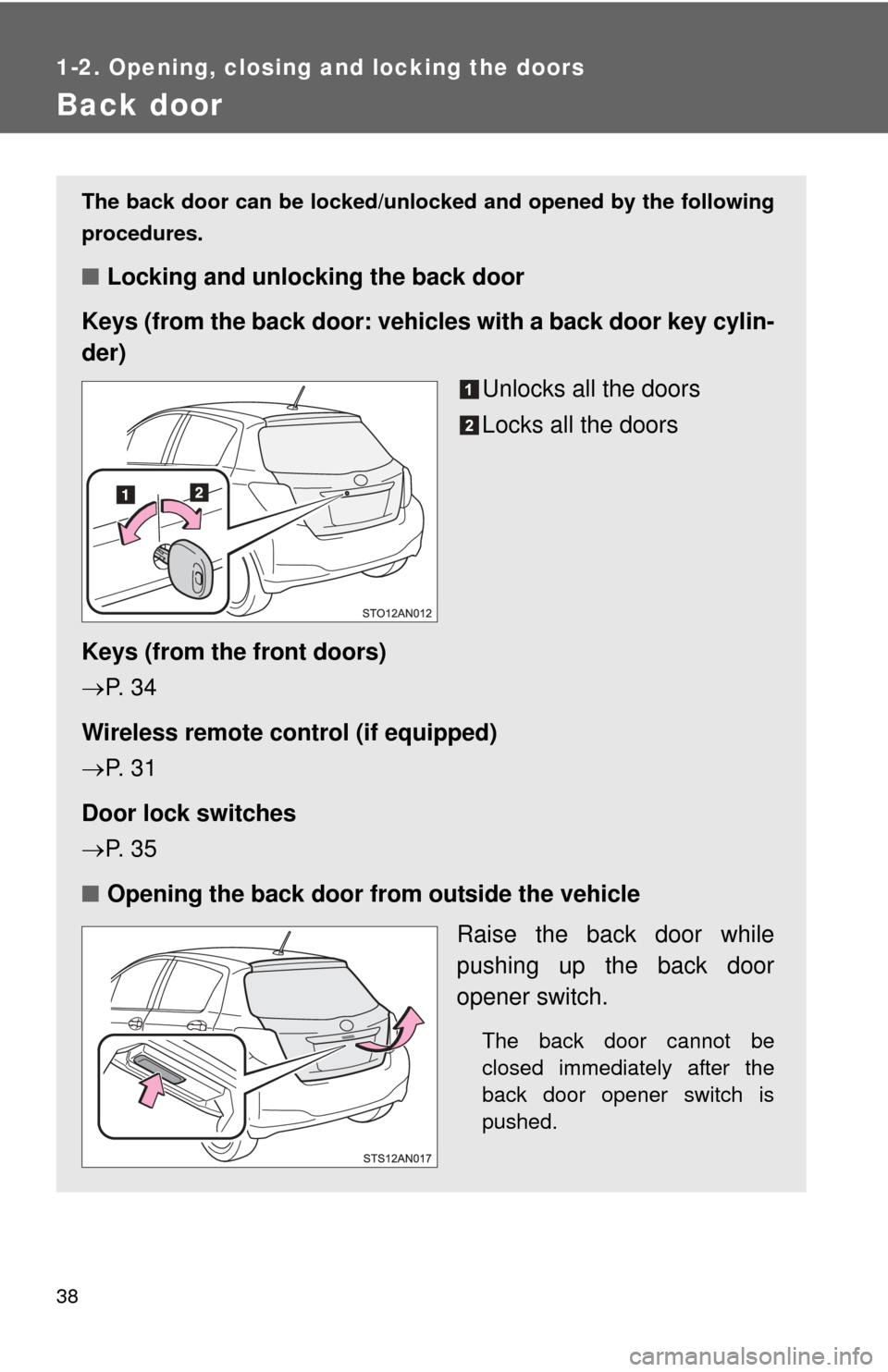
The back door can be locked/unlocked and opened by the following
procedures.
■Locking and unlocking the back door
Keys (from the back door: vehicles with a back door key cylin-
der)
Unlocks all the doors
Locks all the doors
Keys (from the front doors)
P. 3 4
Wireless remote control (if equipped)
P. 3 1
Door lock switches
P. 3 5
■ Opening the back door from outside the vehicle
Raise the back door while
pushing up the back door
opener switch.
The back door cannot be
closed immediately after the
back door opener switch is
pushed.
Page 74 of 400
74
1-6. Theft deterrent system
Alarm (Puerto Rico)
The system sounds the alarm and flashes the lights when forced
entry is detected.
■ Triggering of the alarm
The alarm is triggered in the fo llowing situations when the alarm
is set:
● A locked door is unlocked or opened in any way other than
using a key or wireless remote control. (The doors will lock
again automatically.)
● The hood is opened.
● The battery is reconnected.
■ Setting the alarm system
Close the doors and hood,
and lock all the doors. The
system will be set automati-
cally after 30 seconds.
The indicator light changes
from being on to flashing when
the system is set.
■Deactivating or stopping the alarm
Do one of the following to deactivate or stop the alarm:
●Unlock the doors.
● Turn the engine switch to the “ACC” or “ON” position, or start
the engine. (The alarm will be deactivated or stopped after a
few seconds.)
Page 219 of 400
Maintenance and care4
219
4-1. Maintenance and careCleaning and protecting the vehicle exterior......... 220
Cleaning and protecting the vehicle interior.......... 223
4-2. Maintenance Maintenance requirements .................. 226
General maintenance....... 228
Emission inspection and maintenance (I/M)
programs........................ 232 4-3. Do-it-yourself maintenance
Do-it-yourself service precautions .................... 233
Hood ................................ 236
Positioning a floor jack ..... 238
Engine compartment ........ 241
Tires ................................. 253
Tire inflation pressure ...... 261
Wheels ............................. 265
Air conditioning filter......... 268
Wireless remote control battery ............................ 270
Checking and replacing fuses .............................. 274
Light bulbs........................ 286
Page 270 of 400
270
4-3. Do-it-yourself maintenance
Wireless remote control batter y
: If equipped
Replace the battery with a new one if it is depleted.
■You will need the following items:
●Flathead screwdriver
● Lithium battery CR2016
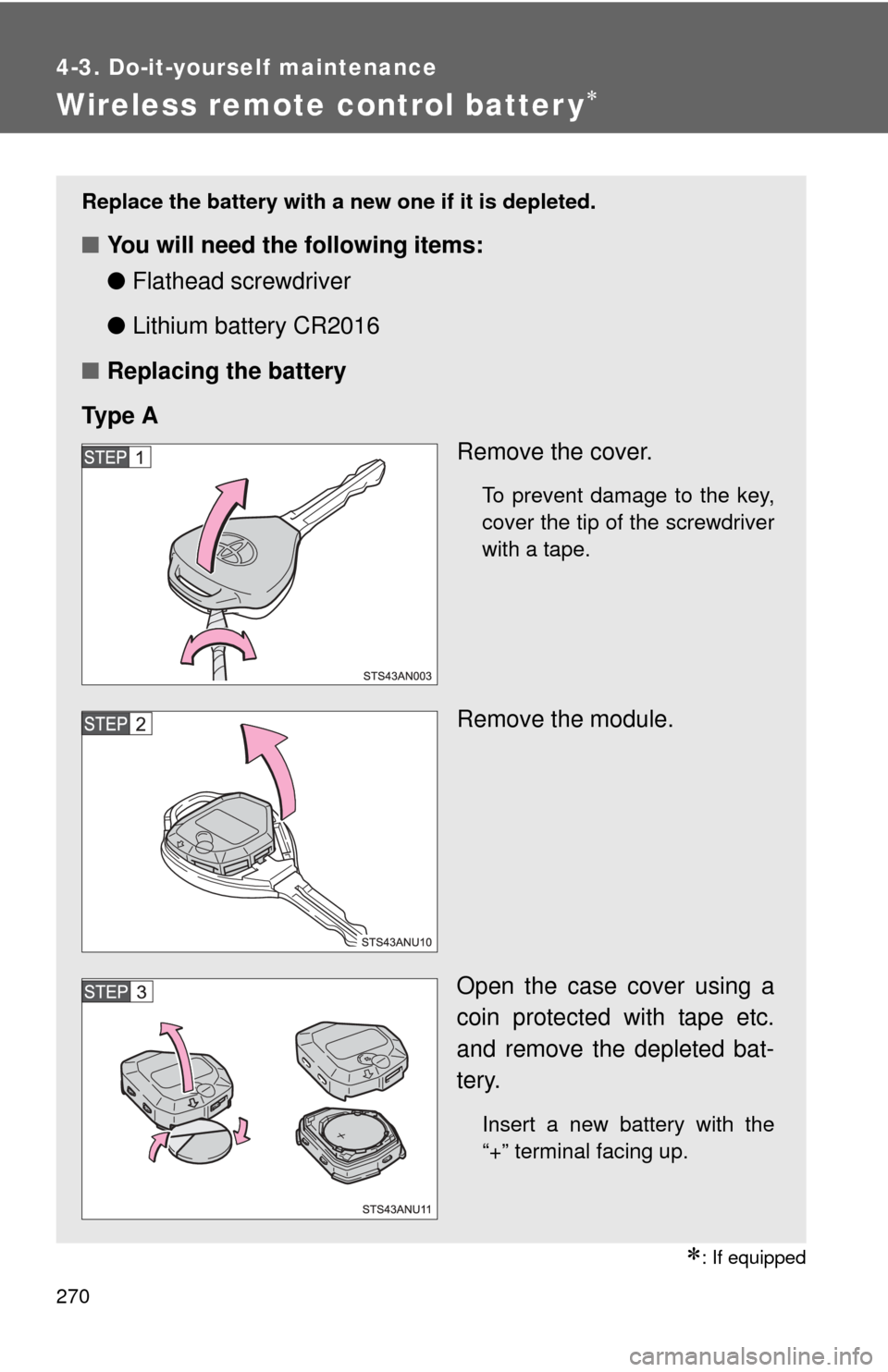
■ Replacing the battery
Ty p e A Remove the cover.
To prevent damage to the key,
cover the tip of the screwdriver
with a tape.
Remove the module.
Open the case cover using a
coin protected with tape etc.
and remove the depleted bat-
tery.
Insert a new battery with the
“+” terminal facing up.
Page 272 of 400
272 4-3. Do-it-yourself maintenance
■Use a CR2016 lithium battery
●Batteries can be purchased at your Toyota dealer, local electrical appli-
ance shops or camera stores.
● Replace only with the same or equivalent type recommended by the
manufacturer.
● Dispose of used batteries according to local laws.
■ If the key battery is depleted
The following symptoms may occur:
●The wireless remote control will not function properly.
● The operational range will be reduced.
■ When replacing the module (type B only)
CAUTION
■Removed battery and other parts
Keep away from children. These parts are small and if swallowed by a child,
they can cause choking. Failure to do so could result in death or serious
injury.
Replace the module from right above.
Replacing it from diagonally above may
prevent the key buttons from operating
properly.
Page 273 of 400
273
4-3. Do-it-yourself maintenance
4
Maintenance and care
NOTICE
■
For normal operation after replacing the battery
Observe the following precautions to prevent accidents:
●Always work with dry hands.
Moisture may cause the battery to rust.
● Do not touch or move any other components inside the remote control.
● Do not bend either of the battery terminals.