Page 153 of 365

172
2-5. Driving information
Winter driving tips
Carry out the necessary preparations and inspections before driving
the vehicle in winter. Always drive the vehicle in a manner appropri-
ate to the prevailing weather conditions.
■ Pre-winter preparations
●Use fluids that are appropriate to the prevailing outside tem-
peratures.
• Engine oil
• Engine coolant
• Washer fluid
● Have a service technician inspect the level and specific grav-
ity of battery electrolyte.
● Have the vehicle fitted with four snow tires or purchase a set
of tire chains for the front tires.
Ensure that all tires are the same size and brand and that their wear
level is not noticeably different with each other. Also make sure that
chains match the size of the tires.
■Before driving the vehicle
Perform the following according to the driving conditions:
●Do not try to forcibly open a window or move a wiper that is
frozen. Pour warm water over the frozen area to melt the ice.
Wipe away the water immediately to prevent it from freezing.
● To ensure proper operation of th e climate control system fan,
remove any snow that has accumulated on the air inlet vents
in front of the windshield.
● Remove any ice that has accumu lated on the vehicle chassis.
● Periodically check for and remove any excess ice or snow
that may have accumulated in the wheel well or on the
brakes.
Page 178 of 365
198 3-1. Using the air conditioning system and defogger
■Air conditioning odors
●During use, various odors from inside and outside the vehicle may enter
into and accumulate in the air conditioning system. This may then cause
odor to be emitted from the vents.
● To reduce potential odors from occurring:
It is recommended that the air conditioning system be set to outside air
mode prior to turning the vehicle off.
■ Air conditioning filter
→ P. 268
CAUTION
■To prevent the windshield from fogging up
Do not use during cool air operation in extremely humid weather. The
difference between the temperature of the outside air and that of the wind-
shield can cause the outer surface of the windshield to fog up, blocking your
vision.
NOTICE
■To prevent battery discharge
Do not leave the air conditioning system on longer than necessary when the
engine is stopped.
Page 183 of 365
203
3-3. Using the interior lights
3
Interior features
Personal lights
Turns the lights on/off
Interior light Turns the lights off
Turns the lights on/off linked to
door position
Turns the lights on
■Illuminated entry system
The lights automatically turn on/off according to the engine switch position,
whether the doors are locked/unlocked, and whether the doors are open/
closed.
■ To prevent battery discharged
If the interior light remains on when the door is not fully closed and the inte-
rior light switch is in the door position, the lights will go off automatically after
20 minutes.
■ Customization that can be co nfigured at Toyota dealer
Settings (e.g. the time elapsed before lights turn off) can be changed.
(Customizable features →P. 368)
Personal lights and interior light
Page 190 of 365
210
3-5. Other interior features
Clock
■The clock is displayed when
The engine switch is in the “ON” position.
■ When disconnecting and reco nnecting battery terminals
The clock data will be reset.
Adjusts the hours
Adjusts the minutes
Page 193 of 365
213
3-5. Other interior features
3
Interior features
Power outlet
■The power outlet can be used when
The engine switch is in the “ACC” or “ON” position.
NOTICE
■To avoid damaging the power outlet
Close the power outlet lid when the power outlet is not in use.
Foreign objects or liquids that enter the power outlet may cause a short cir-
cuit.
■ To prevent blown fuse
Do not use an accessory that uses more than 12 V 10 A.
■ To prevent battery discharge
Do not use the power outlet longer than necessary when the engine is not\
running.
The power outlet can be used for 12 V accessories that run on less
than 10 A.
Page 206 of 365

227
4-2. Maintenance
4
Maintenance and care
■
Reset the maintenance data (except Canada)
After the required maintenance is performed according to the maintenance
schedule, please reset the maintenance data.
To reset the data, follow the procedures described below:
Switch the display to the trip meter “A” when the engine is running.
(→ Page 133)
Turn the engine switch to the “LOCK” position.
While pressing the display change button ( →Page 133), turn the
engine switch to the “ON” position (do not start the engine because
reset mode will be canceled). Continue to press and hold the button
until the trip meter displays “000000”.
■ Allow inspection and repairs to be performed by a Toyota dealer
● Toyota technicians are well-trained specialists and are kept up to date
with the latest service information. They are well informed about the
operations of all systems on your vehicle.
● Keep a copy of the repair order. It proves that the maintenance that has
been performed is under warranty coverage. If any problem should arise
while your vehicle is under warranty, your Toyota dealer will promptly
take care of it.
CAUTION
■If your vehicle is not properly maintained
Improper maintenance could result in serious damage to the vehicle and
possible serious injury or death.
■ Handling of the battery
●Engine exhaust, some of its constituents, and a wide variety of automobile
components contain or emit chemicals known to the State of California to
cause cancer and birth defects and other reproductive harm. Work in a
well ventilated area.
● Oils, fuels and fluids contained in vehicles as well as waste produced by
component wear contain or emit chemicals known to the State of Califor-
nia to cause cancer and birth defects or other reproductive harm. Avoid
exposure and wash any affected area immediately.
● Battery posts, terminals and related accessories contain lead and lead
compounds which are known to cause brain damage. Wash your hands
after handling. ( →P. 249)
Page 207 of 365
228
4-2. Maintenance
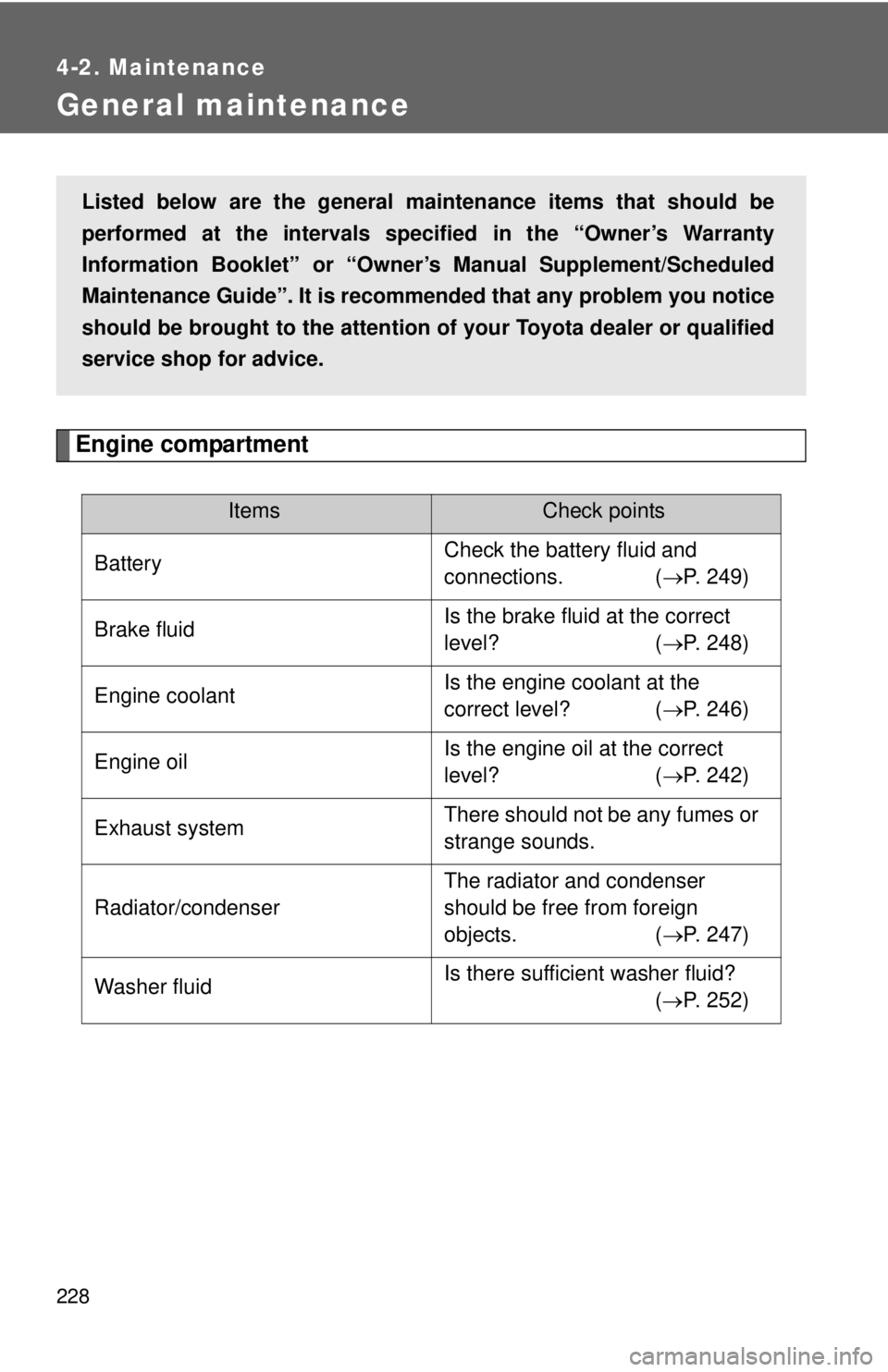
General maintenance
Engine compartment
ItemsCheck points
Battery Check the battery fluid and
connections. (
→P. 249)
Brake fluid Is the brake fluid at the correct
level? (
→P. 248)
Engine coolant Is the engine coolant at the
correct level? (
→P. 246)
Engine oil Is the engine oil at the correct
level? (
→P. 242)
Exhaust system There should not be any fumes or
strange sounds.
Radiator/condenser The radiator and condenser
should be free from foreign
objects. (
→P. 247)
Washer fluid Is there sufficient washer fluid?
(→ P. 252)
Listed below are the general maintenance items that should be
performed at the intervals specified in the “Owner’s Warranty
Information Booklet” or “Owner’s Manual Supplement/Scheduled
Maintenance Guide”. It is recommended that any problem you notice
should be brought to the attention of your Toyota dealer or qualified
service shop for advice.
Page 211 of 365

232
4-2. Maintenance
Emission inspection and maintenance (I/M) programs
Some states have vehicle emission inspection programs which
include OBD (On Board Diagnostics) checks. The OBD system moni-
tors the operation of th e emission control system.
■If the malfunction indicator lamp comes on
The OBD system determines that a problem exists somewhere
in the emission control system. Your vehicle may not pass the I/
M test and may need to be repaired. Contact your Toyota dealer
to service the vehicle.
■ Your vehicle may not pass the I/M test in the following situa-
tions:
●When the battery is disconnected or discharged
Readiness codes that are se t during ordinary driving are
erased.
Also, depending on your driving habits, the readiness codes
may not be completely set.
● When the fuel tank cap is loose
The malfunction indicator lamp comes on indicating a tempo-
rary malfunction and your vehi cle may not pass the I/M test.
■ When the malfunction indicator lamp still remains on after
several driving trips
The error code in the OBD system will not be cleared unless the
vehicle is driven 40 or more times.
■ If your vehicle does not pass the I/M test
Contact your Toyota dealer to prepare the vehicle for re-testing.