Page 178 of 532
178 2-1. Driving procedures
URBAN CRUISER_EE (OM52C21E)
CAUTION
When starting the engine
Always start the engine while sitting in the driver’s seat. Do not press the
accelerator pedal while starting the engine under any circumstances.
Doing so may cause an accident resulting in death or serious injury.
Caution when driving
Do not turn the engine switch to the “LOCK” position while driving. If, in an
emergency, you must turn the engine off while the vehicle is moving, turn the
engine switch only to the “ACC” position to stop the engine. An accident may
result if the engine is stopped while driving.
NOTICE
To prevent battery discharge
Do not leave the engine switch in the “ACC” or “ON” position for long periods
of time without the engine running.
When starting the engine
Do not crank for more than 30 seconds at a time. This may overheat the
starter and wiring systems.
Do not race a cold engine.
If the engine becomes difficult to start or stalls frequently, have the engine
checked immediately.
Page 179 of 532
179
2-1. Driving procedures
2
When driving
URBAN CRUISER_EE (OM52C21E)
Engine (ignition) switch (vehicles with smar t entr y & star t system)
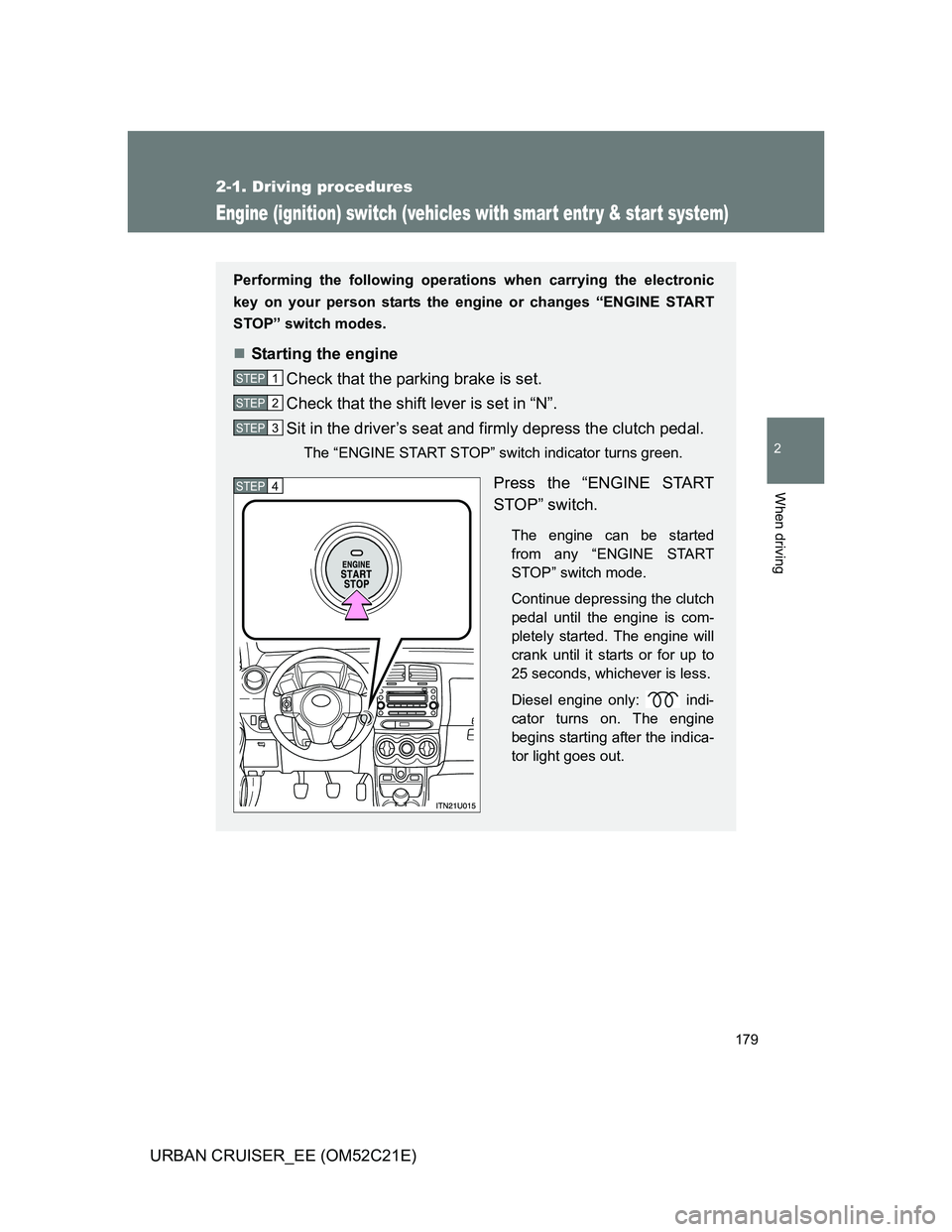
Performing the following operations when carrying the electronic
key on your person starts the engine or changes “ENGINE START
STOP” switch modes.
Starting the engine
Check that the parking brake is set.
Check that the shift lever is set in “N”.
Sit in the driver’s seat and firmly depress the clutch pedal.
The “ENGINE START STOP” switch indicator turns green.
Press the “ENGINE START
STOP” switch.
The engine can be started
from any “ENGINE START
STOP” switch mode.
Continue depressing the clutch
pedal until the engine is com-
pletely started. The engine will
crank until it starts or for up to
25 seconds, whichever is less.
Diesel engine only: indi-
cator turns on. The engine
begins starting after the indica-
tor light goes out.
STEP1
STEP2
STEP3
STEP4
Page 180 of 532
180 2-1. Driving procedures
URBAN CRUISER_EE (OM52C21E)
Stopping the engine
Stop the vehicle.
Shift the shift lever to “N”.
Set the parking brake. (P. 188)
Press the “ENGINE START STOP” switch.
Release the brake pedal and check that the indicator on the
“ENGINE START STOP” switch is off.
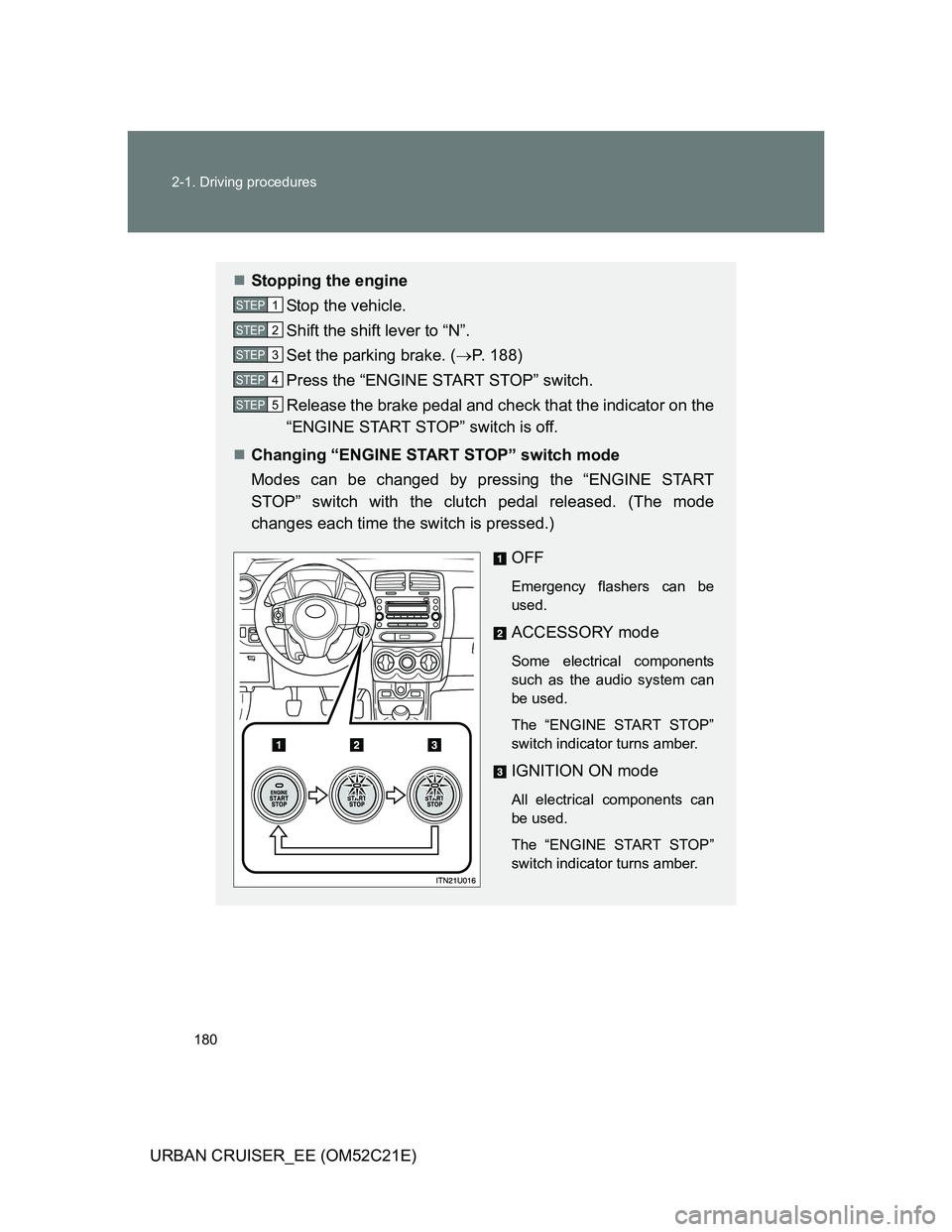
Changing “ENGINE START STOP” switch mode
Modes can be changed by pressing the “ENGINE START
STOP” switch with the clutch pedal released. (The mode
changes each time the switch is pressed.)
OFF
Emergency flashers can be
used.
ACCESSORY mode
Some electrical components
such as the audio system can
be used.
The “ENGINE START STOP”
switch indicator turns amber.
IGNITION ON mode
All electrical components can
be used.
The “ENGINE START STOP”
switch indicator turns amber.
STEP1
STEP2
STEP3
STEP4
STEP5
Page 182 of 532
182 2-1. Driving procedures
URBAN CRUISER_EE (OM52C21E)
CAUTION
When starting the engine
Always start the engine while sitting in the driver’s seat. Do not depress the
accelerator while starting the engine under any circumstances.
Doing so may cause an accident resulting in death or serious injury.
Stopping the engine in an emergency
If you want to stop the engine in an emergency while driving the vehicle,
push and hold the “ENGINE START STOP” switch for more than 3 seconds.
However, do not touch the “ENGINE START STOP” switch while driving
except in an emergency. Turning the engine off while driving will not cause
loss of steering or braking control, but the power assist to these systems will
be lost. This will make it more difficult to steer and brake, so you should pull
over and stop the vehicle as soon as it is safe to do so.
NOTICE
To prevent battery discharge
Do not leave the “ENGINE START STOP” switch in the ACCESSORY or
IGNITION ON mode for long periods without the engine running.
When starting the engine
Do not race a cold engine.
If the engine becomes difficult to start or stalls frequently, have the engine
checked immediately.
Page 187 of 532
187
2-1. Driving procedures
2
When driving
URBAN CRUISER_EE (OM52C21E)
Turn signal lever
Turn signals can be operated when
Vehicles without smart entry & start system
The engine switch is in the “ON” position.
Vehicles with smart entry & start system
The “ENGINE START STOP” switch is in the IGNITION ON mode.
If the indicators flash faster than usual
Check that a light bulb in the front or rear turn signal lights has not burned
out.
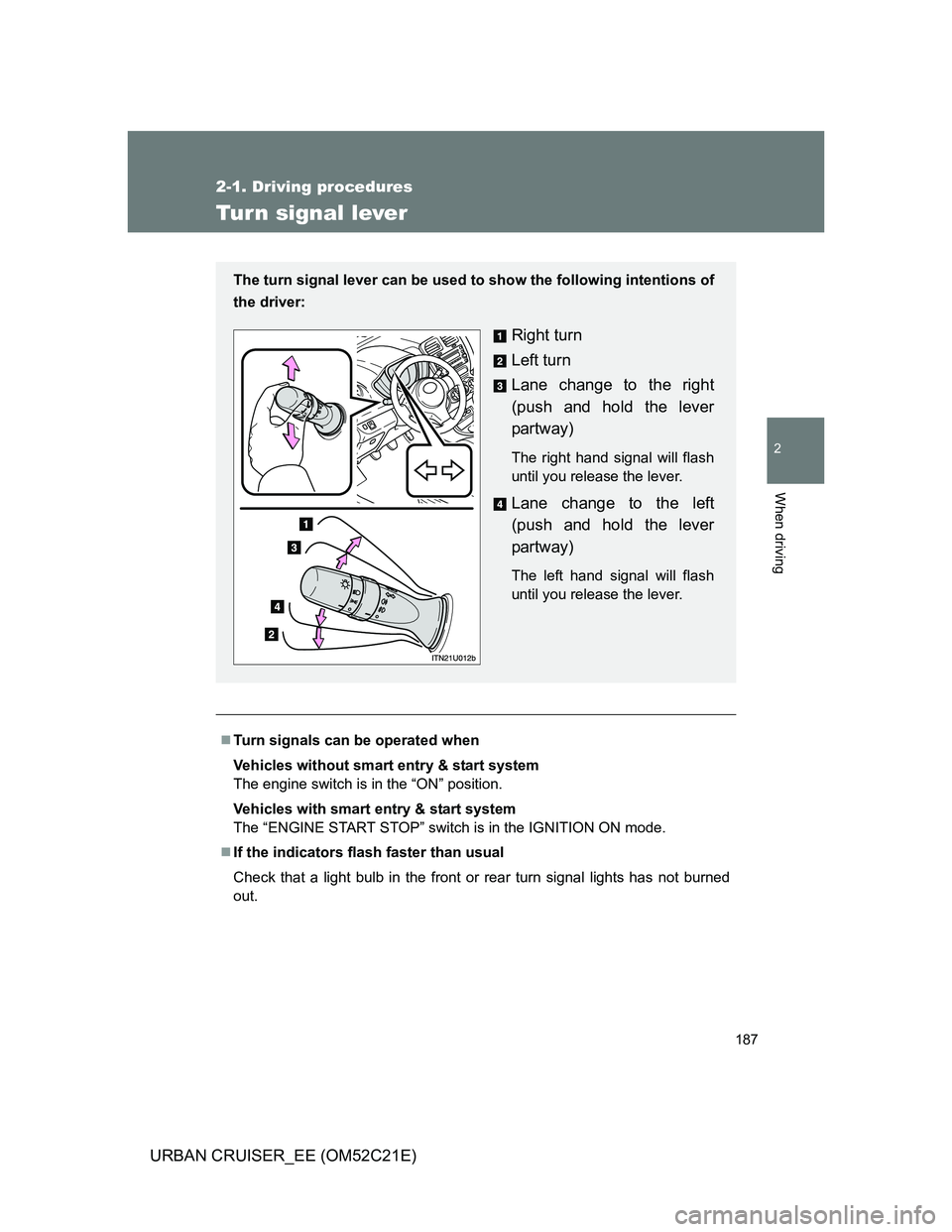
The turn signal lever can be used to show the following intentions of
the driver:
Right turn
Left turn
Lane change to the right
(push and hold the lever
partway)
The right hand signal will flash
until you release the lever.
Lane change to the left
(push and hold the lever
partway)
The left hand signal will flash
until you release the lever.
Page 191 of 532
191 2-2. Instrument cluster
2
When driving
URBAN CRUISER_EE (OM52C21E)
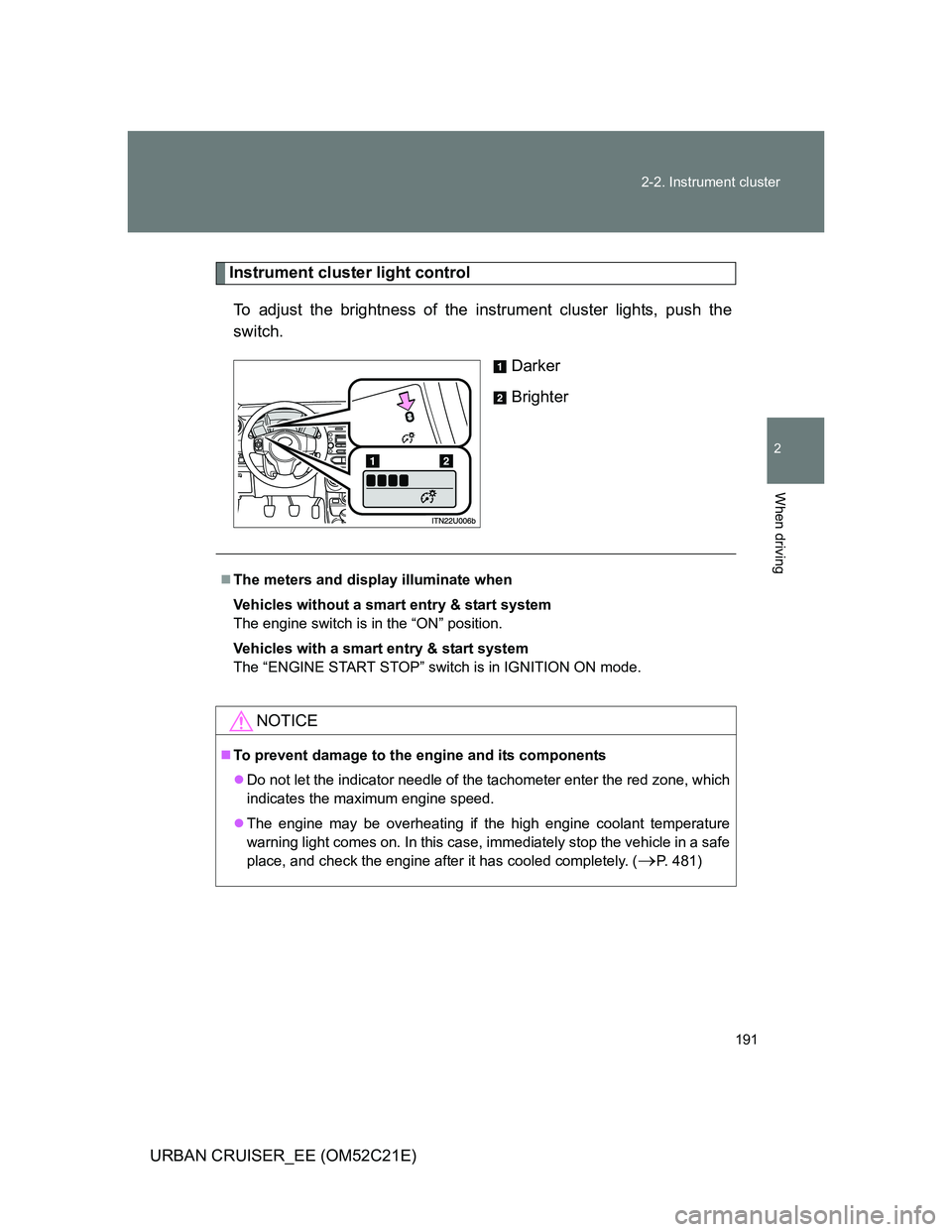
Instrument cluster light control
To adjust the brightness of the instrument cluster lights, push the
switch.
Darker
Brighter
The meters and display illuminate when
Vehicles without a smart entry & start system
The engine switch is in the “ON” position.
Vehicles with a smart entry & start system
The “ENGINE START STOP” switch is in IGNITION ON mode.
NOTICE
To prevent damage to the engine and its components
Do not let the indicator needle of the tachometer enter the red zone, which
indicates the maximum engine speed.
The engine may be overheating if the high engine coolant temperature
warning light comes on. In this case, immediately stop the vehicle in a safe
place, and check the engine after it has cooled completely. (
P. 481)
Page 194 of 532
194 2-2. Instrument cluster
URBAN CRUISER_EE (OM52C21E)
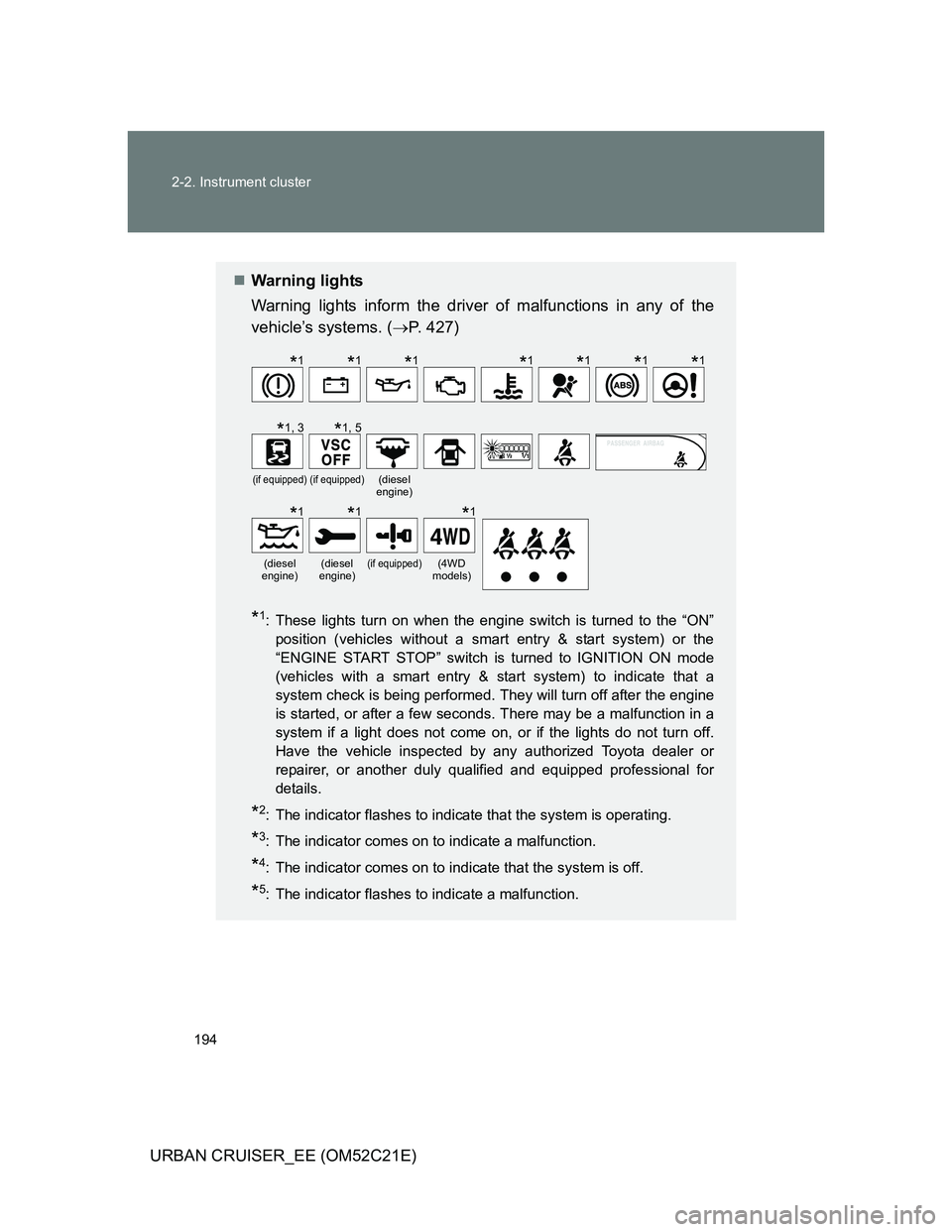
Warning lights
Warning lights inform the driver of malfunctions in any of the
vehicle’s systems. (P. 427)
*1: These lights turn on when the engine switch is turned to the “ON”
position (vehicles without a smart entry & start system) or the
“ENGINE START STOP” switch is turned to IGNITION ON mode
(vehicles with a smart entry & start system) to indicate that a
system check is being performed. They will turn off after the engine
is started, or after a few seconds. There may be a malfunction in a
system if a light does not come on, or if the lights do not turn off.
Have the vehicle inspected by any authorized Toyota dealer or
repairer, or another duly qualified and equipped professional for
details.
*2: The indicator flashes to indicate that the system is operating.
*3: The indicator comes on to indicate a malfunction.
*4: The indicator comes on to indicate that the system is off.
*5: The indicator flashes to indicate a malfunction.
(if equipped)(if equipped)(diesel
engine)
(diesel
engine)(diesel
engine)(if equipped)(4WD
models)
*1*1*1*1*1*1*1
*1, 3*1, 5
*1*1*1
Page 208 of 532
208 2-3. Operating the lights and wipers
URBAN CRUISER_EE (OM52C21E)
The windshield wiper and washer can be operated when
Vehicles without smart entry & start system
The engine switch is in the “ON” position.
Vehicles with smart entry & start system
The “ENGINE START STOP” switch is in the IGNITION ON mode.
If no windshield washer fluid sprays
Check that the washer nozzles are not blocked and if there is washer fluid in
the windshield washer fluid reservoir.
NOTICE
When the windshield is dry
Do not use the wipers, as they may damage the windshield.
When the washer fluid tank is empty
Do not operate the switch continually as the washer fluid pump may over-
heat.
When a nozzle becomes block
Do not try to clear it with a pin or other object. The nozzle will be damaged.