2012 TOYOTA TUNDRA air condition
[x] Cancel search: air conditionPage 1 of 744

TABLE OF CONTENTS
1
1Before drivingAdjusting and operating features such as door locks,
mirrors, and steering column.
2When drivingDriving, stopping, and safe-driving information.
3Interior and
exterior featuresAir conditioning and audio systems, as well as other in-
terior features for a comfortable driving experience.
4Maintenance
and careCleaning and protecting your vehicle, performing do-it-
yourself maintenance, and maintenance information.
5When trouble
arisesWhat to do if the vehicle needs to be towed, gets a flat
tire, or is involved in an accident.
6Vehicle
specificationsDetailed vehicle information.
7For owners
Reporting safety defects for U.S. owners, and seat belt
and SRS airbag instructions for Canadian owners and
camper information.
IndexAlphabetical listing of information contained in this
manual.
Page 3 of 744

1
2
3
4
5
6
7
3
2-3. Operating the lights andwipers
Headlight swi tch .................. 210
Fog light switch ................... 215
Windshield wipers and washer .............................. 217
2-4. Using other driving systems Cruise control ...................... 223
Intuitive parking assist......... 227
Rear view monitor system... 234
Four-wheel drive system ..... 242
AUTO LSD system.............. 246
Driving assist systems ........ 249
2-5. Driving information Off-road precautions ........... 257
Cargo and luggage ............. 262
Vehicle load limits ............... 265
Winter driving tips ............... 267
Trailer towing ...................... 271
Dinghy towing ..................... 294
3-1. Using the air conditioning
system a nd defogger
Automatic air conditioning system .............................. 298
Manual air conditioning system .............................. 307
Outside rear view mirror defoggers and front
windshield wiper de-icer
(if equipped on Regular
Cab and Double Cab
models) ............................. 315 Back window, outside rear
view mirror defoggers
and front windshield
wiper de-icer (if equipped
on CrewMax models) ....... 317
3-2. Using the audio system Audio system types ............ 320
Using the radio ................... 324
Using the CD player ........... 332
Playing MP3 and WMA discs ................................. 341
Operating an iPod .............. 349
Operating a USB memory ............................ 355
Optimal use of the audio system .............................. 362
Using the AUX port............. 366
Using the steering wheel audio switches.................. 368
Antenna .............................. 371
3-3. Using the Bluetooth
® audio
system
Bluetooth
® audio system .... 374
Using the Bluetooth® audio
system .............................. 377
Operating a Bluetooth
®
enabled portable player.... 382
Setting up a Bluetooth
®
enabled portable player.... 384
Bluetooth
® audio system
setup ................................ 389
3Interior and exterior
features
Page 5 of 744

1
2
3
4
5
6
7
5
4-1. Maintenance and careCleaning and protecting the vehicle exterior............ 526
Cleaning and protecting the vehicle interior............. 529
4-2. Maintenance Maintenance requirements ..................... 532
General maintenance.......... 534
Emission inspection and maintenance (I/M)
programs........................... 537
4-3. Do-it-yourself maintenance Do-it-yourself service precautions ....................... 538
Hood ................................... 542
Engine compartment ........... 543
Tires .................................... 557
Tire inflation pressure ......... 565
Wheels ................................ 569
Air conditioning filter............ 572
Wireless remote control battery ............................... 575
Checking and replacing fuses ................................. 577
Light bulbs........................... 588 5-1. Essential information
Emergency flashers............ 600
If your vehicle needs to be towed........................... 601
If you think something is wrong ............................... 607
Fuel pump shut off system .............................. 608
5-2. Steps to take in an emergency If a warning light turns on or a warning buzzer
sounds... .......................... 609
If a warning message is displayed (vehicles
with multi-information
display) ............................. 619
If you have a flat tire ........... 623
If the engine will not start.... 641
If the shift lever cannot be shifted from P ................... 643
If you lose your keys........... 646
If the vehicle battery is discharged........................ 647
If your vehicle overheats .... 651
If the vehicle becomes stuck ................................. 654
If your vehicle has to be stopped in
an emergency .................. 655
4Maintenance and care5When trouble arises
Page 29 of 744
29
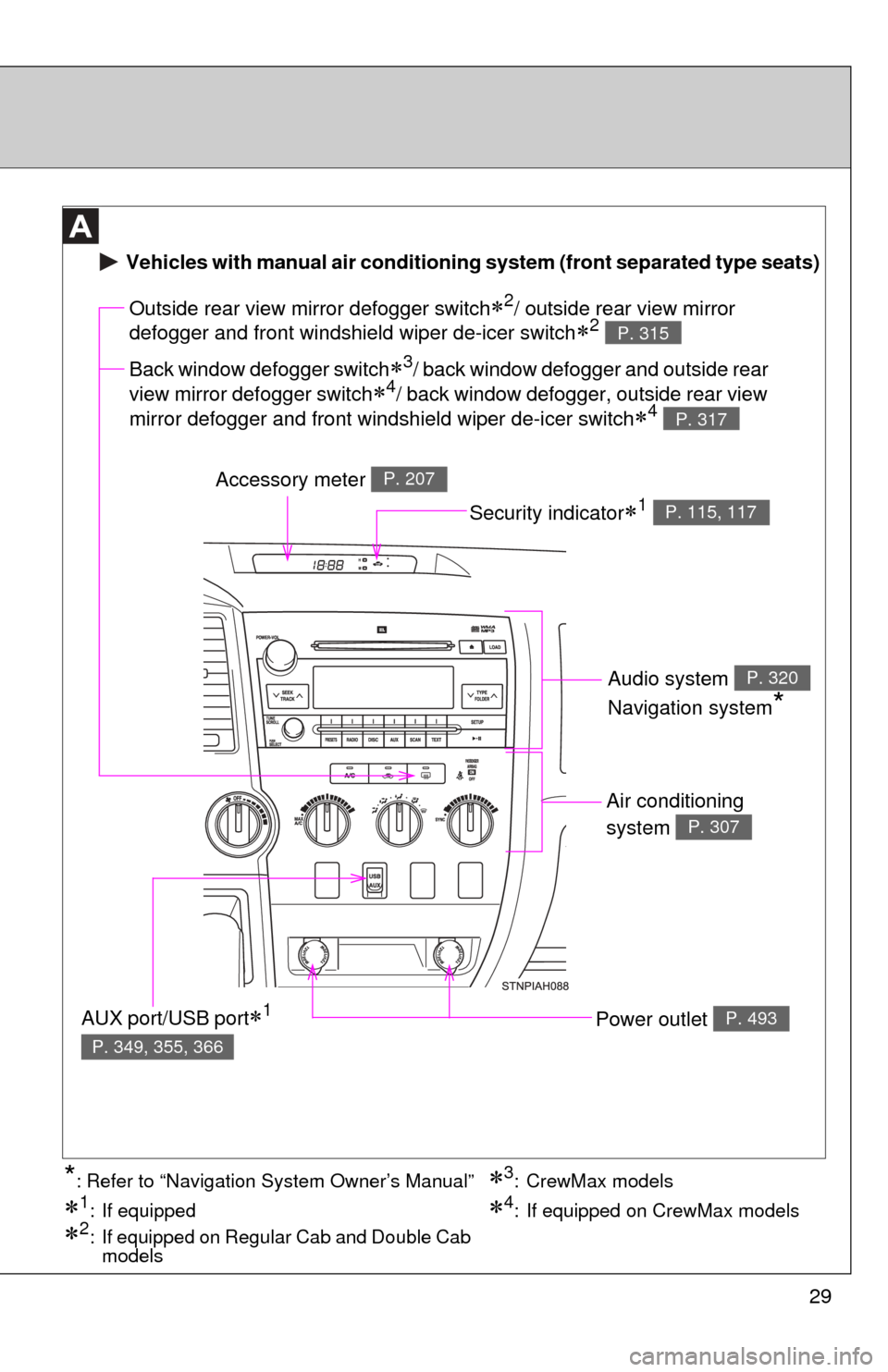
Air conditioning
system
P. 307
Power outlet P. 493
Outside rear view mirror defogger switch2/ outside rear view mirror
defogger and front windshield wiper de-icer switch
2 P. 315
Accessory meter P. 207
AUX port/USB port1
P. 349, 355, 366
Vehicles with manual air conditioning system (front separated type seats)
Back window defogger switch3/ back window defogger and outside rear
view mirror defogger switch
4/ back window defogger, outside rear view
mirror defogger and front windshield wiper de-icer switch
4 P. 317
Security indicator1 P. 115, 117
Audio system
Navigation system
*
P. 320
3: CrewMax models
1: If equipped
2: If equipped on Regular Cab and Double Cab models
4: If equipped on CrewMax models
*: Refer to “Navigation System Owner’s Manual”
Page 30 of 744
30
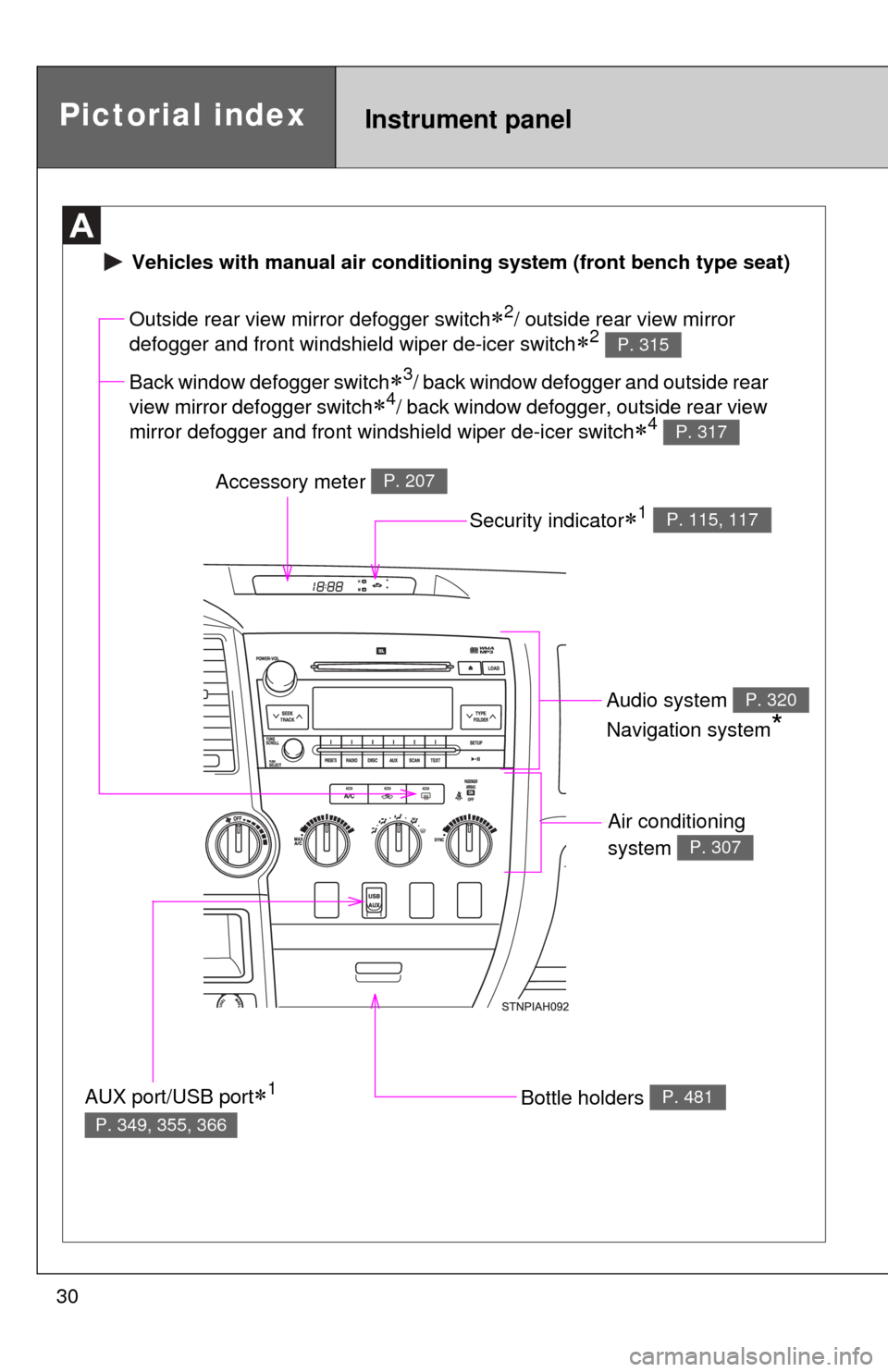
Air conditioning
system
P. 307
Bottle holders P. 481
Outside rear view mirror defogger switch2/ outside rear view mirror
defogger and front windshield wiper de-icer switch
2 P. 315
Accessory meter P. 207
AUX port/USB port1
P. 349, 355, 366
Vehicles with manual ai r conditioning system (front bench type seat)
Back window defogger switch3/ back window defogger and outside rear
view mirror defogger switch
4/ back window defogger, outside rear view
mirror defogger and front windshield wiper de-icer switch
4 P. 317
Security indicator1 P. 115, 117
Audio system
Navigation system
*
P. 320
Pictorial indexInstrument panel
Page 31 of 744
31
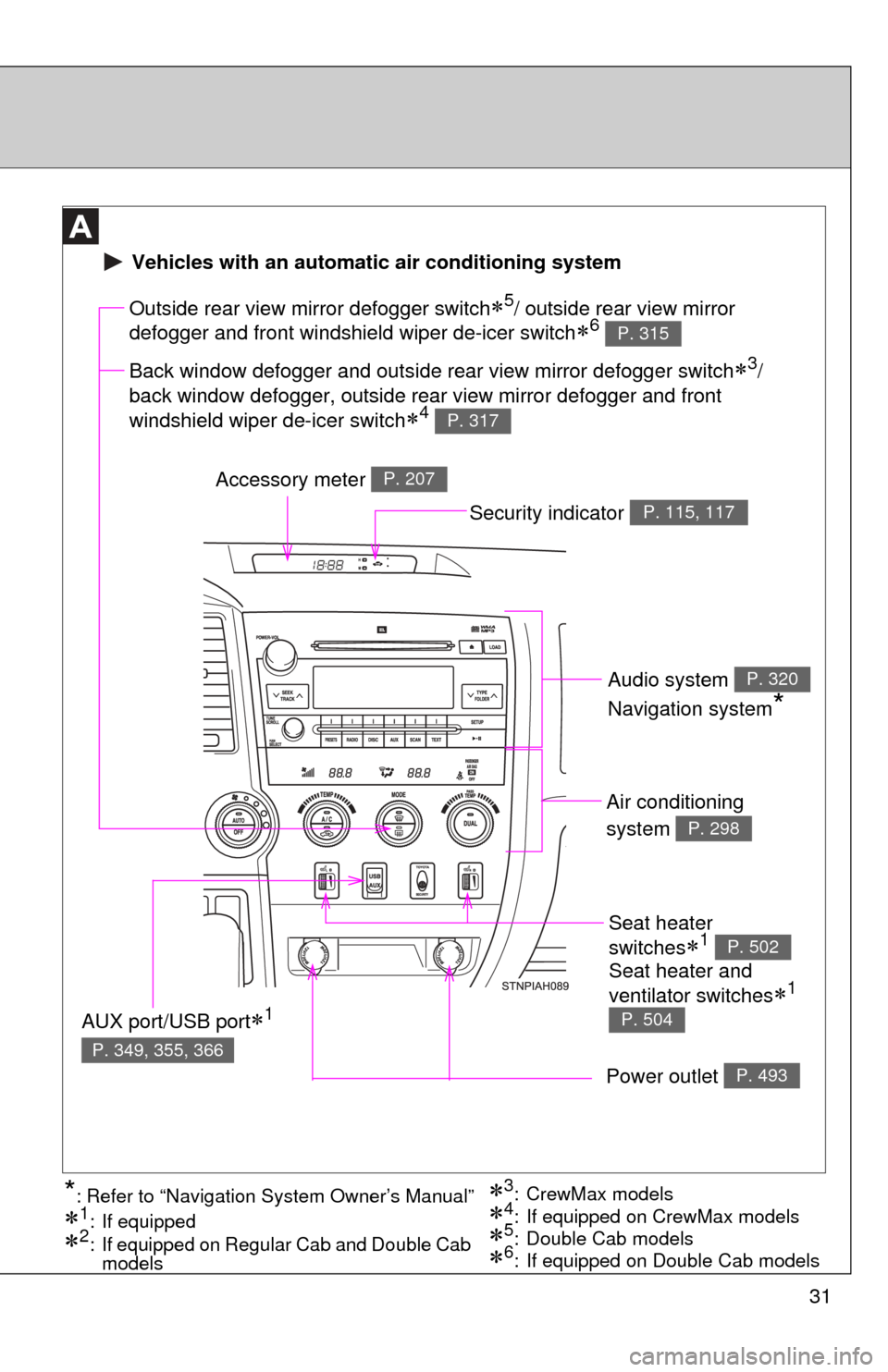
Seat heater
switches
1 P. 502
Air conditioning
system
P. 298
Power outlet P. 493
Outside rear view mirror defogger switch5/ outside rear view mirror
defogger and front windshield wiper de-icer switch
6 P. 315
Accessory meter P. 207
AUX port/USB port1
P. 349, 355, 366
3: CrewMax models
1: If equipped
2: If equipped on Regular Cab and Double Cab models5: Double Cab models4: If equipped on CrewMax models*: Refer to “Navigation System Owner’s Manual”
Vehicles with an automatic air conditioning system
Back window defogger and outside rear view mirror defogger switch3/
back window defogger, outside rear view mirror defogger and front
windshield wiper de-icer switch
4 P. 317
6: If equipped on Double Cab models
Security indicator P. 115, 117
Audio system
Navigation system
*
P. 320
Seat heater and
ventilator switches
1
P. 504
Page 47 of 744

47
1-2. Opening, closing and locking the doors
1
Before driving
■
Wireless remote control battery depletion
The standard battery life is 1 to 2 years. (The battery becomes depleted
even if the wireless remote control is not used.) If the wireless remot\
e control
function does not operate, the battery may be depleted. Replace the battery
when necessary. ( P. 575)
■ If the wireless remote control does not operate
Locking and unlocking the doors: Use the key. ( P. 49)
■ Security feature
If a door is not opened within approximately 60 seconds after the vehicle is
unlocked, the security feature automatically locks the vehicle again.
■ Alarm (if equipped)
Using the wireless remote control to lock the door will set the alarm sy\
stem.
(P. 117)
■ Conditions affecting operation
The wireless remote control function may not operate normally in the follow-
ing situations.
●Near a TV tower, radio station, electr ic power plant, airport or other facil-
ity that generates strong radio waves
● When carrying a portable radio, cell ular phone or other wireless commu-
nication device
● When multiple wireless keys are in the vicinity
● When the wireless key has come into contact with, or is covered by a
metallic object
● When a wireless key (that emits radio waves) is being used nearby
● When the wireless key has been left near an electrical appliance such as
a personal computer
■ When riding in an aircraft
When bringing a wireless remote control onto an aircraft, make sure you do
not press any buttons on the wireless remote control while inside the aircraft
cabin. If you are carrying a wireless remote control in your bag etc, ensure
that the buttons are not likely to be pressed accidentally. Pressing a button
may cause the wireless remote control to emit radio waves that could inter-
fere with the operation of the aircraft.
Page 125 of 744

125
1-7. Safety information
1
Before driving
■
SRS warning light
This warning light system monitors the airbag sensor assembly, front airbag
sensors, side and curtain shield airbag sensor assemblies, curtain shield air-
bag sensor assemblies, driver’s seat position sensor, driver’s seat belt
buckle switch, front passenger occupant classification system, AIR BAG ON
and AIR BAG OFF indicator lights, front passenger’s seat belt buckle switch,
front seat belt pretensioner assemblies , RSCA OFF indicator light, inflators,
interconnecting wiring and power sources. ( P. 610)
■ If the SRS airbags deploy (inflate)
●Bruising and slight abrasions may result from contact with a deploying
(inflating) SRS airbag.
● A loud noise and white powder will be emitted.
● Parts of the airbag module (steering wheel hub, airbag cover and inflator)
as well as the front seats, and parts of the front and rear pillars and roof
side rail, may be hot for several minutes. The airbag itself may also be
hot.
● The front windshield may crack.
■ Operating conditions (front airbags)
●The SRS front airbag will deploy in the event of an impact that exceeds
the set threshold level (the level of force corresponding to an approxi-
mately 12-18 mph [20-30 km/h] frontal collision with a fixed wall that does
not move or deform).
However, this threshold velocity will be considerably higher if the vehicle
strikes an object, such as a parked vehicle or sign pole, which can move or
deform on impact, or if the vehicle is involved in an underride collision (e.g.
a collision in which the front of the vehicle “underrides”, or goes under, the
bed of a truck, etc.).
● It is possible that in some collisions where the forward deceleration of the
vehicle is very close to the designed threshold level, the SRS front air-
bags and the seat belt pretensioners may not activate together.
● The SRS front passenger airbag will not activate if there is no passenger
sitting in the right front passenger seat. However, the front passenger air-
bag may deploy if luggage is put in the seat, or the seat belt is fastened,
even if the seat is unoccupied. ( P. 135)